
5G Modem - Voxl-modem ERROR can not ready GPIOs
-
I'm trying to include a 5G Modem Add-on board on a voxl2, but I cannot interact with it. When I try to control it with voxl-modem, I consistently get an error stating that it cannot ready GPIOs. I can run feather_configure, but detect_modem, read_id and cycle_power all give me the same error. Likewise I can run feather_enable with no issue for usb0-3, but feather_disable fails to disable anything, stating that it's still enabled until it gives up.
I have tried with two 5G modem modules without luck, am I missing anything or could there be some kind of issue with the Voxl2?
-
@DanielHviid The
voxl-modempython script itself is not used for the 5G modem at all, nor is it meant to be run manually from the command line.The modem should enumerate on boot regardless of any other voxl-modem processes running, check this with
ifconfig wwan0I recommend running
voxl-configure-modemand selectingquectelfrom the options. It will then ask if you're connecting to ModalLink, chooseno. Lastly it'll ask for the APN of your SIM card, choose from the list or enter a custom one.Once this is complete, the
voxl-modemsystemd service will startup and attempt to connect to your 5G network, the status of this service can be monitored withsystemctl status voxl-modem -
I did a fresh system install to ensure there wasn't any lingering issues, but I still get the following error:
Sep 06 03:18:11 m0054 voxl-modem-start.sh[1629]: [09-06_03:18:11:755] qmidevice_detect failed Sep 06 03:18:11 m0054 voxl-modem-start.sh[1629]: [09-06_03:18:11:756] Quectel_QConnectManager_Linux_V1.5.9 Sep 06 03:18:11 m0054 voxl-modem-start.sh[1629]: [09-06_03:18:11:756] network interface '' or qmidev '' is not exist Sep 06 03:18:11 m0054 voxl-modem-start.sh[1629]: [09-06_03:18:11:756] qmidevice_detect failed Sep 06 03:18:11 m0054 voxl-modem-start.sh[1629]: [09-06_03:18:11:757] Quectel_QConnectManager_Linux_V1.5.9 Sep 06 03:18:11 m0054 voxl-modem-start.sh[1629]: [09-06_03:18:11:758] network interface '' or qmidev '' is not exist Sep 06 03:18:11 m0054 voxl-modem-start.sh[1629]: [09-06_03:18:11:758] qmidevice_detect failed Sep 06 03:18:11 m0054 voxl-modem-start.sh[1629]: [09-06_03:18:11:759] Quectel_QConnectManager_Linux_V1.5.9 Sep 06 03:18:11 m0054 voxl-modem-start.sh[1629]: [09-06_03:18:11:760] network interface '' or qmidev '' is not exist Sep 06 03:18:11 m0054 voxl-modem-start.sh[1629]: [09-06_03:18:11:760] qmidevice_detect failed -
Can you share a picture of your setup? Is the Quectel RM502Q-AE installed?
-
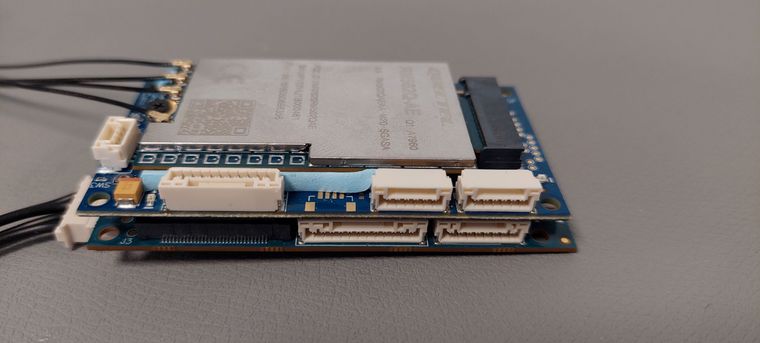
I have tried two separate 5G modules, same issue.
-
@DanielHviid Ensure that both black board to board connectors (left side in pic) are fully seated, the board looks a little crooked. Also double check that the Quectel module itself is fully seated in the pci slot.
What software version are you running on your voxl2? You can check this with:
voxl-version -
The board is fully connected and the voxl2 can find 4 USB connections through it. It looks crooked from the perspective of the image, but is completely parallel with the voxl2 and does not wiggle when pressed. The Quectel module is also tightly connected to the board with the screw that it came with, and I have neither loosened it nor removed it since we received it, with both 5g modem boards we have tested.
We are running this on a clean install of the VOXL2 Platform 0.9 image.
--------------------------------------------------------------------------------
system-image: 1.4.1-M0054-14.1a-perf
kernel:       #1 SMP PREEMPT Thu Oct 13 17:48:16 UTC 2022 4.19.125
--------------------------------------------------------------------------------
hw version:   M0054
--------------------------------------------------------------------------------
voxl-suite:   0.9.4
--------------------------------------------------------------------------------
Packages:
Repo:  http://voxl-packages.modalai.com/ ./dists/qrb5165/sdk-0.9/binary-arm64/
Last Updated: 2022-09-06 03:18:29
WARNING: repo file has changed since last update,
	packages may have originated from a different repo
List:
	libmodal-cv              0.2.3
	libmodal-exposure        0.0.7
	libmodal-journal         0.2.1
	libmodal-json            0.4.3
	libmodal-pipe            2.6.0
	libqrb5165-io            0.1.0
	libvoxl-cci-direct       0.1.5
	libvoxl-cutils           0.1.1
	mv-voxl                  0.1-r0
	qrb5165-bind             0.1-r0
	qrb5165-dfs-server       0.1.0
	qrb5165-imu-server       0.5.0
	qrb5165-slpi-test-sig    01-r0
	qrb5165-system-tweaks    0.1.5
	qrb5165-tflite           2.8.0-2
	voxl-bind                0.0.1
	voxl-camera-calibration  0.2.3
	voxl-camera-server       1.3.5
	voxl-cpu-monitor         0.3.0
	voxl-docker-support      1.2.4
	voxl-gphoto2-server      0.0.10
	voxl-jpeg-turbo          2.1.3-4
	voxl-libgphoto2          0.0.4
	voxl-libuvc              1.0.7
	voxl-logger              0.3.4
	voxl-mavlink             0.1.0
	voxl-mavlink-server      0.2.0
	voxl-modem               0.16.1
	voxl-mongoose            7.7.0-1
	voxl-mpa-to-ros          0.3.6
	voxl-mpa-tools           0.7.6
	voxl-opencv              4.5.5-1
	voxl-portal              0.4.2
	voxl-px4                 1.12.31
	voxl-px4-imu-server      0.1.2
	voxl-qvio-server         0.8.2
	voxl-remote-id           0.0.5
	voxl-streamer            0.4.1
	voxl-suite               0.9.4
	voxl-tag-detector        0.0.4
	voxl-tflite-server       0.3.1
	voxl-utils               1.2.2
	voxl-uvc-server          0.1.3
	voxl-vision-px4          1.4.0
	voxl2-system-image       1.4.1-r0
	voxl2-wlan               1.0-r0
--------------------------------------------------------------------------------
We have just tried it on the 0.9.5 image as well, with no change.
-
ifconfig
bond0: flags=5123<UP,BROADCAST,MASTER,MULTICAST>  mtu 1500
        ether 56:04:23:be:49:16  txqueuelen 1000  (Ethernet)
        RX packets 0  bytes 0 (0.0 B)
        RX errors 0  dropped 0  overruns 0  frame 0
        TX packets 0  bytes 0 (0.0 B)
        TX errors 0  dropped 0 overruns 0  carrier 0  collisions 0

dummy0: flags=195<UP,BROADCAST,RUNNING,NOARP>  mtu 1500
        inet6 fe80::63f1:e926:6645:ed3a  prefixlen 64  scopeid 0x20<link>
        ether 12:88:76:22:4a:2c  txqueuelen 1000  (Ethernet)
        RX packets 0  bytes 0 (0.0 B)
        RX errors 0  dropped 0  overruns 0  frame 0
        TX packets 5  bytes 894 (894.0 B)
        TX errors 0  dropped 0 overruns 0  carrier 0  collisions 0

lo: flags=73<UP,LOOPBACK,RUNNING>  mtu 65536
        inet 127.0.0.1  netmask 255.0.0.0
        inet6 ::1  prefixlen 128  scopeid 0x10<host>
        loop  txqueuelen 1000  (Local Loopback)
        RX packets 80  bytes 5680 (5.6 KB)
        RX errors 0  dropped 0  overruns 0  frame 0
        TX packets 80  bytes 5680 (5.6 KB)
        TX errors 0  dropped 0 overruns 0  carrier 0  collisions 0

wwan0: flags=4291<UP,BROADCAST,RUNNING,NOARP,MULTICAST>  mtu 1500
        inet6 fe80::ae85:f75c:c008:10c7  prefixlen 64  scopeid 0x20<link>
        ether c6:79:d7:12:6a:d4  txqueuelen 1000  (Ethernet)
        RX packets 0  bytes 0 (0.0 B)
        RX errors 0  dropped 0  overruns 0  frame 0
        TX packets 0  bytes 0 (0.0 B)
        TX errors 0  dropped 0 overruns 0  carrier 0  collisions 0
ls /dev | grep ttyUSB ttyUSB0 ttyUSB1 ttyUSB2 ttyUSB3ls /dev | grep cdc cdc-wdm0 -
This post is deleted!
-
quectel-CM -s ###APN### [03-02_12:59:25:085] Quectel_QConnectManager_Linux_V1.5.9 [03-02_12:59:25:088] Find /sys/bus/usb/devices/2-1.1 idVendor=0x2c7c idProduct=0x800, bus=0x002, dev=0x003 [03-02_12:59:25:088] Auto find qmichannel = /dev/cdc-wdm0 [03-02_12:59:25:089] Auto find usbnet_adapter = wwan0 [03-02_12:59:25:089] netcard driver = qmi_wwan, driver version = 22-Aug-2005 [03-02_12:59:25:090] Modem works in QMI mode [03-02_12:59:25:114] /proc/4755/fd/7 -> /dev/cdc-wdm0 [03-02_12:59:25:114] /proc/4755/exe -> /usr/bin/quectel-CM [03-02_12:59:27:116] cdc_wdm_fd = 7 [03-02_12:59:27:213] Get clientWDS = 2 [03-02_12:59:27:244] Get clientDMS = 1 [03-02_12:59:27:276] Get clientNAS = 4 [03-02_12:59:27:308] Get clientUIM = 1 [03-02_12:59:27:340] Get clientWDA = 1 [03-02_12:59:27:372] requestBaseBandVersion RM502QAEAAR11A04M4G [03-02_12:59:40:876] QmiWwanThread read=-1 errno: 2 (No such file or directory) [03-02_12:59:57:373] QmiThreadSendQMITimeout pthread_cond_timeout_np timeout [03-02_12:59:57:373] requestSetEthMode err = 110 [03-02_12:59:57:388] requestGetSIMStatus SIMStatus: SIM_PIN [03-02_12:59:57:388] requestSetProfile[1] ###APN###///0 [03-02_13:00:27:389] QmiThreadSendQMITimeout pthread_cond_timeout_np timeout [03-02_13:00:27:389] requestSetProfile err = 110 [03-02_13:00:57:389] QmiThreadSendQMITimeout pthread_cond_timeout_np timeout [03-02_13:00:57:390] requestGetProfile err = 110 [03-02_13:00:57:420] QmiWwanThread read=-1 errno: 2 (No such file or directory) [03-02_13:01:27:390] QmiThreadSendQMITimeout pthread_cond_timeout_np timeout [03-02_13:01:27:390] requestRegistrationState2 err = 110 [03-02_13:01:27:404] requestQueryDataCall IPv4ConnectionStatus: DISCONNECTED [03-02_13:01:27:405] ifconfig wwan0 down [03-02_13:01:27:451] ifconfig wwan0 0.0.0.0 [03-02_13:01:27:467] requestRegistrationState2 MCC: 238, MNC: 20, PS: Detached, DataCap: UNKNOW [03-02_13:04:27:453] QmiThreadSendQMITimeout pthread_cond_timeout_np timeout [03-02_13:04:27:453] requestQueryDataCall err = 110 [03-02_13:04:57:548] QmiWwanThread read=-1 errno: 2 (No such file or directory) [03-02_13:05:27:517] QmiThreadSendQMITimeout pthread_cond_timeout_np timeout [03-02_13:05:27:517] requestQueryDataCall err = 110 [03-02_13:06:12:524] QmiThreadSendQMITimeout pthread_cond_timeout_np timeout [03-02_13:06:12:524] requestQueryDataCall err = 110 -
@DanielHviid Can you try installing a newer version of voxl-modem?: http://voxl-packages.modalai.com/dists/qrb5165/staging/binary-arm64/voxl-modem_1.0.3_arm64.deb
adb push voxl-modem_1.0.3_arm64.deb .
adb shell
dpkg -i voxl-modem_1.0.3_arm64.deb
This new package includes a newer quectel-CM source
-
@tom Definite improvement, but it seems to be stuck in initialization. This is the output of manually running it it.
quectel-CM -s ###APN### [03-02_13:08:35:594] Quectel_QConnectManager_Linux_V1.6.0.24 [03-02_13:08:35:598] Find /sys/bus/usb/devices/2-1.1 idVendor=0x2c7c idProduct=0x800, bus=0x002, dev=0x003 [03-02_13:08:35:599] Auto find qmichannel = /dev/cdc-wdm0 [03-02_13:08:35:599] Auto find usbnet_adapter = wwan0 [03-02_13:08:35:600] netcard driver = qmi_wwan, driver version = 22-Aug-2005 [03-02_13:08:35:600] Modem works in QMI mode [03-02_13:08:35:621] cdc_wdm_fd = 7 [03-02_13:08:35:708] Get clientWDS = 15 [03-02_13:08:35:739] Get clientDMS = 1 [03-02_13:08:35:771] Get clientNAS = 4 [03-02_13:08:35:803] Get clientUIM = 1 [03-02_13:08:35:835] Get clientWDA = 1 [03-02_13:08:35:867] requestBaseBandVersion RM502QAEAAR11A04M4G [03-02_13:08:35:995] requestGetSIMStatus SIMStatus: SIM_PIN [03-02_13:08:35:995] requestSetProfile[1] ###APN###///0 [03-02_13:08:36:059] requestGetProfile[1] ###APN###///0 [03-02_13:08:36:091] requestRegistrationState2 MCC: 238, MNC: 20, PS: Detached, DataCap: UNKNOW [03-02_13:08:36:123] requestQueryDataCall IPv4ConnectionStatus: DISCONNECTED [03-02_13:08:36:123] ifconfig wwan0 0.0.0.0 [03-02_13:08:36:146] ifconfig wwan0 down -
@DanielHviid I haven't seen this before with SIM status:
requestGetSIMStatus SIMStatus: SIM_PIN, I'm wondering if the SIM card is locked and is expecting a pin number?quectel-CMallows you to pass in a pincode with-p:voxl2:/$ quectel-CM -h Quectel_QConnectManager_Linux_V1.6.0.24 Usage: quectel-CM [options] -s [apn [user password auth]] Set apn/user/password/auth get from your network provider. auth: 1~pap, 2~chap -p pincode Verify sim card pin if sim card is locked -p [quectel-][qmi|mbim]-proxy Request to use proxy -f logfilename Save log message of this program to file -u usbmonlog filename Save usbmon log to file -i interface Specify which network interface to setup data call when multi-modems exits -4 Setup IPv4 data call (default) -6 Setup IPv6 data call -n pdn Specify which pdn to setup data call (default 1 for QMI, 0 for MBIM) -k pdn Specify which pdn to hangup data call (by send SIGINT to 'quectel-CM -n pdn') -m iface-idx Bind QMI data call to wwan0_<iface idx> when QMAP used. E.g '-n 7 -m 1' bind pdn-7 data call to wwan0_1 -b Enable network interface bridge function (default 0) -v Verbose log mode, for debug purpose. [Examples] Example 1: quectel-CM Example 2: quectel-CM -s 3gnet Example 3: quectel-CM -s 3gnet carl 1234 1 -p 1234 -f gobinet_log.txt -
@tom Curriously, it does not seem to accept -p 0000, which was our pin. We changed it to 1234, which is accepted, but that didn't help with the issue, and it acted identically to providing the wrong pin.
quectel-CM -p 0000
[03-02_13:02:16:064] Quectel_QConnectManager_Linux_V1.6.0.24
[03-02_13:02:16:064] unknow -p '0000'
quectel-CM -p 1234 [03-02_13:02:39:300] Quectel_QConnectManager_Linux_V1.6.0.24 [03-02_13:02:39:305] Find /sys/bus/usb/devices/2-1.1 idVendor=0x2c7c idProduct=0x800, bus=0x002, dev=0x003 [03-02_13:02:39:307] Auto find qmichannel = /dev/cdc-wdm0 [03-02_13:02:39:307] Auto find usbnet_adapter = wwan0 [03-02_13:02:39:307] netcard driver = qmi_wwan, driver version = 22-Aug-2005 [03-02_13:02:39:308] Modem works in QMI mode [03-02_13:02:39:325] cdc_wdm_fd = 7 [03-02_13:02:39:399] Get clientWDS = 15 [03-02_13:02:39:430] Get clientDMS = 1 [03-02_13:02:39:462] Get clientNAS = 4 [03-02_13:02:39:494] Get clientUIM = 1 [03-02_13:02:39:526] Get clientWDA = 1 [03-02_13:02:39:557] requestBaseBandVersion RM502QAEAAR11A04M4G [03-02_13:02:39:686] requestGetSIMStatus SIMStatus: SIM_PIN [03-02_13:02:39:718] requestGetProfile[1] 3gnet/carl/1234/1 [03-02_13:02:39:749] requestRegistrationState2 MCC: 238, MNC: 20, PS: Detached, DataCap: UNKNOW [03-02_13:02:39:781] requestQueryDataCall IPv4ConnectionStatus: DISCONNECTED [03-02_13:02:39:781] ifconfig wwan0 0.0.0.0 [03-02_13:02:39:803] ifconfig wwan0 down


Reading along? Create a free ModalAI Forum account to join in.
With an account you can reply, ask your own question, get an email when a ModalAI engineer answers, and mark the reply that solved it. Your place in each thread is saved between visits.
Questions about VOXL, Flight Core, ESCs and ModalAI drones are answered here by the engineers who build them.
Register Login