Skip to content
  • Categories
  • Recent
  • Tags
  • Popular
  • Users
  • Groups
Collapse
Brand Logo

ModalAI Forum

  1. ModalAI Support Forum
  2. Ask your questions right here!
  3. volx-mavlink-server PX4 Disconnected From UART

volx-mavlink-server PX4 Disconnected From UART

Scheduled Pinned Locked Moved Ask your questions right here!
mavlink-servermavlinkvoxl-vision-px4
13 Posts 3 Posters 3.0k Views 1 Watching
  • Oldest to Newest
  • Newest to Oldest
  • Most Votes
Reply
  • Reply as topic
Log in to reply
This topic has been deleted. Only users with topic management privileges can see it.
  • Z Offline
    Z Offline
    zkern5254
    Contributor
    wrote on last edited by
    #1

    When I try to run voxl-mavlink-server I consistently get PX4 disconnect from UART.
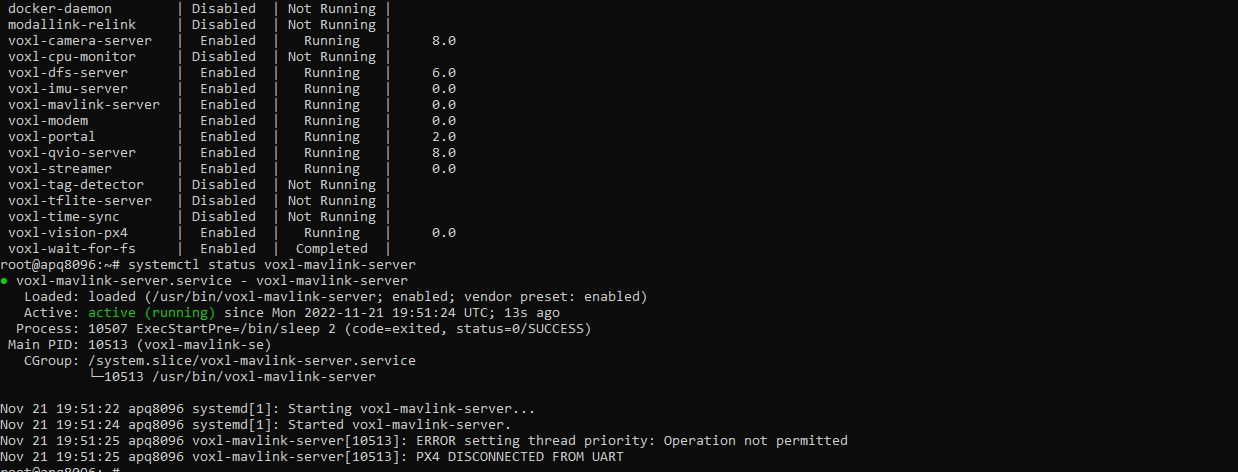
    b32fd76d-0dc0-4f90-8a42-4e6e0e6d68f4-image.png
    voxl-vision-px4 does not actually send mavlink message to QGC, except for the visual odometry message. That does go through.

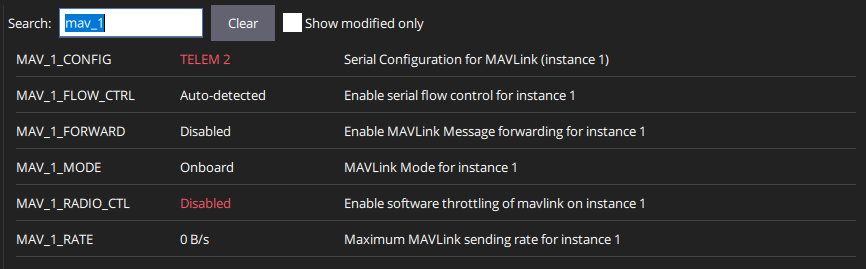
    My PX4 parameters for proper serial all seem to be correct:

    cf290829-b2cd-42f3-a8ab-0be7db0e3691-image.png
    f2ad0eeb-6e5a-4eac-ae9f-8c10e3c8a30f-image.png

    When I run the nuttx shell, the shell starts but I get no responses:

    d89f32e9-4089-4fa0-957e-5ea5d3eaf924-image.png

    Flight Core PX4 version: 1.13.1
    Voxl image version: 3.8.0

    My goal is to connect via a microhard setup. I have the microhard setup complete properly. I can ping the vehicles computer. I can see the visual odometry messages from vision-px4. I can SSH into the vehicle over microhard. I just can't start mavlink-server to get those sweet sweet mavlink messages flowing through the air. Any help would be appreciated, even if it's "your flight deck is bad, send it back and get a new one."

    1 Reply Last reply
    0
    • Z Offline
      Z Offline
      zkern5254
      Contributor
      wrote on last edited by
      #2

      As an update, I downgraded the voxl image to 3.6.0 to see if there was some sort of incompatibility issue. It seems like on 3.8.0 voxl-vision-px4 does not do serve MAVLINK messages (that's why I must start mavlink-server.) On 3.6.0, voxl-vision-px4 attempts to serve MAVLINK but still returns the PX4 DISCONNECTED FROM UART error. So, still stumped, any insight would be helpful.

      1 Reply Last reply
      0
      • Z Offline
        Z Offline
        zkern5254
        Contributor
        wrote on last edited by
        #3

        @modalab @Moderator @admin can someone help with this? We are testing this product for clients and if I can't even get comms working out of the gate it's kind of a bust. Your website says this is the spot to ask questions and there are no other means of technical help but it has been almost two weeks with no response. I just need AN answer. Did I get a bad unit? Is the firmware bad? Am I not giving enough info? Anything helps.

        1 Reply Last reply
        0
        • tomT Offline
          tomT Offline
          tom
          admin
          wrote on last edited by
          #4

          @zkern5254 I would recommend updating to VOXL Platform 0.9, which is our latest software release and is much newer than the software you're testing with.

          The download can be found here: https://developer.modalai.com/asset/1

          Z 1 Reply Last reply
          0
          • Steve TurnerS Offline
            Steve TurnerS Offline
            Steve Turner
            wrote on last edited by
            #5

            I don't work for ModalAI, but a few quick questions I have to try to help:

            VOXL, VOXL Flight or VOXL2?

            What port do you have your PX4 Autopilot/Flight Core plugged into if running a VOXL?

            I recommend running a voxl-configure-mpa and picking one of the options close to your platform or factory reset to configure the mavlink connection via UART for your platform. https://docs.modalai.com/voxl-configure-mpa/

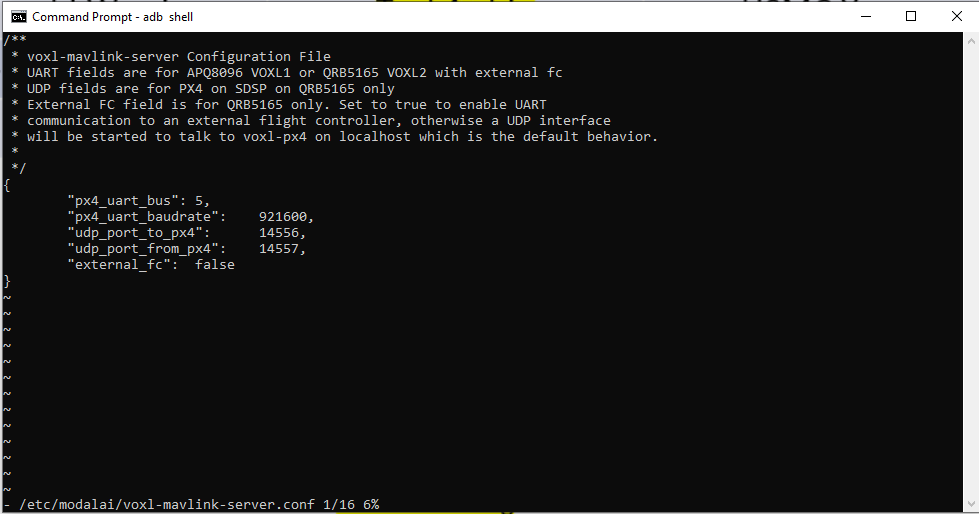
            I would also check /etc/modalai/voxl-mavlink-server.conf and make sure the telemetry port is set up. voxl-configure-mpa should do this for you, but just in case you should see something like:

            /**
             * voxl-mavlink-server Configuration File
             * UART fields are for APQ8096 VOXL1 or QRB5165 VOXL2 with external fc
             * UDP fields are for PX4 on SDSP on QRB5165 only
             * External FC field is for QRB5165 only. Set to true to enable UART
             * communication to an external flight controller, otherwise a UDP interface
             * will be started to talk to voxl-px4 on localhost which is the default behavior.
             *
             */
            {
            	"px4_uart_bus":	5,
            	"px4_uart_baudrate":	921600,
            	"udp_port_to_px4":	14556,
            	"udp_port_from_px4":	14557,
            	"external_fc":	false
            }
            

            If you're running a VOXL with Flight Core, the connection is documented here: https://docs.modalai.com/how-to-connect-voxl-to-flight-core/

            And the UART bus should be port 5 as shown in the config file above.

            If you're using a Flight core, do you have blinking lights on it? Should be solid green, blinking blue.

            I also recommend running image 3.9.0 based on our experience if you can make the upgrade.

            Hope this helps!

            Z 1 Reply Last reply
            0
            • Steve TurnerS Steve Turner

              I don't work for ModalAI, but a few quick questions I have to try to help:

              VOXL, VOXL Flight or VOXL2?

              What port do you have your PX4 Autopilot/Flight Core plugged into if running a VOXL?

              I recommend running a voxl-configure-mpa and picking one of the options close to your platform or factory reset to configure the mavlink connection via UART for your platform. https://docs.modalai.com/voxl-configure-mpa/

              I would also check /etc/modalai/voxl-mavlink-server.conf and make sure the telemetry port is set up. voxl-configure-mpa should do this for you, but just in case you should see something like:

              /**
               * voxl-mavlink-server Configuration File
               * UART fields are for APQ8096 VOXL1 or QRB5165 VOXL2 with external fc
               * UDP fields are for PX4 on SDSP on QRB5165 only
               * External FC field is for QRB5165 only. Set to true to enable UART
               * communication to an external flight controller, otherwise a UDP interface
               * will be started to talk to voxl-px4 on localhost which is the default behavior.
               *
               */
              {
              	"px4_uart_bus":	5,
              	"px4_uart_baudrate":	921600,
              	"udp_port_to_px4":	14556,
              	"udp_port_from_px4":	14557,
              	"external_fc":	false
              }
              

              If you're running a VOXL with Flight Core, the connection is documented here: https://docs.modalai.com/how-to-connect-voxl-to-flight-core/

              And the UART bus should be port 5 as shown in the config file above.

              If you're using a Flight core, do you have blinking lights on it? Should be solid green, blinking blue.

              I also recommend running image 3.9.0 based on our experience if you can make the upgrade.

              Hope this helps!

              Z Offline
              Z Offline
              zkern5254
              Contributor
              wrote on last edited by
              #6

              @Steve-Turner Valid points, I'll check the voxl-configure-mpa but I'm pretty positive I've run that already. I'll give it a go anyways.

              As for the mavlink-server config file. I've checked that so many times I see it in my sleep now.

              I'm actually using the flight deck so all the connections aren't really up to me.

              I'll try the upgrade.

              1 Reply Last reply
              0
              • tomT tom

                @zkern5254 I would recommend updating to VOXL Platform 0.9, which is our latest software release and is much newer than the software you're testing with.

                The download can be found here: https://developer.modalai.com/asset/1

                Z Offline
                Z Offline
                zkern5254
                Contributor
                wrote on last edited by
                #7

                @tom Thanks for answer! I'll give the upgrade a shot. That is probably the only thing I haven't tried yet. I should have mentioned in my original post also that I'm using a flight deck. I think that's why this is most confusing to me. All of the UART connections are board level so I can't be messing those up.

                1 Reply Last reply
                0
                • tomT Offline
                  tomT Offline
                  tom
                  admin
                  wrote on last edited by tom
                  #8

                  @zkern5254 Does your flight deck have an M0019 (VOXL-Flight) or does it have a dual board solution of M0006 (VOXL) and M0018 (Flight Core)? Just trying to determine if the UART connection is internal or through a cable.

                  Z 1 Reply Last reply
                  0
                  • tomT tom

                    @zkern5254 Does your flight deck have an M0019 (VOXL-Flight) or does it have a dual board solution of M0006 (VOXL) and M0018 (Flight Core)? Just trying to determine if the UART connection is internal or through a cable.

                    Z Offline
                    Z Offline
                    zkern5254
                    Contributor
                    wrote on last edited by
                    #9

                    @tom I have the M0019 version

                    1 Reply Last reply
                    0
                    • tomT Offline
                      tomT Offline
                      tom
                      admin
                      wrote on last edited by
                      #10

                      @zkern5254 Okay cool, we do test the internal UART before shipping so unless some sort of issue occured post-shipment the hardware should be good.

                      Z 2 Replies Last reply
                      0
                      • tomT tom

                        @zkern5254 Okay cool, we do test the internal UART before shipping so unless some sort of issue occured post-shipment the hardware should be good.

                        Z Offline
                        Z Offline
                        zkern5254
                        Contributor
                        wrote on last edited by
                        #11

                        @tom Copy that, I'll try the update and see if that fixes anything. We haven't modified the board or anything since receiving it so I'm not sure why something would have gone with the UART connection of all things.

                        1 Reply Last reply
                        0
                        • tomT tom

                          @zkern5254 Okay cool, we do test the internal UART before shipping so unless some sort of issue occured post-shipment the hardware should be good.

                          Z Offline
                          Z Offline
                          zkern5254
                          Contributor
                          wrote on last edited by
                          #12

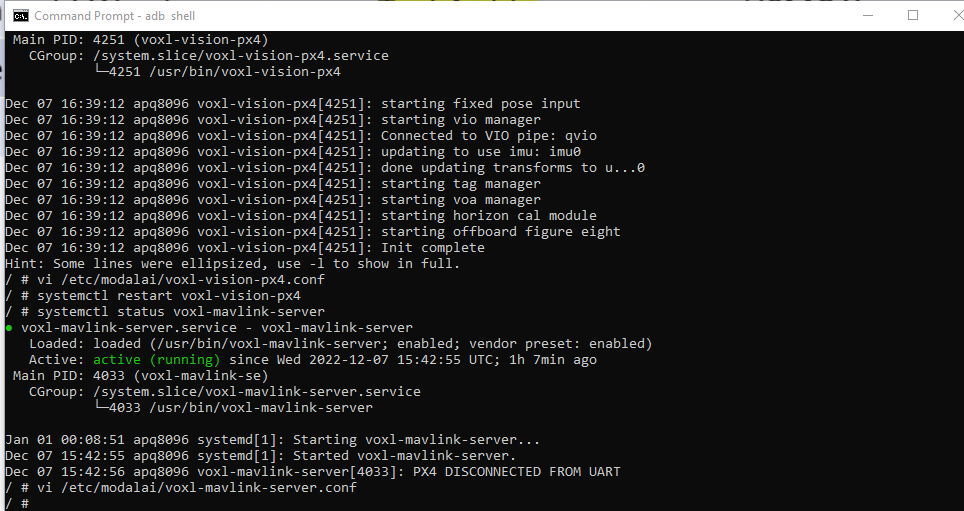
                          @tom I updated to the newest firmware, then ran the voxl-configure-mpa wizard and I'm still getting PX4 DISCONNECTED FROM UART when I check the mavlink-server status. (I can see the visual odometry messages on wireshark, like before. Just not other mav messages.)
                          b34b4a6f-5f51-4892-8750-f6ce5f226cc4-image.png

                          The mavlink-server config files looks like this:
                          914f0510-5884-4aaa-86cf-dd7d9d482ddf-image.png

                          And my px4 serial params look like this:
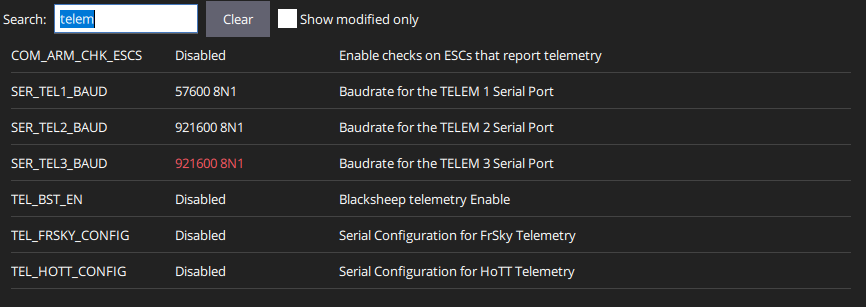
                          1b74bb24-8ab9-470a-b2c9-27f67e4315a5-image.png
                          5a53c652-30dd-43f9-be22-51e9a478b77b-image.png

                          So still no dice.

                          1 Reply Last reply
                          0
                          • tomT Offline
                            tomT Offline
                            tom
                            admin
                            wrote on last edited by
                            #13

                            @zkern5254 I'll see if I can get any other ideas from the team.

                            1 Reply Last reply
                            0

                            Hello! It looks like you're interested in this conversation, but you don't have an account yet.

                            Getting fed up of having to scroll through the same posts each visit? When you register for an account, you'll always come back to exactly where you were before, and choose to be notified of new replies (either via email, or push notification). You'll also be able to save bookmarks and upvote posts to show your appreciation to other community members.

                            With your input, this post could be even better 💗

                            Register Login
                            Reply
                            • Reply as topic
                            Log in to reply
                            • Oldest to Newest
                            • Newest to Oldest
                            • Most Votes


                            ModalAI
                            Categories Recent Tags ModalAI.com Docs
                            © 2026 ModalAI® · Accelerating autonomy for smaller, smarter, safer drones · Powered by NodeBB
                            • Login

                            • Don't have an account? Register

                            • Login or register to search.
                            • First post
                              Last post
                            0
                            • Categories
                            • Recent
                            • Tags
                            • Popular
                            • Users
                            • Groups