
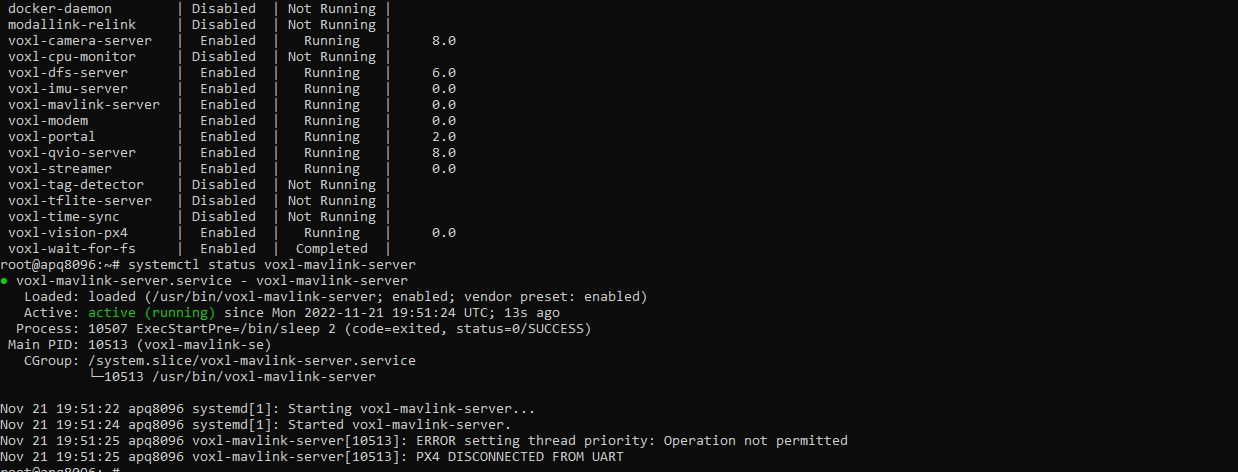
volx-mavlink-server PX4 Disconnected From UART



-
@zkern5254 I would recommend updating to VOXL Platform 0.9, which is our latest software release and is much newer than the software you're testing with.
The download can be found here: https://developer.modalai.com/asset/1
-
I don't work for ModalAI, but a few quick questions I have to try to help:
VOXL, VOXL Flight or VOXL2?
What port do you have your PX4 Autopilot/Flight Core plugged into if running a VOXL?
I recommend running a
voxl-configure-mpaand picking one of the options close to your platform or factory reset to configure the mavlink connection via UART for your platform. https://docs.modalai.com/voxl-configure-mpa/I would also check
/etc/modalai/voxl-mavlink-server.confand make sure the telemetry port is set up.voxl-configure-mpashould do this for you, but just in case you should see something like:/** * voxl-mavlink-server Configuration File * UART fields are for APQ8096 VOXL1 or QRB5165 VOXL2 with external fc * UDP fields are for PX4 on SDSP on QRB5165 only * External FC field is for QRB5165 only. Set to true to enable UART * communication to an external flight controller, otherwise a UDP interface * will be started to talk to voxl-px4 on localhost which is the default behavior. * */ { "px4_uart_bus": 5, "px4_uart_baudrate": 921600, "udp_port_to_px4": 14556, "udp_port_from_px4": 14557, "external_fc": false }If you're running a VOXL with Flight Core, the connection is documented here: https://docs.modalai.com/how-to-connect-voxl-to-flight-core/
And the UART bus should be port 5 as shown in the config file above.
If you're using a Flight core, do you have blinking lights on it? Should be solid green, blinking blue.
I also recommend running image 3.9.0 based on our experience if you can make the upgrade.
Hope this helps!
-
I don't work for ModalAI, but a few quick questions I have to try to help:
VOXL, VOXL Flight or VOXL2?
What port do you have your PX4 Autopilot/Flight Core plugged into if running a VOXL?
I recommend running a
voxl-configure-mpaand picking one of the options close to your platform or factory reset to configure the mavlink connection via UART for your platform. https://docs.modalai.com/voxl-configure-mpa/I would also check
/etc/modalai/voxl-mavlink-server.confand make sure the telemetry port is set up.voxl-configure-mpashould do this for you, but just in case you should see something like:/** * voxl-mavlink-server Configuration File * UART fields are for APQ8096 VOXL1 or QRB5165 VOXL2 with external fc * UDP fields are for PX4 on SDSP on QRB5165 only * External FC field is for QRB5165 only. Set to true to enable UART * communication to an external flight controller, otherwise a UDP interface * will be started to talk to voxl-px4 on localhost which is the default behavior. * */ { "px4_uart_bus": 5, "px4_uart_baudrate": 921600, "udp_port_to_px4": 14556, "udp_port_from_px4": 14557, "external_fc": false }If you're running a VOXL with Flight Core, the connection is documented here: https://docs.modalai.com/how-to-connect-voxl-to-flight-core/
And the UART bus should be port 5 as shown in the config file above.
If you're using a Flight core, do you have blinking lights on it? Should be solid green, blinking blue.
I also recommend running image 3.9.0 based on our experience if you can make the upgrade.
Hope this helps!
@Steve-Turner Valid points, I'll check the voxl-configure-mpa but I'm pretty positive I've run that already. I'll give it a go anyways.
As for the mavlink-server config file. I've checked that so many times I see it in my sleep now.
I'm actually using the flight deck so all the connections aren't really up to me.
I'll try the upgrade.
-
@zkern5254 I would recommend updating to VOXL Platform 0.9, which is our latest software release and is much newer than the software you're testing with.
The download can be found here: https://developer.modalai.com/asset/1
@tom Thanks for answer! I'll give the upgrade a shot. That is probably the only thing I haven't tried yet. I should have mentioned in my original post also that I'm using a flight deck. I think that's why this is most confusing to me. All of the UART connections are board level so I can't be messing those up.
-
@zkern5254 Does your flight deck have an M0019 (VOXL-Flight) or does it have a dual board solution of M0006 (VOXL) and M0018 (Flight Core)? Just trying to determine if the UART connection is internal or through a cable.
-
@zkern5254 Okay cool, we do test the internal UART before shipping so unless some sort of issue occured post-shipment the hardware should be good.
-
@zkern5254 Okay cool, we do test the internal UART before shipping so unless some sort of issue occured post-shipment the hardware should be good.
@tom I updated to the newest firmware, then ran the voxl-configure-mpa wizard and I'm still getting PX4 DISCONNECTED FROM UART when I check the mavlink-server status. (I can see the visual odometry messages on wireshark, like before. Just not other mav messages.)
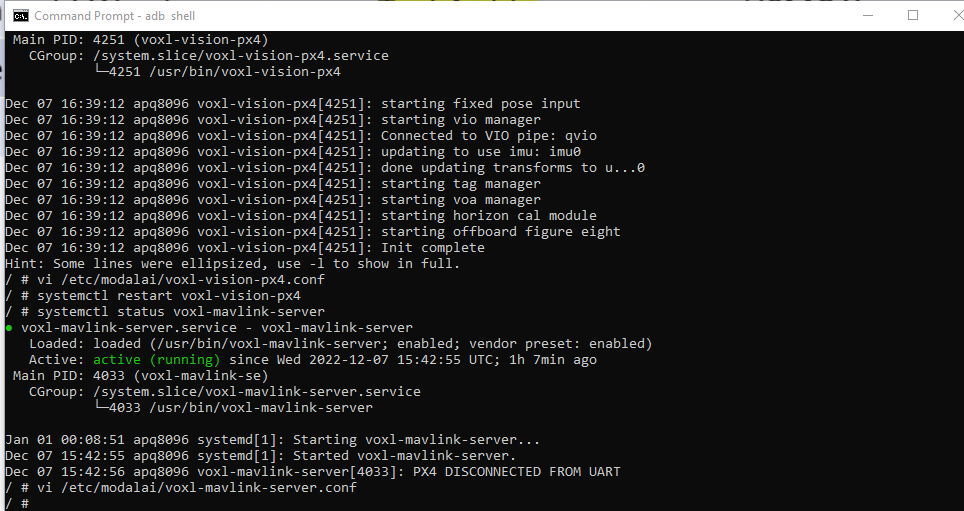
The mavlink-server config files looks like this:
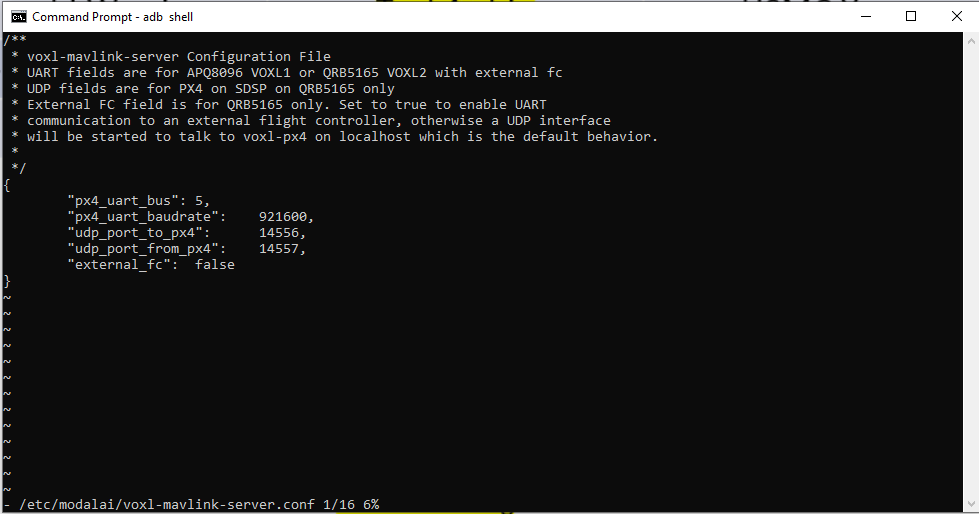
And my px4 serial params look like this:
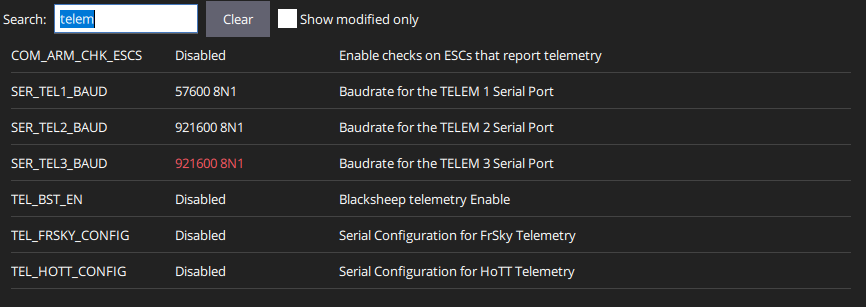
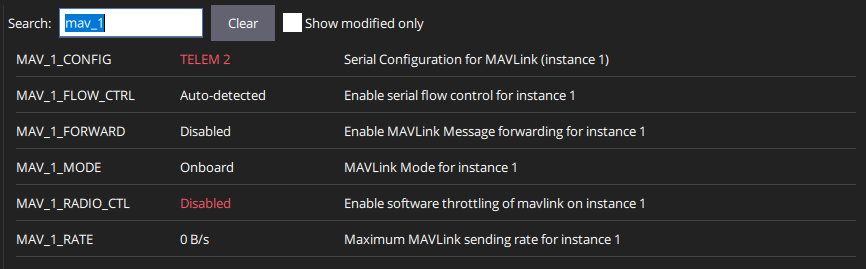
So still no dice.


Reading along? Create a free ModalAI Forum account to join in.
With an account you can reply, ask your own question, get an email when a ModalAI engineer answers, and mark the reply that solved it. Your place in each thread is saved between visits.
Questions about VOXL, Flight Core, ESCs and ModalAI drones are answered here by the engineers who build them.
Register Login