Skip to content
  • Categories
  • Recent
  • Tags
  • Popular
  • Users
  • Groups
Collapse
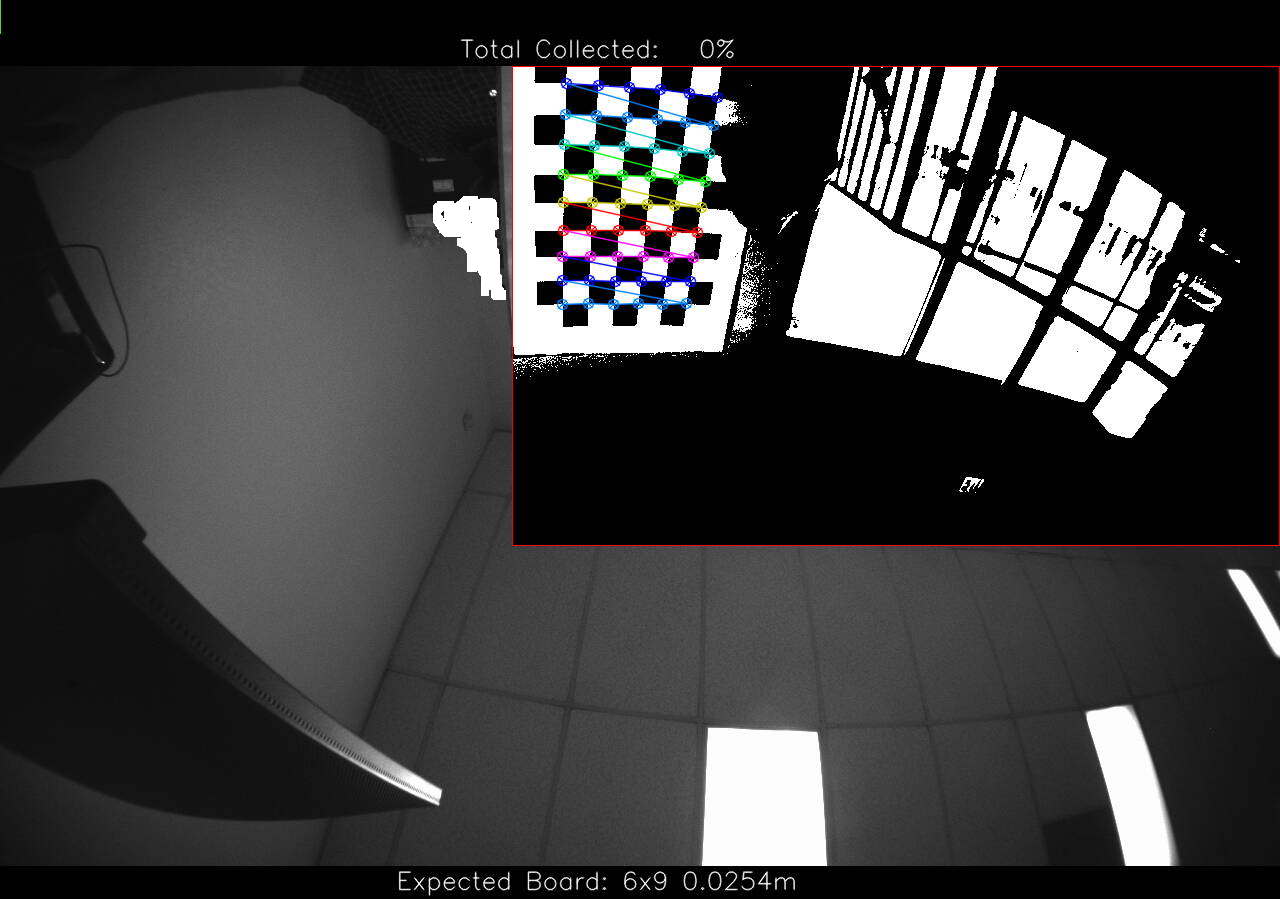
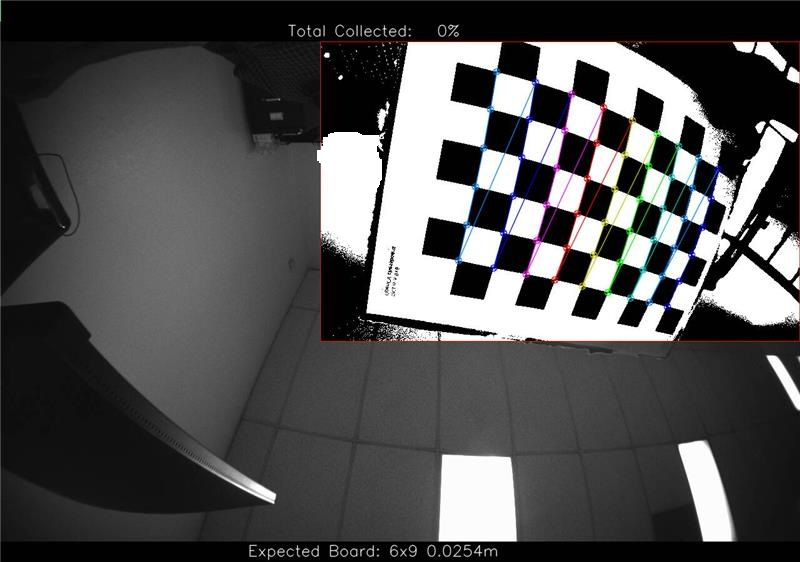
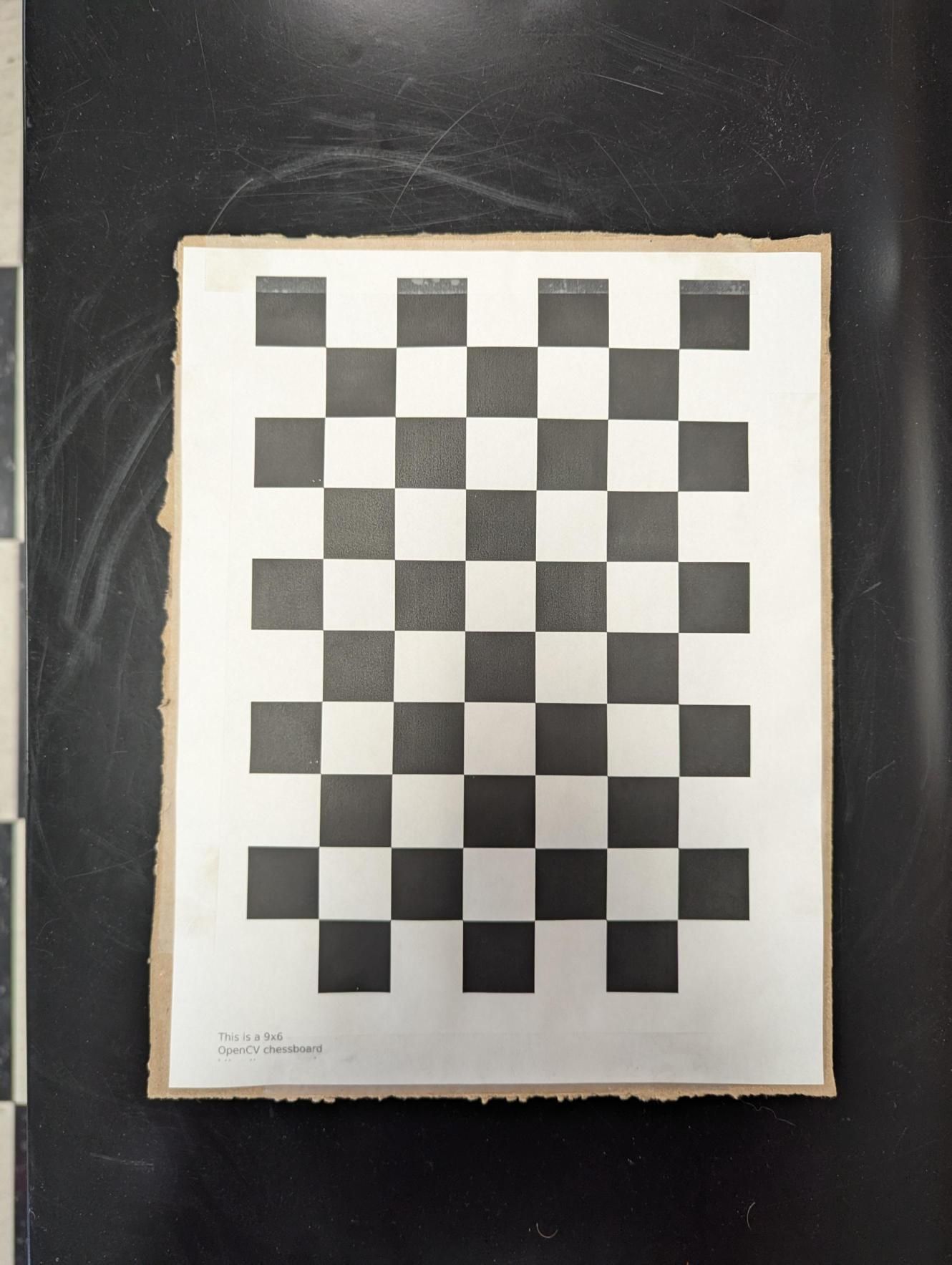
Brand Logo

ModalAI Forum

  1. ModalAI Support Forum
  2. VOXL Dev Kits
  3. VOXL-CAM
  4. Tracking camera calibration not progressing

Tracking camera calibration not progressing

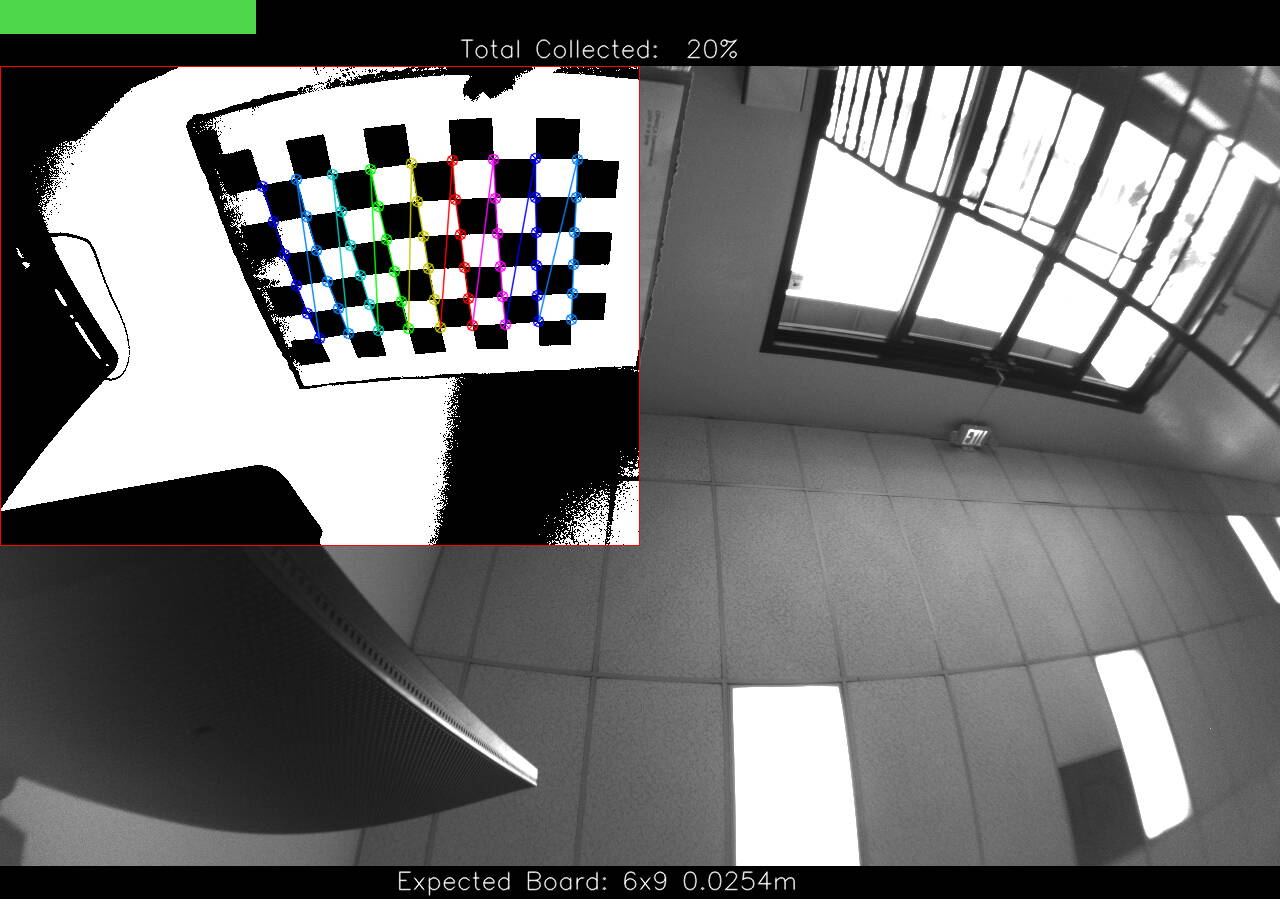
Scheduled Pinned Locked Moved VOXL-CAM
23 Posts 5 Posters 8.1k Views 3 Watching
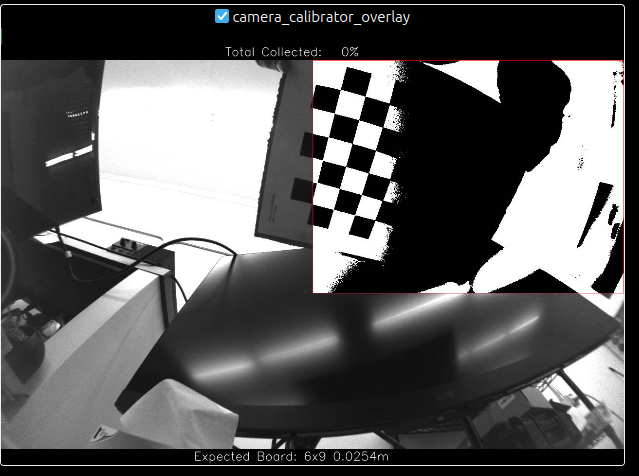
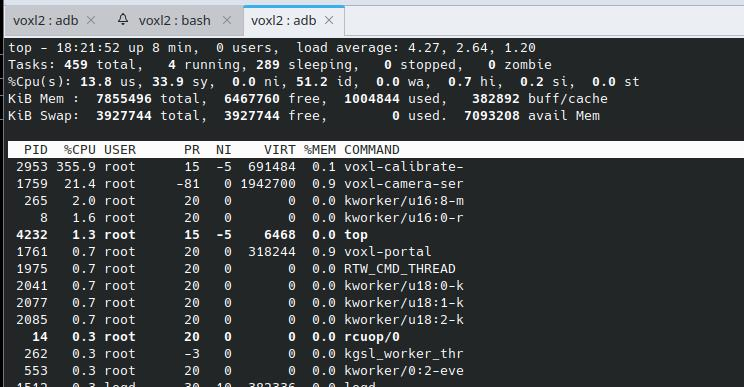
  • Oldest to Newest
  • Newest to Oldest
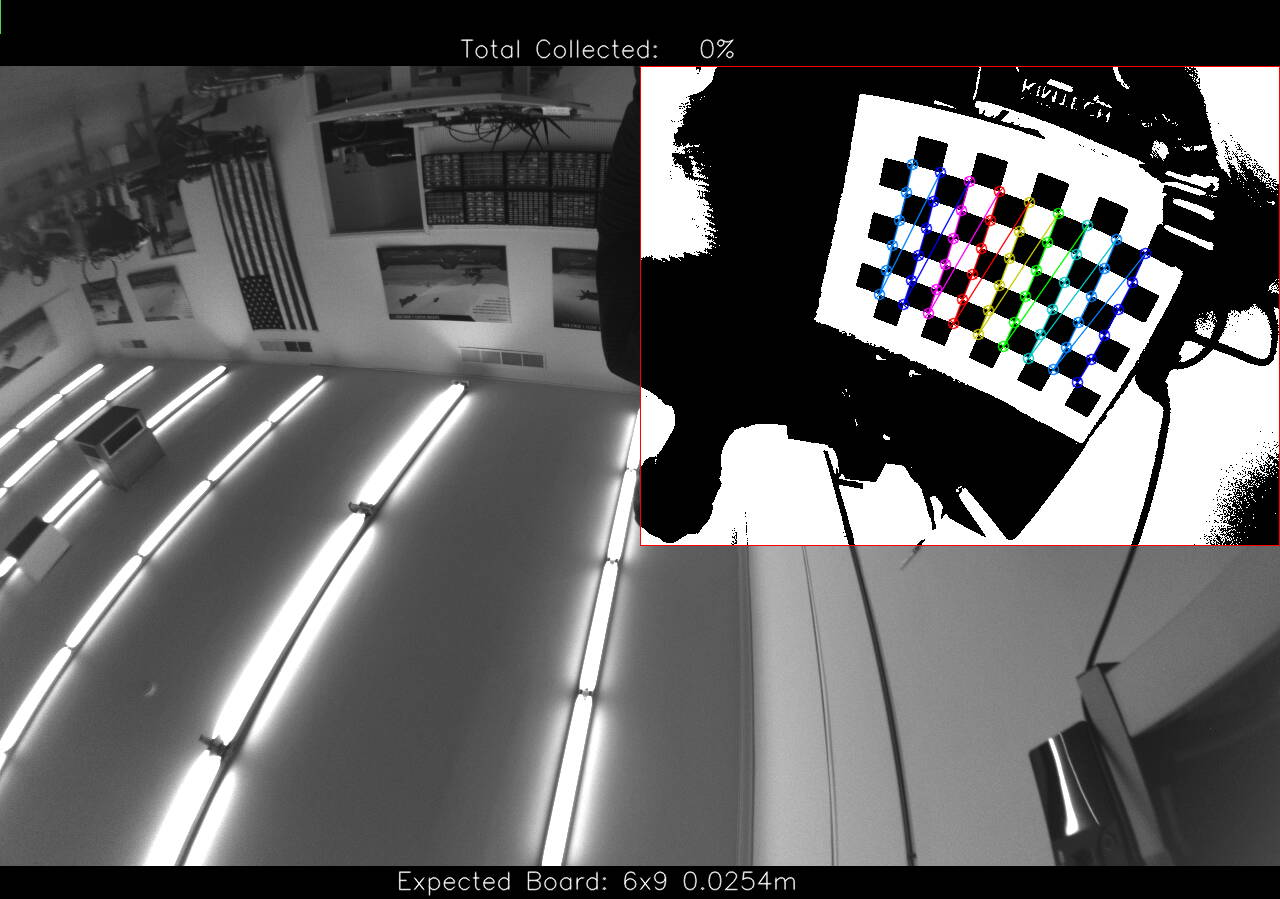
  • Most Votes
Reply
  • Reply as topic
Log in to reply
This topic has been deleted. Only users with topic management privileges can see it.
  • TroiT Offline
    TroiT Offline
    Troi
    wrote on last edited by
    #1

    Hello, I tried to calibrate the tracking camera using a 4x7 checkerboard with side lengths of 4 cm. I launched voxl-portal to view the camera calibration overlay. Then I placed the checkerboard in various positions and orientations within the red box overlayed on the tracking camera image. However, the calibration process does not progress. I never receive a green (overlay) box and the process remains at 0%.

    What should I do to solve this issue?

    Command used:
    voxl-calibrate-camera tracking -f -l 0.04 -s 4x7

    I followed the calibrate camera instructions from here: https://docs.modalai.com/calibrate-cameras/.

    P 1 Reply Last reply
    1
    • TroiT Troi

      Hello, I tried to calibrate the tracking camera using a 4x7 checkerboard with side lengths of 4 cm. I launched voxl-portal to view the camera calibration overlay. Then I placed the checkerboard in various positions and orientations within the red box overlayed on the tracking camera image. However, the calibration process does not progress. I never receive a green (overlay) box and the process remains at 0%.

      What should I do to solve this issue?

      Command used:
      voxl-calibrate-camera tracking -f -l 0.04 -s 4x7

      I followed the calibrate camera instructions from here: https://docs.modalai.com/calibrate-cameras/.

      P Offline
      P Offline
      plub
      wrote on last edited by
      #2

      @Troi same issue here but with stereo camera and command:

      voxl-calibrate-camera stereo_front -s 6x9 -l 0.030
      

      Did you resolve this?

      Alex KushleyevA 1 Reply Last reply
      0
      • P plub

        @Troi same issue here but with stereo camera and command:

        voxl-calibrate-camera stereo_front -s 6x9 -l 0.030
        

        Did you resolve this?

        Alex KushleyevA Offline
        Alex KushleyevA Offline
        Alex Kushleyev
        ModalAI Team
        wrote on last edited by
        #3

        @plub ,

        Can you provide any more details? Are you able to start the camera calibration and view the camera images using voxl-portal ?

        Are you sure that you are using a correct type of the checkerboard (correct number of corners)?

        Alex

        P 1 Reply Last reply
        0
        • Alex KushleyevA Alex Kushleyev

          @plub ,

          Can you provide any more details? Are you able to start the camera calibration and view the camera images using voxl-portal ?

          Are you sure that you are using a correct type of the checkerboard (correct number of corners)?

          Alex

          P Offline
          P Offline
          plub
          wrote on last edited by
          #4

          @Alex-Kushleyev What do you mean by "start" the camera calibration? I've used command which i have pasted in previous post. Then i was able to see camera calibrator tool and images from stereo cameras. Red rectangles showed up but when i placed the chessboard inside them, nothings happened. I am using checkerboard recommended by you: 9x6 OpenCV chessboard. I've tried various combinations in front of the camera but calibration didn't started.

          thanks for trying to help

          Piotr

          Alex KushleyevA 1 Reply Last reply
          0
          • P plub

            @Alex-Kushleyev What do you mean by "start" the camera calibration? I've used command which i have pasted in previous post. Then i was able to see camera calibrator tool and images from stereo cameras. Red rectangles showed up but when i placed the chessboard inside them, nothings happened. I am using checkerboard recommended by you: 9x6 OpenCV chessboard. I've tried various combinations in front of the camera but calibration didn't started.

            thanks for trying to help

            Piotr

            Alex KushleyevA Offline
            Alex KushleyevA Offline
            Alex Kushleyev
            ModalAI Team
            wrote on last edited by
            #5

            @plub , sorry for the delay. By start the calibration, I meant launch the voxl-calibrate-camera app and view the calibration stream via voxl-portal (it seems you have it working).

            Is it possible for you to paste a video of a screen recording while you are doing the calibration (screen record the voxl-portal stream).

            Thank you

            Alex

            P 1 Reply Last reply
            0
            • Alex KushleyevA Alex Kushleyev

              @plub , sorry for the delay. By start the calibration, I meant launch the voxl-calibrate-camera app and view the calibration stream via voxl-portal (it seems you have it working).

              Is it possible for you to paste a video of a screen recording while you are doing the calibration (screen record the voxl-portal stream).

              Thank you

              Alex

              P Offline
              P Offline
              plub
              wrote on last edited by
              #6

              @Alex-Kushleyev Thanks. Now calibration is starting. Solution is to use 5x6 checkerboard with trimmed in half squares on edges. But even we can do full calibration, it says failed in the end. Re-projection error for stereo calibration ( standalone cameras calibrate fine ) is very high. Any solutions for this?

              Alex KushleyevA 1 Reply Last reply
              0
              • P plub

                @Alex-Kushleyev Thanks. Now calibration is starting. Solution is to use 5x6 checkerboard with trimmed in half squares on edges. But even we can do full calibration, it says failed in the end. Re-projection error for stereo calibration ( standalone cameras calibrate fine ) is very high. Any solutions for this?

                Alex KushleyevA Offline
                Alex KushleyevA Offline
                Alex Kushleyev
                ModalAI Team
                wrote on last edited by
                #7

                @plub , could you please clarify which cameras you are using in the stereo configuration? OV7251?

                If the larger pattern was still detected by the procedure but was not accepted as a sample, this means that the pattern took up too little space of the desired area. You need to fill the desired area in each step almost completely, so that the sample is accepted.

                Also, is your checkerboard printed on paper and attached to a very flat surface without wrinkles? A poor calibration pattern can lead to poor results.

                Can you please post the result of the calibration? intrinsic and extrinsic parameters that are generated by the calibration procedure, even though it fails. Also please share the reprojection errors.

                Alex

                1 Reply Last reply
                0
                • KnightHawk06K Offline
                  KnightHawk06K Offline
                  KnightHawk06
                  Contributor
                  wrote on last edited by
                  #8

                  Hello, I'm having the same issue with the dual AR0144 1 MP tracking image sensors not progressing in the calibration sequence. I see some dark obscurations in the tracking rectangle and I am able to see the corners being counted but the calibration sequence never progresses.
                  camera_calibrator_overlay_1744926606.png camera_calibrator_overlay_1744927851.png Media.jpg

                  voxl2:~$ voxl-calibrate-camera tracking_down -s 6x9 -l 0.0254 -d
                  Waiting for valid pipe...
                  Please open voxl-portal in a web browser to view the camera calibrator overlay stream
                  ^C
                  received SIGINT Ctrl-C
                  done sampling
                  Exiting Cleanly
                  waiting to join consumer thread

                  Alex KushleyevA tomT 2 Replies Last reply
                  1
                  • KnightHawk06K KnightHawk06

                    Hello, I'm having the same issue with the dual AR0144 1 MP tracking image sensors not progressing in the calibration sequence. I see some dark obscurations in the tracking rectangle and I am able to see the corners being counted but the calibration sequence never progresses.
                    camera_calibrator_overlay_1744926606.png camera_calibrator_overlay_1744927851.png Media.jpg

                    voxl2:~$ voxl-calibrate-camera tracking_down -s 6x9 -l 0.0254 -d
                    Waiting for valid pipe...
                    Please open voxl-portal in a web browser to view the camera calibrator overlay stream
                    ^C
                    received SIGINT Ctrl-C
                    done sampling
                    Exiting Cleanly
                    waiting to join consumer thread

                    Alex KushleyevA Offline
                    Alex KushleyevA Offline
                    Alex Kushleyev
                    ModalAI Team
                    wrote on last edited by
                    #9

                    Hello @KnightHawk06,

                    This can happen because of lens shading on the AR0144 camera lens causing the thresholding (in camera calibration app) to not work as expected.

                    Depending on the version of VOXL2 SDK you are using, there may be also tracking_down_misp_grey camera stream available, which is the lens shading compensated output for this camera. I believe it should work better for calibration purposes.

                    Can you please try? If that does not help, I can suggest a few other tweaks, but those will require rebuilding the voxl-camera-calibration app.

                    Alex

                    KnightHawk06K 1 Reply Last reply
                    0
                    • KnightHawk06K KnightHawk06

                      Hello, I'm having the same issue with the dual AR0144 1 MP tracking image sensors not progressing in the calibration sequence. I see some dark obscurations in the tracking rectangle and I am able to see the corners being counted but the calibration sequence never progresses.

                      camera_calibrator_overlay_1744926606.png camera_calibrator_overlay_1744927851.png Media.jpg

                      voxl2:~$ voxl-calibrate-camera tracking_down -s 6x9 -l 0.0254 -d
                      Waiting for valid pipe...
                      Please open voxl-portal in a web browser to view the camera calibrator overlay stream
                      ^C
                      received SIGINT Ctrl-C
                      done sampling
                      Exiting Cleanly
                      waiting to join consumer thread

                      tomT Offline
                      tomT Offline
                      tom
                      admin
                      wrote on last edited by
                      #10

                      @KnightHawk06 You'll also want to add a -f to your voxl-calibrate-camera call for "fisheye"

                      1 Reply Last reply
                      1
                      • Alex KushleyevA Alex Kushleyev

                        Hello @KnightHawk06,

                        This can happen because of lens shading on the AR0144 camera lens causing the thresholding (in camera calibration app) to not work as expected.

                        Depending on the version of VOXL2 SDK you are using, there may be also tracking_down_misp_grey camera stream available, which is the lens shading compensated output for this camera. I believe it should work better for calibration purposes.

                        Can you please try? If that does not help, I can suggest a few other tweaks, but those will require rebuilding the voxl-camera-calibration app.

                        Alex

                        KnightHawk06K Offline
                        KnightHawk06K Offline
                        KnightHawk06
                        Contributor
                        wrote on last edited by KnightHawk06
                        #11

                        @Alex-Kushleyev

                        Thanks for the suggestion. I have en_misp enabled and I can see the misp_grey view in the voxl-portal, How do I command voxl-calibrate-camera to use the misp_grey view?

                        ────────────────────────────────────────────────────────────────────────────────
                        system-image: 1.8.02-M0054-14.1a-perf
                        kernel:       #1 SMP PREEMPT Mon Nov 11 22:47:44 UTC 2024 4.19.125
                        ────────────────────────────────────────────────────────────────────────────────
                        hw platform:  M0054
                        mach.var:     1.0.1
                        ────────────────────────────────────────────────────────────────────────────────
                        voxl-suite:   1.4.3
                        ────────────────────────────────────────────────────────────────────────────────
                        
                        
                                       {
                                                                 "type": "ar0144",
                                                                 "name": "tracking_down",
                                                                 "enabled":      true,
                                                                 "camera_id":    3,
                                                                 "fps":  30,
                                                                 "en_rotate":    false,
                                                                 "en_preview":   true,
                                                                 "preview_width":        1280,
                                                                 "preview_height":       800,
                                                                 "en_raw_preview":       true,
                                                                 "en_misp":      true,
                                                                 "misp_width":   1280,
                                                                 "misp_height":  800,
                                                                 "misp_venc_enable":     false,
                                                                 "misp_venc_mode":       "h264",
                                                                 "misp_venc_br_ctrl":    "cqp",
                                                                 "misp_venc_Qfixed":     30,
                                                                 "misp_venc_Qmin":       15,
                                                                 "misp_venc_Qmax":       50,
                                                                 "misp_venc_nPframes":   29,
                                                                 "misp_venc_mbps":       2,
                                                                 "misp_venc_osd":        false,
                                                                 "misp_awb":     "auto",
                                                                 "misp_gamma":   1,
                                                                 "ae_mode":      "lme_msv",
                                                                 "gain_min":     54,
                                                                 "gain_max":     8000,
                                                                 "ae_desired_msv":       60,
                                                                 "exposure_min_us":      20,
                                                                 "exposure_max_us":      12000,
                                                                 "exposure_soft_min_us": 5000,
                                                                 "ae_filter_alpha":      0.600000023841858,
                                                                 "ae_ignore_fraction":   0.20000000298023224,
                                                                 "ae_slope":     0.05000000074505806,
                                                                 "ae_exposure_period":   1,
                                                                 "ae_gain_period":       1
                                                         }
                        
                        
                        Alex KushleyevA 1 Reply Last reply
                        0
                        • KnightHawk06K KnightHawk06

                          @Alex-Kushleyev

                          Thanks for the suggestion. I have en_misp enabled and I can see the misp_grey view in the voxl-portal, How do I command voxl-calibrate-camera to use the misp_grey view?

                          ────────────────────────────────────────────────────────────────────────────────
                          system-image: 1.8.02-M0054-14.1a-perf
                          kernel:       #1 SMP PREEMPT Mon Nov 11 22:47:44 UTC 2024 4.19.125
                          ────────────────────────────────────────────────────────────────────────────────
                          hw platform:  M0054
                          mach.var:     1.0.1
                          ────────────────────────────────────────────────────────────────────────────────
                          voxl-suite:   1.4.3
                          ────────────────────────────────────────────────────────────────────────────────
                          
                          
                                         {
                                                                   "type": "ar0144",
                                                                   "name": "tracking_down",
                                                                   "enabled":      true,
                                                                   "camera_id":    3,
                                                                   "fps":  30,
                                                                   "en_rotate":    false,
                                                                   "en_preview":   true,
                                                                   "preview_width":        1280,
                                                                   "preview_height":       800,
                                                                   "en_raw_preview":       true,
                                                                   "en_misp":      true,
                                                                   "misp_width":   1280,
                                                                   "misp_height":  800,
                                                                   "misp_venc_enable":     false,
                                                                   "misp_venc_mode":       "h264",
                                                                   "misp_venc_br_ctrl":    "cqp",
                                                                   "misp_venc_Qfixed":     30,
                                                                   "misp_venc_Qmin":       15,
                                                                   "misp_venc_Qmax":       50,
                                                                   "misp_venc_nPframes":   29,
                                                                   "misp_venc_mbps":       2,
                                                                   "misp_venc_osd":        false,
                                                                   "misp_awb":     "auto",
                                                                   "misp_gamma":   1,
                                                                   "ae_mode":      "lme_msv",
                                                                   "gain_min":     54,
                                                                   "gain_max":     8000,
                                                                   "ae_desired_msv":       60,
                                                                   "exposure_min_us":      20,
                                                                   "exposure_max_us":      12000,
                                                                   "exposure_soft_min_us": 5000,
                                                                   "ae_filter_alpha":      0.600000023841858,
                                                                   "ae_ignore_fraction":   0.20000000298023224,
                                                                   "ae_slope":     0.05000000074505806,
                                                                   "ae_exposure_period":   1,
                                                                   "ae_gain_period":       1
                                                           }
                          
                          
                          Alex KushleyevA Offline
                          Alex KushleyevA Offline
                          Alex Kushleyev
                          ModalAI Team
                          wrote on last edited by
                          #12

                          @KnightHawk06 , use voxl-calibrare-camera tracking_down_misp_grey <remaining options>

                          KnightHawk06K 1 Reply Last reply
                          1
                          • Alex KushleyevA Alex Kushleyev

                            @KnightHawk06 , use voxl-calibrare-camera tracking_down_misp_grey <remaining options>

                            KnightHawk06K Offline
                            KnightHawk06K Offline
                            KnightHawk06
                            Contributor
                            wrote on last edited by
                            #13

                            @Alex-Kushleyev Thanks! I was able to get to the 2nd calibration panel with the command below but the process became unresponsive a couple times and I had to reboot, I eventually was able to detect the corners in the 2nd panel but am unable to progress.

                            voxl-calibrate-camera tracking_down_misp_grey -f -s 6x9 -l 0.0254

                            Alex KushleyevA 1 Reply Last reply
                            0
                            • KnightHawk06K KnightHawk06

                              @Alex-Kushleyev Thanks! I was able to get to the 2nd calibration panel with the command below but the process became unresponsive a couple times and I had to reboot, I eventually was able to detect the corners in the 2nd panel but am unable to progress.

                              voxl-calibrate-camera tracking_down_misp_grey -f -s 6x9 -l 0.0254

                              Alex KushleyevA Offline
                              Alex KushleyevA Offline
                              Alex Kushleyev
                              ModalAI Team
                              wrote on last edited by
                              #14

                              @KnightHawk06 , thanks for the details. I am not aware of the calibration app becoming unresponsive - do you have any details about that (at which point did it become unresponsive?). Any info you have on this would help. thank you!

                              Alex

                              KnightHawk06K 2 Replies Last reply
                              0
                              • Alex KushleyevA Alex Kushleyev

                                @KnightHawk06 , thanks for the details. I am not aware of the calibration app becoming unresponsive - do you have any details about that (at which point did it become unresponsive?). Any info you have on this would help. thank you!

                                Alex

                                KnightHawk06K Offline
                                KnightHawk06K Offline
                                KnightHawk06
                                Contributor
                                wrote on last edited by
                                #15

                                @Alex-Kushleyev The calibration image froze and I was unable to view any camera data in the VOXL portal, I also was unable to ping the device from my desktop until rebooting the device.

                                I'm still unable to complete the calibration process, are there any logs that I can review to see what's happening? Any other ideas of how I can proceed?
                                camera_calibrator_overlay_1745258021.png

                                KnightHawk06K 1 Reply Last reply
                                0
                                • KnightHawk06K KnightHawk06

                                  @Alex-Kushleyev The calibration image froze and I was unable to view any camera data in the VOXL portal, I also was unable to ping the device from my desktop until rebooting the device.

                                  I'm still unable to complete the calibration process, are there any logs that I can review to see what's happening? Any other ideas of how I can proceed?

                                  camera_calibrator_overlay_1745258021.png

                                  KnightHawk06K Offline
                                  KnightHawk06K Offline
                                  KnightHawk06
                                  Contributor
                                  wrote on last edited by
                                  #16

                                  @Alex-Kushleyev You had mentioned there are some other things to try that will require rebuilding the voxl-camera-calibration app? I tried increasing ae_desired_msv and misp_gamma to help with the lens shading but I was not able to progress any further through calibration.

                                  1 Reply Last reply
                                  0
                                  • Alex KushleyevA Alex Kushleyev

                                    @KnightHawk06 , thanks for the details. I am not aware of the calibration app becoming unresponsive - do you have any details about that (at which point did it become unresponsive?). Any info you have on this would help. thank you!

                                    Alex

                                    KnightHawk06K Offline
                                    KnightHawk06K Offline
                                    KnightHawk06
                                    Contributor
                                    wrote on last edited by
                                    #17

                                    @Alex-Kushleyev Here is some more information on the calibration process freezing, the camera feed stops updating in the voxl portal.
                                    e9089969-52d4-4122-a880-0794fc8b1b09-image.png

                                    cb4dba71-24a5-4bf3-99a2-2a3a81b7a060-image.png

                                    Alex KushleyevA 1 Reply Last reply
                                    0
                                    • KnightHawk06K KnightHawk06

                                      @Alex-Kushleyev Here is some more information on the calibration process freezing, the camera feed stops updating in the voxl portal.

                                      e9089969-52d4-4122-a880-0794fc8b1b09-image.png

                                      cb4dba71-24a5-4bf3-99a2-2a3a81b7a060-image.png

                                      Alex KushleyevA Offline
                                      Alex KushleyevA Offline
                                      Alex Kushleyev
                                      ModalAI Team
                                      wrote on last edited by Alex Kushleyev
                                      #18

                                      @KnightHawk06 , Please try building the calibration app from this branch : https://gitlab.com/voxl-public/voxl-sdk/utilities/voxl-camera-calibration/-/tree/fisheye-stereo?ref_type=heads

                                      Some time ago i fixed it up to work with fisheye stereo calibration, but also changed one parameter in thresholding to make it more smooth : https://gitlab.com/voxl-public/voxl-sdk/utilities/voxl-camera-calibration/-/commit/0bce9a25c67e64a229cfcbad4b6ace3a5837ee1b#f221083d30a7ca966318f904682ecf4970341657 -- in threshold.cpp change the number of tiles from 3 to 5, so that the image thresholding is more smooth across the image (even a larger number like 7 should work even better, but i am not sure if i tried).

                                      In the same branch I also slightly reduced the percentage of the windows that needs to be filled up with the checkerboard pattern, so that it is easier to have the calibration accept the pattern.

                                      Another thing to try, to just reduce the cpu load, just temporarily drop the FPS to 15, so that there are not so many frames to process (you can change it in voxl-camera-server.conf)

                                      I am going to take a look again at this soon and potentially integrate these fixes as options to camera calibration app (number of tiles, frame skip, etc)

                                      Alex

                                      KnightHawk06K 1 Reply Last reply
                                      0
                                      • Alex KushleyevA Alex Kushleyev

                                        @KnightHawk06 , Please try building the calibration app from this branch : https://gitlab.com/voxl-public/voxl-sdk/utilities/voxl-camera-calibration/-/tree/fisheye-stereo?ref_type=heads

                                        Some time ago i fixed it up to work with fisheye stereo calibration, but also changed one parameter in thresholding to make it more smooth : https://gitlab.com/voxl-public/voxl-sdk/utilities/voxl-camera-calibration/-/commit/0bce9a25c67e64a229cfcbad4b6ace3a5837ee1b#f221083d30a7ca966318f904682ecf4970341657 -- in threshold.cpp change the number of tiles from 3 to 5, so that the image thresholding is more smooth across the image (even a larger number like 7 should work even better, but i am not sure if i tried).

                                        In the same branch I also slightly reduced the percentage of the windows that needs to be filled up with the checkerboard pattern, so that it is easier to have the calibration accept the pattern.

                                        Another thing to try, to just reduce the cpu load, just temporarily drop the FPS to 15, so that there are not so many frames to process (you can change it in voxl-camera-server.conf)

                                        I am going to take a look again at this soon and potentially integrate these fixes as options to camera calibration app (number of tiles, frame skip, etc)

                                        Alex

                                        KnightHawk06K Offline
                                        KnightHawk06K Offline
                                        KnightHawk06
                                        Contributor
                                        wrote on last edited by
                                        #19

                                        @Alex-Kushleyev Thanks, this is very helpful. I checked out the fisheye-stereo branch and built and deployed it to the voxl2. I tried both 5 and 7 max tiles and also decreased fps to 15. The image is freezing less often during calibration and it is successfully counting the corners but does not progress past 0%. The 2 cameras are 4.5 cm apart, is that ok? Are there any debug logs that I can turn on to inspect why the calibration is not moving forward?

                                        ~/git/voxl-camera-calibration$ ./deploy_to_voxl.sh
                                        searching for ADB device
                                        checking VOXL for dpkg/opkg
                                        dpkg detected
                                        voxl-camera-calibration_0.5.9_arm64.deb: 1 file pushed, 0 skipped. 417.9 MB/s (177172 bytes in 0.000s)
                                        (Reading database ... 105707 files and directories currently installed.)
                                        Preparing to unpack .../voxl-camera-calibration_0.5.9_arm64.deb ...
                                        Unpacking voxl-camera-calibration (0.5.9) over (0.5.9) ...
                                        Setting up voxl-camera-calibration (0.5.9) ...
                                        Postinst script completed.
                                        DONE
                                        camera_calibrator_overlay_1745449555.png

                                        Alex KushleyevA 1 Reply Last reply
                                        0
                                        • KnightHawk06K KnightHawk06

                                          @Alex-Kushleyev Thanks, this is very helpful. I checked out the fisheye-stereo branch and built and deployed it to the voxl2. I tried both 5 and 7 max tiles and also decreased fps to 15. The image is freezing less often during calibration and it is successfully counting the corners but does not progress past 0%. The 2 cameras are 4.5 cm apart, is that ok? Are there any debug logs that I can turn on to inspect why the calibration is not moving forward?

                                          ~/git/voxl-camera-calibration$ ./deploy_to_voxl.sh
                                          searching for ADB device
                                          checking VOXL for dpkg/opkg
                                          dpkg detected
                                          voxl-camera-calibration_0.5.9_arm64.deb: 1 file pushed, 0 skipped. 417.9 MB/s (177172 bytes in 0.000s)
                                          (Reading database ... 105707 files and directories currently installed.)
                                          Preparing to unpack .../voxl-camera-calibration_0.5.9_arm64.deb ...
                                          Unpacking voxl-camera-calibration (0.5.9) over (0.5.9) ...
                                          Setting up voxl-camera-calibration (0.5.9) ...
                                          Postinst script completed.
                                          DONE

                                          camera_calibrator_overlay_1745449555.png

                                          Alex KushleyevA Offline
                                          Alex KushleyevA Offline
                                          Alex Kushleyev
                                          ModalAI Team
                                          wrote on last edited by
                                          #20

                                          @KnightHawk06 ,

                                          Oh i understand now.. The red box in the overlay defines the region where you need the calibration pattern to be located, HOWEVER there is also a requirement for the area within that red box that the pattern must fill. So, in your case, the detected pattern is too small within the red box, so you need to bring the pattern closer to the camera.

                                          In calibrator.cpp, look for the following:

                                          //Each item represents a desired square in percentages of the image {x1,y1,x2,y2, fill threshold, #samples} from top left
                                          

                                          On that fisheye stereo branch i lowered the thresholds for Fisheye patterns, but not FisheyeWide patterns, so you are still having issues (after trying to bring the pattern closer), you would want to slightly lower the fill thresholds here : https://gitlab.com/voxl-public/voxl-sdk/utilities/voxl-camera-calibration/-/blob/0bce9a25c67e64a229cfcbad4b6ace3a5837ee1b/src/calibrator.cpp#L272 (maybe from 40 to 35 and from 45 to 30).

                                          Alex

                                          KnightHawk06K 1 Reply Last reply
                                          0

                                          Hello! It looks like you're interested in this conversation, but you don't have an account yet.

                                          Getting fed up of having to scroll through the same posts each visit? When you register for an account, you'll always come back to exactly where you were before, and choose to be notified of new replies (either via email, or push notification). You'll also be able to save bookmarks and upvote posts to show your appreciation to other community members.

                                          With your input, this post could be even better 💗

                                          Register Login
                                          Reply
                                          • Reply as topic
                                          Log in to reply
                                          • Oldest to Newest
                                          • Newest to Oldest
                                          • Most Votes


                                          ModalAI
                                          Categories Recent Tags ModalAI.com Docs
                                          © 2026 ModalAI® · Accelerating autonomy for smaller, smarter, safer drones · Powered by NodeBB
                                          • Login

                                          • Don't have an account? Register

                                          • Login or register to search.
                                          • First post
                                            Last post
                                          0
                                          • Categories
                                          • Recent
                                          • Tags
                                          • Popular
                                          • Users
                                          • Groups

