
USB3 streaming slower then expected
-
I am trying to experiment with connecting a USRP Bus-series (b210/b205-mini) SDR to the RB5.
I am connected to header J14 on the 5G breakout board using the USB cable provided on your website. The device properly enumerates as a USB 3.0 device according to
lsusb -v.But when attempting to run the USRP provided benchmarking application I am only able to stream ~15MSps tx and rx(480Mbps) without over/underruns being reported.
topreports cpu usage ~150% and memory usage at ~.3% for the benchmarking application when running.Things that i have tried without much success:
- killing some of the cpu heavy processes(rb5-voa/qvio and camera services) by stoping the corresponding services
- adding an additional fan for cooling
- adjusting the sample size over the wire in uhd
- adjusting the number and size of input and output buffers in uhd
My desired sample rate for our application is 46.08MSps(1.5Gbps). is there any reason to believe that the hardware shouldn't be able to provide the CPU with data at this rate?
is there a different way to test the throughput of that usb connection outside of the SDR software that i have been using?
is there anything else i should be trying for performance tuning?
Hi @Chris-Hinkey
Can you please clarify your HW setup? (maybe post links of what you bought?)
I am not familiar with any of our modem or main boards that have a J14, so I cannot narrow down what your setup actually is in order to help our SW team.Thanks!
-
Sorry i meant the J11 header.
I am using the RB5 drone with the 5G modem optional daughter card. This drone with this cable
picture of my setup:
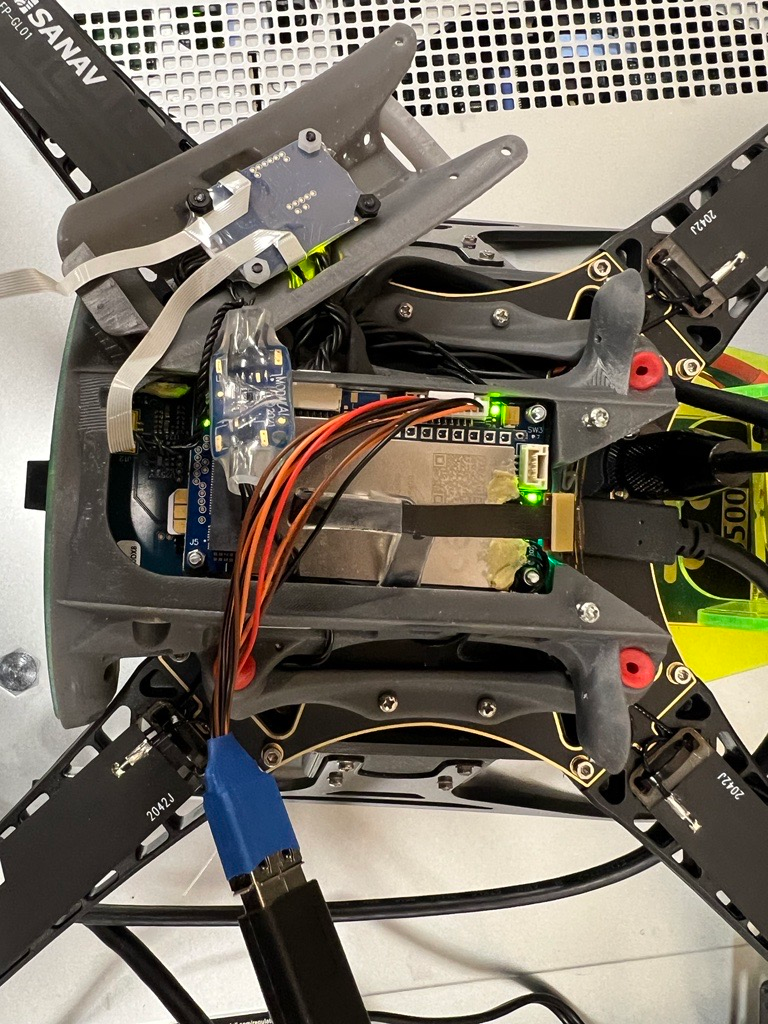
-
Sorry i meant the J11 header.
I am using the RB5 drone with the 5G modem optional daughter card. This drone with this cable
picture of my setup:
OK, @Chris-Hinkey
Thanks for confirming. We should probably send you a new cable. That one in your image is an early proto-type, and surprised we shipped that. New ones have twisted pair cables on the diff pairs as shown on the website.
I'll ask our folks to send you one so you can retry with a better cable. -
Ok, sound like a plan.
Do you think its reasonable to believe that the over/underflows are cause by a bad wire in this case? or is there likely something else going on?
-
Ok, sound like a plan.
Do you think its reasonable to believe that the over/underflows are cause by a bad wire in this case? or is there likely something else going on?
@Chris-Hinkey When we test throughout, we use iPerf. With USB2 only, we see it runs at about 340-380Mbps ( makes sense with overhead losses, etc).
If you do the same type of testing, you can quickly tell if despite enumerating at USB3, only the USB2 signals are working.
I'm not sure if your issue is HW or SW related, but for certain that cable is not correct. I tried to purge them from our inventory when I saw them but some made it out. With the new cable on the way, you should certainly get much better throughput. We can't guarantee greater than 3-5Gbps though since the new cable is still a prototype and has no shielding required to get full 10Gbps USB3 rates. I have that note on our cable tech docs page. Let me know when you get the replacement then we'll know better if there is some SW issue also occurring.
Thanks! -
I received the new cable thanks for getting that out so quickly. I ran through my set of tests and I am seeing similar performance as before.
is it possible the USB hub on the 5G card only supports a lower standard of USB?
I am willing to run an iPerf test in our lab, can you give me a bit more detail on how to perform the tests that you run?
are you using a usb 3.0 to 10G ethernet adapter or doing this directly over USB?
how do i my hardware setup to run that test?
-
I received the new cable thanks for getting that out so quickly. I ran through my set of tests and I am seeing similar performance as before.
is it possible the USB hub on the 5G card only supports a lower standard of USB?
I am willing to run an iPerf test in our lab, can you give me a bit more detail on how to perform the tests that you run?
are you using a usb 3.0 to 10G ethernet adapter or doing this directly over USB?
how do i my hardware setup to run that test?
Hi @Chris-Hinkey
Glad you got the new cable and were able to help rule that out.
The Hub on the M0090 is a USB3 hub, with USB3 backhaul. It is certainly capable of several Gbps.Is it possible your device is not setup to run faster as well? Maybe it is limited to USB2 speeds?
On another post I was just helping a user also understand that when you add in encryption, you are slowing your data rate for the same radio/link rate due to adding more overhead. Something else to think of where maybe your reported sample rate is correct, but you have a 3x overhead loss due to coding or encryption of the link? Food for thought... maybe disable all encryption/parity/ECC, etc on the link to see if you can get your data rate as close as possible to the baud/link rates, then individually enable those back in to see the impact of overhead losses?I'll have to pull in @tom for help on running iPerf. You might be able to use any OTS USB to ETH dongle that supports Linux and you should have a network that supports it somewhere to connect to and push that throughput.
-
This same benchmarking application works perfectly on an intel based laptop or desktop at full rates of 56MS/s full duplex. it is just streaming I/Q samples no extra overhead.
Its possible that the problem is CPU bound but i would expect higher utilization reported from
topwhile the benchmarking application is running if that was the case.I am hoping that running your iPerf test sheds some light on what is happening. looking forward to some guidance.
-
@Chris-Hinkey You could use that USB -> JST cable + an ethernet to USB-A adapter, we like this one: https://www.cablecreation.com/products/usb-3-0-gigabit-adapter-2-pack?_pos=8&_sid=9389ea323&_ss=r
and then connect ethernet from that adapter to your desktop / laptop.
With internet connected to your VOXL2 via. WiFi on ethernet you can run the following to install iperf:
sudo apt update
sudo apt -y install iperf3
Then once you verify that you can ping your VOXL2 from host machine (or vice-versa) you can run
iperf3 -son one machine andiperf3 -c <server IP address>on the other. -
Sorry it took me a while to get back to this effort. I was able to run the test i am seeing some interesting behavior.
between a 1Gbps nic on linux box and 1Gbps usb to eth module on drone:
drone(server) to lab04:
Connecting to host 192.168.1.10, port 5201
[  4] local 192.168.1.20 port 55110 connected to 192.168.1.10 port 5201
[ ID] Interval           Transfer     Bandwidth       Retr  Cwnd
[  4]   0.00-10.00  sec   398 MBytes   334 Mbits/sec  1127    144 KBytes
[  4]  10.00-20.00  sec   420 MBytes   352 Mbits/sec  646    124 KBytes
[  4]  20.00-30.00  sec   409 MBytes   343 Mbits/sec  1051   91.9 KBytes
[  4]  30.00-40.00  sec   402 MBytes   337 Mbits/sec  859    122 KBytes
[  4]  40.00-50.00  sec   411 MBytes   345 Mbits/sec  591    119 KBytes
[  4]  50.00-60.00  sec   414 MBytes   348 Mbits/sec  958    123 KBytes
- - - - - - - - - - - - - - - - - - - - - - - - -
[ ID] Interval           Transfer     Bandwidth       Retr
[  4]   0.00-60.00  sec  2.40 GBytes   343 Mbits/sec  5232             sender
[  4]   0.00-60.00  sec  2.40 GBytes   343 Mbits/sec                  receiver

iperf Done.
lab04(server) to drone:
Connecting to host 192.168.1.20, port 5201
[  4] local 192.168.1.10 port 52686 connected to 192.168.1.20 port 5201
[ ID] Interval           Transfer     Bandwidth       Retr  Cwnd
[  4]   0.00-10.00  sec   297 MBytes   249 Mbits/sec    0    208 KBytes
[  4]  10.00-20.00  sec   301 MBytes   252 Mbits/sec    0    208 KBytes
[  4]  20.00-30.00  sec   294 MBytes   247 Mbits/sec    0    208 KBytes
[  4]  30.00-40.00  sec   297 MBytes   249 Mbits/sec    0    208 KBytes
[  4]  40.00-50.00  sec   295 MBytes   248 Mbits/sec    0    208 KBytes
[  4]  50.00-60.00  sec   301 MBytes   252 Mbits/sec    0    208 KBytes
- - - - - - - - - - - - - - - - - - - - - - - - -
[ ID] Interval           Transfer     Bandwidth       Retr
[  4]   0.00-60.00  sec  1.74 GBytes   250 Mbits/sec    0             sender
[  4]   0.00-60.00  sec  1.74 GBytes   249 Mbits/sec                  receiver

iperf Done.
between a 1Gbps nic on linux box and 1Gbps usb to eth module on another linux box:
lab01(server) to lab04:Connecting to host 192.168.1.20, port 5201 [ 4] local 192.168.1.10 port 56964 connected to 192.168.1.20 port 5201 [ ID] Interval Transfer Bandwidth Retr Cwnd [ 4] 0.00-10.00 sec 1.07 GBytes 923 Mbits/sec 0 208 KBytes [ 4] 10.00-20.00 sec 1.07 GBytes 921 Mbits/sec 0 208 KBytes [ 4] 20.00-30.00 sec 1.07 GBytes 921 Mbits/sec 0 208 KBytes [ 4] 30.00-40.00 sec 1.07 GBytes 921 Mbits/sec 0 208 KBytes [ 4] 40.00-50.00 sec 1.07 GBytes 921 Mbits/sec 0 208 KBytes [ 4] 50.00-60.00 sec 1.07 GBytes 921 Mbits/sec 0 208 KBytes - - - - - - - - - - - - - - - - - - - - - - - - - [ ID] Interval Transfer Bandwidth Retr [ 4] 0.00-60.00 sec 6.44 GBytes 921 Mbits/sec 0 sender [ 4] 0.00-60.00 sec 6.43 GBytes 921 Mbits/sec receiver iperf Done.lab04(server) to lab01:
Connecting to host 192.168.1.10, port 5201
[  4] local 192.168.1.20 port 46692 connected to 192.168.1.10 port 5201
[ ID] Interval           Transfer     Bandwidth       Retr  Cwnd
[  4]   0.00-10.00  sec  1.10 GBytes   942 Mbits/sec    0    477 KBytes
[  4]  10.00-20.00  sec  1.10 GBytes   941 Mbits/sec    0    477 KBytes
[  4]  20.00-30.00  sec  1.10 GBytes   941 Mbits/sec    0    477 KBytes
[  4]  30.00-40.00  sec  1.10 GBytes   941 Mbits/sec    0    477 KBytes
[  4]  40.00-50.00  sec  1.10 GBytes   941 Mbits/sec   85    389 KBytes
[  4]  50.00-60.00  sec  1.10 GBytes   941 Mbits/sec    0    494 KBytes
- - - - - - - - - - - - - - - - - - - - - - - - -
[ ID] Interval           Transfer     Bandwidth       Retr
[  4]   0.00-60.00  sec  6.57 GBytes   941 Mbits/sec   85             sender
[  4]   0.00-60.00  sec  6.57 GBytes   941 Mbits/sec                  receiver

iperf Done.
does this point to a possible hardware defect, or is this the expected performance? Thanks for the help
-
-
any more advice here?
Hi @Chris-Hinkey,
Thanks for the reminder. We just ordered some more equipment to dig in further and for more testing.
Please bear with us and sorry for the delays.
Thanks -
Hi @Chris-Hinkey,
Thanks for the reminder. We just ordered some more equipment to dig in further and for more testing.
Please bear with us and sorry for the delays.
Thanks -
@chinkey I ran a few tests yesterday. I used the speedtest-cli application with a USB dongle. In the first test I connected a USB 2.0 Ethernet dongle to my laptop and got around 90 Mbps. I then connected that dongle to the RB5 USB port and also got about 90 Mbps. I then tried a USB 3.0 Ethernet dongle. On the laptop I saw about 520 Mbps but was only able to achieve about 250 Mbps on RB5. So I think that's pretty similar to what you were seeing. It's unclear at this time why there is such a difference.




Reading along? Create a free ModalAI Forum account to join in.
With an account you can reply, ask your own question, get an email when a ModalAI engineer answers, and mark the reply that solved it. Your place in each thread is saved between visits.
Questions about VOXL, Flight Core, ESCs and ModalAI drones are answered here by the engineers who build them.
Register Login