Skip to content
  • Categories
  • Recent
  • Tags
  • Popular
  • Users
  • Groups
Collapse
Brand Logo

ModalAI Forum

  1. ModalAI Support Forum
  2. VOXL Dev Drones
  3. Qualcomm Flight RB5 5G Drone
  4. Questions regarding RB5 5G drone

Questions regarding RB5 5G drone
Scheduled Pinned Locked Moved Qualcomm Flight RB5 5G Drone
27 Posts 4 Posters 6.7k Views 2 Watching
  • Oldest to Newest
  • Newest to Oldest
  • Most Votes
Reply
  • Reply as topic
Log in to reply
This topic has been deleted. Only users with topic management privileges can see it.
  • M MJ

    @Eric-Katzfey
    Yes...any ideas what to do now? Thanks!

    Eric KatzfeyE Online
    Eric KatzfeyE Online
    Eric Katzfey
    ModalAI Team
    wrote on last edited by
    #13

    @MJ We are discussing internally...

    1 Reply Last reply
    0
    • M MJ

      @Eric-Katzfey
      Yes...any ideas what to do now? Thanks!

      Eric KatzfeyE Online
      Eric KatzfeyE Online
      Eric Katzfey
      ModalAI Team
      wrote on last edited by Eric Katzfey
      #14

      @MJ What do you get when you enter ps aux | grep ssc or ps aux | grep sensor?

      M 1 Reply Last reply
      0
      • M MJ

        @Eric-Katzfey
        Yes...any ideas what to do now? Thanks!

        Eric KatzfeyE Online
        Eric KatzfeyE Online
        Eric Katzfey
        ModalAI Team
        wrote on last edited by
        #15

        @MJ Can your reflash the system image? https://docs.modalai.com/Qualcomm-Flight-RB5-system-image/. It will delete everything on your board so backup any important data before doing this. If ssc_sensor_info doesn't report all of the sensors then px4 will never work as it relies on that ability.

        M 2 Replies Last reply
        0
        • Eric KatzfeyE Eric Katzfey

          @MJ What do you get when you enter ps aux | grep ssc or ps aux | grep sensor?

          M Offline
          M Offline
          MJ
          Contributor
          wrote on last edited by
          #16

          @Eric-Katzfey

          sh-4.4# ps aux | grep ssc
          system    1273  1.0  0.0   2068  1260 ?        Ss   20:16   0:02 /usr/bin/sscrpcd sensorspd
          root      3764  0.0  0.0   2708   648 pts/0    S<+  20:20   0:00 grep ssc
          sh-4.4#
          
          sh-4.4# ps aux | grep sensor
          system    1273  0.9  0.0   2068  1260 ?        Ss   20:16   0:02 /usr/bin/sscrpcd sensorspd
          sensors   1281  0.0  0.0 186552  5896 ?        Ssl  20:16   0:00 /usr/bin/sensors.qti
          root      4196  0.0  0.0   2708   620 pts/0    S<+  20:21   0:00 grep sensor
          sh-4.4#
          
          1 Reply Last reply
          0
          • Eric KatzfeyE Eric Katzfey

            @MJ Can your reflash the system image? https://docs.modalai.com/Qualcomm-Flight-RB5-system-image/. It will delete everything on your board so backup any important data before doing this. If ssc_sensor_info doesn't report all of the sensors then px4 will never work as it relies on that ability.

            M Offline
            M Offline
            MJ
            Contributor
            wrote on last edited by
            #17

            @Eric-Katzfey
            Will try to re-flash within a day or two, so I'll get back to you with the updates.

            1 Reply Last reply
            0
            • Eric KatzfeyE Eric Katzfey

              @MJ Can your reflash the system image? https://docs.modalai.com/Qualcomm-Flight-RB5-system-image/. It will delete everything on your board so backup any important data before doing this. If ssc_sensor_info doesn't report all of the sensors then px4 will never work as it relies on that ability.

              M Offline
              M Offline
              MJ
              Contributor
              wrote on last edited by
              #18
              This post is deleted!
              1 Reply Last reply
              0
              • M Offline
                M Offline
                MJ
                Contributor
                wrote on last edited by MJ
                #19

                Re-flash solved all the previous issues.

                But still I'm unable to arm the unit.

                Following instruction provided here
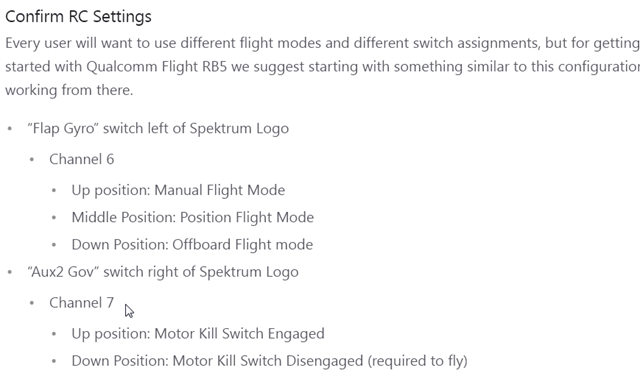
                https://docs.modalai.com/Qualcomm-Flight-RB5-user-guide-first-flight/
                doesn't help as I receive GPS and AHRS errors (while the unit is placed under open and clear sky).
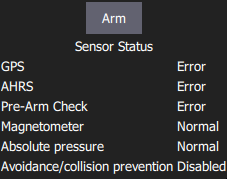
                68ed5d99-1a09-4798-8b49-bcba121393ed-image.png
                Regarding the GPS, I receive the "GPS accuracy too low" (while receiving 10-12 satellites).
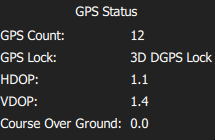
                18064c99-d797-45e3-86d3-720e7288c998-image.png

                ef1077df-6697-4dc1-87aa-c5753a7b021f-image.png

                What could be the cause of these errors?
                Also is the GPS necessary to at least test the motors?
                Is it possible to fly without the GPS?

                1 Reply Last reply
                0
                • ? Offline
                  ? Offline
                  A Former User
                  wrote on last edited by
                  #20

                  Hi @MJ ,

                  Check to see if you have your outdoor parameters correctly set: https://gitlab.com/voxl-public/flight-core-px4/px4-parameters/-/tree/master/helpers/rb5

                  Sometimes the ekf2 aid mask is still set to 280.

                  You can arm the drone without GPS by setting COM_ARM_WO_GPS to 1.

                  1 Reply Last reply
                  1
                  • ? Offline
                    ? Offline
                    A Former User
                    wrote on last edited by
                    #21

                    Also, are the GPS LEDs illuminating? There should be the main one which should go from blue to green when it's ready. And a small one flashing on the side that shows a GPS lock.

                    M 2 Replies Last reply
                    0
                    • ? A Former User

                      Also, are the GPS LEDs illuminating? There should be the main one which should go from blue to green when it's ready. And a small one flashing on the side that shows a GPS lock.

                      M Offline
                      M Offline
                      MJ
                      Contributor
                      wrote on last edited by MJ
                      #22

                      @RichieRich

                      I have made following changes (WO_GPS to 1 and EFK2_AID_MASK to 1 and to 0)
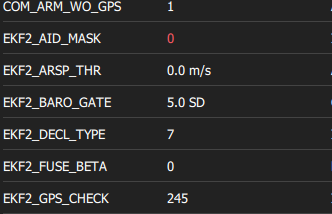
                      3c5c6c98-2bb7-4852-a561-61679657daba-image.png

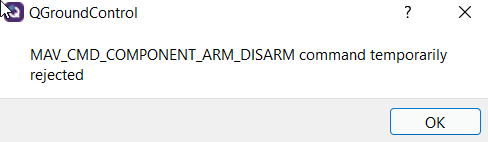
                      but now I receive following error:
                      6630e46e-496a-4edf-9c39-b8ffc2d2fdeb-image.png

                      The main GPS LED (blue) slowly blinks, but only in blue color.
                      The FIX LED has short blinks in blue color.

                      Could you please advise what to do?

                      1 Reply Last reply
                      0
                      • M Offline
                        M Offline
                        MJ
                        Contributor
                        wrote on last edited by MJ
                        #23

                        Also when I go to QGC - Vehicle setup - Safety, I get this error
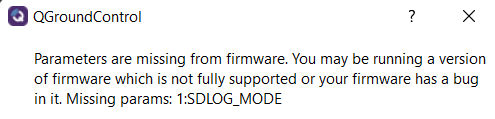
                        0b7a46dc-eaae-48cf-9587-cca3c59f5fac-image.png

                        1 Reply Last reply
                        0
                        • M Offline
                          M Offline
                          MJ
                          Contributor
                          wrote on last edited by
                          #24

                          When EFK2_AID_MASK is set to 1, following errors occur:

                          eb9e5812-78b0-4aab-9dd8-256195f54c9d-image.png

                          I emphasize that drone is under clear and sunny sky
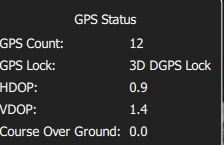
                          5d749c53-9845-40f2-a181-09578526d535-image.png

                          1 Reply Last reply
                          0
                          • ? A Former User

                            Also, are the GPS LEDs illuminating? There should be the main one which should go from blue to green when it's ready. And a small one flashing on the side that shows a GPS lock.

                            M Offline
                            M Offline
                            MJ
                            Contributor
                            wrote on last edited by
                            #25

                            @RichieRich
                            Are there any updates or suggestions regarding above mentioned issues? Thanks!

                            1 Reply Last reply
                            0
                            • ? Offline
                              ? Offline
                              A Former User
                              wrote on last edited by A Former User
                              #26

                              EKF2_AID_MASK should be set to 1 for GPS.

                              Have you set CP_DIST > 0? From the warning, it looks like you have the avoidance system on and it may be seeing something. d5e4c765-1797-4451-bee6-abf63c356689-image.png
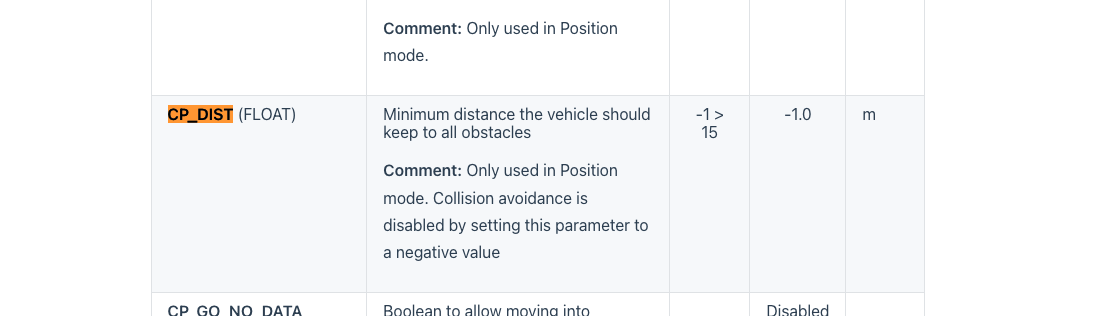
                              How are you mounting the GPS unit? Just an un-modified RB5 with mast? I assume you're outdoors with a clear view of the sky. In some cases, interference will throw that error. Setting COM_ARM_WO_GPS will always allow you to arm despite GPS errors. If you still can't arm, there's usualy another issue, maybe as stated above that the obstacle avoidance system is enabled. Another place to check is in QGC under safeties to ensure the avoidance system is disabled.

                              Againg for the GPS< Flashing blue, means it's still waiting for the GPS to be fully ready. Small blue LED on the side will flash blue showing a lock.

                              You can also try opening up the GPS check values or disabling some checks. For instance you can open up ekf2_req_sacc from 0.5 to about 0.75.
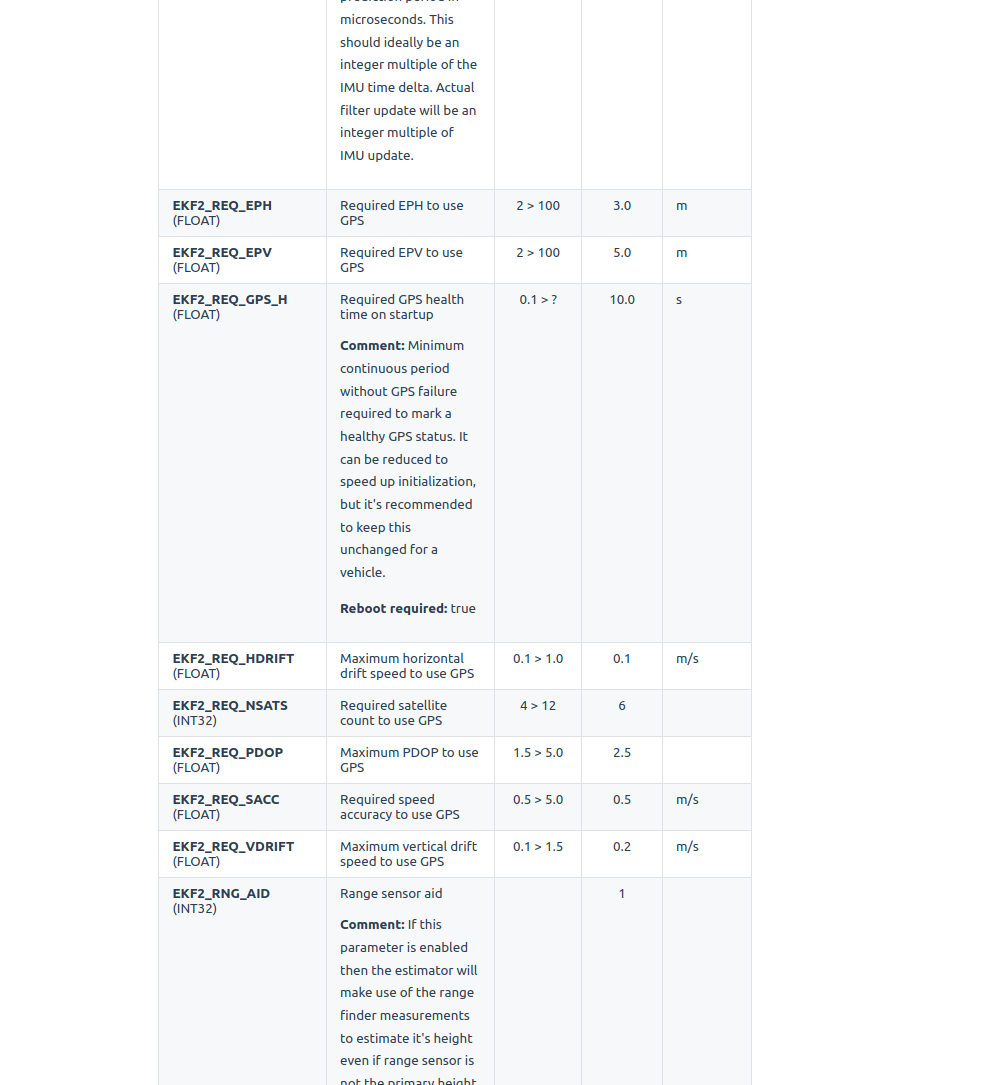
                              4f31c84e-bc33-4668-affc-21723162fc03-image.png

                              There's also the GPS check you can experiment with to see what exactly the error is to get to ready (most likely interference). You can try turning off bit 4 for instance. Your mask is currently set to the default 245 or 11110101.
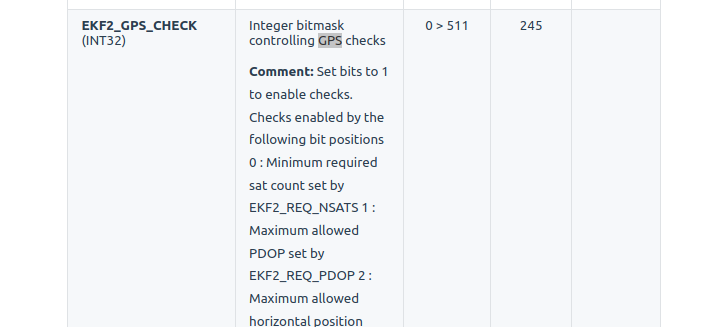
                              f7e4a823-9fb9-4d98-ba03-7aa0eb71d6ef-image.png

                              6e6e897e-5915-4891-9861-c0b5a7855682-image.png

                              M 1 Reply Last reply
                              1
                              • ? A Former User

                                EKF2_AID_MASK should be set to 1 for GPS.

                                Have you set CP_DIST > 0? From the warning, it looks like you have the avoidance system on and it may be seeing something. d5e4c765-1797-4451-bee6-abf63c356689-image.png

                                How are you mounting the GPS unit? Just an un-modified RB5 with mast? I assume you're outdoors with a clear view of the sky. In some cases, interference will throw that error. Setting COM_ARM_WO_GPS will always allow you to arm despite GPS errors. If you still can't arm, there's usualy another issue, maybe as stated above that the obstacle avoidance system is enabled. Another place to check is in QGC under safeties to ensure the avoidance system is disabled.

                                Againg for the GPS< Flashing blue, means it's still waiting for the GPS to be fully ready. Small blue LED on the side will flash blue showing a lock.

                                You can also try opening up the GPS check values or disabling some checks. For instance you can open up ekf2_req_sacc from 0.5 to about 0.75.
                                4f31c84e-bc33-4668-affc-21723162fc03-image.png

                                There's also the GPS check you can experiment with to see what exactly the error is to get to ready (most likely interference). You can try turning off bit 4 for instance. Your mask is currently set to the default 245 or 11110101.
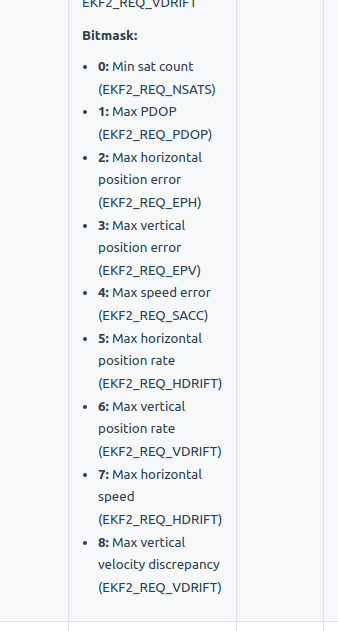
                                f7e4a823-9fb9-4d98-ba03-7aa0eb71d6ef-image.png

                                6e6e897e-5915-4891-9861-c0b5a7855682-image.png

                                M Offline
                                M Offline
                                MJ
                                Contributor
                                wrote on last edited by MJ
                                #27

                                @RichieRich
                                GPS unit is mounted by default (as it comes with RB5 5G drone), mast is locked in vertical postion.
                                Turning EKF2_REQ_SACC to 0,75 provided no errors from GPS.
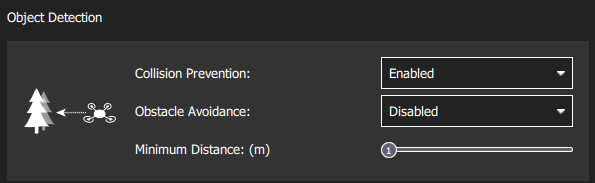
                                Obstacle avoidance was also disabled, so we managed to fly.

                                But I'm still a bit confused why the obstacle avoidance gives error, since the drone was placed on the ground (concrete pavement), no obstacles within few meters, while the minimum distance was set to only 1 m. But this is current setup that works:
                                0de5d598-3401-4512-9e7b-3ef8202ef635-image.png

                                Many thanks for your help. We'll try to figure this out and provide info in a few days.

                                1 Reply Last reply
                                0

                                Hello! It looks like you're interested in this conversation, but you don't have an account yet.

                                Getting fed up of having to scroll through the same posts each visit? When you register for an account, you'll always come back to exactly where you were before, and choose to be notified of new replies (either via email, or push notification). You'll also be able to save bookmarks and upvote posts to show your appreciation to other community members.

                                With your input, this post could be even better 💗

                                Register Login
                                Reply
                                • Reply as topic
                                Log in to reply
                                • Oldest to Newest
                                • Newest to Oldest
                                • Most Votes


                                ModalAI
                                Categories Recent Tags ModalAI.com Docs
                                © 2026 ModalAI® · Accelerating autonomy for smaller, smarter, safer drones · Powered by NodeBB
                                • Login

                                • Don't have an account? Register

                                • Login or register to search.
                                • First post
                                  Last post
                                0
                                • Categories
                                • Recent
                                • Tags
                                • Popular
                                • Users
                                • Groups