
Questions regarding RB5 5G drone
-
I would kindly ask you to provide some information:
- I have updated the SDK to the latest version (1.1.3), successfully (according to the online instructions, including re-enabling all the services).
After the update, I'm not able to connect to the QCG (it was operational prior to the update).
Looking to the config file / script /etc/modalai/full-m0052.config, seems this file was changed after the update, and now is using the find-qgc-address command. When I try to use this command from the command line, it provides no response (NULL).
When I executed following commands, the result is as follows:
root@qrb5165-rb5:~# systemctl enable rb5-px4-startroot@qrb5165-rb5:~# systemctl status rb5-px4-start
● rb5-px4-start.service - rb5-px4-start
Loaded: loaded (/etc/systemd/system/rb5-px4-start.service; enabled; vendor preset: enabled)
Active: inactive (dead)The same status (inactive) is also shown after the reboot.
Could you please advise how to configure the system to connect to QCG, as current instruction do not provide updated info?
-
How to configure output RTSP video stream from cam3? Currently we're receiving 640x480@30 fps, but would like to use full 4k.
-
I ordered Pro Dev Kit w/ 5G. It arrived with DX 6e RC. Seems the RC is paired with the receiver, since the receiver LED is lit still orange (when the transmitter is turned on). But we're unable to arm the drone according to the online guide (https://docs.modalai.com/Qualcomm-Flight-RB5-user-guide-pre-flight-setup/ and https://docs.modalai.com/Qualcomm-Flight-RB5-user-guide-first-flight/).
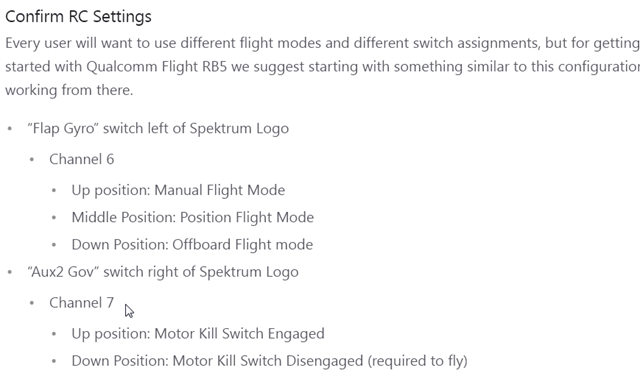
Could you please advise what is Aux2 Gov switch, since it is placed on ch7, and our transmitter has only 6 channels? Could you please provide short instructions how to configure the RC and the RX?
- I have updated the SDK to the latest version (1.1.3), successfully (according to the online instructions, including re-enabling all the services).
-
Hi @MJ ,
I hope all is well!
A good indicator to follow is that the ESC blue LEDs flash at the bottom of the drone when PX4 starts up. If there is an issue and rb5-px4-start service doesn't start, then we will see no blue LEDs flashing.
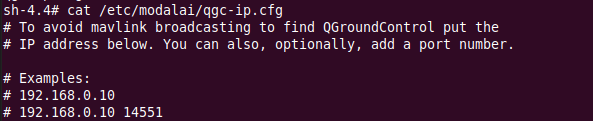
If you would like to set a specific QGC IP you can set it here and PX4 picks it up at start-up:
By the way, what is your console output when you run
px4-versions?Did you update your Wifi settings? PX4 needs a working network interface with IP address.
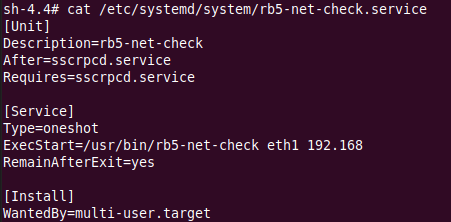
Did you update the netcheck service as well for Wifi, such as wlan0, in this case it shows eth1 on 192.168 subnet:
Regarding the video stream or rb5-streamer, I believe the resolution is fixed. I'm unsure the full 4K could stream, but may only be able to saved to file at such a high resolution. 1080p should work I believe. I could look into releasing source code for modification if helpful.
And regarding RC channels, you can get by with 6 channels. The 7th channel in the example is for the kill switch, which is helpful in some cases: https://docs.modalai.com/Qualcomm-Flight-RB5-user-guide-pre-flight-setup/
You can have all your main flight modes on channel 5 then have the kill switch or another function on channel 6 by using this QGC menu: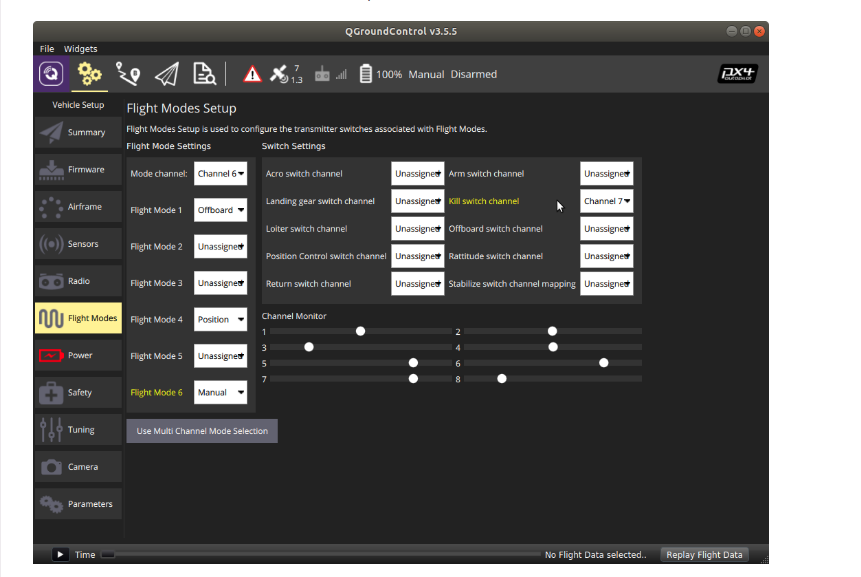
-
The RTSP streaming capabilities will heavily depend on network capacity. The QRB5165 is capable of encoding 8k30, but that is a lot of bandwidth.
To configure different streaming capabilities, disable the rb5-streamer service and use gstreamer on your own. The rb5-streamer app was based off of the code found here
-
Hi @MJ ,
I hope all is well!
A good indicator to follow is that the ESC blue LEDs flash at the bottom of the drone when PX4 starts up. If there is an issue and rb5-px4-start service doesn't start, then we will see no blue LEDs flashing.
If you would like to set a specific QGC IP you can set it here and PX4 picks it up at start-up:
By the way, what is your console output when you run
px4-versions?Did you update your Wifi settings? PX4 needs a working network interface with IP address.
Did you update the netcheck service as well for Wifi, such as wlan0, in this case it shows eth1 on 192.168 subnet:
Regarding the video stream or rb5-streamer, I believe the resolution is fixed. I'm unsure the full 4K could stream, but may only be able to saved to file at such a high resolution. 1080p should work I believe. I could look into releasing source code for modification if helpful.
And regarding RC channels, you can get by with 6 channels. The 7th channel in the example is for the kill switch, which is helpful in some cases: https://docs.modalai.com/Qualcomm-Flight-RB5-user-guide-pre-flight-setup/
You can have all your main flight modes on channel 5 then have the kill switch or another function on channel 6 by using this QGC menu:@RichieRich
Thank you for your excellent advice.I will try to explain my current configuration. For local testing and configuration I'm using ADB and local WLAN. For final application I would like to use 5G network.
Of course, I need VPN (and will use OpenVPN) to provide connection between the ground station and the drone. For OpenVPN server I'm using some Mikrotik appliance configured to provide fixed, predefined IP addresses to GC and the drone.
Ground Control always receives 192.168.88.20
Drone always receives 192.168.88.21
Both are mutually "visible" and can communicate. This is working without issues.In regard to your first question, here is the result of
sh-4.4# px4-versions
modalai-slpi/unknown,now 1.0-6 arm64 [installed]
px4-rb5-flight/unknown,now 1.4-6 arm64 [installed]
px4-support/unknown,now 1.0-4 arm64 [installed]
libfc-sensor/unknown,now 1.0-2 arm64 [installed]
1.0.5-M0052-9.1-perfHere is the result of ifconfig on the drone. wwan0 is the 5G connection, tun0 is the OpenVPN connection tunnel.
sh-4.4# ifconfig
bond0: flags=5123<UP,BROADCAST,MASTER,MULTICAST> mtu 1500
ether 7a:19:6d:34:23:5d txqueuelen 1000 (Ethernet)
RX packets 0 bytes 0 (0.0 B)
RX errors 0 dropped 0 overruns 0 frame 0
TX packets 0 bytes 0 (0.0 B)
TX errors 0 dropped 0 overruns 0 carrier 0 collisions 0dummy0: flags=195<UP,BROADCAST,RUNNING,NOARP> mtu 1500
inet6 fe80::98d0:c594:6a01:f80a prefixlen 64 scopeid 0x20<link>
ether d6:41:ed:11:b0:d3 txqueuelen 1000 (Ethernet)
RX packets 0 bytes 0 (0.0 B)
RX errors 0 dropped 0 overruns 0 frame 0
TX packets 13 bytes 3394 (3.3 KB)
TX errors 0 dropped 0 overruns 0 carrier 0 collisions 0lo: flags=73<UP,LOOPBACK,RUNNING> mtu 65536
inet 127.0.0.1 netmask 255.0.0.0
inet6 ::1 prefixlen 128 scopeid 0x10<host>
loop txqueuelen 1000 (Local Loopback)
RX packets 60750 bytes 10831838 (10.8 MB)
RX errors 0 dropped 0 overruns 0 frame 0
TX packets 60750 bytes 10831838 (10.8 MB)
TX errors 0 dropped 0 overruns 0 carrier 0 collisions 0tun0: flags=4305<UP,POINTOPOINT,RUNNING,NOARP,MULTICAST> mtu 1500
inet 192.168.88.21 netmask 255.255.255.0 destination 192.168.88.21
inet6 fe80::b41d:2608:5fb4:fcc5 prefixlen 64 scopeid 0x20<link>
unspec 00-00-00-00-00-00-00-00-00-00-00-00-00-00-00-00 txqueuelen 100 (UNSPEC)
RX packets 59 bytes 7414 (7.4 KB)
RX errors 0 dropped 0 overruns 0 frame 0
TX packets 96 bytes 18438 (18.4 KB)
TX errors 0 dropped 0 overruns 0 carrier 0 collisions 0wlan0: flags=4099<UP,BROADCAST,MULTICAST> mtu 1500
ether 00:03:7f:12:a2:e9 txqueuelen 3000 (Ethernet)
RX packets 0 bytes 0 (0.0 B)
RX errors 0 dropped 0 overruns 0 frame 0
TX packets 0 bytes 0 (0.0 B)
TX errors 0 dropped 0 overruns 0 carrier 0 collisions 0wwan0: flags=4305<UP,POINTOPOINT,RUNNING,NOARP,MULTICAST> mtu 1430
inet 10.194.65.175 netmask 255.255.255.224 destination 10.194.65.175
unspec 00-00-00-00-00-00-00-00-00-00-00-00-00-00-00-00 txqueuelen 1000 (UNSPEC)
RX packets 14127 bytes 18472229 (18.4 MB)
RX errors 0 dropped 0 overruns 0 frame 0
TX packets 1408 bytes 110804 (110.8 KB)
TX errors 7 dropped 0 overruns 0 carrier 0 collisions 0I have placed following configuration in /etc/systemd/system/rb5-net-check.service
[Unit]
Description=rb5-net-check
#After=sscrpcd.service ---> this is commented
After=openvpn.service ---> I wait for openvpn to start
Requires=sscrpcd.service[Service]
Type=oneshot
ExecStart=/usr/bin/rb5-net-check tun0 192.168
RemainAfterExit=yes[Install]
WantedBy=multi-user.targetAlso I have added the IP 192.168.88.20 to the /etc/modalai/qgc-ip.cfg.
The result of
sh-4.4# rb5-net-check tun0
192.168.88.21is as expected, ok.
But I have issue with PX4. I am not sure what to do here (also the blue LEDs do not blink, as it was before the update).
sh-4.4# systemctl status rb5-px4-start
● rb5-px4-start.service - rb5-px4-start
Loaded: loaded (/etc/systemd/system/rb5-px4-start.service; enabled; vendor pr
Active: failed (Result: exit-code) since Wed 2022-03-30 18:58:41 UTC; 4min 46
Process: 2671 ExecStart=/bin/bash -c PATH=/usr/bin m0052-px4 -d (code=exited,
Main PID: 2671 (code=exited, status=134)sh-4.4# systemctl enable rb5-px4-start
sh-4.4# systemctl status rb5-px4-start
● rb5-px4-start.service - rb5-px4-start
Loaded: loaded (/etc/systemd/system/rb5-px4-start.service; enabled; vendor pr
Active: failed (Result: exit-code) since Wed 2022-03-30 18:58:41 UTC; 5min ag
Main PID: 2671 (code=exited, status=134)Mar 30 18:58:33 qrb5165-rb5 systemd[1]: Started rb5-px4-start.
Mar 30 18:58:41 qrb5165-rb5 bash[2671]: terminate called after throwing an insta
Mar 30 18:58:41 qrb5165-rb5 bash[2671]: what(): FATAL: could not find sensors
Mar 30 18:58:41 qrb5165-rb5 bash[2671]: /usr/bin/m0052-px4: line 18: 2672 Abort
Mar 30 18:58:41 qrb5165-rb5 systemd[1]: rb5-px4-start.service: Main process exit
Mar 30 18:58:41 qrb5165-rb5 systemd[1]: rb5-px4-start.service: Failed with resulWhen I start the QGroundControl, I can receive the video from the drone without any issues (as it is independent from CC link).
Could you provide some idea how to debug and resolve the issues with PX4? Many thanks!
-
The RTSP streaming capabilities will heavily depend on network capacity. The QRB5165 is capable of encoding 8k30, but that is a lot of bandwidth.
To configure different streaming capabilities, disable the rb5-streamer service and use gstreamer on your own. The rb5-streamer app was based off of the code found here
@Chad-Sweet Thank you, will try this soon.
-
@RichieRich
Thank you for your excellent advice.I will try to explain my current configuration. For local testing and configuration I'm using ADB and local WLAN. For final application I would like to use 5G network.
Of course, I need VPN (and will use OpenVPN) to provide connection between the ground station and the drone. For OpenVPN server I'm using some Mikrotik appliance configured to provide fixed, predefined IP addresses to GC and the drone.
Ground Control always receives 192.168.88.20
Drone always receives 192.168.88.21
Both are mutually "visible" and can communicate. This is working without issues.In regard to your first question, here is the result of
sh-4.4# px4-versions
modalai-slpi/unknown,now 1.0-6 arm64 [installed]
px4-rb5-flight/unknown,now 1.4-6 arm64 [installed]
px4-support/unknown,now 1.0-4 arm64 [installed]
libfc-sensor/unknown,now 1.0-2 arm64 [installed]
1.0.5-M0052-9.1-perfHere is the result of ifconfig on the drone. wwan0 is the 5G connection, tun0 is the OpenVPN connection tunnel.
sh-4.4# ifconfig
bond0: flags=5123<UP,BROADCAST,MASTER,MULTICAST> mtu 1500
ether 7a:19:6d:34:23:5d txqueuelen 1000 (Ethernet)
RX packets 0 bytes 0 (0.0 B)
RX errors 0 dropped 0 overruns 0 frame 0
TX packets 0 bytes 0 (0.0 B)
TX errors 0 dropped 0 overruns 0 carrier 0 collisions 0dummy0: flags=195<UP,BROADCAST,RUNNING,NOARP> mtu 1500
inet6 fe80::98d0:c594:6a01:f80a prefixlen 64 scopeid 0x20<link>
ether d6:41:ed:11:b0:d3 txqueuelen 1000 (Ethernet)
RX packets 0 bytes 0 (0.0 B)
RX errors 0 dropped 0 overruns 0 frame 0
TX packets 13 bytes 3394 (3.3 KB)
TX errors 0 dropped 0 overruns 0 carrier 0 collisions 0lo: flags=73<UP,LOOPBACK,RUNNING> mtu 65536
inet 127.0.0.1 netmask 255.0.0.0
inet6 ::1 prefixlen 128 scopeid 0x10<host>
loop txqueuelen 1000 (Local Loopback)
RX packets 60750 bytes 10831838 (10.8 MB)
RX errors 0 dropped 0 overruns 0 frame 0
TX packets 60750 bytes 10831838 (10.8 MB)
TX errors 0 dropped 0 overruns 0 carrier 0 collisions 0tun0: flags=4305<UP,POINTOPOINT,RUNNING,NOARP,MULTICAST> mtu 1500
inet 192.168.88.21 netmask 255.255.255.0 destination 192.168.88.21
inet6 fe80::b41d:2608:5fb4:fcc5 prefixlen 64 scopeid 0x20<link>
unspec 00-00-00-00-00-00-00-00-00-00-00-00-00-00-00-00 txqueuelen 100 (UNSPEC)
RX packets 59 bytes 7414 (7.4 KB)
RX errors 0 dropped 0 overruns 0 frame 0
TX packets 96 bytes 18438 (18.4 KB)
TX errors 0 dropped 0 overruns 0 carrier 0 collisions 0wlan0: flags=4099<UP,BROADCAST,MULTICAST> mtu 1500
ether 00:03:7f:12:a2:e9 txqueuelen 3000 (Ethernet)
RX packets 0 bytes 0 (0.0 B)
RX errors 0 dropped 0 overruns 0 frame 0
TX packets 0 bytes 0 (0.0 B)
TX errors 0 dropped 0 overruns 0 carrier 0 collisions 0wwan0: flags=4305<UP,POINTOPOINT,RUNNING,NOARP,MULTICAST> mtu 1430
inet 10.194.65.175 netmask 255.255.255.224 destination 10.194.65.175
unspec 00-00-00-00-00-00-00-00-00-00-00-00-00-00-00-00 txqueuelen 1000 (UNSPEC)
RX packets 14127 bytes 18472229 (18.4 MB)
RX errors 0 dropped 0 overruns 0 frame 0
TX packets 1408 bytes 110804 (110.8 KB)
TX errors 7 dropped 0 overruns 0 carrier 0 collisions 0I have placed following configuration in /etc/systemd/system/rb5-net-check.service
[Unit]
Description=rb5-net-check
#After=sscrpcd.service ---> this is commented
After=openvpn.service ---> I wait for openvpn to start
Requires=sscrpcd.service[Service]
Type=oneshot
ExecStart=/usr/bin/rb5-net-check tun0 192.168
RemainAfterExit=yes[Install]
WantedBy=multi-user.targetAlso I have added the IP 192.168.88.20 to the /etc/modalai/qgc-ip.cfg.
The result of
sh-4.4# rb5-net-check tun0
192.168.88.21is as expected, ok.
But I have issue with PX4. I am not sure what to do here (also the blue LEDs do not blink, as it was before the update).
sh-4.4# systemctl status rb5-px4-start
● rb5-px4-start.service - rb5-px4-start
Loaded: loaded (/etc/systemd/system/rb5-px4-start.service; enabled; vendor pr
Active: failed (Result: exit-code) since Wed 2022-03-30 18:58:41 UTC; 4min 46
Process: 2671 ExecStart=/bin/bash -c PATH=/usr/bin m0052-px4 -d (code=exited,
Main PID: 2671 (code=exited, status=134)sh-4.4# systemctl enable rb5-px4-start
sh-4.4# systemctl status rb5-px4-start
● rb5-px4-start.service - rb5-px4-start
Loaded: loaded (/etc/systemd/system/rb5-px4-start.service; enabled; vendor pr
Active: failed (Result: exit-code) since Wed 2022-03-30 18:58:41 UTC; 5min ag
Main PID: 2671 (code=exited, status=134)Mar 30 18:58:33 qrb5165-rb5 systemd[1]: Started rb5-px4-start.
Mar 30 18:58:41 qrb5165-rb5 bash[2671]: terminate called after throwing an insta
Mar 30 18:58:41 qrb5165-rb5 bash[2671]: what(): FATAL: could not find sensors
Mar 30 18:58:41 qrb5165-rb5 bash[2671]: /usr/bin/m0052-px4: line 18: 2672 Abort
Mar 30 18:58:41 qrb5165-rb5 systemd[1]: rb5-px4-start.service: Main process exit
Mar 30 18:58:41 qrb5165-rb5 systemd[1]: rb5-px4-start.service: Failed with resulWhen I start the QGroundControl, I can receive the video from the drone without any issues (as it is independent from CC link).
Could you provide some idea how to debug and resolve the issues with PX4? Many thanks!
Since some text was missing, I have attached the complete dump here:
root@qrb5165-rb5:~# systemctl status rb5-px4-start
● rb5-px4-start.service - rb5-px4-start
Loaded: loaded (/etc/systemd/system/rb5-px4-start.service; enabled; vendor preset: enabled)
Active: failed (Result: exit-code) since Wed 2022-03-30 21:14:17 UTC; 11min ago
Main PID: 2320 (code=exited, status=134)Mar 30 21:14:08 qrb5165-rb5 systemd[1]: Started rb5-px4-start.
Mar 30 21:14:17 qrb5165-rb5 bash[2320]: terminate called after throwing an instance of 'std::runtime_error'
Mar 30 21:14:17 qrb5165-rb5 bash[2320]: what(): FATAL: could not find sensors QMI service
Mar 30 21:14:17 qrb5165-rb5 bash[2320]: /usr/bin/m0052-px4: line 18: 2321 Aborted px4 $DAEMON -s /etc/modalai/full-m0052.config
Mar 30 21:14:17 qrb5165-rb5 systemd[1]: rb5-px4-start.service: Main process exited, code=exited, status=134/n/a
Mar 30 21:14:17 qrb5165-rb5 systemd[1]: rb5-px4-start.service: Failed with result 'exit-code'.Here is the full-m0052.config (unedited, from January 2022)
https://pastebin.com/j5WNgF5Q -
Since some text was missing, I have attached the complete dump here:
root@qrb5165-rb5:~# systemctl status rb5-px4-start
● rb5-px4-start.service - rb5-px4-start
Loaded: loaded (/etc/systemd/system/rb5-px4-start.service; enabled; vendor preset: enabled)
Active: failed (Result: exit-code) since Wed 2022-03-30 21:14:17 UTC; 11min ago
Main PID: 2320 (code=exited, status=134)Mar 30 21:14:08 qrb5165-rb5 systemd[1]: Started rb5-px4-start.
Mar 30 21:14:17 qrb5165-rb5 bash[2320]: terminate called after throwing an instance of 'std::runtime_error'
Mar 30 21:14:17 qrb5165-rb5 bash[2320]: what(): FATAL: could not find sensors QMI service
Mar 30 21:14:17 qrb5165-rb5 bash[2320]: /usr/bin/m0052-px4: line 18: 2321 Aborted px4 $DAEMON -s /etc/modalai/full-m0052.config
Mar 30 21:14:17 qrb5165-rb5 systemd[1]: rb5-px4-start.service: Main process exited, code=exited, status=134/n/a
Mar 30 21:14:17 qrb5165-rb5 systemd[1]: rb5-px4-start.service: Failed with result 'exit-code'.Here is the full-m0052.config (unedited, from January 2022)
https://pastebin.com/j5WNgF5Q@MJ Can you disable the startup service?
systemctl disable rb5-px4-startand then reboot. Then, adb into the RB5 and launch px4 from the command linem0052-px4and paste the output of that here. That should tell us more information about what is going wrong. -
@MJ Can you disable the startup service?
systemctl disable rb5-px4-startand then reboot. Then, adb into the RB5 and launch px4 from the command linem0052-px4and paste the output of that here. That should tell us more information about what is going wrong.Please find the output here:
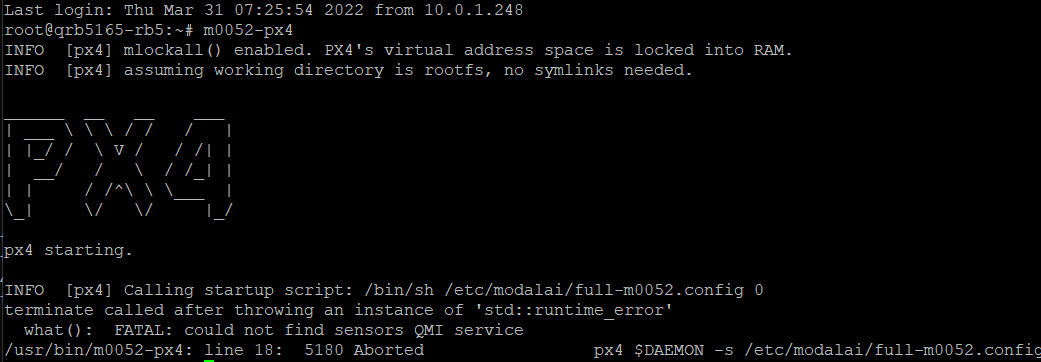
root@qrb5165-rb5:~# m0052-px4
INFO  [px4] mlockall() enabled. PX4's virtual address space is locked into RAM.
INFO  [px4] assuming working directory is rootfs, no symlinks needed.

______  __   __    ___
| ___ \ \ \ / /   /   |
| |_/ /  \ V /   / /| |
|  __/   /   \  / /_| |
| |     / /^\ \ \___  |
\_|     \/   \/     |_/

px4 starting.

INFO  [px4] Calling startup script: /bin/sh /etc/modalai/full-m0052.config 0
terminate called after throwing an instance of 'std::runtime_error'
  what():  FATAL: could not find sensors QMI service
/usr/bin/m0052-px4: line 18:  5180 Aborted                 px4 $DAEMON -s /etc/modalai/full-m0052.config
I tried this several times, every time exact the same message.
-
Please find the output here:
root@qrb5165-rb5:~# m0052-px4
INFO  [px4] mlockall() enabled. PX4's virtual address space is locked into RAM.
INFO  [px4] assuming working directory is rootfs, no symlinks needed.

______  __   __    ___
| ___ \ \ \ / /   /   |
| |_/ /  \ V /   / /| |
|  __/   /   \  / /_| |
| |     / /^\ \ \___  |
\_|     \/   \/     |_/

px4 starting.

INFO  [px4] Calling startup script: /bin/sh /etc/modalai/full-m0052.config 0
terminate called after throwing an instance of 'std::runtime_error'
  what():  FATAL: could not find sensors QMI service
/usr/bin/m0052-px4: line 18:  5180 Aborted                 px4 $DAEMON -s /etc/modalai/full-m0052.config
I tried this several times, every time exact the same message.
@MJ There should be a program called
ssc_sensor_info. Can you run that and paste the output of that here? Also the output ofls -l /usr/lib/libs*? -
@MJ There should be a program called
ssc_sensor_info. Can you run that and paste the output of that here? Also the output ofls -l /usr/lib/libs*?sh-4.4# ls -l /usr/lib/libs* -rw-r--r-- 1 root root 4010 Oct 27 2015 /usr/lib/libsafe_iop.a lrwxrwxrwx 1 root root 18 Oct 27 2015 /usr/lib/libsafe_iop.so -> libsafe_iop.so.0.3 lrwxrwxrwx 1 root root 18 Oct 27 2015 /usr/lib/libsafe_iop.so.0 -> libsafe_iop.so.0.3 -rw-r--r-- 1 root root 9976 Oct 27 2015 /usr/lib/libsafe_iop.so.0.3 -rwxr-xr-x 1 root root 231664 Dec 6 21:46 /usr/lib/libsdsprpc.so lrwxrwxrwx 1 root root 22 Dec 6 21:59 /usr/lib/libsensorslog.so -> libsensorslog.so.1.0.0 lrwxrwxrwx 1 root root 22 Dec 6 21:59 /usr/lib/libsensorslog.so.1 -> libsensorslog.so.1.0.0 -rwxr-xr-x 1 root root 5648 Dec 6 21:47 /usr/lib/libsensorslog.so.1.0.0 -rwxr-xr-x 1 root root 42840 Dec 6 21:49 /usr/lib/libsimple_selectors.so lrwxrwxrwx 1 root root 19 Dec 6 21:59 /usr/lib/libsns_api.so -> libsns_api.so.0.0.0 lrwxrwxrwx 1 root root 19 Dec 6 21:59 /usr/lib/libsns_api.so.0 -> libsns_api.so.0.0.0 -rwxr-xr-x 1 root root 22104 Dec 6 21:47 /usr/lib/libsns_api.so.0.0.0 lrwxrwxrwx 1 root root 35 Dec 6 21:59 /usr/lib/libsns_direct_channel_stub.so -> libsns_direct_channel_stub.so.1.0.0 lrwxrwxrwx 1 root root 35 Dec 6 21:59 /usr/lib/libsns_direct_channel_stub.so.1 -> libsns_direct_channel_stub.so.1.0.0 -rwxr-xr-x 1 root root 9880 Dec 6 21:47 /usr/lib/libsns_direct_channel_stub.so.1.0.0 lrwxrwxrwx 1 root root 28 Dec 6 21:59 /usr/lib/libsns_fastRPC_util.so -> libsns_fastRPC_util.so.1.0.0 lrwxrwxrwx 1 root root 28 Dec 6 21:59 /usr/lib/libsns_fastRPC_util.so.1 -> libsns_fastRPC_util.so.1.0.0 -rwxr-xr-x 1 root root 9880 Dec 6 21:47 /usr/lib/libsns_fastRPC_util.so.1.0.0 lrwxrwxrwx 1 root root 29 Dec 6 21:59 /usr/lib/libsns_registry_skel.so -> libsns_registry_skel.so.1.0.0 lrwxrwxrwx 1 root root 29 Dec 6 21:59 /usr/lib/libsns_registry_skel.so.1 -> libsns_registry_skel.so.1.0.0 -rwxr-xr-x 1 root root 9952 Dec 6 21:47 /usr/lib/libsns_registry_skel.so.1.0.0 lrwxrwxrwx 1 root root 18 Dec 6 21:59 /usr/lib/libsnsapi.so -> libsnsapi.so.1.0.0 lrwxrwxrwx 1 root root 18 Dec 6 21:59 /usr/lib/libsnsapi.so.1 -> libsnsapi.so.1.0.0 -rw-r--r-- 1 root root 12163280 Sep 28 2021 /usr/lib/libsnsapi.so.1.0.0 lrwxrwxrwx 1 root root 22 Dec 6 21:59 /usr/lib/libsnsdiaglog.so -> libsnsdiaglog.so.1.0.0 lrwxrwxrwx 1 root root 22 Dec 6 21:59 /usr/lib/libsnsdiaglog.so.1 -> libsnsdiaglog.so.1.0.0 -rwxr-xr-x 1 root root 22256 Dec 6 21:47 /usr/lib/libsnsdiaglog.so.1.0.0 lrwxrwxrwx 1 root root 18 Dec 6 21:59 /usr/lib/libsparse.so.0 -> libsparse.so.0.0.0 -rwxr-xr-x 1 root root 30584 Dec 6 21:46 /usr/lib/libsparse.so.0.0.0 lrwxrwxrwx 1 root root 15 Dec 6 21:59 /usr/lib/libssc.so -> libssc.so.1.0.0 lrwxrwxrwx 1 root root 15 Dec 6 21:59 /usr/lib/libssc.so.1 -> libssc.so.1.0.0 -rwxr-xr-x 1 root root 91992 Dec 6 21:47 /usr/lib/libssc.so.1.0.0 -rwxr-xr-x 1 root root 9992 Dec 6 21:46 /usr/lib/libssc_default_listener.so lrwxrwxrwx 1 root root 15 Dec 6 22:00 /usr/lib/libssd.so -> libssd.so.1.0.0 lrwxrwxrwx 1 root root 15 Dec 6 22:00 /usr/lib/libssd.so.1 -> libssd.so.1.0.0 -rwxr-xr-x 1 root root 9896 Dec 6 21:47 /usr/lib/libssd.so.1.0.0 -rwxr-xr-x 1 root root 46864 Dec 6 21:49 /usr/lib/libstats_calculator_portable.so lrwxrwxrwx 1 root root 19 Feb 28 2018 /usr/lib/libstonith.so.1 -> libstonith.so.1.0.0 -rw-r--r-- 1 root root 26480 Feb 28 2018 /usr/lib/libstonith.so.1.0.0 -rwxr-xr-x 1 root root 51240 Dec 6 21:47 /usr/lib/libstreamparser.so lrwxrwxrwx 1 root root 16 Dec 6 21:59 /usr/lib/libsync.so.0 -> libsync.so.0.0.0 -rwxr-xr-x 1 root root 9904 Dec 6 21:46 /usr/lib/libsync.so.0.0.0 -rwxr-xr-x 1 root root 26456 Dec 6 21:46 /usr/lib/libsynx.so lrwxrwxrwx 1 root root 20 Dec 6 21:59 /usr/lib/libsysutils.so.0 -> libsysutils.so.0.0.0 -rwxr-xr-x 1 root root 34728 Dec 6 21:46 /usr/lib/libsysutils.so.0.0.0sh-4.4# ssc_sensor_info ssc_sensor_info v1.7 sh-4.4# -
sh-4.4# ls -l /usr/lib/libs*
-rw-r--r-- 1 root root     4010 Oct 27  2015 /usr/lib/libsafe_iop.a
lrwxrwxrwx 1 root root       18 Oct 27  2015 /usr/lib/libsafe_iop.so -> libsafe_iop.so.0.3
lrwxrwxrwx 1 root root       18 Oct 27  2015 /usr/lib/libsafe_iop.so.0 -> libsafe_iop.so.0.3
-rw-r--r-- 1 root root     9976 Oct 27  2015 /usr/lib/libsafe_iop.so.0.3
-rwxr-xr-x 1 root root   231664 Dec  6 21:46 /usr/lib/libsdsprpc.so
lrwxrwxrwx 1 root root       22 Dec  6 21:59 /usr/lib/libsensorslog.so -> libsensorslog.so.1.0.0
lrwxrwxrwx 1 root root       22 Dec  6 21:59 /usr/lib/libsensorslog.so.1 -> libsensorslog.so.1.0.0
-rwxr-xr-x 1 root root     5648 Dec  6 21:47 /usr/lib/libsensorslog.so.1.0.0
-rwxr-xr-x 1 root root    42840 Dec  6 21:49 /usr/lib/libsimple_selectors.so
lrwxrwxrwx 1 root root       19 Dec  6 21:59 /usr/lib/libsns_api.so -> libsns_api.so.0.0.0
lrwxrwxrwx 1 root root       19 Dec  6 21:59 /usr/lib/libsns_api.so.0 -> libsns_api.so.0.0.0
-rwxr-xr-x 1 root root    22104 Dec  6 21:47 /usr/lib/libsns_api.so.0.0.0
lrwxrwxrwx 1 root root       35 Dec  6 21:59 /usr/lib/libsns_direct_channel_stub.so -> libsns_direct_channel_stub.so.1.0.0
lrwxrwxrwx 1 root root       35 Dec  6 21:59 /usr/lib/libsns_direct_channel_stub.so.1 -> libsns_direct_channel_stub.so.1.0.0
-rwxr-xr-x 1 root root     9880 Dec  6 21:47 /usr/lib/libsns_direct_channel_stub.so.1.0.0
lrwxrwxrwx 1 root root       28 Dec  6 21:59 /usr/lib/libsns_fastRPC_util.so -> libsns_fastRPC_util.so.1.0.0
lrwxrwxrwx 1 root root       28 Dec  6 21:59 /usr/lib/libsns_fastRPC_util.so.1 -> libsns_fastRPC_util.so.1.0.0
-rwxr-xr-x 1 root root     9880 Dec  6 21:47 /usr/lib/libsns_fastRPC_util.so.1.0.0
lrwxrwxrwx 1 root root       29 Dec  6 21:59 /usr/lib/libsns_registry_skel.so -> libsns_registry_skel.so.1.0.0
lrwxrwxrwx 1 root root       29 Dec  6 21:59 /usr/lib/libsns_registry_skel.so.1 -> libsns_registry_skel.so.1.0.0
-rwxr-xr-x 1 root root     9952 Dec  6 21:47 /usr/lib/libsns_registry_skel.so.1.0.0
lrwxrwxrwx 1 root root       18 Dec  6 21:59 /usr/lib/libsnsapi.so -> libsnsapi.so.1.0.0
lrwxrwxrwx 1 root root       18 Dec  6 21:59 /usr/lib/libsnsapi.so.1 -> libsnsapi.so.1.0.0
-rw-r--r-- 1 root root 12163280 Sep 28  2021 /usr/lib/libsnsapi.so.1.0.0
lrwxrwxrwx 1 root root       22 Dec  6 21:59 /usr/lib/libsnsdiaglog.so -> libsnsdiaglog.so.1.0.0
lrwxrwxrwx 1 root root       22 Dec  6 21:59 /usr/lib/libsnsdiaglog.so.1 -> libsnsdiaglog.so.1.0.0
-rwxr-xr-x 1 root root    22256 Dec  6 21:47 /usr/lib/libsnsdiaglog.so.1.0.0
lrwxrwxrwx 1 root root       18 Dec  6 21:59 /usr/lib/libsparse.so.0 -> libsparse.so.0.0.0
-rwxr-xr-x 1 root root    30584 Dec  6 21:46 /usr/lib/libsparse.so.0.0.0
lrwxrwxrwx 1 root root       15 Dec  6 21:59 /usr/lib/libssc.so -> libssc.so.1.0.0
lrwxrwxrwx 1 root root       15 Dec  6 21:59 /usr/lib/libssc.so.1 -> libssc.so.1.0.0
-rwxr-xr-x 1 root root    91992 Dec  6 21:47 /usr/lib/libssc.so.1.0.0
-rwxr-xr-x 1 root root     9992 Dec  6 21:46 /usr/lib/libssc_default_listener.so
lrwxrwxrwx 1 root root       15 Dec  6 22:00 /usr/lib/libssd.so -> libssd.so.1.0.0
lrwxrwxrwx 1 root root       15 Dec  6 22:00 /usr/lib/libssd.so.1 -> libssd.so.1.0.0
-rwxr-xr-x 1 root root     9896 Dec  6 21:47 /usr/lib/libssd.so.1.0.0
-rwxr-xr-x 1 root root    46864 Dec  6 21:49 /usr/lib/libstats_calculator_portable.so
lrwxrwxrwx 1 root root       19 Feb 28  2018 /usr/lib/libstonith.so.1 -> libstonith.so.1.0.0
-rw-r--r-- 1 root root    26480 Feb 28  2018 /usr/lib/libstonith.so.1.0.0
-rwxr-xr-x 1 root root    51240 Dec  6 21:47 /usr/lib/libstreamparser.so
lrwxrwxrwx 1 root root       16 Dec  6 21:59 /usr/lib/libsync.so.0 -> libsync.so.0.0.0
-rwxr-xr-x 1 root root     9904 Dec  6 21:46 /usr/lib/libsync.so.0.0.0
-rwxr-xr-x 1 root root    26456 Dec  6 21:46 /usr/lib/libsynx.so
lrwxrwxrwx 1 root root       20 Dec  6 21:59 /usr/lib/libsysutils.so.0 -> libsysutils.so.0.0.0
-rwxr-xr-x 1 root root    34728 Dec  6 21:46 /usr/lib/libsysutils.so.0.0.0
sh-4.4# ssc_sensor_info ssc_sensor_info v1.7 sh-4.4#@MJ Your library listing looks reasonable. But ssc_sensor_info should dump a bunch of information about all of the sensors it sees so there is definitely something wrong there.
-
@MJ Your library listing looks reasonable. But ssc_sensor_info should dump a bunch of information about all of the sensors it sees so there is definitely something wrong there.
@Eric-Katzfey
Yes...any ideas what to do now? Thanks! -
@Eric-Katzfey
Yes...any ideas what to do now? Thanks!@MJ We are discussing internally...
-
@Eric-Katzfey
Yes...any ideas what to do now? Thanks!@MJ What do you get when you enter
ps aux | grep sscorps aux | grep sensor? -
@Eric-Katzfey
Yes...any ideas what to do now? Thanks!@MJ Can your reflash the system image? https://docs.modalai.com/Qualcomm-Flight-RB5-system-image/. It will delete everything on your board so backup any important data before doing this. If
ssc_sensor_infodoesn't report all of the sensors then px4 will never work as it relies on that ability. -
@MJ What do you get when you enter
ps aux | grep sscorps aux | grep sensor?sh-4.4# ps aux | grep ssc system 1273 1.0 0.0 2068 1260 ? Ss 20:16 0:02 /usr/bin/sscrpcd sensorspd root 3764 0.0 0.0 2708 648 pts/0 S<+ 20:20 0:00 grep ssc sh-4.4# sh-4.4# ps aux | grep sensor system 1273 0.9 0.0 2068 1260 ? Ss 20:16 0:02 /usr/bin/sscrpcd sensorspd sensors 1281 0.0 0.0 186552 5896 ? Ssl 20:16 0:00 /usr/bin/sensors.qti root 4196 0.0 0.0 2708 620 pts/0 S<+ 20:21 0:00 grep sensor sh-4.4# -
@MJ Can your reflash the system image? https://docs.modalai.com/Qualcomm-Flight-RB5-system-image/. It will delete everything on your board so backup any important data before doing this. If
ssc_sensor_infodoesn't report all of the sensors then px4 will never work as it relies on that ability.@Eric-Katzfey
Will try to re-flash within a day or two, so I'll get back to you with the updates. -
@MJ Can your reflash the system image? https://docs.modalai.com/Qualcomm-Flight-RB5-system-image/. It will delete everything on your board so backup any important data before doing this. If
ssc_sensor_infodoesn't report all of the sensors then px4 will never work as it relies on that ability.This post is deleted! -
Re-flash solved all the previous issues.
But still I'm unable to arm the unit.
Following instruction provided here
https://docs.modalai.com/Qualcomm-Flight-RB5-user-guide-first-flight/
doesn't help as I receive GPS and AHRS errors (while the unit is placed under open and clear sky).
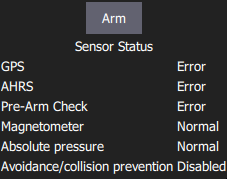
Regarding the GPS, I receive the "GPS accuracy too low" (while receiving 10-12 satellites).
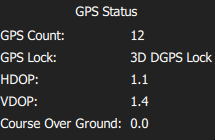
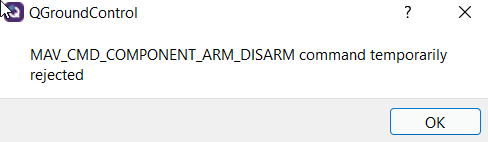
What could be the cause of these errors?
Also is the GPS necessary to at least test the motors?
Is it possible to fly without the GPS? -
Hi @MJ ,
Check to see if you have your outdoor parameters correctly set: https://gitlab.com/voxl-public/flight-core-px4/px4-parameters/-/tree/master/helpers/rb5
Sometimes the ekf2 aid mask is still set to 280.
You can arm the drone without GPS by setting COM_ARM_WO_GPS to 1.


Reading along? Create a free ModalAI Forum account to join in.
With an account you can reply, ask your own question, get an email when a ModalAI engineer answers, and mark the reply that solved it. Your place in each thread is saved between visits.
Questions about VOXL, Flight Core, ESCs and ModalAI drones are answered here by the engineers who build them.
Register Login