
Stinger VRX not turning on
-
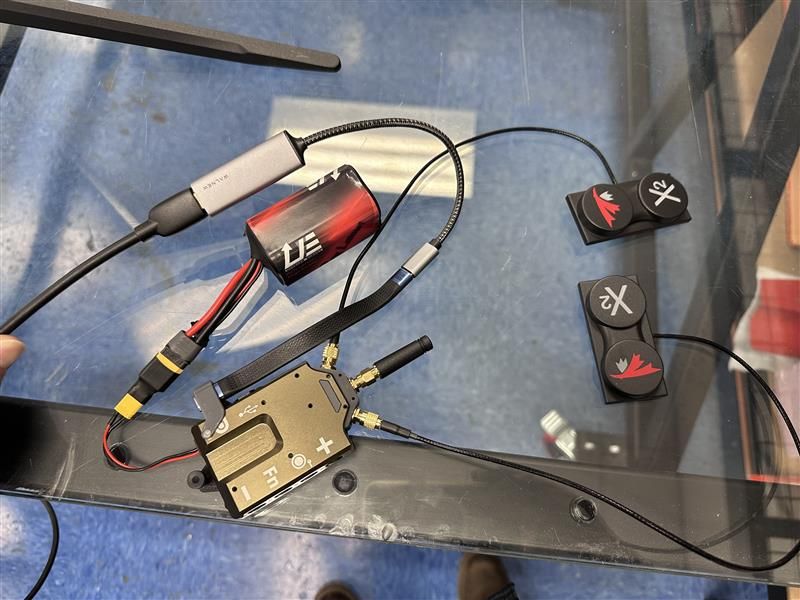
We received our Stinger with VRX in the mail last week. Yesterday, we reviewed all the available YouTube videos and documentation, then set up the unit as instructed. We connected the three antennas and USB-C to HDMI converter, then HDMI into a monitor, but nothing happened. We ensured the 4S batteries were fully charged, double-checked all connections, and tried three different USB-C to HDMI dongles. We tried multiple monitors. In each case, nothing appeared on the screen and no lights showed up on the VRX. Please help.
The VRX SN is: M25000000JUH
-
We received our Stinger with VRX in the mail last week. Yesterday, we reviewed all the available YouTube videos and documentation, then set up the unit as instructed. We connected the three antennas and USB-C to HDMI converter, then HDMI into a monitor, but nothing happened. We ensured the 4S batteries were fully charged, double-checked all connections, and tried three different USB-C to HDMI dongles. We tried multiple monitors. In each case, nothing appeared on the screen and no lights showed up on the VRX. Please help.
The VRX SN is: M25000000JUH
-
@Grier Do you have another USB-C to HDMI converter that you could try?
-
Could you share some information on the adapters that you have tried? This is the adapter we usually use: https://www.cablematters.com/pc-1368-125-48gbps-usb-c-to-hdmi-21-adapter-supports-8k-60hz-4k-240hz-hdr.aspx.
Could you also share some information about your display? Are you trying to power the display via the VRX?
-
Could you share some information on the adapters that you have tried? This is the adapter we usually use: https://www.cablematters.com/pc-1368-125-48gbps-usb-c-to-hdmi-21-adapter-supports-8k-60hz-4k-240hz-hdr.aspx.
Could you also share some information about your display? Are you trying to power the display via the VRX?
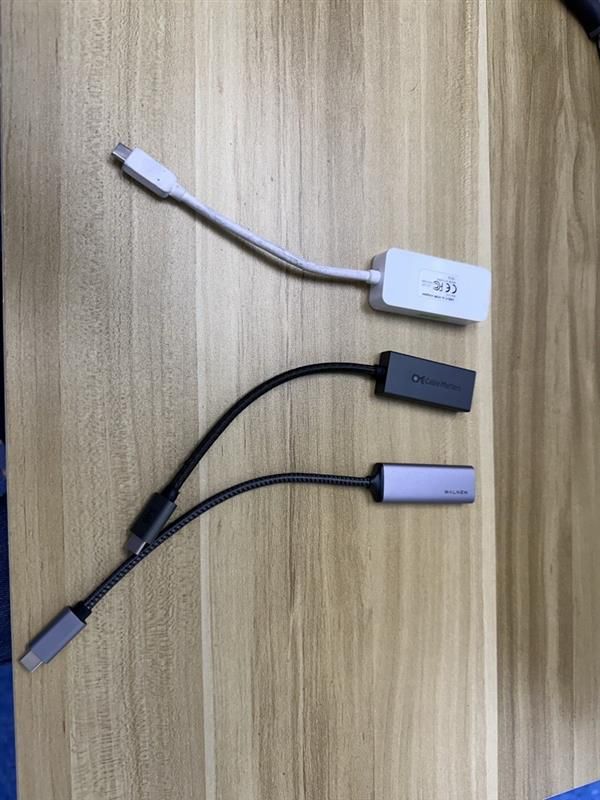
From bottom to top:
1: WALNEW USB C to HDMI Adapter 4K 60Hz, Type-C Male to HDMI Female Cable Converter
2: Cable Matters 48Gbps Unidirectional USB C to HDMI 2.1 Adapter
3: ATIVA VSD1330B1 -
Could you share some information on the adapters that you have tried? This is the adapter we usually use: https://www.cablematters.com/pc-1368-125-48gbps-usb-c-to-hdmi-21-adapter-supports-8k-60hz-4k-240hz-hdr.aspx.
Could you also share some information about your display? Are you trying to power the display via the VRX?
@Jacob-Camarillo The display is just a computer monitor and no we are not powering it with the VRX
-
@Jacob-Camarillo The display is just a computer monitor and no we are not powering it with the VRX
@Grier Thank you for sharing this information. That middle adapter (cable matter) should work, that is the same one that we use. Are there any other devices plugged into the display and is the display set to the corresponding HDMI input that the VRX is connected to? Can you also please confirm that the USB-C cable connected to the VRX is fully connected?
-
@Grier Thank you for sharing this information. That middle adapter (cable matter) should work, that is the same one that we use. Are there any other devices plugged into the display and is the display set to the corresponding HDMI input that the VRX is connected to? Can you also please confirm that the USB-C cable connected to the VRX is fully connected?
@Jacob-Camarillo No other devices are plugged into the display, and the display is set to the correct HDMI input for the VRX. The USB-C cable is also fully connected to the VRX. When powered up, there are no lights on the VRX at all. It is evidently not working. What are the next steps to initiate an RMA?
-
@Jacob-Camarillo No other devices are plugged into the display, and the display is set to the correct HDMI input for the VRX. The USB-C cable is also fully connected to the VRX. When powered up, there are no lights on the VRX at all. It is evidently not working. What are the next steps to initiate an RMA?
@Grier Gotcha, please fill out this RMA form: https://www.modalai.com/pages/rma?_pos=1&_sid=6dd8dbced&_ss=r
Please link this forum post in the RMA form as well

Reading along? Create a free ModalAI Forum account to join in.
With an account you can reply, ask your own question, get an email when a ModalAI engineer answers, and mark the reply that solved it. Your place in each thread is saved between visits.
Questions about VOXL, Flight Core, ESCs and ModalAI drones are answered here by the engineers who build them.
Register Login