Skip to content
  • Categories
  • Recent
  • Tags
  • Popular
  • Users
  • Groups
Collapse
Brand Logo

ModalAI Forum

  1. ModalAI Support Forum
  2. VOXL Dev Drones
  3. Sentinel
  4. 5G modem

5G modem

Scheduled Pinned Locked Moved Sentinel
14 Posts 4 Posters 2.3k Views 2 Watching
  • Oldest to Newest
  • Newest to Oldest
  • Most Votes
Reply
  • Reply as topic
Log in to reply
This topic has been deleted. Only users with topic management privileges can see it.
  • Eric KatzfeyE Eric Katzfey

    @M-al-khatib The modem also supports legacy technologies such as 4G. So the modem will still work on an LTE network.

    M. al-khatibM Offline
    M. al-khatibM Offline
    M. al-khatib
    Contributor
    wrote on last edited by
    #3

    @Eric-Katzfey
    Can you provide me the operating steps?

    tomT Eric KatzfeyE 2 Replies Last reply
    0
    • M. al-khatibM M. al-khatib

      @Eric-Katzfey
      Can you provide me the operating steps?

      tomT Online
      tomT Online
      tom
      admin
      wrote on last edited by
      #4

      @M-al-khatib https://docs.modalai.com/voxl-modem/

      1 Reply Last reply
      0
      • M. al-khatibM M. al-khatib

        @Eric-Katzfey
        Can you provide me the operating steps?

        Eric KatzfeyE Offline
        Eric KatzfeyE Offline
        Eric Katzfey
        ModalAI Team
        wrote on last edited by
        #5

        @M-al-khatib The modem and network do all that automatically. You don't have to tell it to go into 4G mode explicitly.

        1 Reply Last reply
        0
        • M. al-khatibM Offline
          M. al-khatibM Offline
          M. al-khatib
          Contributor
          wrote on last edited by M. al-khatib
          #6

          After using this commands and connect my PC to Tailscale what can i do ?
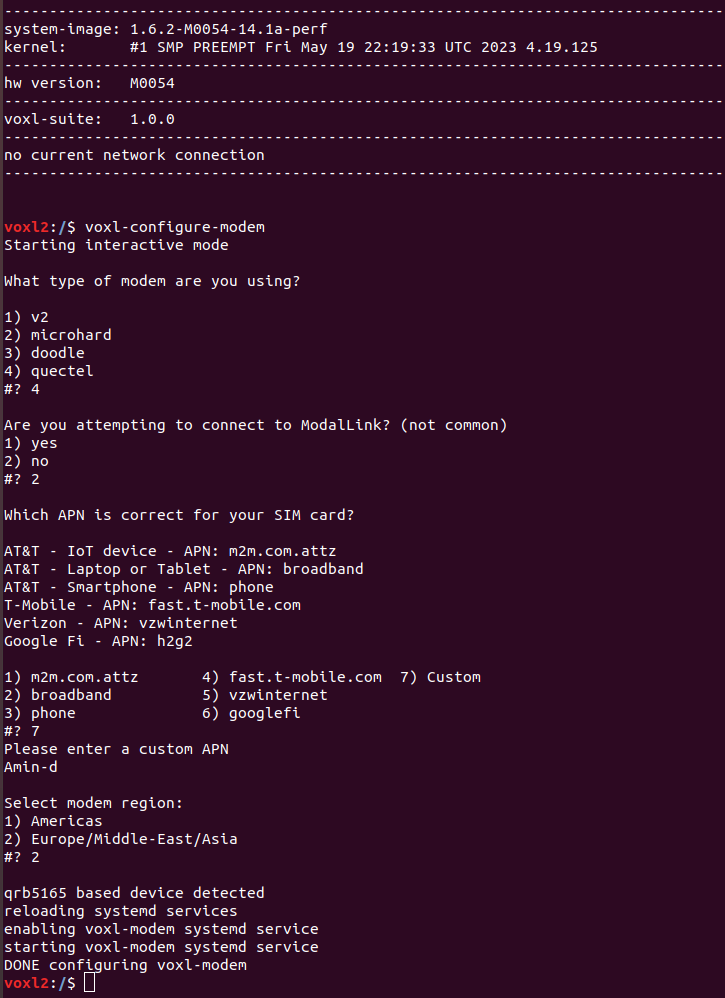
          Screenshot from 2023-08-12 01-25-47.png
          Screenshot from 2023-08-12 01-28-59.png
          Screenshot from 2023-08-12 01-29-02.png

          tomT 1 Reply Last reply
          0
          • M. al-khatibM M. al-khatib

            After using this commands and connect my PC to Tailscale what can i do ?
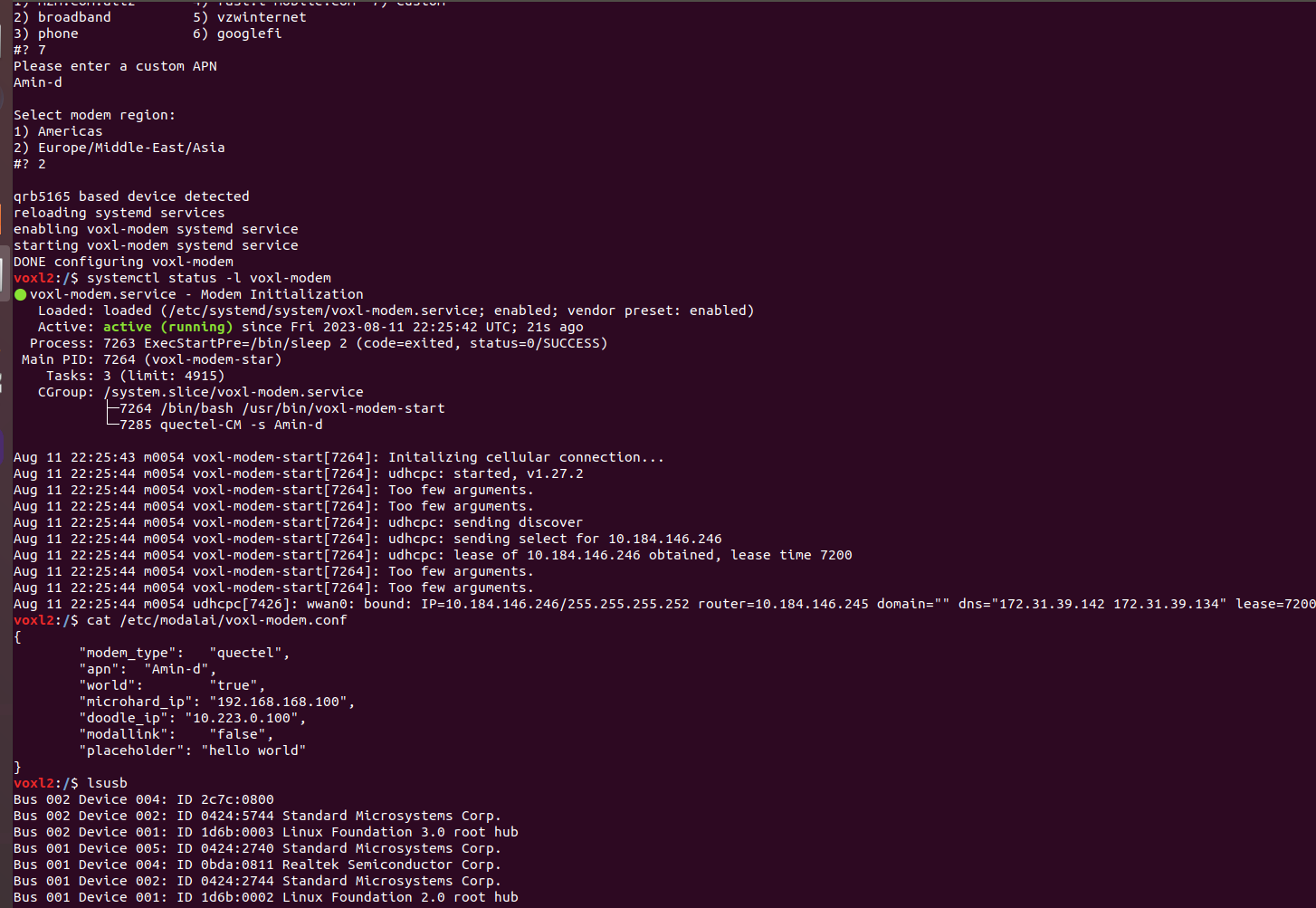
            Screenshot from 2023-08-12 01-25-47.png
            Screenshot from 2023-08-12 01-28-59.png
            Screenshot from 2023-08-12 01-29-02.png

            tomT Online
            tomT Online
            tom
            admin
            wrote on last edited by
            #7

            @M-al-khatib You can connect your VOXL2 to the VPN as well and then you should be able to ping your VOXL2 from your PC

            M. al-khatibM 1 Reply Last reply
            0
            • tomT tom

              @M-al-khatib You can connect your VOXL2 to the VPN as well and then you should be able to ping your VOXL2 from your PC

              M. al-khatibM Offline
              M. al-khatibM Offline
              M. al-khatib
              Contributor
              wrote on last edited by
              #8

              @tom
              Can you provide me the steps to connect it to VPN ?

              Paul CarffP 1 Reply Last reply
              0
              • M. al-khatibM M. al-khatib

                @tom
                Can you provide me the steps to connect it to VPN ?

                Paul CarffP Offline
                Paul CarffP Offline
                Paul Carff
                Contributor
                wrote on last edited by
                #9

                @M-al-khatib
                I followed the directions :https://docs.modalai.com/sentinel-user-guide-connect-gcs/#vpn-setup
                There is a link in the middle
                "In order to install the Tailscale client on VOXL 2, follow these instructions: Installing Tailscale on Ubuntu 18.04."
                That worked settng up TailScale for me very easily.

                tomT 1 Reply Last reply
                1
                • Paul CarffP Paul Carff

                  @M-al-khatib
                  I followed the directions :https://docs.modalai.com/sentinel-user-guide-connect-gcs/#vpn-setup
                  There is a link in the middle
                  "In order to install the Tailscale client on VOXL 2, follow these instructions: Installing Tailscale on Ubuntu 18.04."
                  That worked settng up TailScale for me very easily.

                  tomT Online
                  tomT Online
                  tom
                  admin
                  wrote on last edited by
                  #10

                  @Paul-Carff @M-al-khatib Thanks Paul! Yes, you can follow the steps here: https://tailscale.com/download/linux/ubuntu-1804

                  M. al-khatibM 1 Reply Last reply
                  0
                  • tomT tom

                    @Paul-Carff @M-al-khatib Thanks Paul! Yes, you can follow the steps here: https://tailscale.com/download/linux/ubuntu-1804

                    M. al-khatibM Offline
                    M. al-khatibM Offline
                    M. al-khatib
                    Contributor
                    wrote on last edited by
                    #11

                    @tom
                    How can I determine the type of network (3G, 4G, 5G) that I'm currently connected to, and shouldn't the modem grant me an internet connection when I'm in the process of connecting to it?

                    tomT 1 Reply Last reply
                    0
                    • M. al-khatibM M. al-khatib

                      @tom
                      How can I determine the type of network (3G, 4G, 5G) that I'm currently connected to, and shouldn't the modem grant me an internet connection when I'm in the process of connecting to it?

                      tomT Online
                      tomT Online
                      tom
                      admin
                      wrote on last edited by
                      #12

                      @M-al-khatib Here is an example of sending an AT command to a Quectel modem from VOXL2, the following will tell you what type of network connection you have:

                      echo -ne "AT+QENG=\"servingcell\"\r" | busybox microcom -t 1000 /dev/ttyUSB2
                      
                      M. al-khatibM 1 Reply Last reply
                      0
                      • tomT tom

                        @M-al-khatib Here is an example of sending an AT command to a Quectel modem from VOXL2, the following will tell you what type of network connection you have:

                        echo -ne "AT+QENG=\"servingcell\"\r" | busybox microcom -t 1000 /dev/ttyUSB2
                        
                        M. al-khatibM Offline
                        M. al-khatibM Offline
                        M. al-khatib
                        Contributor
                        wrote on last edited by
                        #13

                        @tom
                        My video link has a weak signal. How can I improve the signal to achieve a 4K video stream for Q Ground Control? Additionally, I have another question: I'm using a 5G SIM card, but when I connect it to the modem, my PC doesn't receive internet.

                        tomT 1 Reply Last reply
                        0
                        • M. al-khatibM M. al-khatib

                          @tom
                          My video link has a weak signal. How can I improve the signal to achieve a 4K video stream for Q Ground Control? Additionally, I have another question: I'm using a 5G SIM card, but when I connect it to the modem, my PC doesn't receive internet.

                          tomT Online
                          tomT Online
                          tom
                          admin
                          wrote on last edited by
                          #14

                          @M-al-khatib Video quality is going to be largely dependent on the cellular coverage in your area.

                          For your second question, can you give me more details on the setup you're trying? Are you connecting a standalone modem to your PC?

                          1 Reply Last reply
                          0

                          Hello! It looks like you're interested in this conversation, but you don't have an account yet.

                          Getting fed up of having to scroll through the same posts each visit? When you register for an account, you'll always come back to exactly where you were before, and choose to be notified of new replies (either via email, or push notification). You'll also be able to save bookmarks and upvote posts to show your appreciation to other community members.

                          With your input, this post could be even better 💗

                          Register Login
                          Reply
                          • Reply as topic
                          Log in to reply
                          • Oldest to Newest
                          • Newest to Oldest
                          • Most Votes


                          ModalAI
                          Categories Recent Tags ModalAI.com Docs
                          © 2026 ModalAI® · Accelerating autonomy for smaller, smarter, safer drones · Powered by NodeBB
                          • Login

                          • Don't have an account? Register

                          • Login or register to search.
                          • First post
                            Last post
                          0
                          • Categories
                          • Recent
                          • Tags
                          • Popular
                          • Users
                          • Groups