Skip to content

VOXL 2 and VOXL 2 Mini

658 Topics 3.7k Posts

VOXL 2, VOXL 2 Mini and VOXL 2 IO: bring-up, connectors, power, cameras, system image and SDK installs on the current compute platform.

  • two tracking camera on the voxl2 mini

    Unsolved voxl-2-mini
    2
    0 Votes
    2 Posts
    950 Views
    Alex KushleyevA
    @Vansh-Aggarwal , sorry for the delay in response. Can you please specify which exact tracking cameras you have and which camera adapters / cables you might already have? Alex
  • ToF sensor and VOA

    Unsolved voxl-2
    9
    2
    0 Votes
    9 Posts
    2k Views
    S
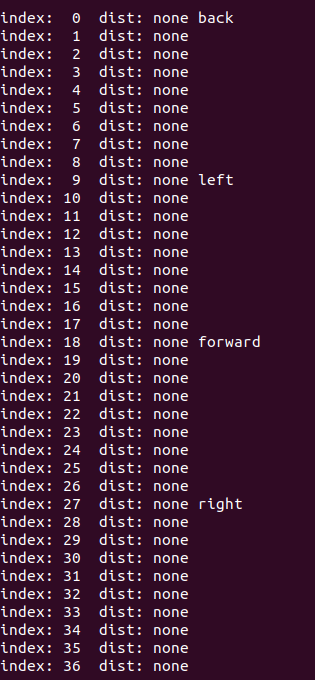
    @James-Strawson Hii , I am also getting the same issue . Kindly look at the following details . I have defined tof in my extrinsics.conf file as given below: parent: body child: tof T_child_wrt_parent: 0.070 0.024 -0.029 RPY_parent_to_child: 0.0 90.0 90.0 R_child_to_parent: 0.000 -0.000 1.000 1.000 0.000 -0.000 -0.000 1.000 0.000 when i run voxl-vision-hub -s i got the following slice 0 dist none back slice 1 dist none slice 2 dist none slice 3 dist none slice 4 dist none slice 5 dist none slice 6 dist none slice 7 dist none slice 8 dist none slice 9 dist none left slice 10 dist none slice 11 dist none slice 12 dist none slice 13 dist none slice 14 dist none slice 15 dist none slice 16 dist none slice 17 dist none slice 18 dist none forward slice 19 dist none slice 20 dist none slice 21 dist none slice 22 dist none slice 23 dist none slice 24 dist none slice 25 dist none slice 26 dist none slice 27 dist none right slice 28 dist none and in my vision-hub-conf file i have the folloeing set up: "en_vio": true, "vio_pipe": "qvio", "secondary_vio_pipe": "ov", "vfc_vio_pipe": "ov", "en_reset_vio_if_initialized_inverted": true, "vio_warmup_s": 3, "send_odom_while_failed": true, "horizon_cal_tolerance": 0.5, "en_hitl": false, "offboard_mode": "figure_eight", "follow_tag_id": 0, "figure_eight_move_home": true, "robot_radius": 0.300000011920929, "collision_sampling_dt": 0.1, "max_lookahead_distance": 1, "backtrack_seconds": 60, "backtrack_rc_chan": 8, "backtrack_rc_thresh": 1500, "wps_move_home": true, "wps_stride": 0, "wps_timeout": 0, "wps_damp": 1, "wps_vfc_mission": true, "wps_vfc_mission_loop": false, "wps_vfc_mission_to_ramp": 25, "wps_vfc_mission_to_kp": 0.10000000149011612, "wps_vfc_mission_cruise_speed": 1, "en_tag_fixed_frame": false, "fixed_frame_filter_len": 5, "en_transform_mavlink_pos_setpoints_from_fixed_frame": false, "vfc_rate": 100, "vfc_rc_chan_min": 980, "vfc_rc_chan_max": 2020, "vfc_thrust_ch": 3, "vfc_roll_ch": 1, "vfc_pitch_ch": 2, "vfc_yaw_ch": 4, "vfc_submode_ch": 6, "vfc_alt_mode_rc_min": 0, "vfc_alt_mode_rc_max": 0, "vfc_flow_mode_rc_min": 0, "vfc_flow_mode_rc_max": 0, "vfc_hybrid_flow_mode_rc_min": 0, "vfc_hybrid_flow_mode_rc_max": 0, "vfc_position_mode_rc_min": 0, "vfc_position_mode_rc_max": 2100, "vfc_traj_mode_rc_min": 0, "vfc_traj_mode_rc_max": 0, "vfc_yaw_deadband": 30, "vfc_vxy_deadband": 50, "vfc_vz_deadband": 150, "vfc_min_thrust": 0, "vfc_max_thrust": 0.800000011920929, "vfc_tilt_max": 0.43599998950958252, "vfc_yaw_rate_max": 3, "vfc_thrust_hover": 0.5, "vfc_vz_max": 1, "vfc_kp_z": 5.2899999618530273, "vfc_kd_z": 5.9800000190734863, "vfc_vxy_max": 3, "vfc_kp_xy": 0.63999998569488525, "vfc_kd_xy": 2.559999942779541, "vfc_kp_z_vio": 5.2899999618530273, "vfc_kd_z_vio": 5.9800000190734863, "vfc_kp_xy_vio": 3.2400000095367432, "vfc_kd_xy_vio": 3.9600000381469727, "vfc_w_filt_xy_vio": 10, "vfc_w_filt_xy_flow": 3, "vfc_vel_ff_factor_vio": 0.899999976158142, "vfc_xy_acc_limit_vio": 2.5, "vfc_max_z_delta": 3, "vfc_att_transition_time": 0.5, "vfc_stick_move_threshold": 30, "vfc_flow_transition_time": 1, "vfc_q_min": 10, "vfc_points_min": 7, "vfc_en_submode_announcement": 1, "vfc_disable_fallback": false, "vfc_traj_csv": "/data/voxl-vision-hub/traj.csv", "en_voa": true, "voa_upper_bound_m": -0.15000000596046448, "voa_lower_bound_m": 0.15000000596046448, "voa_memory_s": 1, "voa_max_pc_per_fusion": 100, "voa_pie_max_dist_m": 20, "voa_pie_min_dist_m": 0.25, "voa_pie_under_trim_m": 1, "voa_pie_threshold": 3, "voa_send_rate_hz": 20, "voa_pie_slices": 36, "voa_pie_bin_depth_m": 0.15000000596046448, "voa_inputs": [{ "enabled": false, "type": "point_cloud", "input_pipe": "dfs_point_cloud", "frame": "stereo_l", "max_depth": 8, "min_depth": 0.300000011920929, "cell_size": 0.079999998211860657, "threshold": 4, "x_fov_deg": 68, "y_fov_deg": 56, "conf_cutoff": 0 }, { "enabled": false, "type": "point_cloud", "input_pipe": "stereo_front_pc", "frame": "stereo_front_l", "max_depth": 8, "min_depth": 0.300000011920929, "cell_size": 0.079999998211860657, "threshold": 4, "x_fov_deg": 68, "y_fov_deg": 56, "conf_cutoff": 0 }, { "enabled": false, "type": "point_cloud", "input_pipe": "stereo_rear_pc", "frame": "stereo_rear_l", "max_depth": 8, "min_depth": 0.300000011920929, "cell_size": 0.079999998211860657, "threshold": 4, "x_fov_deg": 68, "y_fov_deg": 56, "conf_cutoff": 0 }, { "enabled": true, "type": "tof", "input_pipe": "tof", "frame": "tof", "max_depth": 6, "min_depth": 0.15000000596046448, "cell_size": 0.079999998211860657, "threshold": 3, "x_fov_deg": 106.5, "y_fov_deg": 85.0999984741211, "conf_cutoff": 125 }, { "enabled": false, "type": "rangefinder", "input_pipe": "rangefinders", "frame": "body", "max_depth": 8, "min_depth": 0.300000011920929, "cell_size": 0.079999998211860657, "threshold": 4, "x_fov_deg": 68, "y_fov_deg": 56, "conf_cutoff": 0 }], "voa_voa_memory_s": 1 } [image: 1768559497610-screenshot-from-2026-01-16-16-01-23.png]
  • VOXL2 WiFi SoftAP issues (M0141 + AWUS036EACS)

    Unsolved voxl-2
    3
    0 Votes
    3 Posts
    544 Views
    D
    Update: I bought an Alfa Networks AWUS036ACS and it worked out of the box with the M0151 board
  • GPS and Compass Issues on QGround Control

    Unsolved voxl-2-mini
    2
    0 Votes
    2 Posts
    981 Views
    J
    @jeremyrbrown5 We have figured it out. It was the parameters SYS_HAS_MAG and SYS_HAS_GPS. Will be testing autonomous flight tomorrow!
  • RTSP streaming issues

    Unsolved voxl-2-mini
    5
    0 Votes
    5 Posts
    1k Views
    Alex KushleyevA
    Hello @SKA, Thank you for the details. I can't think of anything right now, but will double check this. I know that there is one potential issue in voxl-camera-server - the SPS header (which is part of the H264 / H265 stream) is only sent by the video encoder once (at the beginning of the stream). I believe that voxl-streamer will cache the SPS packet (which contains things like resolution, etc) and i think when clients connect to voxl-streamer, then it will send that SPS header to the clients. However, if voxl-streamer does not get that first header, it will not be able to forward it to the clients. This is a guess for now, but could be related to the issue that you are seeing. I can look into this issue. Can you please let me know how exactly to set up VLC for 0ms cache? I want to make sure that my test is the same. Also, which version of VLC are you using? Also, i noticed one thing - you are using hires_misp_color stream from camera server, which is not actually encoded, but YUV. Then voxl-streamer will take those YUVs and encode them (using hardware encoder). Is there a reason why you are not using the hires_misp_encoded stream to get H264 directly from camera server and serve it using voxl-streamer without re-encoding? I wonder if in the old SDK you were using _color or _encoded stream? Alex
  • This topic is deleted!

    1
    0 Votes
    1 Posts
    1 Views
    No one has replied
  • Use volx2 and accessories on custom products

    Unsolved voxl-2
    2
    0 Votes
    2 Posts
    501 Views
    ModeratorM
    @qubotics-admin Hi, we sell all of those components for companies to integrate into their products. The Flir Hadron adapter (MDK-M0202-1-00) can be requested by reaching out to sales at https://modalai.com/contact The rest of the components should be available to purchase at modalai.com
  • Voxl 2 USB-C And Unity

    Unsolved volx2 voxl-2
    2
    0 Votes
    2 Posts
    973 Views
    ModeratorM
    @JoonaR Hi Joona, the DP should work to drive an HDMI projector with the appropriate adapter. This adapter has been tested to work: https://www.amazon.com/Cable-Matters-48Gbps-Adapter-Supporting/dp/B08MSWMXT4?th=1
  • IP Routing on VOXL2 with Microhard modem + IP camera

    Unsolved voxl-2
    2
    0 Votes
    2 Posts
    455 Views
    A
    @Alex-Kushleyev Can you please look into this or tag someone who can help me solving this type of networking related issue?
  • No WiFi connection M0151 + USB 3.0 + Alfa Networks Dongle

    Unsolved voxl-2
    2
    0 Votes
    2 Posts
    385 Views
    D
    I did some additional testing and was able to narrow things down a bit. After reconfiguring the WiFi as a SoftAP using voxl-wifi and then rebooting the VOXL, the network now shows up consistently again. So the broadcast issue seems to be resolved for the moment. However, the core problem remains: I still can’t actually connect to the AP — the connection attempt starts, prompts for the password, and then fails just like before. If anyone has ideas on what else I could check or has seen similar behavior with this setup, I’d really appreciate the help.
  • This topic is deleted!

    2
    0 Votes
    2 Posts
    8 Views
  • IP Routing, allowing device from usb0 to communicate with device on eth0

    Unsolved voxl-2
    4
    0 Votes
    4 Posts
    1k Views
    A
    @John-Nomikos Hi, Can you please explain how you solved this? I am facing same problem where my camera is connected via USB to ethenret convertor with Microhard add-on board and my host machine is unable to ping my camera but can ping voxl2.
  • About the usage of CPU core

    Unsolved voxl-2
    4
    1
    0 Votes
    4 Posts
    559 Views
    Alex KushleyevA
    @Seungjae-Baek , the resolution of the camera should depend on the use case. However, it is also important to keep in mind what exactly you are doing with the images coming from the hires cameras. For example, if you set the resolution to 4K and you try to view those uncompressed images using voxl-portal, this process will be very taxing on the CPU for the following reason: when you view uncompressed images in voxl-portal, these images are encoded with a software JPG encoder and then sent from voxl2 to your browser. This process is very cpu-heavy. On the contrary, if you use h264 / h265 stream, it should be perfectly fine to encode 4K30 video to disk or even stream, since H264 / H265 encoding is done by a hardware encoder. voxl-portal, actually does support showing h264 (but not h265) 30FPS streams, so that would be a lot more efficient for the CPU, since there would be no jpg encoding. Otherwise, if you are using raw frames (not _encoded) in voxl-portal , please keep in mind that you will always have a lot of cpu overhead. voxl-portal is designed for debugging / development purposes, so it's not necessarily the most efficient solution for video streaming. For real video streaming use cases, you would use h264 or h265 encoding and save to disk on voxl2 + stream the encoded video for remote viewing. You could encode the same camera source with two different resolutions / codecs / bitrates. If you need help setting up a specific use case, please provide some details and I can help you further. Alex
  • Hadron EO camera crash problem

    Unsolved voxl-2
    3
    0 Votes
    3 Posts
    469 Views
    Alex KushleyevA
    Actually, I see from the log that your FPV camera is IMX214 (please confirm). So then my next questions are: which Voxl2 SDK are you using? does the crash happen if you only view the Hadron EO stream (this is OV64B camera) can you please check the cpu temps when you view many cameras (using voxl-inspect-cpu) The dmesg error suggests some sort of low level error during MIPI transmission, but it could be tied to the SoC overheating. When voxl-portal is used to view images (especially in multi-view), the images on VOXL2 are converted from YUV to Jpeg using a software Jpeg encoder (which is very taxing on the cpu for large images). This can cause the cpu to overheat and start throttling operating frequencies to reduce the temperature). We are aware of this issue and it is on the list to fix the multi view to be more efficient and not overheat the CPU. Alex
  • RRFPV PIZZA 13” rebuild with NDAA components/ModalAI components

    Unsolved
    9
    0 Votes
    9 Posts
    5k Views
    B
    @Eric-Katzfey interesting, think you for this information. Once i demo this drone for a couple weeks in its current BNF w/ ndaa add ons configuration I will be looking to move to a smart system and incorporating optical hold and other gps denied search features.
  • Issues with custom Yolov8

    Unsolved yolov8 deep learning voxl 2 mini custom models voxl-2-mini
    10
    0 Votes
    10 Posts
    2k Views
    J
    @jeremyrbrown5 we figured it out, we just changed the name of the model to yolov8n_float16.tflite. Pretty spot on now!
  • Softap issues

    Unsolved voxl-2-mini
    4
    0 Votes
    4 Posts
    1k Views
    Alex KushleyevA
    @jeremyrbrown5 , it is possible that overheating VOXL2 cpu could be causing your SoftAP performance slowdown. You can run voxl-inspect-cpu which is a tool that will show you cpu usage, temps and other stats. If the CPU cores reach 95 deg C, the thermal management will slow down the cpu clock, so all the processes will run slower, including SoftAP. Alex
  • Recovering Flight Logs from a Bricked VOXL2

    Unsolved voxl-2
    6
    2
    0 Votes
    6 Posts
    2k Views
    N. ChenN
    @lhermosillo That is harsh. Do you have a bare board, or one with some additions? If you can use the bare voxl2, try that. If you have been using the bare board all along, I'm stumped here. I'd maybe try to reinstall the modalai-qdl env, or use another image. Maybe the qdl command itself instead of the webUI. Hope you'll be able to save your board!
  • Bricked VOXL2

    Unsolved voxl-2
    3
    2
    0 Votes
    3 Posts
    465 Views
    R
    @N-Chen I tried the webUI and the command line and as near as I can tell the webUI uses lsusb (or something along those lines) to detect the presence of the board. The install.sh uses adb or fastboot to detect the board and will sit waiting until the board is detected or CTL C is sent. My guess is the usb controller interface is alive and reporting but everything beyond it is dead.
  • VOXL 2 Connecting an External Flight Controller Problem

    Unsolved voxl-2
    14
    1
    0 Votes
    14 Posts
    1k Views
    Eric KatzfeyE
    @ravi I'm suspecting you have a bad cable or the cable is subject to some interference. Can you try this on a benchtop with just a VOXL 2 and an FC v2 and no other components? Is it currently integrated into a custom drone? Can you look at the signal quality on the TX and RX UART lines with an oscilloscope?