
About the usage of CPU core
-
Hi Modal AI Team,
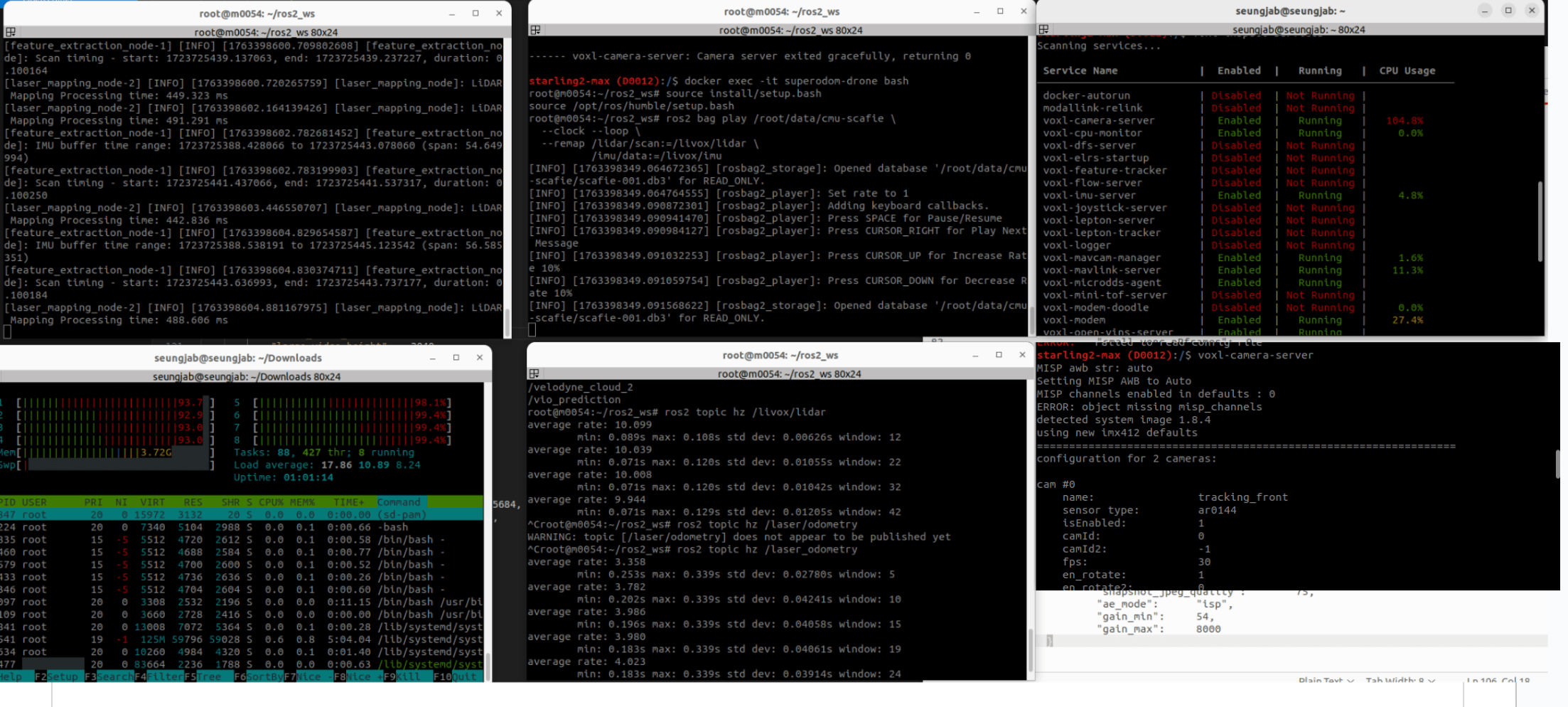
Currently we are using Starling 2 max, and we want to ask you whether we can mitigate the CPU usage of voxl-camera-server.
As you can see the bottom right terminal, we manually turn off 3 cams and only using 2 front cams (total 5, turn off 3 at bottom) by modifying .conf file.!
but still the CPU usage of camera is very high (over 100% when seeing with voxl-inspect-services) , as you can see in the top right and bottom left terminal.
We attached the screenshot. Thank you.
-
Hi Modal AI Team,
Currently we are using Starling 2 max, and we want to ask you whether we can mitigate the CPU usage of voxl-camera-server.
As you can see the bottom right terminal, we manually turn off 3 cams and only using 2 front cams (total 5, turn off 3 at bottom) by modifying .conf file.!
but still the CPU usage of camera is very high (over 100% when seeing with voxl-inspect-services) , as you can see in the top right and bottom left terminal.
We attached the screenshot. Thank you.
Hi @Seungjae-Baek,
It is hard to see the detail in the screenshot, it is very low resolution. Can you please clarify which cameras you are turning on / off?
Also, what streams are consumed from the camera server (by other processes) and what are the resolutions?
Also, keep in mind that your cpu may not run at a high frequency. Please check
voxl-inspect-cpufor more details. If your cpu governor is inautomode, it will reduce cpu core frequency, which will result in higher % usage of each core (at lower frequency).If you sent your cpu to performance mode (
voxl-set-cpu-mode perf), this will push the frequency of all cores to the maximum and will give you a better estimate of the cpu usage per process (out of the full core capacity). Please note that in performance mode, the cpu will consume more power (and heat up a bit more) to perform the same tasks (with lower latency).Alex
-
Hi @Seungjae-Baek,
It is hard to see the detail in the screenshot, it is very low resolution. Can you please clarify which cameras you are turning on / off?
Also, what streams are consumed from the camera server (by other processes) and what are the resolutions?
Also, keep in mind that your cpu may not run at a high frequency. Please check
voxl-inspect-cpufor more details. If your cpu governor is inautomode, it will reduce cpu core frequency, which will result in higher % usage of each core (at lower frequency).If you sent your cpu to performance mode (
voxl-set-cpu-mode perf), this will push the frequency of all cores to the maximum and will give you a better estimate of the cpu usage per process (out of the full core capacity). Please note that in performance mode, the cpu will consume more power (and heat up a bit more) to perform the same tasks (with lower latency).Alex
Hi Alex,
we turned on only front cam (rgb + tracking) and turned off all bottom cam.
We will try performance mode as you said, while we reduced the resoltuion from the default 4k to 1024 x 768.
-
Hi Alex,
we turned on only front cam (rgb + tracking) and turned off all bottom cam.
We will try performance mode as you said, while we reduced the resoltuion from the default 4k to 1024 x 768.
@Seungjae-Baek , the resolution of the camera should depend on the use case. However, it is also important to keep in mind what exactly you are doing with the images coming from the hires cameras. For example, if you set the resolution to 4K and you try to view those uncompressed images using
voxl-portal, this process will be very taxing on the CPU for the following reason: when you view uncompressed images invoxl-portal, these images are encoded with a software JPG encoder and then sent from voxl2 to your browser. This process is very cpu-heavy. On the contrary, if you use h264 / h265 stream, it should be perfectly fine to encode 4K30 video to disk or even stream, since H264 / H265 encoding is done by a hardware encoder.voxl-portal, actually does support showing h264 (but not h265) 30FPS streams, so that would be a lot more efficient for the CPU, since there would be no jpg encoding. Otherwise, if you are using raw frames (not_encoded) invoxl-portal, please keep in mind that you will always have a lot of cpu overhead.voxl-portalis designed for debugging / development purposes, so it's not necessarily the most efficient solution for video streaming. For real video streaming use cases, you would use h264 or h265 encoding and save to disk on voxl2 + stream the encoded video for remote viewing. You could encode the same camera source with two different resolutions / codecs / bitrates.If you need help setting up a specific use case, please provide some details and I can help you further.
Alex


Reading along? Create a free ModalAI Forum account to join in.
With an account you can reply, ask your own question, get an email when a ModalAI engineer answers, and mark the reply that solved it. Your place in each thread is saved between visits.
Questions about VOXL, Flight Core, ESCs and ModalAI drones are answered here by the engineers who build them.
Register Login