Skip to content
  • Categories
  • Recent
  • Tags
  • Popular
  • Users
  • Groups
Collapse
Brand Logo

ModalAI Forum

  1. ModalAI Support Forum
  2. VOXL Dev Kits
  3. VOXL-CAM
  4. ADB devices not found

ADB devices not found

Scheduled Pinned Locked Moved VOXL-CAM
31 Posts 4 Posters 14.2k Views 2 Watching
  • Oldest to Newest
  • Newest to Oldest
  • Most Votes
Reply
  • Reply as topic
Log in to reply
This topic has been deleted. Only users with topic management privileges can see it.
  • tomT Offline
    tomT Offline
    tom
    admin
    wrote on last edited by
    #3

    @marian Does it show up with fastboot devices perhaps?

    1 Reply Last reply
    0
    • M Offline
      M Offline
      marian
      Contributor
      wrote on last edited by marian
      #4

      @tom Thank you for your reply.
      No, it doesn't.

      I verified the link and it's fine as per below:

      On Windows
      PS C:\WINDOWS\system32> usbipd wsl list
      BUSID DEVICE STATE
      3-1 APQ8096-MTP _SN:4549C070, ADB Interface Attached - Ubuntu-20.04

      On Ubuntu client:
      marian@RM:~$ lsusb
      Bus 002 Device 001: ID 1d6b:0003 Linux Foundation 3.0 root hub
      Bus 001 Device 004: ID 05c6:901d Qualcomm, Inc. APQ8096-MTP _SN:4549C070
      Bus 001 Device 001: ID 1d6b:0002 Linux Foundation 2.0 root hub

      marian@RM:~$ dmesg | tail
      [ 2188.224798] usb 1-1: SetAddress Request (4) to port 0
      [ 2188.318613] usb 1-1: New USB device found, idVendor=05c6, idProduct=901d, bcdDevice= 3.18
      [ 2188.318617] usb 1-1: New USB device strings: Mfr=1, Product=2, SerialNumber=3
      [ 2188.318621] usb 1-1: Product: APQ8096-MTP _SN:4549C070
      [ 2188.318625] usb 1-1: Manufacturer: Android
      [ 2188.318629] usb 1-1: SerialNumber: c6f37030

      cat /etc/udev/rules.d/51-android.rules
      SUBSYSTEM=="usb", ATTRS{idVendor}=="05c6", ATTRS{idProduct}=="901d", MODE="0660", GROUP="plugdev", SYMLINK+="voxl%n"
      SUBSYSTEM=="usb", ATTRS{idVendor}=="18d1", ATTRS{idProduct}=="d00d", MODE="0660", GROUP="plugdev", SYMLINK+="voxl-fastboot%n"

      marian@RM:~$ adb --version
      Android Debug Bridge version 1.0.39
      Version 1:8.1.0+r23-5ubuntu2
      Installed as /usr/lib/android-sdk/platform-tools/adb

      marian@RM:~$ fastboot --version
      fastboot version 1:8.1.0+r23-5ubuntu2
      Installed as /usr/lib/android-sdk/platform-tools/fastboot

      And the results of the commands:
      marian@RM:~$ adb devices
      List of devices attached

      marian@RM:~$ fastboot devices
      marian@RM:~$

      1 Reply Last reply
      0
      • tomT Offline
        tomT Offline
        tom
        admin
        wrote on last edited by
        #5

        @marian Were you able to connect to the VOXL-Cam via ADB in the past? Or have you been having these issues out of the box?

        1 Reply Last reply
        0
        • M Offline
          M Offline
          marian
          Contributor
          wrote on last edited by
          #6

          @tom I have being issue out of the box, it never connect via adb

          1 Reply Last reply
          0
          • tomT Offline
            tomT Offline
            tom
            admin
            wrote on last edited by
            #7

            @marian And using this same PC, are you able to ADB onto a different VOXL-Cam?

            1 Reply Last reply
            0
            • M Offline
              M Offline
              marian
              Contributor
              wrote on last edited by
              #8

              @tom I have only one voxl-cam

              1 Reply Last reply
              0
              • tomT Offline
                tomT Offline
                tom
                admin
                wrote on last edited by tom
                #9

                @marian So is SSH working then? I see that you've done some work with this VOXL Cam already based on your post history?
                Or were you connecting directly to the Flight Core via JST to USB?

                1 Reply Last reply
                0
                • M Offline
                  M Offline
                  marian
                  Contributor
                  wrote on last edited by
                  #10

                  @tom Yes, the ssh and connecting the flight core via jst to usb is working.

                  When I bought the voxl-cam I understood that came calibrated and ready to use. But, as I used it on a custom frame the sensors like accelerometer, compass and gyroscope are not calibrated.

                  I used it on the frame on the same way like seekers (of course, I needed it to adapt the /etc/modalai/extrinsics.conf file for my configuration), but

                  • whenever I use a GPS with compass (as M8N u-blox) I can't calibrate the compass, it will see a different position instead of the position the drone really is, it is finishing the calibration anyway, but after reboot it will ask me again to re-calibrate the compass
                  • whenever I used it for indoor navigation, so GPS and compass disabled, I calibrate the accelerometer with ROTATION-NONE as per modalai documentation,then once I have the local position on, the QGC tell me that I have a roll failure detected and, of course, can't proceed with arming.

                  So, basically I can't use at all the voxl-cam 😞

                  1 Reply Last reply
                  0
                  • tomT Offline
                    tomT Offline
                    tom
                    admin
                    wrote on last edited by
                    #11

                    @marian Okay that is good that at least ssh is working so the board should be functional. I wonder if it is some sort of user privileges issue that ADB isn't coming up. What if you do sudo adb devices? And what if you remove that android rules file: sudo rm /etc/udev/rules.d/51-android.rules and reboot your PC? I'm not sure that file is necessary.

                    For those other questions, I would open a new forum topic so that the whole team can get eyes on it.

                    Hyunsoo Kim 0H 1 Reply Last reply
                    0
                    • M Offline
                      M Offline
                      marian
                      Contributor
                      wrote on last edited by
                      #12

                      @tom The results are the same even if I use sudo or I remove the 51-android.rules

                      tomT 1 Reply Last reply
                      0
                      • M marian

                        @tom The results are the same even if I use sudo or I remove the 51-android.rules

                        tomT Offline
                        tomT Offline
                        tom
                        admin
                        wrote on last edited by
                        #13

                        @marian Did you reboot after removing the android-rules file?

                        M 1 Reply Last reply
                        0
                        • tomT Offline
                          tomT Offline
                          tom
                          admin
                          wrote on last edited by
                          #14

                          @marian We may have to take a look at your hardware in house, checkout our RMA info here: https://modalai.com/rma

                          M 1 Reply Last reply
                          0
                          • tomT tom

                            @marian Did you reboot after removing the android-rules file?

                            M Offline
                            M Offline
                            marian
                            Contributor
                            wrote on last edited by
                            #15

                            @tom yes, I rebooted the pc

                            1 Reply Last reply
                            0
                            • tomT tom

                              @marian We may have to take a look at your hardware in house, checkout our RMA info here: https://modalai.com/rma

                              M Offline
                              M Offline
                              marian
                              Contributor
                              wrote on last edited by marian
                              #16

                              @tom In terms of RMA, can we try to have a remote diagnostic? I'm far a way from US ...

                              1 Reply Last reply
                              0
                              • tomT Offline
                                tomT Offline
                                tom
                                admin
                                wrote on last edited by
                                #17

                                @marian Have you been able to ADB in to any other VOXL devices on this PC in the past? From what I see in your lsusb output everything looks correct. I'm wondering if there's an issue with your ADB install

                                1 Reply Last reply
                                0
                                • tomT Offline
                                  tomT Offline
                                  tom
                                  admin
                                  wrote on last edited by
                                  #18

                                  @marian Here is what a working VOXL looks like on my machine running Ubuntu 18: Bus 001 Device 068: ID 05c6:901d Qualcomm, Inc. We have others at the company who use 20 so that shouldn't be an issue

                                  1 Reply Last reply
                                  0
                                  • tomT Offline
                                    tomT Offline
                                    tom
                                    admin
                                    wrote on last edited by tom
                                    #19

                                    @marian

                                    [  +0.150491] usb 1-1: New USB device found, idVendor=05c6, idProduct=901d, bcdDevice= 3.18
                                    [  +0.000010] usb 1-1: New USB device strings: Mfr=1, Product=2, SerialNumber=3
                                    [  +0.000005] usb 1-1: Product: APQ8096-MTP _SN:AF0F8B82
                                    [  +0.000004] usb 1-1: Manufacturer: Android
                                    [  +0.000003] usb 1-1: SerialNumber: 4399683d```
                                    1 Reply Last reply
                                    0
                                    • M Offline
                                      M Offline
                                      marian
                                      Contributor
                                      wrote on last edited by
                                      #20

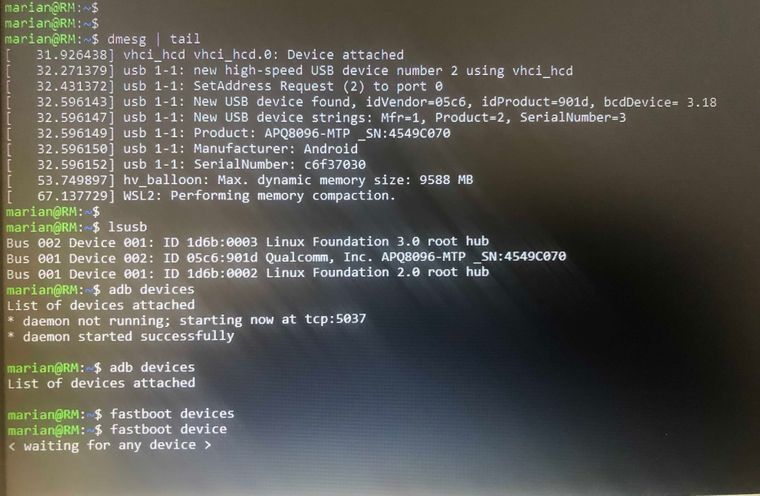
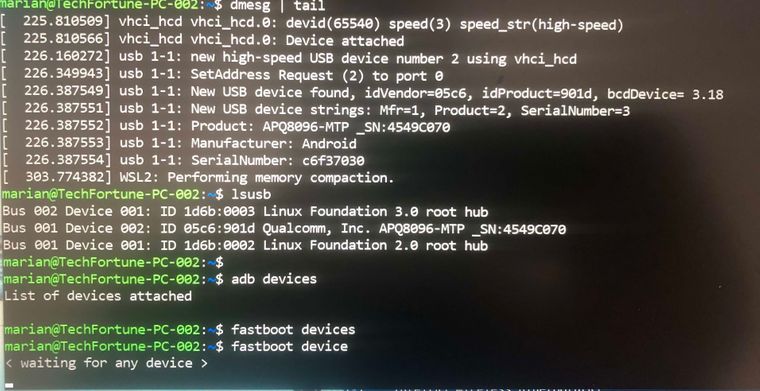
                                      @tom I see the same things, but stiill the adb or fastboot commands don't see my device. I tried with two different laptops, and the problem is the same as per images below:

                                      IMG_2349-1.jpeg
                                      IMG_2348.jpg

                                      1 Reply Last reply
                                      0
                                      • M Offline
                                        M Offline
                                        marian
                                        Contributor
                                        wrote on last edited by
                                        #21

                                        @tom I tried the adb for windows and it is working fine, I'm able to connect onto the voxl-cam via adb shell command.

                                        Still have a problem via wsl to see the devices from ubuntu client, but if is working from windows client for adb I suppose that the device is fine.

                                        1 Reply Last reply
                                        0
                                        • tomT Offline
                                          tomT Offline
                                          tom
                                          admin
                                          wrote on last edited by
                                          #22

                                          @marian Okay that's some good news! Since you're able to ADB from windows that means the VOXL Cam itself is functional. It must be some permission issue. We recommend using Ubuntu 18 directly and none of our engineers here use Windows for software development so I'm not too familiar with WSL. Do USB devices need to be added manually? Not sure they're shared from windows to WSL automatically. You may also need to stop the ADB server from running on the Windows client in order for it to work in WSL. (adb kill-server)

                                          1 Reply Last reply
                                          0

                                          Hello! It looks like you're interested in this conversation, but you don't have an account yet.

                                          Getting fed up of having to scroll through the same posts each visit? When you register for an account, you'll always come back to exactly where you were before, and choose to be notified of new replies (either via email, or push notification). You'll also be able to save bookmarks and upvote posts to show your appreciation to other community members.

                                          With your input, this post could be even better 💗

                                          Register Login
                                          Reply
                                          • Reply as topic
                                          Log in to reply
                                          • Oldest to Newest
                                          • Newest to Oldest
                                          • Most Votes


                                          ModalAI
                                          Categories Recent Tags ModalAI.com Docs
                                          © 2026 ModalAI® · Accelerating autonomy for smaller, smarter, safer drones · Powered by NodeBB
                                          • Login

                                          • Login or register to search.
                                          • First post
                                            Last post
                                          0
                                          • Categories
                                          • Recent
                                          • Tags
                                          • Popular
                                          • Users
                                          • Groups