
Warning PX4 disconnected from UART
-
Hi all,
I am getting this message on my Voxl flight deck
Warning PX4 disconnected from UART.
I had this issue yesterday as well, I thought it might be a cable issue but everything was fine. So I reset my flight core and set it up again and uploaded this parameter file from GitHub parameter
The error then went away yesterday. But today again i got this error message.I checked this Post and my parameters are the same. I again uploaded the GitHub parameters like before but no luck.yocto:~$ voxl-vision-px4 -d loading our own config file ================================================================= Parameters as loaded from config file: qgc_ip: 192.168.1.114 en_localhost_mavlink_udp 1 en_secondary_qgc: 0 secondary_qgc_ip: 192.168.1.214 qgc_udp_port_number: 14550 localhost_udp_port_number: 14551 udp_mtu: 512 en_vio: 1 en_voa: 1 en_send_vio_to_qgc: 1 en_send_voa_to_qgc: 1 en_set_clock_from_gps: 1 en_force_onboard_mav1_mode: 1 en_reset_px4_on_error: 1 qvio_auto_reset_quality: 0.000500 en_adsb: 0 adsb_uart_bus: 7 adsb_uart_baudrate: 57600 px4_uart_bus: 5 px4_uart_baudrate: 921600 offboard_mode: off follow_tag_id: 0 en_tag_fixed_frame: 0 fixed_frame_filter_len: 5 en_transform_mavlink_pos_setpoints_from_fixed_frame:0 ================================================================= loading extrinsics config file starting geometry module starting px4 monitor starting uart mavlink Successfully opened mavparser starting udp mavlink Adding manual QGC IP address to udp connection list: 192.168.1.114 Added new UDP connection to 192.168.1.114 starting px4 shell starting fixed pose input starting vio manager starting tag manager starting voa manager Init complete, entering main loop Connected to voxl-qvio-server done updating transforms to use imu: imu0 WARNING PX4 DISCONNECTED FROM UARTThanks & Regards,
Mohammed Naveed -
Hi @mohammednaveed ,
Sorry for the lag, is this still showing up as an issue?
One way I try to trouble shoot the MAVLink connection over the UART from the VOXL processor(s) to Flight Core STM32 is using: https://docs.modalai.com/voxl-vision-px4-nuttx-shell/#interactive-mode
From the other side, if you can open a MAVLink connection over USB to the Flight Core, and run
mavlink statusfrom the nutshell, to see if you have any active traffic? -
Hi @modaltb
Its alright!
It still shows up randomly, will try your suggested method and get back soon!Thanks & Regards,
Mohammed Naveed -
Hi @modaltb
I checked it today, the issue still exists!
I followed your instructions and have attached the following messages. This is only happening on this Voxl flight deck unit, my other unit is working perfectly.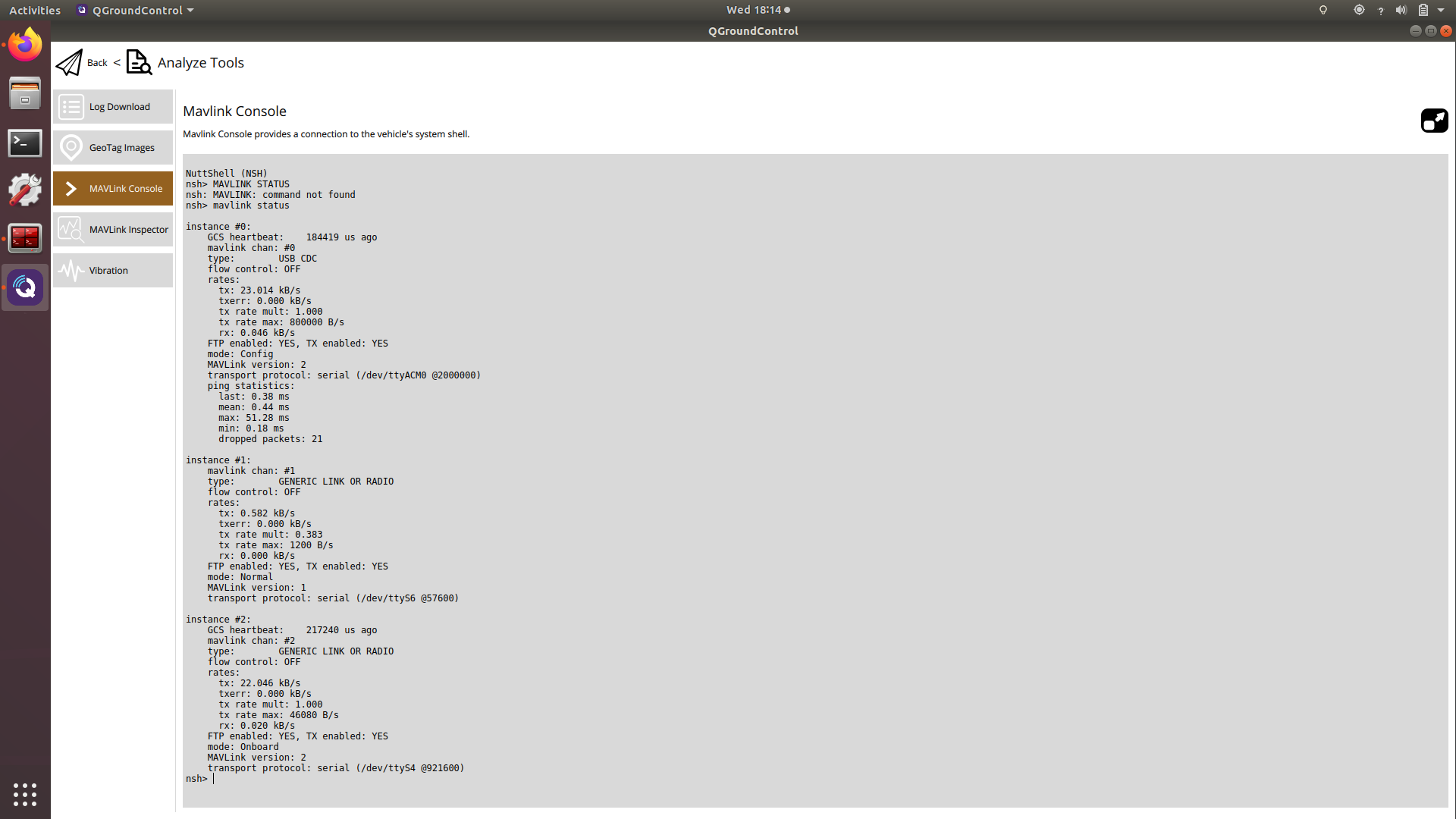
loading our own config file ================================================================= Parameters as loaded from config file: qgc_ip: 192.168.1.114 en_localhost_mavlink_udp 1 en_secondary_qgc: 0 secondary_qgc_ip: 192.168.1.214 qgc_udp_port_number: 14550 localhost_udp_port_number: 14551 udp_mtu: 512 en_vio: 1 en_voa: 1 en_send_vio_to_qgc: 1 en_send_voa_to_qgc: 1 en_set_clock_from_gps: 1 en_force_onboard_mav1_mode: 1 en_reset_px4_on_error: 1 qvio_auto_reset_quality: 0.000500 en_adsb: 0 adsb_uart_bus: 7 adsb_uart_baudrate: 57600 px4_uart_bus: 5 px4_uart_baudrate: 921600 offboard_mode: off follow_tag_id: 0 en_tag_fixed_frame: 0 fixed_frame_filter_len: 5 en_transform_mavlink_pos_setpoints_from_fixed_frame:0 ================================================================= loading extrinsics config file starting geometry module starting px4 monitor starting uart mavlink Successfully opened mavparser uart send msgid: 0 sysid: 0 compid:197 starting udp mavlink Adding manual QGC IP address to udp connection list: 192.168.1.114 Added new UDP connection to 192.168.1.114 starting px4 shell starting fixed pose input starting vio manager starting tag manager starting voa manager Init complete, entering main loop Connected to voxl-qvio-server done updating transforms to use imu: imu0 uart send msgid: 0 sysid:255 compid:190 uart send msgid: 0 sysid:255 compid:190 WARNING PX4 DISCONNECTED FROM UART uart send msgid: 0 sysid:255 compid:190 uart send msgid: 0 sysid:255 compid:190 ^C received SIGINT Ctrl-C Starting shutdown sequence Stopping adsb stopping voa manager stopping tag manager stopping vio manager stopping fixed pose in module stopping px4 shell module Stopping udp mavlink module exiting QGC udp listener thread exiting localhost udp listener thread udp_mavlink stopped Stopping uart mavlink module waiting for uart reader thread to join waiting for SDSP mavparser to close Stopping px4 monitor closing remaining client pipes closing remaining server pipes Removing PID file exiting -
Is there a possibility that my VOXL board is bricked? Since the issue hasn't been resolved.
-
Hi @mohammednaveed ,
The screen shot from QGC is of the unit with the issue? I'm a little confused as it shows a connection here which is that connecting to the VOXL:
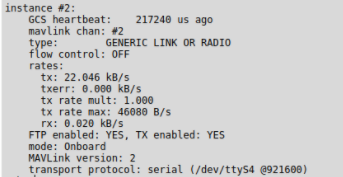
If you can adb into the VOXL side and also get a MAVLink connection over USB to the Flight Core side, I'd say no it's not bricked.
I'm wondering if we are missing something else. Are you modifying the PX4 FW or software on VOXL at all?
What else are you running if anything on VOXL?
There's a physical UART connecting the two, there are discrete components on the board such as ESD diodes, is the hardware being altered or installed into anything or just used in a Flight Deck? It's sounding like software and maybe an edge case with timing if it's intermittent though... if hardware issue it wouldn't work at all..
-
Hi @modaltb
No I can ADB into the voxl, so its not bricked!
This board is brand new and we were just configuring the flight core and we had just updated the custom firmware from v0.0.5 to v0.2.3.
We just wanted to do VOA.
However we found the issue, it seems to be a hardware issue!
The J12 port to which the TELEM cable is connected to is not working correctly. I physically inspected if there are any damages but couldnt find anything wrong.
This voxl was not able to communicate with another flight core as well. But once we shifted to J10 port it started to work correctly.
So is it still hardware issue?Thanks & Regards,
Mohammed Naveed -
Hi @mohammednaveed ,
AH ok I thought you had a VOXL-Flight, but it sounds like you have a VOXL and an external flight controller?
J12 is on the VOXL:
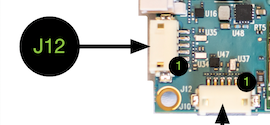
On VOXL-Flight, it's internally routed.
OK, we have a loop back test that you can use to test the hardware on J12.
If you can connect pins 2/3 together via a custom cable, you can try the loop back test to see if the HW is OK: https://gitlab.com/voxl-public/core-libs/libvoxl_io/-/blob/master/lib/apps/voxl-uart-loopback.c#L54
-
Hi @modaltb
Sorry if i didnt mention this earlier. Its a VOXL flight deck which is having this issue. My other VOXL flight deck is working fine and we tried to interchange the board and see where the issue was and found out to be the J12 port. In the other flight deck J12 is working correctly.
I'll try the loop back test.Thanks & Regards,
Mohammed Naveed -
Hi @modaltb
Sorry if i didnt mention this earlier. Its a VOXL flight deck which is having this issue. My other VOXL flight deck is working fine and we tried to interchange the board and see where the issue was and found out to be the J12 port. In the other flight deck J12 is working correctly.
I'll try the loop back test.Thanks & Regards,
Mohammed Naveed@mohammednaveed Hi, have you solved your issue? Do you know where the issue is from?
-
Hi @mohammednaveed ,
AH ok I thought you had a VOXL-Flight, but it sounds like you have a VOXL and an external flight controller?
J12 is on the VOXL:
On VOXL-Flight, it's internally routed.
OK, we have a loop back test that you can use to test the hardware on J12.
If you can connect pins 2/3 together via a custom cable, you can try the loop back test to see if the HW is OK: https://gitlab.com/voxl-public/core-libs/libvoxl_io/-/blob/master/lib/apps/voxl-uart-loopback.c#L54
-
S Syed Omair referenced this topic on

Reading along? Create a free ModalAI Forum account to join in.
With an account you can reply, ask your own question, get an email when a ModalAI engineer answers, and mark the reply that solved it. Your place in each thread is saved between visits.
Questions about VOXL, Flight Core, ESCs and ModalAI drones are answered here by the engineers who build them.
Register Login