Skip to content
  • Categories
  • Recent
  • Tags
  • Popular
  • Users
  • Groups
Collapse
Brand Logo

ModalAI Forum

  1. ModalAI Support Forum
  2. Ask your questions right here!
  3. Connecting to Wi-Fi

Connecting to Wi-Fi

Scheduled Pinned Locked Moved Ask your questions right here!
8 Posts 2 Posters 1.7k Views 1 Watching
  • Oldest to Newest
  • Newest to Oldest
  • Most Votes
Reply
  • Reply as topic
Log in to reply
This topic has been deleted. Only users with topic management privileges can see it.
  • Jae ParkJ Offline
    Jae ParkJ Offline
    Jae Park
    wrote on last edited by
    #1

    Hi,

    So I am working in a research lab with the m500 drone, and the drone won't connect to the Wi-Fi.

    Here's what happened. A former student was working in the lab using the drone. He left, and I joined right after that. He was doing Computer Vision stuff with the drone, so everything should have been set up.

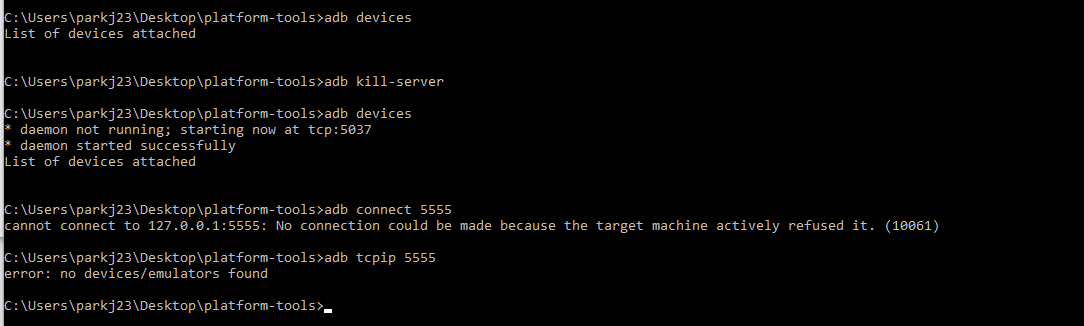
    We have a Wi-Fi router in the lab which the drone is supposed to connect to automatically, and it doesn't. The drone is not in SoftAP mode either, so the only way left for me was to connect to it using the cable (through the blue port for USB-QGroundControl). When the drone is connected to the pc via cable, this is what I see from ADB.
    prob.png

    I'm not sure why the drone wouldn't be visible. Also, another symptom is that the red light on the antenna keeps blinking red (similar to here). Please advise on what I should/can do to connect to the drone.

    1 Reply Last reply
    0
    • tomT Offline
      tomT Offline
      tom
      admin
      wrote on last edited by
      #2

      @Jae-Park In order to ADB onto VOXL, you will need to plug a Micro USB cable into J8 seen here: https://docs.modalai.com/voxl-hardware-setup/

      You can also checkout this video for a quick overview

      1 Reply Last reply
      0
      • Jae ParkJ Offline
        Jae ParkJ Offline
        Jae Park
        wrote on last edited by Jae Park
        #3

        Hi Tom,

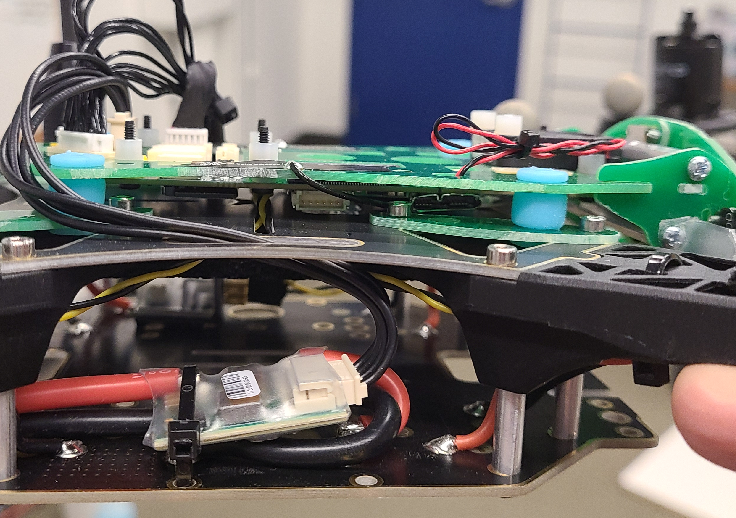
        First, thank you for your reply. From the video it seems like I should be using the port here (right under the red&black cables).
        m500_rightside.png

        So after connecting the cable, I should be able to use ADB or factory reset, right? Was there a documentation on how to go about resetting the drone settings? Thank you.

        1 Reply Last reply
        0
        • tomT Offline
          tomT Offline
          tom
          admin
          wrote on last edited by
          #4

          @Jae-Park That is correct. You can use a normal micro-usb cable to connect. You can download the latest System Image from: downloads.modalai.com. The newest release is VOXL Platform Release 3-3-0 0.5.0 a

          Jae ParkJ 1 Reply Last reply
          0
          • tomT tom

            @Jae-Park That is correct. You can use a normal micro-usb cable to connect. You can download the latest System Image from: downloads.modalai.com. The newest release is VOXL Platform Release 3-3-0 0.5.0 a

            Jae ParkJ Offline
            Jae ParkJ Offline
            Jae Park
            wrote on last edited by
            #5

            @tom Hi Tom,

            My question is now not so much related of the subject 'Connecting to Wi-Fi', but I think I'm just going to keep this thread going.

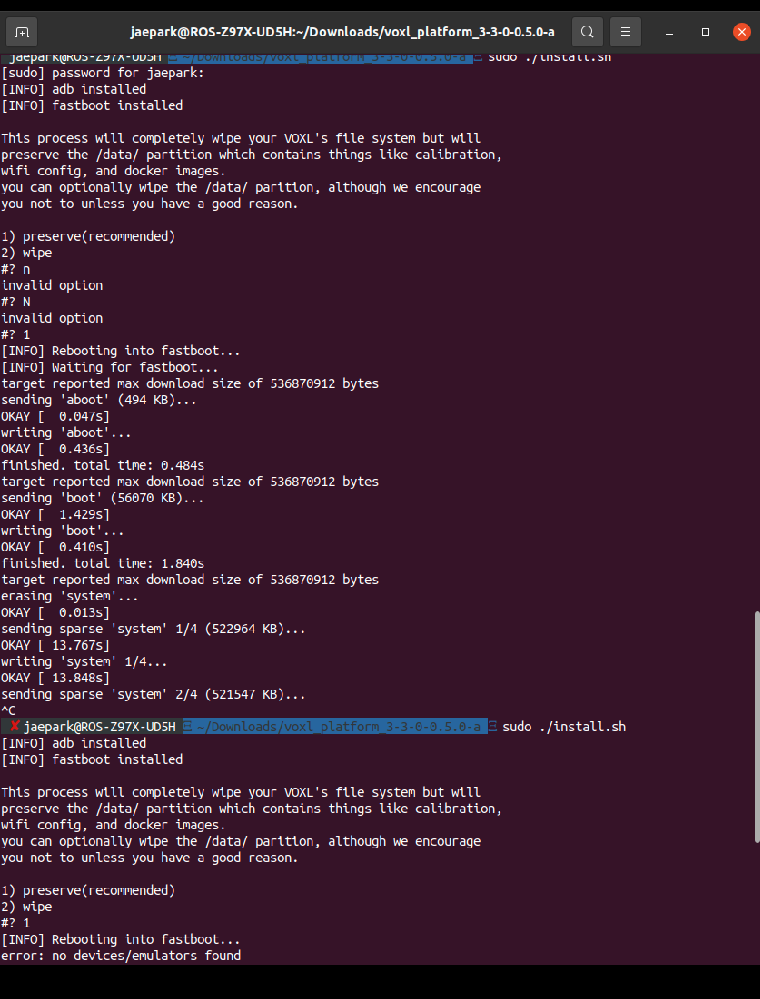
            So, I was trying to flash a new Sys Img to the drone using ADB. While running the install.sh, I accidentally stop the running shell and it now fails to run.
            img.png

            Here's a screenshot of what happened..

            How should I go from here?
            Basically the person who was using this drone before me didn't not leave any information about the SSID or password, so I'm unable to connect to it via either Station or AP modes. Therefore, I'm just trying to factory reset the whole thing and start from scratch. Any suggestion on how I can reset the whole thing again or a way to connect to the drone without knowing SSID or pw? Any advice would be greatly appreciated. Thank you!

            1 Reply Last reply
            0
            • tomT Offline
              tomT Offline
              tom
              admin
              wrote on last edited by
              #6

              @Jae-Park Unfortunately stopping a system image half way through will cause the VOXL to enter a "bricked" state where neither ADB nor Fastboot can be brought up using the command line.

              The solution to force it into fastboot requires one of our debug boards.

              Checkout this page for more info: https://docs.modalai.com/unbrick-voxl/#prevent-flash-corruption-ie-bricking


              Jae ParkJ 1 Reply Last reply
              0
              • tomT tom

                @Jae-Park Unfortunately stopping a system image half way through will cause the VOXL to enter a "bricked" state where neither ADB nor Fastboot can be brought up using the command line.

                The solution to force it into fastboot requires one of our debug boards.

                Checkout this page for more info: https://docs.modalai.com/unbrick-voxl/#prevent-flash-corruption-ie-bricking

                Jae ParkJ Offline
                Jae ParkJ Offline
                Jae Park
                wrote on last edited by
                #7

                @tom And this board was not included in the original kit right?

                1 Reply Last reply
                0
                • tomT Offline
                  tomT Offline
                  tom
                  admin
                  wrote on last edited by
                  #8

                  @Jae-Park Correct, I’d your team didn’t explicitly purchase it then you’ll have to order it from https://www.modalai.com/collections/voxl-add-ons/products/voxl-usb-expansion-board-with-debug-fastboot-and-emergency-boot

                  1 Reply Last reply
                  0

                  Hello! It looks like you're interested in this conversation, but you don't have an account yet.

                  Getting fed up of having to scroll through the same posts each visit? When you register for an account, you'll always come back to exactly where you were before, and choose to be notified of new replies (either via email, or push notification). You'll also be able to save bookmarks and upvote posts to show your appreciation to other community members.

                  With your input, this post could be even better 💗

                  Register Login
                  Reply
                  • Reply as topic
                  Log in to reply
                  • Oldest to Newest
                  • Newest to Oldest
                  • Most Votes


                  ModalAI
                  Categories Recent Tags ModalAI.com Docs
                  © 2026 ModalAI® · Accelerating autonomy for smaller, smarter, safer drones · Powered by NodeBB
                  • Login

                  • Login or register to search.
                  • First post
                    Last post
                  0
                  • Categories
                  • Recent
                  • Tags
                  • Popular
                  • Users
                  • Groups