
98% Packet Loss between QGC & Vehicle
-
I have worked through several setup issues since recv this system from a vendor. I setup the voxl-vision-px4 I am not 100% confident that it is correct, hence why I may be experiencing the current huge packet loss.
What my end goal looks like:
- Establish LTE connection. (working)
- Create VPN with OpenVPN (working)
- Create/Execute a Script that polls the LTE connection for signal strength/cellid and push the results (wget) to a server on the VPN executes every 5 secs. (works)
- 1,2,3 works well when voxl-vision-px4 is not running
When voxl-vision-px4 is running, I can barely get a ping to the server within the vpn. Is there a better way to poll and submit to a server within the vpn via wget? Is this just a system loading issue? Is the request attempting to go through voxl-vision-px4 and creating issues? Can i send this request around voxl-vision-px4?
- Establish QGC to Vehicle via LTE vpn. (working)
- QGC Unable to get the parms, vehicle setup etc due to over a 98% mavlink packet loss. My LTE connection is solid, RSRP -80. My connection status flickers between Connected and Disconnected
I am not sure what I can do to decrease the packet loss?
Can I set up the vehicle via USB?
Thanks in advance
Chuck -
Any chance you are also connecting QGC over Wifi? That network traffic could be colliding with the LTE traffic
-
I dont think so. QGC is connected on the VPN. I only have VPN comm link definitions. Are there any parms that can be adjusted for message rates on the vehicle?
-
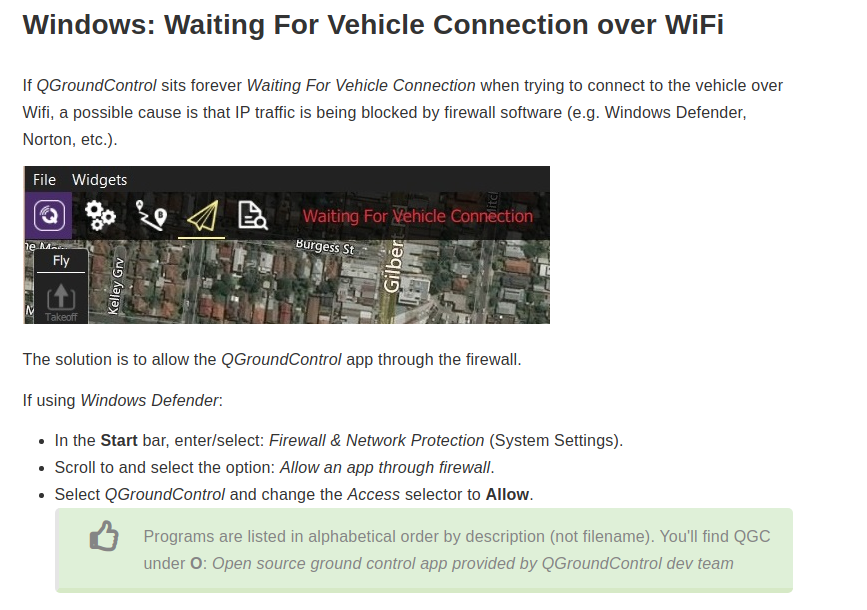
@Chuck-Bokath Are you using a Windows machine to run QGroundControl? If so, there are known issues with the default firewall settings that need to be tweaked.
From https://docs.qgroundcontrol.com/master/en/Support/troubleshooting_qgc.html
-
@Chuck-Bokath Are you using a Windows machine to run QGroundControl? If so, there are known issues with the default firewall settings that need to be tweaked.
From https://docs.qgroundcontrol.com/master/en/Support/troubleshooting_qgc.html
@tom The vehicle connects. I am just dropping a ton of packets. I followed the instructions, Ground Control is allowed.
-
@Chuck-Bokath Okay so what I have setup is a VOXL Flight connected to our OpenVPN server using a V2 LTE modem and a Google Fi SIM. I then have QGC running on my Ubuntu desktop machine which is also connected to my VPN server. I have voxl-vision-px4 running on my VOXL Flight pointing to the IP address of my ground station assigned by the VPN server.
Here is my current packet loss %
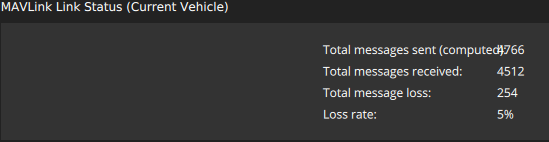
Completely normal sitting around 5% and dropping.A couple thoughts for you:
-
A constant connection / disconnection could be related to two different devices attempting to use the same key to connect to your VPN server and they are constantly kicking each other off. So that is one thing to check. Make sure the VOXL and ground control station are using unique keys.
-
We have seen in the past where Windows machines have bandwidth issue when using QGC. Do you have a machine with Ubuntu 18.04 on it that you could test with? This is the OS that the majority of our internal machines are loaded with.
-
-
@Chuck-Bokath Okay so what I have setup is a VOXL Flight connected to our OpenVPN server using a V2 LTE modem and a Google Fi SIM. I then have QGC running on my Ubuntu desktop machine which is also connected to my VPN server. I have voxl-vision-px4 running on my VOXL Flight pointing to the IP address of my ground station assigned by the VPN server.
Here is my current packet loss %
Completely normal sitting around 5% and dropping.A couple thoughts for you:
-
A constant connection / disconnection could be related to two different devices attempting to use the same key to connect to your VPN server and they are constantly kicking each other off. So that is one thing to check. Make sure the VOXL and ground control station are using unique keys.
-
We have seen in the past where Windows machines have bandwidth issue when using QGC. Do you have a machine with Ubuntu 18.04 on it that you could test with? This is the OS that the majority of our internal machines are loaded with.
@tom Thanks for the tips. I'll verify the key issue with openvpn. That didnt occur to me. They are both using the same key. I do have several machines with Ubuntu on them. I'll try that next. Thanks!
w/r/t voxl-vision-px4 running and attempting to run a shell script after openvpn connects much less pinging a server on the vpn; -- should the voxl system experience such a large load making those operations fail?
-
-
@Chuck-Bokath Those shouldn't be super large loads so that shouldn't interfere with any of the other processes on VOXL. I'm guessing it's all related to the keys, that would explain a lot of this behavior that you're seeing.
@tom It may have done the trick. I had QGC running in the background with the vehicle on, connected to the vpn. When I changed the keys; the vehicle's led 1 changed from solid green to flashing green, then to flashing red. I googled around for the led flash pattern, bc it never seems good when a system flashes red - I haven't found what flash red mean yet, though i ran across a mention where flashing green means firmware upgrade? I suspect the red means the flash of the firmware failed. I can't get back into the system via adb or any method so far. If, in fact the flashing red light mean error with the firmware can you point me to the correct docs to reload the firmware and get my system back to the previous state? I feel that the key issue was the culprit.
thank you!
-
@Chuck-Bokath Can you describe the hardware you're using? Is it just an M500 or a custom build? Can you also describe which LED is doing this behavior, or send a picture or video of what you're seeing so we can figure out what is going on?
No ADB can mean a couple things. See this topic for some instructions on how to get it back: https://forum.modalai.com/topic/488/adb-or-wi-fi-no-longer-communicating?_=1636651334161
-
@Chuck-Bokath Can you describe the hardware you're using? Is it just an M500 or a custom build? Can you also describe which LED is doing this behavior, or send a picture or video of what you're seeing so we can figure out what is going on?
No ADB can mean a couple things. See this topic for some instructions on how to get it back: https://forum.modalai.com/topic/488/adb-or-wi-fi-no-longer-communicating?_=1636651334161
@tom Tom, Thanks for the help. The connection issue was definitively the VPN key. I used the same keys with different login credentials. I created a new user cert, and new profile, associated those 2 together downloaded the ovpn and create a separate instance of the vpn session. No problem connecting with the vehicle, though it says thats its at 60% loss. I have a goo connection with ATT at -90 RSRP, low SNR.
The flickering lights appear to be from a bad battery. I change batteries when I went into the office, and all was better.
Also, the ability to push the signals from the modem to a server via wget works well. I believe that was symptom of the vpn key issue.
Now, I just need to figure out how to compile a c program to use the voxl-inspect-gps program to pull real time off the gps pipe. Is there a concise document you can point me to? Will I need to compile on a ubuntu system then push it over to the vehicle? Thats fine, I am use to that..
-
@Chuck-Bokath Great to hear that you're making progress. As for developing your new program you can use the
voxl-emulatordocker image: https://docs.modalai.com/voxl-emulator/ in order to compile programs for VOXL on an Ubuntu machine. Here is a good doc on MPA https://docs.modalai.com/voxl-sdk/#what-is-modal-pipe-architecture-mpa



Reading along? Create a free ModalAI Forum account to join in.
With an account you can reply, ask your own question, get an email when a ModalAI engineer answers, and mark the reply that solved it. Your place in each thread is saved between visits.
Questions about VOXL, Flight Core, ESCs and ModalAI drones are answered here by the engineers who build them.
Register Login