
Need Urgent Support ASAP regarding Starling Max 2 Controller Arming issue
-
Hi @oiler251 , please follow these steps to diagnose the issue. It looks like Step 1 is ok, but double check it anyway.
Step 1: Check the RC protocol setting
SSH or ADB into the drone and check
/etc/modalai/voxl-px4.conf:cat /etc/modalai/voxl-px4.confLook for the
RCsetting. It must match your controller's protocol. For Ghost/GHST receivers (the Starling Max 2's default), it should read:RC=GHSTIf it shows
SPEKTRUM,SBUS, or anything else, change it toGHST(or whatever protocol your controller uses), then reboot:rebootThis exact issue caused arming failures for other Starling Max 2 users after running ESC or RC calibration — see this thread and this one for confirmed resolutions.
Step 2: Re-check RC calibration (switch channels)
If the protocol is correct, the calibration itself may have missed the switch channels. When you re-run RC calibration in QGroundControl, make sure you move all switches (kill switch, mode switch, and any others) through their full range when prompted. Channels 5–8 need to be swept or the calibration will leave them in a bad state.
Step 3: Check the specific arming failure reason in QGC
Connect to QGroundControl and attempt to arm. QGC will display a specific pre-arm failure message (e.g., "RC not calibrated", "Throttle too high", "Kill switch engaged"). That message will tell you exactly what PX4 is blocking on.
Common blockers:
- Throttle not at zero — left stick must be fully down before arming
- Kill switch active — ensure it's in the "disarmed" (off) position
- RC not calibrated — re-run calibration as above
Regarding the original drift issue:
Drift after takeoff is usually caused by an IMU or accelerometer calibration issue, or by flying in a mode that requires GPS/VIO when neither is available (or not configured). Once you get arming working, if drift persists, share the output of
voxl-inspect-servicesand a flight log — that will help diagnose whether it's a sensor calibration or an estimation/navigation issue.How to retrieve PX4 logs (for when you need them):
Option 1 — ADB over USB:
adb shell ls /data/px4/log          # list sessions
adb pull /data/px4/log/sess001/log001.ulg .
Option 2 — SCP over WiFi (replace IP with your drone's IP):
scp -r root@192.168.x.x:/data/px4/log ./px4_logsOption 3 — QGroundControl:
Go to Analyze → Log Download while connected over WiFi.Then upload the
.ulgfile to https://logs.px4.io for analysis.
Please try Step 1 first and report what the RC setting shows — that's resolved this exact symptom in at least two prior cases.
Sources
- Starling 2 Max Not Arming (forum post/19806) — RC protocol set to SPEKTRUM instead of GHST; confirmed fix
- Drone not flying manually with ORQA FPV.Ctrl controller (forum post/19647) — same RC protocol fix confirmed by ModalAI staff
- Arming Issues with Controller (forum post/3641) — controller switches visible in QGC but arm gesture not working
- Starling 2 Max does not roll and pitch in position mode — related flight behavior thread
- Downloading PX4 ulog files (forum post/7053) — log retrieval methods
- VOXL PX4 docs — official VOXL 2 PX4 documentation
-
Hi @alex-kushleyev Alex
I will follow the instructions tomorrow morning.
Regarding Channels 5–8 need to be swept during calibration, one of the steps ask for both joystick to be in certain position and left and right top button. In that case, do I press/toggle channel 5-8 all at once or one after another. The instructions were not clear, so I believe that may have caused the calibration at bad state as you mentioned. Would you mind provide steps particularly for channel 5-8 for Ghost RC.
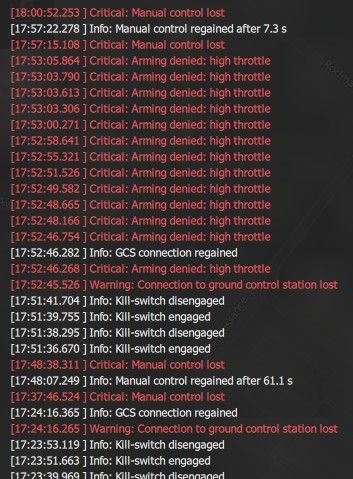
Also, are you available over the phone tomorrow if support needed.It looks like arming denied due to high throttle. I had throttle pulled all the way down and to the right for arming propeller as that is how it used to arm prior calibration.
-
Please refer to the standard PX4 calibration procedure for the RC. For example, more details here https://docs.px4.io/main/en/config/radio . You may also just need to clear your RC parameters from PX4.
You can also try to clear your calibration since it's normally not required : https://docs.qgroundcontrol.com/v4.4.3/en/qgc-user-guide/setup_view/radio.html
"
TIPYou can clear all parameter/tuning channel mappings by selecting menu Tools > Clear RC to Param at the top right of the Parameters screen.
" -
@alex-kushleyev
Thank you for additional information. I will try these instructions tomorrow morning and update you accordingly. -
@alex-kushleyev
I followed the instruction steps and still arming issue. Below are the steps result.
Step 1: The RC=GHST
Step 2: Re-run Calibration as per the instruction as well as per the video. Calibration Successful.
Step 3: Manual arm gesture does not report any error but if I set arm to channel 7, I can see Arming denied: high throttle message.
I also tried tried clear all RC to Param and does not arm the drone.Please, advise how can we troubleshoot further.
-
Is it mode 1 or mode 2 for Ghost RC calibration? Mine is mode 1 by default.
-
When you lower your throttle stick on the RC and look at the RC tab in QGC, does the throttle slider actually decrease or is it mapped to pitch? If you are assuming that throttle is the left stick (up down), that is Mode 2. Mode 1 would put throttle on the right joystick, so that seems like your issue.
-
I realized it would be mode 2 for Ghost joystick with left stick as throttle.
The drone arms with the controller now. The drone is tethered to a fixture inside our lab (GPS denied ambience) and when arm and takes off at manual mode, I can control less now. It use to be more controller with height adjustment and maneuvering clock wise or anti clock wise at 3 ft height. It is like jumping up and down and drift front, back, left and right.
Do I have to disable any sensors? -
@alex-kushleyev
Now is back to normal setting as it used to be whereas i still see the drift issue after take off.
Can you support how to configure it to hold position once take off?
My demo will be inside the building in big 20' x 30' closed area and I can not run this with drift in any direction after take off and hit the boundary net.
Can you advise how i can resolve this drifting issue? -
HI @oiler251 , we will work on a more detailed step by step guide for debugging VIO. Meanwhile, you may found the below unofficial guide useful.
VOXL 2 / OpenVINS Drift Troubleshooting Guide
Applies to: Starling 2 / Starling 2 Max and other VOXL 2 vehicles running
voxl-open-vins-serverwith PX4
How to use this guide
The steps are ordered by cost × likelihood: the first few take minutes and catch the problems that cause most "my drone drifts" reports. Each step has a pass/fail check. Don't skip ahead. If a step fails, fix it and restart from Step 1, because a fix upstream often changes what you see downstream.
The pipeline you're debugging, end to end:
tracking cams + imu_apps ──► voxl-open-vins-server ──► voxl-vision-hub ──► PX4 EKF2 ──► position controller
     (Steps 4, 7, 8)              (Steps 3, 5, 9)          (Step 6)          (Steps 1, 6)      (Step 0, 8)
The core diagnostic split, straight from ModalAI's docs: if
voxl-inspect-vinsshows valid, moving position data, VIO is working, and no amount of camera recalibration will help; the problem is on the PX4 side. Use that rule constantly.
Quick triage table
Symptom Most likely cause Go to Drifts in Manual / Stabilized mode Expected; no position control in that mode Step 0 QGC says "position mode rejected" / falls back to Altitude PX4 not getting or not fusing VIO; outdoor/GPS params loaded Step 1 Position mode accepted, but slow wander VIO quality, environment, calibration Steps 3–5, 7 Position mode accepted, vehicle runs away fast after takeoff Frame/extrinsics mismatch Step 6 Holds OK, then sudden jump/lurch mid-flight VIO reset in flight Step 9 "Bouncing" up and down, oscillating Height source, vibration, tether, or tuning Step 8 VIO stays in INIT on the ground IMU cal, cam cal, texture at takeoff spot Step 9
Step 0 — Confirm which flight mode the drift happens in (2 min)
Why first: this single question resolves a large share of reports. Manual mode will drift because it has no position control.
Do:
- Note the mode on the RC mode switch and in QGC at the moment of drift.
- Manual / Stabilized / Altitude: horizontal drift is expected. Altitude mode holds height only.
- Only Position (and Offboard) mode uses VIO to hold X/Y.
Pass: the drift is happening in Position mode. → Continue.
Fail: the drift is in Manual/Altitude. → The fix is to get Position mode working; go to Step 1.Note for the #5505 case: the user also re-ran QGC's sensor calibration hoping to fix drift. That calibrates PX4's flight IMU, which helps attitude, but it does not touch
imu_apps, the IMU OpenVINS uses (see Step 7). It also cannot make Manual mode hold position.
Step 1 — Is PX4 configured for indoor VIO? (5–10 min, highest-yield check)
Why: a ModalAI moderator stated that the Starling 2 Max is marketed as an outdoor drone and ships with "outdoor GPS" PX4 parameters, so its default Position mode tries to use GPS. Indoors with no GPS fix, PX4 then rejects Position mode or flies on a bad estimate. Another Starling 2 Max user's drift was resolved by loading
indoor_vio_missing_gps.params.Do:
- Plug in the battery, wait ~30 s for
voxl-vision-hubto start, connect QGC. - Flip the mode switch Manual → Position with the props off or disarmed. Listen for QGC's announcement:
- "position" → PX4 accepts the VIO.
- "position mode rejected, altitude flight mode" → PX4 isn't getting or isn't fusing VIO.
- Load the version-matched indoor VIO parameter file from voxl-px4-params (for PX4 v1.14:
params/v1.14/EKF2_helpers/indoor_vio.params, orindoor_vio_missing_gps.paramsif no GPS is attached). In QGC: Parameters → Tools → Load from file, then reboot. - Spot-check these parameters afterward:
Param Indoor VIO-only value Notes EKF2_EV_CTRLper param file ModalAI calls this the most often overlooked VIO param SYS_HAS_MAG0Otherwise PX4 may reject Position mode for want of a magnetometer EKF2_MAG_TYPE5Disables mag fusion SYS_HAS_GPS0Only if no GPS is on the vehicle EKF2_AID_MASKno longer exists on PX4 1.14; ignore older guides that reference it.Pass: QGC accepts Position mode on the bench.
Fail: continue to Steps 2–3 to find out why VIO isn't reaching EKF2.Watch for: params from the wrong PX4 version cause subtle breakage. Also, a connected GPS/mag unit fighting VIO can corrupt local position. For a quick experiment, ModalAI suggests disconnecting it.
Step 2 — Are the right services running, and only one VIO engine? (2 min)
Do:
voxl-version
voxl-inspect-services
Pass criteria:
voxl-camera-server,voxl-open-vins-server,voxl-vision-hub,voxl-px4are Enabled + Running.voxl-qvio-serveris Disabled / Not Running. Only one VIO engine should run at a time./etc/modalai/voxl-vision-hub.confhas:
Vehicles set up on older SDKs may still have"vio_pipe": "ov", "secondary_vio_pipe": "","vio_pipe": "qvio"with OpenVINS as the fallback.- All packages come from one SDK release. Mixed package versions break the pipeline. Prefer flashing a complete SDK over upgrading single packages.
Fix if needed:
voxl-configure-qvio disable
systemctl stop voxl-qvio-server
systemctl enable voxl-open-vins-server
systemctl restart voxl-open-vins-server voxl-vision-hub
Nuclear option:
voxl-configure-mparesets every service config to the SKU defaults.
Step 3 — Is VIO healthy on the ground before arming? (2 min)
Do:
voxl-inspect-vinsRead three fields:
- State:
FAIL(0),INIT(1), orOKAY(2). Must beOKAY. - Quality: higher is better;
-1= failed. OpenVINS applies hysteresis, so it shouldn't flicker. - Error codes: a hex bitfield decoded by the tool. Mostly meaningful when the state is FAIL. The full table is on the Pipe Interface page.
Pass:
OKAY, stable quality, position near zero and not wandering while the vehicle sits still.
Fail: stuck in INIT → Step 9's "won't initialize from rest" list. Wandering while stationary → Steps 4 and 7.Operational rule: ModalAI recommends that if you need VIO from takeoff, you initialize statically on the ground, confirm
OKAY, and only then take off. Make "wait for OKAY" part of the preflight.
Step 4 — Look at the camera images (5 min)
Why: VIO depends on visible features plus low-noise IMU data. Bad imagery is the most common physical cause of drift indoors.
Do: open voxl-portal in a browser (drone's IP) and view each tracking camera and the VIO tab.
Checklist:
- Lens covers removed, lenses clean (plastic lens; microfiber only)
- In focus: for OV7251 fisheye, everything beyond ~15 cm should be sharp (test with high-contrast objects at 15 cm and 1 m)
- Enough light; no glare or hot spots
- Texture at both near and far range. A plain lab floor under the down camera, blank walls, or a boundary net filling the view all starve the tracker. Far-only features give orientation but poor position.
- Nothing intruding into the view (legs, tether, payloads, wiring)
- Cameras detected:
voxl-camera-server -l
Also check camera-server health. A Starling 2 Max user on SDK 1.6.3 / OpenVINS 0.6.0 saw massive drift from feature loss. Running
voxl-camera-serverin the foreground showed repeatedReceived "Result"/"Buffer" error from camera: tracking_downanddropping frame after re-init. ModalAI's fix was updating OpenVINS to the GitLab master branch (or thesynced-timestampbranch for epoch-synced AR0144 tracking cams). To look for this:systemctl stop voxl-camera-server voxl-camera-server # watch for repeated per-frame errors, then Ctrl-C systemctl start voxl-camera-serverFix: add texture (tape patterns, posters, mats on the floor), improve lighting, or move the takeoff spot. ModalAI's guidance is to fix the scene rather than tune the estimator.
For the 20' × 30' netted demo area: a uniform floor plus a net perimeter is a weak VIO environment. Put high-contrast texture on the floor under the takeoff point and along the walls the front camera will see.
Step 5 — Hand-held test (5 min, props off)
This is the definitive "is VIO itself healthy?" test. Repeat it after any VIO config change.
- Props off, VIO running, VIO tab open in voxl-portal.
- Slowly lift and move the vehicle about half a meter. Features should stay locked on the same physical points. Features that pop in and out or slide off their targets usually mean wrong camera-to-IMU extrinsics.
- Walk it around the room and return it to the exact start position and heading. Reported drift should be a few percent of distance traveled, with very small yaw drift.
- While moving, sanity-check axes in
voxl-inspect-vins. Forward should give +X; up should give −Z (FRD/NED).
Pass: drift is a few percent and features are locked → VIO is fine. Go to Step 6.
Fail: large drift or sliding features → Step 7 (calibration/extrinsics). If calibration checks out → Step 9 logging.
Step 6 — Verify the pose that actually reaches PX4 (5 min)
Why: VIO can be perfect while the estimate PX4 flies on is wrong, because extrinsics or EKF2 fusion sit in between. A coordinate mismatch makes PX4 take off and then quickly run away out of control.
Do:
- Pose after extrinsics are applied (should match PX4's local position):
Good VIO but wrong pose here → extrinsics problem. Check withvoxl-inspect-pose vvhub_body_wrt_localvoxl-inspect-extrinsicsand see Configure Extrinsics. - In QGC → Analyze → MAVLink Inspector:
ODOMETRY: X/Y non-zero and moving correctly in NED as you carry the drone (forward = +X North-ish in local frame, right = +Y, up = −Z).LOCAL_POSITION_NED: Z updating but X/Y stuck at zero = EKF2 config problem, not VIO. Go back to Step 1.
- Check camera selection:
voxl-inspect-vio-cams(config in/etc/modalai/vio_cams.conf).
Pass: VIO pose, vision-hub pose, and PX4 local position all agree and move in the right directions.
Step 7 — Calibration (15–60 min)
Only do this if Steps 3–6 point at estimation quality. Recalibrating isn't free, and it doesn't help when VIO is already good (see the decision rule at the top).
7a. VIO IMU (
imu_apps), not the PX4 IMU- The VIO IMU is the apps-processor IMU (
imu_apps), not the one PX4 flies on. QGC sensor calibration does not calibrate it. - Recalibrate with
voxl-calibrate-imu(or from voxl-portal), then confirm gravity reads ≈ 9.81 m/s²:voxl-inspect-imu imu_apps - A wrong gravity magnitude or bad biases give a static init that looks fine on the bench and falls apart once airborne.
- Try removing the IMU temperature-calibration file from
/data/modalai/. It's optional and can hurt if captured poorly. Back it up first.
7b. Camera intrinsics
- Files:
/data/modalai/opencv_<pipe>_intrinsics.yml. - Resolution in the cal file must match the camera's current streaming resolution. A 640×480 cal is invalid at 1280×800.
- Check the stored
reprojection_error. The ModalAI calibrator accepts ≤ 0.75 px (pinhole) / ≤ 0.60 px (fisheye); recalibrate if you're near the limit. - Tracking cameras are factory-calibrated. If you've lost the factory cal, ModalAI keeps production backups; ask on the forum with the board's serial number.
7c. Extrinsics
/etc/modalai/extrinsics.confdefines camera/IMU geometry. ModalAI ships these from CAD, so they're accurate but not per-unit calibrated. They only need changing if cameras were moved or the airframe was modified.
 ️ Documentation discrepancy (calibration threshold): ModalAI's calibrator accepts up to 0.75 px (pinhole) / 0.60 px (fisheye). Upstream OpenVINS says a good calibration has reprojection error under about 0.2–0.5 px. A cal that "passes" ModalAI's gate can still be mediocre by OpenVINS's standard. If you're chasing residual drift, treat anything above ~0.5 px as a recalibration candidate.
Step 8 — Mechanical & flight-dynamics confounders (10 min)
These make a good estimate look like drift, or degrade it in flight only.
- Vibration: degrades VIO significantly. Check with:
and the PX4 log. Fix damping, balance props, and replace damaged props before touching software.voxl-inspect-vibration - Tether / test fixture: the #5505 user is flying tethered to a fixture. A taut tether pulls the vehicle, so the position controller fights it, which can look like "jumping up and down" and drift. It may also intrude into a camera view. Validate VIO with a slack tether, or untethered at low altitude in a netted area.
- Height "bouncing": check which height source EKF2 uses in the indoor param file you loaded and confirm it actually applied. In a small enclosed room, prop wash and ground effect disturb a barometer.
- Airframe changes: added payloads, lights, or prop guards affect both vibration and camera view.
Step 9 — Initialization & in-flight resets
VIO won't initialize from rest (stuck in INIT)
ModalAI's ordered list:
- Recalibrate IMU; confirm ≈ 9.81 m/s² (Step 7a).
- Camera calibration resolution matches current stream (Step 7b).
- Lighting/texture at the takeoff spot. Static init doesn't need features, but the filter needs them immediately after.
- Static vs dynamic init: static needs the vehicle stationary and level-ish. Dynamic needs ~2 s of motion with parallax, which a vehicle sitting still never provides.
- Vibration / airframe intrusions.
- Record a log (Step 10).
Sudden jump or lurch mid-flight
That's likely an auto-reset. The health monitor (30 Hz) resets on estimator-health codes (corrupt covariance, sustained low quality, feature starvation, velocity-uncertainty breaches). Transport warnings such as dropped frames do not trigger resets. A dynamic re-init can produce a jump discontinuity in the estimate, which PX4 will chase.
- Watch
voxl-inspect-vinsduring a hover for state changes and error codes. - If the use case can't tolerate jumps, ModalAI's advice is not to rely on dynamic init or warm resets. Initialize statically on the ground instead.
- Relevant knobs:
en_auto_reset,auto_reset_max_velocity,auto_reset_max_v_cov_timeout_s,auto_reset_min_features,auto_reset_min_feature_timeout_sin/etc/modalai/voxl-open-vins-server.conf;init_dyn_useinestimator_config.yaml. The shipped values are sensible, so change one group at a time and validate with replays.
️ Documentation discrepancy (initialization defaults and where init_dyn_uselives):- The Flying with VIO page says Open-VINS "initializes dynamically at any attitude."
- A 2025 forum reply from ModalAI staff (SDK 1.4.1) says the default config does not use dynamic initialization, and puts
init_dyn_useinvoxl-open-vins-server.conf. - The current Initialization & Resets page puts
init_dyn_useinestimator_config.yaml(under theyaml_folder, default/usr/share/modalai/voxl-open-vins/VoxlConfig/starling2) and presents static vs dynamic as an application choice.
Behavior has changed across SDK versions. Check
init_dyn_usein both files on the actual vehicle rather than trusting any one page, and match it to the SDK reported byvoxl-version.
Step 10 — Capture data and escalate
If you got here without a fix, collect a complete package before posting to the forum. It turns a multi-day back-and-forth into one reply.
voxl-version > voxl-version.txt
voxl-inspect-services > services.txt
cp /etc/modalai/voxl-open-vins-server.conf /etc/modalai/vio_cams.conf /etc/modalai/extrinsics.conf .
voxl-logger -b -v ov            # record VIO around a failing hover/takeoff
PX4 flight log (
.ulg
adb shell ls /data/px4/log
adb pull /data/px4/log/<session>/<log>.ulg .
# or: QGC → Analyze → Log Download
Upload the
.ulgto https://logs.px4.io. The VIO log can be replayed offline withvoxl-benchmark-vio.Include: flight mode at time of drift, the hand-held test result, and screenshots of the voxl-portal VIO tab and the QGC
ODOMETRY/LOCAL_POSITION_NEDinspector.
Appendix A — Likely path for forum thread #5505
Based only on what the user posted. Not confirmed.
- Flew in Manual mode → drift is expected (Step 0).
- Indoor GPS-denied lab on a Starling 2 Max → very likely still on the factory outdoor/GPS params; load the indoor VIO params (Step 1). This is the single most likely fix.
- Recalibrated sensors in QGC → doesn't affect
imu_apps; if VIO is bad, usevoxl-calibrate-imu(Step 7a). - Tethered to a fixture, "jumping up and down" → tether loading and/or height source; test with slack tether (Step 8).
- Demo in a netted 20'×30' room → add floor/wall texture and wait for
OKAYbefore arming (Steps 3–4).
Appendix B — Command cheat sheet
Purpose Command SDK/package versions voxl-versionService status voxl-inspect-servicesVIO state/quality/errors voxl-inspect-vinsReset VIO voxl-reset-vinsPose sent to PX4 voxl-inspect-pose vvhub_body_wrt_localVIO camera selection voxl-inspect-vio-camsExtrinsics voxl-inspect-extrinsicsDetected cameras voxl-camera-server -lVIO IMU check voxl-inspect-imu imu_appsVIO IMU calibration voxl-calibrate-imuVibration voxl-inspect-vibrationReset all configs to SKU default voxl-configure-mpaLog VIO for replay voxl-logger -b -v ovSources
- ModalAI — Flying with VIO (triage ladder, hand-held test, X/Y-zero rule, IMU and calibration checks, PX4 params)
- ModalAI — voxl-open-vins-server
- ModalAI — Initialization & Resets
- ModalAI — Pipe Interface / error codes
- ModalAI — voxl-px4-params
- OpenVINS — Sensor Calibration
- Forum — #5505 Starling Max 2 arming/drift
- Forum — Starling 2 Max drifting off (manual mode)
- Forum — Position Mode Unavailable (outdoor GPS params)
- Forum — OpenVINS drift from camera-server errors
- Forum — Problems resetting voxl-open-vins-server
- Forum — voxl-open-vins-server config (SDK 1.4.1)

Reading along? Create a free ModalAI Forum account to join in.
With an account you can reply, ask your own question, get an email when a ModalAI engineer answers, and mark the reply that solved it. Your place in each thread is saved between visits.
Questions about VOXL, Flight Core, ESCs and ModalAI drones are answered here by the engineers who build them.
Register Login