Skip to content
  • Categories
  • Recent
  • Tags
  • Popular
  • Users
  • Groups
Collapse
Brand Logo

ModalAI Forum

  1. ModalAI Support Forum
  2. Ask your questions right here!
  3. voxl-streamer client repetitive connect/disconnect

voxl-streamer client repetitive connect/disconnect

Scheduled Pinned Locked Moved Ask your questions right here!
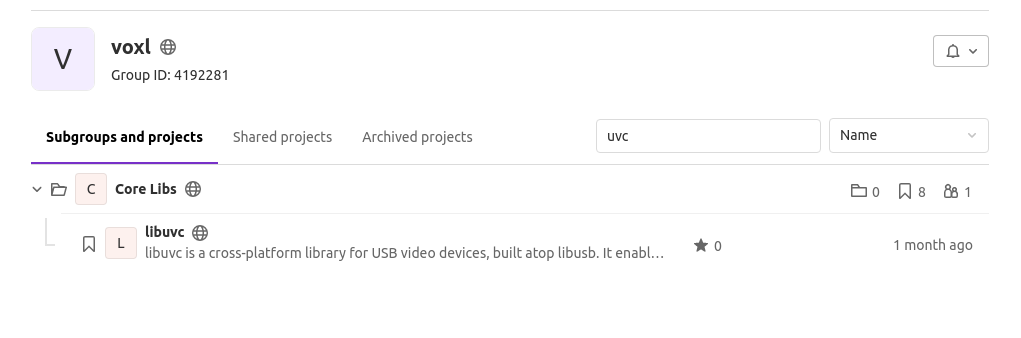
63 Posts 3 Posters 23.7k Views 3 Watching
  • Oldest to Newest
  • Newest to Oldest
  • Most Votes
Reply
  • Reply as topic
Log in to reply
This topic has been deleted. Only users with topic management privileges can see it.
  • wilkinsafW Offline
    wilkinsafW Offline
    wilkinsaf
    ModalAI Team
    wrote on last edited by
    #1

    We are having problems when streaming our UVC camera with VOXL streamer.

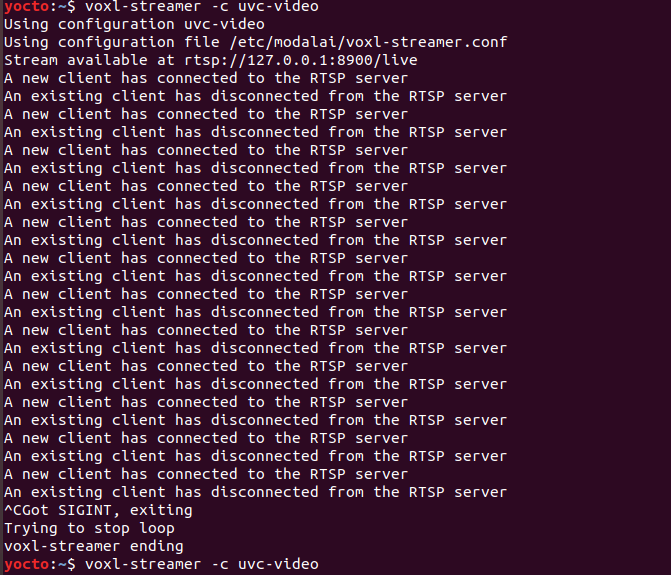
    The voxl-streamer repetitively connects then disconnects when trying to access the camera
    448b4318-d44d-4bba-9d96-b1a35ee4bb80-image.png

    Some background, we are using the Sony IMX sensor that is connected to the Microhard add-on board.

    When running lsusb we can see the device there (although there is no name for it)db9b8d2b-f510-4038-917e-a962409a8224-image.png

    The tracking camera and hires camera are able to stream without incident.

    Any insight would be greatly appreciated. Thank you!

    1 Reply Last reply
    0
    • Chad SweetC Offline
      Chad SweetC Offline
      Chad Sweet
      ModalAI Team
      wrote on last edited by
      #2

      There is a known issue with UVC streaming. I'm not sure when it will be fixed. We'll try to investigate and get back to you in a few days.

      wilkinsafW 1 Reply Last reply
      0
      • Chad SweetC Chad Sweet

        There is a known issue with UVC streaming. I'm not sure when it will be fixed. We'll try to investigate and get back to you in a few days.

        wilkinsafW Offline
        wilkinsafW Offline
        wilkinsaf
        ModalAI Team
        wrote on last edited by
        #3

        @Chad-Sweet

        Right on. I will try some troubleshooting from my end as well. Will let you know if I find anything interesting.

        Thanks!

        Eric KatzfeyE 2 Replies Last reply
        0
        • wilkinsafW wilkinsaf

          @Chad-Sweet

          Right on. I will try some troubleshooting from my end as well. Will let you know if I find anything interesting.

          Thanks!

          Eric KatzfeyE Offline
          Eric KatzfeyE Offline
          Eric Katzfey
          ModalAI Team
          wrote on last edited by
          #4

          @wilkinsaf UVC camera support was developed against QGroundControl v3.5.6 and using a Logitech C270 camera. Newer versions of QGroundControl do not wait long enough for the connection to come up and try to restart. Also, cameras that do not support a raw format won't work. I would try with QGoundControl v3.5.6 first and see if your camera works with that.

          1 Reply Last reply
          0
          • Eric KatzfeyE Offline
            Eric KatzfeyE Offline
            Eric Katzfey
            ModalAI Team
            wrote on last edited by
            #5

            An update to UVC camera support has been started. It will increase number of supported cameras by allowing MJPEG and will increase number of supported viewers including latest QGroundControl versions. Target availability is mid-December.

            wilkinsafW 1 Reply Last reply
            1
            • Eric KatzfeyE Eric Katzfey

              An update to UVC camera support has been started. It will increase number of supported cameras by allowing MJPEG and will increase number of supported viewers including latest QGroundControl versions. Target availability is mid-December.

              wilkinsafW Offline
              wilkinsafW Offline
              wilkinsaf
              ModalAI Team
              wrote on last edited by
              #6

              @Eric-Katzfey Thank you for the update Eric!

              Also, is there a format/guide on how to modify the camera configuration file? For example if a camera was giving off a different format, framerate, size, etc...

              I was trying to find a guide on how to modify that file, but could not.

              I figured it would be helpful for developers.

              Eric KatzfeyE 2 Replies Last reply
              0
              • wilkinsafW wilkinsaf

                @Eric-Katzfey Thank you for the update Eric!

                Also, is there a format/guide on how to modify the camera configuration file? For example if a camera was giving off a different format, framerate, size, etc...

                I was trying to find a guide on how to modify that file, but could not.

                I figured it would be helpful for developers.

                Eric KatzfeyE Offline
                Eric KatzfeyE Offline
                Eric Katzfey
                ModalAI Team
                wrote on last edited by
                #7

                @wilkinsaf The configuration file for voxl-streamer is documented here: https://docs.modalai.com/voxl-streamer/#configuration-file-format

                1 Reply Last reply
                1
                • wilkinsafW wilkinsaf

                  @Eric-Katzfey Thank you for the update Eric!

                  Also, is there a format/guide on how to modify the camera configuration file? For example if a camera was giving off a different format, framerate, size, etc...

                  I was trying to find a guide on how to modify that file, but could not.

                  I figured it would be helpful for developers.

                  Eric KatzfeyE Offline
                  Eric KatzfeyE Offline
                  Eric Katzfey
                  ModalAI Team
                  wrote on last edited by
                  #8

                  @wilkinsaf The configuration for voxl-camera-server is discussed here: https://docs.modalai.com/voxl-camera-server/#configuration

                  1 Reply Last reply
                  1
                  • wilkinsafW wilkinsaf

                    @Chad-Sweet

                    Right on. I will try some troubleshooting from my end as well. Will let you know if I find anything interesting.

                    Thanks!

                    Eric KatzfeyE Offline
                    Eric KatzfeyE Offline
                    Eric Katzfey
                    ModalAI Team
                    wrote on last edited by Eric Katzfey
                    #9

                    @wilkinsaf There is an initial version of a new UVC camera server application now available from our "dev" package repo. The application voxl-uvc-server works in conjunction with voxl-streamer to better support UVC cameras. It has been tested with the Logitech C270 and Videology 5MP Micro USB 2.0 Board Camera. The documentation is at https://docs.modalai.com/voxl-uvc-server/ and the code is at https://gitlab.com/voxl-public/modal-pipe-architecture/voxl-uvc-server. To try it out, install the latest Voxl platform release voxl_platform_3-3-0-0.5.0-a. On target, configure the opkg package manager to use the modalai dev repo (https://docs.modalai.com/configure-opkg/). Then use opkg install voxl-streamer to upgrade voxl-streamer from 0.2.6 to 0.2.7 (and libmodal_pipe from 2.1.1 to 2.1.2). Then opkg install voxl-uvc-server to install the new voxl-uvc-server application v0.0.5. Run voxl-uvc-server -d to start the application with debug messages. Then run voxl-streamer with voxl-streamer -f /usr/share/modalai/voxl-streamer/voxl-streamer.conf -c uvc-server to use the new configuration file and record type for the uvc server. Let me know if this works for you.

                    1 Reply Last reply
                    1
                    • wilkinsafW Offline
                      wilkinsafW Offline
                      wilkinsaf
                      ModalAI Team
                      wrote on last edited by
                      #10

                      quick comment for anyone reading this, it is

                      voxl-uvc-server -d when running

                      Eric KatzfeyE 1 Reply Last reply
                      0
                      • wilkinsafW wilkinsaf

                        quick comment for anyone reading this, it is

                        voxl-uvc-server -d when running

                        Eric KatzfeyE Offline
                        Eric KatzfeyE Offline
                        Eric Katzfey
                        ModalAI Team
                        wrote on last edited by
                        #11

                        @wilkinsaf Thanks! I fixed the typo in the original post.

                        1 Reply Last reply
                        0
                        • wilkinsafW Offline
                          wilkinsafW Offline
                          wilkinsaf
                          ModalAI Team
                          wrote on last edited by wilkinsaf
                          #12

                          @Eric-Katzfey

                          I am seeing that this failed for MJPEG

                          voxl:~$ voxl-uvc-server -d
                          Enabling debug messages
                          voxl-uvc-server starting
                          UVC initialized
                          Device found
                          Device opened
                          uvc_get_stream_ctrl_format_size failed for MJPEG
                          uvc_get_stream_ctrl_format_size failed

                          Is there a config file for this that I can modify to change the format?

                          Eric KatzfeyE 1 Reply Last reply
                          0
                          • wilkinsafW wilkinsaf

                            @Eric-Katzfey

                            I am seeing that this failed for MJPEG

                            voxl:~$ voxl-uvc-server -d
                            Enabling debug messages
                            voxl-uvc-server starting
                            UVC initialized
                            Device found
                            Device opened
                            uvc_get_stream_ctrl_format_size failed for MJPEG
                            uvc_get_stream_ctrl_format_size failed

                            Is there a config file for this that I can modify to change the format?

                            Eric KatzfeyE Offline
                            Eric KatzfeyE Offline
                            Eric Katzfey
                            ModalAI Team
                            wrote on last edited by
                            #13

                            @wilkinsaf That shows a failure of the camera to support either MJPEG or YUV422. In order to support that camera you need to know what formats it supports. The best way to do that is to query it's capabilities on the command line. First of all use the lsusb command to find out the device id and product id of the camera. For example:

                            Ubuntu18$ lsusb
                            Bus 001 Device 090: ID 046d:0825 Logitech, Inc. Webcam C270
                            Bus 001 Device 001: ID 1d6b:0002 Linux Foundation 2.0 root hub
                            

                            This shows you that the UVC webcam has device id and product id 046d:0825. You can use that to query it's capabilities with lsusb -v -d 046d:0825. This will dump all of the camera capabilities to the output. Can you respond with the output from your camera?

                            wilkinsafW 1 Reply Last reply
                            0
                            • Eric KatzfeyE Eric Katzfey

                              @wilkinsaf That shows a failure of the camera to support either MJPEG or YUV422. In order to support that camera you need to know what formats it supports. The best way to do that is to query it's capabilities on the command line. First of all use the lsusb command to find out the device id and product id of the camera. For example:

                              Ubuntu18$ lsusb
                              Bus 001 Device 090: ID 046d:0825 Logitech, Inc. Webcam C270
                              Bus 001 Device 001: ID 1d6b:0002 Linux Foundation 2.0 root hub
                              

                              This shows you that the UVC webcam has device id and product id 046d:0825. You can use that to query it's capabilities with lsusb -v -d 046d:0825. This will dump all of the camera capabilities to the output. Can you respond with the output from your camera?

                              wilkinsafW Offline
                              wilkinsafW Offline
                              wilkinsaf
                              ModalAI Team
                              wrote on last edited by
                              #14

                              @Eric-Katzfey

                              Apologies for the delay. Some other things came up.
                              I was able to pull down the camera information. We have 2 cameras we are trying to get up.

                              Cam 1: https://pastebin.com/qHvHKXay
                              Cam 2: https://pastebin.com/7DgvP58k

                              They appear to be able to post in MJPEG

                              Eric KatzfeyE 4 Replies Last reply
                              0
                              • wilkinsafW Offline
                                wilkinsafW Offline
                                wilkinsaf
                                ModalAI Team
                                wrote on last edited by
                                #15

                                Not sure if voxl-uvc-server got removed.
                                I can not seem to find it in the public repo:
                                6c9ccd79-a410-48ce-9117-b4ec0156f68e-image.png

                                Eric KatzfeyE 2 Replies Last reply
                                0
                                • wilkinsafW wilkinsaf

                                  Not sure if voxl-uvc-server got removed.
                                  I can not seem to find it in the public repo:

                                  6c9ccd79-a410-48ce-9117-b4ec0156f68e-image.png

                                  Eric KatzfeyE Offline
                                  Eric KatzfeyE Offline
                                  Eric Katzfey
                                  ModalAI Team
                                  wrote on last edited by
                                  #16

                                  @wilkinsaf Project is here: https://gitlab.com/voxl-public/modal-pipe-architecture/voxl-uvc-server

                                  wilkinsafW 1 Reply Last reply
                                  0
                                  • wilkinsafW wilkinsaf

                                    @Eric-Katzfey

                                    Apologies for the delay. Some other things came up.
                                    I was able to pull down the camera information. We have 2 cameras we are trying to get up.

                                    Cam 1: https://pastebin.com/qHvHKXay
                                    Cam 2: https://pastebin.com/7DgvP58k

                                    They appear to be able to post in MJPEG

                                    Eric KatzfeyE Offline
                                    Eric KatzfeyE Offline
                                    Eric Katzfey
                                    ModalAI Team
                                    wrote on last edited by
                                    #17

                                    @wilkinsaf The current voxl-uvc-server capabilities only cover uncompressed frames, not mjpeg. The two cameras that you are looking at both have uncompressed formats but the guidFormat is slightly different than the cameras I have tested with. Let me look into this a little deeper.

                                    1 Reply Last reply
                                    0
                                    • wilkinsafW wilkinsaf

                                      @Eric-Katzfey

                                      Apologies for the delay. Some other things came up.
                                      I was able to pull down the camera information. We have 2 cameras we are trying to get up.

                                      Cam 1: https://pastebin.com/qHvHKXay
                                      Cam 2: https://pastebin.com/7DgvP58k

                                      They appear to be able to post in MJPEG

                                      Eric KatzfeyE Offline
                                      Eric KatzfeyE Offline
                                      Eric Katzfey
                                      ModalAI Team
                                      wrote on last edited by
                                      #18

                                      @wilkinsaf The formats should be compatible. I'll have to dig into the libuvc code to see why they are not accepted.

                                      1 Reply Last reply
                                      0
                                      • wilkinsafW wilkinsaf

                                        Not sure if voxl-uvc-server got removed.
                                        I can not seem to find it in the public repo:

                                        6c9ccd79-a410-48ce-9117-b4ec0156f68e-image.png

                                        Eric KatzfeyE Offline
                                        Eric KatzfeyE Offline
                                        Eric Katzfey
                                        ModalAI Team
                                        wrote on last edited by
                                        #19

                                        @wilkinsaf Are either of these cameras cheap and easy to purchase?

                                        1 Reply Last reply
                                        0
                                        • wilkinsafW Offline
                                          wilkinsafW Offline
                                          wilkinsaf
                                          ModalAI Team
                                          wrote on last edited by
                                          #20

                                          I believe so. Let me find them online really quick. I was able to get the video's from the cameras streaming using the directions here: https://docs.modalai.com/uvc-streaming/

                                          I moved over the ffmpeg ipk and executed
                                          ffmpeg -i /dev/video2 -f mpegts udp://QCS_IP:4242

                                          So I know that they are working.

                                          1 Reply Last reply
                                          0

                                          Hello! It looks like you're interested in this conversation, but you don't have an account yet.

                                          Getting fed up of having to scroll through the same posts each visit? When you register for an account, you'll always come back to exactly where you were before, and choose to be notified of new replies (either via email, or push notification). You'll also be able to save bookmarks and upvote posts to show your appreciation to other community members.

                                          With your input, this post could be even better 💗

                                          Register Login
                                          Reply
                                          • Reply as topic
                                          Log in to reply
                                          • Oldest to Newest
                                          • Newest to Oldest
                                          • Most Votes


                                          ModalAI
                                          Categories Recent Tags ModalAI.com Docs
                                          © 2026 ModalAI® · Accelerating autonomy for smaller, smarter, safer drones · Powered by NodeBB
                                          • Login

                                          • Don't have an account? Register

                                          • Login or register to search.
                                          • First post
                                            Last post
                                          0
                                          • Categories
                                          • Recent
                                          • Tags
                                          • Popular
                                          • Users
                                          • Groups