Skip to content
  • Categories
  • Recent
  • Tags
  • Popular
  • Users
  • Groups
Collapse
Brand Logo

ModalAI Forum

  1. ModalAI Support Forum
  2. Ask your questions right here!
  3. Support Request Format for Best Results
  4. I2C reading of 12S battery

I2C reading of 12S battery

Scheduled Pinned Locked Moved Support Request Format for Best Results
19 Posts 3 Posters 4.7k Views 2 Watching
  • Oldest to Newest
  • Newest to Oldest
  • Most Votes
Reply
  • Reply as topic
Log in to reply
This topic has been deleted. Only users with topic management privileges can see it.
  • Eric KatzfeyE Eric Katzfey

    @Nikos-Mavr Which pins are you using? i2cdetect is only looking at i2c ports on the Linux (applications) processor. For PX4, the standard i2c ports are mapped to the DSP (aka SLPI) so you wouldn't see them.

    Nikos MavrN Offline
    Nikos MavrN Offline
    Nikos Mavr
    Contributor
    wrote on last edited by
    #3

    @Eric-Katzfey thank you for the reply. I have tried the j4 with a level shifter and j19 ports. What would be the proper command to see them?

    Eric KatzfeyE 1 Reply Last reply
    0
    • Nikos MavrN Nikos Mavr

      @Eric-Katzfey thank you for the reply. I have tried the j4 with a level shifter and j19 ports. What would be the proper command to see them?

      Eric KatzfeyE Online
      Eric KatzfeyE Online
      Eric Katzfey
      ModalAI Team
      wrote on last edited by
      #4

      @Nikos-Mavr I'm not a hardware guy so not sure on the specifics of proper level shifting, etc. But have you made sure the unit works with some other board first like an Arduino? What is the sen228 module? Is a data sheet publicly available for that? What is the i2c address? J4 / J19 i2c ports should work with PX4 running the correct driver for that module.

      Nikos MavrN 1 Reply Last reply
      0
      • Eric KatzfeyE Eric Katzfey

        @Nikos-Mavr I'm not a hardware guy so not sure on the specifics of proper level shifting, etc. But have you made sure the unit works with some other board first like an Arduino? What is the sen228 module? Is a data sheet publicly available for that? What is the i2c address? J4 / J19 i2c ports should work with PX4 running the correct driver for that module.

        Nikos MavrN Offline
        Nikos MavrN Offline
        Nikos Mavr
        Contributor
        wrote on last edited by
        #5

        @Eric-Katzfey the level shifter works properly with arduino right. The power module is holybro PM02D. Both pins are stuck to high which means communication is not successful.

        VinnyV Eric KatzfeyE 2 Replies Last reply
        0
        • Nikos MavrN Nikos Mavr

          @Eric-Katzfey the level shifter works properly with arduino right. The power module is holybro PM02D. Both pins are stuck to high which means communication is not successful.

          VinnyV Offline
          VinnyV Offline
          Vinny
          ModalAI Team
          wrote on last edited by
          #6

          Hi @Nikos-Mavr
          Please provide a drawing or sketch of your setup in question for the I2C interface, include as many details as possible so I can help you.
          Thanks!
          Vinny

          Nikos MavrN 1 Reply Last reply
          0
          • Nikos MavrN Nikos Mavr

            @Eric-Katzfey the level shifter works properly with arduino right. The power module is holybro PM02D. Both pins are stuck to high which means communication is not successful.

            Eric KatzfeyE Online
            Eric KatzfeyE Online
            Eric Katzfey
            ModalAI Team
            wrote on last edited by
            #7

            @Nikos-Mavr Once you get the signals figured out I added i2cdetect to px4 so you can scan the buses and see if your device is detected. Some rudimentary instructions are here: https://docs.modalai.com/voxl-px4-dev-build-guide/#i2c-debugging. You will need the latest voxl-px4 which is here: http://voxl-packages.modalai.com/dists/qrb5165/dev/binary-arm64/voxl-px4_1.14.0-2.0.135-202603171827_arm64.deb

            Nikos MavrN 1 Reply Last reply
            0
            • Eric KatzfeyE Eric Katzfey

              @Nikos-Mavr Once you get the signals figured out I added i2cdetect to px4 so you can scan the buses and see if your device is detected. Some rudimentary instructions are here: https://docs.modalai.com/voxl-px4-dev-build-guide/#i2c-debugging. You will need the latest voxl-px4 which is here: http://voxl-packages.modalai.com/dists/qrb5165/dev/binary-arm64/voxl-px4_1.14.0-2.0.135-202603171827_arm64.deb

              Nikos MavrN Offline
              Nikos MavrN Offline
              Nikos Mavr
              Contributor
              wrote on last edited by
              #8

              @Eric-Katzfey Yes, that worked, identified bus 4 channel 41. No while INA228 is enabled, I am not sure whether I should change the power_manager in voxl-px4.conf to NONE or EXTERNAL.

              Eric KatzfeyE 2 Replies Last reply
              0
              • VinnyV Vinny

                Hi @Nikos-Mavr
                Please provide a drawing or sketch of your setup in question for the I2C interface, include as many details as possible so I can help you.
                Thanks!
                Vinny

                Nikos MavrN Offline
                Nikos MavrN Offline
                Nikos Mavr
                Contributor
                wrote on last edited by
                #9

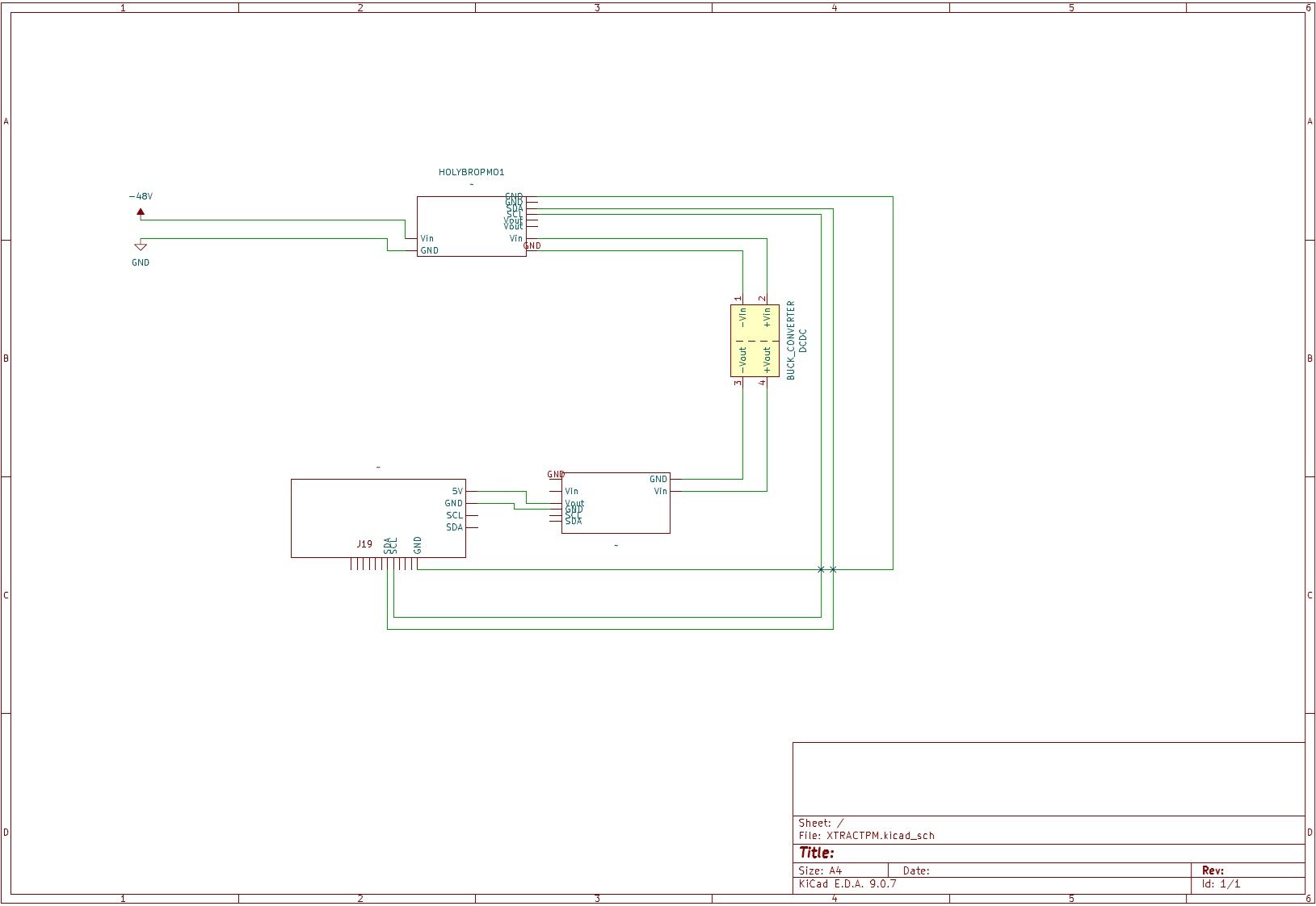
                @Vinny !Untitled.jpg

                VinnyV 1 Reply Last reply
                0
                • Nikos MavrN Nikos Mavr

                  @Vinny !Untitled.jpg

                  VinnyV Offline
                  VinnyV Offline
                  Vinny
                  ModalAI Team
                  wrote on last edited by
                  #10

                  Thanks @Nikos-Mavr for the drawing, that helped.
                  The thing to be careful about is the I2C voltage levels.
                  https://docs.modalai.com/voxl2-connectors/
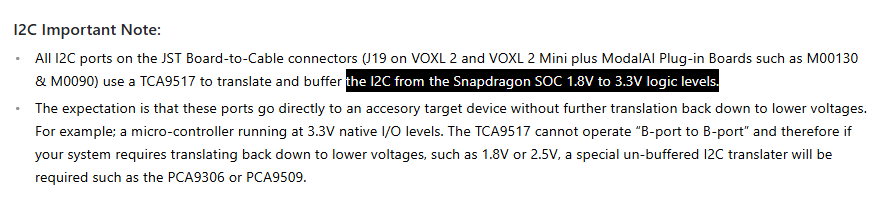
                  b1885549-f182-4e2e-97fb-a1b7bde1413a-image.png

                  J19 port I2C's are set to 3.3V with on-board pullups. So, I'm not sure what the 12S module I2C levels are, but be sure they are either (3.3V) or (set by host, i.e.: no pulls on the battery side)

                  I'm not sure what voltage is feeding into this portion... make sure it is limited to 6S:
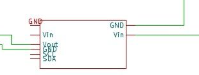
                  b4114148-d9ec-4c33-8631-54512996cc2d-image.png

                  Now that Eric has given you a bunch of guidance, let us know if there are still problems overall.

                  Thanks!

                  Nikos MavrN 1 Reply Last reply
                  0
                  • Nikos MavrN Nikos Mavr

                    @Eric-Katzfey Yes, that worked, identified bus 4 channel 41. No while INA228 is enabled, I am not sure whether I should change the power_manager in voxl-px4.conf to NONE or EXTERNAL.

                    Eric KatzfeyE Online
                    Eric KatzfeyE Online
                    Eric Katzfey
                    ModalAI Team
                    wrote on last edited by Eric Katzfey
                    #11

                    @Nikos-Mavr Okay, great, so the I2C is working then. But address 0x41 is an INA226, not an INA228. The PX4 driver indicates that an INA228 has an address of 0x45. And the Holybro data sheet for the PM02D indicates that the lower voltage one for up to 6S battery uses the INA226 while the higher voltage one for up to 12S. Am I reading that correctly? Regardless, it doesn't matter how you set POWER_MANAGER in voxl-px4.conf because that just determines whether it will start the voxlpm driver. But, probably best to set it to EXTERNAL for now. The bigger issue is that the drivers for INA226 and INA228 are not in the image. So they need to be added to the image and then started in the voxl-px4-start startup script located in /usr/bin.

                    1 Reply Last reply
                    0
                    • Nikos MavrN Nikos Mavr

                      @Eric-Katzfey Yes, that worked, identified bus 4 channel 41. No while INA228 is enabled, I am not sure whether I should change the power_manager in voxl-px4.conf to NONE or EXTERNAL.

                      Eric KatzfeyE Online
                      Eric KatzfeyE Online
                      Eric Katzfey
                      ModalAI Team
                      wrote on last edited by
                      #12

                      @Nikos-Mavr I added the ina226 and ina228 drivers into the build. Updated build can be found here: http://voxl-packages.modalai.com/dists/qrb5165/dev/binary-arm64/voxl-px4_1.14.0-2.0.136-202603180951_arm64.deb

                      To try it out use the command qshell ina226 start -X -b 4 or qshell ina228 start -X -b 4 from the px4 command line to see if the driver sees your device.

                      Nikos MavrN 1 Reply Last reply
                      0
                      • VinnyV Vinny

                        Thanks @Nikos-Mavr for the drawing, that helped.
                        The thing to be careful about is the I2C voltage levels.
                        https://docs.modalai.com/voxl2-connectors/
                        b1885549-f182-4e2e-97fb-a1b7bde1413a-image.png

                        J19 port I2C's are set to 3.3V with on-board pullups. So, I'm not sure what the 12S module I2C levels are, but be sure they are either (3.3V) or (set by host, i.e.: no pulls on the battery side)

                        I'm not sure what voltage is feeding into this portion... make sure it is limited to 6S:
                        b4114148-d9ec-4c33-8631-54512996cc2d-image.png

                        Now that Eric has given you a bunch of guidance, let us know if there are still problems overall.

                        Thanks!

                        Nikos MavrN Offline
                        Nikos MavrN Offline
                        Nikos Mavr
                        Contributor
                        wrote on last edited by
                        #13

                        @Vinny yes I removed the level shifter for that setup and yes the voltage drops to 3s for the highlighted area.

                        1 Reply Last reply
                        0
                        • Eric KatzfeyE Eric Katzfey

                          @Nikos-Mavr I added the ina226 and ina228 drivers into the build. Updated build can be found here: http://voxl-packages.modalai.com/dists/qrb5165/dev/binary-arm64/voxl-px4_1.14.0-2.0.136-202603180951_arm64.deb

                          To try it out use the command qshell ina226 start -X -b 4 or qshell ina228 start -X -b 4 from the px4 command line to see if the driver sees your device.

                          Nikos MavrN Offline
                          Nikos MavrN Offline
                          Nikos Mavr
                          Contributor
                          wrote on last edited by
                          #14

                          @Eric-Katzfey
                          Thank you for your constant help. Unfortunately, this is what I get with this package with both command and even when I am trying to scan i2c now.
                          pxh> qshell ina226 start -X -b 4
                          INFO [qshell] Send cmd: 'ina226 start -X -b 4'
                          ERROR [uORB] Error Sending [qshell_req] topic data over comm_channel
                          ERROR [qshell] command timed out
                          ERROR [qshell] Command failed

                          Eric KatzfeyE 1 Reply Last reply
                          0
                          • Nikos MavrN Nikos Mavr

                            @Eric-Katzfey
                            Thank you for your constant help. Unfortunately, this is what I get with this package with both command and even when I am trying to scan i2c now.
                            pxh> qshell ina226 start -X -b 4
                            INFO [qshell] Send cmd: 'ina226 start -X -b 4'
                            ERROR [uORB] Error Sending [qshell_req] topic data over comm_channel
                            ERROR [qshell] command timed out
                            ERROR [qshell] Command failed

                            Eric KatzfeyE Online
                            Eric KatzfeyE Online
                            Eric Katzfey
                            ModalAI Team
                            wrote on last edited by
                            #15

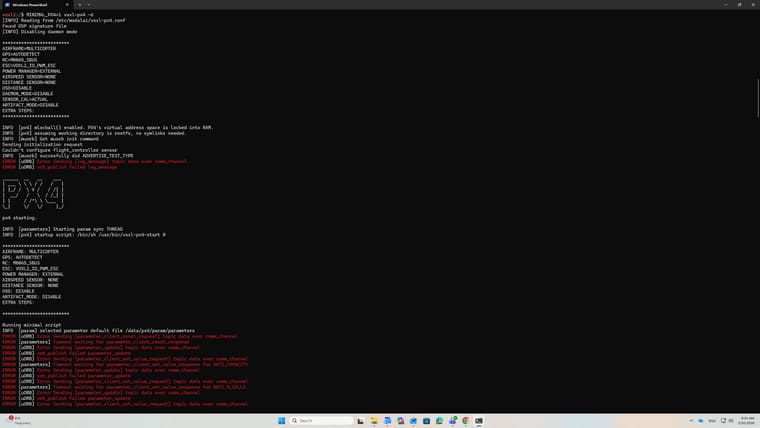
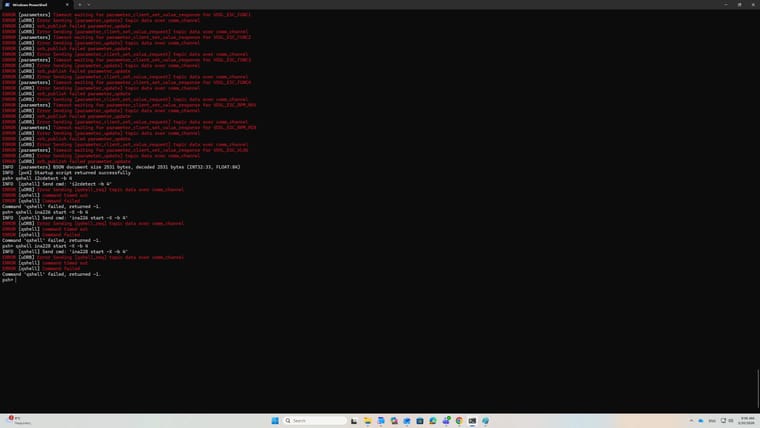
                            @Nikos-Mavr Can you reboot, try the command again, and send the entire output of PX4 so that I can see the entire startup process?

                            Nikos MavrN 2 Replies Last reply
                            0
                            • Eric KatzfeyE Eric Katzfey

                              @Nikos-Mavr Can you reboot, try the command again, and send the entire output of PX4 so that I can see the entire startup process?

                              Nikos MavrN Offline
                              Nikos MavrN Offline
                              Nikos Mavr
                              Contributor
                              wrote on last edited by
                              #16

                              @Eric-Katzfey 1.jpg 2.jpg

                              1 Reply Last reply
                              0
                              • Eric KatzfeyE Eric Katzfey

                                @Nikos-Mavr Can you reboot, try the command again, and send the entire output of PX4 so that I can see the entire startup process?

                                Nikos MavrN Offline
                                Nikos MavrN Offline
                                Nikos Mavr
                                Contributor
                                wrote on last edited by
                                #17

                                @Eric-Katzfey upgraded to latest SDK now it is smooth
                                pxh> qshell ina226 start -X -b 4
                                INFO [qshell] Send cmd: 'ina226 start -X -b 4'
                                INFO [muorb] [uORB] Marking DeviceNode(qshell_req) as advertised in process_remote_topic
                                INFO [muorb] [qshell] qshell gotten: ina226 start -X -b 4
                                INFO [muorb] [qshell] arg0 = 'ina226'
                                INFO [muorb] [qshell] arg1 = 'start'
                                INFO [muorb] [qshell] arg2 = '-X'
                                INFO [muorb] [qshell] arg3 = '-b'
                                INFO [muorb] [qshell] arg4 = '4'
                                INFO [muorb] [drivers__device] *** I2C Device ID 0xd04121 13648161
                                INFO [uORB] Marking DeviceNode(battery_status) as advertised in process_remote_topic
                                INFO [muorb] [drivers__device] Set up I2C bus mutex for bus 4
                                INFO [muorb] ina226 #0 on I2C bus 4
                                INFO [muorb] (external)
                                INFO [muorb] address 0x41
                                INFO [muorb]

                                INFO [muorb] [qshell] Ok executing command: ina226 start -X -b 4
                                INFO [qshell] qshell return value timestamp: 1170693307, local time: 1170694295

                                Nikos MavrN 1 Reply Last reply
                                0
                                • Nikos MavrN Nikos Mavr

                                  @Eric-Katzfey upgraded to latest SDK now it is smooth
                                  pxh> qshell ina226 start -X -b 4
                                  INFO [qshell] Send cmd: 'ina226 start -X -b 4'
                                  INFO [muorb] [uORB] Marking DeviceNode(qshell_req) as advertised in process_remote_topic
                                  INFO [muorb] [qshell] qshell gotten: ina226 start -X -b 4
                                  INFO [muorb] [qshell] arg0 = 'ina226'
                                  INFO [muorb] [qshell] arg1 = 'start'
                                  INFO [muorb] [qshell] arg2 = '-X'
                                  INFO [muorb] [qshell] arg3 = '-b'
                                  INFO [muorb] [qshell] arg4 = '4'
                                  INFO [muorb] [drivers__device] *** I2C Device ID 0xd04121 13648161
                                  INFO [uORB] Marking DeviceNode(battery_status) as advertised in process_remote_topic
                                  INFO [muorb] [drivers__device] Set up I2C bus mutex for bus 4
                                  INFO [muorb] ina226 #0 on I2C bus 4
                                  INFO [muorb] (external)
                                  INFO [muorb] address 0x41
                                  INFO [muorb]

                                  INFO [muorb] [qshell] Ok executing command: ina226 start -X -b 4
                                  INFO [qshell] qshell return value timestamp: 1170693307, local time: 1170694295

                                  Nikos MavrN Offline
                                  Nikos MavrN Offline
                                  Nikos Mavr
                                  Contributor
                                  wrote on last edited by
                                  #18

                                  @Nikos-Mavr Oh wow, it works now. Thank you for your help. By the way during this process my tp link antenna stopped responding and when I do voxl-wifi it says wifi devices not detected, while the device works for other PCS and voxl recognizes other USB devices. Are there any ideas why?

                                  Eric KatzfeyE 1 Reply Last reply
                                  0
                                  • Nikos MavrN Nikos Mavr

                                    @Nikos-Mavr Oh wow, it works now. Thank you for your help. By the way during this process my tp link antenna stopped responding and when I do voxl-wifi it says wifi devices not detected, while the device works for other PCS and voxl recognizes other USB devices. Are there any ideas why?

                                    Eric KatzfeyE Online
                                    Eric KatzfeyE Online
                                    Eric Katzfey
                                    ModalAI Team
                                    wrote on last edited by
                                    #19

                                    @Nikos-Mavr You're welcome! And can you please start a new forum post for this new issue? Thanks!

                                    1 Reply Last reply
                                    0

                                    Hello! It looks like you're interested in this conversation, but you don't have an account yet.

                                    Getting fed up of having to scroll through the same posts each visit? When you register for an account, you'll always come back to exactly where you were before, and choose to be notified of new replies (either via email, or push notification). You'll also be able to save bookmarks and upvote posts to show your appreciation to other community members.

                                    With your input, this post could be even better 💗

                                    Register Login
                                    Reply
                                    • Reply as topic
                                    Log in to reply
                                    • Oldest to Newest
                                    • Newest to Oldest
                                    • Most Votes


                                    ModalAI
                                    Categories Recent Tags ModalAI.com Docs
                                    © 2026 ModalAI® · Accelerating autonomy for smaller, smarter, safer drones · Powered by NodeBB
                                    • Login

                                    • Don't have an account? Register

                                    • Login or register to search.
                                    • First post
                                      Last post
                                    0
                                    • Categories
                                    • Recent
                                    • Tags
                                    • Popular
                                    • Users
                                    • Groups