
I2C reading of 12S battery
-
@Nikos-Mavr I'm not a hardware guy so not sure on the specifics of proper level shifting, etc. But have you made sure the unit works with some other board first like an Arduino? What is the sen228 module? Is a data sheet publicly available for that? What is the i2c address? J4 / J19 i2c ports should work with PX4 running the correct driver for that module.
@Eric-Katzfey the level shifter works properly with arduino right. The power module is holybro PM02D. Both pins are stuck to high which means communication is not successful.
-
@Eric-Katzfey the level shifter works properly with arduino right. The power module is holybro PM02D. Both pins are stuck to high which means communication is not successful.
Hi @Nikos-Mavr
Please provide a drawing or sketch of your setup in question for the I2C interface, include as many details as possible so I can help you.
Thanks!
Vinny -
@Eric-Katzfey the level shifter works properly with arduino right. The power module is holybro PM02D. Both pins are stuck to high which means communication is not successful.
@Nikos-Mavr Once you get the signals figured out I added i2cdetect to px4 so you can scan the buses and see if your device is detected. Some rudimentary instructions are here: https://docs.modalai.com/voxl-px4-dev-build-guide/#i2c-debugging. You will need the latest voxl-px4 which is here: http://voxl-packages.modalai.com/dists/qrb5165/dev/binary-arm64/voxl-px4_1.14.0-2.0.135-202603171827_arm64.deb
-
@Nikos-Mavr Once you get the signals figured out I added i2cdetect to px4 so you can scan the buses and see if your device is detected. Some rudimentary instructions are here: https://docs.modalai.com/voxl-px4-dev-build-guide/#i2c-debugging. You will need the latest voxl-px4 which is here: http://voxl-packages.modalai.com/dists/qrb5165/dev/binary-arm64/voxl-px4_1.14.0-2.0.135-202603171827_arm64.deb
@Eric-Katzfey Yes, that worked, identified bus 4 channel 41. No while INA228 is enabled, I am not sure whether I should change the power_manager in voxl-px4.conf to NONE or EXTERNAL.
-
Hi @Nikos-Mavr
Please provide a drawing or sketch of your setup in question for the I2C interface, include as many details as possible so I can help you.
Thanks!
Vinny -
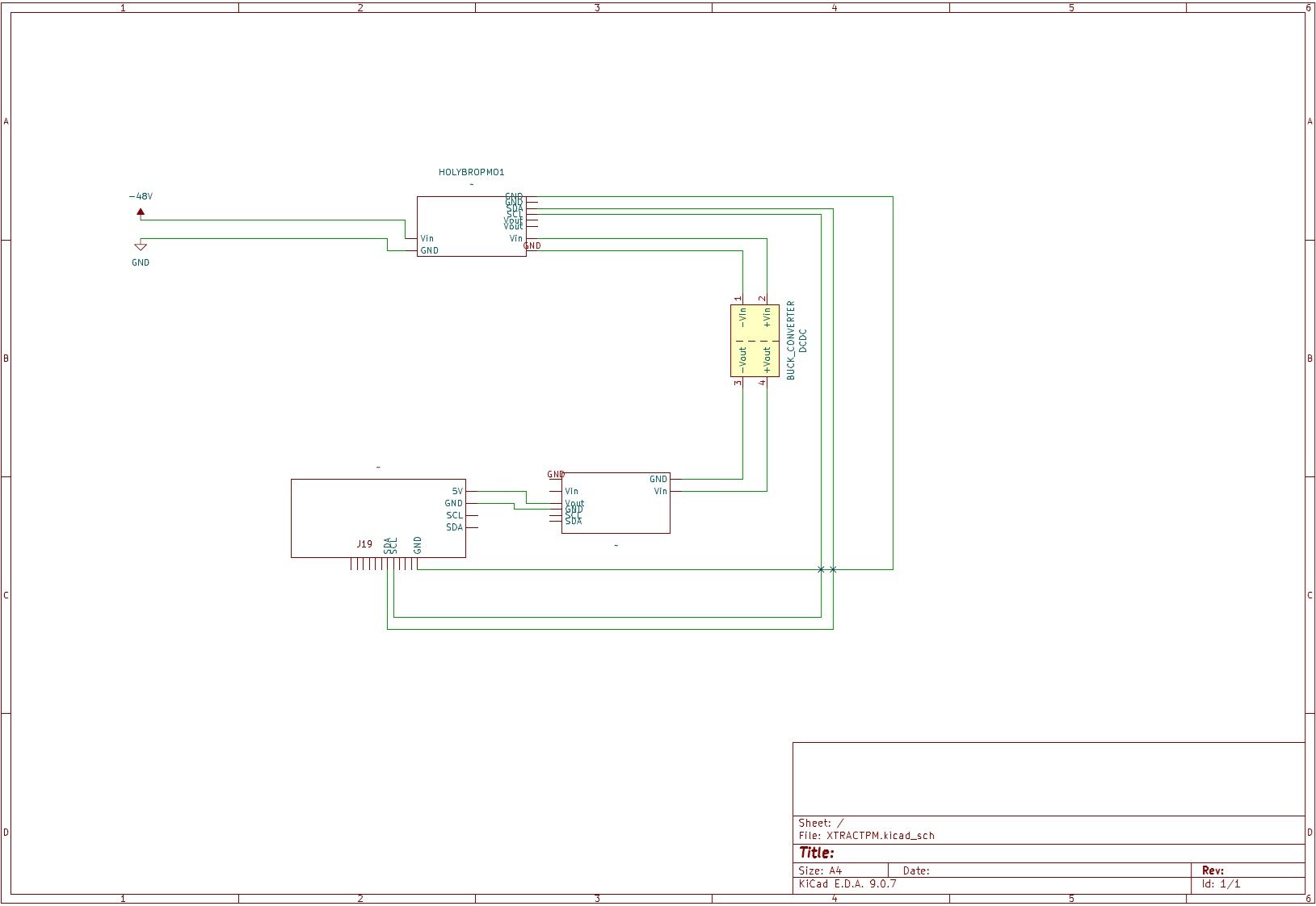
Thanks @Nikos-Mavr for the drawing, that helped.
The thing to be careful about is the I2C voltage levels.
https://docs.modalai.com/voxl2-connectors/
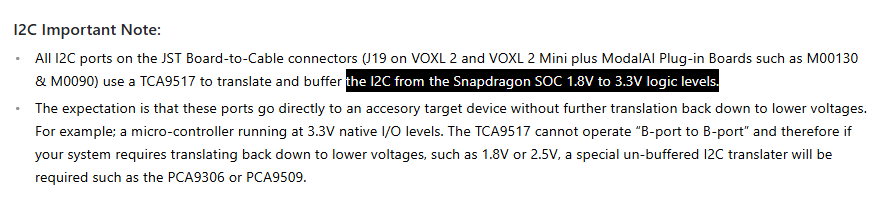
J19 port I2C's are set to 3.3V with on-board pullups. So, I'm not sure what the 12S module I2C levels are, but be sure they are either (3.3V) or (set by host, i.e.: no pulls on the battery side)
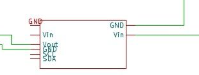
I'm not sure what voltage is feeding into this portion... make sure it is limited to 6S:
Now that Eric has given you a bunch of guidance, let us know if there are still problems overall.
Thanks!
-
@Eric-Katzfey Yes, that worked, identified bus 4 channel 41. No while INA228 is enabled, I am not sure whether I should change the power_manager in voxl-px4.conf to NONE or EXTERNAL.
@Nikos-Mavr Okay, great, so the I2C is working then. But address 0x41 is an INA226, not an INA228. The PX4 driver indicates that an INA228 has an address of 0x45. And the Holybro data sheet for the PM02D indicates that the lower voltage one for up to 6S battery uses the INA226 while the higher voltage one for up to 12S. Am I reading that correctly? Regardless, it doesn't matter how you set POWER_MANAGER in voxl-px4.conf because that just determines whether it will start the voxlpm driver. But, probably best to set it to EXTERNAL for now. The bigger issue is that the drivers for INA226 and INA228 are not in the image. So they need to be added to the image and then started in the voxl-px4-start startup script located in /usr/bin.
-
@Eric-Katzfey Yes, that worked, identified bus 4 channel 41. No while INA228 is enabled, I am not sure whether I should change the power_manager in voxl-px4.conf to NONE or EXTERNAL.
@Nikos-Mavr I added the ina226 and ina228 drivers into the build. Updated build can be found here: http://voxl-packages.modalai.com/dists/qrb5165/dev/binary-arm64/voxl-px4_1.14.0-2.0.136-202603180951_arm64.deb
To try it out use the command
qshell ina226 start -X -b 4orqshell ina228 start -X -b 4from the px4 command line to see if the driver sees your device. -
Thanks @Nikos-Mavr for the drawing, that helped.
The thing to be careful about is the I2C voltage levels.
https://docs.modalai.com/voxl2-connectors/
J19 port I2C's are set to 3.3V with on-board pullups. So, I'm not sure what the 12S module I2C levels are, but be sure they are either (3.3V) or (set by host, i.e.: no pulls on the battery side)
I'm not sure what voltage is feeding into this portion... make sure it is limited to 6S:
Now that Eric has given you a bunch of guidance, let us know if there are still problems overall.
Thanks!
@Vinny yes I removed the level shifter for that setup and yes the voltage drops to 3s for the highlighted area.
-
@Nikos-Mavr I added the ina226 and ina228 drivers into the build. Updated build can be found here: http://voxl-packages.modalai.com/dists/qrb5165/dev/binary-arm64/voxl-px4_1.14.0-2.0.136-202603180951_arm64.deb
To try it out use the command
qshell ina226 start -X -b 4orqshell ina228 start -X -b 4from the px4 command line to see if the driver sees your device.@Eric-Katzfey
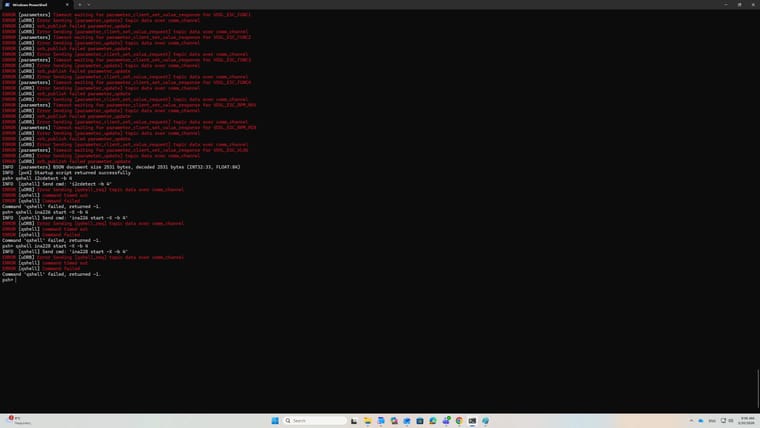
Thank you for your constant help. Unfortunately, this is what I get with this package with both command and even when I am trying to scan i2c now.
pxh> qshell ina226 start -X -b 4
INFO [qshell] Send cmd: 'ina226 start -X -b 4'
ERROR [uORB] Error Sending [qshell_req] topic data over comm_channel
ERROR [qshell] command timed out
ERROR [qshell] Command failed -
@Eric-Katzfey
Thank you for your constant help. Unfortunately, this is what I get with this package with both command and even when I am trying to scan i2c now.
pxh> qshell ina226 start -X -b 4
INFO [qshell] Send cmd: 'ina226 start -X -b 4'
ERROR [uORB] Error Sending [qshell_req] topic data over comm_channel
ERROR [qshell] command timed out
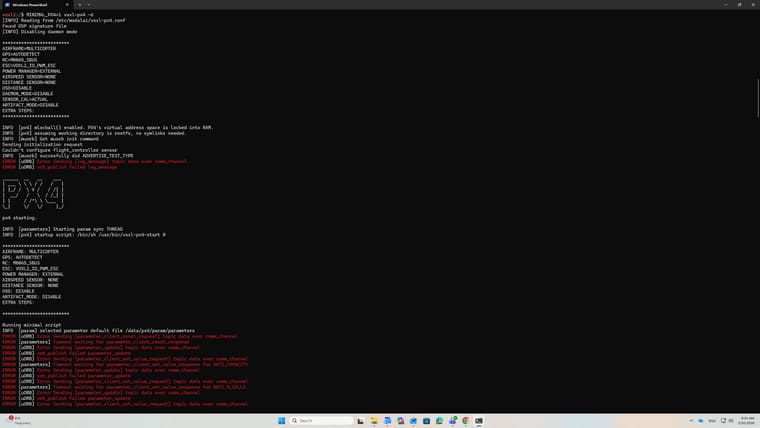
ERROR [qshell] Command failed@Nikos-Mavr Can you reboot, try the command again, and send the entire output of PX4 so that I can see the entire startup process?
-
@Nikos-Mavr Can you reboot, try the command again, and send the entire output of PX4 so that I can see the entire startup process?
-
@Nikos-Mavr Can you reboot, try the command again, and send the entire output of PX4 so that I can see the entire startup process?
@Eric-Katzfey upgraded to latest SDK now it is smooth
pxh> qshell ina226 start -X -b 4
INFO [qshell] Send cmd: 'ina226 start -X -b 4'
INFO [muorb] [uORB] Marking DeviceNode(qshell_req) as advertised in process_remote_topic
INFO [muorb] [qshell] qshell gotten: ina226 start -X -b 4
INFO [muorb] [qshell] arg0 = 'ina226'
INFO [muorb] [qshell] arg1 = 'start'
INFO [muorb] [qshell] arg2 = '-X'
INFO [muorb] [qshell] arg3 = '-b'
INFO [muorb] [qshell] arg4 = '4'
INFO [muorb] [drivers__device] *** I2C Device ID 0xd04121 13648161
INFO [uORB] Marking DeviceNode(battery_status) as advertised in process_remote_topic
INFO [muorb] [drivers__device] Set up I2C bus mutex for bus 4
INFO [muorb] ina226 #0 on I2C bus 4
INFO [muorb] (external)
INFO [muorb] address 0x41
INFO [muorb]INFO [muorb] [qshell] Ok executing command: ina226 start -X -b 4
INFO [qshell] qshell return value timestamp: 1170693307, local time: 1170694295 -
@Eric-Katzfey upgraded to latest SDK now it is smooth
pxh> qshell ina226 start -X -b 4
INFO [qshell] Send cmd: 'ina226 start -X -b 4'
INFO [muorb] [uORB] Marking DeviceNode(qshell_req) as advertised in process_remote_topic
INFO [muorb] [qshell] qshell gotten: ina226 start -X -b 4
INFO [muorb] [qshell] arg0 = 'ina226'
INFO [muorb] [qshell] arg1 = 'start'
INFO [muorb] [qshell] arg2 = '-X'
INFO [muorb] [qshell] arg3 = '-b'
INFO [muorb] [qshell] arg4 = '4'
INFO [muorb] [drivers__device] *** I2C Device ID 0xd04121 13648161
INFO [uORB] Marking DeviceNode(battery_status) as advertised in process_remote_topic
INFO [muorb] [drivers__device] Set up I2C bus mutex for bus 4
INFO [muorb] ina226 #0 on I2C bus 4
INFO [muorb] (external)
INFO [muorb] address 0x41
INFO [muorb]INFO [muorb] [qshell] Ok executing command: ina226 start -X -b 4
INFO [qshell] qshell return value timestamp: 1170693307, local time: 1170694295@Nikos-Mavr Oh wow, it works now. Thank you for your help. By the way during this process my tp link antenna stopped responding and when I do voxl-wifi it says wifi devices not detected, while the device works for other PCS and voxl recognizes other USB devices. Are there any ideas why?
-
@Nikos-Mavr Oh wow, it works now. Thank you for your help. By the way during this process my tp link antenna stopped responding and when I do voxl-wifi it says wifi devices not detected, while the device works for other PCS and voxl recognizes other USB devices. Are there any ideas why?
@Nikos-Mavr You're welcome! And can you please start a new forum post for this new issue? Thanks!



Reading along? Create a free ModalAI Forum account to join in.
With an account you can reply, ask your own question, get an email when a ModalAI engineer answers, and mark the reply that solved it. Your place in each thread is saved between visits.
Questions about VOXL, Flight Core, ESCs and ModalAI drones are answered here by the engineers who build them.
Register Login