Skip to content
  • Categories
  • Recent
  • Tags
  • Popular
  • Users
  • Groups
Collapse
Brand Logo

ModalAI Forum

  1. ModalAI Support Forum
  2. Ask your questions right here!
  3. Support Request Format for Best Results
  4. Stinger VRX not turning on

Stinger VRX not turning on

Scheduled Pinned Locked Moved Support Request Format for Best Results
13 Posts 3 Posters 1.7k Views 1 Watching
  • Oldest to Newest
  • Newest to Oldest
  • Most Votes
Reply
  • Reply as topic
Log in to reply
This topic has been deleted. Only users with topic management privileges can see it.
  • G Offline
    G Offline
    Grier
    wrote on last edited by
    #3

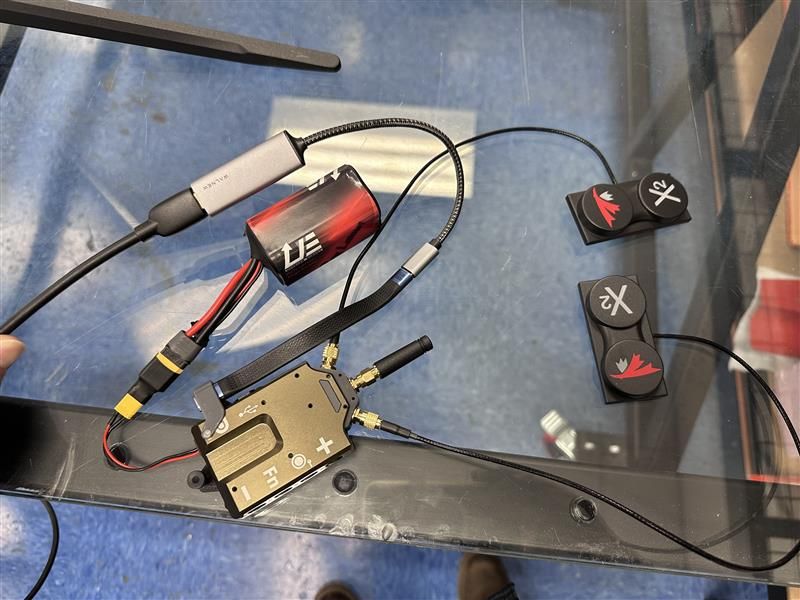
    596fd888-4d18-4839-a0c1-0fac269effae.jpg

    1 Reply Last reply
    0
    • G Offline
      G Offline
      Grier
      wrote on last edited by
      #4

      Any help on this would be greatly appreciated.

      1 Reply Last reply
      0
      • J Offline
        J Offline
        Jacob Camarillo
        ModalAI Team
        wrote on last edited by
        #5

        @Grier Do you have another USB-C to HDMI converter that you could try?

        1 Reply Last reply
        0
        • G Offline
          G Offline
          Grier
          wrote on last edited by
          #6

          Yes, we tried three and nothing works.

          1 Reply Last reply
          0
          • G Offline
            G Offline
            Grier
            wrote on last edited by
            #7

            The three are all different makes/models

            1 Reply Last reply
            0
            • J Offline
              J Offline
              Jacob Camarillo
              ModalAI Team
              wrote on last edited by
              #8

              Could you share some information on the adapters that you have tried? This is the adapter we usually use: https://www.cablematters.com/pc-1368-125-48gbps-usb-c-to-hdmi-21-adapter-supports-8k-60hz-4k-240hz-hdr.aspx.

              Could you also share some information about your display? Are you trying to power the display via the VRX?

              G 2 Replies Last reply
              0
              • J Jacob Camarillo

                Could you share some information on the adapters that you have tried? This is the adapter we usually use: https://www.cablematters.com/pc-1368-125-48gbps-usb-c-to-hdmi-21-adapter-supports-8k-60hz-4k-240hz-hdr.aspx.

                Could you also share some information about your display? Are you trying to power the display via the VRX?

                G Offline
                G Offline
                Grier
                wrote on last edited by
                #9

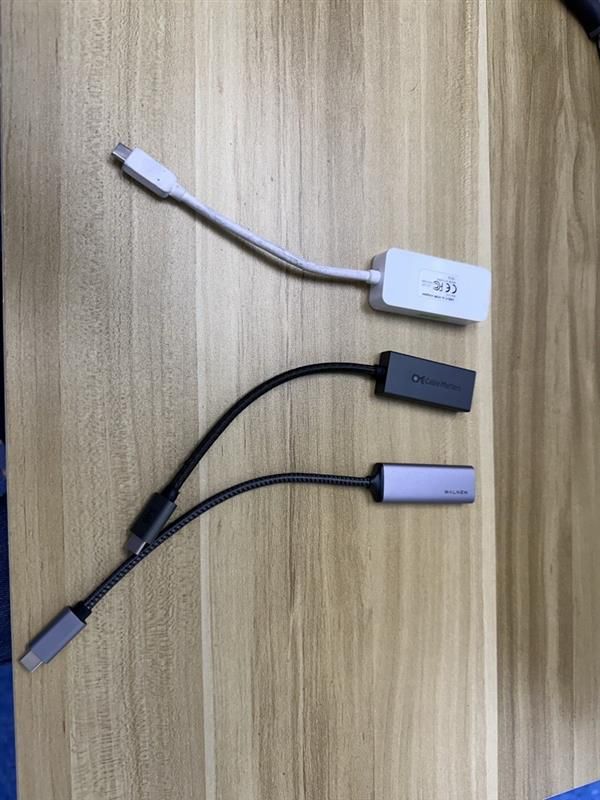
                @Jacob-Camarillo 02210486-9797-4e05-b2c6-1112f455a209.jpg

                From bottom to top:
                1: WALNEW USB C to HDMI Adapter 4K 60Hz, Type-C Male to HDMI Female Cable Converter
                2: Cable Matters 48Gbps Unidirectional USB C to HDMI 2.1 Adapter
                3: ATIVA VSD1330B1

                1 Reply Last reply
                0
                • J Jacob Camarillo

                  Could you share some information on the adapters that you have tried? This is the adapter we usually use: https://www.cablematters.com/pc-1368-125-48gbps-usb-c-to-hdmi-21-adapter-supports-8k-60hz-4k-240hz-hdr.aspx.

                  Could you also share some information about your display? Are you trying to power the display via the VRX?

                  G Offline
                  G Offline
                  Grier
                  wrote on last edited by
                  #10

                  @Jacob-Camarillo The display is just a computer monitor and no we are not powering it with the VRX

                  J 1 Reply Last reply
                  0
                  • G Grier

                    @Jacob-Camarillo The display is just a computer monitor and no we are not powering it with the VRX

                    J Offline
                    J Offline
                    Jacob Camarillo
                    ModalAI Team
                    wrote on last edited by
                    #11

                    @Grier Thank you for sharing this information. That middle adapter (cable matter) should work, that is the same one that we use. Are there any other devices plugged into the display and is the display set to the corresponding HDMI input that the VRX is connected to? Can you also please confirm that the USB-C cable connected to the VRX is fully connected?

                    G 1 Reply Last reply
                    0
                    • J Jacob Camarillo

                      @Grier Thank you for sharing this information. That middle adapter (cable matter) should work, that is the same one that we use. Are there any other devices plugged into the display and is the display set to the corresponding HDMI input that the VRX is connected to? Can you also please confirm that the USB-C cable connected to the VRX is fully connected?

                      G Offline
                      G Offline
                      Grier
                      wrote on last edited by
                      #12

                      @Jacob-Camarillo No other devices are plugged into the display, and the display is set to the correct HDMI input for the VRX. The USB-C cable is also fully connected to the VRX. When powered up, there are no lights on the VRX at all. It is evidently not working. What are the next steps to initiate an RMA?

                      J 1 Reply Last reply
                      0
                      • G Grier

                        @Jacob-Camarillo No other devices are plugged into the display, and the display is set to the correct HDMI input for the VRX. The USB-C cable is also fully connected to the VRX. When powered up, there are no lights on the VRX at all. It is evidently not working. What are the next steps to initiate an RMA?

                        J Offline
                        J Offline
                        Jacob Camarillo
                        ModalAI Team
                        wrote on last edited by
                        #13

                        @Grier Gotcha, please fill out this RMA form: https://www.modalai.com/pages/rma?_pos=1&_sid=6dd8dbced&_ss=r

                        Please link this forum post in the RMA form as well
                        1 Reply Last reply
                        0

                        Hello! It looks like you're interested in this conversation, but you don't have an account yet.

                        Getting fed up of having to scroll through the same posts each visit? When you register for an account, you'll always come back to exactly where you were before, and choose to be notified of new replies (either via email, or push notification). You'll also be able to save bookmarks and upvote posts to show your appreciation to other community members.

                        With your input, this post could be even better 💗

                        Register Login
                        Reply
                        • Reply as topic
                        Log in to reply
                        • Oldest to Newest
                        • Newest to Oldest
                        • Most Votes


                        ModalAI
                        Categories Recent Tags ModalAI.com Docs
                        © 2026 ModalAI® · Accelerating autonomy for smaller, smarter, safer drones · Powered by NodeBB
                        • Login

                        • Don't have an account? Register

                        • Login or register to search.
                        • First post
                          Last post
                        0
                        • Categories
                        • Recent
                        • Tags
                        • Popular
                        • Users
                        • Groups