Skip to content
  • Categories
  • Recent
  • Tags
  • Popular
  • Users
  • Groups
Collapse
Brand Logo

ModalAI Forum

  1. ModalAI Support Forum
  2. Ask your questions right here!
  3. doodle labs and joystick setup

doodle labs and joystick setup

Scheduled Pinned Locked Moved Ask your questions right here!
30 Posts 2 Posters 5.4k Views 1 Watching
  • Oldest to Newest
  • Newest to Oldest
  • Most Votes
Reply
  • Reply as topic
Log in to reply
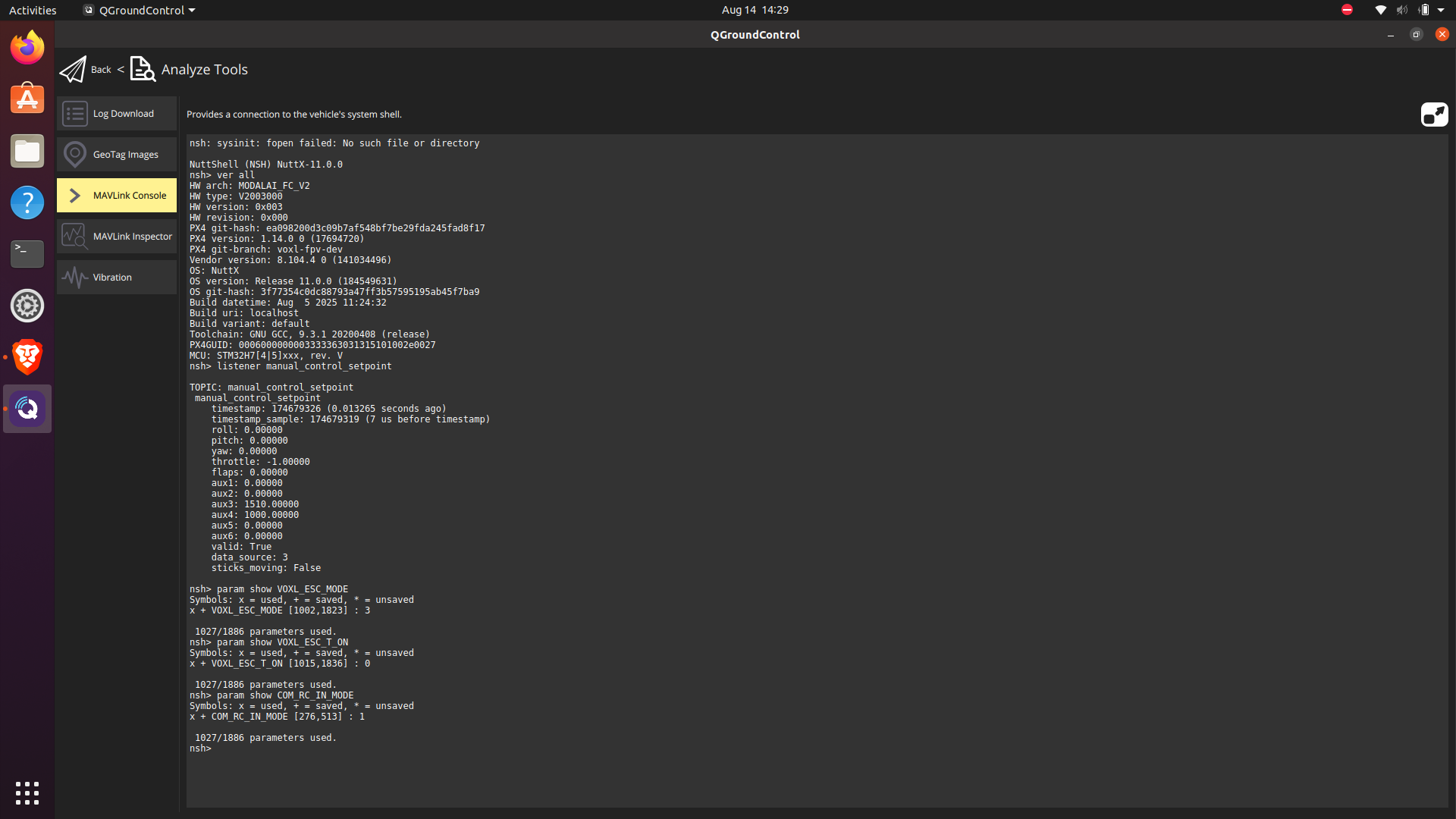
This topic has been deleted. Only users with topic management privileges can see it.
  • Eric KatzfeyE Eric Katzfey

    @Jetson-Nano voxl-fpv-dev is the name of the branch. The version will be a number, such as 1.14.0-8.104.3. Most of the joystick button mapping is handled by QGC directly. It maps them to commands that are sent over Mavlink. But the turtle mode is something specific built into the ESC driver. For the joystick buttons to work for turtle mode you need to set VOXL_ESC_MODE to 1. For newer versions of the voxl-fpv-dev branch you can also set VOXL_ESC_MODE to 2. The verify that the button mapping is working you can look at the manual_control_setpoint topic in px4 and see if the aux1 / aux2 fields are changing between 0.0 and 1.0. (e.g. px4-listener manual_control_setpoint)

    Jetson NanoJ Offline
    Jetson NanoJ Offline
    Jetson Nano
    Veteran
    wrote on last edited by
    #6

    @Eric-Katzfey Thank you for the support. I will test it out and get back to you encase of any further queries.

    Jetson NanoJ 1 Reply Last reply
    0
    • Jetson NanoJ Jetson Nano

      @Eric-Katzfey Thank you for the support. I will test it out and get back to you encase of any further queries.

      Jetson NanoJ Offline
      Jetson NanoJ Offline
      Jetson Nano
      Veteran
      wrote on last edited by
      #7

      @Eric-Katzfey
      I tested what you asked me, since i am using external Fc and doodle labs, I am not able to assign AUX to any button, is there any work around on how to assign AUX

      Jetson NanoJ 1 Reply Last reply
      0
      • Jetson NanoJ Jetson Nano

        @Eric-Katzfey
        I tested what you asked me, since i am using external Fc and doodle labs, I am not able to assign AUX to any button, is there any work around on how to assign AUX

        Jetson NanoJ Offline
        Jetson NanoJ Offline
        Jetson Nano
        Veteran
        wrote on last edited by
        #8

        @Eric-Katzfey @Alex-Kushleyev
        hey guys, just a random thought, can I enable turtle mode through a button instead of taking AUX 1 into consideration. just a thought, any guidance and help would be greatly appreciated.

        Eric KatzfeyE 1 Reply Last reply
        0
        • Jetson NanoJ Jetson Nano

          @Eric-Katzfey @Alex-Kushleyev
          hey guys, just a random thought, can I enable turtle mode through a button instead of taking AUX 1 into consideration. just a thought, any guidance and help would be greatly appreciated.

          Eric KatzfeyE Online
          Eric KatzfeyE Online
          Eric Katzfey
          ModalAI Team
          wrote on last edited by
          #9

          @Jetson-Nano What do you see if you go to the MAVLink console in QGC and look at the manual_control_setpoint topic? (listener manual_control_setpoint)?

          Eric KatzfeyE Jetson NanoJ 2 Replies Last reply
          0
          • Eric KatzfeyE Eric Katzfey

            @Jetson-Nano What do you see if you go to the MAVLink console in QGC and look at the manual_control_setpoint topic? (listener manual_control_setpoint)?

            Eric KatzfeyE Online
            Eric KatzfeyE Online
            Eric Katzfey
            ModalAI Team
            wrote on last edited by
            #10

            @Eric-Katzfey Also, there is a parameter called VOXL_ESC_T_ON. How is that set? It determines which button will be used for turtle mode. The code is here: https://github.com/modalai/px4-firmware/blob/ea098200d3c09b7af548bf7be29fda245fad8f17/src/modules/mavlink/mavlink_receiver.cpp#L2083

            Jetson NanoJ 2 Replies Last reply
            0
            • Eric KatzfeyE Eric Katzfey

              @Jetson-Nano What do you see if you go to the MAVLink console in QGC and look at the manual_control_setpoint topic? (listener manual_control_setpoint)?

              Jetson NanoJ Offline
              Jetson NanoJ Offline
              Jetson Nano
              Veteran
              wrote on last edited by Jetson Nano
              #11

              @Eric-Katzfey
              This is the output i am getting while running listener manual_control_setpoint

              NuttShell (NSH) NuttX-11.0.0
              nsh> listener manual_control_setpoint
              
              TOPIC: manual_control_setpoint
               manual_control_setpoint
                  timestamp: 438754659 (0.033455 seconds ago)
                  timestamp_sample: 438754653 (6 us before timestamp)
                  roll: 0.00000
                  pitch: 0.00000
                  yaw: 0.00000
                  throttle: 0.00000
                  flaps: 0.00000
                  aux1: 0.00000
                  aux2: 0.00000
                  aux3: 0.00000
                  aux4: 0.00000
                  aux5: 0.00000
                  aux6: 0.00000
                  buttons: 0
                  valid: True
                  data_source: 2
                  sticks_moving: False
              
              nsh> listener manual_control_setpoint
              
              TOPIC: manual_control_setpoint
               manual_control_setpoint
                  timestamp: 446282690 (0.039850 seconds ago)
                  timestamp_sample: 446282683 (7 us before timestamp)
                  roll: 0.00000
                  pitch: 0.00000
                  yaw: 0.00000
                  throttle: 0.00000
                  flaps: 0.00000
                  aux1: 0.00000
                  aux2: 0.00000
                  aux3: 0.00000
                  aux4: 0.00000
                  aux5: 0.00000
                  aux6: 0.00000
                  buttons: 0
                  valid: True
                  data_source: 2
                  sticks_moving: False
              
              Eric KatzfeyE 1 Reply Last reply
              0
              • Eric KatzfeyE Eric Katzfey

                @Eric-Katzfey Also, there is a parameter called VOXL_ESC_T_ON. How is that set? It determines which button will be used for turtle mode. The code is here: https://github.com/modalai/px4-firmware/blob/ea098200d3c09b7af548bf7be29fda245fad8f17/src/modules/mavlink/mavlink_receiver.cpp#L2083

                Jetson NanoJ Offline
                Jetson NanoJ Offline
                Jetson Nano
                Veteran
                wrote on last edited by Jetson Nano
                #12

                @Eric-Katzfey I am not able to see the option you have mentioned VOXL_ESC_T_ON

                Eric KatzfeyE 1 Reply Last reply
                0
                • Jetson NanoJ Jetson Nano

                  @Eric-Katzfey I am not able to see the option you have mentioned VOXL_ESC_T_ON

                  Eric KatzfeyE Online
                  Eric KatzfeyE Online
                  Eric Katzfey
                  ModalAI Team
                  wrote on last edited by
                  #13

                  @Jetson-Nano said in doodle labs and joystick setup:

                  I am not able to see the option you have mentioned VOXL_ESC_T_ON

                  In the Mavlink console what do you see with "param show VOXL_ESC_*"?

                  And what about "ver all"?

                  1 Reply Last reply
                  0
                  • Jetson NanoJ Jetson Nano

                    @Eric-Katzfey
                    This is the output i am getting while running listener manual_control_setpoint

                    NuttShell (NSH) NuttX-11.0.0
                    nsh> listener manual_control_setpoint
                    
                    TOPIC: manual_control_setpoint
                     manual_control_setpoint
                        timestamp: 438754659 (0.033455 seconds ago)
                        timestamp_sample: 438754653 (6 us before timestamp)
                        roll: 0.00000
                        pitch: 0.00000
                        yaw: 0.00000
                        throttle: 0.00000
                        flaps: 0.00000
                        aux1: 0.00000
                        aux2: 0.00000
                        aux3: 0.00000
                        aux4: 0.00000
                        aux5: 0.00000
                        aux6: 0.00000
                        buttons: 0
                        valid: True
                        data_source: 2
                        sticks_moving: False
                    
                    nsh> listener manual_control_setpoint
                    
                    TOPIC: manual_control_setpoint
                     manual_control_setpoint
                        timestamp: 446282690 (0.039850 seconds ago)
                        timestamp_sample: 446282683 (7 us before timestamp)
                        roll: 0.00000
                        pitch: 0.00000
                        yaw: 0.00000
                        throttle: 0.00000
                        flaps: 0.00000
                        aux1: 0.00000
                        aux2: 0.00000
                        aux3: 0.00000
                        aux4: 0.00000
                        aux5: 0.00000
                        aux6: 0.00000
                        buttons: 0
                        valid: True
                        data_source: 2
                        sticks_moving: False
                    
                    Eric KatzfeyE Online
                    Eric KatzfeyE Online
                    Eric Katzfey
                    ModalAI Team
                    wrote on last edited by
                    #14

                    @Jetson-Nano said in doodle labs and joystick setup:

                    This is the output i am getting while running listener manual_control_setpoint

                    What is the parameter COM_RC_IN_MODE set to?

                    Jetson NanoJ 1 Reply Last reply
                    0
                    • Eric KatzfeyE Eric Katzfey

                      @Jetson-Nano said in doodle labs and joystick setup:

                      This is the output i am getting while running listener manual_control_setpoint

                      What is the parameter COM_RC_IN_MODE set to?

                      Jetson NanoJ Offline
                      Jetson NanoJ Offline
                      Jetson Nano
                      Veteran
                      wrote on last edited by
                      #15

                      @Eric-Katzfey COM_RC_IN_MODE is set to joystick only

                      1 Reply Last reply
                      0
                      • Eric KatzfeyE Eric Katzfey

                        @Eric-Katzfey Also, there is a parameter called VOXL_ESC_T_ON. How is that set? It determines which button will be used for turtle mode. The code is here: https://github.com/modalai/px4-firmware/blob/ea098200d3c09b7af548bf7be29fda245fad8f17/src/modules/mavlink/mavlink_receiver.cpp#L2083

                        Jetson NanoJ Offline
                        Jetson NanoJ Offline
                        Jetson Nano
                        Veteran
                        wrote on last edited by Jetson Nano
                        #16

                        @Eric-Katzfey Hey hope you are doing fine, I checked the code and various branches of PX4, I noticed I was able to see the parameter VOXL_ESC_T_ON but the option only showcased button 1 for assignment . what to do if I want to assign another button.

                        Eric KatzfeyE 1 Reply Last reply
                        0
                        • Jetson NanoJ Jetson Nano

                          @Eric-Katzfey Hey hope you are doing fine, I checked the code and various branches of PX4, I noticed I was able to see the parameter VOXL_ESC_T_ON but the option only showcased button 1 for assignment . what to do if I want to assign another button.

                          Eric KatzfeyE Online
                          Eric KatzfeyE Online
                          Eric Katzfey
                          ModalAI Team
                          wrote on last edited by
                          #17

                          @Jetson-Nano You set that parameter to match the button you want to use.

                          Jetson NanoJ 1 Reply Last reply
                          0
                          • Eric KatzfeyE Eric Katzfey

                            @Jetson-Nano You set that parameter to match the button you want to use.

                            Jetson NanoJ Offline
                            Jetson NanoJ Offline
                            Jetson Nano
                            Veteran
                            wrote on last edited by
                            #18

                            @Eric-Katzfey Thank you for reverting back, The options only show one option button 1. I tested with button one but the drone was not taking in the command for enabling the turtle mode.
                            I want to know whether the code was tested out, so that I can be sure about not missing out on any parameter or setup

                            Eric KatzfeyE 1 Reply Last reply
                            0
                            • Jetson NanoJ Jetson Nano

                              @Eric-Katzfey Thank you for reverting back, The options only show one option button 1. I tested with button one but the drone was not taking in the command for enabling the turtle mode.
                              I want to know whether the code was tested out, so that I can be sure about not missing out on any parameter or setup

                              Eric KatzfeyE Online
                              Eric KatzfeyE Online
                              Eric Katzfey
                              ModalAI Team
                              wrote on last edited by
                              #19

                              @Jetson-Nano It's a parameter that you can set to any number you want. In QGC you can look at the joysticks tab and see as you press each button which number it is. Then set the parameter to that number.

                              Jetson NanoJ 1 Reply Last reply
                              0
                              • Eric KatzfeyE Eric Katzfey

                                @Jetson-Nano It's a parameter that you can set to any number you want. In QGC you can look at the joysticks tab and see as you press each button which number it is. Then set the parameter to that number.

                                Jetson NanoJ Offline
                                Jetson NanoJ Offline
                                Jetson Nano
                                Veteran
                                wrote on last edited by
                                #20

                                @Eric-Katzfey I am not able to setup multiple buttons, it is only showing one option of button 1.
                                Also after assigning the button one and trying to enable and use turtle mode, it is not working.
                                Is there any particular version of px4 that this works with.
                                My setup is VOXL 2 ---> TELEM 1 --> Flight core v2 --> TELEM 2 --> FPV ESC
                                In normal setup the motors are working and rotating, but when I try to keep the drone upside down and enable the turtle mode , the QGC is still showing not ready message. Also I am not able to ARM because of this.
                                Is there anything I am missing out?

                                Jetson NanoJ 1 Reply Last reply
                                0
                                • Jetson NanoJ Jetson Nano

                                  @Eric-Katzfey I am not able to setup multiple buttons, it is only showing one option of button 1.
                                  Also after assigning the button one and trying to enable and use turtle mode, it is not working.
                                  Is there any particular version of px4 that this works with.
                                  My setup is VOXL 2 ---> TELEM 1 --> Flight core v2 --> TELEM 2 --> FPV ESC
                                  In normal setup the motors are working and rotating, but when I try to keep the drone upside down and enable the turtle mode , the QGC is still showing not ready message. Also I am not able to ARM because of this.
                                  Is there anything I am missing out?

                                  Jetson NanoJ Offline
                                  Jetson NanoJ Offline
                                  Jetson Nano
                                  Veteran
                                  wrote on last edited by
                                  #21

                                  @Eric-Katzfey could you please help me out here

                                  Eric KatzfeyE 2 Replies Last reply
                                  0
                                  • Jetson NanoJ Jetson Nano

                                    @Eric-Katzfey could you please help me out here

                                    Eric KatzfeyE Online
                                    Eric KatzfeyE Online
                                    Eric Katzfey
                                    ModalAI Team
                                    wrote on last edited by Eric Katzfey
                                    #22

                                    @Jetson-Nano Let's try to walk through this and see where it is going wrong. Please provide answers to all of the following questions. Go to the joystick tab in QGC and press the button on the joystick that you want to use for turtle mode. Which number lights up when you press the button? Next, go to the MAVLink console and provide the output of these commands: ver all, listener manual_control_setpoint, param show VOXL_ESC_MODE, param show VOXL_ESC_T_ON, and param show COM_RC_IN_MODE. If VOXL_ESC_T_ON is not set to the number of the button you just discovered on the joystick tab then change it to the value you want. For example, by default VOXL_ESC_T_ON is set to 9. If you want to use button 10 instead then do param set VOXL_ESC_T_ON 10. If you had to change that parameter then reboot and verify that it is now set correctly. You should see the aux1 value in manual_control_setpoint change from 0.0 to 1.0 when you press the button that you have chosen. Can you verify that you are seeing that?

                                    1 Reply Last reply
                                    0
                                    • Jetson NanoJ Jetson Nano

                                      @Eric-Katzfey could you please help me out here

                                      Eric KatzfeyE Online
                                      Eric KatzfeyE Online
                                      Eric Katzfey
                                      ModalAI Team
                                      wrote on last edited by
                                      #23

                                      @Jetson-Nano If all that seems to be working then press the turtle button and arm (with drone right side up, not upside down) and verify that with turtle mode enabled the propellers are spinning in the opposite direction and the drone won't lift off. Of course, you must be extremely careful when running this test!!! Make sure that the drone is in a location where it cannot cause damage or injure someone if it goes out of control. It would be best to completely remove the propellers and just verify that the motors are spinning in the opposite direction of normal flight.

                                      Jetson NanoJ 1 Reply Last reply
                                      0
                                      • Eric KatzfeyE Eric Katzfey

                                        @Jetson-Nano If all that seems to be working then press the turtle button and arm (with drone right side up, not upside down) and verify that with turtle mode enabled the propellers are spinning in the opposite direction and the drone won't lift off. Of course, you must be extremely careful when running this test!!! Make sure that the drone is in a location where it cannot cause damage or injure someone if it goes out of control. It would be best to completely remove the propellers and just verify that the motors are spinning in the opposite direction of normal flight.

                                        Jetson NanoJ Offline
                                        Jetson NanoJ Offline
                                        Jetson Nano
                                        Veteran
                                        wrote on last edited by Jetson Nano
                                        #24

                                        @Eric-Katzfey
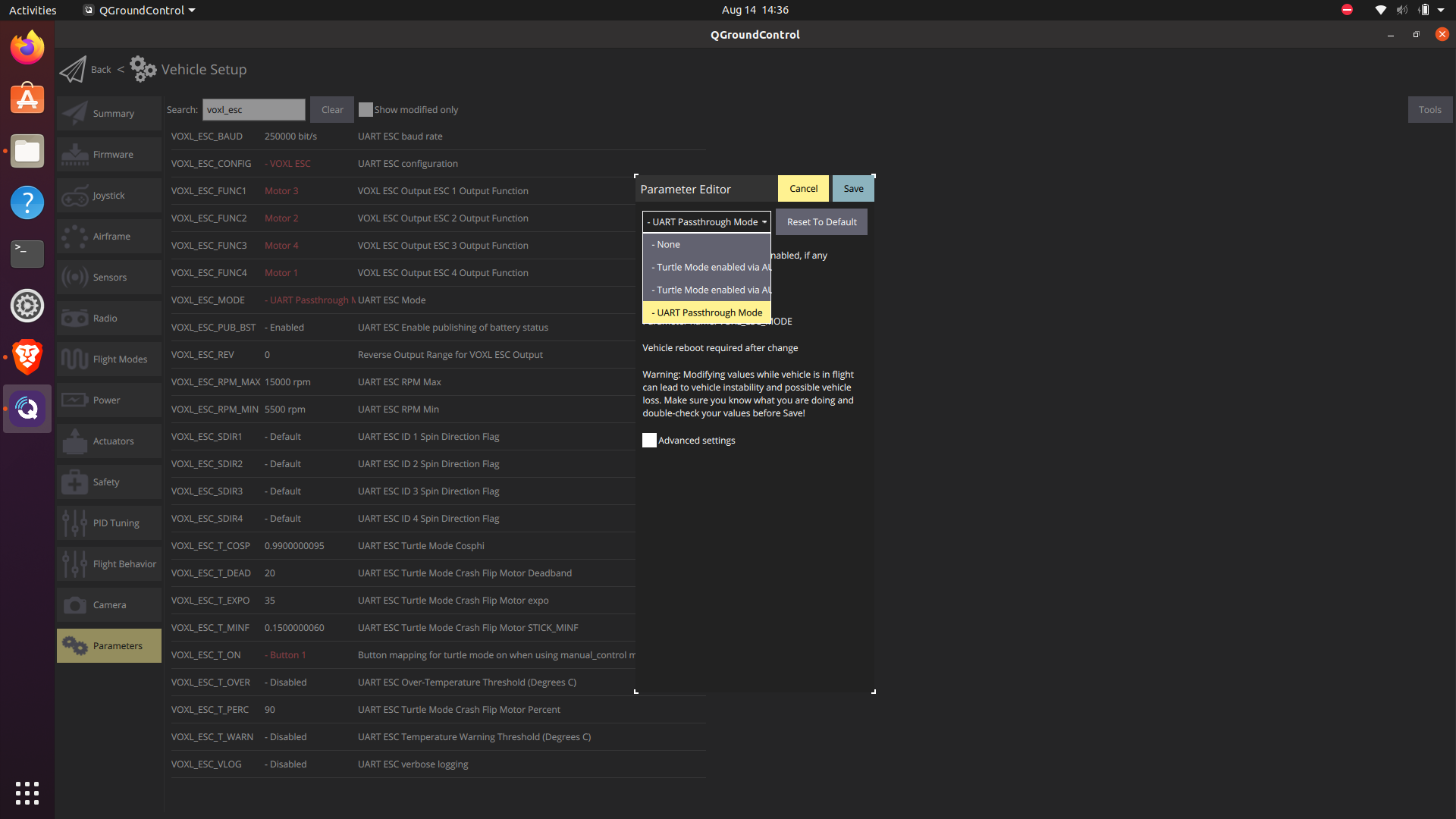
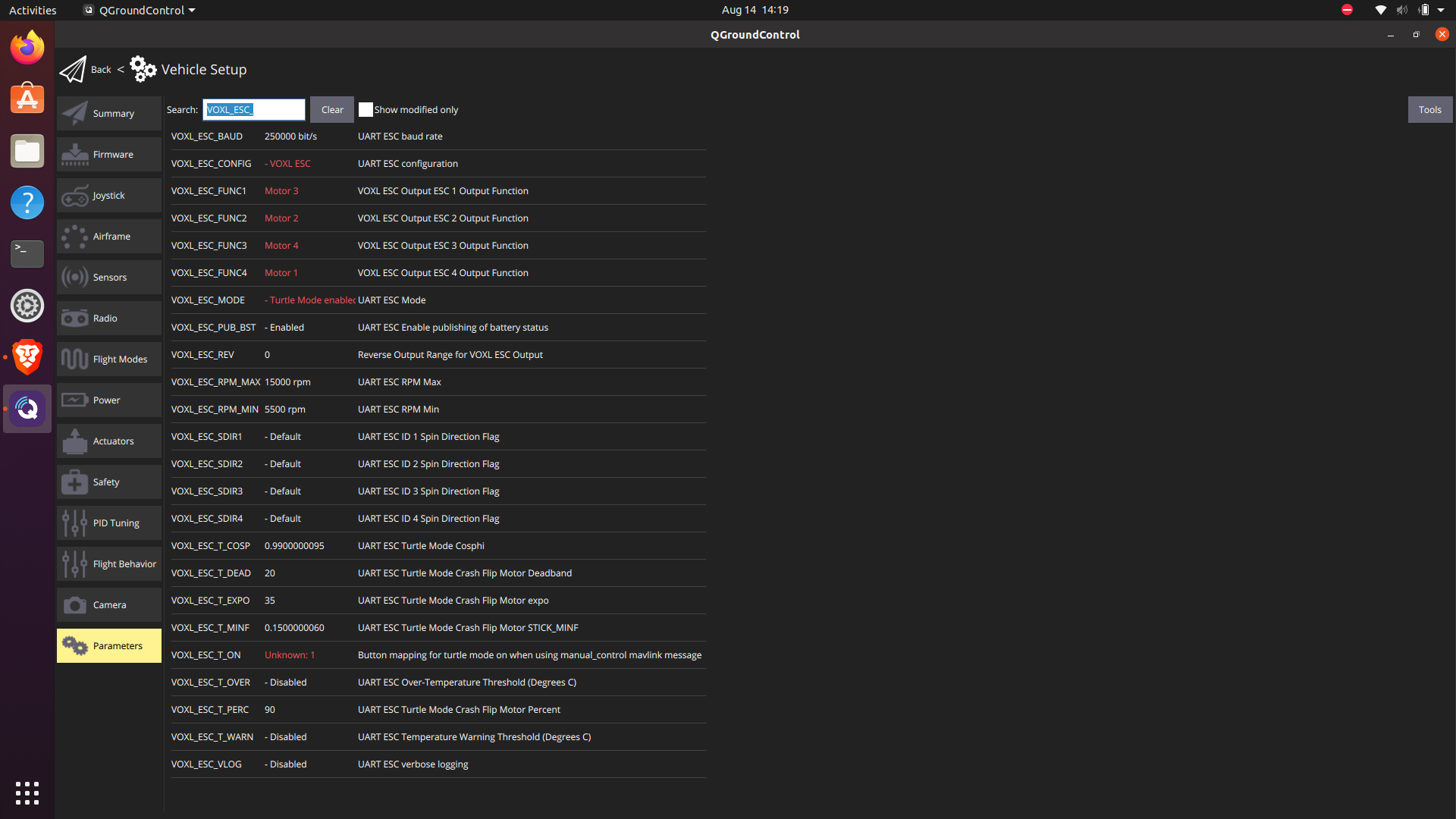
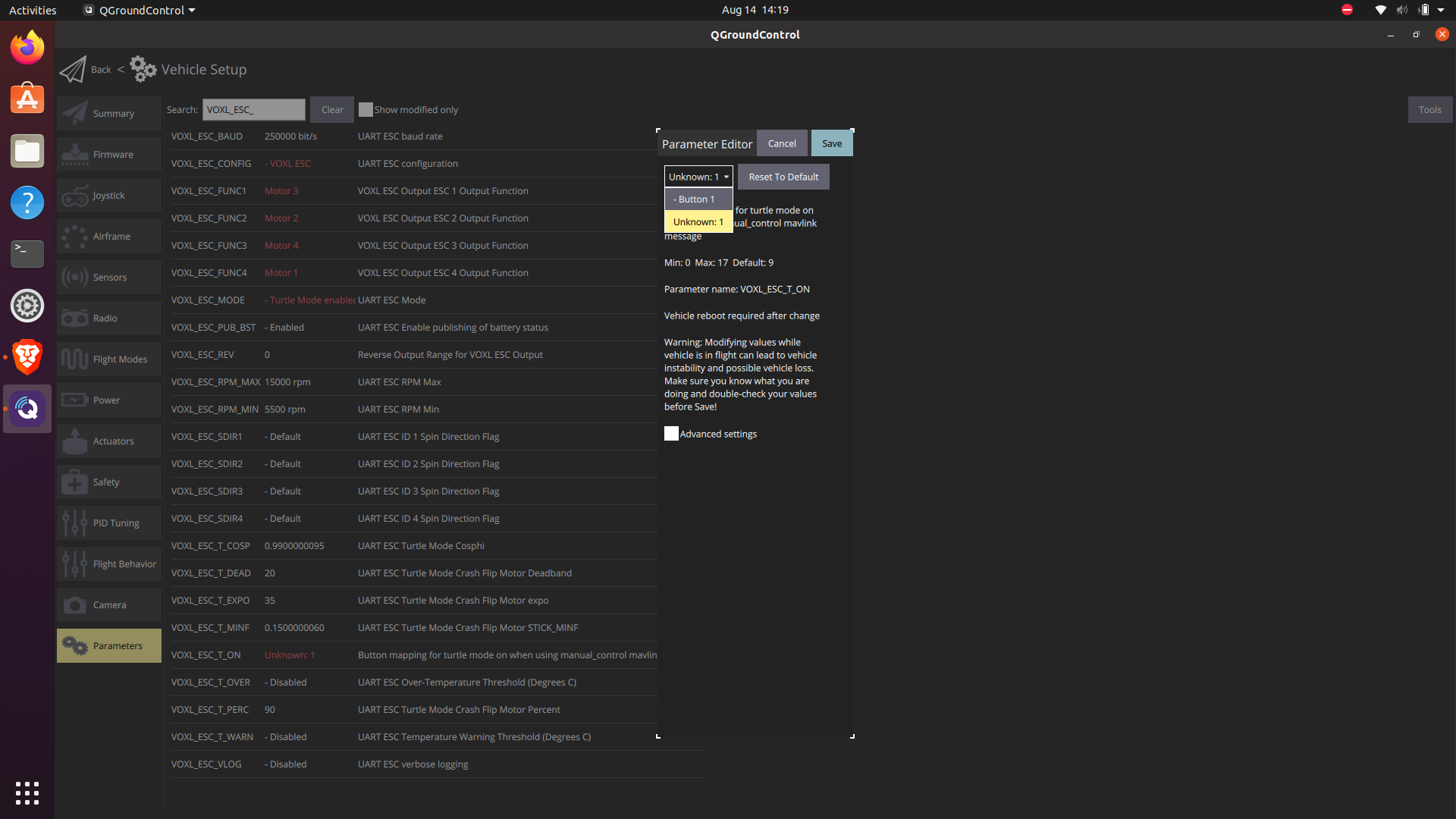
                                        I followed the steps you suggested, i am attaching the Screenshots. I tried what you suggested the result is still the same, I am not able to arm the system. I tried with various options for VOXL_ESC_MODE, still the same.

                                        Screenshot from 2025-08-14 14-29-56.png

                                        I clicked the assigned button here, AUX 1 values are changing but only when i keep the voxl_ESC_MODE to UART passthorugh
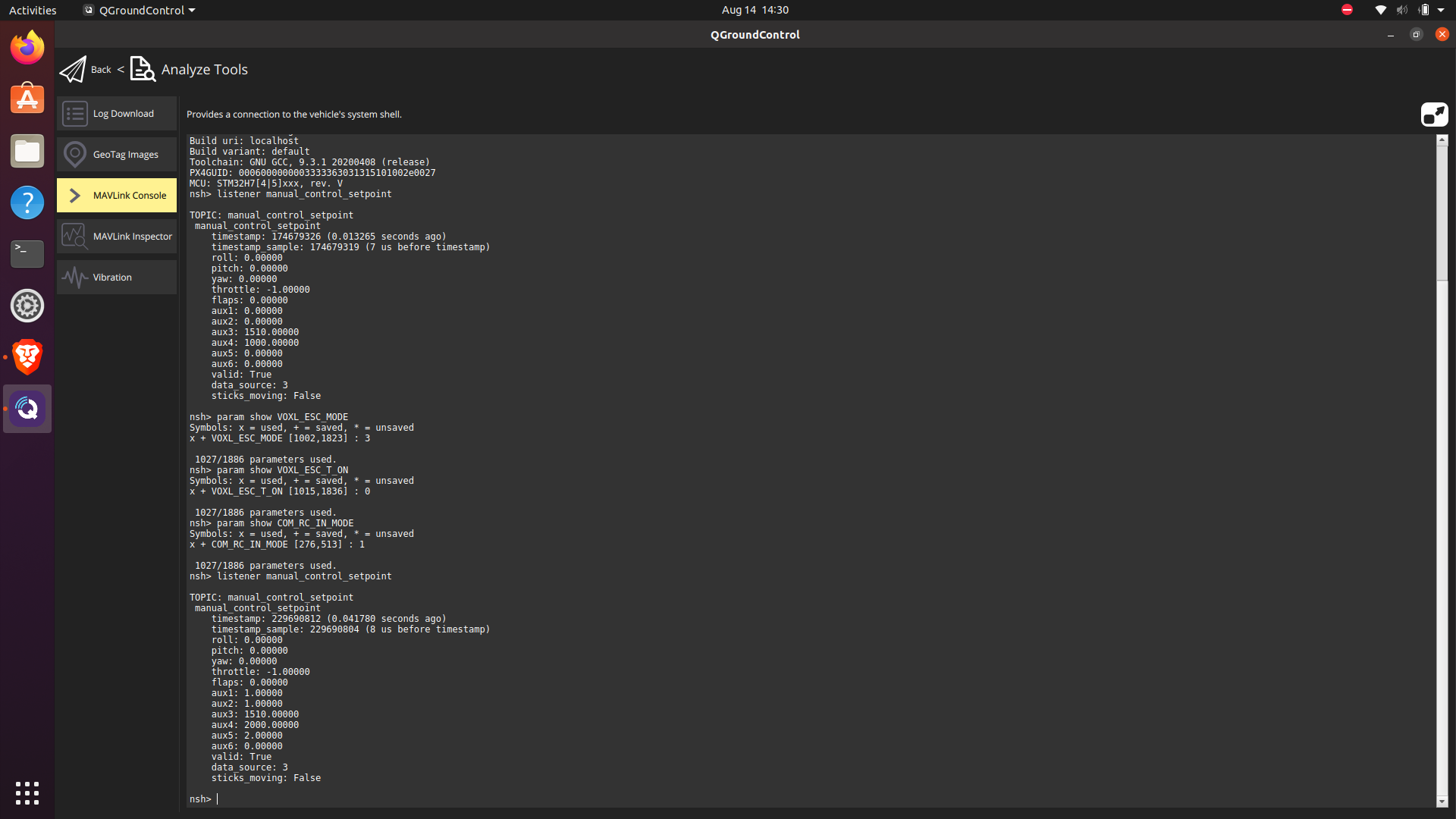
                                        Screenshot from 2025-08-14 14-30-08.png

                                        Screenshot from 2025-08-14 14-19-46.png

                                        Screenshot from 2025-08-14 14-19-43.png

                                        Screenshot from 2025-08-14 14-36-35.png

                                        Eric KatzfeyE 1 Reply Last reply
                                        0
                                        • Jetson NanoJ Jetson Nano

                                          @Eric-Katzfey
                                          I followed the steps you suggested, i am attaching the Screenshots. I tried what you suggested the result is still the same, I am not able to arm the system. I tried with various options for VOXL_ESC_MODE, still the same.

                                          Screenshot from 2025-08-14 14-29-56.png

                                          I clicked the assigned button here, AUX 1 values are changing but only when i keep the voxl_ESC_MODE to UART passthorugh
                                          Screenshot from 2025-08-14 14-30-08.png

                                          Screenshot from 2025-08-14 14-19-46.png

                                          Screenshot from 2025-08-14 14-19-43.png

                                          Screenshot from 2025-08-14 14-36-35.png

                                          Eric KatzfeyE Online
                                          Eric KatzfeyE Online
                                          Eric Katzfey
                                          ModalAI Team
                                          wrote on last edited by
                                          #25

                                          @Jetson-Nano Here are the steps I am using for testing. Here are my VOXL_ESC parameters:
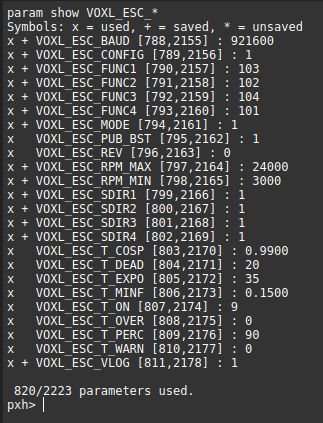
                                          6d7b7752-038a-4078-8455-ce8b3f4e46dc-image.png
                                          My VOXL_ESC_BAUD is set non-standard because I am using an ESC simulator. I have flight mode set to altitude mode. If I check the ESC commands I see no output:

                                          c4703501-1b3d-4d39-aeec-43e3e5cf3c10-image.png
                                          Then I arm and check ESC commands and see values:

                                          ecde7a30-8903-4116-819c-abd998b4d8b1-image.png
                                          Then I disarm, press button 9, arm, move both sticks around and see these ESC commands:

                                          c0b19cce-bed1-4358-96c8-87595e4dd924-image.png
                                          Notice that most motors are 0 except for 1 or 2 and are of opposite sign than normal. In this case pitch was centered and roll was full right. Hope this helps.

                                          Jetson NanoJ 2 Replies Last reply
                                          0

                                          Hello! It looks like you're interested in this conversation, but you don't have an account yet.

                                          Getting fed up of having to scroll through the same posts each visit? When you register for an account, you'll always come back to exactly where you were before, and choose to be notified of new replies (either via email, or push notification). You'll also be able to save bookmarks and upvote posts to show your appreciation to other community members.

                                          With your input, this post could be even better 💗

                                          Register Login
                                          Reply
                                          • Reply as topic
                                          Log in to reply
                                          • Oldest to Newest
                                          • Newest to Oldest
                                          • Most Votes


                                          ModalAI
                                          Categories Recent Tags ModalAI.com Docs
                                          © 2026 ModalAI® · Accelerating autonomy for smaller, smarter, safer drones · Powered by NodeBB
                                          • Login

                                          • Don't have an account? Register

                                          • Login or register to search.
                                          • First post
                                            Last post
                                          0
                                          • Categories
                                          • Recent
                                          • Tags
                                          • Popular
                                          • Users
                                          • Groups