Skip to content
  • Categories
  • Recent
  • Tags
  • Popular
  • Users
  • Groups
Collapse
Brand Logo

ModalAI Forum

  1. ModalAI Support Forum
  2. Ask your questions right here!
  3. "Adopted" drone, help setting up

"Adopted" drone, help setting up

Scheduled Pinned Locked Moved Ask your questions right here!
19 Posts 2 Posters 2.3k Views 2 Watching
  • Oldest to Newest
  • Newest to Oldest
  • Most Votes
Reply
  • Reply as topic
Log in to reply
This topic has been deleted. Only users with topic management privileges can see it.
  • J jbhines929

    @tom Thanks for the reply. It is a VOXL Flight, so far as I can tell. Has the microhard 'hat' on it. I was able to connect USB. I found a tutorial on your website about setting up the microhard. I was able to connect with USB and ADB and able to go through the setup steps. I appear to be able to ping the VOXL from the GCS computer. I wasn't able to connect yet with MP or QGC, but that may have been because I only had a USB boot Ubuntu and not a full install. (USGOVT computer and it's a pain to install non supported OSes) Hope to find out more later.
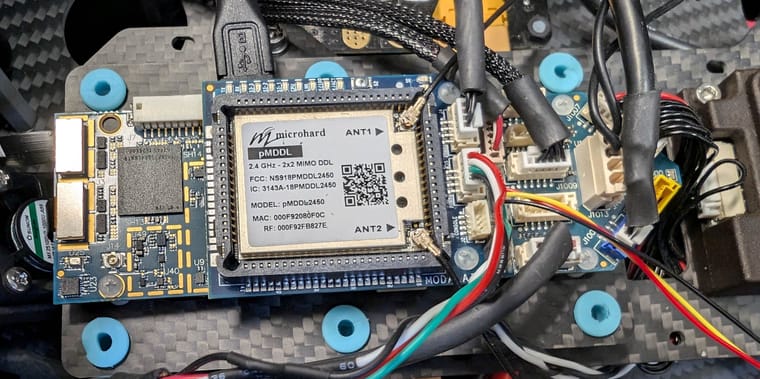
    voxlnew.jpg

    tomT Offline
    tomT Offline
    tom
    admin
    wrote on last edited by
    #4

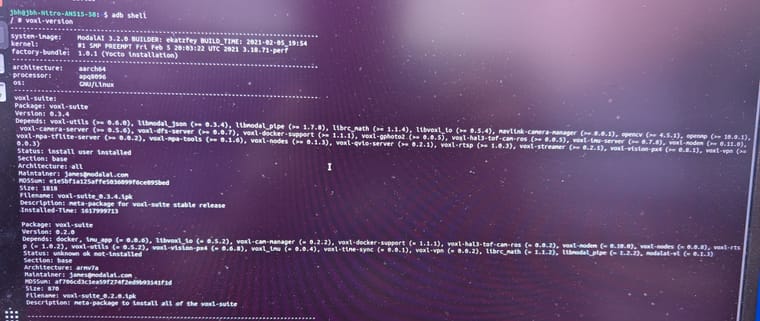
    @jbhines929 I'm curious what SDK is on that voxl-flight (It's been a while since I've worked with VOXL 1 personally so it'll take me a sec to get my brain aligned)

    What do you see if you ADB in and run the following:

    voxl-version
    
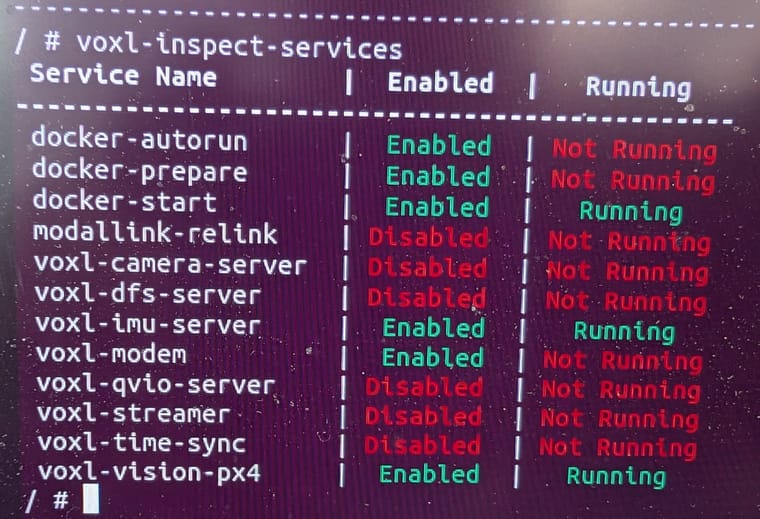
    voxl-inspect-services
    
    J 1 Reply Last reply
    0
    • tomT tom

      @jbhines929 I'm curious what SDK is on that voxl-flight (It's been a while since I've worked with VOXL 1 personally so it'll take me a sec to get my brain aligned)

      What do you see if you ADB in and run the following:

      voxl-version
      
      voxl-inspect-services
      
      J Offline
      J Offline
      jbhines929
      Contributor
      wrote on last edited by
      #5

      @tom no worries! It is a very old system by drone terms. I believe it was acquired in 2020. voxl_version.jpg
      J 1 Reply Last reply
      0
      • J jbhines929

        @tom no worries! It is a very old system by drone terms. I believe it was acquired in 2020. voxl_version.jpg

        J Offline
        J Offline
        jbhines929
        Contributor
        wrote on last edited by
        #6

        @jbhines929 VOXL_inspect_services.jpg

        looks like a lot of services aren't running

        J 1 Reply Last reply
        0
        • J jbhines929

          @jbhines929 VOXL_inspect_services.jpg

          looks like a lot of services aren't running

          J Offline
          J Offline
          jbhines929
          Contributor
          wrote on last edited by
          #7

          @jbhines929 would following the procedure here: https://docs.modalai.com/flash-system-image/ reset it to factory defaults?

          tomT 1 Reply Last reply
          0
          • J jbhines929

            @jbhines929 would following the procedure here: https://docs.modalai.com/flash-system-image/ reset it to factory defaults?

            tomT Offline
            tomT Offline
            tom
            admin
            wrote on last edited by
            #8

            @jbhines929 I would recommend loading the latest VOXL 1 SDK: 1.2.0 which can be downloaded from downloads.modalai.com

            You'll want to follow the steps here: https://docs.modalai.com/flash-system-image/#flashing-a-voxl-sdk-release

            J 1 Reply Last reply
            0
            • tomT tom

              @jbhines929 I would recommend loading the latest VOXL 1 SDK: 1.2.0 which can be downloaded from downloads.modalai.com

              You'll want to follow the steps here: https://docs.modalai.com/flash-system-image/#flashing-a-voxl-sdk-release

              J Offline
              J Offline
              jbhines929
              Contributor
              wrote on last edited by
              #9

              @tom I appear to have been successful in updating that. I still haven't been able to connect to VOXL via microhard on QGC. What is the port to use?

              tomT 1 Reply Last reply
              0
              • J jbhines929

                @tom I appear to have been successful in updating that. I still haven't been able to connect to VOXL via microhard on QGC. What is the port to use?

                tomT Offline
                tomT Offline
                tom
                admin
                wrote on last edited by
                #10

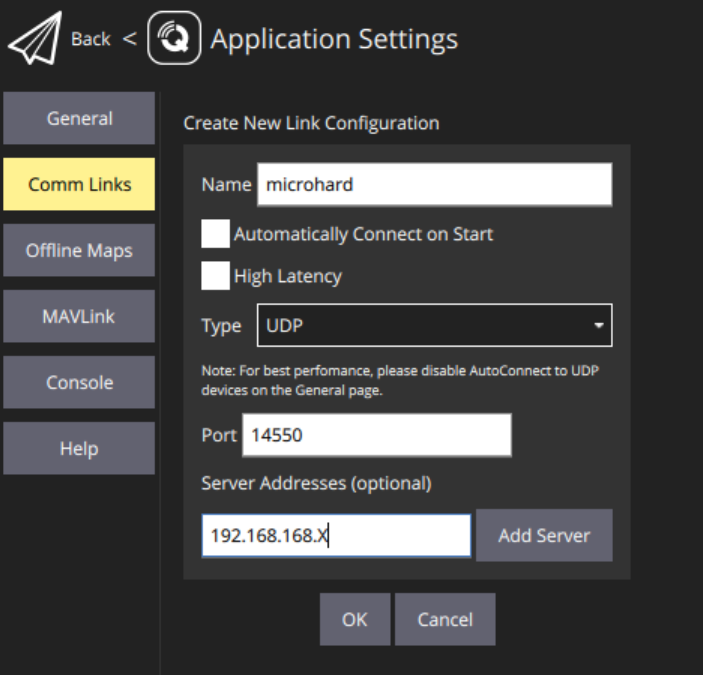
                @jbhines929 You'll want to establish a connection like this, where "Server Address" is the IP of the VOXL on the microhard network

                You can check this with ifconfig on VOXL

                bac0c119-167f-4f77-9a0e-a08ddcf69cde-image.png

                tomT 1 Reply Last reply
                0
                • tomT tom

                  @jbhines929 You'll want to establish a connection like this, where "Server Address" is the IP of the VOXL on the microhard network

                  You can check this with ifconfig on VOXL

                  bac0c119-167f-4f77-9a0e-a08ddcf69cde-image.png

                  tomT Offline
                  tomT Offline
                  tom
                  admin
                  wrote on last edited by
                  #11

                  @tom On VOXL make sure you've run voxl-configure-modem and selected microhard in the menu

                  J 1 Reply Last reply
                  0
                  • tomT tom

                    @tom On VOXL make sure you've run voxl-configure-modem and selected microhard in the menu

                    J Offline
                    J Offline
                    jbhines929
                    Contributor
                    wrote on last edited by
                    #12

                    @tom I tried that just now. I am able to ping across the microhard network. I can ping the laptop -> VOXL. I can ping VOXL -> laptop, I can even ping each microhard device from either the VOXL or the laptop. It just seems to not be making that final link to QGC. I ran and reran voxl-configure-modem, selecting microhard. I tried with both the default IP and a custom IP. Do I have to do some kind of configureation with teh mavlink server? (I am getting way out of my depth here, lol)

                    J 1 Reply Last reply
                    0
                    • J jbhines929

                      @tom I tried that just now. I am able to ping across the microhard network. I can ping the laptop -> VOXL. I can ping VOXL -> laptop, I can even ping each microhard device from either the VOXL or the laptop. It just seems to not be making that final link to QGC. I ran and reran voxl-configure-modem, selecting microhard. I tried with both the default IP and a custom IP. Do I have to do some kind of configureation with teh mavlink server? (I am getting way out of my depth here, lol)

                      J Offline
                      J Offline
                      jbhines929
                      Contributor
                      wrote on last edited by
                      #13

                      @jbhines929 (I should also specifiy that this is on a personal, fully open laptop, tried on Windows 11 and on Ubuntu) So there shouldn't be any security settings in the way re: ports.

                      J 1 Reply Last reply
                      0
                      • J jbhines929

                        @jbhines929 (I should also specifiy that this is on a personal, fully open laptop, tried on Windows 11 and on Ubuntu) So there shouldn't be any security settings in the way re: ports.

                        J Offline
                        J Offline
                        jbhines929
                        Contributor
                        wrote on last edited by
                        #14

                        @jbhines929 Ok I retract the last post. I just tried again and I am able to connect over Microhard/QGC on windows. Ubuntu wasn't working, but seems like Windows is functional. I'll do some more tests. Otherwise, thank you very much for your assistance!

                        tomT J 2 Replies Last reply
                        0
                        • J jbhines929

                          @jbhines929 Ok I retract the last post. I just tried again and I am able to connect over Microhard/QGC on windows. Ubuntu wasn't working, but seems like Windows is functional. I'll do some more tests. Otherwise, thank you very much for your assistance!

                          tomT Offline
                          tomT Offline
                          tom
                          admin
                          wrote on last edited by
                          #15

                          @jbhines929 Interesting I wonder if that port is being blocked on your Ubuntu machine for some reason

                          1 Reply Last reply
                          0
                          • J jbhines929

                            @jbhines929 Ok I retract the last post. I just tried again and I am able to connect over Microhard/QGC on windows. Ubuntu wasn't working, but seems like Windows is functional. I'll do some more tests. Otherwise, thank you very much for your assistance!

                            J Offline
                            J Offline
                            jbhines929
                            Contributor
                            wrote on last edited by
                            #16

                            @jbhines929 I was able to do a test flight, however in Position mode it won't hold gps position (even though I have good # satellites). I wonder if this is something due to the optical flow and VOXL?

                            tomT 1 Reply Last reply
                            0
                            • J jbhines929

                              @jbhines929 I was able to do a test flight, however in Position mode it won't hold gps position (even though I have good # satellites). I wonder if this is something due to the optical flow and VOXL?

                              tomT Offline
                              tomT Offline
                              tom
                              admin
                              wrote on last edited by
                              #17

                              @jbhines929 Hmm I would make sure you have the correct px4 parameter set loaded on your flight core, i.e. "outdoor_gps.params" from https://gitlab.com/voxl-public/voxl-sdk/utilities/voxl-px4-params/-/blob/master/params/v1.14/EKF2_helpers/outdoor_gps.params?ref_type=heads

                              J 1 Reply Last reply
                              0
                              • tomT tom

                                @jbhines929 Hmm I would make sure you have the correct px4 parameter set loaded on your flight core, i.e. "outdoor_gps.params" from https://gitlab.com/voxl-public/voxl-sdk/utilities/voxl-px4-params/-/blob/master/params/v1.14/EKF2_helpers/outdoor_gps.params?ref_type=heads

                                J Offline
                                J Offline
                                jbhines929
                                Contributor
                                wrote on last edited by
                                #18

                                @tom Thank you very much for all your help on this. I ended up getting it to work, not sure why it wasnt on Ubuntu earlier. Probably user error! 🙂

                                Honestly, got to our wits end with it and a colleague ended up blasting the PX4 firmware and putting Arducopter on it. Seems to be working fine now, with VOXL apparently just handling sending packets to the microhard. I really appreciate your support and answering my questions, they were most helpful.

                                tomT 1 Reply Last reply
                                0
                                • J jbhines929

                                  @tom Thank you very much for all your help on this. I ended up getting it to work, not sure why it wasnt on Ubuntu earlier. Probably user error! 🙂

                                  Honestly, got to our wits end with it and a colleague ended up blasting the PX4 firmware and putting Arducopter on it. Seems to be working fine now, with VOXL apparently just handling sending packets to the microhard. I really appreciate your support and answering my questions, they were most helpful.

                                  tomT Offline
                                  tomT Offline
                                  tom
                                  admin
                                  wrote on last edited by
                                  #19

                                  @jbhines929 No problem, thanks for the patience!

                                  1 Reply Last reply
                                  0

                                  Hello! It looks like you're interested in this conversation, but you don't have an account yet.

                                  Getting fed up of having to scroll through the same posts each visit? When you register for an account, you'll always come back to exactly where you were before, and choose to be notified of new replies (either via email, or push notification). You'll also be able to save bookmarks and upvote posts to show your appreciation to other community members.

                                  With your input, this post could be even better 💗

                                  Register Login
                                  Reply
                                  • Reply as topic
                                  Log in to reply
                                  • Oldest to Newest
                                  • Newest to Oldest
                                  • Most Votes


                                  ModalAI
                                  Categories Recent Tags ModalAI.com Docs
                                  © 2026 ModalAI® · Accelerating autonomy for smaller, smarter, safer drones · Powered by NodeBB
                                  • Login

                                  • Don't have an account? Register

                                  • Login or register to search.
                                  • First post
                                    Last post
                                  0
                                  • Categories
                                  • Recent
                                  • Tags
                                  • Popular
                                  • Users
                                  • Groups