Skip to content
  • Categories
  • Recent
  • Tags
  • Popular
  • Users
  • Groups
Collapse
Brand Logo

ModalAI Forum

  1. ModalAI Support Forum
  2. ESCs
  3. VOXL ESC FPV queries

VOXL ESC FPV queries

Scheduled Pinned Locked Moved ESCs
32 Posts 4 Posters 7.2k Views 3 Watching
  • Oldest to Newest
  • Newest to Oldest
  • Most Votes
Reply
  • Reply as topic
Log in to reply
This topic has been deleted. Only users with topic management privileges can see it.
  • Alex KushleyevA Alex Kushleyev

    @Jetson-Nano , can you please clarify which connector on VOXL2 is your Flight Core connected to (for uart communication) and whether you have any indication that the communication is established? Have you previously been able to connect to VOXL2 from QGC and access the Flight Core V2 while it has been connected to VOXL2?

    Alex

    Jetson NanoJ Offline
    Jetson NanoJ Offline
    Jetson Nano
    Veteran
    wrote on last edited by
    #21

    @Alex-Kushleyev I currently use, VOXL2 USB 3.0 Expansion Adapter connected to VOXL2. From the UART7 port of the Expansion Adapter I have connected to 6-PIN Telemetry1 Port in Flight Core V2.

    My connection is similar to this,
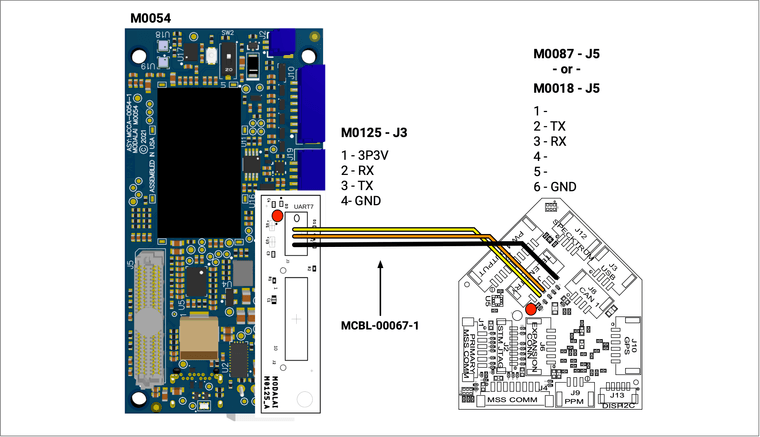
    a976cc01-f06c-4080-b2dc-a551ef614cce-image.png

    As you mentioned earlier, I'm establishing connection through port /dev/ttyHS1. When I run the cat command to read the messages from this port, I get garbled data as below,
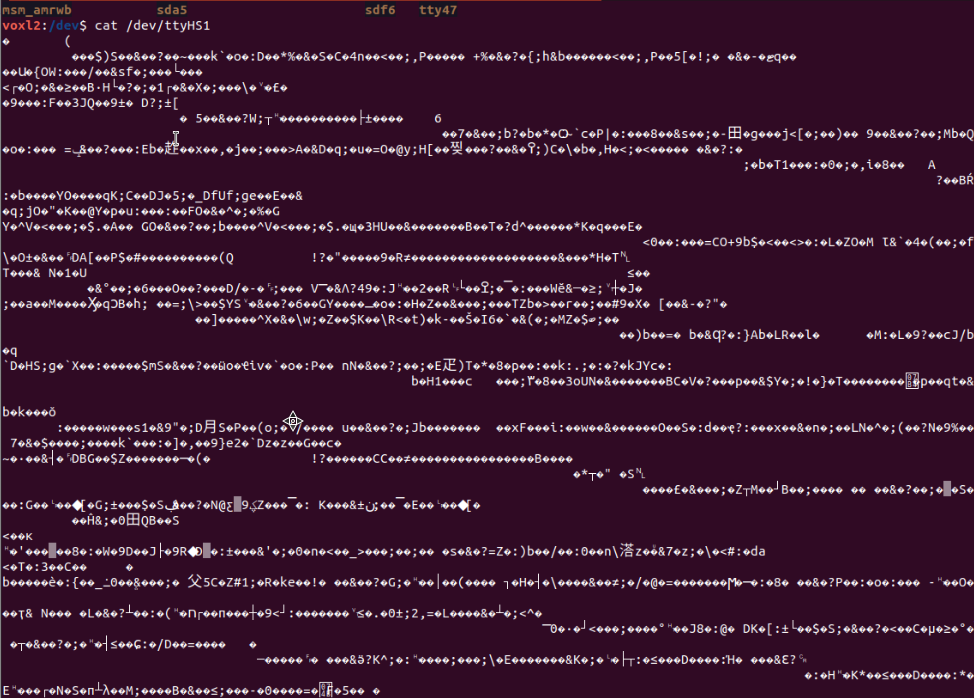
    646c42a2-3edd-4b18-aecd-c0a36af3721e-image.png.

    I'm not exactly clear when you mean if I have tried connecting to VOXL2 from QGC and access the Flight Core V2. Few things I have tried is,

    • Connecting to FlightCore V2 by connecting to Wifi of VOXL2. I also have a Wifi setup on VOXL2, which also acts as my Telemetry line. From QGC I connect to this local network to access FC data and PX4 parameters on Flight Core V2.

    • I have tried and tested few mavlink message commads which communicate with PX4 directly for C2C.

    1 Reply Last reply
    0
    • tomT tom

      @Alex-Kushleyev @Jetson-Nano You'll want to make sure that in /etc/modalai/voxl-mavlink-server.conf that en_external_uart_ap is set to true

      Once you restart the service you should be able to run voxl-inspect-mavlink mavlink_offboard to view the generated messages from FC

      Jetson NanoJ Offline
      Jetson NanoJ Offline
      Jetson Nano
      Veteran
      wrote on last edited by
      #22

      @tom As per your response on shifting to voxl-inspect-mavlink mavlink_offboard, I see that even in mavlink server documentation from ModalAI that service pipeline is not listed. Is it that something that has to be explicitly be enabled somewhere?
      Even as per the documentation, I dont see this service pipeline listed.
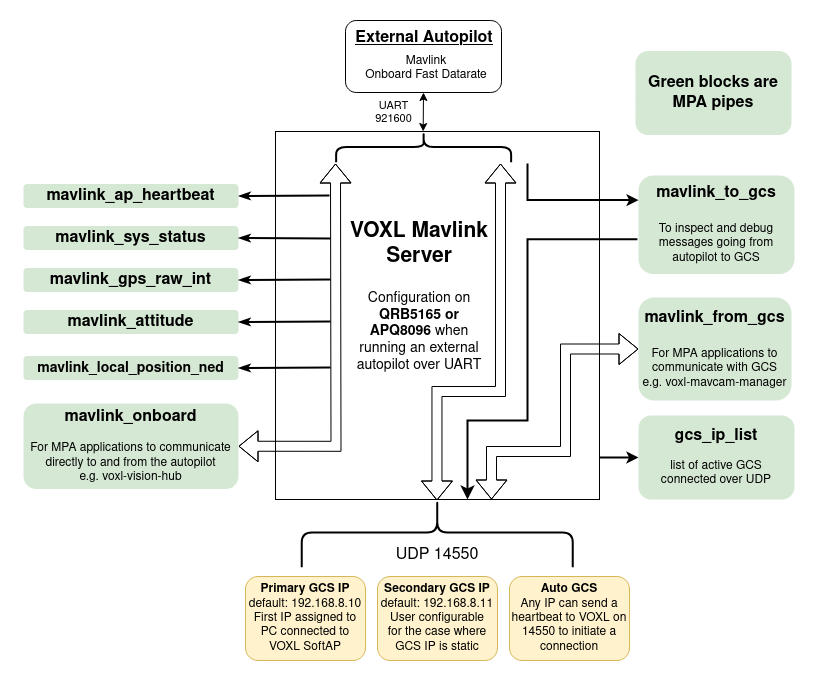
      0abeaffd-4404-446e-9b9b-a1c2ab30b668-image.png

      tomT 1 Reply Last reply
      0
      • Jetson NanoJ Jetson Nano

        @tom As per your response on shifting to voxl-inspect-mavlink mavlink_offboard, I see that even in mavlink server documentation from ModalAI that service pipeline is not listed. Is it that something that has to be explicitly be enabled somewhere?
        Even as per the documentation, I dont see this service pipeline listed.

        0abeaffd-4404-446e-9b9b-a1c2ab30b668-image.png

        tomT Offline
        tomT Offline
        tom
        admin
        wrote on last edited by
        #23

        @Jetson-Nano I could have the naming wrong. If you inspect mavlink_onboard what kind of data do you see?

        Jetson NanoJ 1 Reply Last reply
        0
        • tomT tom

          @Jetson-Nano I could have the naming wrong. If you inspect mavlink_onboard what kind of data do you see?

          Jetson NanoJ Offline
          Jetson NanoJ Offline
          Jetson Nano
          Veteran
          wrote on last edited by
          #24

          @tom This is the output I get,

          Screenshot from 2025-01-16 20-49-20.png

          tomT 1 Reply Last reply
          0
          • Jetson NanoJ Jetson Nano

            @tom This is the output I get,

            Screenshot from 2025-01-16 20-49-20.png

            tomT Offline
            tomT Offline
            tom
            admin
            wrote on last edited by
            #25

            @Jetson-Nano Since you don't have voxl-px4 running I think that data is likely coming from your external flight controller

            Jetson NanoJ 1 Reply Last reply
            0
            • tomT tom

              @Jetson-Nano Since you don't have voxl-px4 running I think that data is likely coming from your external flight controller

              Jetson NanoJ Offline
              Jetson NanoJ Offline
              Jetson Nano
              Veteran
              wrote on last edited by
              #26

              @tom yes, the message is coming from external flight controller, Flight core v2. Now can you share how to double check if the RC message is set up to forward to voxl-mavlink-server from Flight Core (if not, how to enable it) and how to actually read that message?

              Eric KatzfeyE 1 Reply Last reply
              0
              • Jetson NanoJ Jetson Nano

                @tom yes, the message is coming from external flight controller, Flight core v2. Now can you share how to double check if the RC message is set up to forward to voxl-mavlink-server from Flight Core (if not, how to enable it) and how to actually read that message?

                Eric KatzfeyE Offline
                Eric KatzfeyE Offline
                Eric Katzfey
                ModalAI Team
                wrote on last edited by
                #27

                @Jetson-Nano Probably should also look at the pipe for messages from the flight controller to the GCS (Labeled mavlink_to_gcs in the above diagram but you'll have to double check that name). Generally the flight controller is configured with two mavlink streams. One is the onboard stream that has high rate messages and is intended for local use (e.g. on VOXL or VOXL 2) and the other is more the default settings for communication with a GCS. You can configure what each of these streams contain in PX4. You can add streams, change stream rates, etc. all via PX4 configuration. Please refer to the PX4 documentation for details on how to do this.

                Jetson NanoJ 1 Reply Last reply
                0
                • Eric KatzfeyE Eric Katzfey

                  @Jetson-Nano Probably should also look at the pipe for messages from the flight controller to the GCS (Labeled mavlink_to_gcs in the above diagram but you'll have to double check that name). Generally the flight controller is configured with two mavlink streams. One is the onboard stream that has high rate messages and is intended for local use (e.g. on VOXL or VOXL 2) and the other is more the default settings for communication with a GCS. You can configure what each of these streams contain in PX4. You can add streams, change stream rates, etc. all via PX4 configuration. Please refer to the PX4 documentation for details on how to do this.

                  Jetson NanoJ Offline
                  Jetson NanoJ Offline
                  Jetson Nano
                  Veteran
                  wrote on last edited by
                  #28

                  Hi @Eric-Katzfey, I was thinking another approach, where we can use pymavlink to get the RC_channel data. Any inputs to the mentioned approach, is it feasible?

                  Eric KatzfeyE 1 Reply Last reply
                  0
                  • Jetson NanoJ Jetson Nano

                    Hi @Eric-Katzfey, I was thinking another approach, where we can use pymavlink to get the RC_channel data. Any inputs to the mentioned approach, is it feasible?

                    Eric KatzfeyE Offline
                    Eric KatzfeyE Offline
                    Eric Katzfey
                    ModalAI Team
                    wrote on last edited by
                    #29

                    @Jetson-Nano Yes, that should work. You should be able to send heartbeats from a Python script using pymavlink and connect to the flight controller via voxl-mavlink-server. Then you should start receiving all the normal messages sent out by the flight controller to the GCS which should include the RC channels message.

                    Jetson NanoJ 1 Reply Last reply
                    0
                    • Eric KatzfeyE Eric Katzfey

                      @Jetson-Nano Yes, that should work. You should be able to send heartbeats from a Python script using pymavlink and connect to the flight controller via voxl-mavlink-server. Then you should start receiving all the normal messages sent out by the flight controller to the GCS which should include the RC channels message.

                      Jetson NanoJ Offline
                      Jetson NanoJ Offline
                      Jetson Nano
                      Veteran
                      wrote on last edited by Jetson Nano
                      #30
                      This post is deleted!
                      Jetson NanoJ 1 Reply Last reply
                      0
                      • Jetson NanoJ Jetson Nano

                        This post is deleted!

                        Jetson NanoJ Offline
                        Jetson NanoJ Offline
                        Jetson Nano
                        Veteran
                        wrote on last edited by
                        #31

                        @Alex-Kushleyev can you check the above mentioned approach

                        Alex KushleyevA 1 Reply Last reply
                        0
                        • Jetson NanoJ Jetson Nano

                          @Alex-Kushleyev can you check the above mentioned approach

                          Alex KushleyevA Offline
                          Alex KushleyevA Offline
                          Alex Kushleyev
                          ModalAI Team
                          wrote on last edited by
                          #32

                          @Jetson-Nano , I am sorry, I don't have this hardware set up right now, so I can't actually test what you are trying to do. I will check with the team regarding who can test it.

                          Alex

                          1 Reply Last reply
                          0

                          Hello! It looks like you're interested in this conversation, but you don't have an account yet.

                          Getting fed up of having to scroll through the same posts each visit? When you register for an account, you'll always come back to exactly where you were before, and choose to be notified of new replies (either via email, or push notification). You'll also be able to save bookmarks and upvote posts to show your appreciation to other community members.

                          With your input, this post could be even better 💗

                          Register Login
                          Reply
                          • Reply as topic
                          Log in to reply
                          • Oldest to Newest
                          • Newest to Oldest
                          • Most Votes


                          ModalAI
                          Categories Recent Tags ModalAI.com Docs
                          © 2026 ModalAI® · Accelerating autonomy for smaller, smarter, safer drones · Powered by NodeBB
                          • Login

                          • Login or register to search.
                          • First post
                            Last post
                          0
                          • Categories
                          • Recent
                          • Tags
                          • Popular
                          • Users
                          • Groups