
VOXL ESC FPV queries
-
@Alex-Kushleyev @Jetson-Nano You'll want to make sure that in
/etc/modalai/voxl-mavlink-server.confthaten_external_uart_apis set totrueOnce you restart the service you should be able to run
voxl-inspect-mavlink mavlink_offboardto view the generated messages from FC@tom As per your response on shifting to
voxl-inspect-mavlink mavlink_offboard, I see that even in mavlink server documentation from ModalAI that service pipeline is not listed. Is it that something that has to be explicitly be enabled somewhere?
Even as per the documentation, I dont see this service pipeline listed.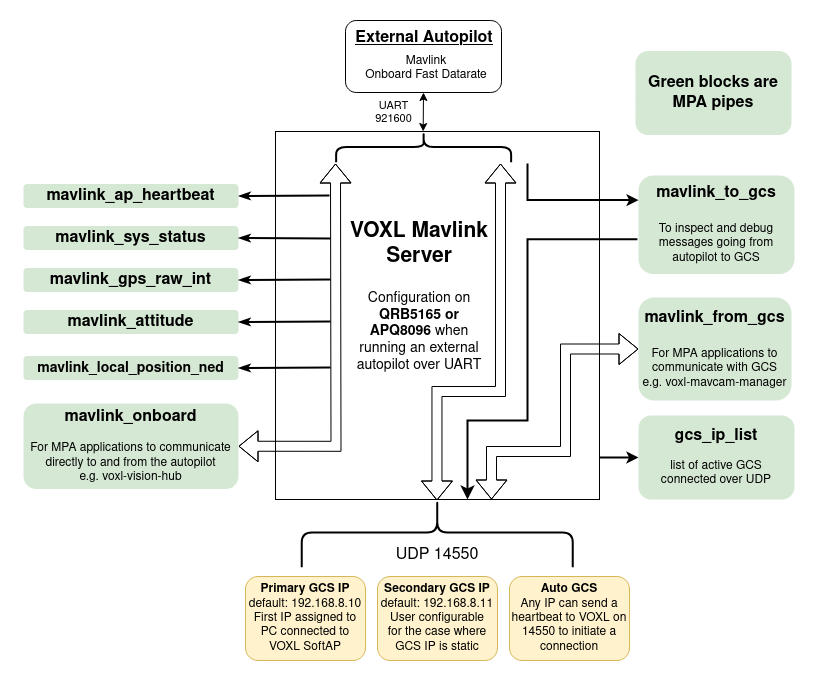
-
@tom As per your response on shifting to
voxl-inspect-mavlink mavlink_offboard, I see that even in mavlink server documentation from ModalAI that service pipeline is not listed. Is it that something that has to be explicitly be enabled somewhere?
Even as per the documentation, I dont see this service pipeline listed. -
@Jetson-Nano I could have the naming wrong. If you inspect
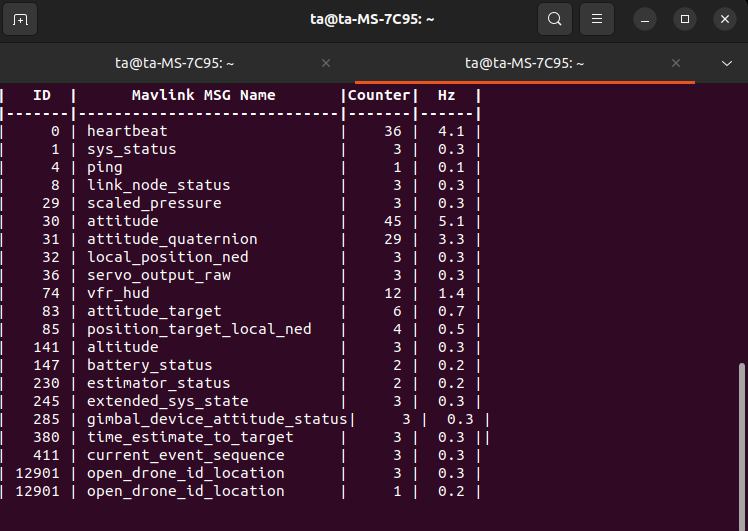
mavlink_onboardwhat kind of data do you see? -
@tom This is the output I get,
-
@Jetson-Nano Since you don't have voxl-px4 running I think that data is likely coming from your external flight controller
@tom yes, the message is coming from external flight controller, Flight core v2. Now can you share how to double check if the RC message is set up to forward to voxl-mavlink-server from Flight Core (if not, how to enable it) and how to actually read that message?
-
@tom yes, the message is coming from external flight controller, Flight core v2. Now can you share how to double check if the RC message is set up to forward to voxl-mavlink-server from Flight Core (if not, how to enable it) and how to actually read that message?
@Jetson-Nano Probably should also look at the pipe for messages from the flight controller to the GCS (Labeled mavlink_to_gcs in the above diagram but you'll have to double check that name). Generally the flight controller is configured with two mavlink streams. One is the onboard stream that has high rate messages and is intended for local use (e.g. on VOXL or VOXL 2) and the other is more the default settings for communication with a GCS. You can configure what each of these streams contain in PX4. You can add streams, change stream rates, etc. all via PX4 configuration. Please refer to the PX4 documentation for details on how to do this.
-
@Jetson-Nano Probably should also look at the pipe for messages from the flight controller to the GCS (Labeled mavlink_to_gcs in the above diagram but you'll have to double check that name). Generally the flight controller is configured with two mavlink streams. One is the onboard stream that has high rate messages and is intended for local use (e.g. on VOXL or VOXL 2) and the other is more the default settings for communication with a GCS. You can configure what each of these streams contain in PX4. You can add streams, change stream rates, etc. all via PX4 configuration. Please refer to the PX4 documentation for details on how to do this.
Hi @Eric-Katzfey, I was thinking another approach, where we can use pymavlink to get the RC_channel data. Any inputs to the mentioned approach, is it feasible?
-
Hi @Eric-Katzfey, I was thinking another approach, where we can use pymavlink to get the RC_channel data. Any inputs to the mentioned approach, is it feasible?
@Jetson-Nano Yes, that should work. You should be able to send heartbeats from a Python script using pymavlink and connect to the flight controller via voxl-mavlink-server. Then you should start receiving all the normal messages sent out by the flight controller to the GCS which should include the RC channels message.
-
@Jetson-Nano Yes, that should work. You should be able to send heartbeats from a Python script using pymavlink and connect to the flight controller via voxl-mavlink-server. Then you should start receiving all the normal messages sent out by the flight controller to the GCS which should include the RC channels message.
-
[[topic:post-is-deleted]]
@Alex-Kushleyev can you check the above mentioned approach
-
@Alex-Kushleyev can you check the above mentioned approach
@Jetson-Nano , I am sorry, I don't have this hardware set up right now, so I can't actually test what you are trying to do. I will check with the team regarding who can test it.
Alex




Reading along? Create a free ModalAI Forum account to join in.
With an account you can reply, ask your own question, get an email when a ModalAI engineer answers, and mark the reply that solved it. Your place in each thread is saved between visits.
Questions about VOXL, Flight Core, ESCs and ModalAI drones are answered here by the engineers who build them.
Register Login