
Voxl-Mavcam-Manager Multiple RTSP Stream Setup
-
Hello all,
I am using the RTSP streams from a Starling 2 Max drone, it is unclear to me how
voxl-streamerandvoxl-mavcam-managerinterplay with the produced RTSP streams. Ideally, I want to be able to automatically setup several streams for different cameras. I already have a setup to intercept the streams and just need to get the aircraft to broadcast the separate streams.- Based on the
voxl-streamerdocumentation, it seems that it is the RTSP streams which are what QGC is using to display video. - The
voxl-mavcam-managerdocumentation seems to indicate that it is the method by which QGC locates the necessary RTSP streams. - My understanding is that the
voxl-mavcam-manageris what creates the other, camera components that are visible as mavlink heartbeats and which QGC can query to get the RTSP URI and send commands to. - However, I do not understand why the
voxl-mavcam-manager.confincludes snapshot, video record pipes, and URI fields. - Is the URI assumed to be the input to
voxl-mavcam-manager, where it can find the RTSP stream to send to QGC? Or is this the output, i.e. wherevoxl-mavcam-managerwill send the stream. Based on other wording in the doc I would assume the former but am not sure, I have not been able to view 2 streams from QGC. - Since it seems I will need to have 2 instances of
voxl-streamerrunning, how can I set this up programmatically such that the 2 instances are started on startup. It does not seem like I can just add another streamer to thevoxl-streamer.conffile. - If I want to have 2 streams running while not in SoftAP mode, how can I setup the uri? The documentation indicates that using auto ip is only possible when streaming a single RTSP stream.
- How can I manage 2 streams when connected over 4G/5G? Will I need to hardcode in the ip address of the drone?
I have not yet been able to get 2 streams to appear in QGC with the following
voxl-mavcam-manager.conf:{ "mavcam_inputs": [{ "snapshot_pipe_name": "hires_front_snapshot", "video_record_pipe_name": "hires_front_large_encoded", "default_uri": "rtsp://192.168.8.1:8900/live", "enable_auto_ip": true, "mavlink_sys_id": 1 },{ "snapshot_pipe_name": "hires_down_snapshot", "video_record_pipe_name": "hires_down_large_encoded", "default_uri": "rtsp://192.168.8.1:8901/live", "enable_auto_ip": true, "mavlink_sys_id": 1 }] }and a second stream started manually with
voxl-streamer -son port8901.Any help is appreciated,
Griffin - Based on the
-
Hello all,
I am using the RTSP streams from a Starling 2 Max drone, it is unclear to me how
voxl-streamerandvoxl-mavcam-managerinterplay with the produced RTSP streams. Ideally, I want to be able to automatically setup several streams for different cameras. I already have a setup to intercept the streams and just need to get the aircraft to broadcast the separate streams.- Based on the
voxl-streamerdocumentation, it seems that it is the RTSP streams which are what QGC is using to display video. - The
voxl-mavcam-managerdocumentation seems to indicate that it is the method by which QGC locates the necessary RTSP streams. - My understanding is that the
voxl-mavcam-manageris what creates the other, camera components that are visible as mavlink heartbeats and which QGC can query to get the RTSP URI and send commands to. - However, I do not understand why the
voxl-mavcam-manager.confincludes snapshot, video record pipes, and URI fields. - Is the URI assumed to be the input to
voxl-mavcam-manager, where it can find the RTSP stream to send to QGC? Or is this the output, i.e. wherevoxl-mavcam-managerwill send the stream. Based on other wording in the doc I would assume the former but am not sure, I have not been able to view 2 streams from QGC. - Since it seems I will need to have 2 instances of
voxl-streamerrunning, how can I set this up programmatically such that the 2 instances are started on startup. It does not seem like I can just add another streamer to thevoxl-streamer.conffile. - If I want to have 2 streams running while not in SoftAP mode, how can I setup the uri? The documentation indicates that using auto ip is only possible when streaming a single RTSP stream.
- How can I manage 2 streams when connected over 4G/5G? Will I need to hardcode in the ip address of the drone?
I have not yet been able to get 2 streams to appear in QGC with the following
voxl-mavcam-manager.conf:{ "mavcam_inputs": [{ "snapshot_pipe_name": "hires_front_snapshot", "video_record_pipe_name": "hires_front_large_encoded", "default_uri": "rtsp://192.168.8.1:8900/live", "enable_auto_ip": true, "mavlink_sys_id": 1 },{ "snapshot_pipe_name": "hires_down_snapshot", "video_record_pipe_name": "hires_down_large_encoded", "default_uri": "rtsp://192.168.8.1:8901/live", "enable_auto_ip": true, "mavlink_sys_id": 1 }] }and a second stream started manually with
voxl-streamer -son port8901.Any help is appreciated,
Griffin - Based on the
-
@tom regarding your previous response about
/etc/systemd/system/voxl-streamer.service, I don't see a call to thevoxl-streamer.conffile in there, only to the.pidand binary files. Do you know how I can modify the configuration loaded into a secondaryvoxl-streamerprocess? -
@tom regarding your previous response about
/etc/systemd/system/voxl-streamer.service, I don't see a call to thevoxl-streamer.conffile in there, only to the.pidand binary files. Do you know how I can modify the configuration loaded into a secondaryvoxl-streamerprocess?@griffin Sorry I deleted that response because I misread your question. I don't believe you need a second instance of voxl-streamer going.
I guess I'm a bit confused what isn't working. You're able to view both of the streams at the same time but not via. QGC?
-
@griffin Sorry I deleted that response because I misread your question. I don't believe you need a second instance of voxl-streamer going.
I guess I'm a bit confused what isn't working. You're able to view both of the streams at the same time but not via. QGC?
@tom they do not appear in qgc when I manually start up the second streamer.
Your original response seemed promising to me, how can I automate starting up a second rtsp stream if not through the voxl-streamer?Additionally, I am not sure about the exact behavior of the different parameters for each mavcam in the
voxl-mavcam-manager.conf, why exactly do I need to specify the pipes for video and and snapshots? Are they just for if mavlink commands are sent to start recording or capture a screenshot? But why do we need to send a video record command if the GCS is already receiving the video stream?Are the mavcams in the
.conffile also what create the camera components that are visible as mavlink heartbeats when connected to the drone? Do you know what command I can use to request the RTSP URI via mavlink (as I assume QGC does)?Sorry for the barrage of questions, just trying to understand how to wrangle a mutlicam RTSP setup nicely.
-
@tom they do not appear in qgc when I manually start up the second streamer.
Your original response seemed promising to me, how can I automate starting up a second rtsp stream if not through the voxl-streamer?Additionally, I am not sure about the exact behavior of the different parameters for each mavcam in the
voxl-mavcam-manager.conf, why exactly do I need to specify the pipes for video and and snapshots? Are they just for if mavlink commands are sent to start recording or capture a screenshot? But why do we need to send a video record command if the GCS is already receiving the video stream?Are the mavcams in the
.conffile also what create the camera components that are visible as mavlink heartbeats when connected to the drone? Do you know what command I can use to request the RTSP URI via mavlink (as I assume QGC does)?Sorry for the barrage of questions, just trying to understand how to wrangle a mutlicam RTSP setup nicely.
@griffin You don't need to send a video record command in order to stream video to QGC but QGC will give you the option to start a recording therefore if you don't have the pipe specified correctly it won't be able to record. Same with the snapshots, it basically gives you the ability to take snapshots and camera recordings from higher res pipes than what you're actually streaming to QGC.
If you want to create a second voxl-streamer systemd service you can do the following:
cp /etc/systemd/system/voxl-streamer.service /etc/systemd/system/voxl-streamer2.serviceYou can then change the
ExecStartline in the service file if you want to pass in additional args:
https://gitlab.com/voxl-public/voxl-sdk/services/voxl-streamer/-/blob/master/services/voxl-streamer.service?ref_type=heads#L17This is where the additional args are defined: https://gitlab.com/voxl-public/voxl-sdk/services/voxl-streamer/-/blob/master/src/main.c?ref_type=heads#L373
You can then enable the service to start on boot with
systemctl enable voxl-streamer2Y
-
@griffin You don't need to send a video record command in order to stream video to QGC but QGC will give you the option to start a recording therefore if you don't have the pipe specified correctly it won't be able to record. Same with the snapshots, it basically gives you the ability to take snapshots and camera recordings from higher res pipes than what you're actually streaming to QGC.
If you want to create a second voxl-streamer systemd service you can do the following:
cp /etc/systemd/system/voxl-streamer.service /etc/systemd/system/voxl-streamer2.serviceYou can then change the
ExecStartline in the service file if you want to pass in additional args:
https://gitlab.com/voxl-public/voxl-sdk/services/voxl-streamer/-/blob/master/services/voxl-streamer.service?ref_type=heads#L17This is where the additional args are defined: https://gitlab.com/voxl-public/voxl-sdk/services/voxl-streamer/-/blob/master/src/main.c?ref_type=heads#L373
You can then enable the service to start on boot with
systemctl enable voxl-streamer2Y
@tom thanks! That seems to have allowed me to startup a second (and third) RTSP stream automatically which was my primary goal.
The reason I keep asking about QGC is because I am trying to get it so I can have my GCS automatically find any available RTSP streams, ideally without having to manually pass all of the individual URI. My understanding was that this is what the mavcam manager service is doing: creating mavlink camera objects which can be queried to get the rtsp streams, and that this is how QGC works. Since I do not yet have the querying setup I was trying to use QGC as test case, i.e. if QGC can do it, I should be able to do it with mavlink commands.
At the moment when I startup QGC and look at the camera output I see the following:
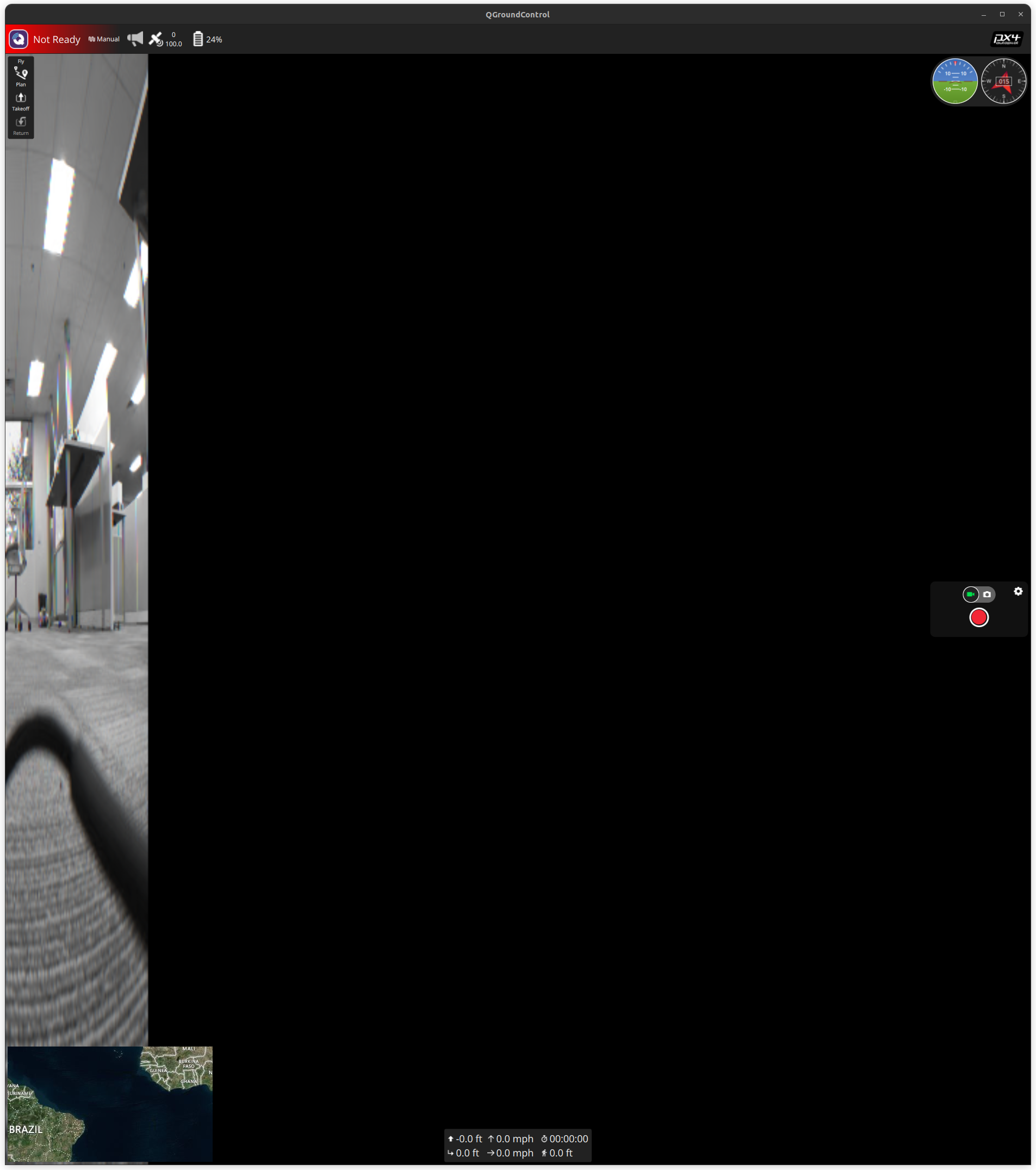
with myvoxl-mavcam-manager.confas above and my streamers:voxl2:/$ systemctl status voxl-streamer ● voxl-streamer.service - voxl-streamer Loaded: loaded (/usr/bin/voxl-streamer; enabled; vendor preset: enabled) Active: active (running) since Fri 2024-12-06 22:40:09 UTC; 44s ago Process: 1451 ExecStartPre=/bin/sleep 5 (code=exited, status=0/SUCCESS) Main PID: 1942 (voxl-streamer) Tasks: 2 (limit: 4915) CGroup: /system.slice/voxl-streamer.service └─1942 /usr/bin/voxl-streamervoxl2:/$ systemctl status voxl-streamer2 ● voxl-streamer2.service - voxl-streamer Loaded: loaded (/usr/bin/voxl-streamer; enabled; vendor preset: enabled) Active: active (running) since Fri 2024-12-06 22:40:09 UTC; 53s ago Process: 1450 ExecStartPre=/bin/sleep 5 (code=exited, status=0/SUCCESS) Main PID: 1943 (voxl-streamer) Tasks: 2 (limit: 4915) CGroup: /system.slice/voxl-streamer2.service └─1943 /usr/bin/voxl-streamer -s -p 8901 -i hires_down_small_encoded -
@tom thanks! That seems to have allowed me to startup a second (and third) RTSP stream automatically which was my primary goal.
The reason I keep asking about QGC is because I am trying to get it so I can have my GCS automatically find any available RTSP streams, ideally without having to manually pass all of the individual URI. My understanding was that this is what the mavcam manager service is doing: creating mavlink camera objects which can be queried to get the rtsp streams, and that this is how QGC works. Since I do not yet have the querying setup I was trying to use QGC as test case, i.e. if QGC can do it, I should be able to do it with mavlink commands.
At the moment when I startup QGC and look at the camera output I see the following:
with myvoxl-mavcam-manager.confas above and my streamers:voxl2:/$ systemctl status voxl-streamer ● voxl-streamer.service - voxl-streamer Loaded: loaded (/usr/bin/voxl-streamer; enabled; vendor preset: enabled) Active: active (running) since Fri 2024-12-06 22:40:09 UTC; 44s ago Process: 1451 ExecStartPre=/bin/sleep 5 (code=exited, status=0/SUCCESS) Main PID: 1942 (voxl-streamer) Tasks: 2 (limit: 4915) CGroup: /system.slice/voxl-streamer.service └─1942 /usr/bin/voxl-streamervoxl2:/$ systemctl status voxl-streamer2 ● voxl-streamer2.service - voxl-streamer Loaded: loaded (/usr/bin/voxl-streamer; enabled; vendor preset: enabled) Active: active (running) since Fri 2024-12-06 22:40:09 UTC; 53s ago Process: 1450 ExecStartPre=/bin/sleep 5 (code=exited, status=0/SUCCESS) Main PID: 1943 (voxl-streamer) Tasks: 2 (limit: 4915) CGroup: /system.slice/voxl-streamer2.service └─1943 /usr/bin/voxl-streamer -s -p 8901 -i hires_down_small_encoded@griffin yes, voxl-mavcam-manager can inform QGC about the multiple streams and allow you to choose whichever one you want.
-
@griffin yes, voxl-mavcam-manager can inform QGC about the multiple streams and allow you to choose whichever one you want.
@Eric-Katzfey @tom unfortunately I don't see them in QGC with the 2 RTSP streams set up (and verified by connecting directly via openCV) and the
voxl-mavcam-manager.confas above.Additionally, if I request camera information via mavlink I get result
2(denied) when I request from the drone and result4(failed) when I request from the camera component.Even with my mavcam setup as above I only see 1 camera component heartbeat over mavlink, not the 2 that I thought would be started with 2 mavcams inside the
.conf. -
@Eric-Katzfey @tom unfortunately I don't see them in QGC with the 2 RTSP streams set up (and verified by connecting directly via openCV) and the
voxl-mavcam-manager.confas above.Additionally, if I request camera information via mavlink I get result
2(denied) when I request from the drone and result4(failed) when I request from the camera component.Even with my mavcam setup as above I only see 1 camera component heartbeat over mavlink, not the 2 that I thought would be started with 2 mavcams inside the
.conf.@griffin @tom it looks like discovery of multiple streams is improperly implemented in voxl-mavcam-manger.
the first issue I see is that each camera is being advertised as the same component ID
init_arr[i].context.compid = MAV_COMP_ID_CAMERA; // todo make this command line argaccording to the mavlink spec each cam should have a unique id. https://mavlink.io/en/services/camera.html#camera_identification I would image this should look some thing like this.
int cam_comp_ids[MAX_MAVCAM_INPUTS] = {MAV_COMP_ID_CAMERA, MAV_COMP_ID_CAMERA2, MAV_COMP_ID_CAMERA3, MAV_COMP_ID_CAMERA4, MAV_COMP_ID_CAMERA5, MAV_COMP_ID_CAMERA6};

    for(int i=0; i<n_mavcam_inputs; i++){
...
    init_arr[i].context.compid = cam_comp_ids[i];
however when testing this change I think I have run into a bigger problem which is that I think only the last context's threads are running. I am not sure why this is, but it seems like the maybe the different threads can't read from the same modal pipe that is providing the mavlink? I suspect that somehow the reading and writing to the modal pipe is not sufficiently isolated causing either overwriting the first's context's callbacks or preventing the first context's callbacks from running.
let me know what ya'll think
-
@griffin @tom it looks like discovery of multiple streams is improperly implemented in voxl-mavcam-manger.
the first issue I see is that each camera is being advertised as the same component ID
init_arr[i].context.compid = MAV_COMP_ID_CAMERA; // todo make this command line argaccording to the mavlink spec each cam should have a unique id. https://mavlink.io/en/services/camera.html#camera_identification I would image this should look some thing like this.
int cam_comp_ids[MAX_MAVCAM_INPUTS] = {MAV_COMP_ID_CAMERA, MAV_COMP_ID_CAMERA2, MAV_COMP_ID_CAMERA3, MAV_COMP_ID_CAMERA4, MAV_COMP_ID_CAMERA5, MAV_COMP_ID_CAMERA6};

    for(int i=0; i<n_mavcam_inputs; i++){
...
    init_arr[i].context.compid = cam_comp_ids[i];
however when testing this change I think I have run into a bigger problem which is that I think only the last context's threads are running. I am not sure why this is, but it seems like the maybe the different threads can't read from the same modal pipe that is providing the mavlink? I suspect that somehow the reading and writing to the modal pipe is not sufficiently isolated causing either overwriting the first's context's callbacks or preventing the first context's callbacks from running.
let me know what ya'll think
@ejohnson you are correct on both accounts.
There needs to be a unique component ID for each camera stream. And yes, each camera stream needs it's own pipe opened, since running all the threads in the same pipe will result in one pipe blocking the rest (and the mavlink streams will not work for the other camera instances)
There is already a compid variable within the context struct, so I just need to implement that in the main.c for loop. Will also need to add a unique "mavlink_from_gcs" pipe channel for each stream instance in the context struct as well. I can push these changes upstream
-
@griffin @tom it looks like discovery of multiple streams is improperly implemented in voxl-mavcam-manger.
the first issue I see is that each camera is being advertised as the same component ID
init_arr[i].context.compid = MAV_COMP_ID_CAMERA; // todo make this command line argaccording to the mavlink spec each cam should have a unique id. https://mavlink.io/en/services/camera.html#camera_identification I would image this should look some thing like this.
int cam_comp_ids[MAX_MAVCAM_INPUTS] = {MAV_COMP_ID_CAMERA, MAV_COMP_ID_CAMERA2, MAV_COMP_ID_CAMERA3, MAV_COMP_ID_CAMERA4, MAV_COMP_ID_CAMERA5, MAV_COMP_ID_CAMERA6};

    for(int i=0; i<n_mavcam_inputs; i++){
...
    init_arr[i].context.compid = cam_comp_ids[i];
however when testing this change I think I have run into a bigger problem which is that I think only the last context's threads are running. I am not sure why this is, but it seems like the maybe the different threads can't read from the same modal pipe that is providing the mavlink? I suspect that somehow the reading and writing to the modal pipe is not sufficiently isolated causing either overwriting the first's context's callbacks or preventing the first context's callbacks from running.
let me know what ya'll think
@ejohnson Can you try with QGC version 4.3.0? Seems newer QGC versions changed how they support this protocol so we will be updating our implementation accordingly.
-
@brahim after looking at this some more I think it is valid to have multiple streams per camera. I guess the use case would be to have a high res stream and a low res stream that's separate or something like that.
However I think people would still like to setup multiple cameras. I haven't tried this yet, but I think it could also be valid to spawn a manager per camera, and then stagger the component ids for each app. I think this might also fix the threading issue since each application would initialize separate pipe reads and wouldn't be blocked by each other?
@Eric-Katzfey I'm using a different mavlink GCS that's not QGC, so I need to make voxl-mavcam-manager conform to the standard.


Reading along? Create a free ModalAI Forum account to join in.
With an account you can reply, ask your own question, get an email when a ModalAI engineer answers, and mark the reply that solved it. Your place in each thread is saved between visits.
Questions about VOXL, Flight Core, ESCs and ModalAI drones are answered here by the engineers who build them.
Register Login