
RAM building up fast
-
Hello,
I have the Starling 2 development kit, and during long-term testing, I've noticed that RAM usage increases very quickly (to the point of crashing the drone), even though the drone is on the bench and I’m only connected via SSH without running any external programs. I'm using SDK version 1.3.5. Has this happened before, and how can I clear the RAM to prevent the drone from crashing?Julien
Setup : Starling 2 , SDK 1.3.5,
-
@Judoor-0 this is a very unlikely occurance for a barebones instance with no external code running on the drone. I would recommend reflashing SDK 1.3.5 and the sys image and starting fresh to make sure there is nothing corrupt going on behind the scenes. Post install if this is still the case please let us know.
-
Hello,
I have the Starling 2 development kit, and during long-term testing, I've noticed that RAM usage increases very quickly (to the point of crashing the drone), even though the drone is on the bench and I’m only connected via SSH without running any external programs. I'm using SDK version 1.3.5. Has this happened before, and how can I clear the RAM to prevent the drone from crashing?Julien
Setup : Starling 2 , SDK 1.3.5,
-
@Judoor-0 Can you post the output of
voxl-inspect-servicesso we can get an idea of what parts of the software stack you're running?@tom
Here is a picture of my services :
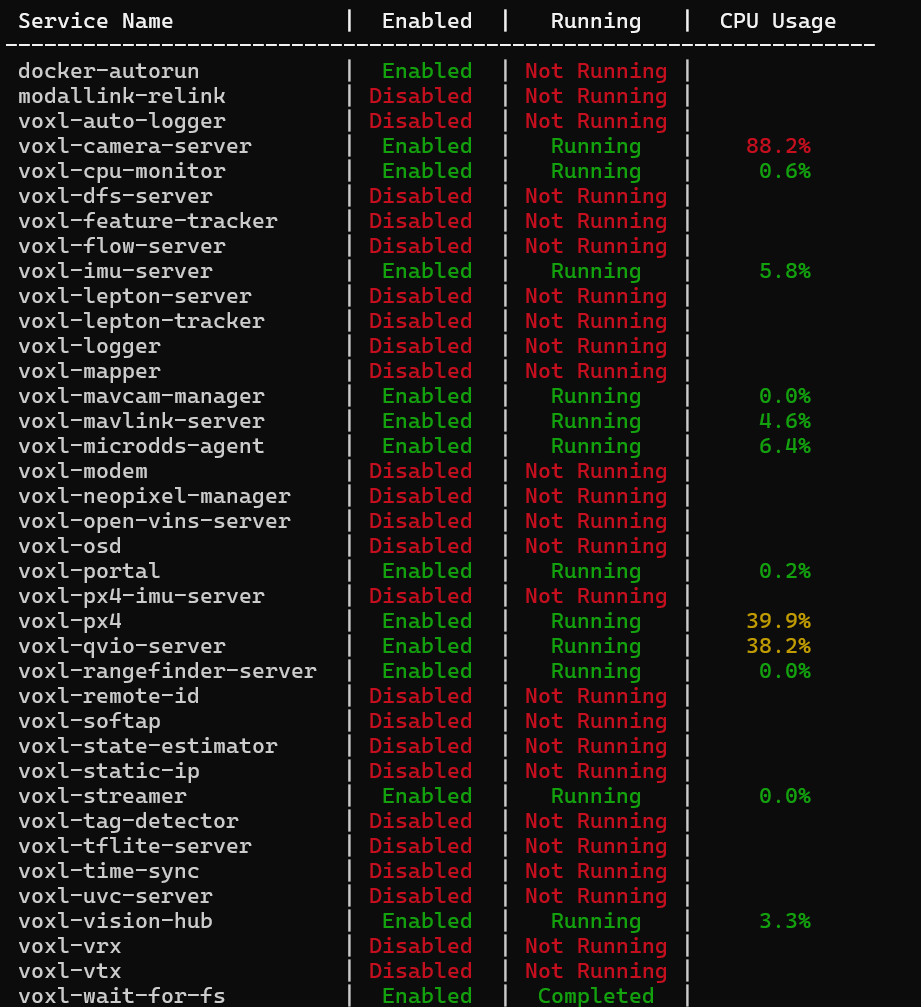
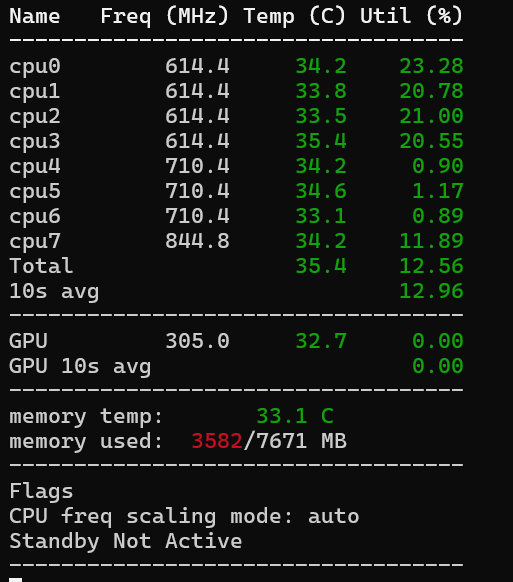
It happened only the other day, multiple time.
But I've tested the drone again today and ram seems good, never going above 3590MB/7671MB.Maybe one of my code was running in the back, I don't really know. If it happen again i'll tell you. And send you more precise information on what's running
Thanks for your help.
Julien
-
@tom
Here is a picture of my services :
It happened only the other day, multiple time.
But I've tested the drone again today and ram seems good, never going above 3590MB/7671MB.Maybe one of my code was running in the back, I don't really know. If it happen again i'll tell you. And send you more precise information on what's running
Thanks for your help.
Julien
@Judoor-0 , if you can reliably reproduce this, please look at output of
top, which will show all the processes and amount of memory they are using, you can also sort them by memory usage, please check usage of thetoptool. Hopefully this will allow you to pinpoint which process uses a lot of memory and more importantly increasing amount of memory.You can check the memory usage per process and see if there is any process that uses more memory over time. Try to do that without flying first, but running the whole processing stack if possible.
Alex



Reading along? Create a free ModalAI Forum account to join in.
With an account you can reply, ask your own question, get an email when a ModalAI engineer answers, and mark the reply that solved it. Your place in each thread is saved between visits.
Questions about VOXL, Flight Core, ESCs and ModalAI drones are answered here by the engineers who build them.
Register Login