Skip to content
  • Categories
  • Recent
  • Tags
  • Popular
  • Users
  • Groups
Collapse
Brand Logo

ModalAI Forum

  1. ModalAI Support Forum
  2. Software Development
  3. Voxl2 PID building and deployment on RB5

Voxl2 PID building and deployment on RB5

Scheduled Pinned Locked Moved Software Development
px4-firmwarepidvoxl2rb5
22 Posts 2 Posters 6.5k Views 1 Watching
  • Oldest to Newest
  • Newest to Oldest
  • Most Votes
Reply
  • Reply as topic
Log in to reply
This topic has been deleted. Only users with topic management privileges can see it.
  • T Offline
    T Offline
    tahawaru
    Regular
    wrote on last edited by
    #1

    Hi,

    We have 7 RB5s from modalai running Voxl2.
    From the following source code https://discuss.px4.io/t/modal-ai-rb5-drone-and-mavros/28303,
    we have modified the code for the PID at px4-firmware/src/lib/pid.

    How to build the new code, deploy and test it on the RB5?

    cc":@Amin Bassiri

    Best wishes,

    Eric KatzfeyE 1 Reply Last reply
    0
    • T tahawaru

      Hi,

      We have 7 RB5s from modalai running Voxl2.
      From the following source code https://discuss.px4.io/t/modal-ai-rb5-drone-and-mavros/28303,
      we have modified the code for the PID at px4-firmware/src/lib/pid.

      How to build the new code, deploy and test it on the RB5?

      cc":@Amin Bassiri

      Best wishes,

      Eric KatzfeyE Offline
      Eric KatzfeyE Offline
      Eric Katzfey
      ModalAI Team
      wrote on last edited by
      #2

      @tahawaru This docker: https://gitlab.com/voxl-public/rb5-flight/rb5-flight-px4-build-docker#rb5-flight-px4-build-docker is the build environment. This is the repo that has PX4: https://gitlab.com/voxl-public/voxl-sdk/services/voxl-px4/-/blob/master/README.md?ref_type=heads

      T 3 Replies Last reply
      0
      • Eric KatzfeyE Eric Katzfey

        @tahawaru This docker: https://gitlab.com/voxl-public/rb5-flight/rb5-flight-px4-build-docker#rb5-flight-px4-build-docker is the build environment. This is the repo that has PX4: https://gitlab.com/voxl-public/voxl-sdk/services/voxl-px4/-/blob/master/README.md?ref_type=heads

        T Offline
        T Offline
        tahawaru
        Regular
        wrote on last edited by
        #3

        @Eric-Katzfey

        My laptop has Ubuntu 22.04

        I have the following details for the rb5:
        rb5:~$ lsb_release -a
        No LSB modules are available.
        Distributor ID: Ubuntu
        Description: Ubuntu 18.04.5 LTS
        Release: 18.04
        Codename: bionic

        XXXX@ZZZZ:~$ adb shell px4-versions

        modalai-slpi 1.1-10

        px4-support/now 1.0-6 arm64 [installed,local]

        voxl-px4/unknown,now 1.14.0-2.0.63 arm64 [installed,automatic]

        voxl-px4-imu-server/unknown,now 0.1.2 arm64 [installed,automatic]

        voxl-px4-params/unknown,now 0.3.3 arm64 [installed,automatic]

        libfc-sensor/now 1.0-4 arm64 [installed,local]

        1.7.1-M0052-14.1a-perf-nightly-20231025

        adb shell px4-ver all

        • daemon not running; starting now at tcp:5037
        • daemon started successfully
          HW arch: MODALAI_VOXL2
          PX4 git-hash: b02a6b4ae93d12fa399673bf442c45087cee0759
          PX4 version: 1.14.0 0 (17694720)
          Vendor version: 2.0.63 0 (33570560)
          OS: Linux
          OS version: Release 4.19.125 (68386303)
          Build datetime: Dec 11 2023 20:06:45
          Build uri: localhost
          Build variant: default
          Toolchain: GNU GCC, 7.5.0
          PX4GUID: 100a41444f4d5649414c324c584f30303030
          UNKNOWN MCU

        May I proceed with the build though it's stated at https://gitlab.com/voxl-public/rb5-flight/rb5-flight-px4-build-docker#rb5-flight-px4-build-docker

        "Getting started
        The build environment for PX4 on RB5 Flight is only supported on Ubuntu 20.04 LTS (Focal Fossa)."

        Best wishes,

        Eric KatzfeyE 1 Reply Last reply
        0
        • Eric KatzfeyE Eric Katzfey

          @tahawaru This docker: https://gitlab.com/voxl-public/rb5-flight/rb5-flight-px4-build-docker#rb5-flight-px4-build-docker is the build environment. This is the repo that has PX4: https://gitlab.com/voxl-public/voxl-sdk/services/voxl-px4/-/blob/master/README.md?ref_type=heads

          T Offline
          T Offline
          tahawaru
          Regular
          wrote on last edited by
          #4

          @Eric-Katzfey

          Here are the steps I followed to o download QualcommPackageManager.2.0.21.1.Linux-x86.deb:
          1)https://developer.qualcomm.com/download/software

          1. click on Hexagon SDK (https://developer.qualcomm.com/software/hexagon-dsp-sdk/tools)

          3)Download Qualcomm Package Manager - Linux v2.0

          1 Reply Last reply
          0
          • Eric KatzfeyE Eric Katzfey

            @tahawaru This docker: https://gitlab.com/voxl-public/rb5-flight/rb5-flight-px4-build-docker#rb5-flight-px4-build-docker is the build environment. This is the repo that has PX4: https://gitlab.com/voxl-public/voxl-sdk/services/voxl-px4/-/blob/master/README.md?ref_type=heads

            T Offline
            T Offline
            tahawaru
            Regular
            wrote on last edited by
            #5

            @Eric-Katzfey
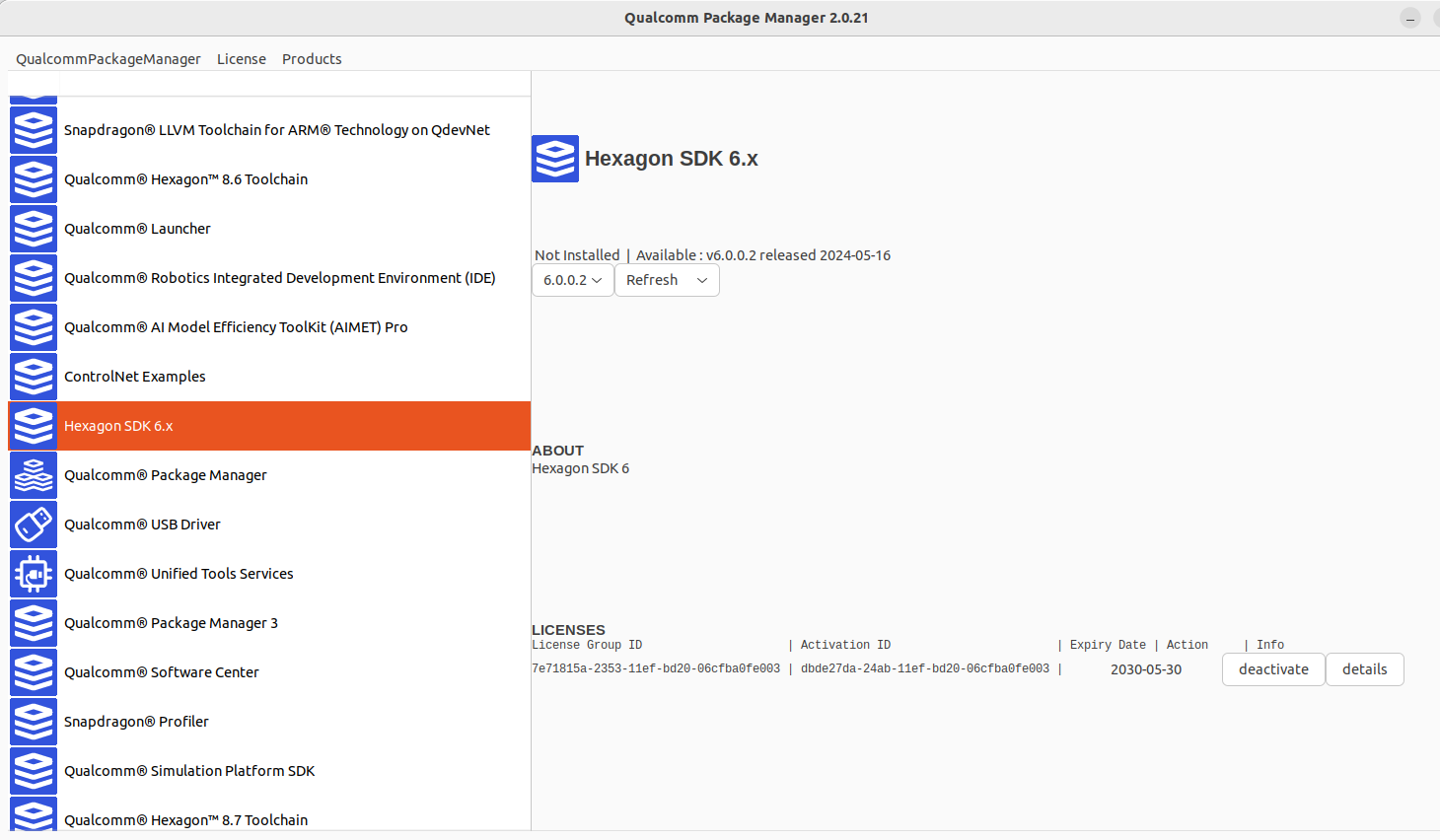
            ef7a9fd9-6cda-4ff0-8193-3364a8269370-image.png

            Eric KatzfeyE 1 Reply Last reply
            0
            • T tahawaru

              @Eric-Katzfey

              My laptop has Ubuntu 22.04

              I have the following details for the rb5:
              rb5:~$ lsb_release -a
              No LSB modules are available.
              Distributor ID: Ubuntu
              Description: Ubuntu 18.04.5 LTS
              Release: 18.04
              Codename: bionic

              XXXX@ZZZZ:~$ adb shell px4-versions

              modalai-slpi 1.1-10

              px4-support/now 1.0-6 arm64 [installed,local]

              voxl-px4/unknown,now 1.14.0-2.0.63 arm64 [installed,automatic]

              voxl-px4-imu-server/unknown,now 0.1.2 arm64 [installed,automatic]

              voxl-px4-params/unknown,now 0.3.3 arm64 [installed,automatic]

              libfc-sensor/now 1.0-4 arm64 [installed,local]

              1.7.1-M0052-14.1a-perf-nightly-20231025

              adb shell px4-ver all

              • daemon not running; starting now at tcp:5037
              • daemon started successfully
                HW arch: MODALAI_VOXL2
                PX4 git-hash: b02a6b4ae93d12fa399673bf442c45087cee0759
                PX4 version: 1.14.0 0 (17694720)
                Vendor version: 2.0.63 0 (33570560)
                OS: Linux
                OS version: Release 4.19.125 (68386303)
                Build datetime: Dec 11 2023 20:06:45
                Build uri: localhost
                Build variant: default
                Toolchain: GNU GCC, 7.5.0
                PX4GUID: 100a41444f4d5649414c324c584f30303030
                UNKNOWN MCU

              May I proceed with the build though it's stated at https://gitlab.com/voxl-public/rb5-flight/rb5-flight-px4-build-docker#rb5-flight-px4-build-docker

              "Getting started
              The build environment for PX4 on RB5 Flight is only supported on Ubuntu 20.04 LTS (Focal Fossa)."

              Best wishes,

              Eric KatzfeyE Offline
              Eric KatzfeyE Offline
              Eric Katzfey
              ModalAI Team
              wrote on last edited by
              #6

              @tahawaru We have only tested with Ubuntu 20.04. Should work on Ubuntu 22.04 but we don't know for sure.

              1 Reply Last reply
              0
              • T tahawaru

                @Eric-Katzfey
                ef7a9fd9-6cda-4ff0-8193-3364a8269370-image.png

                Eric KatzfeyE Offline
                Eric KatzfeyE Offline
                Eric Katzfey
                ModalAI Team
                wrote on last edited by
                #7

                @tahawaru The instructions say Hexagon SDK 4.x. Your picture shows Hexagon SDK 6.x highlighted. That is not correct. Please follow the instructions exactly.

                T 1 Reply Last reply
                0
                • Eric KatzfeyE Eric Katzfey

                  @tahawaru The instructions say Hexagon SDK 4.x. Your picture shows Hexagon SDK 6.x highlighted. That is not correct. Please follow the instructions exactly.

                  T Offline
                  T Offline
                  tahawaru
                  Regular
                  wrote on last edited by
                  #8

                  @Eric-Katzfey

                  I cannot find Hexagon SDK 4.x..
                  Where's it?

                  Best wishes,

                  Eric KatzfeyE 1 Reply Last reply
                  0
                  • T tahawaru

                    @Eric-Katzfey

                    I cannot find Hexagon SDK 4.x..
                    Where's it?

                    Best wishes,

                    Eric KatzfeyE Offline
                    Eric KatzfeyE Offline
                    Eric Katzfey
                    ModalAI Team
                    wrote on last edited by
                    #9

                    @tahawaru Scroll down on the menu

                    T 2 Replies Last reply
                    0
                    • Eric KatzfeyE Eric Katzfey

                      @tahawaru Scroll down on the menu

                      T Offline
                      T Offline
                      tahawaru
                      Regular
                      wrote on last edited by
                      #10

                      @Eric-Katzfey
                      Thank you.
                      Now I'm here
                      37a64fb5-703f-4415-9f20-e7767a2643bb-image.png

                      1 Reply Last reply
                      0
                      • Eric KatzfeyE Eric Katzfey

                        @tahawaru Scroll down on the menu

                        T Offline
                        T Offline
                        tahawaru
                        Regular
                        wrote on last edited by
                        #11

                        @Eric-Katzfey

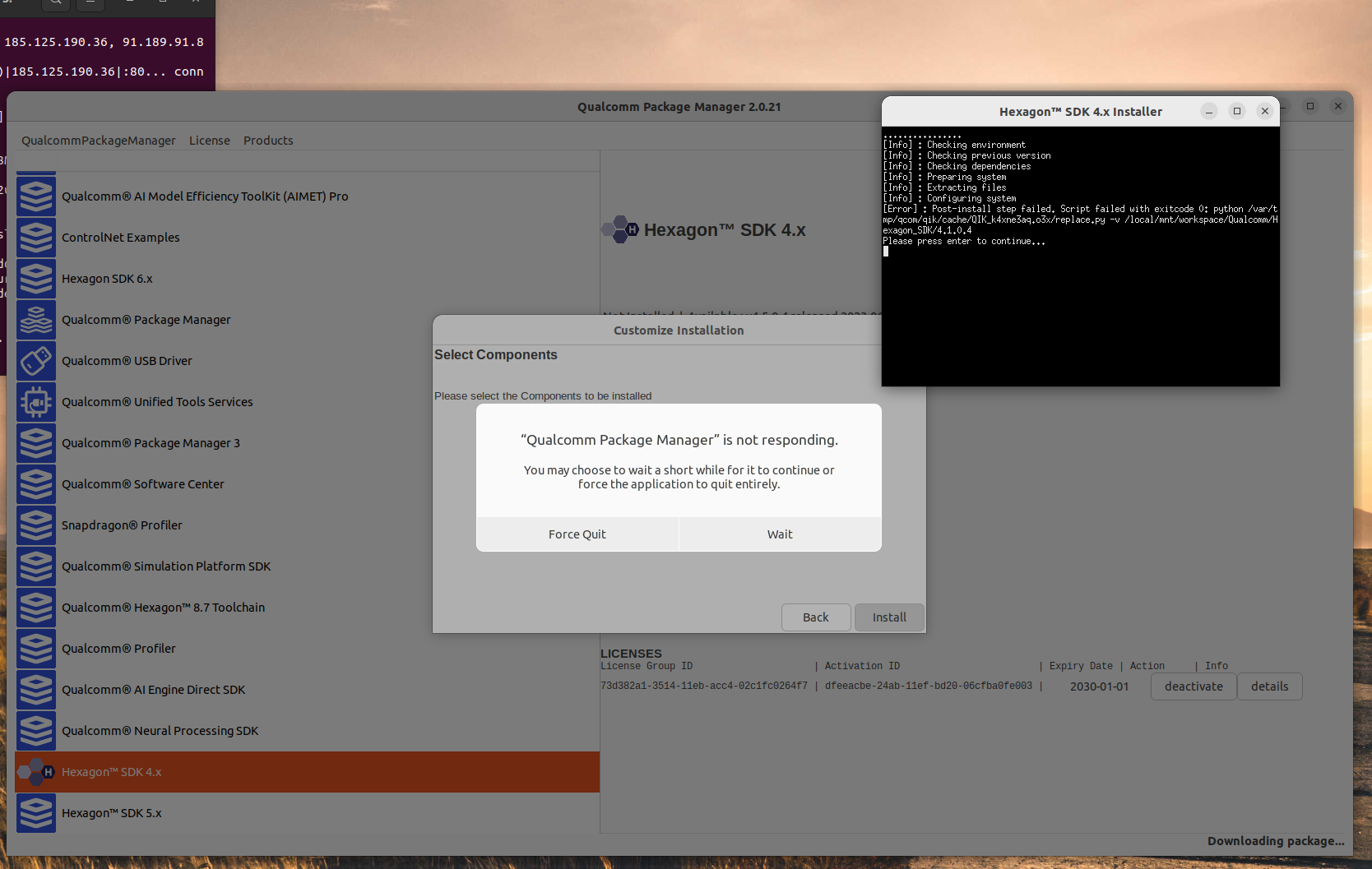
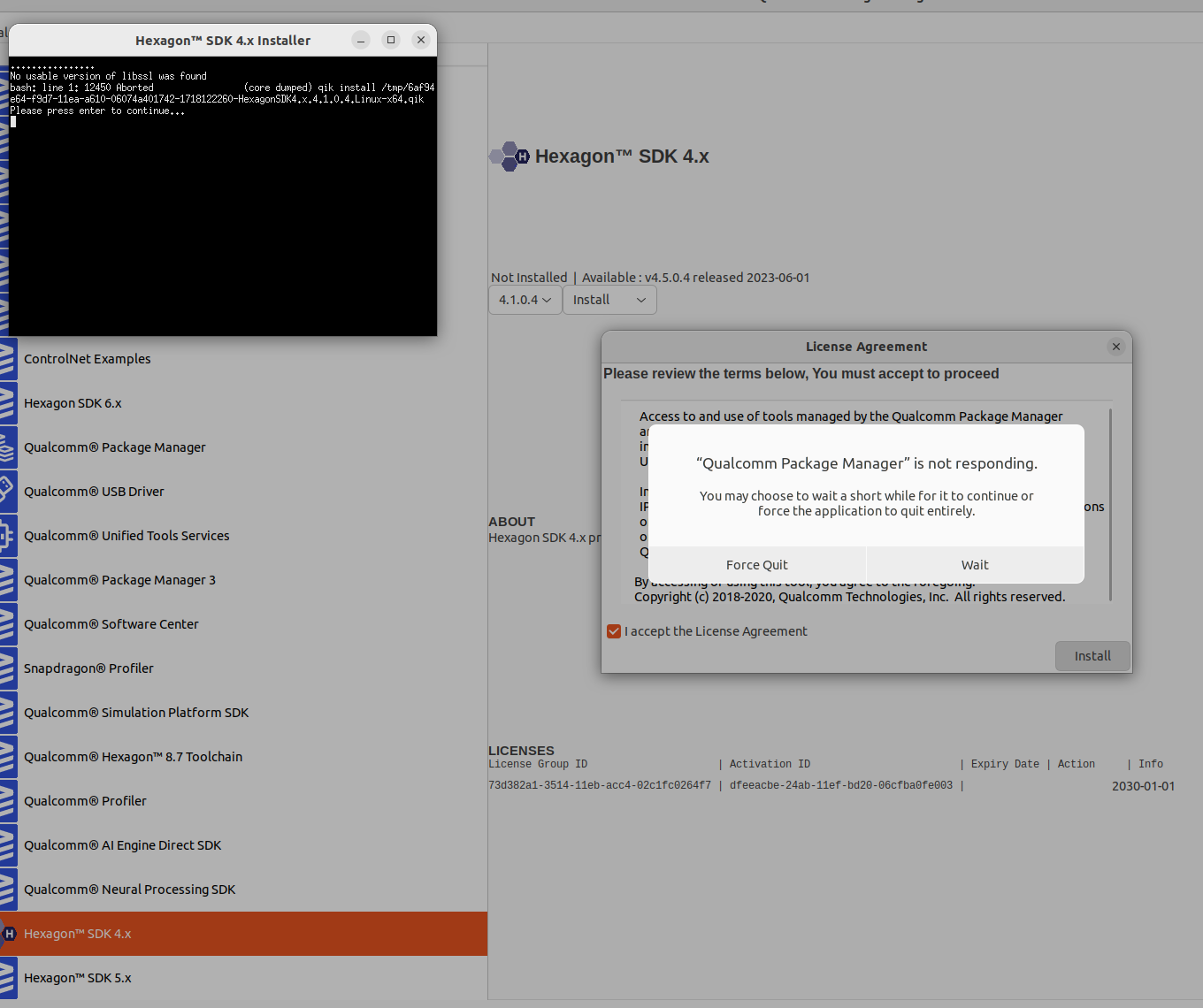
                        After installing libssl1.1
                        53a48c9a-c0c8-48d6-afe7-957eacca0dce-image.png

                        Eric KatzfeyE 2 Replies Last reply
                        0
                        • T tahawaru

                          @Eric-Katzfey

                          After installing libssl1.1
                          53a48c9a-c0c8-48d6-afe7-957eacca0dce-image.png

                          Eric KatzfeyE Offline
                          Eric KatzfeyE Offline
                          Eric Katzfey
                          ModalAI Team
                          wrote on last edited by
                          #12

                          @tahawaru I'm afraid I cannot help much with the Qualcomm Package Manager. It is really difficult to deal with. Sometimes it appears to be dead and I have to just let it sit for a long time before it finally responds. It is very frustrating to use it but there really isn't much that we can do about it. The good news is that once you finally get it to download the SDK you don't have to deal with it anymore. Sometimes is appears like it didn't do anything but did actually download what you need.

                          1 Reply Last reply
                          1
                          • T tahawaru

                            @Eric-Katzfey

                            After installing libssl1.1
                            53a48c9a-c0c8-48d6-afe7-957eacca0dce-image.png

                            Eric KatzfeyE Offline
                            Eric KatzfeyE Offline
                            Eric Katzfey
                            ModalAI Team
                            wrote on last edited by
                            #13

                            @tahawaru Take a look in /local/mnt/workspace. It may have placed the SDK there.

                            T 2 Replies Last reply
                            1
                            • Eric KatzfeyE Eric Katzfey

                              @tahawaru Take a look in /local/mnt/workspace. It may have placed the SDK there.

                              T Offline
                              T Offline
                              tahawaru
                              Regular
                              wrote on last edited by
                              #14

                              @Eric-Katzfey

                              Thank you.

                              I got a few errors during the build(-- Detecting C compiler ABI info - failed
                              )
                              But it got to
                              *** End of qurt slpi build ***
                              /usr/local/workspace
                              User ID is 1000
                              Group ID is 1000
                              *** End of build ***

                              and
                              root@27a3c2a4a155:/usr/local/workspace# ./make_package.sh
                              Package Name: voxl-px4
                              version Number: 1.14.0-2.0.77
                              starting building Debian Package
                              dpkg-deb: building package 'voxl-px4' in 'voxl-px4_1.14.0-2.0.77_arm64.deb'.
                              DONE
                              root@27a3c2a4a155:/usr/local/workspace#

                              I haven't tested the new build yet.
                              Hopefully will be fine.

                              1 Reply Last reply
                              0
                              • Eric KatzfeyE Eric Katzfey

                                @tahawaru Take a look in /local/mnt/workspace. It may have placed the SDK there.

                                T Offline
                                T Offline
                                tahawaru
                                Regular
                                wrote on last edited by
                                #15

                                @Eric-Katzfey

                                We have deployed the newly build px4 into a Rb5 with the following configuration:

                                system-image: 1.7.1-M0052-14.1a-perf-nightly-20231025
                                kernel: #1 SMP PREEMPT Thu Oct 26 05:24:02 UTC 2023 4.19.125

                                hw version: M0052

                                voxl-suite: 1.1.2

                                Problem:
                                we have started the service voxl-px4 with the systemctl command but it stops running after a while.

                                Questions: Why? Do we need some additional things to do for the new build to work?

                                Best wishes,

                                Eric KatzfeyE 1 Reply Last reply
                                0
                                • T tahawaru

                                  @Eric-Katzfey

                                  We have deployed the newly build px4 into a Rb5 with the following configuration:

                                  system-image: 1.7.1-M0052-14.1a-perf-nightly-20231025
                                  kernel: #1 SMP PREEMPT Thu Oct 26 05:24:02 UTC 2023 4.19.125

                                  hw version: M0052

                                  voxl-suite: 1.1.2

                                  Problem:
                                  we have started the service voxl-px4 with the systemctl command but it stops running after a while.

                                  Questions: Why? Do we need some additional things to do for the new build to work?

                                  Best wishes,

                                  Eric KatzfeyE Offline
                                  Eric KatzfeyE Offline
                                  Eric Katzfey
                                  ModalAI Team
                                  wrote on last edited by
                                  #16

                                  @tahawaru You need to start with a version of voxl-px4 that is compatible with the version of SDK you are using. So, if you are using SDK 1.1.2 then you will need to start with voxl-px4 1.14.0-2.0.63 and add your changes on top of that.

                                  T 1 Reply Last reply
                                  1
                                  • Eric KatzfeyE Eric Katzfey

                                    @tahawaru You need to start with a version of voxl-px4 that is compatible with the version of SDK you are using. So, if you are using SDK 1.1.2 then you will need to start with voxl-px4 1.14.0-2.0.63 and add your changes on top of that.

                                    T Offline
                                    T Offline
                                    tahawaru
                                    Regular
                                    wrote on last edited by
                                    #17

                                    @Eric-Katzfey

                                    Where can we find such old version?

                                    Our current voxl-px4 build output is voxl-px4_1.14.0-2.0.77_arm64.deb

                                    Best wishes,

                                    Eric KatzfeyE 1 Reply Last reply
                                    0
                                    • T tahawaru

                                      @Eric-Katzfey

                                      Where can we find such old version?

                                      Our current voxl-px4 build output is voxl-px4_1.14.0-2.0.77_arm64.deb

                                      Best wishes,

                                      Eric KatzfeyE Offline
                                      Eric KatzfeyE Offline
                                      Eric Katzfey
                                      ModalAI Team
                                      wrote on last edited by
                                      #18

                                      @tahawaru https://gitlab.com/voxl-public/voxl-sdk/services/voxl-px4/-/tags/v1.14.0-2.0.63

                                      T 1 Reply Last reply
                                      1
                                      • Eric KatzfeyE Eric Katzfey

                                        @tahawaru https://gitlab.com/voxl-public/voxl-sdk/services/voxl-px4/-/tags/v1.14.0-2.0.63

                                        T Offline
                                        T Offline
                                        tahawaru
                                        Regular
                                        wrote on last edited by
                                        #19

                                        @Eric-Katzfey

                                        We have built the voxl-px4 using the link for voxl-px4 1.14.0-2.0.63 and the instructions.
                                        At the end, we still have voxl-px4_1.14.0-2.0.77_arm64.deb, not voxl-px4_1.14.0-2.0.63_arm64.deb.

                                        What should we do differently?

                                        Best wishes,

                                        Eric KatzfeyE 1 Reply Last reply
                                        0
                                        • T tahawaru

                                          @Eric-Katzfey

                                          We have built the voxl-px4 using the link for voxl-px4 1.14.0-2.0.63 and the instructions.
                                          At the end, we still have voxl-px4_1.14.0-2.0.77_arm64.deb, not voxl-px4_1.14.0-2.0.63_arm64.deb.

                                          What should we do differently?

                                          Best wishes,

                                          Eric KatzfeyE Offline
                                          Eric KatzfeyE Offline
                                          Eric Katzfey
                                          ModalAI Team
                                          wrote on last edited by
                                          #20

                                          @tahawaru Somewhere along the line you didn't get the correct source code from git. What does git log say for the voxl-px4 repo? If you go into the px4-firmware subdirectory (submodule), what does it show you for git log? These basic git commands will help you determine what you have fetched and are actually building.

                                          T 1 Reply Last reply
                                          0

                                          Hello! It looks like you're interested in this conversation, but you don't have an account yet.

                                          Getting fed up of having to scroll through the same posts each visit? When you register for an account, you'll always come back to exactly where you were before, and choose to be notified of new replies (either via email, or push notification). You'll also be able to save bookmarks and upvote posts to show your appreciation to other community members.

                                          With your input, this post could be even better 💗

                                          Register Login
                                          Reply
                                          • Reply as topic
                                          Log in to reply
                                          • Oldest to Newest
                                          • Newest to Oldest
                                          • Most Votes


                                          ModalAI
                                          Categories Recent Tags ModalAI.com Docs
                                          © 2026 ModalAI® · Accelerating autonomy for smaller, smarter, safer drones · Powered by NodeBB
                                          • Login

                                          • Login or register to search.
                                          • First post
                                            Last post
                                          0
                                          • Categories
                                          • Recent
                                          • Tags
                                          • Popular
                                          • Users
                                          • Groups