
Failed Unbricking
-
Good Day,
Our team purchased a few Voxl2 dev kits and we have had success in the unbricking procedure with one of the products previously.
On our most recent attempt to unbrick a Voxl2 we are unable to adb shell into the board after the sw2 has been reverted to its native position.
Terminal photo below. The unbricking process up until this point went flawlessly. Any assistance would be appreciated.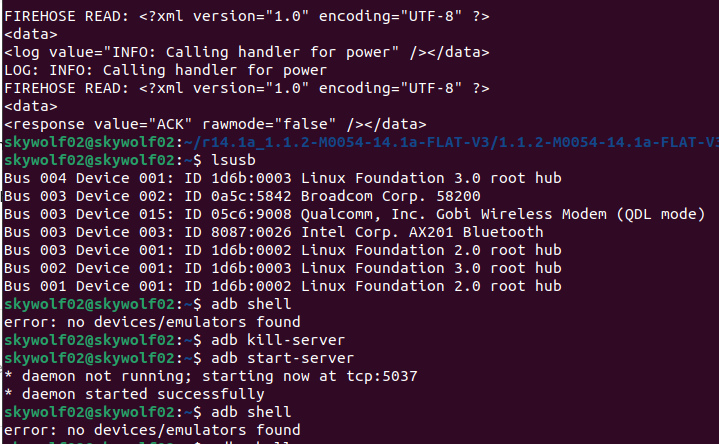
-
Good Day,
Our team purchased a few Voxl2 dev kits and we have had success in the unbricking procedure with one of the products previously.
On our most recent attempt to unbrick a Voxl2 we are unable to adb shell into the board after the sw2 has been reverted to its native position.
Terminal photo below. The unbricking process up until this point went flawlessly. Any assistance would be appreciated.@Stefan-Amundarain Can you confirm whether you have a QRB or QSM -based voxl 2:
https://docs.modalai.com/m0054-versions/#m0054-1-and-m0054-2
This will determine which of the 2 images should be flashed via. QDL
-
@Stefan-Amundarain Can you confirm whether you have a QRB or QSM -based voxl 2:
https://docs.modalai.com/m0054-versions/#m0054-1-and-m0054-2
This will determine which of the 2 images should be flashed via. QDL
@tom good afternoon,
We have the QRB version and therefore should be able to flash any SDK.
Once we complete the first part of the unbricking procedure, we are told to switch sw2 back to its original position and ADB shell into the drone to then reflash the SDK. When we try to ADB shell back into the newly "unbricked" voxl, we are unable to view the device or able to choose which image to flash. I do not think I can flash an image without being able to view or ADB into the Voxl.
I have tried the Unbricking procedure 3x on this product.
-
@tom good afternoon,
We have the QRB version and therefore should be able to flash any SDK.
Once we complete the first part of the unbricking procedure, we are told to switch sw2 back to its original position and ADB shell into the drone to then reflash the SDK. When we try to ADB shell back into the newly "unbricked" voxl, we are unable to view the device or able to choose which image to flash. I do not think I can flash an image without being able to view or ADB into the Voxl.
I have tried the Unbricking procedure 3x on this product.
@Stefan-Amundarain Okay if you have a QRB5165-based VOXL 2 then it looks like you're flashing the correct image through QDL. After the unbricking procedure try powering off your VOXL 2, turning the SW2 switch off, and powering the board back on.
Then connect VOXL 2 to your host PC via. usb and run
lsusbon your host machine and post the output here. It may take some time for the board to boot. -
@Stefan-Amundarain Okay if you have a QRB5165-based VOXL 2 then it looks like you're flashing the correct image through QDL. After the unbricking procedure try powering off your VOXL 2, turning the SW2 switch off, and powering the board back on.
Then connect VOXL 2 to your host PC via. usb and run
lsusbon your host machine and post the output here. It may take some time for the board to boot.@tom said in Failed Unbricking:
@Stefan-Amundarain Okay if you have a QRB5165-based VOXL 2 then it looks like you're flashing the correct image through QDL. After the unbricking procedure try powering off your VOXL 2, turning the SW2 switch off, and powering the board back on.
Then connect VOXL 2 to your host PC via. usb and run
lsusbon your host machine and post the output here. It may take some time for the board to boot.@tom - I'm sorry to jump on this thread, but I think I am having a similar issue where I go through the QDL procedures, switch SW2 off and I can't successfully make it through an installation of the SDK (I tried 1.1.3 & 1.2.0 with and without the -w command). My lsusb command shows the VOXL2 connected as a Qualcomm bulk device (the exact output is on another computer).
Again - sorry to hijack this thread, but I seem to be having a similar issue.
Thanks!
Matt -
@tom said in Failed Unbricking:
@Stefan-Amundarain Okay if you have a QRB5165-based VOXL 2 then it looks like you're flashing the correct image through QDL. After the unbricking procedure try powering off your VOXL 2, turning the SW2 switch off, and powering the board back on.
Then connect VOXL 2 to your host PC via. usb and run
lsusbon your host machine and post the output here. It may take some time for the board to boot.@tom - I'm sorry to jump on this thread, but I think I am having a similar issue where I go through the QDL procedures, switch SW2 off and I can't successfully make it through an installation of the SDK (I tried 1.1.3 & 1.2.0 with and without the -w command). My lsusb command shows the VOXL2 connected as a Qualcomm bulk device (the exact output is on another computer).
Again - sorry to hijack this thread, but I seem to be having a similar issue.
Thanks!
MattAfter completing the unbricking, switching SW2 back off and then rebooting the VOXL2 the command lsusb shows the same as it does in my first screen shot:
Bus 003 Device 015: ID 05c6:9008 Qualcomm, Inc. Gobi Wireless Modem (QDL mode)
when ADB shell is used; error; no device/emulators found shows.
Is this a hardware issue? I have attempted the same first part of the process 3 times now and reach the same point where the device is still unreachable via ADB shell.
-
After completing the unbricking, switching SW2 back off and then rebooting the VOXL2 the command lsusb shows the same as it does in my first screen shot:
Bus 003 Device 015: ID 05c6:9008 Qualcomm, Inc. Gobi Wireless Modem (QDL mode)
when ADB shell is used; error; no device/emulators found shows.
Is this a hardware issue? I have attempted the same first part of the process 3 times now and reach the same point where the device is still unreachable via ADB shell.
-
@Stefan-Amundarain What is the name of the QDL image you're flashing onto your VOXL 2?
Are you using:
2024-02-09-1.7.4-M0054-2.zipor
r14.1a_1.1.2-M0054-14.1a-FLAT-V3.zip@tom looks like we had been utilizing the second download,
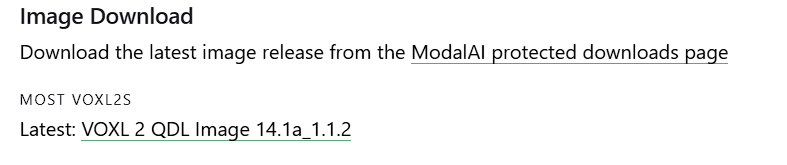
r14.1a_1.1.2-M0054-14.1a-FLAT-V3.zipwhich auto downloads when the VOXL2 Image link is clicked from the docs.modalai.com/voxl2-unbricking Screenshot 2024-05-28 142625.png
-
@tom looks like we had been utilizing the second download,
r14.1a_1.1.2-M0054-14.1a-FLAT-V3.zipwhich auto downloads when the VOXL2 Image link is clicked from the docs.modalai.com/voxl2-unbricking Screenshot 2024-05-28 142625.png
@tom should i be using the other download file? Does my board need to be sent in? Are there any other steps I can take?
-
@tom should i be using the other download file? Does my board need to be sent in? Are there any other steps I can take?
@Stefan-Amundarain That's the correct QDL image for QRB5165. The next step would be to submit an RMA: https://www.modalai.com/pages/rma
-
P pettertei referenced this topic on



Reading along? Create a free ModalAI Forum account to join in.
With an account you can reply, ask your own question, get an email when a ModalAI engineer answers, and mark the reply that solved it. Your place in each thread is saved between visits.
Questions about VOXL, Flight Core, ESCs and ModalAI drones are answered here by the engineers who build them.
Register Login