
Masking qVio
-
Hello Voxl Team,
During testing my drone prototype which has about 2m diameter I've seen that the VIO seems to be detecting features on the drone arms etc. what makes loss of VIO quality by sticking points on a moving drone through the tracking sensor.
In that case I've decided to mask disturbing elements to let the computing power takes place in free space out of the drone.
I have tried to add mask trough config as this changes suggest https://gitlab.com/voxl-public/voxl-sdk/services/voxl-qvio-server/-/commit/c20b35e19f8fb289d272877648fd77e1afc7810c but It's not working I have used example mask I put in /etc/modalai/mask.pgm. I have tried to hardcode mask file path in code and rebuild voxl-qvio-server but without success.
Regards
@droen8 , please review this post, the mask should work.
https://forum.modalai.com/topic/2551/add-mask-file-to-qvio-algorithm
You should try the example mask from this location : https://gitlab.com/voxl-public/voxl-sdk/services/voxl-qvio-server/-/blob/master/misc/mask_example_160x120.pgm and in this test case, you should observe half of image not finding any new features (easiest to check without moving). If features are found in unmasked region, the will be tracked through the whole image after that.
If the mask is not working, then either the mask format is not correct or the mask file is not found. What camera are you using for QVIO?
Alex
-
Hi @Alex-Kushleyev,
I am using ov7251 for tracking. I think I have made everything as described but it's still not working.
https://ibb.co/XyDGG7w
https://ibb.co/WkSDC2V
https://ibb.co/6X5N6YVRegards
-
Hi @Alex-Kushleyev,
I am using ov7251 for tracking. I think I have made everything as described but it's still not working.
https://ibb.co/XyDGG7w
https://ibb.co/WkSDC2V
https://ibb.co/6X5N6YVRegards
@droen8 , quick question, did you move the camera after starting vio or has it been stationary?
Can you please try again by pointing the camera at a feature rich environment to make sure that top and bottom have many features and do not move the camera after you start qvio. I just want to double check.
Also, something to check, if you provide an incorrect file name in qvio (or rename your mask), do you get a warning from qvio server saying that the file could not be loaded?
Thanks
Alex
-
@droen8 , quick question, did you move the camera after starting vio or has it been stationary?
Can you please try again by pointing the camera at a feature rich environment to make sure that top and bottom have many features and do not move the camera after you start qvio. I just want to double check.
Also, something to check, if you provide an incorrect file name in qvio (or rename your mask), do you get a warning from qvio server saying that the file could not be loaded?
Thanks
Alex
@Alex-Kushleyev
Yes I have tried multiple times, the screenshoot was taken after few restarts of voxl-qvio-server. It's for sure not using a mask.
I have tried renaming mask and I have not seen any errors when mask do not exist in provided path. I have tried to displayprintf("Mask file name = %s \n", staticMaskFileName);in _hard_reset function and the path is displayed properely. I do not have idea how can I debug this issue.With existing file in
mask_file_path:
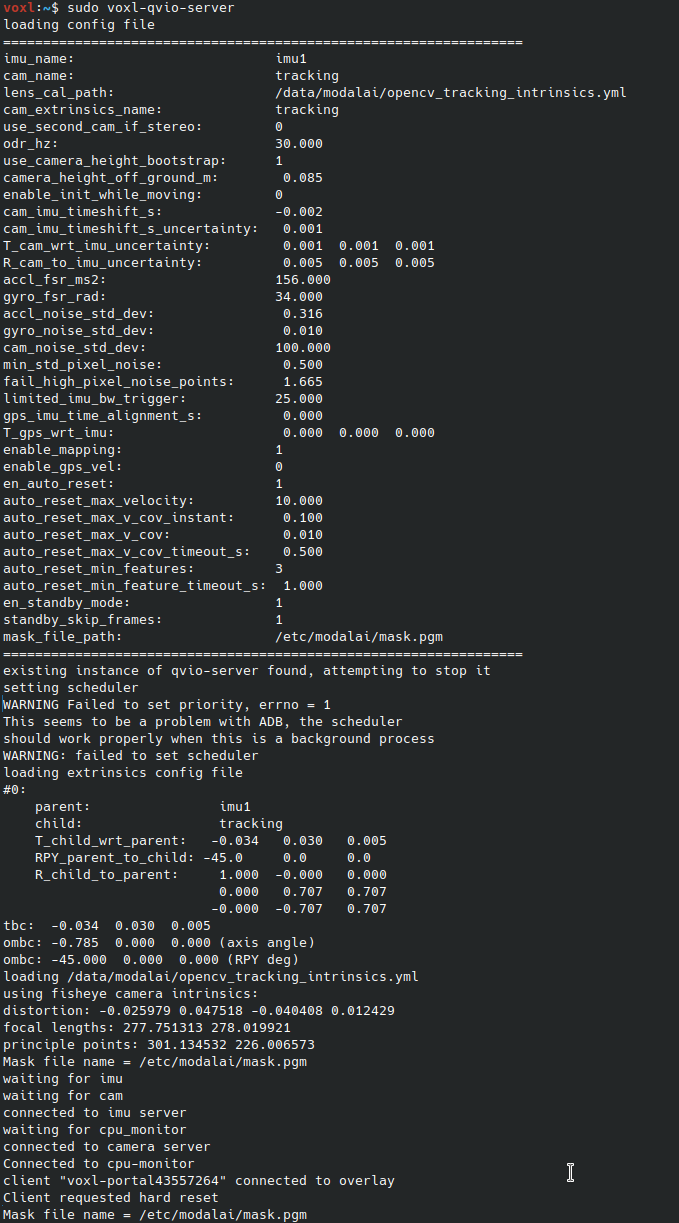
Renamed file:
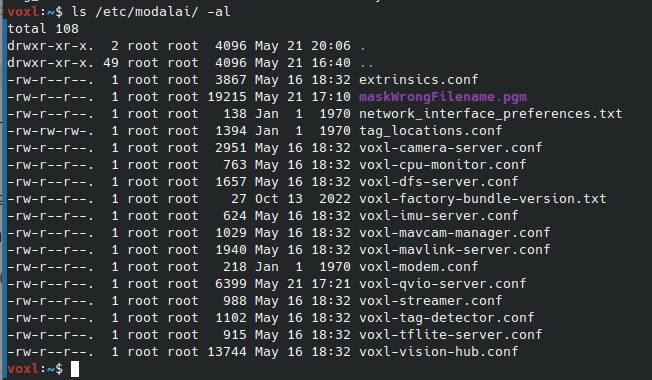
After renaming to ...maskWrongFilename.pgm :
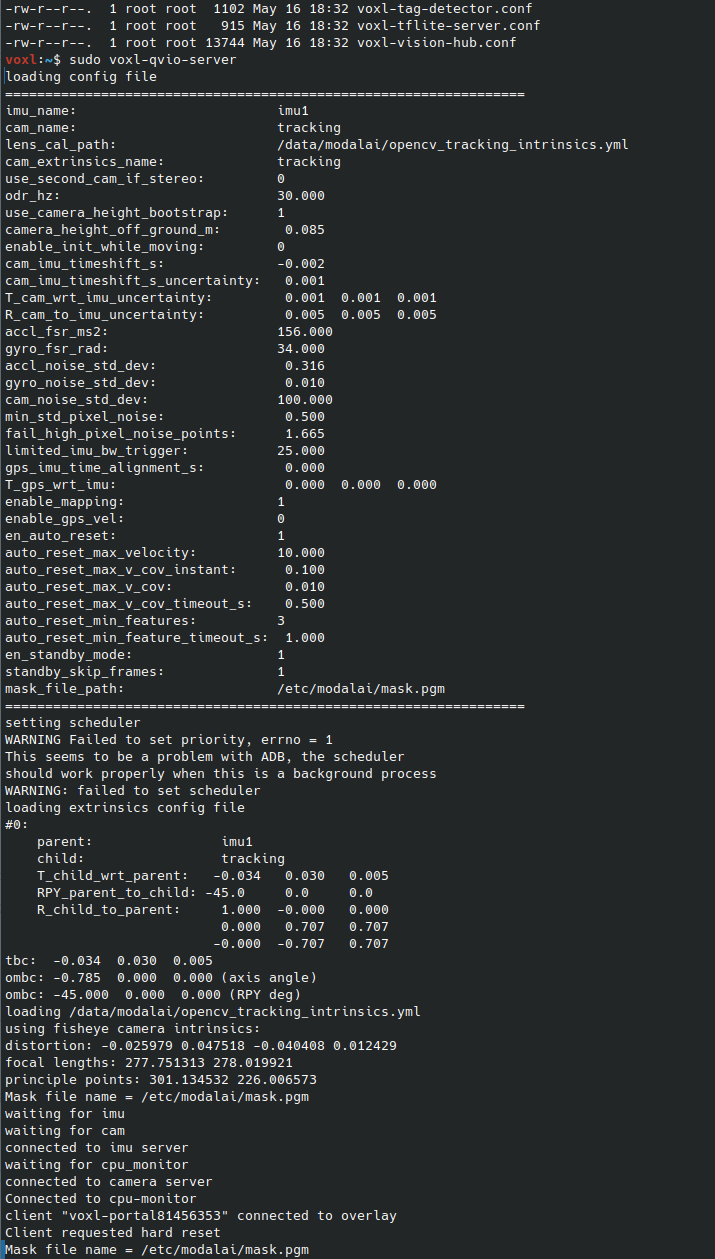
-
@Alex-Kushleyev
Yes I have tried multiple times, the screenshoot was taken after few restarts of voxl-qvio-server. It's for sure not using a mask.
I have tried renaming mask and I have not seen any errors when mask do not exist in provided path. I have tried to displayprintf("Mask file name = %s \n", staticMaskFileName);in _hard_reset function and the path is displayed properely. I do not have idea how can I debug this issue.With existing file in
mask_file_path:
Renamed file:
After renaming to ...maskWrongFilename.pgm :
@droen8 , i believe there is a special command that silences the output of QVIO during initialization:
Please try to remove that wrapper
SILENT_STDaround themvVISLAM_Initializecall and see if you get any messages about the mask file (when it has correct or incorrect file name).Sorry, there is no good way to debug this, but hopefully this will provide more information.
Alex
-
@droen8 , i believe there is a special command that silences the output of QVIO during initialization:
Please try to remove that wrapper
SILENT_STDaround themvVISLAM_Initializecall and see if you get any messages about the mask file (when it has correct or incorrect file name).Sorry, there is no good way to debug this, but hopefully this will provide more information.
Alex
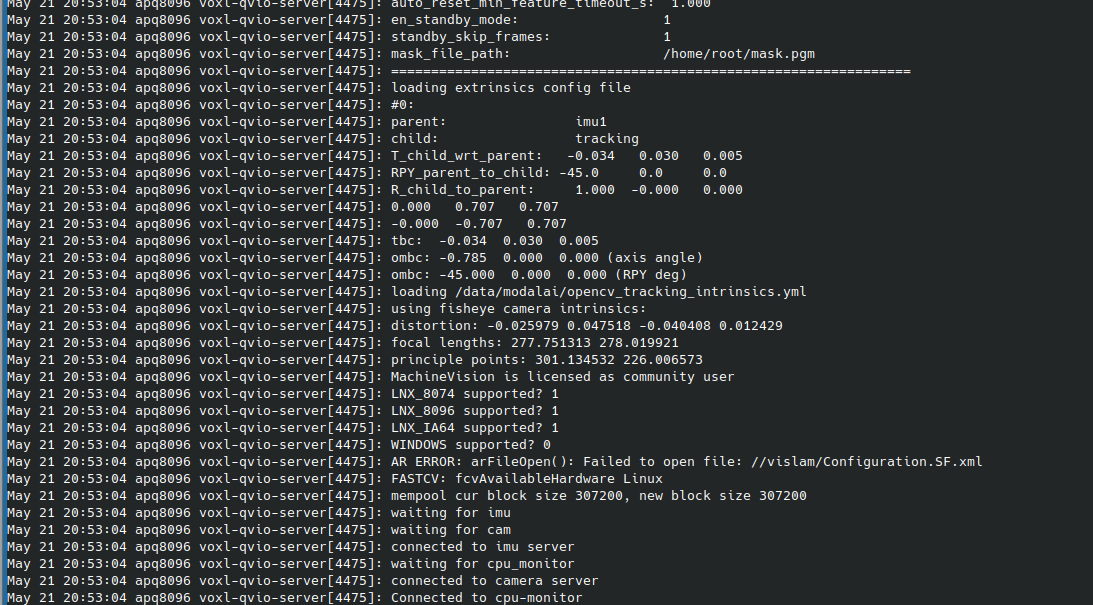
@Alex-Kushleyev thank you, I have not noticed that init function is wrapped. Now I can see that path is relative to /home/root
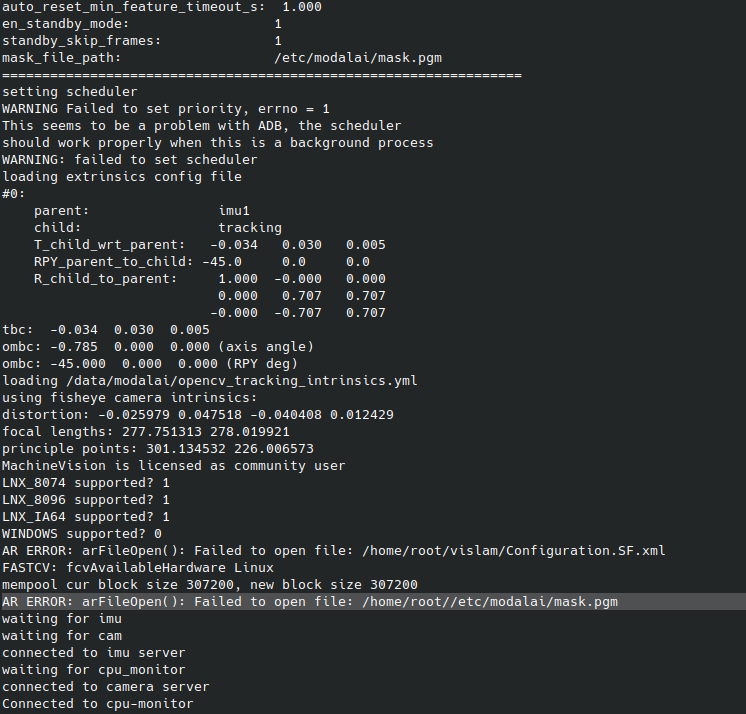
I will try in few if it's working but it will for sure
 There is another error with Configuration.SF.xml should I have It in mind?
 -
@Alex-Kushleyev thank you, I have not noticed that init function is wrapped. Now I can see that path is relative to /home/root
I will try in few if it's working but it will for sure
There is another error with Configuration.SF.xml should I have It in mind?@droen8 ,
Oh yes... you found the issue.
I believe the other error (Configuration.SF.xml) is OK, we never used that file, so the configuration is passed via the
mvVISLAM_Initializecall.I'll discuss with the team how to fix this path issue for the mask file
Alex
-
@Alex-Kushleyev thank you, I have not noticed that init function is wrapped. Now I can see that path is relative to /home/root
I will try in few if it's working but it will for sure
There is another error with Configuration.SF.xml should I have It in mind?This post is deleted! -
@droen8 ,
Oh yes... you found the issue.
I believe the other error (Configuration.SF.xml) is OK, we never used that file, so the configuration is passed via the
mvVISLAM_Initializecall.I'll discuss with the team how to fix this path issue for the mask file
Alex
@Alex-Kushleyev It is not complaining about mask opening fail now but It is still not working:
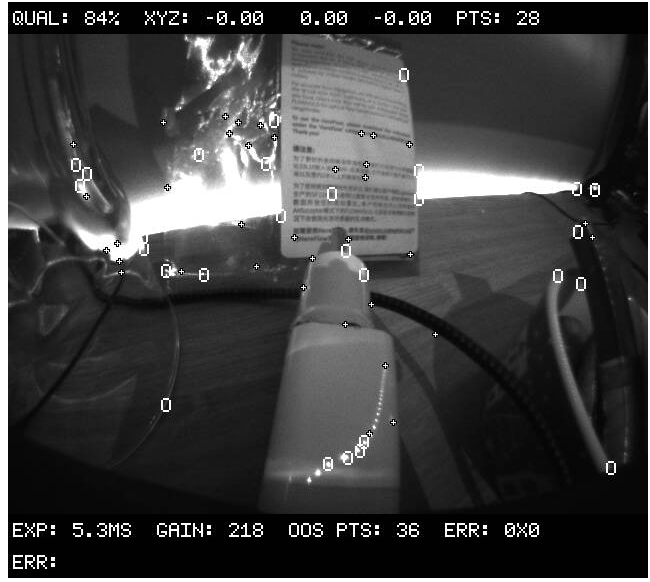
Voxl is stationary and I have tried reseting qvio:
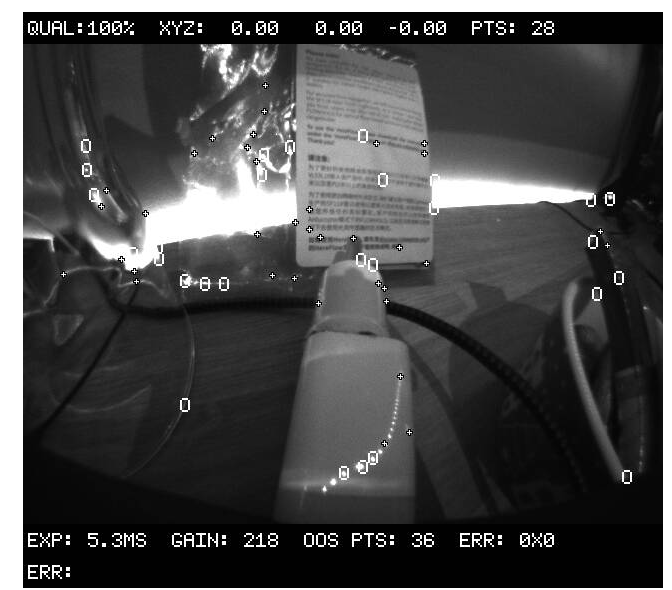
//edit the relativity of a path was due to me running voxl-qvio-server from there. When I run It as a service It is using absolute paths now. But still not working with repository example mask nor with my own mask.
-
@Alex-Kushleyev It is not complaining about mask opening fail now but It is still not working:
Voxl is stationary and I have tried reseting qvio:
//edit the relativity of a path was due to me running voxl-qvio-server from there. When I run It as a service It is using absolute paths now. But still not working with repository example mask nor with my own mask.
@droen8 , it looks like the mask file that I shared is not working. I did some digging and found that there is a formatting issue. if you open the pgm file with vi, you can see:
P5 160 120 255
^@^@^@^@^@^@^@^@...
but it should be:
P5
#
160 120
255
^@^@^@^@^@^@^
I am not sure how this happened.
I used vi to fix the sample mask, can you please try it? https://storage.googleapis.com/modalai_public/temp/voxl2-misc-packages/mask_example_160x120_fixed.pgm . Also, can you inspect the mask that you created? The PGM file should have the header above and then 8-bit mask entries where white (255) being where NO features should be found and black (0) where ok to have features.
Alex
-
@droen8 , it looks like the mask file that I shared is not working. I did some digging and found that there is a formatting issue. if you open the pgm file with vi, you can see:
P5 160 120 255
^@^@^@^@^@^@^@^@...
but it should be:
P5
#
160 120
255
^@^@^@^@^@^@^
I am not sure how this happened.
I used vi to fix the sample mask, can you please try it? https://storage.googleapis.com/modalai_public/temp/voxl2-misc-packages/mask_example_160x120_fixed.pgm . Also, can you inspect the mask that you created? The PGM file should have the header above and then 8-bit mask entries where white (255) being where NO features should be found and black (0) where ok to have features.
Alex
@Alex-Kushleyev said in Masking qVio:
P5
160 120
255
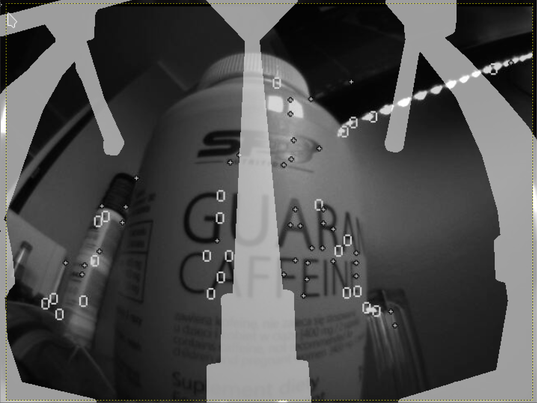
^@^@^@^@^@^@^It is working now thanks. I have created mask in monochrome bmp and then used online tool to convert it into pgm but output had wrong header:
P5
160 120
1
^@^@^@^@^@^@^
I have used gimp now and exported with .pgm (binary) and it's working

I put a preview mask on output image.
-
A Alex Kushleyev referenced this topic on
-
G Gary Holmgren referenced this topic on
-
-
Reading along? Create a free ModalAI Forum account to join in.
With an account you can reply, ask your own question, get an email when a ModalAI engineer answers, and mark the reply that solved it. Your place in each thread is saved between visits.
Questions about VOXL, Flight Core, ESCs and ModalAI drones are answered here by the engineers who build them.
Register Login