
Camera server keep crashing everytime it is launched
-
@Alex-Kushleyev I really need this sensor to work so can you tell me if you think that it is a hardware problem I need to change the faulty piece as quick as possible. I'm right now making a new order for another starling 2 so I need to know.
Otherwise, what can I do to debug this sensor.
Julien@Judoor-0 , I am sorry that this happened to you.
It seems that there is some hardware issue.
Let's do a quick test by connecting TOF to a different camera port and updating camera server configuration to reflect this:
- i am assuming your 3 cameras (tof, hires, tracking) are connected in the following configuration : https://docs.modalai.com/voxl2-camera-configs/#c-06-tof-hires-and-tracking-d0005-starling
- this means TOF should be in slot 0, IMX214 in slot 2, ov7251 (tracking) in slot 3. the last two i can see confirmed from the log that you posted (where TOF was not detected).
- power off voxl2
- remove the flex cable witih IMX214 and tracking camera from J7
- disconnect M0135 + TOF from J6 and plug it into J7 (same orientation as it was plugged into J6)
- power on voxl2
- copy the TOF driver for slot 2: /usr/share/modalai/chi-cdk/irs1645/com.qti.sensormodule.irs1645_2.bin
- run
voxl-camera-server -lto see if TOF is detected in slot 2 - edit /etc/voxl-camera-server.conf to disable hires and tracking cameras (enabled : false), confirm that TOF camera ID is set to 0 and TOF is enabled in the config file
- start voxl-camera-server in foreground and see if TOF is functioning normally.
Please let me know the result.
Alex
-
@Judoor-0 , I am sorry that this happened to you.
It seems that there is some hardware issue.
Let's do a quick test by connecting TOF to a different camera port and updating camera server configuration to reflect this:
- i am assuming your 3 cameras (tof, hires, tracking) are connected in the following configuration : https://docs.modalai.com/voxl2-camera-configs/#c-06-tof-hires-and-tracking-d0005-starling
- this means TOF should be in slot 0, IMX214 in slot 2, ov7251 (tracking) in slot 3. the last two i can see confirmed from the log that you posted (where TOF was not detected).
- power off voxl2
- remove the flex cable witih IMX214 and tracking camera from J7
- disconnect M0135 + TOF from J6 and plug it into J7 (same orientation as it was plugged into J6)
- power on voxl2
- copy the TOF driver for slot 2: /usr/share/modalai/chi-cdk/irs1645/com.qti.sensormodule.irs1645_2.bin
- run
voxl-camera-server -lto see if TOF is detected in slot 2 - edit /etc/voxl-camera-server.conf to disable hires and tracking cameras (enabled : false), confirm that TOF camera ID is set to 0 and TOF is enabled in the config file
- start voxl-camera-server in foreground and see if TOF is functioning normally.
Please let me know the result.
Alex
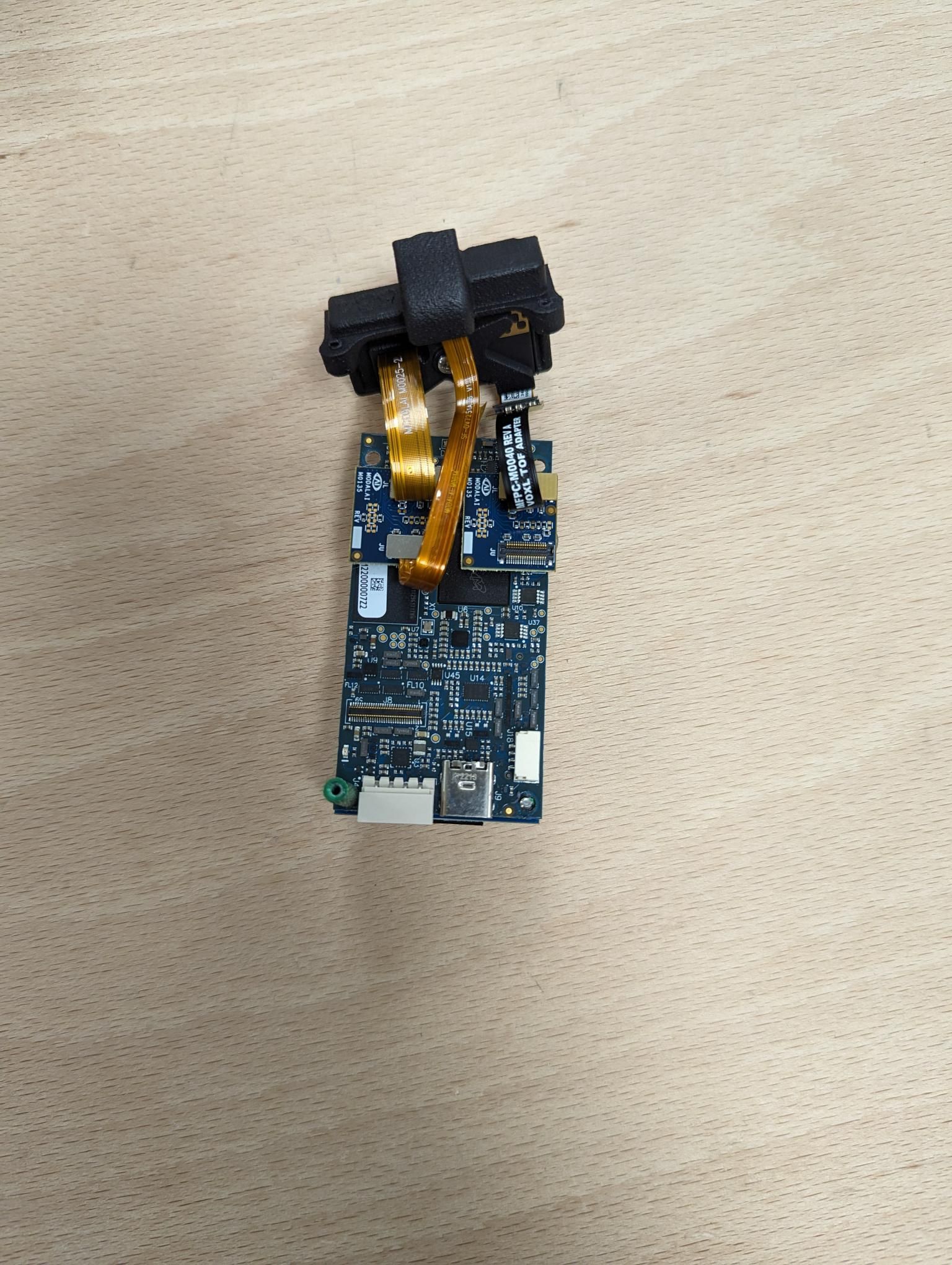
@Alex-Kushleyev Here is my starling 2 camera configuration the only difference is that I also have a M0135 module to connect the imx214 and tracking.
So, I unpluged the cameras, plug the TOF sensor on the other M0135 adapter.
I copied the driver in /usr/lib/camera and delete the existing one for slot 2 (it was imx214)
Now when I run voxl-camera-server -l I got this, so I suppose it correctly detected the TOF sensor.voxl2:/$ voxl-camera-server -l DEBUG: Attempting to open the hal module DEBUG: SUCCESS: Camera module opened on attempt 0 DEBUG: ----------- Number of cameras: 1 DEBUG: Cam idx: 0, Cam slot: 2, Slave Address: 0x007A, Sensor Id: 0x003D DEBUG: Note: This list comes from the HAL module and may not be indicative DEBUG: of configurations that have full pipelines DEBUG: Number of cameras: 1 ==================================== Stats for camera: 0 ANDROID_SCALER_AVAILABLE_RAW_SIZES: These are likely supported by the sensor 224 x 1557 ANDROID_SCALER_AVAILABLE_STREAM_CONFIGURATIONS: These are NOT necessarily supported by the sensor 176 x 144 HAL_PIXEL_FORMAT_YCbCr_420_888 176 x 144 HAL_PIXEL_FORMAT_BLOB 224 x 1557 HAL_PIXEL_FORMAT_RAW10 224 x 1557 HAL_PIXEL_FORMAT_RAW12 224 x 1557 HAL_PIXEL_FORMAT_RAW16 224 x 1557 HAL_PIXEL_FORMAT_RAW_OPAQUE ANDROID_SENSOR_INFO_SENSITIVITY_RANGE min = 54 max = 0 ANDROID_SENSOR_MAX_ANALOG_SENSITIVITY 0 ANDROID_SENSOR_INFO_EXPOSURE_TIME_RANGE min = 0ns max = 0ns ==================================== Number of cameras detected: 1 ====================================Just a note here, I found weird that the recommended resolution for the camera is 224x1557. Shouldn't it be 224x171 ?
Then when I disable the other cam and start the voxl-camera-server, I still got this with voxl-inspect-cam -a
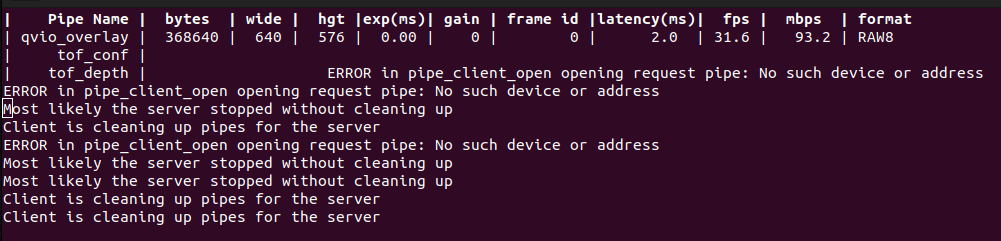
And I've got the same errors when I directly run voxl-camera-server, the command end up by aborted and nothing's working.
voxl2:/$ voxl-camera-server detected system image 1.7.6 using new imx214 defaults ================================================================= configuration for 3 cameras: cam #0 name: tof sensor type: pmd-tof isEnabled: 1 camId: 0 camId2: -1 fps: 5 en_rotate: 0 en_rotate2: 0 en_preview: 1 pre_width: 224 pre_height: 1557 en_raw_preview: 1 en_small_video: 0 small_video_width: -1 small_video_height: -1 en_large_video: 0 large_video_width: -1 large_video_height: -1 en_snapshot: 0 snap_width: -1 snap_height: -1 ae_mode: off standby_enabled: 0 decimator: 5 independent_exposure:0 cam #1 name: hires sensor type: imx214 isEnabled: 0 camId: 1 camId2: -1 fps: 30 en_rotate: 0 en_rotate2: 0 en_preview: 0 pre_width: 640 pre_height: 480 en_raw_preview: 0 en_small_video: 1 small_video_width: 1024 small_video_height: 768 en_large_video: 1 large_video_width: 4208 large_video_height: 3120 en_snapshot: 1 snap_width: 4208 snap_height: 3120 ae_mode: isp standby_enabled: 0 decimator: 1 independent_exposure:0 cam #2 name: tracking sensor type: ov7251 isEnabled: 0 camId: 2 camId2: -1 fps: 30 en_rotate: 0 en_rotate2: 0 en_preview: 1 pre_width: 640 pre_height: 480 en_raw_preview: 1 en_small_video: 0 small_video_width: -1 small_video_height: -1 en_large_video: 0 large_video_width: -1 large_video_height: -1 en_snapshot: 0 snap_width: -1 snap_height: -1 ae_mode: lme_msv standby_enabled: 0 decimator: 1 independent_exposure:0 fsync_en: 0 fsync_gpio: 111 ================================================================= connected to GPS mavlink pipe Starting Camera: tof (id #0) Connected to cpu-monitor Using gain limits min: 54 max: 8000 gbm_create_device(156): Info: backend name is: msm_drm Skipping Camera: hires, configuration marked disabled Skipping Camera: tracking, configuration marked disabled ------ voxl-camera-server: Started 1 of 3 cameras ------ voxl-camera-server: Camera server is now running Aborted -
@Alex-Kushleyev Here is my starling 2 camera configuration the only difference is that I also have a M0135 module to connect the imx214 and tracking.
So, I unpluged the cameras, plug the TOF sensor on the other M0135 adapter.
I copied the driver in /usr/lib/camera and delete the existing one for slot 2 (it was imx214)
Now when I run voxl-camera-server -l I got this, so I suppose it correctly detected the TOF sensor.voxl2:/$ voxl-camera-server -l DEBUG: Attempting to open the hal module DEBUG: SUCCESS: Camera module opened on attempt 0 DEBUG: ----------- Number of cameras: 1 DEBUG: Cam idx: 0, Cam slot: 2, Slave Address: 0x007A, Sensor Id: 0x003D DEBUG: Note: This list comes from the HAL module and may not be indicative DEBUG: of configurations that have full pipelines DEBUG: Number of cameras: 1 ==================================== Stats for camera: 0 ANDROID_SCALER_AVAILABLE_RAW_SIZES: These are likely supported by the sensor 224 x 1557 ANDROID_SCALER_AVAILABLE_STREAM_CONFIGURATIONS: These are NOT necessarily supported by the sensor 176 x 144 HAL_PIXEL_FORMAT_YCbCr_420_888 176 x 144 HAL_PIXEL_FORMAT_BLOB 224 x 1557 HAL_PIXEL_FORMAT_RAW10 224 x 1557 HAL_PIXEL_FORMAT_RAW12 224 x 1557 HAL_PIXEL_FORMAT_RAW16 224 x 1557 HAL_PIXEL_FORMAT_RAW_OPAQUE ANDROID_SENSOR_INFO_SENSITIVITY_RANGE min = 54 max = 0 ANDROID_SENSOR_MAX_ANALOG_SENSITIVITY 0 ANDROID_SENSOR_INFO_EXPOSURE_TIME_RANGE min = 0ns max = 0ns ==================================== Number of cameras detected: 1 ====================================Just a note here, I found weird that the recommended resolution for the camera is 224x1557. Shouldn't it be 224x171 ?
Then when I disable the other cam and start the voxl-camera-server, I still got this with voxl-inspect-cam -a
And I've got the same errors when I directly run voxl-camera-server, the command end up by aborted and nothing's working.
voxl2:/$ voxl-camera-server detected system image 1.7.6 using new imx214 defaults ================================================================= configuration for 3 cameras: cam #0 name: tof sensor type: pmd-tof isEnabled: 1 camId: 0 camId2: -1 fps: 5 en_rotate: 0 en_rotate2: 0 en_preview: 1 pre_width: 224 pre_height: 1557 en_raw_preview: 1 en_small_video: 0 small_video_width: -1 small_video_height: -1 en_large_video: 0 large_video_width: -1 large_video_height: -1 en_snapshot: 0 snap_width: -1 snap_height: -1 ae_mode: off standby_enabled: 0 decimator: 5 independent_exposure:0 cam #1 name: hires sensor type: imx214 isEnabled: 0 camId: 1 camId2: -1 fps: 30 en_rotate: 0 en_rotate2: 0 en_preview: 0 pre_width: 640 pre_height: 480 en_raw_preview: 0 en_small_video: 1 small_video_width: 1024 small_video_height: 768 en_large_video: 1 large_video_width: 4208 large_video_height: 3120 en_snapshot: 1 snap_width: 4208 snap_height: 3120 ae_mode: isp standby_enabled: 0 decimator: 1 independent_exposure:0 cam #2 name: tracking sensor type: ov7251 isEnabled: 0 camId: 2 camId2: -1 fps: 30 en_rotate: 0 en_rotate2: 0 en_preview: 1 pre_width: 640 pre_height: 480 en_raw_preview: 1 en_small_video: 0 small_video_width: -1 small_video_height: -1 en_large_video: 0 large_video_width: -1 large_video_height: -1 en_snapshot: 0 snap_width: -1 snap_height: -1 ae_mode: lme_msv standby_enabled: 0 decimator: 1 independent_exposure:0 fsync_en: 0 fsync_gpio: 111 ================================================================= connected to GPS mavlink pipe Starting Camera: tof (id #0) Connected to cpu-monitor Using gain limits min: 54 max: 8000 gbm_create_device(156): Info: backend name is: msm_drm Skipping Camera: hires, configuration marked disabled Skipping Camera: tracking, configuration marked disabled ------ voxl-camera-server: Started 1 of 3 cameras ------ voxl-camera-server: Camera server is now running Aborted@Judoor-0 , since the issue is the same when using voxl2 J7, it seems there may be a hw issue either in the m0135 adapter or the tof module. If you are able, please try the second m0135 adapter (disconnect from the hires and tracking cameras and connect to tof), then plug back into j7. If the symptoms repeat, the TOF sensor is most likely bad, so we can send a replacement one to you.
Alex
-
@Judoor-0 , since the issue is the same when using voxl2 J7, it seems there may be a hw issue either in the m0135 adapter or the tof module. If you are able, please try the second m0135 adapter (disconnect from the hires and tracking cameras and connect to tof), then plug back into j7. If the symptoms repeat, the TOF sensor is most likely bad, so we can send a replacement one to you.
Alex
-
@Judoor-0 , since the issue is the same when using voxl2 J7, it seems there may be a hw issue either in the m0135 adapter or the tof module. If you are able, please try the second m0135 adapter (disconnect from the hires and tracking cameras and connect to tof), then plug back into j7. If the symptoms repeat, the TOF sensor is most likely bad, so we can send a replacement one to you.
Alex
-
@Alex-Kushleyev Also why does it says that the resolution for the camera should be 224x1557 and not 224x171 like on the datasheet of the sensor?
Julien@Judoor-0 , the tof sensor takes multiple exposures and returns stacked IR image (kind of like HDR). That image is processed by the TOF library on the cpu to output the final image at the proper resolution.
I will check about RMA, you probably need to fill out the form: https://www.modalai.com/pages/rma
-
@Judoor-0 , the tof sensor takes multiple exposures and returns stacked IR image (kind of like HDR). That image is processed by the TOF library on the cpu to output the final image at the proper resolution.
I will check about RMA, you probably need to fill out the form: https://www.modalai.com/pages/rma
-
@Alex-Kushleyev Ok, I filled up the RMA form in cas it's needed.
My S/N is M23000001E9.
Julien -
@Judoor-0 I'm facing a similar problem with ToF configuration on a Starling setup. Through RMA was anything wrt. to hardware found? If not how did RMA help you?
@Jetson-Nano , if you run the camera server in foreground (and with
-d 0option to enable debugging), it could help localize the issue. Also try disabling cameras one by one invoxl-camera-server.confto find which camera is causing an issue.Is the issue you are seeing specific to TOF? Was it previously working?
Alex
-
@Jetson-Nano , if you run the camera server in foreground (and with
-d 0option to enable debugging), it could help localize the issue. Also try disabling cameras one by one invoxl-camera-server.confto find which camera is causing an issue.Is the issue you are seeing specific to TOF? Was it previously working?
Alex
@Alex-Kushleyev I tried that and have posted the output here (https://forum.modalai.com/topic/3688/vision-sensors-not-detected-in-voxl2). Initially the issue was with all the cameras, now it is only ToF.
-
@Alex-Kushleyev I tried that and have posted the output here (https://forum.modalai.com/topic/3688/vision-sensors-not-detected-in-voxl2). Initially the issue was with all the cameras, now it is only ToF.
@Jetson-Nano , OK it seems we have two parallel threads going. please see my reply to the other thread https://forum.modalai.com/topic/3688/vision-sensors-not-detected-in-voxl2 and test it step by step as I suggested (reducing fps of imx214 camera first, then disabling sensors one by one)
Alex


Reading along? Create a free ModalAI Forum account to join in.
With an account you can reply, ask your own question, get an email when a ModalAI engineer answers, and mark the reply that solved it. Your place in each thread is saved between visits.
Questions about VOXL, Flight Core, ESCs and ModalAI drones are answered here by the engineers who build them.
Register Login