Skip to content
  • Categories
  • Recent
  • Tags
  • Popular
  • Users
  • Groups
Collapse
Brand Logo

ModalAI Forum

  1. ModalAI Support Forum
  2. Ask your questions right here!
  3. Unable to communicate with add-on board

Unable to communicate with add-on board

Scheduled Pinned Locked Moved Ask your questions right here!
13 Posts 4 Posters 2.4k Views 2 Watching
  • Oldest to Newest
  • Newest to Oldest
  • Most Votes
Reply
  • Reply as topic
Log in to reply
This topic has been deleted. Only users with topic management privileges can see it.
  • R Offline
    R Offline
    rogerli
    Contributor
    wrote on last edited by
    #1

    Hello, I encountered some issues with my VOXL2. Initially, it showed a red light when powered on. After disconnecting all connections and powering it on again, the light turned green. However, I couldn't connect via adb. Later, after leaving it for some time, I was suddenly able to connect via adb. At this point, I noticed some strange behavior with the LEDs. Firstly, D1 had a yellow light, and then DS2 would turn off about five seconds after powering on.

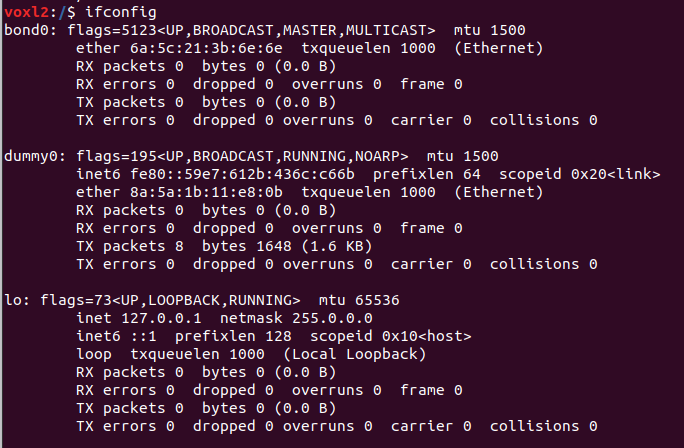
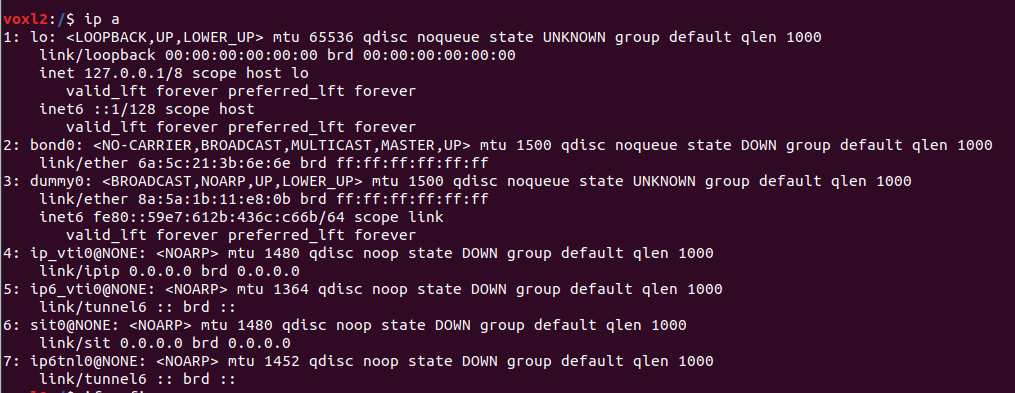
    Regarding functionality, I used voxl-inspect-server to check, and all the opened servers appeared to be working fine. However, I found that there was only power but no communication between VOXL2 and the Microhard add-on board (the Microhard could pair with my computer). When I checked with ifconfig, I noticed that VOXL2 did not display usb0 or eth0. Even when using a WiFi dongle, wlo0 was not displayed.

    What is the current status of VOXL2? What steps should I take to ensure that VOXL2 functions properly?

    VinnyV 1 Reply Last reply
    0
    • R rogerli

      Hello, I encountered some issues with my VOXL2. Initially, it showed a red light when powered on. After disconnecting all connections and powering it on again, the light turned green. However, I couldn't connect via adb. Later, after leaving it for some time, I was suddenly able to connect via adb. At this point, I noticed some strange behavior with the LEDs. Firstly, D1 had a yellow light, and then DS2 would turn off about five seconds after powering on.

      Regarding functionality, I used voxl-inspect-server to check, and all the opened servers appeared to be working fine. However, I found that there was only power but no communication between VOXL2 and the Microhard add-on board (the Microhard could pair with my computer). When I checked with ifconfig, I noticed that VOXL2 did not display usb0 or eth0. Even when using a WiFi dongle, wlo0 was not displayed.

      What is the current status of VOXL2? What steps should I take to ensure that VOXL2 functions properly?

      VinnyV Offline
      VinnyV Offline
      Vinny
      ModalAI Team
      wrote on last edited by
      #2

      Hi @rogerli
      A red light at DS1 when powering ON implies your power supply input to VOXL 2 is not in spec.
      https://docs.modalai.com/voxl2-leds/

      Can you please post a pic of your setup and we can go from there. No point doing any further steps until we know you have a good power module.

      Thanks!
      Vinny

      R 1 Reply Last reply
      0
      • VinnyV Vinny

        Hi @rogerli
        A red light at DS1 when powering ON implies your power supply input to VOXL 2 is not in spec.
        https://docs.modalai.com/voxl2-leds/

        Can you please post a pic of your setup and we can go from there. No point doing any further steps until we know you have a good power module.

        Thanks!
        Vinny

        R Offline
        R Offline
        rogerli
        Contributor
        wrote on last edited by
        #3

        @Vinny Here are my current settings and the power module can run normally.
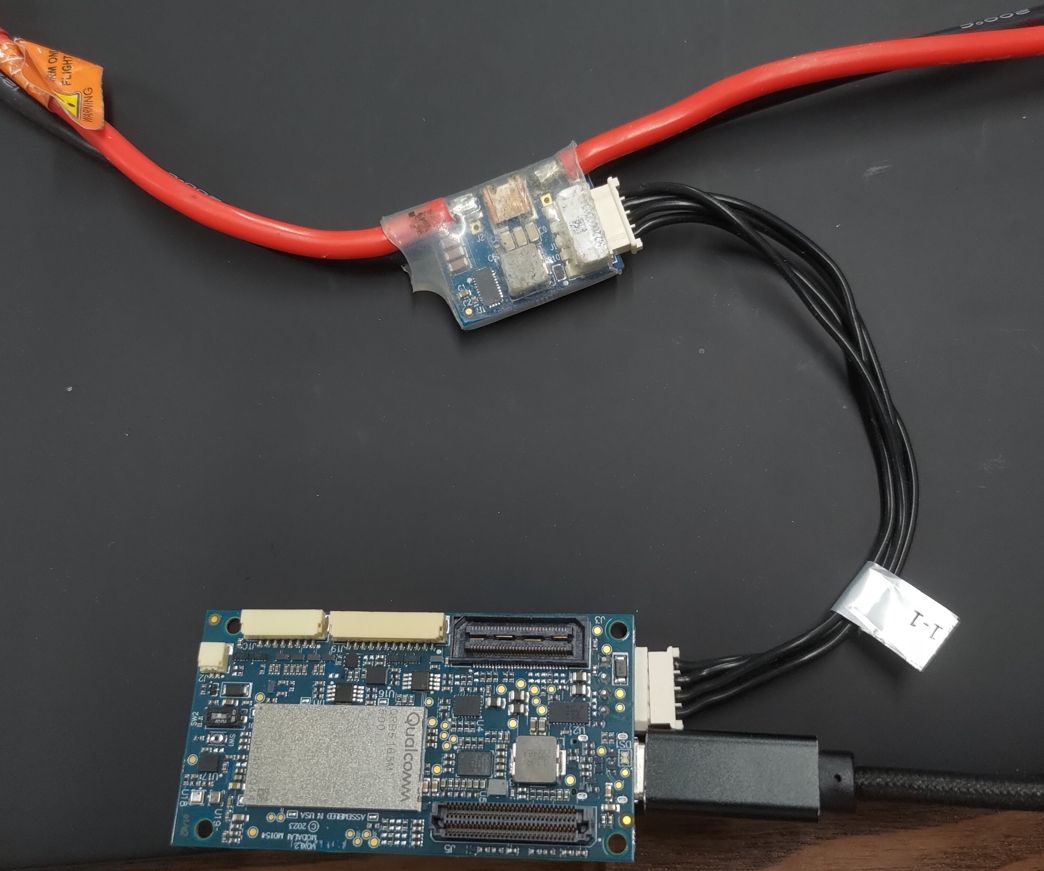
        16d6bbf0-28cf-46fe-ad73-d8d15c26e805-1715198081152.jpg

        Additionally, I previously had an external flight controller connected to J18, a Microhard add-on board connected to J3, and a stereo camera connected to J6.

        VinnyV 1 Reply Last reply
        0
        • R rogerli

          @Vinny Here are my current settings and the power module can run normally.
          16d6bbf0-28cf-46fe-ad73-d8d15c26e805-1715198081152.jpg

          Additionally, I previously had an external flight controller connected to J18, a Microhard add-on board connected to J3, and a stereo camera connected to J6.

          VinnyV Offline
          VinnyV Offline
          Vinny
          ModalAI Team
          wrote on last edited by
          #4

          Hi @rogerli
          Thanks for the pic. OK good. That is all normal, and your MCBL-00001-1 is from newer stock that is much more reliable than older MCBL-00001's a few years ago.

          Now, regarding the specific plug-in board with Microhard, I wonder if you had an issue we are aware of as reported from previous forum users and we capture that here:
          https://docs.modalai.com/expansion-design-guide/#j3j5-expansion
          d68d4be2-a5e4-452f-8389-0ab6059a0f0f-image.png

          So, when you install the Microhard, be sure the bottom of the MH board is not touching J5. If it does, that can make the system and then LEDs go wonky from shorting out stuff and prevent you from seeing the devices with lsusb.

          If you can get past all of that then someone from SW will have to chime in to help you further.
          I just jump in when I see potential HW related topics 🙂

          R 1 Reply Last reply
          0
          • VinnyV Vinny

            Hi @rogerli
            Thanks for the pic. OK good. That is all normal, and your MCBL-00001-1 is from newer stock that is much more reliable than older MCBL-00001's a few years ago.

            Now, regarding the specific plug-in board with Microhard, I wonder if you had an issue we are aware of as reported from previous forum users and we capture that here:
            https://docs.modalai.com/expansion-design-guide/#j3j5-expansion
            d68d4be2-a5e4-452f-8389-0ab6059a0f0f-image.png

            So, when you install the Microhard, be sure the bottom of the MH board is not touching J5. If it does, that can make the system and then LEDs go wonky from shorting out stuff and prevent you from seeing the devices with lsusb.

            If you can get past all of that then someone from SW will have to chime in to help you further.
            I just jump in when I see potential HW related topics 🙂

            R Offline
            R Offline
            rogerli
            Contributor
            wrote on last edited by
            #5

            @Vinny
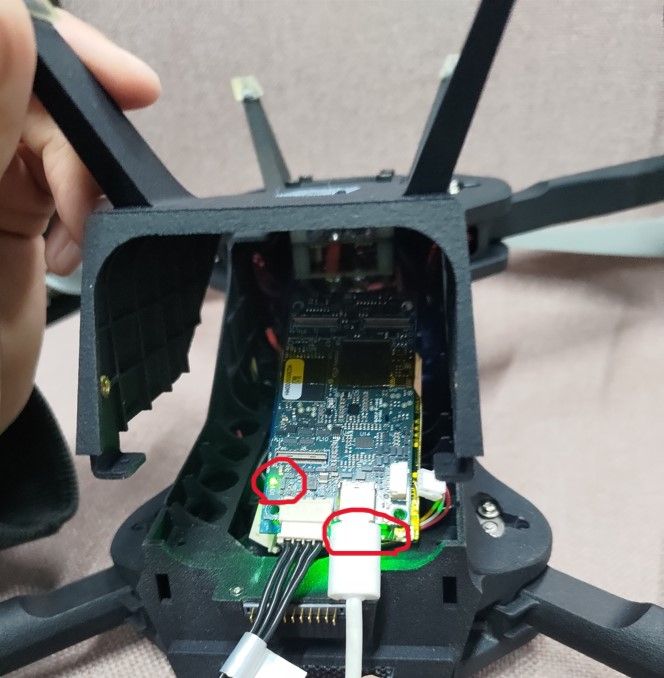
            I placed insulating tape between the VOXL2 and the MH add-on board to ensure they don't make direct contact, but it still didn't resolve the communication issue. D1 still lights up and DS2 turns off, and I still can't find the IP address of the MH.

            Only D1 and DS1 light up
            98c7b91d-45a7-4e56-b0a0-a5b6720338f9-1715333401887.jpg

            bc018c94-5d53-413b-88e1-304e5872783a-Screenshot from 2024-05-09 18-29-19.png

            8f0423b1-8231-4130-a799-9a02e77ae768-Screenshot from 2024-05-09 18-29-45.png

            VinnyV 1 Reply Last reply
            0
            • R rogerli

              @Vinny
              I placed insulating tape between the VOXL2 and the MH add-on board to ensure they don't make direct contact, but it still didn't resolve the communication issue. D1 still lights up and DS2 turns off, and I still can't find the IP address of the MH.

              Only D1 and DS1 light up
              98c7b91d-45a7-4e56-b0a0-a5b6720338f9-1715333401887.jpg

              bc018c94-5d53-413b-88e1-304e5872783a-Screenshot from 2024-05-09 18-29-19.png

              8f0423b1-8231-4130-a799-9a02e77ae768-Screenshot from 2024-05-09 18-29-45.png

              VinnyV Offline
              VinnyV Offline
              Vinny
              ModalAI Team
              wrote on last edited by
              #6

              Thanks @rogerli , at least now we have confidence this is not HW related. Those indicators are acting normally now.

              At this point, I'm going to defer to our expert @tom who can help guide you further now that we are looking more likely at SW issues.
              Thanks!
              Vinny

              R 1 Reply Last reply
              0
              • VinnyV Vinny

                Thanks @rogerli , at least now we have confidence this is not HW related. Those indicators are acting normally now.

                At this point, I'm going to defer to our expert @tom who can help guide you further now that we are looking more likely at SW issues.
                Thanks!
                Vinny

                R Offline
                R Offline
                rogerli
                Contributor
                wrote on last edited by
                #7

                @Vinny Thank you for your response. So it's normal that DS2 doesn't light up? Also, do I need to reflash the SDK or unbrick the VOXL2?

                VinnyV tomT 2 Replies Last reply
                0
                • R rogerli

                  @Vinny Thank you for your response. So it's normal that DS2 doesn't light up? Also, do I need to reflash the SDK or unbrick the VOXL2?

                  VinnyV Offline
                  VinnyV Offline
                  Vinny
                  ModalAI Team
                  wrote on last edited by
                  #8

                  Hi @rogerli
                  That is fine. DS2 is user controlled as per that web link above.
                  It normally flashes at first then goes quiet until commanded by SW.

                  1 Reply Last reply
                  0
                  • R rogerli

                    @Vinny Thank you for your response. So it's normal that DS2 doesn't light up? Also, do I need to reflash the SDK or unbrick the VOXL2?

                    tomT Online
                    tomT Online
                    tom
                    admin
                    wrote on last edited by
                    #9

                    @rogerli The microhard network interface (either usb0 or eth0) should at least enumerate without any custom sw configuration.

                    What SDK version are you using? (voxl-version)

                    1 Reply Last reply
                    0
                    • R Offline
                      R Offline
                      rogerli
                      Contributor
                      wrote on last edited by
                      #10

                      @Vinny I have another VOXL2 where only DS1 and DS2 lights up constantly, but D1 doesn't light up. Is this normal? (There was a slight deformation near the power interface due to a previous fall.)

                      @tom The SDK version of the VOXL2 that I'm using is 1.1.3.

                      VinnyV A 2 Replies Last reply
                      0
                      • R rogerli

                        @Vinny I have another VOXL2 where only DS1 and DS2 lights up constantly, but D1 doesn't light up. Is this normal? (There was a slight deformation near the power interface due to a previous fall.)

                        @tom The SDK version of the VOXL2 that I'm using is 1.1.3.

                        VinnyV Offline
                        VinnyV Offline
                        Vinny
                        ModalAI Team
                        wrote on last edited by
                        #11

                        @rogerli said in Unable to communicate with add-on board:

                        @Vinny I have another VOXL2 where only DS1 and DS2 lights up constantly, but D1 doesn't light up. Is this normal? (There was a slight deformation near the power interface due to a previous fall.)

                        No. D1 means most of the system power is good. If it is OFF, your hardware has gone bad from that crash.

                        R 1 Reply Last reply
                        0
                        • VinnyV Vinny

                          @rogerli said in Unable to communicate with add-on board:

                          @Vinny I have another VOXL2 where only DS1 and DS2 lights up constantly, but D1 doesn't light up. Is this normal? (There was a slight deformation near the power interface due to a previous fall.)

                          No. D1 means most of the system power is good. If it is OFF, your hardware has gone bad from that crash.

                          R Offline
                          R Offline
                          rogerli
                          Contributor
                          wrote on last edited by
                          #12

                          @Vinny said in Unable to communicate with add-on board:

                          No. D1 means most of the system power is good. If it is OFF, your hardware has gone bad from that crash.

                          Thank you for your response. I wanted to inquire about the situation because the VOXL2 that had been dropped is functioning normally except for unstable MH/WIFI communication.

                          1 Reply Last reply
                          0
                          • R rogerli

                            @Vinny I have another VOXL2 where only DS1 and DS2 lights up constantly, but D1 doesn't light up. Is this normal? (There was a slight deformation near the power interface due to a previous fall.)

                            @tom The SDK version of the VOXL2 that I'm using is 1.1.3.

                            A Offline
                            A Offline
                            anghung
                            Contributor
                            wrote on last edited by
                            #13

                            @rogerli said in Unable to communicate with add-on board:

                            @Vinny I have another VOXL2 where only DS1 and DS2 lights up constantly, but D1 doesn't light up. Is this normal? (There was a slight deformation near the power interface due to a previous fall.)

                            @tom The SDK version of the VOXL2 that I'm using is 1.1.3.

                            I initially bought two VOXL2 boards, both version 1.1.2. One was deformed due to a crash, but the other still works well. Later, I purchased two more VOXL2 boards, which arrived with version 1.1.3. One of them was completely non-functional, and the other also had communication issues. Due to time constraints, we urgently ordered two more VOXL2 boards. Should we downgrade the SDK to 1.1.2 for safety? Currently, as we are in the pre-mass production stage and sending products for inspection, we cannot afford sudden failures of critical components.


                            1 Reply Last reply
                            0

                            Hello! It looks like you're interested in this conversation, but you don't have an account yet.

                            Getting fed up of having to scroll through the same posts each visit? When you register for an account, you'll always come back to exactly where you were before, and choose to be notified of new replies (either via email, or push notification). You'll also be able to save bookmarks and upvote posts to show your appreciation to other community members.

                            With your input, this post could be even better 💗

                            Register Login
                            Reply
                            • Reply as topic
                            Log in to reply
                            • Oldest to Newest
                            • Newest to Oldest
                            • Most Votes


                            ModalAI
                            Categories Recent Tags ModalAI.com Docs
                            © 2026 ModalAI® · Accelerating autonomy for smaller, smarter, safer drones · Powered by NodeBB
                            • Login

                            • Don't have an account? Register

                            • Login or register to search.
                            • First post
                              Last post
                            0
                            • Categories
                            • Recent
                            • Tags
                            • Popular
                            • Users
                            • Groups