
Recording and Receiving Videos
-
I'm working on recording videos and taking snapshots (VOXL SDK 1.1.1. ). I'm following the steps outlined in the MAVCam Manager Doc, and using QGC to take the photos and videos. The snapshots are automatically transferred directly onto my laptop in the photos folder within the QGC folder by just clicking the shutter button (no pulling required).
However, I'm having issues accessing the videos. The doc says that videos are saved locally to the VOXL disc.
ls -la /data/videosandls -la /data/snapshotsreturns that old files exist, but the new recordings/photos aren't there (recorded 4/29/24). Also, pulling returns two empty folders.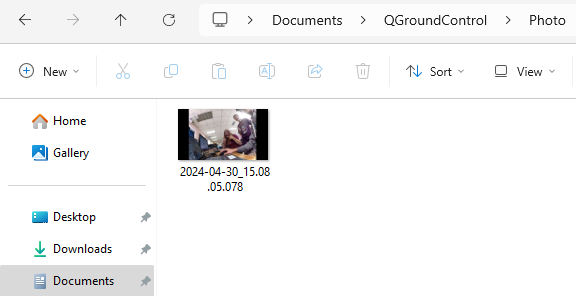
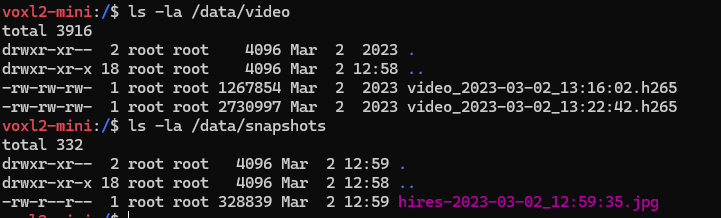
Here's the output of
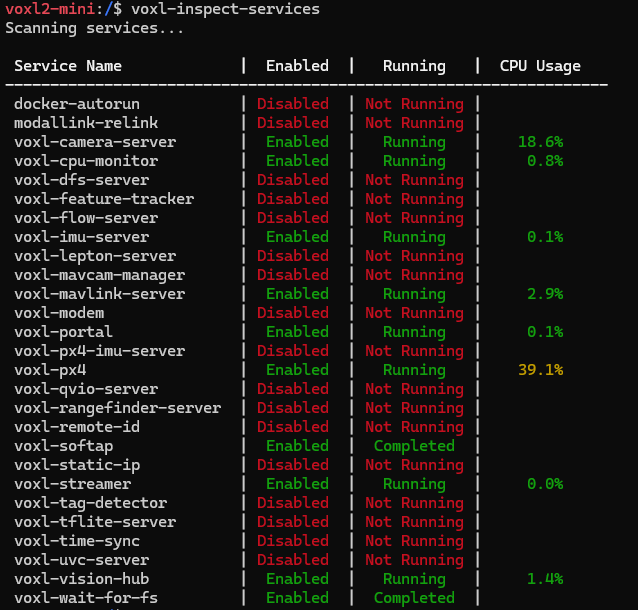
ls -la /dataandvoxl-inspect-services, in case it's helpful.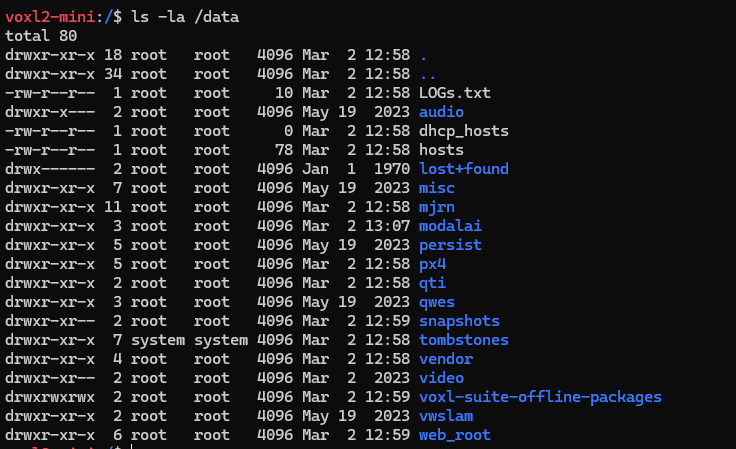
-
I'm working on recording videos and taking snapshots (VOXL SDK 1.1.1. ). I'm following the steps outlined in the MAVCam Manager Doc, and using QGC to take the photos and videos. The snapshots are automatically transferred directly onto my laptop in the photos folder within the QGC folder by just clicking the shutter button (no pulling required).
However, I'm having issues accessing the videos. The doc says that videos are saved locally to the VOXL disc.
ls -la /data/videosandls -la /data/snapshotsreturns that old files exist, but the new recordings/photos aren't there (recorded 4/29/24). Also, pulling returns two empty folders.Here's the output of
ls -la /dataandvoxl-inspect-services, in case it's helpful.@WineVirus try running
systemctl start voxl-mavcam-managermake sure it's running, then try again with QGC
-
I'm working on recording videos and taking snapshots (VOXL SDK 1.1.1. ). I'm following the steps outlined in the MAVCam Manager Doc, and using QGC to take the photos and videos. The snapshots are automatically transferred directly onto my laptop in the photos folder within the QGC folder by just clicking the shutter button (no pulling required).
However, I'm having issues accessing the videos. The doc says that videos are saved locally to the VOXL disc.
ls -la /data/videosandls -la /data/snapshotsreturns that old files exist, but the new recordings/photos aren't there (recorded 4/29/24). Also, pulling returns two empty folders.Here's the output of
ls -la /dataandvoxl-inspect-services, in case it's helpful.@WineVirus If you issue the command
dateon VOXL 2 what do you get? If you aren't connected to the Internet then VOXL 2 cannot update it's time and date and so uses an old value. Maybe those h265 videos and jpeg snapshot are the current ones. Can you adb pull each file individually? e.g.adb pull /data/video/video_2023-03-02_13:16:02.h265etc. -
@WineVirus If you issue the command
dateon VOXL 2 what do you get? If you aren't connected to the Internet then VOXL 2 cannot update it's time and date and so uses an old value. Maybe those h265 videos and jpeg snapshot are the current ones. Can you adb pull each file individually? e.g.adb pull /data/video/video_2023-03-02_13:16:02.h265etc.@Eric-Katzfey
dategives me 3/2/23. I'm using SoftAP, so I guess it makes sense that files that I've pushed while on WiFi have the correct date, but the videos are using the default date.I tried the above suggested by @Moderator and it worked, adding the new video to the folder.
Pulling the direct file name
./adb pull /data/video/video_2023-03-02_13:16:02.h265gives me an error; pulling just/data/videogives me the same error. Could it be a corrupted file?

Updated
ls -la /data/videooutput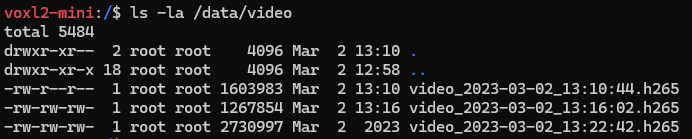
-
@Eric-Katzfey
dategives me 3/2/23. I'm using SoftAP, so I guess it makes sense that files that I've pushed while on WiFi have the correct date, but the videos are using the default date.I tried the above suggested by @Moderator and it worked, adding the new video to the folder.
Pulling the direct file name
./adb pull /data/video/video_2023-03-02_13:16:02.h265gives me an error; pulling just/data/videogives me the same error. Could it be a corrupted file?Updated
ls -la /data/videooutput@WineVirus Windows doesn't allow semicolons in file names. It's likely that's the issue. Try renaming that video file to video1.h265 or something simple
-
@WineVirus Windows doesn't allow semicolons in file names. It's likely that's the issue. Try renaming that video file to video1.h265 or something simple
@Moderator
./adb shell mv /data/video/video_2023-03-02_13:16:02.h265 /data/video/video1.h265 -
@WineVirus Windows doesn't allow semicolons in file names. It's likely that's the issue. Try renaming that video file to video1.h265 or something simple
@Moderator Ah, yep. That fixed it. Thanks for the help!
-
@Moderator Ah, yep. That fixed it. Thanks for the help!
@WineVirus
@Moderator What part do I need to modify to automatically save it to the QGC area?


Reading along? Create a free ModalAI Forum account to join in.
With an account you can reply, ask your own question, get an email when a ModalAI engineer answers, and mark the reply that solved it. Your place in each thread is saved between visits.
Questions about VOXL, Flight Core, ESCs and ModalAI drones are answered here by the engineers who build them.
Register Login