Skip to content
  • Categories
  • Recent
  • Tags
  • Popular
  • Users
  • Groups
Collapse
Brand Logo

ModalAI Forum

  1. ModalAI Support Forum
  2. Ask your questions right here!
  3. Issue with Microhard IP configuration.

Issue with Microhard IP configuration.
Scheduled Pinned Locked Moved Ask your questions right here!
20 Posts 3 Posters 3.5k Views 2 Watching
  • Oldest to Newest
  • Newest to Oldest
  • Most Votes
Reply
  • Reply as topic
Log in to reply
This topic has been deleted. Only users with topic management privileges can see it.
  • Eric KatzfeyE Eric Katzfey

    @rogerli There are a couple of options that come to mind. One it to use the VOXL2 as a router such that you can directly pass messages between the TRIP2 and QGC. That would require some messing with routing tables and such on VOXL2. If you are comfortable with networking then maybe this is the cleanest route to go. Otherwise you can just write a custom relay node that runs on VOXL2 and shuttles the messages between the two endpoints.

    R Offline
    R Offline
    rogerli
    Contributor
    wrote on last edited by
    #8

    @Eric-Katzfey Thank you for your suggestion, I will try it out. However, I am not familiar with networking , so I plan to use a custom relay node. Is it possible to achieve this goal using MAVProxy?

    Eric KatzfeyE 1 Reply Last reply
    0
    • R rogerli

      @Eric-Katzfey Thank you for your suggestion, I will try it out. However, I am not familiar with networking , so I plan to use a custom relay node. Is it possible to achieve this goal using MAVProxy?

      Eric KatzfeyE Offline
      Eric KatzfeyE Offline
      Eric Katzfey
      ModalAI Team
      wrote on last edited by
      #9

      @rogerli I don't have any experience with mavproxy but seems like it's possible. Worth a try at least.

      R 1 Reply Last reply
      0
      • Eric KatzfeyE Eric Katzfey

        @rogerli I don't have any experience with mavproxy but seems like it's possible. Worth a try at least.

        R Offline
        R Offline
        rogerli
        Contributor
        wrote on last edited by
        #10

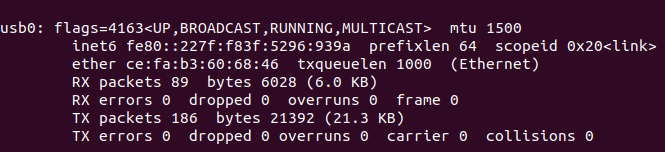
        @Eric-Katzfey I can use Mavproxy for message forwarding, but when I connect trip2 to the MH add-on board via Ethernet, the IP of MH keeps changing. How can I make the IP of MH fixed? (The IP of MH is fixed when not connected to trip2 via Ethernet.)

        tomT 1 Reply Last reply
        0
        • R rogerli

          @Eric-Katzfey I can use Mavproxy for message forwarding, but when I connect trip2 to the MH add-on board via Ethernet, the IP of MH keeps changing. How can I make the IP of MH fixed? (The IP of MH is fixed when not connected to trip2 via Ethernet.)

          tomT Offline
          tomT Offline
          tom
          admin
          wrote on last edited by
          #11

          @rogerli What is the network interface that isn't using a fixed IP as you expect? eth0? usb0?

          R 1 Reply Last reply
          0
          • tomT tom

            @rogerli What is the network interface that isn't using a fixed IP as you expect? eth0? usb0?

            R Offline
            R Offline
            rogerli
            Contributor
            wrote on last edited by
            #12

            @tom It's usb0, eth0 is always 169.254.4.1

            tomT 1 Reply Last reply
            0
            • R rogerli

              @tom It's usb0, eth0 is always 169.254.4.1

              tomT Offline
              tomT Offline
              tom
              admin
              wrote on last edited by
              #13

              @rogerli Hmm okay I wonder if voxl-modem is getting confused. If you disable the voxl-modem service with systemctl disable voxl-modem and run voxl-modem-start manually from the command line it might give you a clue of what interface it's targeting. It's possible with this custom setup that some tweaking to the startup script needs to be made, whether it's a sleep to wait until the device fully boots or a change in network interface name somewhere.

              R 1 Reply Last reply
              0
              • tomT tom

                @rogerli Hmm okay I wonder if voxl-modem is getting confused. If you disable the voxl-modem service with systemctl disable voxl-modem and run voxl-modem-start manually from the command line it might give you a clue of what interface it's targeting. It's possible with this custom setup that some tweaking to the startup script needs to be made, whether it's a sleep to wait until the device fully boots or a change in network interface name somewhere.

                R Offline
                R Offline
                rogerli
                Contributor
                wrote on last edited by
                #14

                @tom I disabled the voxl-modem service and manually ran voxl-modem-start from the command line, but I didn't see any hints about the interface, so I'll try modifying the script directly.
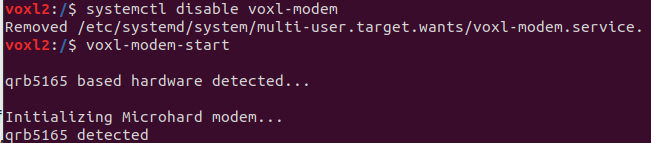
                f752dc81-a17a-49b5-8e97-8d19a7d9b8d7-voxl-modem-start.png

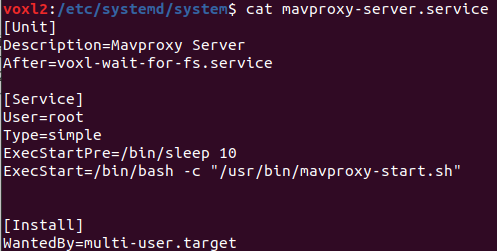
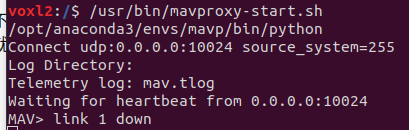
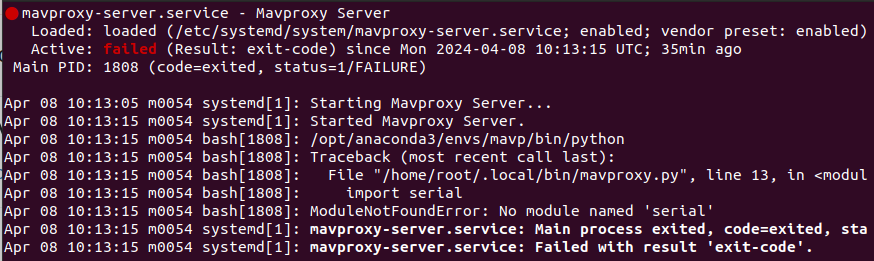
                Additionally, I'm currently writing a script to automatically execute mavproxy.py, but during the automatic execution, I encounter the issue "No module named 'xxx'". Even though I've included the Python path used by mavproxy.py in the script, it doesn't resolve the issue. Is there a way to fix this problem? (I can run mavproxy.py normally by manually entering commands.)
                3538a11e-2478-4d28-9da5-c7f3675060ec-mavproxy-status.png

                6890be7b-b968-4c49-88d8-65d5c9896b8c-mavproxy-start.png

                8b4b614b-268a-4eba-bf79-ba94bab1bd2a-mavproxy-server.png

                tomT 1 Reply Last reply
                0
                • R rogerli

                  @tom I disabled the voxl-modem service and manually ran voxl-modem-start from the command line, but I didn't see any hints about the interface, so I'll try modifying the script directly.
                  f752dc81-a17a-49b5-8e97-8d19a7d9b8d7-voxl-modem-start.png

                  Additionally, I'm currently writing a script to automatically execute mavproxy.py, but during the automatic execution, I encounter the issue "No module named 'xxx'". Even though I've included the Python path used by mavproxy.py in the script, it doesn't resolve the issue. Is there a way to fix this problem? (I can run mavproxy.py normally by manually entering commands.)

                  3538a11e-2478-4d28-9da5-c7f3675060ec-mavproxy-status.png

                  6890be7b-b968-4c49-88d8-65d5c9896b8c-mavproxy-start.png

                  8b4b614b-268a-4eba-bf79-ba94bab1bd2a-mavproxy-server.png

                  tomT Offline
                  tomT Offline
                  tom
                  admin
                  wrote on last edited by
                  #15

                  @rogerli Is the serial python3 library installed? If you run python3 from the command line and run import serial do you get the same error? It might need to be installed with pip3

                  R 1 Reply Last reply
                  0
                  • tomT tom

                    @rogerli Is the serial python3 library installed? If you run python3 from the command line and run import serial do you get the same error? It might need to be installed with pip3

                    R Offline
                    R Offline
                    rogerli
                    Contributor
                    wrote on last edited by
                    #16

                    @tom I'll need to confirm tomorrow, but I believe I have it installed because I can manually run mavproxy.py from the command line. However, when executing it automatically with a script in the system, I encounter the aforementioned issue.

                    tomT 1 Reply Last reply
                    0
                    • R rogerli

                      @tom I'll need to confirm tomorrow, but I believe I have it installed because I can manually run mavproxy.py from the command line. However, when executing it automatically with a script in the system, I encounter the aforementioned issue.

                      tomT Offline
                      tomT Offline
                      tom
                      admin
                      wrote on last edited by
                      #17

                      @rogerli When you run /usr/bin/mavproxy-start.sh from the command line does it work?

                      R 1 Reply Last reply
                      0
                      • tomT tom

                        @rogerli When you run /usr/bin/mavproxy-start.sh from the command line does it work?

                        R Offline
                        R Offline
                        rogerli
                        Contributor
                        wrote on last edited by
                        #18

                        @tom Yes, it can run normally
                        1f055c7c-64f8-413d-8005-7c58d566879f-run-script.png

                        tomT 1 Reply Last reply
                        0
                        • R rogerli

                          @tom Yes, it can run normally
                          1f055c7c-64f8-413d-8005-7c58d566879f-run-script.png

                          tomT Offline
                          tomT Offline
                          tom
                          admin
                          wrote on last edited by
                          #19

                          @rogerli Hmm that's interesting, I'm unsure why it would have issues seeing the serial library when running as a service but not when run manually.

                          I've never used a python venv or anaconda before on voxl2 so I'm guessing that's where the issue lies

                          R 1 Reply Last reply
                          0
                          • tomT tom

                            @rogerli Hmm that's interesting, I'm unsure why it would have issues seeing the serial library when running as a service but not when run manually.

                            I've never used a python venv or anaconda before on voxl2 so I'm guessing that's where the issue lies

                            R Offline
                            R Offline
                            rogerli
                            Contributor
                            wrote on last edited by
                            #20

                            @tom I had the same idea, so I directly installed Mavproxy and related packages on VOXL2, and successfully resolved the issue with the serial library. However, when running the service, I still couldn't import the Python files related to Mavproxy. Even adding the paths of those Python files to the environment variables didn't solve the problem.


                            1 Reply Last reply
                            0

                            Hello! It looks like you're interested in this conversation, but you don't have an account yet.

                            Getting fed up of having to scroll through the same posts each visit? When you register for an account, you'll always come back to exactly where you were before, and choose to be notified of new replies (either via email, or push notification). You'll also be able to save bookmarks and upvote posts to show your appreciation to other community members.

                            With your input, this post could be even better 💗

                            Register Login
                            Reply
                            • Reply as topic
                            Log in to reply
                            • Oldest to Newest
                            • Newest to Oldest
                            • Most Votes


                            ModalAI
                            Categories Recent Tags ModalAI.com Docs
                            © 2026 ModalAI® · Accelerating autonomy for smaller, smarter, safer drones · Powered by NodeBB
                            • Login

                            • Don't have an account? Register

                            • Login or register to search.
                            • First post
                              Last post
                            0
                            • Categories
                            • Recent
                            • Tags
                            • Popular
                            • Users
                            • Groups