
4K Hires Camera crashes camera server
-
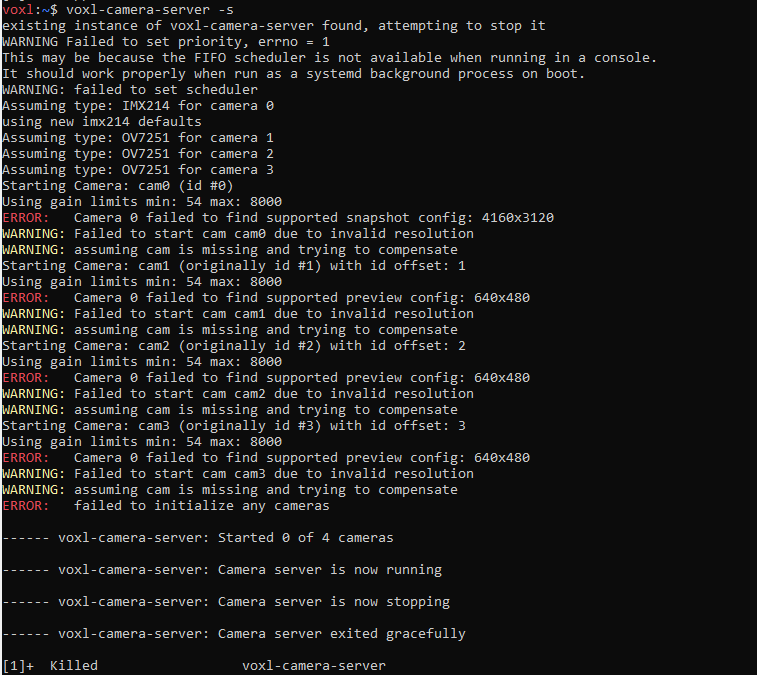
I am trying to replace 4k Hires sensor ([https://www.modalai.com/collections/accessories/products/mdk-m0061-1?variant=45119396380976](link url)) on VOXL. As soon as I connect this 4K Hires sensor, the camera server crashes.
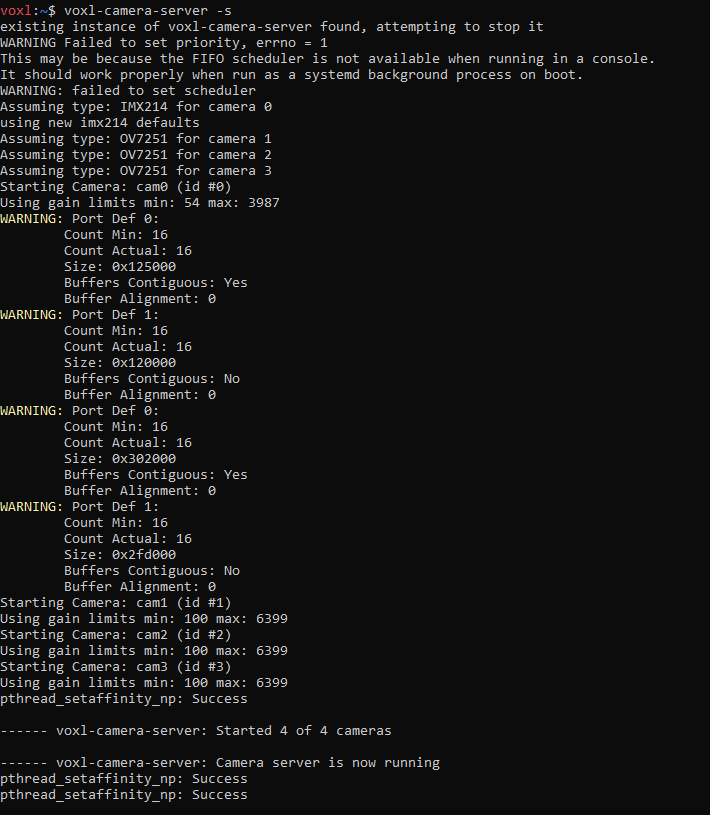
But when I use the hires sensor that came with VOXL, it just works fine.
-
I am trying to replace 4k Hires sensor ([https://www.modalai.com/collections/accessories/products/mdk-m0061-1?variant=45119396380976](link url)) on VOXL. As soon as I connect this 4K Hires sensor, the camera server crashes.
But when I use the hires sensor that came with VOXL, it just works fine.
@riteshsharma Can you please verify cabling matches one of the supported configs and that you have configured voxl-camera-server to the config that you have wired?
Another common issue is cables plugged in backwards or not fully seated
-
@riteshsharma Can you please verify cabling matches one of the supported configs and that you have configured voxl-camera-server to the config that you have wired?
Another common issue is cables plugged in backwards or not fully seated
When you change the camera configuration on VOXL2, a few things need to happen:
- you need to identify which slot you have connected the camera (or better yet, plug in the camera in the slot that is recommended in supported configurations) : https://docs.modalai.com/voxl2-camera-configs/
- J6 has slots 0,1, J7 has slots 2,3, J8 has slots 4,5. Each one of (J6,7,8) has Lower and Upper camera slot, so J6L would be slot 0, J7U would be slot 3.
- correct
sensormodule.binfiles (essentially camera drivers) need to be placed into/usr/lib/camera. All of the possible drivers are stored in/usr/share/modalai/chi-cdk - update /etc/modalai/voxl-camera-server.conf to reflect the camera configuration (resolution, fps, output) that you want
- make sure the type of the camera is also selected correctly (e.g. imx214 vs imx412, which may affect some settings in camera server)
Please note that
voxl-configure-camerascan do all of these for you, as long as you plug in the camera(s) in one of the supported use cases. Then you can make adjustments to thevoxl-camera-server.confif you want to customize resolution, or something else.Also, you can use
voxl-camera-server -la quick test to see if cameras are detected, their slot number and list of available resolutions. usually based on the list of available raw resolutions, you can actually tell which camera is being detected in which slot (if you are confused) -
When you change the camera configuration on VOXL2, a few things need to happen:
- you need to identify which slot you have connected the camera (or better yet, plug in the camera in the slot that is recommended in supported configurations) : https://docs.modalai.com/voxl2-camera-configs/
- J6 has slots 0,1, J7 has slots 2,3, J8 has slots 4,5. Each one of (J6,7,8) has Lower and Upper camera slot, so J6L would be slot 0, J7U would be slot 3.
- correct
sensormodule.binfiles (essentially camera drivers) need to be placed into/usr/lib/camera. All of the possible drivers are stored in/usr/share/modalai/chi-cdk - update /etc/modalai/voxl-camera-server.conf to reflect the camera configuration (resolution, fps, output) that you want
- make sure the type of the camera is also selected correctly (e.g. imx214 vs imx412, which may affect some settings in camera server)
Please note that
voxl-configure-camerascan do all of these for you, as long as you plug in the camera(s) in one of the supported use cases. Then you can make adjustments to thevoxl-camera-server.confif you want to customize resolution, or something else.Also, you can use
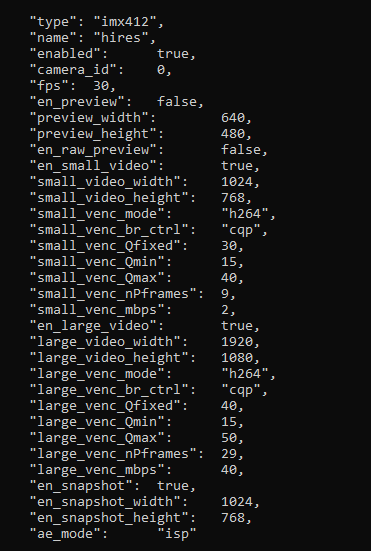
voxl-camera-server -la quick test to see if cameras are detected, their slot number and list of available resolutions. usually based on the list of available raw resolutions, you can actually tell which camera is being detected in which slot (if you are confused)Thank you for your suggestion. Now the Hires Camera is being detected when I change hires type to "imx412" and en_snapshot resolution to 1024x768 in etc/modalai/voxl-camera-server.conf file. Below is the changes I made.
I was wondering why is the default en_snapshot resolution 4160x3120 is not handled. Camera server just crashes for the en_snapshot resolution set to 4160x3120 . Can you please provide some insight? I am trying to get 4K resolution video.
-
Thank you for your suggestion. Now the Hires Camera is being detected when I change hires type to "imx412" and en_snapshot resolution to 1024x768 in etc/modalai/voxl-camera-server.conf file. Below is the changes I made.
I was wondering why is the default en_snapshot resolution 4160x3120 is not handled. Camera server just crashes for the en_snapshot resolution set to 4160x3120 . Can you please provide some insight? I am trying to get 4K resolution video.
@riteshsharma , IMX412 has the maximum resolution of 4056x3040, which you can also see if you check the output of
voxl-camera-server -l, look forANDROID_SCALER_AVAILABLE_RAW_SIZES -
@riteshsharma , IMX412 has the maximum resolution of 4056x3040, which you can also see if you check the output of
voxl-camera-server -l, look forANDROID_SCALER_AVAILABLE_RAW_SIZESIf you just want 4K video, you should select "large_video_width"
3840and height2160, you can disable snapshot and small video if you are not using them. -
If you just want 4K video, you should select "large_video_width"
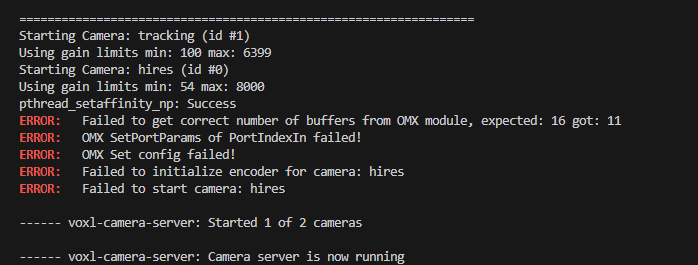
3840and height2160, you can disable snapshot and small video if you are not using them.@Alex-Kushleyev I followed your suggestion and selected "large_video_width" 3840 and height 2160. Now hires camera isn't working. But if I go back to 1920x1080, it works
-
@Alex-Kushleyev I followed your suggestion and selected "large_video_width" 3840 and height 2160. Now hires camera isn't working. But if I go back to 1920x1080, it works
@riteshsharma that is interesting, it looks like it is failing to allocate memory for the video encoder. Can you please disable the small video stream in and disable the snapshot
voxl-camera-server.confand try again? -
@riteshsharma that is interesting, it looks like it is failing to allocate memory for the video encoder. Can you please disable the small video stream in and disable the snapshot
voxl-camera-server.confand try again?@Alex-Kushleyev Yes, I disabled small video stream before trying this. This is what my voxl-camera-server.conf looks like:
voxl:/$ cat etc/modalai/voxl-camera-server.conf
/**- voxl-camera-server Configuration File
- Each camera has configurations for up to 4 HAL3 streams:
-
previewstream for raw unprocessed images from CV cameras
-
small_video720p (ish) h264/h265 compressed for fpv video streaming
-
large_video4k (ish) h264/h265 for onboard video recording to disk
-
snapshotISP-processed JPG snapshots that get saved to disk
- on QRB5165 platforms (VOXL2 and VOXL2 mini) you can only have 3 of the 4 enabled
- This file is generated from default values by voxl-configure-cameras.
- Do not expect arbitrary resolutions to work, the ISP and video compression
- pipelines only support very specific resolutions.
- The default video compression mode is cqp or Constant Quantization Parameter
*/
{
"version": 0.1,
"cameras": [{
"type": "ov7251",
"name": "tracking",
"enabled": true,
"camera_id": 1,
"fps": 30,
"en_rotate": false,
"en_preview": true,
"preview_width": 640,
"preview_height": 480,
"en_raw_preview": true,
"ae_mode": "lme_msv",
"ae_desired_msv": 60,
"exposure_min_us": 20,
"exposure_max_us": 33000,
"gain_min": 54,
"gain_max": 8000,
"exposure_soft_min_us": 5000,
"ae_filter_alpha": 0.600000023841858,
"ae_ignore_fraction": 0.20000000298023224,
"ae_slope": 0.05000000074505806,
"ae_exposure_period": 1,
"ae_gain_period": 1
}, {
"type": "imx412",
"name": "hires",
"enabled": true,
"camera_id": 0,
"fps": 30,
"en_preview": false,
"preview_width": 640,
"preview_height": 480,
"en_raw_preview": false,
"en_small_video": false,
"small_video_width": 1024,
"small_video_height": 768,
"small_venc_mode": "h264",
"small_venc_br_ctrl": "cqp",
"small_venc_Qfixed": 30,
"small_venc_Qmin": 15,
"small_venc_Qmax": 40,
"small_venc_nPframes": 9,
"small_venc_mbps": 2,
"en_large_video": true,
"large_video_width": 3840,
"large_video_height": 2160,
"large_venc_mode": "h264",
"large_venc_br_ctrl": "cqp",
"large_venc_Qfixed": 40,
"large_venc_Qmin": 15,
"large_venc_Qmax": 50,
"large_venc_nPframes": 29,
"large_venc_mbps": 40,
"en_snapshot": false,
"en_snapshot_width": 3840,
"en_snapshot_height": 2160,
"ae_mode": "isp"
}]
} -
@Alex-Kushleyev Yes, I disabled small video stream before trying this. This is what my voxl-camera-server.conf looks like:
voxl:/$ cat etc/modalai/voxl-camera-server.conf
/**- voxl-camera-server Configuration File
- Each camera has configurations for up to 4 HAL3 streams:
-
previewstream for raw unprocessed images from CV cameras
-
small_video720p (ish) h264/h265 compressed for fpv video streaming
-
large_video4k (ish) h264/h265 for onboard video recording to disk
-
snapshotISP-processed JPG snapshots that get saved to disk
- on QRB5165 platforms (VOXL2 and VOXL2 mini) you can only have 3 of the 4 enabled
- This file is generated from default values by voxl-configure-cameras.
- Do not expect arbitrary resolutions to work, the ISP and video compression
- pipelines only support very specific resolutions.
- The default video compression mode is cqp or Constant Quantization Parameter
*/
{
"version": 0.1,
"cameras": [{
"type": "ov7251",
"name": "tracking",
"enabled": true,
"camera_id": 1,
"fps": 30,
"en_rotate": false,
"en_preview": true,
"preview_width": 640,
"preview_height": 480,
"en_raw_preview": true,
"ae_mode": "lme_msv",
"ae_desired_msv": 60,
"exposure_min_us": 20,
"exposure_max_us": 33000,
"gain_min": 54,
"gain_max": 8000,
"exposure_soft_min_us": 5000,
"ae_filter_alpha": 0.600000023841858,
"ae_ignore_fraction": 0.20000000298023224,
"ae_slope": 0.05000000074505806,
"ae_exposure_period": 1,
"ae_gain_period": 1
}, {
"type": "imx412",
"name": "hires",
"enabled": true,
"camera_id": 0,
"fps": 30,
"en_preview": false,
"preview_width": 640,
"preview_height": 480,
"en_raw_preview": false,
"en_small_video": false,
"small_video_width": 1024,
"small_video_height": 768,
"small_venc_mode": "h264",
"small_venc_br_ctrl": "cqp",
"small_venc_Qfixed": 30,
"small_venc_Qmin": 15,
"small_venc_Qmax": 40,
"small_venc_nPframes": 9,
"small_venc_mbps": 2,
"en_large_video": true,
"large_video_width": 3840,
"large_video_height": 2160,
"large_venc_mode": "h264",
"large_venc_br_ctrl": "cqp",
"large_venc_Qfixed": 40,
"large_venc_Qmin": 15,
"large_venc_Qmax": 50,
"large_venc_nPframes": 29,
"large_venc_mbps": 40,
"en_snapshot": false,
"en_snapshot_width": 3840,
"en_snapshot_height": 2160,
"ae_mode": "isp"
}]
}Are you using VOXL1 or VOXL2? it seems VOXL1 based on the terminal output.
Which SDK do you have installed?
I am going to assume this is VOXL1, it is possible that it does not have enough memory designated for camera pipeline for all the buffers.
Are you able to change the number of NUM_RECORD_BUFFERS from 16 to 8 or 10? https://gitlab.com/voxl-public/voxl-sdk/services/voxl-camera-server/-/blob/master/src/hal3_camera_mgr.cpp?ref_type=heads#L86
I believe we increased the number of buffers at some point and the 4K30 use was missed in testing on VOXL1.
If you are able to experiment with number of buffers yourself, that would be great, maybe the easiest way to do this is to get the camera server repo on your VOXL1 and compile on target with modified number of buffers. If you cannot compile the camera server in any way, i can help you.
-
Are you using VOXL1 or VOXL2? it seems VOXL1 based on the terminal output.
Which SDK do you have installed?
I am going to assume this is VOXL1, it is possible that it does not have enough memory designated for camera pipeline for all the buffers.
Are you able to change the number of NUM_RECORD_BUFFERS from 16 to 8 or 10? https://gitlab.com/voxl-public/voxl-sdk/services/voxl-camera-server/-/blob/master/src/hal3_camera_mgr.cpp?ref_type=heads#L86
I believe we increased the number of buffers at some point and the 4K30 use was missed in testing on VOXL1.
If you are able to experiment with number of buffers yourself, that would be great, maybe the easiest way to do this is to get the camera server repo on your VOXL1 and compile on target with modified number of buffers. If you cannot compile the camera server in any way, i can help you.
also in your earlier posts, you showed more prints that print out the buffer info, such as:
    Count Min: 16
    Count Actual: 16
etc
This is the buffer information for the two cameras, you can see if less than 16 were allocated for the hires camera (camera 0)
Also, i see you are using three ov7251 cameras, which also require some additional "special" memory and perhaps we missed testing that use case with 16 buffers, so reducing number of recording buffers should solve the issue (it looks like it is able to allocate 11 of them, but you can use 8 to be safe)
-
also in your earlier posts, you showed more prints that print out the buffer info, such as:
    Count Min: 16
    Count Actual: 16
etc
This is the buffer information for the two cameras, you can see if less than 16 were allocated for the hires camera (camera 0)
Also, i see you are using three ov7251 cameras, which also require some additional "special" memory and perhaps we missed testing that use case with 16 buffers, so reducing number of recording buffers should solve the issue (it looks like it is able to allocate 11 of them, but you can use 8 to be safe)
@Alex-Kushleyev Hi Alex, Thank you for your suggestion, I will try to change the buffers to 10. I have two stereo camera ("ov7251"), one tracking camera ("ov7251"), one flir boson camera ("uvc") and one Hires camera ("imx412"). I am trying to operate all cameras on VOXL1 together. I am not sure if 10 buffers will be enough.
-
@Alex-Kushleyev Hi Alex, Thank you for your suggestion, I will try to change the buffers to 10. I have two stereo camera ("ov7251"), one tracking camera ("ov7251"), one flir boson camera ("uvc") and one Hires camera ("imx412"). I am trying to operate all cameras on VOXL1 together. I am not sure if 10 buffers will be enough.
@riteshsharma , the number of buffers is per camera
 so 16 is definitely an overkill
 -
@riteshsharma , the number of buffers is per camera
so 16 is definitely an overkill@Alex-Kushleyev Hi Alex, I tried changing buffer to 8. It is still failing to initialize encoder for hires camera.
=================================================================
Starting Camera: tracking (id #1)
Using gain limits min: 100 max: 6399
Starting Camera: hires (id #0)
Using gain limits min: 54 max: 8000
pthread_setaffinity_np: Success
WARNING: Port Def 0:
Count Min: 11
Count Actual: 11
Size: 0xbfd000
Buffers Contiguous: Yes
Buffer Alignment: 0
WARNING: Port Def 1:
Count Min: 16
Count Actual: 16
Size: 0xbdd800
Buffers Contiguous: No
Buffer Alignment: 0
WARNING: Encoder expecting(11) more buffers than module allocated(8)
ERROR: OMX Set config failed!
ERROR: Failed to initialize encoder for camera: hires
ERROR: Failed to start camera: hires
Starting Camera: stereo (id #2)
Using gain limits min: 100 max: 6399with buffers set to 12, it is still failing to start:
=================================================================
Starting Camera: tracking (id #1)
Using gain limits min: 100 max: 6399
Starting Camera: hires (id #0)
Using gain limits min: 54 max: 8000
pthread_setaffinity_np: Success
ERROR: Failed to get correct number of buffers from OMX module, expected: 12 got: 11
ERROR: OMX SetPortParams of PortIndexIn failed!
ERROR: OMX Set config failed!
ERROR: Failed to initialize encoder for camera: hires
ERROR: Failed to start camera: hires
Starting Camera: stereo (id #2)
Using gain limits min: 100 max: 6399------ voxl-camera-server: Started 2 of 3 cameras
------ voxl-camera-server: Camera server is now running
pthread_setaffinity_np: Success
pthread_setaffinity_np: Success -
@Alex-Kushleyev Hi Alex, I tried changing buffer to 8. It is still failing to initialize encoder for hires camera.
=================================================================
Starting Camera: tracking (id #1)
Using gain limits min: 100 max: 6399
Starting Camera: hires (id #0)
Using gain limits min: 54 max: 8000
pthread_setaffinity_np: Success
WARNING: Port Def 0:
Count Min: 11
Count Actual: 11
Size: 0xbfd000
Buffers Contiguous: Yes
Buffer Alignment: 0
WARNING: Port Def 1:
Count Min: 16
Count Actual: 16
Size: 0xbdd800
Buffers Contiguous: No
Buffer Alignment: 0
WARNING: Encoder expecting(11) more buffers than module allocated(8)
ERROR: OMX Set config failed!
ERROR: Failed to initialize encoder for camera: hires
ERROR: Failed to start camera: hires
Starting Camera: stereo (id #2)
Using gain limits min: 100 max: 6399with buffers set to 12, it is still failing to start:
=================================================================
Starting Camera: tracking (id #1)
Using gain limits min: 100 max: 6399
Starting Camera: hires (id #0)
Using gain limits min: 54 max: 8000
pthread_setaffinity_np: Success
ERROR: Failed to get correct number of buffers from OMX module, expected: 12 got: 11
ERROR: OMX SetPortParams of PortIndexIn failed!
ERROR: OMX Set config failed!
ERROR: Failed to initialize encoder for camera: hires
ERROR: Failed to start camera: hires
Starting Camera: stereo (id #2)
Using gain limits min: 100 max: 6399------ voxl-camera-server: Started 2 of 3 cameras
------ voxl-camera-server: Camera server is now running
pthread_setaffinity_np: Success
pthread_setaffinity_np: Success -
Can you try 11?
Also, just for the test, you could try to disable the other cameras and see if the system is able to allocate more buffers for hires camera (12?)
I can test your setup sometime soon and provide better recommendations, I just dont have it in front of me right now.
-
Also, just for the test, you could try to disable the other cameras and see if the system is able to allocate more buffers for hires camera (12?)
I can test your setup sometime soon and provide better recommendations, I just dont have it in front of me right now.
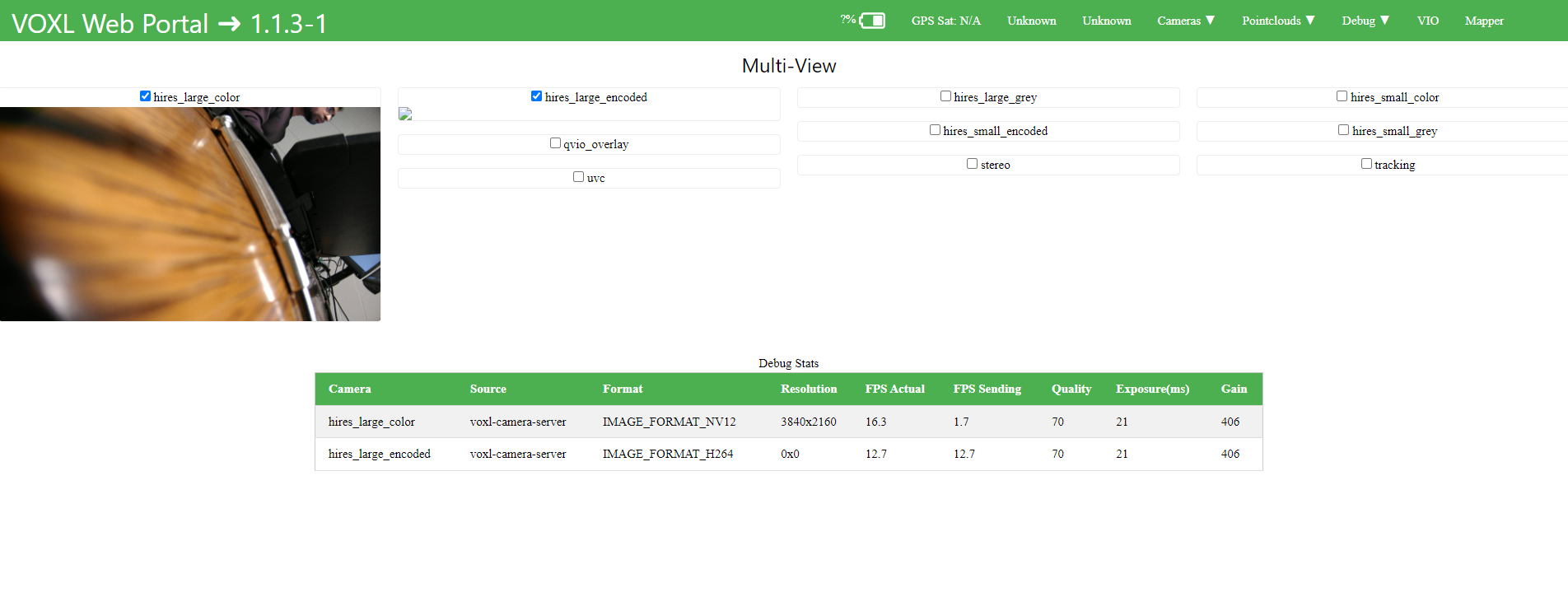
@Alex-Kushleyev Hi Alex, buffer when set to 11 works. I am able to see all my cameras. But now I am not seeing hires_large_encoded and hires_small_encoded stream on my voxl-portal.
-
@Alex-Kushleyev Hi Alex, buffer when set to 11 works. I am able to see all my cameras. But now I am not seeing hires_large_encoded and hires_small_encoded stream on my voxl-portal.
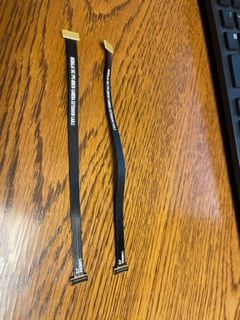
@Alex-Kushleyev I have one more question about the length of the cable for connecting Hires (imx412) 4k Camera. I tried using more than one extension and it does not work. Do you have any suggestion for longer wire or extension.
-
@Alex-Kushleyev I have one more question about the length of the cable for connecting Hires (imx412) 4k Camera. I tried using more than one extension and it does not work. Do you have any suggestion for longer wire or extension.
@riteshsharma , good progress.. i dont think voxl-portal is able to display h264 stream.
If you use “voxl-inspect-cam -a” , it should show stream stats. Also you can view the h264 stream using voxl-streamer, at least that is what we do on voxl2.
Regarding chaining the extension flex cables, our tests also showed that only one extension works for imx412 due to high data rate. Other cameras may be able to go longer. We dont have a longer solution for imx412
-
@riteshsharma , good progress.. i dont think voxl-portal is able to display h264 stream.
If you use “voxl-inspect-cam -a” , it should show stream stats. Also you can view the h264 stream using voxl-streamer, at least that is what we do on voxl2.
Regarding chaining the extension flex cables, our tests also showed that only one extension works for imx412 due to high data rate. Other cameras may be able to go longer. We dont have a longer solution for imx412
@Alex-Kushleyev Thanks Alex. You have been great help.


Reading along? Create a free ModalAI Forum account to join in.
With an account you can reply, ask your own question, get an email when a ModalAI engineer answers, and mark the reply that solved it. Your place in each thread is saved between visits.
Questions about VOXL, Flight Core, ESCs and ModalAI drones are answered here by the engineers who build them.
Register Login