
voxl-vision-px4 not showing up
-
I upgraded from voxl-suite 0.9.5 to 1.1.2 on the Seeker.
Then I suddenly cannot connect to QGroundControl.
I checked my services and did not see any px4 there.
Then I checked my version and noticed that px4 was no longer there.There is no location for me to enter the Seeker's IP in order to communicate with QGroundControl.
voxl:~$ voxl-version
--------------------------------------------------------------------------------
system-image: 4.0.0
kernel:       #1 SMP PREEMPT Thu Oct 13 17:57:05 UTC 2022 3.18.71-perf
--------------------------------------------------------------------------------
hw version:   VOXL
--------------------------------------------------------------------------------
voxl-suite:   1.1.2
--------------------------------------------------------------------------------
Packages:
Repo: http://voxl-packages.modalai.com/dists/apq8096/sdk-1.1/binary-arm64/
Last Updated: Never
List:
	apq8096-dfs-server          0.3.1
	apq8096-imu-server          1.1.0
	apq8096-libpng              1.6.38-1
	apq8096-rangefinder-server  0.1.3
	apq8096-system-tweaks       0.2.3
	apq8096-tflite              2.8.3-1
	libapq8096-io               0.6.0
	libmodal-cv                 0.4.0
	libmodal-exposure           0.1.0
	libmodal-journal            0.2.2
	libmodal-json               0.4.3
	libmodal-pipe               2.9.2
	libvoxl-cci-direct          0.2.1
	libvoxl-cutils              0.1.1
	voxl-camera-calibration     0.5.3
	voxl-camera-server          1.8.9
	voxl-configurator           0.4.8
	voxl-cpu-monitor            0.4.7
	voxl-docker-support         1.3.0
	voxl-gphoto2-server         0.0.10
	voxl-jpeg-turbo             2.1.3-5
	voxl-lepton-server          1.2.0
	voxl-libgphoto2             0.0.4
	voxl-libuvc                 1.0.7
	voxl-logger                 0.3.5
	voxl-mavcam-manager         0.5.3
	voxl-mavlink                0.1.1
	voxl-mavlink-server         1.3.2
	voxl-modem                  1.0.8
	voxl-mongoose               7.7.0-1
	voxl-mpa-to-ros             0.3.7
	voxl-mpa-tools              1.1.3
	voxl-opencv                 4.5.5-2
	voxl-portal                 0.6.3
	voxl-qvio-server            1.0.0
	voxl-remote-id              0.0.9
	voxl-streamer               0.7.4
	voxl-suite                  1.1.2
	voxl-system-image           4.0-r0
	voxl-tag-detector           0.0.4
	voxl-tflite-server          0.3.1
	voxl-utils                  1.3.3
	voxl-uvc-server             0.1.6
	voxl-vision-hub             1.7.3
	voxl-vpn                    0.0.6
--------------------------------------------------------------------------------
voxl:~$ voxl-inspect-services Scanning services... Service Name | Enabled | Running | CPU Usage ------------------------------------------------------------------- docker-autorun | Disabled | Not Running | docker-daemon | Disabled | Not Running | modallink-relink | Disabled | Not Running | voxl-camera-server | Enabled | Running | 12.7% voxl-cpu-monitor | Enabled | Running | 2.1% voxl-dfs-server | Enabled | Running | 2.1% voxl-imu-server | Enabled | Running | 0.0% voxl-lepton-server | Disabled | Not Running | voxl-mavcam-manager | Disabled | Not Running | voxl-mavlink-server | Enabled | Running | 2.1% voxl-modem | Disabled | Not Running | voxl-portal | Enabled | Running | 0.0% voxl-qvio-server | Enabled | Running | 6.3% voxl-rangefinder-server | Disabled | Not Running | voxl-remote-id | Disabled | Not Running | voxl-streamer | Disabled | Not Running | voxl-tag-detector | Disabled | Not Running | voxl-tflite-server | Disabled | Not Running | voxl-time-sync | Disabled | Not Running | voxl-uvc-server | Disabled | Not Running | voxl-vision-hub | Enabled | Running | 0.0% voxl-wait-for-fs | Enabled | Completed |I have downgraded to previous versions (voxl SDK 1.1.1 and SDK 1.1.0) but neither had px4 in them.
I am only able to get platform 0.9.5 to work (contains px4).Am I missing something or should I manually push px4 into the Seeker?
If so, what folder should I push it into?
Should it be the .ipk or the master px4 folder? -
I upgraded from voxl-suite 0.9.5 to 1.1.2 on the Seeker.
Then I suddenly cannot connect to QGroundControl.
I checked my services and did not see any px4 there.
Then I checked my version and noticed that px4 was no longer there.There is no location for me to enter the Seeker's IP in order to communicate with QGroundControl.
voxl:~$ voxl-version
--------------------------------------------------------------------------------
system-image: 4.0.0
kernel:       #1 SMP PREEMPT Thu Oct 13 17:57:05 UTC 2022 3.18.71-perf
--------------------------------------------------------------------------------
hw version:   VOXL
--------------------------------------------------------------------------------
voxl-suite:   1.1.2
--------------------------------------------------------------------------------
Packages:
Repo: http://voxl-packages.modalai.com/dists/apq8096/sdk-1.1/binary-arm64/
Last Updated: Never
List:
	apq8096-dfs-server          0.3.1
	apq8096-imu-server          1.1.0
	apq8096-libpng              1.6.38-1
	apq8096-rangefinder-server  0.1.3
	apq8096-system-tweaks       0.2.3
	apq8096-tflite              2.8.3-1
	libapq8096-io               0.6.0
	libmodal-cv                 0.4.0
	libmodal-exposure           0.1.0
	libmodal-journal            0.2.2
	libmodal-json               0.4.3
	libmodal-pipe               2.9.2
	libvoxl-cci-direct          0.2.1
	libvoxl-cutils              0.1.1
	voxl-camera-calibration     0.5.3
	voxl-camera-server          1.8.9
	voxl-configurator           0.4.8
	voxl-cpu-monitor            0.4.7
	voxl-docker-support         1.3.0
	voxl-gphoto2-server         0.0.10
	voxl-jpeg-turbo             2.1.3-5
	voxl-lepton-server          1.2.0
	voxl-libgphoto2             0.0.4
	voxl-libuvc                 1.0.7
	voxl-logger                 0.3.5
	voxl-mavcam-manager         0.5.3
	voxl-mavlink                0.1.1
	voxl-mavlink-server         1.3.2
	voxl-modem                  1.0.8
	voxl-mongoose               7.7.0-1
	voxl-mpa-to-ros             0.3.7
	voxl-mpa-tools              1.1.3
	voxl-opencv                 4.5.5-2
	voxl-portal                 0.6.3
	voxl-qvio-server            1.0.0
	voxl-remote-id              0.0.9
	voxl-streamer               0.7.4
	voxl-suite                  1.1.2
	voxl-system-image           4.0-r0
	voxl-tag-detector           0.0.4
	voxl-tflite-server          0.3.1
	voxl-utils                  1.3.3
	voxl-uvc-server             0.1.6
	voxl-vision-hub             1.7.3
	voxl-vpn                    0.0.6
--------------------------------------------------------------------------------
voxl:~$ voxl-inspect-services Scanning services... Service Name | Enabled | Running | CPU Usage ------------------------------------------------------------------- docker-autorun | Disabled | Not Running | docker-daemon | Disabled | Not Running | modallink-relink | Disabled | Not Running | voxl-camera-server | Enabled | Running | 12.7% voxl-cpu-monitor | Enabled | Running | 2.1% voxl-dfs-server | Enabled | Running | 2.1% voxl-imu-server | Enabled | Running | 0.0% voxl-lepton-server | Disabled | Not Running | voxl-mavcam-manager | Disabled | Not Running | voxl-mavlink-server | Enabled | Running | 2.1% voxl-modem | Disabled | Not Running | voxl-portal | Enabled | Running | 0.0% voxl-qvio-server | Enabled | Running | 6.3% voxl-rangefinder-server | Disabled | Not Running | voxl-remote-id | Disabled | Not Running | voxl-streamer | Disabled | Not Running | voxl-tag-detector | Disabled | Not Running | voxl-tflite-server | Disabled | Not Running | voxl-time-sync | Disabled | Not Running | voxl-uvc-server | Disabled | Not Running | voxl-vision-hub | Enabled | Running | 0.0% voxl-wait-for-fs | Enabled | Completed |I have downgraded to previous versions (voxl SDK 1.1.1 and SDK 1.1.0) but neither had px4 in them.
I am only able to get platform 0.9.5 to work (contains px4).Am I missing something or should I manually push px4 into the Seeker?
If so, what folder should I push it into?
Should it be the .ipk or the master px4 folder?voxl:~$ cat /etc/opkg/opkg.conf ################################################################ ## This file has been automatically generated. ## Please use voxl-configure-opkg to modify it. ################################################################ dest root / option lists_dir /var/lib/opkg/lists arch all 1 arch arm64 7 src/gz modalai http://voxl-packages.modalai.com/dists/apq8096/sdk-1.1/binary-arm64/ voxl:~$ opkg info voxl-vision-px4 voxl:~$ opkg info voxl-qvio-server Package: voxl-qvio-server Version: 1.0.0 Depends: libmodal-pipe (>= 2.7.2), libmodal-json (>= 0.4.0), voxl-mpa-tools (>= 0.7.0) Status: install ok installed Architecture: arm64 Installed-Time: 1709167790 -
voxl:~$ cat /etc/opkg/opkg.conf ################################################################ ## This file has been automatically generated. ## Please use voxl-configure-opkg to modify it. ################################################################ dest root / option lists_dir /var/lib/opkg/lists arch all 1 arch arm64 7 src/gz modalai http://voxl-packages.modalai.com/dists/apq8096/sdk-1.1/binary-arm64/ voxl:~$ opkg info voxl-vision-px4 voxl:~$ opkg info voxl-qvio-server Package: voxl-qvio-server Version: 1.0.0 Depends: libmodal-pipe (>= 2.7.2), libmodal-json (>= 0.4.0), voxl-mpa-tools (>= 0.7.0) Status: install ok installed Architecture: arm64 Installed-Time: 1709167790I was able to connect to QGroundControl on SDK 1.1.2 using these application settings on QGroundControl v4.2.4
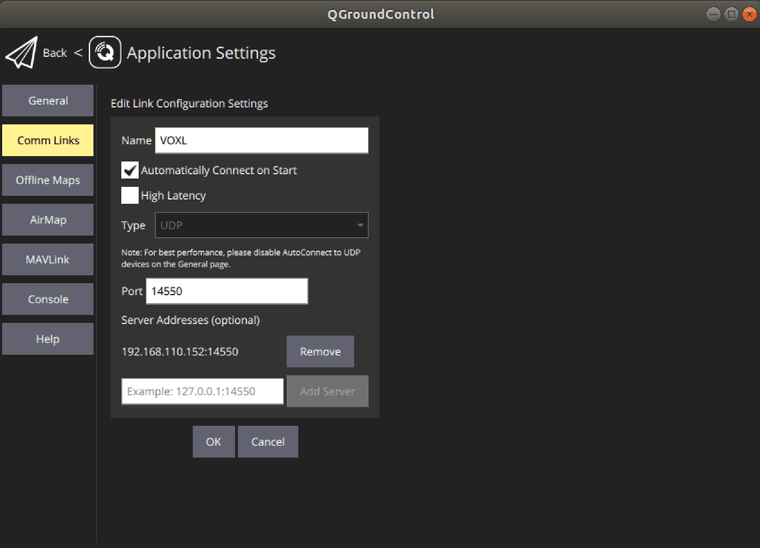
However I did not feel like px4 was communicating with QGroundControl.
In voxl-vision-hub.conf
I enabled VIO and VOA.
I was able to fly the Seeker in Position mode, but VOA was not working.I was not able to connect voxl mpa to ros using the command
despite having the correct IP for my Seeker and Host PC setup in the my_ros_env.sh
I was getting this error message;
voxl:~$ roslaunch voxl_mpa_to_ros voxl_mpa_to_ros.launch
... logging to /home/root/.ros/log/7ec53908-d6c2-11ee-b3ea-18473db1c389/roslaunch-apq8096-3584.log
Checking log directory for disk usage. This may take awhile.
Press Ctrl-C to interrupt
Done checking log file disk usage. Usage is <1GB.

Unable to contact my own server at [http://192.168.8.1:56009/].
This usually means that the network is not configured properly.

A common cause is that the machine cannot ping itself.  Please check
for errors by running:

	ping 192.168.8.1

For more tips, please see

	http://www.ros.org/wiki/ROS/NetworkSetup

The traceback for the exception was written to the log file
I am not sure why ROS is trying to connect to 192.168.8.1 when I have my
export ROS_MASTER_IP=192.168.105.180 (Seeker IP)
and my
export ROS_IP=192.168.105.189 (Host PC IP)How am I supposed to tell the Seeker what my host pc IP is if there is no option to do so in voxl-vision-hub.conf and there is no px4/voxl-vision-px4.conf
-
I was able to connect to QGroundControl on SDK 1.1.2 using these application settings on QGroundControl v4.2.4
However I did not feel like px4 was communicating with QGroundControl.
In voxl-vision-hub.conf
I enabled VIO and VOA.
I was able to fly the Seeker in Position mode, but VOA was not working.I was not able to connect voxl mpa to ros using the command
despite having the correct IP for my Seeker and Host PC setup in the my_ros_env.sh
I was getting this error message;
voxl:~$ roslaunch voxl_mpa_to_ros voxl_mpa_to_ros.launch
... logging to /home/root/.ros/log/7ec53908-d6c2-11ee-b3ea-18473db1c389/roslaunch-apq8096-3584.log
Checking log directory for disk usage. This may take awhile.
Press Ctrl-C to interrupt
Done checking log file disk usage. Usage is <1GB.

Unable to contact my own server at [http://192.168.8.1:56009/].
This usually means that the network is not configured properly.

A common cause is that the machine cannot ping itself.  Please check
for errors by running:

	ping 192.168.8.1

For more tips, please see

	http://www.ros.org/wiki/ROS/NetworkSetup

The traceback for the exception was written to the log file
I am not sure why ROS is trying to connect to 192.168.8.1 when I have my
export ROS_MASTER_IP=192.168.105.180 (Seeker IP)
and my
export ROS_IP=192.168.105.189 (Host PC IP)How am I supposed to tell the Seeker what my host pc IP is if there is no option to do so in voxl-vision-hub.conf and there is no px4/voxl-vision-px4.conf
@Kris Please refer to this document that describes mavlink routing in VOXL SDK https://docs.modalai.com/mavlink/
-
I was able to connect to QGroundControl on SDK 1.1.2 using these application settings on QGroundControl v4.2.4
However I did not feel like px4 was communicating with QGroundControl.
In voxl-vision-hub.conf
I enabled VIO and VOA.
I was able to fly the Seeker in Position mode, but VOA was not working.I was not able to connect voxl mpa to ros using the command
despite having the correct IP for my Seeker and Host PC setup in the my_ros_env.sh
I was getting this error message;
voxl:~$ roslaunch voxl_mpa_to_ros voxl_mpa_to_ros.launch
... logging to /home/root/.ros/log/7ec53908-d6c2-11ee-b3ea-18473db1c389/roslaunch-apq8096-3584.log
Checking log directory for disk usage. This may take awhile.
Press Ctrl-C to interrupt
Done checking log file disk usage. Usage is <1GB.

Unable to contact my own server at [http://192.168.8.1:56009/].
This usually means that the network is not configured properly.

A common cause is that the machine cannot ping itself.  Please check
for errors by running:

	ping 192.168.8.1

For more tips, please see

	http://www.ros.org/wiki/ROS/NetworkSetup

The traceback for the exception was written to the log file
I am not sure why ROS is trying to connect to 192.168.8.1 when I have my
export ROS_MASTER_IP=192.168.105.180 (Seeker IP)
and my
export ROS_IP=192.168.105.189 (Host PC IP)How am I supposed to tell the Seeker what my host pc IP is if there is no option to do so in voxl-vision-hub.conf and there is no px4/voxl-vision-px4.conf
-
@tom
Thank you for your response
It was a great answer.So, whenever I inspect the services on the Seeker with SDK 1.1.2, is it normal not to see voxl-px4 and voxl-px4-imu-server services?
Should'nt px4 services automatically download if I install the 1.1.2 SDK? -
@tom
Thank you for your response
It was a great answer.So, whenever I inspect the services on the Seeker with SDK 1.1.2, is it normal not to see voxl-px4 and voxl-px4-imu-server services?
Should'nt px4 services automatically download if I install the 1.1.2 SDK?@Kris On seeker PX4 runs on flight core, a separate board, not on voxl. So no, you shouldn't see voxl-px4 running on voxl. And voxl-px4-imu-server is a service specific to RB5 platforms so it isn't applicable to seeker.




Reading along? Create a free ModalAI Forum account to join in.
With an account you can reply, ask your own question, get an email when a ModalAI engineer answers, and mark the reply that solved it. Your place in each thread is saved between visits.
Questions about VOXL, Flight Core, ESCs and ModalAI drones are answered here by the engineers who build them.
Register Login