
voxl-dfs-server Crashes
-
Hello everyone,
I have sentinel drone and upgraded to SDK 1.0 while following the documentation. The board and services details are as follow.
voxl2:/$ voxl-inspect-sku

family code:   MRB-D0006 (sentinel)
compute board: 4 (voxl2)
hw version:    1
cam config:    11
SKU:           MRB-D0006-4-V1-C11

voxl2:/$ voxl-version
--------------------------------------------------------------------------------
system-image: 1.6.2-M0054-14.1a-perf
kernel:       #1 SMP PREEMPT Fri May 19 22:19:33 UTC 2023 4.19.125
--------------------------------------------------------------------------------
hw version:   M0054
--------------------------------------------------------------------------------
voxl-suite:   1.0.0
--------------------------------------------------------------------------------
Packages:
Repo:  http://voxl-packages.modalai.com/ ./dists/qrb5165/sdk-1.0/binary-arm64/
Last Updated: 2023-03-02 12:58:27
WARNING: repo file has changed since last update,
	packages may have originated from a different repo
List:
	libmodal-cv              0.3.2
	libmodal-exposure        0.0.8
	libmodal-journal         0.2.2
	libmodal-json            0.4.3
	libmodal-pipe            2.8.5
	libqrb5165-io            0.2.0
	libvoxl-cci-direct       0.1.5
	libvoxl-cutils           0.1.1
	mv-voxl                  0.1-r0
	qrb5165-bind             0.1-r0
	qrb5165-dfs-server       0.1.0
	qrb5165-imu-server       0.6.0
	qrb5165-slpi-test-sig    01-r0
	qrb5165-system-tweaks    0.2.2
	qrb5165-tflite           2.8.0-2
	voxl-bind-spektrum       0.1.0
	voxl-camera-calibration  0.4.0
	voxl-camera-server       1.6.2
	voxl-configurator        0.2.7
	voxl-cpu-monitor         0.4.6
	voxl-docker-support      1.2.5
	voxl-eigen3              3.4.0
	voxl-elrs                0.0.7
	voxl-esc                 1.2.2
	voxl-feature-tracker     0.2.3
	voxl-flow-server         0.3.3
	voxl-gphoto2-server      0.0.10
	voxl-jpeg-turbo          2.1.3
	voxl-lepton-server       1.1.2
	voxl-libgphoto2          0.0.4
	voxl-libuvc              1.0.7
	voxl-logger              0.3.4
	voxl-mavcam-manager      0.5.1
	voxl-mavlink             0.1.1
	voxl-mavlink-server      1.2.0
	voxl-modem               1.0.5
	voxl-mongoose            7.7.0-1
	voxl-mpa-to-ros          0.3.6
	voxl-mpa-tools           1.0.4
	voxl-opencv              4.5.5-1
	voxl-portal              0.5.9
	voxl-px4                 1.14.0-2.0.34
	voxl-px4-imu-server      0.1.2
	voxl-px4-params          0.1.8
	voxl-qvio-server         0.9.3
	voxl-remote-id           0.0.8
	voxl-slpi-uart-bridge    1.0.1
	voxl-streamer            0.7.1
	voxl-suite               1.0.0
	voxl-tag-detector        0.0.4
	voxl-tflite-server       0.3.1
	voxl-utils               1.3.1
	voxl-uvc-server          0.1.6
	voxl-vision-hub          1.6.6
	voxl2-system-image       1.6.2-r0
	voxl2-wlan               1.0-r0
--------------------------------------------------------------------------------
voxl2:/$ voxl-inspect-services -v
Scanning services...

 Service Name          |  Version  |  Enabled  |   Running   |  CPU Usage
----------------------------------------------------------------------------
 docker-autorun        |    1.2.5  | Disabled  | Not Running |
 docker-daemon         |    1.2.5  | Disabled  | Not Running |
 modallink-relink      |    1.0.5  | Disabled  | Not Running |
 voxl-camera-server    |    1.6.2  |  Enabled  |   Running   |    81.7%
 voxl-cpu-monitor      |    0.4.6  |  Enabled  |   Running   |     0.6%
 voxl-dfs-server       |    0.1.0  |  Enabled  | Not Running |
 voxl-feature-tracker  |    0.2.3  | Disabled  | Not Running |
 voxl-flow-server      |    0.3.3  | Disabled  | Not Running |
 voxl-imu-server       |    0.6.0  |  Enabled  |   Running   |     5.9%
 voxl-lepton-server    |    1.1.2  | Disabled  | Not Running |
 voxl-mavcam-manager   |    0.5.1  |  Enabled  |   Running   |     0.0%
 voxl-mavlink-server   |    1.2.0  |  Enabled  |   Running   |     3.9%
 voxl-modem            |    1.0.5  | Disabled  | Not Running |
 voxl-portal           |    0.5.9  |  Enabled  |   Running   |     0.4%
 voxl-px4-imu-server   |    0.1.2  | Disabled  | Not Running |
 voxl-px4              |   1.14.0  |  Enabled  |   Running   |    40.8%
 voxl-qvio-server      |    0.9.3  |  Enabled  |   Running   |    36.7%
 voxl-remote-id        |    0.0.8  | Disabled  | Not Running |
 voxl-softap           |    0.2.2  | Disabled  | Not Running |
 voxl-static-ip        |    0.2.2  | Disabled  | Not Running |
 voxl-streamer         |    0.7.1  |  Enabled  |   Running   |     0.0%
 voxl-tag-detector     |    0.0.4  | Disabled  | Not Running |
 voxl-tflite-server    |    0.3.1  | Disabled  | Not Running |
 voxl-time-sync        |    1.3.1  | Disabled  | Not Running |
 voxl-uvc-server       |    0.1.6  | Disabled  | Not Running |
 voxl-vision-hub       |    1.6.6  |  Enabled  |   Running   |     2.1%
 voxl-wait-for-fs      |    1.3.1  |  Enabled  |  Completed  |
The problem is with running voxl-dfs-server command, the program exit after running less than a few second with the following error
voxl2:/$ voxl-dfs-server --debug
Enabling debug mode
=================================================================
min_disparity:   4
max_disparity:   64
min_threshold:   10
cost_threshold:  10
width:           640
height:          480
pc_skip_n_lines: 4
dfs pair #0
    enable:             1
    input_pipe:         stereo_front
    skip_n_frames:      1
    blur_size:          0
    post_median_size:   0
    intrinsics_file:    /data/modalai/opencv_stereo_front_intrinsics.yml
    extrinsics_file:    /data/modalai/opencv_stereo_front_extrinsics.yml
dfs pair #1
    enable:             1
    input_pipe:         stereo_rear
    skip_n_frames:      1
    blur_size:          0
    post_median_size:   0
    intrinsics_file:    /data/modalai/opencv_stereo_rear_intrinsics.yml
    extrinsics_file:    /data/modalai/opencv_stereo_rear_extrinsics.yml
=================================================================
loading calibration files
for Pair #0, loaded these lens params:
f:  497.433807
cx: 299.806549
cy: 251.570435
baseline_m: 0.080547
for Pair #1, loaded these lens params:
f:  501.798187
cx: 280.967346
cy: 222.201584
baseline_m: 0.080042
initializing dfs module
connected to pipe stereo_front
connected to pipe stereo_rear
ch1 starting processing
ch0 starting processing
ch1 starting processing
ch0 starting processing
ch1 starting processing
ch0 starting processing
client voxl-vision-hub0 connected to ch 5
client voxl-vision-hub0 connected to ch 2
*** stack smashing detected ***: <unknown> terminated
Aborted
Each time I run voxl-dfs-server disparity image on the portal update for a split second and freezes as the service crashes.
I tried to installing qrb5165-dfs-server from the source code with qrb5165 and with different versions dev, stag, sdk1.0, sdk0.9 but this time i got this error. With fresh install disparity image in portal doesn't update at all.
voxl2:/$ voxl-dfs-server  --debug
voxl-dfs-server: symbol lookup error: voxl-dfs-server: undefined symbol: mcv_create_stereo_undistort_grid
I already did fresh SDK install again but the problem still continues.
Looking forward to your help. Thank you.
Emre -
Hello everyone,
I have sentinel drone and upgraded to SDK 1.0 while following the documentation. The board and services details are as follow.
voxl2:/$ voxl-inspect-sku

family code:   MRB-D0006 (sentinel)
compute board: 4 (voxl2)
hw version:    1
cam config:    11
SKU:           MRB-D0006-4-V1-C11

voxl2:/$ voxl-version
--------------------------------------------------------------------------------
system-image: 1.6.2-M0054-14.1a-perf
kernel:       #1 SMP PREEMPT Fri May 19 22:19:33 UTC 2023 4.19.125
--------------------------------------------------------------------------------
hw version:   M0054
--------------------------------------------------------------------------------
voxl-suite:   1.0.0
--------------------------------------------------------------------------------
Packages:
Repo:  http://voxl-packages.modalai.com/ ./dists/qrb5165/sdk-1.0/binary-arm64/
Last Updated: 2023-03-02 12:58:27
WARNING: repo file has changed since last update,
	packages may have originated from a different repo
List:
	libmodal-cv              0.3.2
	libmodal-exposure        0.0.8
	libmodal-journal         0.2.2
	libmodal-json            0.4.3
	libmodal-pipe            2.8.5
	libqrb5165-io            0.2.0
	libvoxl-cci-direct       0.1.5
	libvoxl-cutils           0.1.1
	mv-voxl                  0.1-r0
	qrb5165-bind             0.1-r0
	qrb5165-dfs-server       0.1.0
	qrb5165-imu-server       0.6.0
	qrb5165-slpi-test-sig    01-r0
	qrb5165-system-tweaks    0.2.2
	qrb5165-tflite           2.8.0-2
	voxl-bind-spektrum       0.1.0
	voxl-camera-calibration  0.4.0
	voxl-camera-server       1.6.2
	voxl-configurator        0.2.7
	voxl-cpu-monitor         0.4.6
	voxl-docker-support      1.2.5
	voxl-eigen3              3.4.0
	voxl-elrs                0.0.7
	voxl-esc                 1.2.2
	voxl-feature-tracker     0.2.3
	voxl-flow-server         0.3.3
	voxl-gphoto2-server      0.0.10
	voxl-jpeg-turbo          2.1.3
	voxl-lepton-server       1.1.2
	voxl-libgphoto2          0.0.4
	voxl-libuvc              1.0.7
	voxl-logger              0.3.4
	voxl-mavcam-manager      0.5.1
	voxl-mavlink             0.1.1
	voxl-mavlink-server      1.2.0
	voxl-modem               1.0.5
	voxl-mongoose            7.7.0-1
	voxl-mpa-to-ros          0.3.6
	voxl-mpa-tools           1.0.4
	voxl-opencv              4.5.5-1
	voxl-portal              0.5.9
	voxl-px4                 1.14.0-2.0.34
	voxl-px4-imu-server      0.1.2
	voxl-px4-params          0.1.8
	voxl-qvio-server         0.9.3
	voxl-remote-id           0.0.8
	voxl-slpi-uart-bridge    1.0.1
	voxl-streamer            0.7.1
	voxl-suite               1.0.0
	voxl-tag-detector        0.0.4
	voxl-tflite-server       0.3.1
	voxl-utils               1.3.1
	voxl-uvc-server          0.1.6
	voxl-vision-hub          1.6.6
	voxl2-system-image       1.6.2-r0
	voxl2-wlan               1.0-r0
--------------------------------------------------------------------------------
voxl2:/$ voxl-inspect-services -v
Scanning services...

 Service Name          |  Version  |  Enabled  |   Running   |  CPU Usage
----------------------------------------------------------------------------
 docker-autorun        |    1.2.5  | Disabled  | Not Running |
 docker-daemon         |    1.2.5  | Disabled  | Not Running |
 modallink-relink      |    1.0.5  | Disabled  | Not Running |
 voxl-camera-server    |    1.6.2  |  Enabled  |   Running   |    81.7%
 voxl-cpu-monitor      |    0.4.6  |  Enabled  |   Running   |     0.6%
 voxl-dfs-server       |    0.1.0  |  Enabled  | Not Running |
 voxl-feature-tracker  |    0.2.3  | Disabled  | Not Running |
 voxl-flow-server      |    0.3.3  | Disabled  | Not Running |
 voxl-imu-server       |    0.6.0  |  Enabled  |   Running   |     5.9%
 voxl-lepton-server    |    1.1.2  | Disabled  | Not Running |
 voxl-mavcam-manager   |    0.5.1  |  Enabled  |   Running   |     0.0%
 voxl-mavlink-server   |    1.2.0  |  Enabled  |   Running   |     3.9%
 voxl-modem            |    1.0.5  | Disabled  | Not Running |
 voxl-portal           |    0.5.9  |  Enabled  |   Running   |     0.4%
 voxl-px4-imu-server   |    0.1.2  | Disabled  | Not Running |
 voxl-px4              |   1.14.0  |  Enabled  |   Running   |    40.8%
 voxl-qvio-server      |    0.9.3  |  Enabled  |   Running   |    36.7%
 voxl-remote-id        |    0.0.8  | Disabled  | Not Running |
 voxl-softap           |    0.2.2  | Disabled  | Not Running |
 voxl-static-ip        |    0.2.2  | Disabled  | Not Running |
 voxl-streamer         |    0.7.1  |  Enabled  |   Running   |     0.0%
 voxl-tag-detector     |    0.0.4  | Disabled  | Not Running |
 voxl-tflite-server    |    0.3.1  | Disabled  | Not Running |
 voxl-time-sync        |    1.3.1  | Disabled  | Not Running |
 voxl-uvc-server       |    0.1.6  | Disabled  | Not Running |
 voxl-vision-hub       |    1.6.6  |  Enabled  |   Running   |     2.1%
 voxl-wait-for-fs      |    1.3.1  |  Enabled  |  Completed  |
The problem is with running voxl-dfs-server command, the program exit after running less than a few second with the following error
voxl2:/$ voxl-dfs-server --debug
Enabling debug mode
=================================================================
min_disparity:   4
max_disparity:   64
min_threshold:   10
cost_threshold:  10
width:           640
height:          480
pc_skip_n_lines: 4
dfs pair #0
    enable:             1
    input_pipe:         stereo_front
    skip_n_frames:      1
    blur_size:          0
    post_median_size:   0
    intrinsics_file:    /data/modalai/opencv_stereo_front_intrinsics.yml
    extrinsics_file:    /data/modalai/opencv_stereo_front_extrinsics.yml
dfs pair #1
    enable:             1
    input_pipe:         stereo_rear
    skip_n_frames:      1
    blur_size:          0
    post_median_size:   0
    intrinsics_file:    /data/modalai/opencv_stereo_rear_intrinsics.yml
    extrinsics_file:    /data/modalai/opencv_stereo_rear_extrinsics.yml
=================================================================
loading calibration files
for Pair #0, loaded these lens params:
f:  497.433807
cx: 299.806549
cy: 251.570435
baseline_m: 0.080547
for Pair #1, loaded these lens params:
f:  501.798187
cx: 280.967346
cy: 222.201584
baseline_m: 0.080042
initializing dfs module
connected to pipe stereo_front
connected to pipe stereo_rear
ch1 starting processing
ch0 starting processing
ch1 starting processing
ch0 starting processing
ch1 starting processing
ch0 starting processing
client voxl-vision-hub0 connected to ch 5
client voxl-vision-hub0 connected to ch 2
*** stack smashing detected ***: <unknown> terminated
Aborted
Each time I run voxl-dfs-server disparity image on the portal update for a split second and freezes as the service crashes.
I tried to installing qrb5165-dfs-server from the source code with qrb5165 and with different versions dev, stag, sdk1.0, sdk0.9 but this time i got this error. With fresh install disparity image in portal doesn't update at all.
voxl2:/$ voxl-dfs-server  --debug
voxl-dfs-server: symbol lookup error: voxl-dfs-server: undefined symbol: mcv_create_stereo_undistort_grid
I already did fresh SDK install again but the problem still continues.
Looking forward to your help. Thank you.
EmreHow did you upgrade the SDK? Did you upgrade the full platform image? These symptoms look like a software mismatch.
Please follow the instructions for installing a Full VOXL-SDK Release: https://docs.modalai.com/flash-system-image/#flashing-a-voxl-sdk-release
-
How did you upgrade the SDK? Did you upgrade the full platform image? These symptoms look like a software mismatch.
Please follow the instructions for installing a Full VOXL-SDK Release: https://docs.modalai.com/flash-system-image/#flashing-a-voxl-sdk-release
@Moderator Yes I installed full VOXL-SDK as outlined in the documentation with the following command. Set sku, camera configuration to leave as.
tar -xzvf voxl2_SDK_1.0.0.tar.gz
cd voxl2_SDK_1.0.0
./install.sh
In my latest install, I set voxl-configure-sku configuration as "3) sentinel" and as "11 tracking(ov7251) + Hires(imx214) + Dual Stereo" but I still got the "*** stack smashing detected ***: <unknown> terminated" error.
I'll revert back to VOXL2 Platform 0.9.5 to see if this changes anything.
-
@Moderator Yes I installed full VOXL-SDK as outlined in the documentation with the following command. Set sku, camera configuration to leave as.
tar -xzvf voxl2_SDK_1.0.0.tar.gz
cd voxl2_SDK_1.0.0
./install.sh
In my latest install, I set voxl-configure-sku configuration as "3) sentinel" and as "11 tracking(ov7251) + Hires(imx214) + Dual Stereo" but I still got the "*** stack smashing detected ***: <unknown> terminated" error.
I'll revert back to VOXL2 Platform 0.9.5 to see if this changes anything.
@esaldiran can you take a picture or draw a diagram of your setup? Have you changed any cabling? It has to be a specific way
-
@esaldiran can you take a picture or draw a diagram of your setup? Have you changed any cabling? It has to be a specific way
Hi @Chad-Sweet,
I am using Sentinel Drone with default configuration and did not change anything at all. I encountered this problem while following the documentation.
I reverted back to VOXL2 Platform 0.9.5 without any configuration change and I can start voxl-dfs-server without any crash and I can see the results on portal.
Please let me know if you need any more info.
-
Hi @Chad-Sweet,
I am using Sentinel Drone with default configuration and did not change anything at all. I encountered this problem while following the documentation.
I reverted back to VOXL2 Platform 0.9.5 without any configuration change and I can start voxl-dfs-server without any crash and I can see the results on portal.
Please let me know if you need any more info.
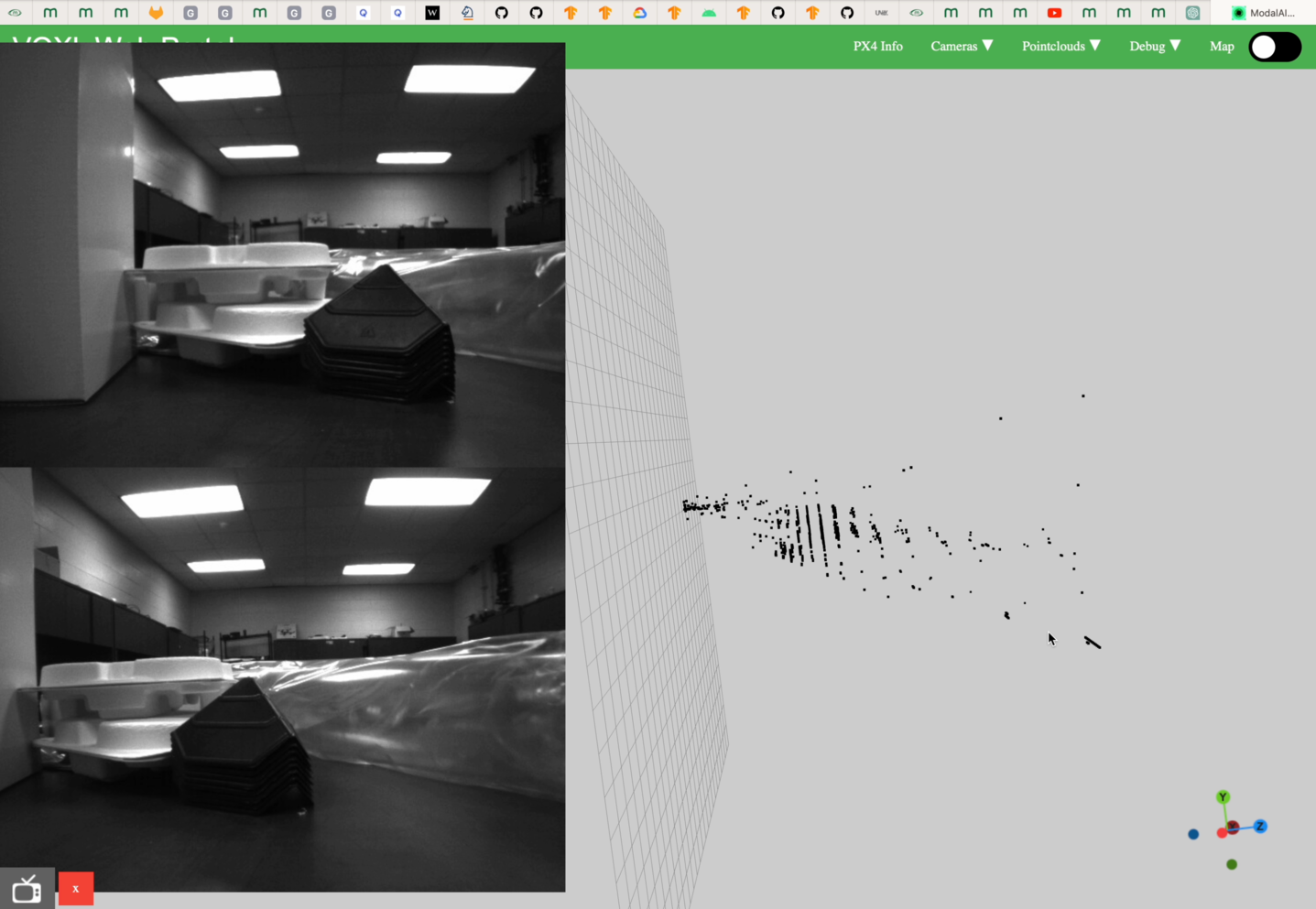
@esaldiran @Chad-Sweet @Moderator The same issue was occurring for me, I am now running the dfs server on SDK 0.9.5 perfectly.


Reading along? Create a free ModalAI Forum account to join in.
With an account you can reply, ask your own question, get an email when a ModalAI engineer answers, and mark the reply that solved it. Your place in each thread is saved between visits.
Questions about VOXL, Flight Core, ESCs and ModalAI drones are answered here by the engineers who build them.
Register Login