
Issue Getting uart Connection on VOXL2 to PixHawk4 on 5G Hat
-
Good afternoon,
I have been trying to get a serial connection from the J9 socket of a 5G hat to a PixHawk 4. However, there does not seem to be any data going through ttyHS2.
I triple checked to make sure my physical connection is correct and the wires are in the correct area. They look correct to me.
I have the JST from the J9 socket connected to TELEM2 of the PixHawk 4. The baudrate is set to 921600.
The way I am testing this is by using mavlink-router. I run this command:
mavlink-routerd /dev/ttyHS2:921600 -e {my ip}:14550 -vIt has worked before when connecting to the usb port on the hat via an FTDI cable, but we're trying to get it working with the serial port.
I also decided to follow this to see if I could get anything from sending stuff to the port. I saw nothing. But I could be completely wrong that this is a valid way of testing the connection:
(In one terminal):
cat -v < /dev/ttyHS2(In another terminal):
echo -ne '\033[2J' > /dev/ttyHS2I did not see anything on the first terminal.
Also, I tried using voxl-mavlink-server to test this. I am on a beta platform (system-image: 1.5.5-M0054-14.1a-perf), so options are a little bit different than what I'm used to.
I had this set as my configuration file:
{
        "primary_static_gcs_ip":        "192.168.8.10",
        "secondary_static_gcs_ip":      "192.168.8.11",
        "onboard_port_to_autopilot":    14556,
        "onboard_port_from_autopilot":  14557,
        "gcs_port_to_autopilot":        14558,
        "gcs_port_from_autopilot":      14559,
        "en_external_uart_ap":  false,
        "autopilot_uart_bus":   2,
        "autopilot_uart_baudrate":      921600,
        "en_external_ap_timesync":      1,
        "en_external_ap_heartbeat":     1,
        "udp_mtu":      0,
        "gcs_timeout_s":        4.5
}
I believe "autipilot_uart_bus" was what I had to set to 2 to get it to go through ttyHS2. I could not see any data passing through though.
I am curious what the problem could be. Any help would be much appreciated.
-
Good afternoon,
I have been trying to get a serial connection from the J9 socket of a 5G hat to a PixHawk 4. However, there does not seem to be any data going through ttyHS2.
I triple checked to make sure my physical connection is correct and the wires are in the correct area. They look correct to me.
I have the JST from the J9 socket connected to TELEM2 of the PixHawk 4. The baudrate is set to 921600.
The way I am testing this is by using mavlink-router. I run this command:
mavlink-routerd /dev/ttyHS2:921600 -e {my ip}:14550 -vIt has worked before when connecting to the usb port on the hat via an FTDI cable, but we're trying to get it working with the serial port.
I also decided to follow this to see if I could get anything from sending stuff to the port. I saw nothing. But I could be completely wrong that this is a valid way of testing the connection:
(In one terminal):
cat -v < /dev/ttyHS2(In another terminal):
echo -ne '\033[2J' > /dev/ttyHS2I did not see anything on the first terminal.
Also, I tried using voxl-mavlink-server to test this. I am on a beta platform (system-image: 1.5.5-M0054-14.1a-perf), so options are a little bit different than what I'm used to.
I had this set as my configuration file:
{
        "primary_static_gcs_ip":        "192.168.8.10",
        "secondary_static_gcs_ip":      "192.168.8.11",
        "onboard_port_to_autopilot":    14556,
        "onboard_port_from_autopilot":  14557,
        "gcs_port_to_autopilot":        14558,
        "gcs_port_from_autopilot":      14559,
        "en_external_uart_ap":  false,
        "autopilot_uart_bus":   2,
        "autopilot_uart_baudrate":      921600,
        "en_external_ap_timesync":      1,
        "en_external_ap_heartbeat":     1,
        "udp_mtu":      0,
        "gcs_timeout_s":        4.5
}
I believe "autipilot_uart_bus" was what I had to set to 2 to get it to go through ttyHS2. I could not see any data passing through though.
I am curious what the problem could be. Any help would be much appreciated.
For context, the UART/USB addon board is working (https://docs.modalai.com/voxl2-usb3-uart-add-on-user-guide/)
and we are using cables provided by ModalAI. So, it appears that it is just the 5G modem carrier board that is not letting this through -
For context, the UART/USB addon board is working (https://docs.modalai.com/voxl2-usb3-uart-add-on-user-guide/)
and we are using cables provided by ModalAI. So, it appears that it is just the 5G modem carrier board that is not letting this through -
for context as well, here are the serial devices by-id page. All of them are from Quectel.

Dont think that matters, but just trying to add context.
Also, the 5G carrier board is operational. We see the wwan0 interface
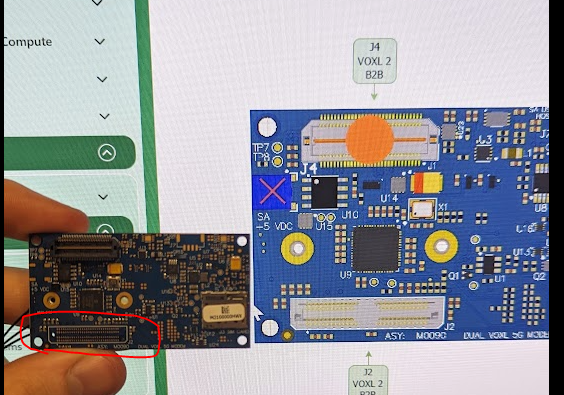
I think this might be the issue
-
I think this might be the issue
@wilkinsaf That must be the VOXL1 flavor
-
@wilkinsaf That must be the VOXL1 flavor
This post is deleted! -
@wilkinsaf That must be the VOXL1 flavor
-
@tom Damn.... welp... that would explain what's going on.
Back to the ModalAI store. Thanks for confirmation Tom



Reading along? Create a free ModalAI Forum account to join in.
With an account you can reply, ask your own question, get an email when a ModalAI engineer answers, and mark the reply that solved it. Your place in each thread is saved between visits.
Questions about VOXL, Flight Core, ESCs and ModalAI drones are answered here by the engineers who build them.
Register Login