Skip to content
  • Categories
  • Recent
  • Tags
  • Popular
  • Users
  • Groups
Collapse
Brand Logo

ModalAI Forum

  1. ModalAI Support Forum
  2. Ask your questions right here!
  3. uvc_get_stream_ctrl_format_size failed

uvc_get_stream_ctrl_format_size failed

Scheduled Pinned Locked Moved Ask your questions right here!
39 Posts 3 Posters 14.8k Views 3 Watching
  • Oldest to Newest
  • Newest to Oldest
  • Most Votes
Reply
  • Reply as topic
Log in to reply
This topic has been deleted. Only users with topic management privileges can see it.
  • tomT Offline
    tomT Offline
    tom
    admin
    wrote on last edited by
    #8

    @Kris Are you sure that your UVC camera is 640x480 resolution?

    KrisK 2 Replies Last reply
    0
    • tomT tom

      @Kris Are you sure that your UVC camera is 640x480 resolution?

      KrisK Offline
      KrisK Offline
      Kris
      Regular
      wrote on last edited by
      #9

      @tom
      Yes, in the debug messages, it says that it is 640x480.
      Is there another way to check the resolution?

      1 Reply Last reply
      0
      • tomT Offline
        tomT Offline
        tom
        admin
        wrote on last edited by
        #10

        @Kris Yeah that's just the default that voxl-uvc-server uses if not explicitly specified otherwise with the -r flag.

        You can use show-video-device-info.sh and that may provide some clues.

        What is the part number or make and model of the UVC camera you're using? It's possible it's supported image formats don't match up with those supported by voxl-uvc-server

        KrisK 4 Replies Last reply
        0
        • tomT tom

          @Kris Yeah that's just the default that voxl-uvc-server uses if not explicitly specified otherwise with the -r flag.

          You can use show-video-device-info.sh and that may provide some clues.

          What is the part number or make and model of the UVC camera you're using? It's possible it's supported image formats don't match up with those supported by voxl-uvc-server

          KrisK Offline
          KrisK Offline
          Kris
          Regular
          wrote on last edited by
          #11

          @tom Ok, Thank you I will try that now.
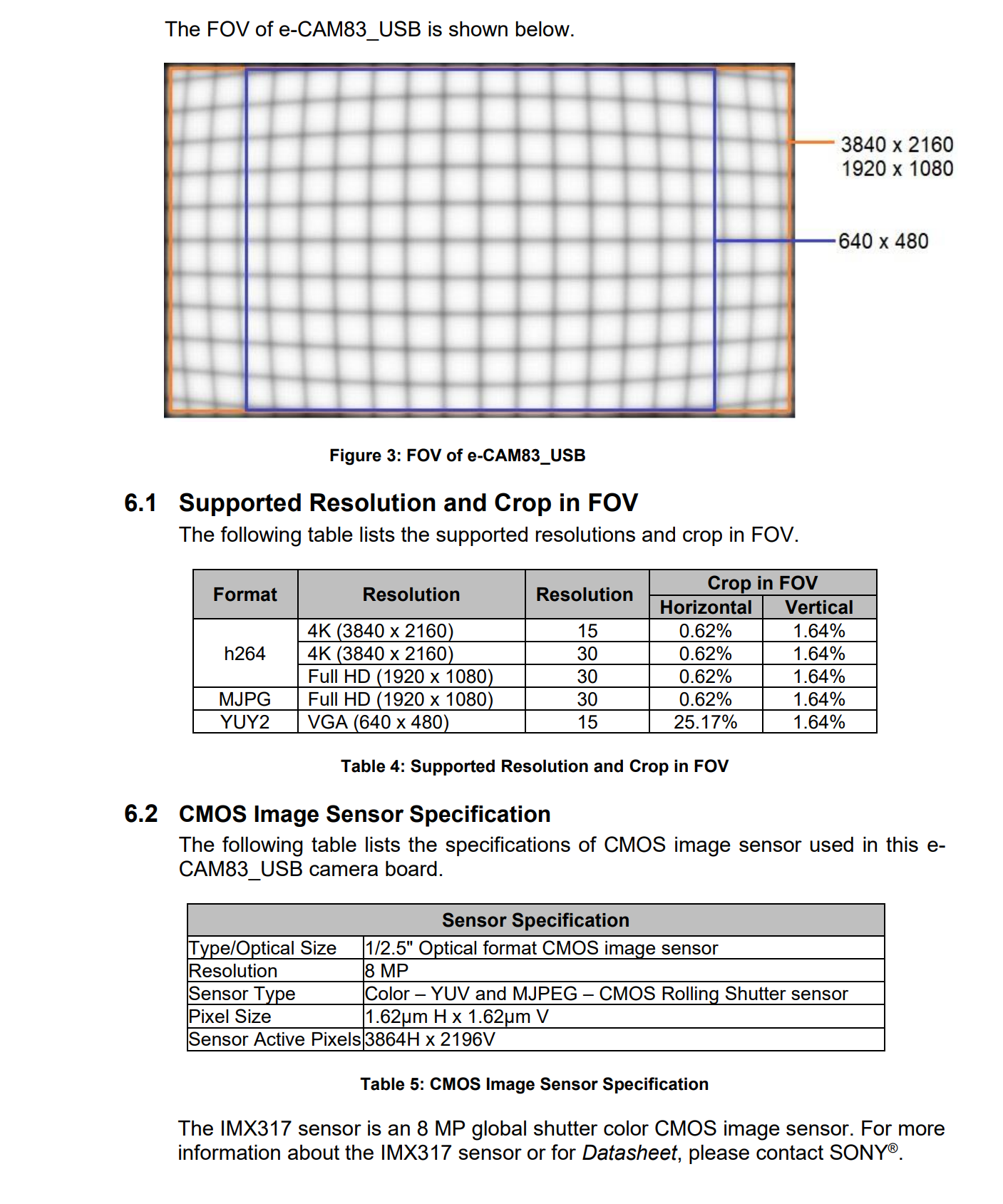
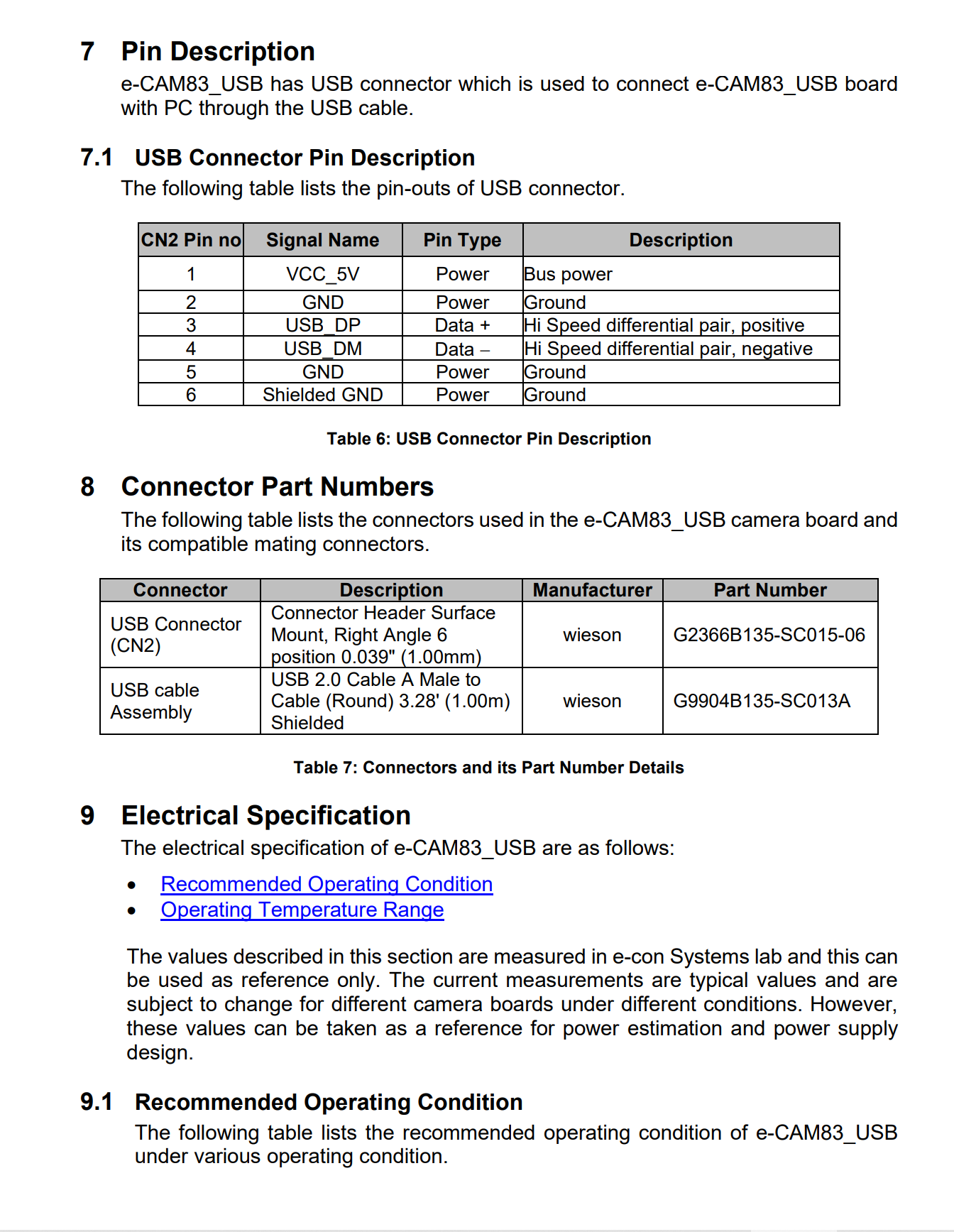
          Here are some details of my UVC 2.0 camera.
          e-CAM83.png

          1 Reply Last reply
          0
          • tomT tom

            @Kris Yeah that's just the default that voxl-uvc-server uses if not explicitly specified otherwise with the -r flag.

            You can use show-video-device-info.sh and that may provide some clues.

            What is the part number or make and model of the UVC camera you're using? It's possible it's supported image formats don't match up with those supported by voxl-uvc-server

            KrisK Offline
            KrisK Offline
            Kris
            Regular
            wrote on last edited by
            #12

            @tom
            This is all the information I get from show-video-device-info.sh

            voxl:~$ show-video-device-info.sh
            /dev/video2: e-CAM83_USB 2560:c184
            /dev/video3: e-CAM83_USB 2560:c184
            
            1 Reply Last reply
            0
            • KrisK Offline
              KrisK Offline
              Kris
              Regular
              wrote on last edited by Kris
              #13

              Is there any chance I can get 1920 x 1080 @30 fps using h264 in the voxl-uvc-server?
              Or is 640 x 480 the only option in the voxl-uvc-server?

              1 Reply Last reply
              0
              • KrisK Offline
                KrisK Offline
                Kris
                Regular
                wrote on last edited by
                #14

                The rest of the information about my current uvc camera is here.

                1 Reply Last reply
                0
                • KrisK Offline
                  KrisK Offline
                  Kris
                  Regular
                  wrote on last edited by
                  #15

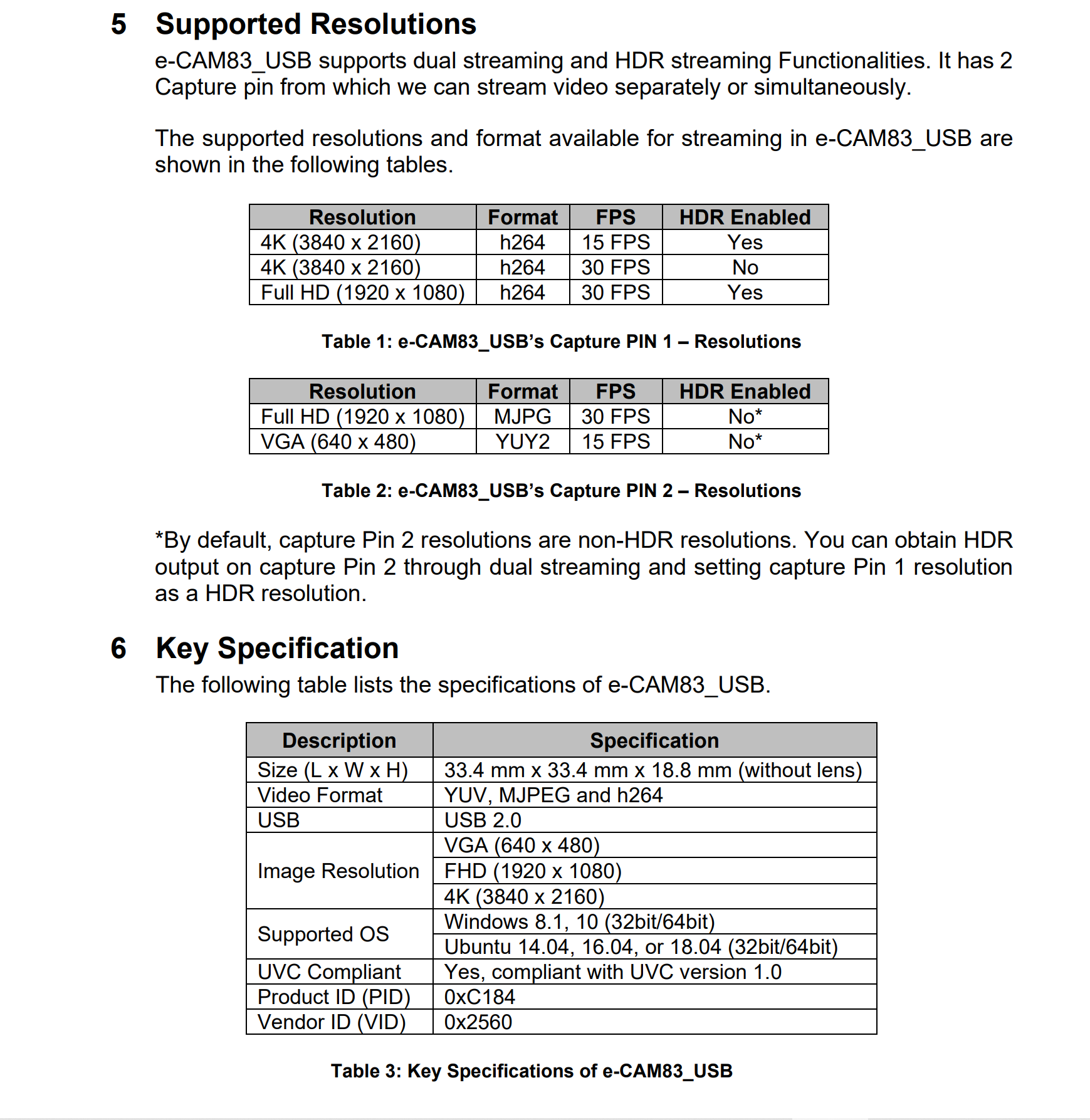
                  Additional information;
                  e-CAM83-1.png
                  e-CAM83-2.png

                  1 Reply Last reply
                  0
                  • tomT tom

                    @Kris Yeah that's just the default that voxl-uvc-server uses if not explicitly specified otherwise with the -r flag.

                    You can use show-video-device-info.sh and that may provide some clues.

                    What is the part number or make and model of the UVC camera you're using? It's possible it's supported image formats don't match up with those supported by voxl-uvc-server

                    KrisK Offline
                    KrisK Offline
                    Kris
                    Regular
                    wrote on last edited by
                    #16

                    @tom
                    I gave this a try, but no luck.

                    voxl:~$ voxl-uvc-server -d -r 1920x1080 -f 30
                    Enabling debug messages
                    voxl-uvc-server starting
                    Image resolution 1920x1080, 30 fps chosen
                    UVC initialized
                    Device found
                    uvc_open failed
                    UVC exited
                    voxl-uvc-server ending
                    
                    1 Reply Last reply
                    0
                    • tomT tom

                      @Kris Are you sure that your UVC camera is 640x480 resolution?

                      KrisK Offline
                      KrisK Offline
                      Kris
                      Regular
                      wrote on last edited by
                      #17

                      @tom

                      voxl:~$ show-video-device-info.sh
                      /dev/video2: e-CAM83_USB 2560:c184
                      /dev/video3: e-CAM83_USB 2560:c184
                      

                      /dev/video2: is h264
                      /dev/video3: is MJPG & YUY2

                      1 Reply Last reply
                      0
                      • KrisK Offline
                        KrisK Offline
                        Kris
                        Regular
                        wrote on last edited by
                        #18
                        voxl:~$ voxl-uvc-server -l
                        *** START DEVICE LIST ***
                        
                        Found device 0
                        
                        Got device descriptor for 2560:c184 (null)
                        
                        Found device 2560:c184
                        
                        uvc_open failed, Return code: I/O error (-1)
                        
                        Found device 0
                        
                        Got device descriptor for 2560:c184 (null)
                        
                        Found device 2560:c184
                        
                        uvc_open failed, Return code: No such device (-4)
                        
                        Found device 0
                        
                        Got device descriptor for 2560:c184 (null)
                        
                        uvc_find_device failed, Return code: No such device (-4)
                        
                        Got device descriptor for 2560:c184 (null)
                        
                        Found device 2560:c184
                        
                        DEVICE CONFIGURATION (2560:c184/00.00.01) ---
                        Status: idle
                        VideoControl:
                        	bcdUVC: 0x0100
                        VideoStreaming(1):
                        	bEndpointAddress: 129
                        	Formats:
                        	FrameFormat(1)
                        		  bits per pixel: 16
                        		  GUID: 4832363400001000800000aa00389b71 (H264)
                        		  default frame: 1
                        		  aspect ratio: 0x0
                        		  interlace flags: 00
                        		  copy protect: 00
                        			FrameDescriptor(1)
                        			  capabilities: 00
                        			  size: 3840x2160
                        			  bit rate: 165888000-995328000
                        			  max frame size: 0
                        			  default interval: 1/15
                        			  interval[0]: 1/30
                        			  interval[1]: 1/15
                        			FrameDescriptor(2)
                        			  capabilities: 00
                        			  size: 1920x1080
                        			  bit rate: 165888000-995328000
                        			  max frame size: 0
                        			  default interval: 1/30
                        			  interval[0]: 1/30
                        VideoStreaming(2):
                        	bEndpointAddress: 136
                        	Formats:
                        	UncompressedFormat(1)
                        		  bits per pixel: 16
                        		  GUID: 5955593200001000800000aa00389b71 (YUY2)
                        		  default frame: 1
                        		  aspect ratio: 0x0
                        		  interlace flags: 00
                        		  copy protect: 00
                        			FrameDescriptor(1)
                        			  capabilities: 00
                        			  size: 640x480
                        			  bit rate: 24576000-147456000
                        			  max frame size: 614400
                        			  default interval: 1/15
                        			  interval[0]: 1/15
                        	MJPEGFormat(2)
                        		  bits per pixel: 0
                        		  GUID: 4d4a5047000000000000000000000000 (MJPG)
                        		  default frame: 1
                        		  aspect ratio: 0x0
                        		  interlace flags: 00
                        		  copy protect: 00
                        			FrameDescriptor(1)
                        			  capabilities: 00
                        			  size: 1920x1080
                        			  bit rate: 24576000-147456000
                        			  max frame size: 614400
                        			  default interval: 1/30
                        			  interval[0]: 1/30
                        END DEVICE CONFIGURATION
                        
                        *** END DEVICE LIST ***
                        
                        1 Reply Last reply
                        0
                        • tomT tom

                          @Kris Yeah that's just the default that voxl-uvc-server uses if not explicitly specified otherwise with the -r flag.

                          You can use show-video-device-info.sh and that may provide some clues.

                          What is the part number or make and model of the UVC camera you're using? It's possible it's supported image formats don't match up with those supported by voxl-uvc-server

                          KrisK Offline
                          KrisK Offline
                          Kris
                          Regular
                          wrote on last edited by
                          #19

                          @tom
                          May I ask what image formats the voxl-uvc-serversupports?

                          1 Reply Last reply
                          0
                          • KrisK Offline
                            KrisK Offline
                            Kris
                            Regular
                            wrote on last edited by
                            #20

                            I have a feeling that maybe the problem is deriving from my camera’s GUID Format.
                            Does the voxl-uvc-server accept GUID: 4832363400001000800000aa00389b71
                            for h264 format?
                            How would I go about correcting the guidFormat to match up with the voxl-uvc-server?

                            1 Reply Last reply
                            0
                            • tomT Offline
                              tomT Offline
                              tom
                              admin
                              wrote on last edited by
                              #21

                              @Kris You can see supported format info here: https://gitlab.com/voxl-public/voxl-sdk/services/voxl-uvc-server/-/blob/master/src/main.c#L64

                              Another thing to try out is using gstreamer instead of voxl-uvc-server + voxl-streamer with a pipeline similar to the following:

                              gst-launch-1.0 v4l2src device=/dev/video2 ! video/x-raw,format=YUY2 ! videoconvert ! x264enc speed-preset=ultrafast tune=zerolatency ! rtph264pay name=pay0 ! udpsink host=192.168.1.97 port=8554

                              The pipeline may need to be tweaked slightly but it's one I've used before for other UVC cameras that voxl-uvc-server was unhappy with

                              KrisK 4 Replies Last reply
                              0
                              • tomT tom

                                @Kris You can see supported format info here: https://gitlab.com/voxl-public/voxl-sdk/services/voxl-uvc-server/-/blob/master/src/main.c#L64

                                Another thing to try out is using gstreamer instead of voxl-uvc-server + voxl-streamer with a pipeline similar to the following:

                                gst-launch-1.0 v4l2src device=/dev/video2 ! video/x-raw,format=YUY2 ! videoconvert ! x264enc speed-preset=ultrafast tune=zerolatency ! rtph264pay name=pay0 ! udpsink host=192.168.1.97 port=8554

                                The pipeline may need to be tweaked slightly but it's one I've used before for other UVC cameras that voxl-uvc-server was unhappy with

                                KrisK Offline
                                KrisK Offline
                                Kris
                                Regular
                                wrote on last edited by
                                #22

                                @tom
                                Thank you, I will give this a try.
                                I am trying to use H.264 on this camera.
                                This is the second UVC camera that I’ve purchased because I am trying to log the frames from voxl-logger. From what I understand, H.264 output is the format that can do this.
                                Is there a way to call for only the /dev/video2 to start with the voxl-uvc-server or gstreamer?
                                Does the voxl-uvc-server accept h264 1920x1080 @30fps?

                                1 Reply Last reply
                                0
                                • tomT tom

                                  @Kris You can see supported format info here: https://gitlab.com/voxl-public/voxl-sdk/services/voxl-uvc-server/-/blob/master/src/main.c#L64

                                  Another thing to try out is using gstreamer instead of voxl-uvc-server + voxl-streamer with a pipeline similar to the following:

                                  gst-launch-1.0 v4l2src device=/dev/video2 ! video/x-raw,format=YUY2 ! videoconvert ! x264enc speed-preset=ultrafast tune=zerolatency ! rtph264pay name=pay0 ! udpsink host=192.168.1.97 port=8554

                                  The pipeline may need to be tweaked slightly but it's one I've used before for other UVC cameras that voxl-uvc-server was unhappy with

                                  KrisK Offline
                                  KrisK Offline
                                  Kris
                                  Regular
                                  wrote on last edited by
                                  #23

                                  @tom
                                  Do I paste this in the voxl terminal?

                                  gst-launch-1.0 v4l2src device=/dev/video2 ! video/x-raw,format=YUY2 ! videoconvert ! x264enc speed-preset=ultrafast tune=zerolatency ! rtph264pay name=pay0 ! udpsink host=192.168.1.97 port=8554
                                  

                                  Does this have uvc frame or video capture capabilities?

                                  1 Reply Last reply
                                  0
                                  • tomT tom

                                    @Kris You can see supported format info here: https://gitlab.com/voxl-public/voxl-sdk/services/voxl-uvc-server/-/blob/master/src/main.c#L64

                                    Another thing to try out is using gstreamer instead of voxl-uvc-server + voxl-streamer with a pipeline similar to the following:

                                    gst-launch-1.0 v4l2src device=/dev/video2 ! video/x-raw,format=YUY2 ! videoconvert ! x264enc speed-preset=ultrafast tune=zerolatency ! rtph264pay name=pay0 ! udpsink host=192.168.1.97 port=8554

                                    The pipeline may need to be tweaked slightly but it's one I've used before for other UVC cameras that voxl-uvc-server was unhappy with

                                    KrisK Offline
                                    KrisK Offline
                                    Kris
                                    Regular
                                    wrote on last edited by
                                    #24

                                    @tom
                                    Sorry to bother you again, but I am not seeing the h264 format supported in the main.c script you provided for the voxl-uvc-server. Is it possible to edit the voxl-uvc-server main.c script to accept h264 format at 1920x1080 @30fps?

                                    1 Reply Last reply
                                    0
                                    • tomT Offline
                                      tomT Offline
                                      tom
                                      admin
                                      wrote on last edited by
                                      #25

                                      @Kris You can read more about how gstreamer and the gst-launch-1.0 command works here: https://gstreamer.freedesktop.org/documentation/tools/gst-launch.html?gi-language=c

                                      Yes, you would run that command on VOXL2. That specific command pulls frames from /dev/video22 (the UVC camera), it tells it to expect YUY2 formatted frames (you can change this to your liking) and then it converts it to an RTSP video stream. You could modify the pipeline to instead write to a file instead of streaming.

                                      There is a ton of documentation on gstreamer out there that can help you out with tailoring the pipeline.

                                      KrisK 1 Reply Last reply
                                      0
                                      • tomT tom

                                        @Kris You can read more about how gstreamer and the gst-launch-1.0 command works here: https://gstreamer.freedesktop.org/documentation/tools/gst-launch.html?gi-language=c

                                        Yes, you would run that command on VOXL2. That specific command pulls frames from /dev/video22 (the UVC camera), it tells it to expect YUY2 formatted frames (you can change this to your liking) and then it converts it to an RTSP video stream. You could modify the pipeline to instead write to a file instead of streaming.

                                        There is a ton of documentation on gstreamer out there that can help you out with tailoring the pipeline.
                                        KrisK Offline
                                        KrisK Offline
                                        Kris
                                        Regular
                                        wrote on last edited by
                                        #26

                                        @tom
                                        Ok, thank you for the explanation.
                                        I will read up on gstreamer and try to figure this out.
                                        You mentioned that I would run this on VOXL2.
                                        I dont have a VOXL2. Does this work on VOXL for the Seeker?

                                        1 Reply Last reply
                                        0
                                        • tomT Offline
                                          tomT Offline
                                          tom
                                          admin
                                          wrote on last edited by
                                          #27

                                          @Kris Apologies, I'm not sure if that will work on VOXL1. Do you have a hires mipi sensor on your VOXL? It would allow you to avoid a lot of trouble

                                          KrisK 3 Replies Last reply
                                          0

                                          Hello! It looks like you're interested in this conversation, but you don't have an account yet.

                                          Getting fed up of having to scroll through the same posts each visit? When you register for an account, you'll always come back to exactly where you were before, and choose to be notified of new replies (either via email, or push notification). You'll also be able to save bookmarks and upvote posts to show your appreciation to other community members.

                                          With your input, this post could be even better 💗

                                          Register Login
                                          Reply
                                          • Reply as topic
                                          Log in to reply
                                          • Oldest to Newest
                                          • Newest to Oldest
                                          • Most Votes


                                          ModalAI
                                          Categories Recent Tags ModalAI.com Docs
                                          © 2026 ModalAI® · Accelerating autonomy for smaller, smarter, safer drones · Powered by NodeBB
                                          • Login

                                          • Login or register to search.
                                          • First post
                                            Last post
                                          0
                                          • Categories
                                          • Recent
                                          • Tags
                                          • Popular
                                          • Users
                                          • Groups