
How to use VOXL2 J19 Port for Serial Communication
-
Hello,
I'm trying to communicate via Serial communication on port J19 on the VOXL2. Currently I can open a port on the corresponding interface (
/dev/ttyACM0) but I cannot read or write any data. This is how I currently wired my serial device to this port, do you have any recommendations or insight on I can open serial communication on this port?I do not have any GPS or magnetometer connected to the drone at those ports.
The table contains the pins of the device I am connecting the J19 port, and the lines are the left are what pins on the J19 port I am connecting them to.
I also tried swapping the wire at pin 8 to pin 3, and pin 7 to pin 2 of the J19 port to try and take advantage of the GPS's communication lines, but this didn't work either.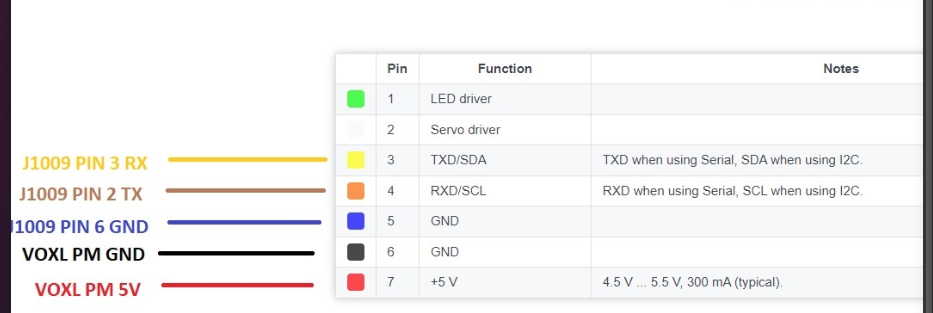
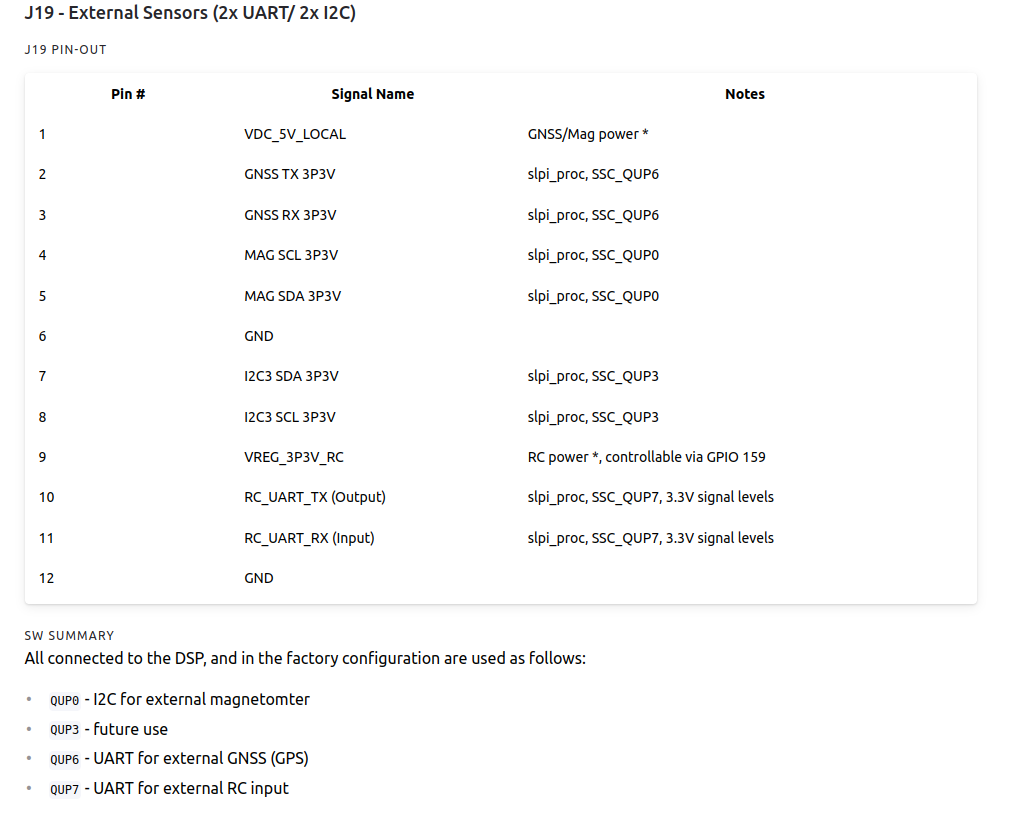
Relevant link: https://docs.modalai.com/voxl2-connectors/#j19---external-sensors-2x-uart-2x-i2c
-
Hello,
I'm trying to communicate via Serial communication on port J19 on the VOXL2. Currently I can open a port on the corresponding interface (
/dev/ttyACM0) but I cannot read or write any data. This is how I currently wired my serial device to this port, do you have any recommendations or insight on I can open serial communication on this port?I do not have any GPS or magnetometer connected to the drone at those ports.
The table contains the pins of the device I am connecting the J19 port, and the lines are the left are what pins on the J19 port I am connecting them to.
I also tried swapping the wire at pin 8 to pin 3, and pin 7 to pin 2 of the J19 port to try and take advantage of the GPS's communication lines, but this didn't work either.Relevant link: https://docs.modalai.com/voxl2-connectors/#j19---external-sensors-2x-uart-2x-i2c
@Daniel-Ryu These ports are mapped to the DSP where the PX4 flight control software runs. These ports are not available for use by the Linux processor.
-
Just adding to this thread. Is the only way to connect external sensors to the Linux processor through the USB ports on the Microhard add on board? And I2C is not possible?
-
The J19 connector is specfically connected to the sDSP, so that particular connector yes, but we have other apps_proc interfaces for UART/I2C/SPI/GPIO.
This is where it's likely easiest to locate where the interfaces are:
https://docs.modalai.com/voxl2-linux-user-guide/VOXL2 has been optimized for size, and thus some/most of these interfaces require some kind of connector that is likely harder than just making a JST cable real quick to test something out, or a daughter card that exposes it on a JST.



Reading along? Create a free ModalAI Forum account to join in.
With an account you can reply, ask your own question, get an email when a ModalAI engineer answers, and mark the reply that solved it. Your place in each thread is saved between visits.
Questions about VOXL, Flight Core, ESCs and ModalAI drones are answered here by the engineers who build them.
Register Login