Skip to content
  • Categories
  • Recent
  • Tags
  • Popular
  • Users
  • Groups
Collapse
Brand Logo

ModalAI Forum

  1. ModalAI Support Forum
  2. VOXL Compute & Autopilot
  3. VOXL 2
  4. Voxl2/Microhard/NV Trip 2

Voxl2/Microhard/NV Trip 2

Scheduled Pinned Locked Moved VOXL 2
29 Posts 6 Posters 6.9k Views 2 Watching
  • Oldest to Newest
  • Newest to Oldest
  • Most Votes
Reply
  • Reply as topic
Log in to reply
This topic has been deleted. Only users with topic management privileges can see it.
  • M Offline
    M Offline
    McMason
    Regular
    wrote on last edited by McMason
    #18

    Sweet, thanks @Vinny I might actually have a 5g modem board as well! Man i really appreciate your patience with all my questions.

    1 Reply Last reply
    0
    • M Offline
      M Offline
      McMason
      Regular
      wrote on last edited by
      #19

      Nevermind its the 4gLte carrier.

      VinnyV 1 Reply Last reply
      0
      • M McMason

        Nevermind its the 4gLte carrier.

        VinnyV Offline
        VinnyV Offline
        Vinny
        ModalAI Team
        wrote on last edited by
        #20

        Hi @McMason
        Of course, we want you to be successful!!
        That 4G modem board works just like the Microhard boards we have... you have the same USB hub and the same VBUS capabilities, and you do not need to install a modem to get that functionality.
        Hope that helps!

        1 Reply Last reply
        0
        • M Offline
          M Offline
          McMason
          Regular
          wrote on last edited by
          #21

          @Vinny , made the decision to just go with MH for better downrange reception.

          Is there a guide or anything you can point me too that would be a good start to set up a non MIPI camera? it will be connected via ETH from the trip2

          I would be ecstatic if it were as simple as voxl-configure-cameras lol.

          VinnyV 1 Reply Last reply
          0
          • M McMason

            @Vinny , made the decision to just go with MH for better downrange reception.

            Is there a guide or anything you can point me too that would be a good start to set up a non MIPI camera? it will be connected via ETH from the trip2

            I would be ecstatic if it were as simple as voxl-configure-cameras lol.

            VinnyV Offline
            VinnyV Offline
            Vinny
            ModalAI Team
            wrote on last edited by
            #22

            @McMason
            Sorry, I'll have to tag team this one off to @tom or someone else from software...
            Not sure how the USB based cameras show up different (if they do) from MIPI based cameras.

            Keep us posted!!

            1 Reply Last reply
            0
            • M Offline
              M Offline
              McMason
              Regular
              wrote on last edited by
              #23

              Will do @Vinny thank you again

              1 Reply Last reply
              0
              • tomT Offline
                tomT Offline
                tom
                admin
                wrote on last edited by
                #24

                @McMason For normal USB cameras (UVC), we use voxl-uvc-server. However, we haven't tested an ethernet to USB camera so I'm not sure how much guidance we'll be able to provide there.

                1 Reply Last reply
                0
                • M Offline
                  M Offline
                  McMason
                  Regular
                  wrote on last edited by McMason
                  #25

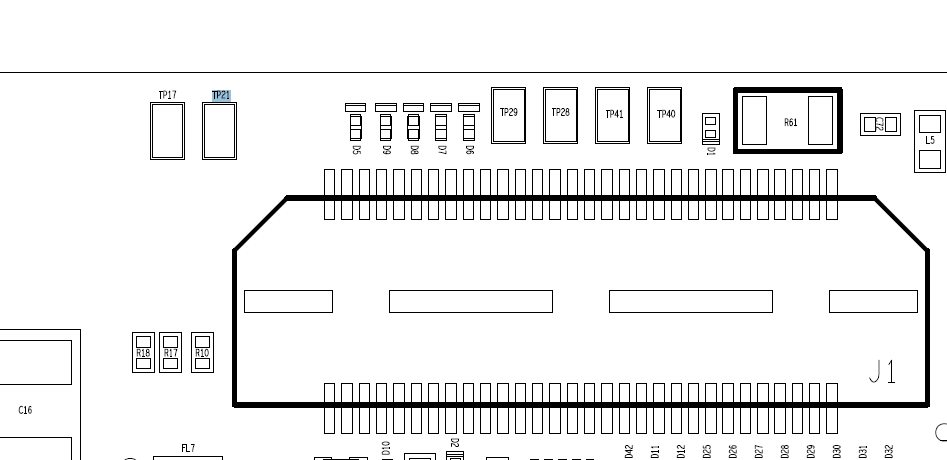
                  @vinny Is there any other VREG_S4A_1P8V test pads beside TP21 i can get power from on the bottom of the MH carrier? I put a meter to verify power and wasnt getting voltage out

                  VinnyV 1 Reply Last reply
                  0
                  • M McMason

                    @vinny Is there any other VREG_S4A_1P8V test pads beside TP21 i can get power from on the bottom of the MH carrier? I put a meter to verify power and wasnt getting voltage out

                    VinnyV Offline
                    VinnyV Offline
                    Vinny
                    ModalAI Team
                    wrote on last edited by
                    #26

                    @McMason
                    TP21 is it unfortunately.
                    All the rest are component pads which can easily break something. Right next to it is TP17 which is a GND.
                    This is only present on the "plug-in" version FYI (even if it's obvious, I need to say it) and it's not present on the dongle based versions (but in which case you can't have access to the UART either).
                    b04c0005-63c1-43a8-9f78-a928c97b8a2a-image.png

                    1 Reply Last reply
                    0
                    • M Offline
                      M Offline
                      McMason
                      Regular
                      wrote on last edited by
                      #27

                      @Vinny Thank you. Looks like ill be getting something on order soon.

                      1 Reply Last reply
                      0
                      • R Offline
                        R Offline
                        rogerli
                        Contributor
                        wrote on last edited by
                        #28

                        Hello @McMason ,
                        Have you successfully connected VOXL2 and NV Trip2? Currently, I am using Ethernet and the Microhard Add-on board to connect VOXL2 and NV Trip2, and I can confirm successful connection using the ping command. However, I am unable to perform image transmission. Do you have any suggestions on how to resolve this issue?


                        Chase RileyC 1 Reply Last reply
                        0
                        • R rogerli

                          Hello @McMason ,
                          Have you successfully connected VOXL2 and NV Trip2? Currently, I am using Ethernet and the Microhard Add-on board to connect VOXL2 and NV Trip2, and I can confirm successful connection using the ping command. However, I am unable to perform image transmission. Do you have any suggestions on how to resolve this issue?

                          Chase RileyC Offline
                          Chase RileyC Offline
                          Chase Riley
                          Regular
                          wrote on last edited by
                          #29

                          @rogerli or @McMason Were either of you successful in getting the VOXL2 to connect to the NV Trip2? Working the same issue on my end.

                          1 Reply Last reply
                          0

                          Hello! It looks like you're interested in this conversation, but you don't have an account yet.

                          Getting fed up of having to scroll through the same posts each visit? When you register for an account, you'll always come back to exactly where you were before, and choose to be notified of new replies (either via email, or push notification). You'll also be able to save bookmarks and upvote posts to show your appreciation to other community members.

                          With your input, this post could be even better 💗

                          Register Login
                          Reply
                          • Reply as topic
                          Log in to reply
                          • Oldest to Newest
                          • Newest to Oldest
                          • Most Votes


                          ModalAI
                          Categories Recent Tags ModalAI.com Docs
                          © 2026 ModalAI® · Accelerating autonomy for smaller, smarter, safer drones · Powered by NodeBB
                          • Login

                          • Don't have an account? Register

                          • Login or register to search.
                          • First post
                            Last post
                          0
                          • Categories
                          • Recent
                          • Tags
                          • Popular
                          • Users
                          • Groups