
Drone IP Address keeps changing
-
Whenever I turn off the drone and turn it back on, its IP address when connecting to my wifi network always changes. How do I make the RB5 Drone's IP address stay constant after turning it off and back on?
This IP address change is very annoying for the 2 following reasons:
1 - I am working with multiple robots communicating with each other over wifi via socket programming scripts. I have to declare each robots' IP address on my scripts. The IP address of my other robots, as well as my computer don't change.
2 - Sometimes I want the ROS master of the RB5 Drone on my computer. This is essential for me to view from voxl_mpa_to_ros on Rviz, as well as test computer vision scripts.
To get the ROS master on my comptuer, I ssh into the drone and edit the ~/.bashrc file, adding the following linesexport ROS_MASTER_URI=http://{PC_IP_ADDRESS}:11311/ export ROS_HOSTNAME={RB5_DRONE_IP}I'd have to change the IP address on the ~/.bashrc every time the drone is turned off and back on later.
-
@alfa-budiman this is a known issue and we're currently working on resolving it. Please be patient till we can figure out a solution.
You can try loading rb5-with the Voxl-sdk, which will keep the same ip -
This bug is due to an issue with Qualcomm's RB5 hardware itself due to the wifi chip's MAC address changing every boot.
Like @Adrian-Hidalgo said there is a work around if you flash the VOXL SDK: https://docs.modalai.com/Qualcomm-Flight-RB5-system-image/#voxl-sdk-for-rb5-flightThis will allow you to use the
voxl-static-ipbash script and systemd service in order to set the IP to your liking on each boot. -
@alfa-budiman the source for that script above is here:
-
I just tried executing the voxl-static-ip command and it returns saying "unkown host". I believe I'm already loading rb5 with voxl-sdk as I am able to programmatically fly it using MAVROS and work with its camera imagery through voxl_mpa_to_ros_node.

My intuition tells me that the current script on my RB5 drone isn't setup properly and that I should just take the bash file from source (https://gitlab.com/voxl-public/voxl-sdk/utilities/qrb5165-system-tweaks/-/blob/master/scripts/voxl-static-ip), fill in the LOCAL_IP and ROUTER_IP, push that file onto my drone and execute it.
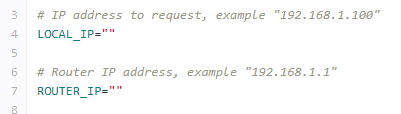
I'm not too familiar with that, what should I put for "LOCAL_IP" and "ROUTER_IP" ?
I think (but am not too sure) that LOCAL_IP is what the drone's IP will be (permanently). As for router IP, I'm not sure what that would be. If it is the IP address of the computer I am ssh-ing from then that is an issue as I would like to be able to ssh into the drone from any computer or any router as long as they are on the same network.
Before I do something that could cause connectivity issues would it be possible to run the bash script without ROUTER_IP? Something like this:
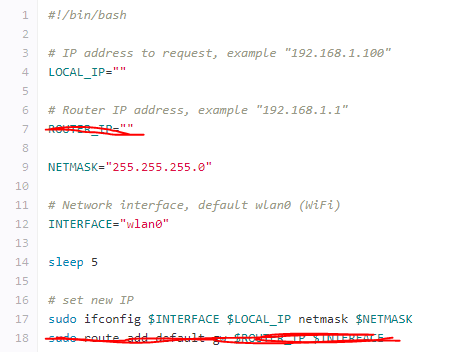
-
@alfa-budiman The ROUTE_IP and LOCAL_IP depend on the format of the IP addresses on the WiFi network you are attempting to connect to.
I would connect to your WiFi network and check the IP address given to your drone by the network.
If it gives you an IP address in the format 192.168.X.Y you'll want to set the ROUTER_IP to 192.168.X.1
then set LOCAL_IP to whatever IP you want to request from the router, it will need to be in the format 192.168.X.Z where Z is the number you want to request.
-
@alfa-budiman The ROUTE_IP and LOCAL_IP depend on the format of the IP addresses on the WiFi network you are attempting to connect to.
I would connect to your WiFi network and check the IP address given to your drone by the network.
If it gives you an IP address in the format 192.168.X.Y you'll want to set the ROUTER_IP to 192.168.X.1
then set LOCAL_IP to whatever IP you want to request from the router, it will need to be in the format 192.168.X.Z where Z is the number you want to request.
I setup wifi connectivity on the RB5 drone by executing
voxl-wifi station ssid passwordIt automatically connects to any network with that matching ssid and password, whether it is a hotspot setup by my cellphone or setup by my personal laptop, regardless of their IP address. This is the functionality that I want. If the IP address of the drone changes because it is connected on a different network, that is fine. The issue is the drone IP address changing even though it is re-connecting on the same network after being turned off and turned back on.
@tom said in Drone IP Address keeps changing:
@alfa-budiman The ROUTE_IP and LOCAL_IP depend on the format of the IP addresses on the WiFi network you are attempting to connect to.
I would connect to your WiFi network and check the IP address given to your drone by the network.
If it gives you an IP address in the format 192.168.X.Y you'll want to set the ROUTER_IP to 192.168.X.1
then set LOCAL_IP to whatever IP you want to request from the router, it will need to be in the format 192.168.X.Z where Z is the number you want to request.
My concern with entering these IP addresses is that it would then cause the cause drone to search for a specific IP address or else it will not connect.
I documented the steps I took to setup my drone here:
https://github.com/albud187/uav_nav_ops/blob/manual/RB5_Drone_Setup.docx




Reading along? Create a free ModalAI Forum account to join in.
With an account you can reply, ask your own question, get an email when a ModalAI engineer answers, and mark the reply that solved it. Your place in each thread is saved between visits.
Questions about VOXL, Flight Core, ESCs and ModalAI drones are answered here by the engineers who build them.
Register Login