
GPS not working
-
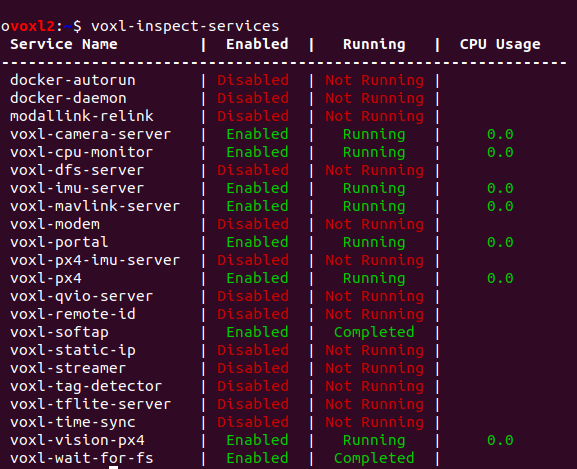
@Eric-Katzfey Unfortunately the GPS is not working as expected. Yesterday we were momentarily able to get between 9-12 satellites, which I think is a little low. With that number of satellites, we were not able to get GPS lock on the drone, QGC displayed an error related to GPS accuracy too low. Even after allowing to arm without GPS lock and flying at about 15 m, the number of satellites didn't change and we couldn't even put the drone in position mode, because of not being GPS locked.
What we did to be able to even get those satellites was
systemctl disable voxl-px4,systemctl disable voxl-mavlink-server, rebooted the drone and, in two different ssh shells, ran both services manually.Today, using this approach, I'm not even able to get any satellites at all. All the following tests were done with the
ekf2_outdoor_gps_mag.paramsconfiguration file from your Gitlab.The output from
voxl-px4was:voxl2:~$ voxl-px4 Found DSP signature file INFO [px4] mlockall() enabled. PX4's virtual address space is locked into RAM. INFO [px4] assuming working directory is rootfs, no symlinks needed. ______ __ __ ___ | ___ \ \ \ / / / | | |_/ / \ V / / /| | | __/ / \ / /_| | | | / /^\ \ \___ | \_| \/ \/ |_/ px4 starting. INFO [px4] Calling startup script: /bin/sh /etc/modalai/voxl-px4.config 0 Running on M0054 INFO [muorb] SLPI: Creating qurt thread hpwork INFO [muorb] SLPI: Successfully created px4 task PX4_hpwork with tid 82 INFO [muorb] SLPI: Creating qurt thread lpwork INFO [muorb] SLPI: Successfully created px4 task PX4_lpwork with tid 81 INFO [muorb] SLPI: Creating qurt thread wkr_hrt INFO [muorb] SLPI: Successfully created px4 task PX4_wkr_hrt with tid 80 INFO [muorb] SLPI: Creating qurt thread client_sync_thread INFO [muorb] SLPI: Successfully created px4 task PX4_client_sync_thread with tid 79 INFO [muorb] SLPI: Creating qurt thread wq_manager INFO [muorb] SLPI: Successfully created px4 task PX4_wq_manager with tid 78 INFO [muorb] SLPI: Creating qurt thread qshell INFO [muorb] SLPI: Successfully created px4 task PX4_qshell with tid 77 INFO [qshell] Send cmd: 'icm42688p start -s' INFO [muorb] SLPI: Marking DeviceNode(qshell_req) as advertised in process_remote_topic INFO [muorb] SLPI: qshell gotten: icm42688p start -s INFO [muorb] SLPI: Creating qurt thread wq_SPI1 INFO [muorb] SLPI: Successfully created px4 task PX4_wq_SPI1 with tid 76 INFO [muorb] SLPI: *** SPI Device ID 0x26000a 2490378 INFO [uorb] Advertising remote topic sensor_accel INFO [uorb] Marking DeviceNode(parameter_server_set_used_request) as advertised in process_remote_topic INFO [muorb] SLPI: Marking DeviceNode(parameter_server_set_used_response) as advertised in process_remote_to INFO [uorb] Advertising remote topic sensor_gyro INFO [uorb] Advertising remote topic imu_server INFO [muorb] SLPI: on SPI bus 1 INFO [muorb] SLPI: icm42688p #0 on SPI bus 1 (devid=0x0) INFO [muorb] SLPI: INFO [muorb] SLPI: Ok executing command: icm42688p start -s INFO [muorb] SLPI: Sending qshell retval with timestamp 23323798, current timestamp 23323799 INFO [uorb] Advertising remote topic qshell_retval INFO [qshell] qshell return value timestamp: 23323798, local time: 23327958 INFO [muorb] SLPI: Marking DeviceNode(parameter_client_reset_request) as advertised in process_remote_topic ERROR [muorb] SLPI: Cannot reset all parameters on client side INFO [uorb] Marking DeviceNode(parameter_client_reset_response) as advertised in process_remote_topic INFO [muorb] SLPI: Advertising remote topic parameter_update INFO [muorb] SLPI: Marking DeviceNode(parameter_client_set_value_request) as advertised in process_remote_to INFO [uorb] Marking DeviceNode(parameter_client_set_value_response) as advertised in process_remote_topic INFO [logger] logger started (mode=all) Starting Holybro magnetometer INFO [qshell] Send cmd: 'ist8310 start -R 10 -X -b 1' INFO [muorb] SLPI: Marking DeviceNode(qshell_req) as advertised in process_remote_topic INFO [muorb] SLPI: qshell gotten: ist8310 start -R 10 -X -b 1 INFO [muorb] SLPI: Creating qurt thread wq_I2C1 INFO [muorb] SLPI: Successfully created px4 task PX4_wq_I2C1 with tid 75 INFO [muorb] SLPI: *** I2C Device ID 0x60e09 396809 INFO [muorb] SLPI: ist8310 #0 on I2C bus 1 (external) INFO [muorb] SLPI: Ok executing command: ist8310 start -R 10 -X -b 1 INFO [muorb] SLPI: Sending qshell retval with timestamp 26405496, current timestamp 26405497 INFO [qshell] qshell return value timestamp: 26405496, local time: 26406391 Starting Holybro LED driver INFO [muorb] SLPI: Marking DeviceNode(qshell_req) as advertised in process_remote_topic INFO [muorb] SLPI: qshell gotten: rgbled_ncp5623c start -X -b 1 -f 400 -a 56 INFO [muorb] SLPI: *** I2C Device ID 0x7b3809 8075273 INFO [qshell] Send cmd: 'rgbled_ncp5623c start -X -b 1 -f 400 -a 56' INFO [muorb] SLPI: rgbled_ncp5623c #0 on I2C bus 1 (external) INFO [muorb] SLPI: Ok executing command: rgbled_ncp5623c start -X -b 1 -f 400 -a 56 INFO [muorb] SLPI: Sending qshell retval with timestamp 26445017, current timestamp 26445018 INFO [qshell] qshell return value timestamp: 26445017, local time: 26445673 INFO [qshell] Send cmd: 'icp10100 start -I -b 5' INFO [muorb] SLPI: Marking DeviceNode(qshell_req) as advertised in process_remote_topic INFO [muorb] SLPI: qshell gotten: icp10100 start -I -b 5 INFO [muorb] SLPI: Creating qurt thread wq_I2C5 INFO [muorb] SLPI: Successfully created px4 task PX4_wq_I2C5 with tid 74 INFO [muorb] SLPI: *** I2C Device ID 0x9c6329 10249001 INFO [muorb] SLPI: probe probe succeeded. data = 0x1 0x48 INFO [muorb] SLPI: icp10100 #0 on I2C bus 5 INFO [muorb] SLPI: Ok executing command: icp10100 start -I -b 5 INFO [muorb] SLPI: Sending qshell retval with timestamp 26486020, current timestamp 26486021 INFO [qshell] qshell return value timestamp: 26486020, local time: 26487682 INFO [uorb] Advertising remote topic sensor_mag INFO [qshell] Send cmd: 'modalai_esc start' INFO [muorb] SLPI: Marking DeviceNode(qshell_req) as advertised in process_remote_topic INFO [muorb] SLPI: qshell gotten: modalai_esc start INFO [muorb] SLPI: Creating qurt thread wq_hp_default INFO [muorb] SLPI: Successfully created px4 task PX4_wq_hp_default with tid 73 INFO [uorb] Advertising remote topic sensor_baro INFO [uorb] Advertising remote topic test_motor INFO [muorb] SLPI: Ok executing command: modalai_esc start INFO [muorb] SLPI: Sending qshell retval with timestamp 26546800, current timestamp 26546801 INFO [muorb] SLPI: Opened UART ESC device INFO [qshell] qshell return value timestamp: 26546800, local time: 26548152 INFO [qshell] Send cmd: 'mixer load /dev/uart_esc quad_x.main.mix' INFO [muorb] SLPI: Marking DeviceNode(qshell_req) as advertised in process_remote_topic INFO [muorb] SLPI: qshell gotten: mixer load /dev/uart_esc quad_x.main.mix INFO [muorb] SLPI: Creating qurt thread wq_rate_ctrl INFO [muorb] SLPI: Successfully created px4 task PX4_wq_rate_ctrl with tid 71 INFO [muorb] SLPI: Ok executing command: mixer load /dev/uart_esc quad_x.main.mix INFO [muorb] SLPI: Sending qshell retval with timestamp 26609932, current timestamp 26609933 INFO [qshell] qshell return value timestamp: 26609932, local time: 26611050 INFO [uorb] Advertising remote topic actuator_outputs INFO [uorb] Advertising remote topic multirotor_motor_limits INFO [qshell] Send cmd: 'voxlpm start -X -b 2' INFO [muorb] SLPI: Marking DeviceNode(qshell_req) as advertised in process_remote_topic INFO [muorb] SLPI: qshell gotten: voxlpm start -X -b 2 INFO [muorb] SLPI: Creating qurt thread wq_I2C2 INFO [muorb] SLPI: Successfully created px4 task PX4_wq_I2C2 with tid 4169 INFO [muorb] SLPI: *** I2C Device ID 0x784411 7881745 INFO [uorb] Advertising remote topic battery_status INFO [muorb] SLPI: voxlpm #0 on I2C bus 2 (external) INFO [muorb] SLPI: Ok executing command: voxlpm start -X -b 2 INFO [muorb] SLPI: Sending qshell retval with timestamp 26674290, current timestamp 26674291 INFO [qshell] qshell return value timestamp: 26674290, local time: 26675325 INFO [uorb] Advertising remote topic power_monitor Starting Holybro GPS INFO [qshell] Send cmd: 'gps start -d 7 -b 115200' INFO [muorb] SLPI: Marking DeviceNode(qshell_req) as advertised in process_remote_topic INFO [muorb] SLPI: qshell gotten: gps start -d 7 -b 115200 INFO [muorb] SLPI: Creating qurt thread gps INFO [muorb] SLPI: Successfully created px4 task PX4_gps with tid 70 INFO [muorb] SLPI: Ok executing command: gps start -d 7 -b 115200 INFO [muorb] SLPI: Sending qshell retval with timestamp 26712883, current timestamp 26712884 INFO [qshell] qshell return value timestamp: 26712883, local time: 26713903 INFO [qshell] Send cmd: 'px4io detect' INFO [muorb] SLPI: Marking DeviceNode(qshell_req) as advertised in process_remote_topic INFO [muorb] SLPI: qshell gotten: px4io detect INFO [muorb] SLPI: serial port fd 2 ERROR [muorb] SLPI: px4io read failed ERROR [muorb] SLPI: px4io io_reg_get(0,0,1): data error -5 ERROR [muorb] SLPI: IO not installed ERROR [muorb] SLPI: Detection attempt 2 failed ERROR [muorb] SLPI: Detection attempt 1 failed ERROR [muorb] SLPI: Detection attempt 0 failed ERROR [muorb] SLPI: Failed to execute command: px4io detect INFO [muorb] SLPI: Sending qshell retval with timestamp 26777758, current timestamp 26777759 INFO [qshell] cmd returned with: -17 INFO [qshell] qshell return value timestamp: 26777758, local time: 26778378 ERROR [qshell] Command failed M0065 not detected, starting Spektrum RC driver INFO [qshell] Send cmd: 'spektrum_rc start -d 8' INFO [muorb] SLPI: Marking DeviceNode(qshell_req) as advertised in process_remote_topic INFO [muorb] SLPI: qshell gotten: spektrum_rc start -d 8 INFO [muorb] SLPI: Creating qurt thread spektrum_rc_main INFO [muorb] SLPI: Successfully created px4 task PX4_spektrum_rc_main with tid 67 INFO [muorb] SLPI: Ok executing command: spektrum_rc start -d 8 INFO [muorb] SLPI: Sending qshell retval with timestamp 26822566, current timestamp 26822566 INFO [qshell] qshell return value timestamp: 26822566, local time: 26823292 INFO [qshell] Send cmd: 'sensors start' INFO [muorb] SLPI: Marking DeviceNode(qshell_req) as advertised in process_remote_topic INFO [muorb] SLPI: qshell gotten: sensors start INFO [muorb] SLPI: Creating qurt thread wq_nav_and_controllers INFO [muorb] SLPI: Successfully created px4 task PX4_wq_nav_and_controllers with tid 66 INFO [muorb] SLPI: Ok executing command: sensors start INFO [muorb] SLPI: Sending qshell retval with timestamp 27885493, current timestamp 27885494 INFO [uorb] Advertising remote topic vehicle_angular_acceleration INFO [uorb] Advertising remote topic vehicle_angular_velocity INFO [qshell] qshell return value timestamp: 27885493, local time: 27890054 INFO [muorb] SLPI: Creating qurt thread wq_INS0 INFO [muorb] SLPI: Successfully created px4 task PX4_wq_INS0 with tid 65 INFO [uorb] Advertising remote topic vehicle_imu INFO [uorb] Advertising remote topic vehicle_imu_status INFO [uorb] Advertising remote topic sensors_status_imu INFO [uorb] Advertising remote topic vehicle_acceleration INFO [uorb] Advertising remote topic vehicle_air_data INFO [uorb] Advertising remote topic sensor_selection INFO [uorb] Advertising remote topic sensor_combined INFO [qshell] Send cmd: 'ekf2 start' INFO [muorb] SLPI: Marking DeviceNode(qshell_req) as advertised in process_remote_topic INFO [muorb] SLPI: qshell gotten: ekf2 start INFO [muorb] SLPI: Ok executing command: ekf2 start INFO [muorb] SLPI: Sending qshell retval with timestamp 28080230, current timestamp 28080231 INFO [qshell] qshell return value timestamp: 28080230, local time: 28081490 INFO [uorb] Advertising remote topic ekf2_timestamps INFO [qshell] Send cmd: 'mc_pos_control start' INFO [muorb] SLPI: Marking DeviceNode(qshell_req) as advertised in process_remote_topic INFO [muorb] SLPI: qshell gotten: mc_pos_control start INFO [muorb] SLPI: Ok executing command: mc_pos_control start INFO [muorb] SLPI: Sending qshell retval with timestamp 28141872, current timestamp 28141873 INFO [qshell] qshell return value timestamp: 28141872, local time: 28143606 INFO [qshell] Send cmd: 'mc_att_control start' INFO [muorb] SLPI: Marking DeviceNode(qshell_req) as advertised in process_remote_topic INFO [muorb] SLPI: qshell gotten: mc_att_control start INFO [muorb] SLPI: Ok executing command: mc_att_control start INFO [muorb] SLPI: Sending qshell retval with timestamp 28193889, current timestamp 28193890 INFO [qshell] qshell return value timestamp: 28193889, local time: 28194908 INFO [muorb] SLPI: Marking DeviceNode(qshell_req) as advertised in process_remote_topic INFO [muorb] SLPI: qshell gotten: mc_rate_control start INFO [qshell] Send cmd: 'mc_rate_control start' INFO [muorb] SLPI: Ok executing command: mc_rate_control start INFO [muorb] SLPI: Sending qshell retval with timestamp 28277320, current timestamp 28277321 INFO [qshell] qshell return value timestamp: 28277320, local time: 28277781 INFO [qshell] Send cmd: 'mc_hover_thrust_estimator start' INFO [muorb] SLPI: Marking DeviceNode(qshell_req) as advertised in process_remote_topic INFO [muorb] SLPI: qshell gotten: mc_hover_thrust_estimator start INFO [muorb] SLPI: Ok executing command: mc_hover_thrust_estimator start INFO [muorb] SLPI: Sending qshell retval with timestamp 28316740, current timestamp 28316741 INFO [qshell] qshell return value timestamp: 28316740, local time: 28317757 INFO [muorb] SLPI: Marking DeviceNode(qshell_req) as advertised in process_remote_topic INFO [qshell] Send cmd: 'land_detector start multicopter' INFO [muorb] SLPI: qshell gotten: land_detector start multicopter INFO [muorb] SLPI: Ok executing command: land_detector start multicopter INFO [muorb] SLPI: Sending qshell retval with timestamp 28355231, current timestamp 28355232 INFO [qshell] qshell return value timestamp: 28355231, local time: 28356012 INFO [uorb] Advertising remote topic vehicle_land_detected INFO [muorb] SLPI: 28570980: reset position to last known position INFO [muorb] SLPI: 28570980: reset velocity to zero INFO [uorb] Advertising remote topic vehicle_local_position INFO [uorb] Advertising remote topic vehicle_odometry INFO [uorb] Advertising remote topic estimator_states INFO [uorb] Advertising remote topic estimator_status INFO [uorb] Advertising remote topic estimator_status_flags INFO [uorb] Advertising remote topic estimator_innovations INFO [uorb] Advertising remote topic estimator_innovation_test_ratios INFO [uorb] Advertising remote topic estimator_innovation_variances INFO [dataman] Unknown restart, data manager file '/data/px4/dataman' size is 11798680 bytes INFO [muorb] SLPI: Advertising remote topic position_setpoint_triplet INFO [commander] LED: open /dev/led0 failed (22) INFO [muorb] SLPI: Advertising remote topic led_control INFO [muorb] SLPI: Advertising remote topic tune_control INFO [PreFlightCheck] Failed EKF health preflight check while waiting for filter to settle INFO [muorb] SLPI: Advertising remote topic vehicle_control_mode INFO [muorb] SLPI: Advertising remote topic vehicle_status INFO [muorb] SLPI: Advertising remote topic actuator_armed INFO [uorb] Advertising remote topic rate_ctrl_status INFO [uorb] Advertising remote topic actuator_controls_0 INFO [muorb] SLPI: Advertising remote topic commander_state INFO [muorb] SLPI: Advertising remote topic vehicle_status_flags INFO [muorb] SLPI: Advertising remote topic vehicle_command INFO [commander] Handling Commander command 176 INFO [muorb] SLPI: Advertising remote topic vehicle_command_ack INFO [mavlink] mode: Onboard, data rate: 100000 B/s on udp port 14556 remote port 14557 INFO [muorb] SLPI: Marking DeviceNode(vehicle_command) as advertised in process_remote_topic INFO [uorb] Advertising remote topic estimator_sensor_bias INFO [px4] Startup script returned successfully pxh> INFO [muorb] SLPI: Advertising remote topic telemetry_status INFO [muorb] SLPI: 34702200: EKF aligned, (baro hgt, IMU buf: 11, OBS buf: 8) INFO [uorb] Advertising remote topic vehicle_attitude INFO [uorb] Advertising remote topic vehicle_attitude_setpoint INFO [uorb] Advertising remote topic vehicle_rates_setpointInside the pxh console, we ran the
gps statuscommand and got:INFO [gps] not running Command 'gps' failed, returned -1.I find this strange since when we ran the
voxl-px4service it had the start command for the gps. Since gps was not running, I decided to test again the gps start by doinggps stopand thengps start -d 7 -b 115200, that appeared on the output of ```voxl-px4``. The console output was:ERROR [gps] GPS: failed to open serial port: 7 err: 2We also tried the same with
qshell.
qshell gps statusoutputted:pxh> qshell gps status INFO [qshell] Send cmd: 'gps status' INFO [muorb] SLPI: Marking DeviceNode(qshell_req) as advertised in process_remote_topic INFO [muorb] SLPI: qshell gotten: gps status INFO [muorb] SLPI: Main GPS INFO [muorb] SLPI: protocol: UBX INFO [muorb] SLPI: status: NOT OK, port: 6, baudrate: 115200 INFO [muorb] SLPI: sat info: disabled INFO [muorb] SLPI: rate reading: 0 B/s INFO [muorb] SLPI: Ok executing command: gps status INFO [muorb] SLPI: Sending qshell retval with timestamp 318302556, current timestamp 318302557 INFO [qshell] qshell return value timestamp: 318302556, local time: 318308860We also tried to stop and run it again with
qshell gps stopandqshell gps start.After this, the output of
qshell gps statuswas:pxh> qshell gps status INFO [qshell] Send cmd: 'gps status' INFO [muorb] SLPI: Marking DeviceNode(qshell_req) as advertised in process_remote_topic INFO [muorb] SLPI: qshell gotten: gps status INFO [muorb] SLPI: Main GPS INFO [muorb] SLPI: protocol: UBX INFO [muorb] SLPI: status: OK, port: 6, baudrate: 115200 INFO [muorb] SLPI: sat info: disabled INFO [muorb] SLPI: rate reading: 695 B/s INFO [muorb] SLPI: rate position: 5.00 Hz INFO [muorb] SLPI: rate velocity: 5.00 Hz INFO [muorb] SLPI: rate publication: 5.00 Hz INFO [muorb] SLPI: rate RTCM injection: 0.00 Hz INFO [muorb] SLPI: sensor_gps_s INFO [muorb] SLPI: timestamp: 405957015 (0.197956 seconds ago) INFO [muorb] SLPI: time_utc_usec: 0 INFO [muorb] SLPI: lat: 0 INFO [muorb] SLPI: lon: 0 INFO [muorb] SLPI: alt: -17000 INFO [muorb] SLPI: alt_ellipsoid: 0 INFO [muorb] SLPI: s_variance_m_s: 1000.0001 INFO [muorb] SLPI: c_variance_rad: 3.1416 INFO [muorb] SLPI: eph: 4294967.5000 INFO [muorb] SLPI: epv: 3772217.5000 INFO [muorb] SLPI: hdop: 99.9900 INFO [muorb] SLPI: vdop: 99.9900 INFO [muorb] SLPI: noise_per_ms: 93 INFO [muorb] SLPI: jamming_indicator: 30 INFO [muorb] SLPI: vel_m_s: 0.0000 INFO [muorb] SLPI: vel_n_m_s: 0.0000 INFO [muorb] SLPI: vel_e_m_s: 0.0000 INFO [muorb] SLPI: vel_d_m_s: 0.0000 INFO [muorb] SLPI: cog_rad: 0.0000 INFO [muorb] SLPI: timestamp_time_relative: 0 INFO [muorb] SLPI: heading: -nan INFO [muorb] SLPI: heading_offset: 0.0000 INFO [muorb] SLPI: fix_type: 0 INFO [muorb] SLPI: jamming_state: 0 INFO [muorb] SLPI: vel_ned_valid: False INFO [muorb] SLPI: satellites_used: 0 INFO [muorb] SLPI: Ok executing command: gps status INFO [muorb] SLPI: Sending qshell retval with timestamp 406155973, current timestamp 406155974 INFO [qshell] qshell return value timestamp: 406155973, local time: 406158054Any ideia of what the problem could be?
I also noticed the following errors on the
voxl-px4output:ERROR [muorb] SLPI: px4io read failed ERROR [muorb] SLPI: px4io io_reg_get(0,0,1): data error -5 ERROR [muorb] SLPI: IO not installed ERROR [muorb] SLPI: Detection attempt 2 failed ERROR [muorb] SLPI: Detection attempt 1 failed ERROR [muorb] SLPI: Detection attempt 0 failed ERROR [muorb] SLPI: Failed to execute command: px4io detectIs this normal?
Thank you.
@andremoura The other issue appears to be that you don't always get the driver to communicate with the GPS unit on startup. The start line in
/etc/modalai/voxl-px4.configisqshell gps start -d 7 -b 115200. When you didqshell gps stopand thenqshell gps startwas it started withqshell gps start -d 7 -b 115200or justqshell gps start? -
@andremoura Yes, the errors related to px4io detection are expected since you do not have a px4io unit attached to the drone. And yes, you have to interact with things on the DSP (where the GPS driver runs) with
qshellas you already figured out. Do you have any other Sentinel drones that you can compare against? Or other types of drones with GPS to compare against? When you are able to get 9 to 12 satellites what doesqshell gps statusshow? It does appear to be wired up correctly as sometimes it is obviously communicating with the GPS unit.@Eric-Katzfey We don't have any other Sentinel drones. We have other drones with GPS, that detect at least the same or higher number of satellites but they all are able to GPS lock.
When we had that number of satellites, the
qshell gps statusseemed ok with number of satellites, latitude and longitude, but we aren't able to replicate that test right now because of bad weather conditions. -
@andremoura It looks like there are at least 2 different issues here. One is that when you do see it working it has poor performance and doesn't get a lock. That is why I wanted to compare against other drones or other GPS units. If other units are working fine and this one isn't then maybe it's a faulty unit. If they all have poor performance then maybe it's something about the test location.
@Eric-Katzfey I will test the Sentinel drone on a new better location next week, if weather gets better, and I will get back to you.
-
@andremoura The other issue appears to be that you don't always get the driver to communicate with the GPS unit on startup. The start line in
/etc/modalai/voxl-px4.configisqshell gps start -d 7 -b 115200. When you didqshell gps stopand thenqshell gps startwas it started withqshell gps start -d 7 -b 115200or justqshell gps start?@Eric-Katzfey GPS mostly hasn't beeen working on startup again.
We started it with
qshell gps start, but we also testedqshell gps start -d 7 -b 115200. Both commands only worked a few times, we are not able to consistently start the GPS, having to stop and start again the service a few times before it works. -
@Eric-Katzfey GPS mostly hasn't beeen working on startup again.
We started it with
qshell gps start, but we also testedqshell gps start -d 7 -b 115200. Both commands only worked a few times, we are not able to consistently start the GPS, having to stop and start again the service a few times before it works.@andremoura Is the LED on top of the unit (multicolor LED) coming on?
-
@andremoura Is the LED on top of the unit (multicolor LED) coming on?
@Eric-Katzfey said in GPS not working:
@andremoura Is the LED on top of the unit (multicolor LED) coming on?
Yes, every time
voxl-px4is running. -
@Eric-Katzfey said in GPS not working:
@andremoura Is the LED on top of the unit (multicolor LED) coming on?
Yes, every time
voxl-px4is running.@andremoura Okay, good. Holybro changed some of the components in their unit at one point and if that LED wasn't coming on it could indicate that it was one of the older units. But since it is on that indicates to me that it is the correct version of the Holybro unit.
-
@Eric-Katzfey Ok, new find! It seems that when
voxl-px4runs, the GPS service isn't able to start immediately, but if we wait a for a bit and start it manually, it works.Seems like something isn't ready to start immediately after
voxl-px4. -
@Eric-Katzfey Ok, new find! It seems that when
voxl-px4runs, the GPS service isn't able to start immediately, but if we wait a for a bit and start it manually, it works.Seems like something isn't ready to start immediately after
voxl-px4.@andremoura Interesting! Okay, how do you accomplish that? Do you mean you are stopping the service and then starting voxl-px4 later manually or you are leaving voxl-px4 service enabled but commenting out the gps start line in
/etc/modalai/voxl-px4.config? -
@andremoura Interesting! Okay, how do you accomplish that? Do you mean you are stopping the service and then starting voxl-px4 later manually or you are leaving voxl-px4 service enabled but commenting out the gps start line in
/etc/modalai/voxl-px4.config?@Eric-Katzfey We are stopping the GPS service manually (
qshell gps stop) and then starting it later manually (qshell gps start), not thevoxl-px4.Do you want us to do the same test with commenting the gps start line in
/etc/modalai/voxl-px4.config? -
@Eric-Katzfey We are stopping the GPS service manually (
qshell gps stop) and then starting it later manually (qshell gps start), not thevoxl-px4.Do you want us to do the same test with commenting the gps start line in
/etc/modalai/voxl-px4.config?@andremoura Actually, can you try removing the
-d 7 -b 115200from the gps start line in/etc/modalai/voxl-px4.configand see if that changes anything? Thanks for trying all this stuff out! -
@andremoura Actually, can you try removing the
-d 7 -b 115200from the gps start line in/etc/modalai/voxl-px4.configand see if that changes anything? Thanks for trying all this stuff out!@Eric-Katzfey Hello, today I tested removing
-d 7 -b 115200from/etc/modalai/voxl-px4.configand it seems like the GPS service is working correctly on startup. I'm still going to test if I can get more fixed satellites and GPS lock on a new location with more open space and then get back to this post with more information. -
@andremoura Actually, can you try removing the
-d 7 -b 115200from the gps start line in/etc/modalai/voxl-px4.configand see if that changes anything? Thanks for trying all this stuff out!@Eric-Katzfey On the new location, we were able to get GPS lock after fixing 12 satellites, which allowed for take-off. During flight we reached 19 satellites at one point. Getting GPS lock with this sensor is a bit challenging, our previous location didn't have that many obstructions, but everything seems to be working.
-
@Eric-Katzfey On the new location, we were able to get GPS lock after fixing 12 satellites, which allowed for take-off. During flight we reached 19 satellites at one point. Getting GPS lock with this sensor is a bit challenging, our previous location didn't have that many obstructions, but everything seems to be working.
@Andre-Moura Thanks for all of the testing! We really appreciate it, this is all great feedback! It seems that Holybro may have changed the default configuration of the units and that could be why it wasn't coming up properly.
-
@Eric-Katzfey Hello, today I tested removing
-d 7 -b 115200from/etc/modalai/voxl-px4.configand it seems like the GPS service is working correctly on startup. I'm still going to test if I can get more fixed satellites and GPS lock on a new location with more open space and then get back to this post with more information.@Andre-Moura We have same issue here but we try to remove -d 7 -b 115200 from /etc/modalai/voxl-px4.config is still not working. Did you modify thr code like this?
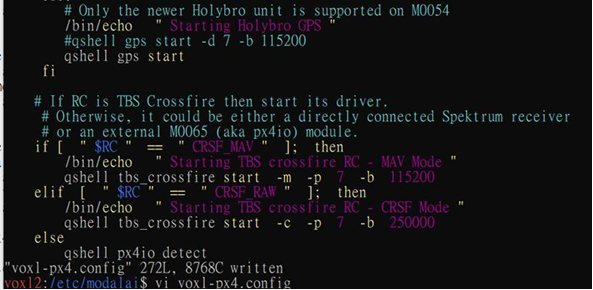
Removing the 115200 baud rate is still not see GPS log.

-
@Andre-Moura We have same issue here but we try to remove -d 7 -b 115200 from /etc/modalai/voxl-px4.config is still not working. Did you modify thr code like this?
Removing the 115200 baud rate is still not see GPS log.
@daniel I think that's all I did, but here is my
/etc/modalai/voxl-px4.config, in case you want to look for any differences:#!/bin/sh # PX4 commands need the 'px4-' prefix in bash. # (px4-alias.sh is expected to be in the PATH) . px4-alias.sh # Figure out what platform we are running on. # Eventually there will be a utility called voxl-platform that will # return the platform tag or an error code. This utility is not yet # ubiquitous so it may be that it isn't available. Trying to call a # non existent program will generate an error code by the OS. If the # program exists and doesn't return an error code then use the results. PLATFORM=`/usr/bin/voxl-platform 2> /dev/null` RETURNCODE=$? if [ $RETURNCODE -ne 0 ]; then # If we couldn't get the platform from the voxl-platform utility then check # /etc/version to see if there is an M0052 substring in the version string. If so, # then we assume that we are on M0052. Otherwise assume M0054. VERSIONSTRING=$(</etc/version) M0052SUBSTRING="M0052" if [[ "$VERSIONSTRING" == *"$M0052SUBSTRING"* ]]; then PLATFORM="M0052" else PLATFORM="M0054" fi fi # We can only run on M0052 or M0054 so exit with error if that is not the case if [ $PLATFORM = "M0052" ]; then /bin/echo "Running on M0052" if [ "$RC" == "CRSF" ]; then /bin/echo "Error, crossfire not supported on M0052!" exit 0 fi elif [ $PLATFORM = "M0054" ]; then /bin/echo "Running on M0054" else /bin/echo "Error, cannot determine platform!" exit 0 fi uorb start muorb start # In order to just exit after starting the uorb / muorb modules define # the environment variable MINIMAL_PX4. (e.g. export MINIMAL_PX4=1) # This is useful for testing / debug where you may want to start drivers # and modules manually from the px4 command shell if [ ! -z $MINIMAL_PX4 ]; then /bin/echo "Running minimal script" exit 0 fi # Sleep a little here. A lot happens when the uorb and muorb start # and we need to make sure that it all completes successfully to avoid # any possible race conditions. /bin/sleep 1 # IMU (accelerometer / gyroscope) # Start this first because it gets the high rate interrupts coming in to the # DSP. Without this the DSP will oversleep and miss critical timeouts. # TODO: Why is that the case? if [ "$IMU" == "ROTATE_IMU_YAW_180" ]; then /bin/echo "Starting IMU driver with yaw 180 rotation" qshell icm42688p start -s -R 4 else qshell icm42688p start -s fi /bin/sleep 1 # Load in all of the parameters that have been saved in the file param load # Start logging and use timestamps for log files when possible. # Add the "-e" option to start logging immediately. Default is # to log only when armed logger start -t # We do not change the value of SYS_AUTOCONFIG but if it does not # show up as used then it is not reported to QGC and we get a # missing parameter error. param touch SYS_AUTOCONFIG # Start all of the device drivers on DSP # Magnetometer if [ "$GPS" == "MATEK" ]; then # Use this line for the magnetometer in the Matek Systems M8Q-5883 module /bin/echo "Starting Mateksys M8Q-5883 magnetometer" qshell qmc5883l start -R 10 -X -b 1 elif [ "$GPS" == "HERE3" ]; then # Use this line for the magnetometer in the Here3 GPS module /bin/echo "Starting Here3 ak09916 magnetometer" qshell ak09916 start -R 2 -X else # Use this line for the magnetometer in the Holybro GPS module /bin/echo "Starting Holybro magnetometer" qshell ist8310 start -R 10 -X -b 1 fi # LED driver for the Pixhawk 4 GPS module # Older units have i2c address 0x39 (57) and newer ones 0x38 (56) # M0054 only supports the newer one. M0052 can support either. if [ $PLATFORM = "M0052" ]; then qshell rgbled_ncp5623c start -X -b 1 -f 400 -a 57 fi if [ "$GPS" == "HOLYBRO" ]; then /bin/echo "Starting Holybro LED driver" qshell rgbled_ncp5623c start -X -b 1 -f 400 -a 56 elif [ "$GPS" == "HERE3" ]; then # Use this line for the Here3 GPS module LED controller /bin/echo "Starting Here3 LED" qshell rgbled start -X -f 400 fi # Barometer qshell icp10100 start -I -b 5 # ESC driver # We start this even if there is a PX4IO module. If there is # a PX4IO (M0065) module it will be plugged into the RC port # and so this driver will output commands on an empty port. qshell modalai_esc start qshell mixer load /dev/uart_esc quad_x.main.mix # APM power monitor qshell voxlpm start -X -b 2 # On M0052 the GPS and RC drivers run on the apps processor if [ $PLATFORM = "M0052" ]; then # Pixhawk 4 GPS module gps start -d /dev/ttyHS2 # RC input may be coming via either an external M0065 (aka px4io) module # or a directly attached Spektrum receiver. First see if the M0065 is detected. px4io detect PX4IO_STATUS=$? /bin/echo "PX4IO detect returned value $PX4IO_STATUS" if [ $PX4IO_STATUS -eq 0 ]; then /bin/echo "Found M0065, starting px4io" # On M0052 px4io only supports RC input, not PWM output px4io start else /bin/echo "M0065 not detected, starting Spektrum RC driver" spektrum_rc start -d /dev/ttyHS1 fi # On M0054 the GPS and RC drivers run on SLPI DSP else if [ "$GPS" == "MATEK" ]; then # Use this gps start line instead for Matek Systems M8Q-5883 module /bin/echo "Starting Mateksys M8Q-5883 GPS" qshell gps start elif [ "$GPS" == "HERE3" ]; then # Use this line for the Here3 GPS module /bin/echo "Starting Here3 GPS" qshell gps start else # Only the newer Holybro unit is supported on M0054 /bin/echo "Starting Holybro GPS" qshell gps start fi # If RC is TBS Crossfire then start its driver. # Otherwise, it could be either a directly connected Spektrum receiver # or an external M0065 (aka px4io) module. if [ "$RC" == "CRSF_MAV" ]; then /bin/echo "Starting TBS crossfire RC - MAV Mode" qshell tbs_crossfire start -m -p 7 -b 115200 elif [ "$RC" == "CRSF_RAW" ]; then /bin/echo "Starting TBS crossfire RC - CRSF Mode" qshell tbs_crossfire start -c -p 7 -b 250000 else qshell px4io detect PX4IO_STATUS=$? if [ $PX4IO_STATUS -eq 0 ]; then /bin/echo "Found M0065, starting px4io" # On M0054 we also support PWM output from M0065 (aka PX4IO) # If there are no pwm escs then that connector will be empty. qshell px4io start qshell px4io recovery qshell mixer load /dev/px4io quad_x_io.main.mix sleep 1 qshell pwm rate -c 1234 -r 400 qshell pwm disarmed -c 1234 -p 900 qshell pwm min -c 1234 -p 1060 qshell pwm max -c 1234 -p 2000 qshell pwm failsafe -c 1234 -p -1 -d /dev/px4io else /bin/echo "M0065 not detected, starting Spektrum RC driver" qshell spektrum_rc start -d 8 fi fi fi /bin/sleep 1 # Start all of the processing modules on DSP qshell sensors start qshell ekf2 start qshell mc_pos_control start qshell mc_att_control start qshell mc_rate_control start qshell mc_hover_thrust_estimator start qshell land_detector start multicopter /bin/sleep 1 # Start all of the processing modules on the applications processor rc_update start dataman start navigator start commander start commander mode manual # This is needed for altitude and position hold modes flight_mode_manager start # Start our service to update system time from GPS modalai_gps_timer start # As of 1.4.11 mavlink configuration has been changed!!! All communications are # now done via the mavlink server and voxl-vision-px4!!! param set MAV_BROADCAST 0 if [ "$RC" == "CRSF_MAV" ]; then # Slow everything way down if we are using TBS Crossfire mavlink start -a -x -u 14556 -o 14557 -r 10000 -n lo -m minimal /bin/sleep 1 else mavlink start -x -u 14556 -o 14557 -r 100000 -n lo -m onboard /bin/sleep 1 # slow down some of the fastest streams in onboard mode mavlink stream -u 14556 -s HIGHRES_IMU -r 10 mavlink stream -u 14556 -s ATTITUDE -r 10 mavlink stream -u 14556 -s ATTITUDE_QUATERNION -r 10 # speed up rc_channels mavlink stream -u 14556 -s RC_CHANNELS -r 50 /bin/sleep 1 fi if [ $PLATFORM = "M0052" ]; then # Start up the IMU server to support VIO. This is done differently on M0054 imu_server start fi mavlink boot_complete # For now we use a mavlink bridge for TBS Crossfire support if [ "$RC" == "CRSF_MAV" ]; then mavlink_bridge start fi # Optional MSP OSD driver for DJI goggles # This is only supported on M0054 (with M0125 accessory board) if [ $PLATFORM = "M0054" ]; then if [ "$OSD" == "OSD" ]; then /bin/echo "Starting OSD driver" msp_osd start -d /dev/ttyHS1 fi fiIf your config is like this and it still doesn't work, maybe @Eric-Katzfey can help you better.
-
@daniel I think that's all I did, but here is my
/etc/modalai/voxl-px4.config, in case you want to look for any differences:#!/bin/sh # PX4 commands need the 'px4-' prefix in bash. # (px4-alias.sh is expected to be in the PATH) . px4-alias.sh # Figure out what platform we are running on. # Eventually there will be a utility called voxl-platform that will # return the platform tag or an error code. This utility is not yet # ubiquitous so it may be that it isn't available. Trying to call a # non existent program will generate an error code by the OS. If the # program exists and doesn't return an error code then use the results. PLATFORM=`/usr/bin/voxl-platform 2> /dev/null` RETURNCODE=$? if [ $RETURNCODE -ne 0 ]; then # If we couldn't get the platform from the voxl-platform utility then check # /etc/version to see if there is an M0052 substring in the version string. If so, # then we assume that we are on M0052. Otherwise assume M0054. VERSIONSTRING=$(</etc/version) M0052SUBSTRING="M0052" if [[ "$VERSIONSTRING" == *"$M0052SUBSTRING"* ]]; then PLATFORM="M0052" else PLATFORM="M0054" fi fi # We can only run on M0052 or M0054 so exit with error if that is not the case if [ $PLATFORM = "M0052" ]; then /bin/echo "Running on M0052" if [ "$RC" == "CRSF" ]; then /bin/echo "Error, crossfire not supported on M0052!" exit 0 fi elif [ $PLATFORM = "M0054" ]; then /bin/echo "Running on M0054" else /bin/echo "Error, cannot determine platform!" exit 0 fi uorb start muorb start # In order to just exit after starting the uorb / muorb modules define # the environment variable MINIMAL_PX4. (e.g. export MINIMAL_PX4=1) # This is useful for testing / debug where you may want to start drivers # and modules manually from the px4 command shell if [ ! -z $MINIMAL_PX4 ]; then /bin/echo "Running minimal script" exit 0 fi # Sleep a little here. A lot happens when the uorb and muorb start # and we need to make sure that it all completes successfully to avoid # any possible race conditions. /bin/sleep 1 # IMU (accelerometer / gyroscope) # Start this first because it gets the high rate interrupts coming in to the # DSP. Without this the DSP will oversleep and miss critical timeouts. # TODO: Why is that the case? if [ "$IMU" == "ROTATE_IMU_YAW_180" ]; then /bin/echo "Starting IMU driver with yaw 180 rotation" qshell icm42688p start -s -R 4 else qshell icm42688p start -s fi /bin/sleep 1 # Load in all of the parameters that have been saved in the file param load # Start logging and use timestamps for log files when possible. # Add the "-e" option to start logging immediately. Default is # to log only when armed logger start -t # We do not change the value of SYS_AUTOCONFIG but if it does not # show up as used then it is not reported to QGC and we get a # missing parameter error. param touch SYS_AUTOCONFIG # Start all of the device drivers on DSP # Magnetometer if [ "$GPS" == "MATEK" ]; then # Use this line for the magnetometer in the Matek Systems M8Q-5883 module /bin/echo "Starting Mateksys M8Q-5883 magnetometer" qshell qmc5883l start -R 10 -X -b 1 elif [ "$GPS" == "HERE3" ]; then # Use this line for the magnetometer in the Here3 GPS module /bin/echo "Starting Here3 ak09916 magnetometer" qshell ak09916 start -R 2 -X else # Use this line for the magnetometer in the Holybro GPS module /bin/echo "Starting Holybro magnetometer" qshell ist8310 start -R 10 -X -b 1 fi # LED driver for the Pixhawk 4 GPS module # Older units have i2c address 0x39 (57) and newer ones 0x38 (56) # M0054 only supports the newer one. M0052 can support either. if [ $PLATFORM = "M0052" ]; then qshell rgbled_ncp5623c start -X -b 1 -f 400 -a 57 fi if [ "$GPS" == "HOLYBRO" ]; then /bin/echo "Starting Holybro LED driver" qshell rgbled_ncp5623c start -X -b 1 -f 400 -a 56 elif [ "$GPS" == "HERE3" ]; then # Use this line for the Here3 GPS module LED controller /bin/echo "Starting Here3 LED" qshell rgbled start -X -f 400 fi # Barometer qshell icp10100 start -I -b 5 # ESC driver # We start this even if there is a PX4IO module. If there is # a PX4IO (M0065) module it will be plugged into the RC port # and so this driver will output commands on an empty port. qshell modalai_esc start qshell mixer load /dev/uart_esc quad_x.main.mix # APM power monitor qshell voxlpm start -X -b 2 # On M0052 the GPS and RC drivers run on the apps processor if [ $PLATFORM = "M0052" ]; then # Pixhawk 4 GPS module gps start -d /dev/ttyHS2 # RC input may be coming via either an external M0065 (aka px4io) module # or a directly attached Spektrum receiver. First see if the M0065 is detected. px4io detect PX4IO_STATUS=$? /bin/echo "PX4IO detect returned value $PX4IO_STATUS" if [ $PX4IO_STATUS -eq 0 ]; then /bin/echo "Found M0065, starting px4io" # On M0052 px4io only supports RC input, not PWM output px4io start else /bin/echo "M0065 not detected, starting Spektrum RC driver" spektrum_rc start -d /dev/ttyHS1 fi # On M0054 the GPS and RC drivers run on SLPI DSP else if [ "$GPS" == "MATEK" ]; then # Use this gps start line instead for Matek Systems M8Q-5883 module /bin/echo "Starting Mateksys M8Q-5883 GPS" qshell gps start elif [ "$GPS" == "HERE3" ]; then # Use this line for the Here3 GPS module /bin/echo "Starting Here3 GPS" qshell gps start else # Only the newer Holybro unit is supported on M0054 /bin/echo "Starting Holybro GPS" qshell gps start fi # If RC is TBS Crossfire then start its driver. # Otherwise, it could be either a directly connected Spektrum receiver # or an external M0065 (aka px4io) module. if [ "$RC" == "CRSF_MAV" ]; then /bin/echo "Starting TBS crossfire RC - MAV Mode" qshell tbs_crossfire start -m -p 7 -b 115200 elif [ "$RC" == "CRSF_RAW" ]; then /bin/echo "Starting TBS crossfire RC - CRSF Mode" qshell tbs_crossfire start -c -p 7 -b 250000 else qshell px4io detect PX4IO_STATUS=$? if [ $PX4IO_STATUS -eq 0 ]; then /bin/echo "Found M0065, starting px4io" # On M0054 we also support PWM output from M0065 (aka PX4IO) # If there are no pwm escs then that connector will be empty. qshell px4io start qshell px4io recovery qshell mixer load /dev/px4io quad_x_io.main.mix sleep 1 qshell pwm rate -c 1234 -r 400 qshell pwm disarmed -c 1234 -p 900 qshell pwm min -c 1234 -p 1060 qshell pwm max -c 1234 -p 2000 qshell pwm failsafe -c 1234 -p -1 -d /dev/px4io else /bin/echo "M0065 not detected, starting Spektrum RC driver" qshell spektrum_rc start -d 8 fi fi fi /bin/sleep 1 # Start all of the processing modules on DSP qshell sensors start qshell ekf2 start qshell mc_pos_control start qshell mc_att_control start qshell mc_rate_control start qshell mc_hover_thrust_estimator start qshell land_detector start multicopter /bin/sleep 1 # Start all of the processing modules on the applications processor rc_update start dataman start navigator start commander start commander mode manual # This is needed for altitude and position hold modes flight_mode_manager start # Start our service to update system time from GPS modalai_gps_timer start # As of 1.4.11 mavlink configuration has been changed!!! All communications are # now done via the mavlink server and voxl-vision-px4!!! param set MAV_BROADCAST 0 if [ "$RC" == "CRSF_MAV" ]; then # Slow everything way down if we are using TBS Crossfire mavlink start -a -x -u 14556 -o 14557 -r 10000 -n lo -m minimal /bin/sleep 1 else mavlink start -x -u 14556 -o 14557 -r 100000 -n lo -m onboard /bin/sleep 1 # slow down some of the fastest streams in onboard mode mavlink stream -u 14556 -s HIGHRES_IMU -r 10 mavlink stream -u 14556 -s ATTITUDE -r 10 mavlink stream -u 14556 -s ATTITUDE_QUATERNION -r 10 # speed up rc_channels mavlink stream -u 14556 -s RC_CHANNELS -r 50 /bin/sleep 1 fi if [ $PLATFORM = "M0052" ]; then # Start up the IMU server to support VIO. This is done differently on M0054 imu_server start fi mavlink boot_complete # For now we use a mavlink bridge for TBS Crossfire support if [ "$RC" == "CRSF_MAV" ]; then mavlink_bridge start fi # Optional MSP OSD driver for DJI goggles # This is only supported on M0054 (with M0125 accessory board) if [ $PLATFORM = "M0054" ]; then if [ "$OSD" == "OSD" ]; then /bin/echo "Starting OSD driver" msp_osd start -d /dev/ttyHS1 fi fiIf your config is like this and it still doesn't work, maybe @Eric-Katzfey can help you better.
@Andre-Moura Thank You! We fixed our GPS setting problem.
-
@daniel what ended up being your fix? I was seeing the same issues yesterday with our Sentinel trying to do GPS only outdoor flights. It wouldn't ARM due to the GPS Speed Accuracy. Flashing blue for a minute or two and then turning green after what i assumed was VIO getting healthy.
@Eric-Katzfey I don't want to use the Sentinel VIO so was hoping there was a GPS Only No VIO params file. It seems like the one posted on the git is still looking at VIO.
-
you will likely want to configure px4 params to suit your exact use case, e.g. some people will want it to arm without a gps lock, some won't. As a starting point we have "helper" files that can be loaded through QGC that set up the handful of relevant PX4 params for indoor vs outdoor flight
Here is the outdoor helper for px4 1.12:
https://gitlab.com/voxl-public/voxl-sdk/utilities/voxl-px4-params/-/blob/master/params/v1.12/ekf2_outdoor_gps_mag.paramsAnd the helpers for PX4 1.14:
https://gitlab.com/voxl-public/voxl-sdk/utilities/voxl-px4-params/-/tree/master/params/v1.14/EKF2_helpers -
you will likely want to configure px4 params to suit your exact use case, e.g. some people will want it to arm without a gps lock, some won't. As a starting point we have "helper" files that can be loaded through QGC that set up the handful of relevant PX4 params for indoor vs outdoor flight
Here is the outdoor helper for px4 1.12:
https://gitlab.com/voxl-public/voxl-sdk/utilities/voxl-px4-params/-/blob/master/params/v1.12/ekf2_outdoor_gps_mag.paramsAnd the helpers for PX4 1.14:
https://gitlab.com/voxl-public/voxl-sdk/utilities/voxl-px4-params/-/tree/master/params/v1.14/EKF2_helpers@James-Strawson Awesome, thanks I am going to load the outdoor params. Just didn't know if someone had already blessed us all with a known good config.


Reading along? Create a free ModalAI Forum account to join in.
With an account you can reply, ask your own question, get an email when a ModalAI engineer answers, and mark the reply that solved it. Your place in each thread is saved between visits.
Questions about VOXL, Flight Core, ESCs and ModalAI drones are answered here by the engineers who build them.
Register Login