Skip to content
  • Categories
  • Recent
  • Tags
  • Popular
  • Users
  • Groups
Collapse
Brand Logo

ModalAI Forum

  1. ModalAI Support Forum
  2. VOXL Compute & Autopilot
  3. VOXL 2
  4. No option for dual TOF sensor on voxl2

No option for dual TOF sensor on voxl2

Scheduled Pinned Locked Moved VOXL 2
9 Posts 4 Posters 1.5k Views 1 Watching
  • Oldest to Newest
  • Newest to Oldest
  • Most Votes
Reply
  • Reply as topic
Log in to reply
This topic has been deleted. Only users with topic management privileges can see it.
  • Tamas Pal 0T Offline
    Tamas Pal 0T Offline
    Tamas Pal 0
    Regular
    wrote on last edited by
    #1

    I am trying to run dual TOF with tracking and hires cam on voxl2. I am currently using voxl-camera-server version -1.3.7-202301202318. There is no option for that -

    0  None
    1  Tracking + Stereo(OV7251)
    2  Tracking Only
    3  Hires + Stereo(OV7251) + Tracking
    4  Hires + Tracking
    5  TOF + Tracking
    6  Hires + TOF + Tracking
    7  TOF + Stereo(OV7251) + Tracking
    8  Hires Only
    9  TOF Only
    10 Stereo(OV7251) only
    11 Tracking + Hires + Dual Stereo(OV7251) Pairs
    12 Stereo(OV9782) only
    13 Hires + Stereo(OV7251)
    14 Stereo(OV9782) + TOF + Tracking
    

    How to get dual TOF running with hires and tracking cam? Please help

    1 Reply Last reply
    0
    • modaltbM Offline
      modaltbM Offline
      modaltb
      ModalAI Team
      wrote on last edited by A Former User
      #2

      Hi @Tamas-Pal-0 ,

      I think we have a util that can be used as a work around....

      Are all 4 image sensors showing up when you run voxl-camera-server -l ?

      If so, then use those IDs and try running this helper which can get the config file setup:

      camera-server-config-helper vio0:ov7251:0 fpv:imx214:1 tof_front:pmd-tof:2 tof_rear:pmd-tof:3

      Note, the last values there are the IDs from your setup and might be different.

      Let me know if this works, I only have a single ToF with me to test so I'm not positive!

      Tamas Pal 0T 2 Replies Last reply
      0
      • modaltbM modaltb

        Hi @Tamas-Pal-0 ,

        I think we have a util that can be used as a work around....

        Are all 4 image sensors showing up when you run voxl-camera-server -l ?

        If so, then use those IDs and try running this helper which can get the config file setup:

        camera-server-config-helper vio0:ov7251:0 fpv:imx214:1 tof_front:pmd-tof:2 tof_rear:pmd-tof:3

        Note, the last values there are the IDs from your setup and might be different.

        Let me know if this works, I only have a single ToF with me to test so I'm not positive!

        Tamas Pal 0T Offline
        Tamas Pal 0T Offline
        Tamas Pal 0
        Regular
        wrote on last edited by
        #3

        @modaltb It's working !!! Thanks.
        By the way when will we get the update for voxl-camera-server for this ?

        1 Reply Last reply
        0
        • modaltbM modaltb

          Hi @Tamas-Pal-0 ,

          I think we have a util that can be used as a work around....

          Are all 4 image sensors showing up when you run voxl-camera-server -l ?

          If so, then use those IDs and try running this helper which can get the config file setup:

          camera-server-config-helper vio0:ov7251:0 fpv:imx214:1 tof_front:pmd-tof:2 tof_rear:pmd-tof:3

          Note, the last values there are the IDs from your setup and might be different.

          Let me know if this works, I only have a single ToF with me to test so I'm not positive!

          Tamas Pal 0T Offline
          Tamas Pal 0T Offline
          Tamas Pal 0
          Regular
          wrote on last edited by
          #4

          @modaltb I am able to get the sensor data, but unable to use it in qgc side. What should be topic name for TOF sesnsors to get front and rear object distance data on qgc side like front and rear stereo pairs?

          1 Reply Last reply
          0
          • modaltbM Offline
            modaltbM Offline
            modaltb
            ModalAI Team
            wrote on last edited by
            #5

            Hi @Tamas-Pal-0 ,

            I'm not totally sure, we normally use voxl-portal for this like here.

            1 Reply Last reply
            0
            • M Offline
              M Offline
              msberk
              Contributor
              wrote on last edited by msberk
              #6

              Hey there - I am facing a similar issue where I would like to use 3 or 4 ToF sensors to provide nearly complete vision around the drone. Is there a limit to only having 2 ToF sensors at the same time? When I try to run 3 ToFs then I get preview errors upon start of voxl-camera-server and it crashes. On 1.4.1-M0054-14.1a-perf

              I am trying to use the cameras in this ordering:
              HW0: ToF
              HW1: ToF
              HW2: Tracking
              HW3: HiRes
              HW4: ToF

              But when I do that I get an error on either the ToF or the Tracking (depending on the order I arrange them in voxl-camera-server.conf about not being able to find the correct preview upon starting the camera server. See configuration below:

              {
                      "version":      0.1,
                      "cameras":      [{
                                      "name": "tof_backright",
                                      "enabled":      true,
                                      "frame_rate":   5,
                                      "type": "pmd-tof",
                                      "camera_id":    0
                              }, {
                                      "name": "tof_backleft",
                                      "enabled":      true,
                                      "frame_rate":   5,
                                      "type": "pmd-tof",
                                      "camera_id":    1
                              }, {
                                      "name": "tracking",
                                      "enabled":      true,
                                      "frame_rate":   30,
                                      "type": "ov7251",
                                      "camera_id":    2,
                                      "ae_desired_msv":       60,
                                      "ae_filter_alpha":      0.600000023841858,
                                      "ae_ignore_fraction":   0.20000000298023224,
                                      "ae_slope":     0.05000000074505806,
                                      "ae_exposure_period":   1,
                                      "ae_gain_period":       1
                              }, {
                                      "name": "hires",
                                      "enabled":      true,
                                      "frame_rate":   30,
                                      "type": "imx214",
                                      "camera_id":    3,
                                      "preview_width":        640,
                                      "preview_height":       480,
                                      "snapshot_width":       3840,
                                      "snapshot_height":      2160
                              }, {
                                      "name": "tof_front",
                                      "enabled":      true,
                                      "frame_rate":   5,
                                      "type": "pmd-tof",
                                      "camera_id":    4
                              }, ]
              }
              
              1 Reply Last reply
              0
              • modaltbM Offline
                modaltbM Offline
                modaltb
                ModalAI Team
                wrote on last edited by
                #7

                At this point only two have been proven to work at a single time, see tested configurations here, https://docs.modalai.com/voxl2-camera-configs/#available-configurations

                We do want to have more than 2 going but there's some effort involved and I don't have a timeline at this point, but it's something we do want to do.


                1 Reply Last reply
                0
                • A Offline
                  A Offline
                  afdrus
                  Regular
                  wrote on last edited by
                  #8

                  Is it possible to use 2 tofs + stereo + tracking + hires?

                  1 Reply Last reply
                  1
                  • A Offline
                    A Offline
                    afdrus
                    Regular
                    wrote on last edited by
                    #9

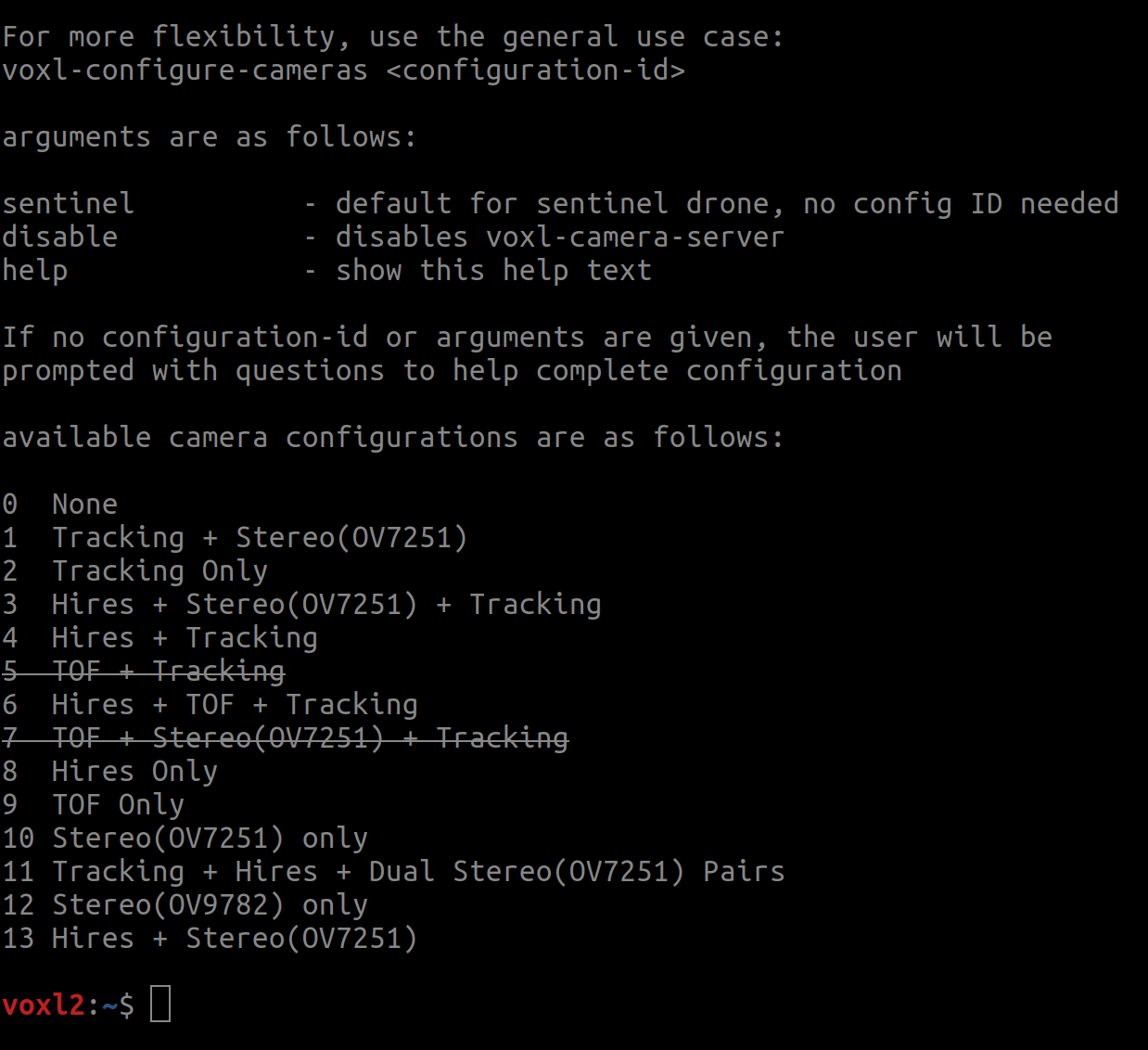
                    Because on my voxl2 it seems that neither this configuration nor the 2TOF2 configuration is possible...
                    Screenshot from 2023-04-05 16-02-47.png

                    1 Reply Last reply
                    0

                    Hello! It looks like you're interested in this conversation, but you don't have an account yet.

                    Getting fed up of having to scroll through the same posts each visit? When you register for an account, you'll always come back to exactly where you were before, and choose to be notified of new replies (either via email, or push notification). You'll also be able to save bookmarks and upvote posts to show your appreciation to other community members.

                    With your input, this post could be even better 💗

                    Register Login
                    Reply
                    • Reply as topic
                    Log in to reply
                    • Oldest to Newest
                    • Newest to Oldest
                    • Most Votes


                    ModalAI
                    Categories Recent Tags ModalAI.com Docs
                    © 2026 ModalAI® · Accelerating autonomy for smaller, smarter, safer drones · Powered by NodeBB
                    • Login

                    • Don't have an account? Register

                    • Login or register to search.
                    • First post
                      Last post
                    0
                    • Categories
                    • Recent
                    • Tags
                    • Popular
                    • Users
                    • Groups