Skip to content
  • Categories
  • Recent
  • Tags
  • Popular
  • Users
  • Groups
Collapse
Brand Logo

ModalAI Forum

  1. ModalAI Support Forum
  2. VOXL Dev Kits
  3. VOXL Flight Deck
  4. Propellers not Spinning / Calibration Issues

Propellers not Spinning / Calibration Issues

Scheduled Pinned Locked Moved VOXL Flight Deck
18 Posts 5 Posters 3.5k Views 2 Watching
  • Oldest to Newest
  • Newest to Oldest
  • Most Votes
Reply
  • Reply as topic
Log in to reply
This topic has been deleted. Only users with topic management privileges can see it.
  • Adrian HidalgoA Offline
    Adrian HidalgoA Offline
    Adrian Hidalgo
    ModalAI Team
    wrote on last edited by
    #2

    @alfa-budiman sorry to hear you're having problems. Let's see what we can do to resolve this.
    Want to clarify some things if you don't mind. In QGC(Q-Ground-Control) you've already set the frame to the hex?
    What version is your software?
    What motor and esc combo are you using?
    How are you connecting the esc's to the VF(Voxl-Flight)?
    From what you mentioned in attempting to calibrate the esc's, it sounds like esc's aren't talking with the VF. Are they PWM or DShot capable?

    alfa budimanA 1 Reply Last reply
    0
    • Chad SweetC Offline
      Chad SweetC Offline
      Chad Sweet
      ModalAI Team
      wrote on last edited by
      #3

      Please confirm you have a battery connected and NOT a wall supply

      1 Reply Last reply
      0
      • alfa budimanA Offline
        alfa budimanA Offline
        alfa budiman
        Contributor
        wrote on last edited by
        #4
        This post is deleted!
        1 Reply Last reply
        0
        • Adrian HidalgoA Adrian Hidalgo

          @alfa-budiman sorry to hear you're having problems. Let's see what we can do to resolve this.
          Want to clarify some things if you don't mind. In QGC(Q-Ground-Control) you've already set the frame to the hex?
          What version is your software?
          What motor and esc combo are you using?
          How are you connecting the esc's to the VF(Voxl-Flight)?
          From what you mentioned in attempting to calibrate the esc's, it sounds like esc's aren't talking with the VF. Are they PWM or DShot capable?

          alfa budimanA Offline
          alfa budimanA Offline
          alfa budiman
          Contributor
          wrote on last edited by alfa budiman
          #5

          @Adrian-Hidalgo
          Want to clarify some things if you don't mind. In QGC(Q-Ground-Control) you've already set the frame to the hex?

          • Yes

          What version is your software?

          • 1.11.3

          What motor and esc combo are you using?

          • ESCs: Readytosky 2-6S 40A Electronic Speed Controller

          • Motors: FlyCat HRotor 5010-360KV

          How are you connecting the esc's to the VF(Voxl-Flight)?

          • PWM breakout board that came with the VOXL Flight Deck.

          From what you mentioned in attempting to calibrate the esc's, it sounds like esc's aren't talking with the VF. Are they PWM or DShot capable?

          • I'll confirm and get back to you on this.

          @Chad-Sweet
          I am using a battery and not a wall power supply.

          1 Reply Last reply
          0
          • alfa budimanA Offline
            alfa budimanA Offline
            alfa budiman
            Contributor
            wrote on last edited by
            #6

            Some more info that may help:

            from mavlink shell on QGC:
            pwm info with drone disarmed:
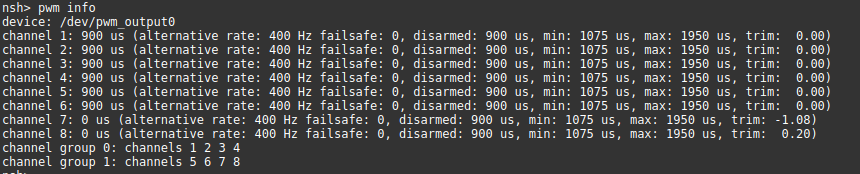
            db48d118-7c5a-436b-acb4-3befdf668511-image.png

            pwm info with the drone armed:
            9b026b98-a94d-425a-8c08-bdb07af1540f-image.png

            The ESCs are PWM capable

            1 Reply Last reply
            0
            • Adrian HidalgoA Offline
              Adrian HidalgoA Offline
              Adrian Hidalgo
              ModalAI Team
              wrote on last edited by Adrian Hidalgo
              #7

              Thanks for the information! We're looking into it and will get back to you.
              Can you spin the motors in the terminal of QGC using either:
              "pwm test -c 1 -p 1100" --> c designates which motor
              or
              "motor_test test -m 0 -p 15" ? --> m designates which motor

              When you plug in the battery, do the esc make a chime?

              alfa budimanA 1 Reply Last reply
              0
              • Adrian HidalgoA Adrian Hidalgo

                Thanks for the information! We're looking into it and will get back to you.
                Can you spin the motors in the terminal of QGC using either:
                "pwm test -c 1 -p 1100" --> c designates which motor
                or
                "motor_test test -m 0 -p 15" ? --> m designates which motor

                When you plug in the battery, do the esc make a chime?

                alfa budimanA Offline
                alfa budimanA Offline
                alfa budiman
                Contributor
                wrote on last edited by
                #8

                @Adrian-Hidalgo
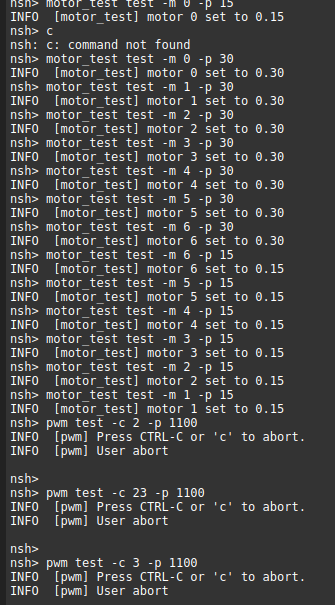
                I cannot spin the motors in terminal of QGC using the commands you provided. I tried different variations of them too and the motors do not spin. I also tried Motors Setup and it just says "Vehicle did not respond to command MAV_CMD_DO_MOTOR_TEST"

                I tried them with different options as well:
                8d7b6f89-f7d6-4629-be35-99b5d7167728-image.png

                The ESC does indeed make a chime when the battery is plugged in.

                I have a question - is it possible that some of the parameters I set on Q Ground control could result in my issue? Notably I should point out that I am using local_position_estimator for SYS_MC_EST_GROUP.

                I have also tried changing PWM_MAIN_MAXn to 2000 and PWM_MAIN_MINn to 1000, where n is 1 to 6. I tried setting it to other values as well, This didn't work either.

                alfa budimanA 1 Reply Last reply
                0
                • alfa budimanA alfa budiman

                  @Adrian-Hidalgo
                  I cannot spin the motors in terminal of QGC using the commands you provided. I tried different variations of them too and the motors do not spin. I also tried Motors Setup and it just says "Vehicle did not respond to command MAV_CMD_DO_MOTOR_TEST"

                  I tried them with different options as well:
                  8d7b6f89-f7d6-4629-be35-99b5d7167728-image.png

                  The ESC does indeed make a chime when the battery is plugged in.

                  I have a question - is it possible that some of the parameters I set on Q Ground control could result in my issue? Notably I should point out that I am using local_position_estimator for SYS_MC_EST_GROUP.

                  I have also tried changing PWM_MAIN_MAXn to 2000 and PWM_MAIN_MINn to 1000, where n is 1 to 6. I tried setting it to other values as well, This didn't work either.

                  alfa budimanA Offline
                  alfa budimanA Offline
                  alfa budiman
                  Contributor
                  wrote on last edited by alfa budiman
                  #9

                  I tried resetting the params, re-calibrating the sensors and using ekf2 for SYS_MC_EST_GROUP. I followed the instructions here: https://docs.modalai.com/upload-px4-parameters/

                  I should also note that I am working with two seperate VOXL Flight decks and have ran these tests on both of them, using both sets of params* and have the same result - which is that the motors do not spin.

                  *One set of params was from following your instructions - using the ek2_indoor_vio.params, the other set was one I put together myself thru trial and error, which used local_position_estimator.

                  Again, I tried manually changing PWM_MAIN_MAXn to and PWM_MAIN_MINn on both VOXL Flight Decks and the motors do not spin.

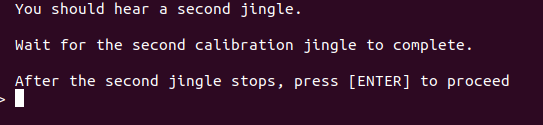
                  I tried calibrating ESCs as per your instructions, on both wired and wireless methods: https://docs.modalai.com/flight-core-pwm-esc-calibration/

                  This part is good to go
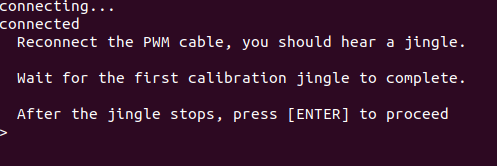
                  710863c2-77da-41b2-b8bc-d1baa2614a46-image.png

                  This part is an issue, I wait a few minutes and there is no second jingle
                  d0924e6c-5eb8-4ed8-b599-287f7d075110-image.png

                  1 Reply Last reply
                  0
                  • alfa budimanA Offline
                    alfa budimanA Offline
                    alfa budiman
                    Contributor
                    wrote on last edited by alfa budiman
                    #10

                    Overall, the problem is something that effects all ESCs or all the motors. It is unlikely that all 6 ESCs and all 6 motors are broken, if faulty parts are an issue (but everything else was good to go) then the properly functioning motors/ESCs would spin while the broken ones wouldn't. It's also unlikely that all the wiring between the VOXL Flight and all 6 ESCs would be improper.

                    If the issue is related to the physical components, I beleive it would be one of the following:

                    • the brand of motor is incompatible
                    • the brand of ESC is incompatible
                    • the breakout board is faulty
                    • the connection from the breakout board to the VOXL Flight deck is faulty
                    • PWM output on VOXL Flight Deck is faulty (J1007). Unlikely as I have two VOXL Flight Decks. Furthermore, I have done the following:
                      1 - disconnect PWM from VOXL Flight Deck. ESCs remain connected to power distribution
                      2 - connect drone to battery - ESCs chime
                      3 - while the drone is powered up, I connect PWM to VOXL Flight Deck via J1007. The ESCs chime again, coinciding with making that first jingle in the calibration process.

                    However, since the issue effects all ESCs / motors, a software issue, or an issue with the VOXL Flight Decks is a possibility. I think hardware issues with the VOXL Flight Deck is unlikely as I have tested two of them.

                    As for software issues, this could be PX4 version or QGround Control parameters, or something else. But I have no indication to tell me that the PX4 version or QGC params are the issue, I've tested two different sets of parameters; and on QGC the heading and artificial horizon respond as expected when I move the drone. I genuinely have no idea what to do next if it is a software issue.

                    The only other hint I have is the problem with calibration. I also do not think it is a battery / power issue, I tested it with a full battery, motors still don't spin.

                    1 Reply Last reply
                    0
                    • alfa budimanA Offline
                      alfa budimanA Offline
                      alfa budiman
                      Contributor
                      wrote on last edited by
                      #11

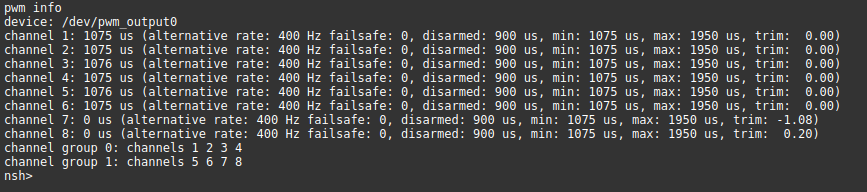
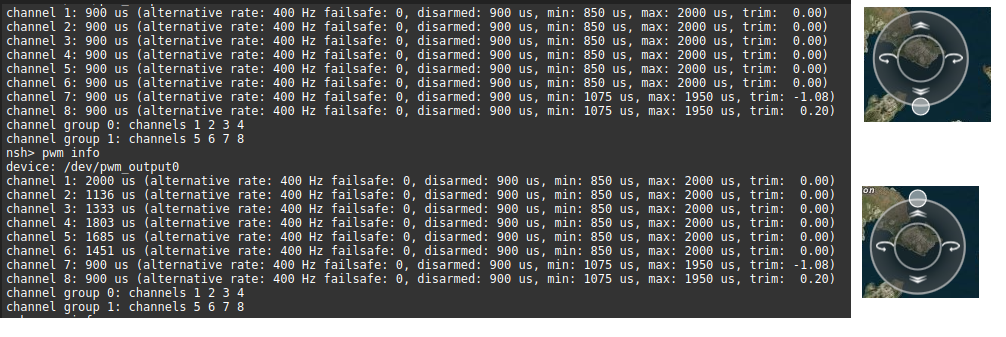
                      Additional testing with pwm info:

                      It does appear to be attempting to adjust PWM signal as I throttle the drone on virtual joystick:
                      e5050220-a904-4af9-9608-0abf171fb4c4-image.png

                      One possible theory - the ESC / motors need more PWM then what can be provided by QGC / VOXL Flight Deck. The max PWM it can provide is around 2100, even if the I set PWM_MAIN_MAX to 4000, it doesn't provide more than approx 2100. I'm certain that PWM_MAX_MAIN is the correct setting, as when I set this to 1600, and check pwm info, the PWM at max throttle is around 1600.

                      1 Reply Last reply
                      0
                      • modaltbM Offline
                        modaltbM Offline
                        modaltb
                        ModalAI Team
                        wrote on last edited by
                        #12

                        Hi @alfa-budiman ,

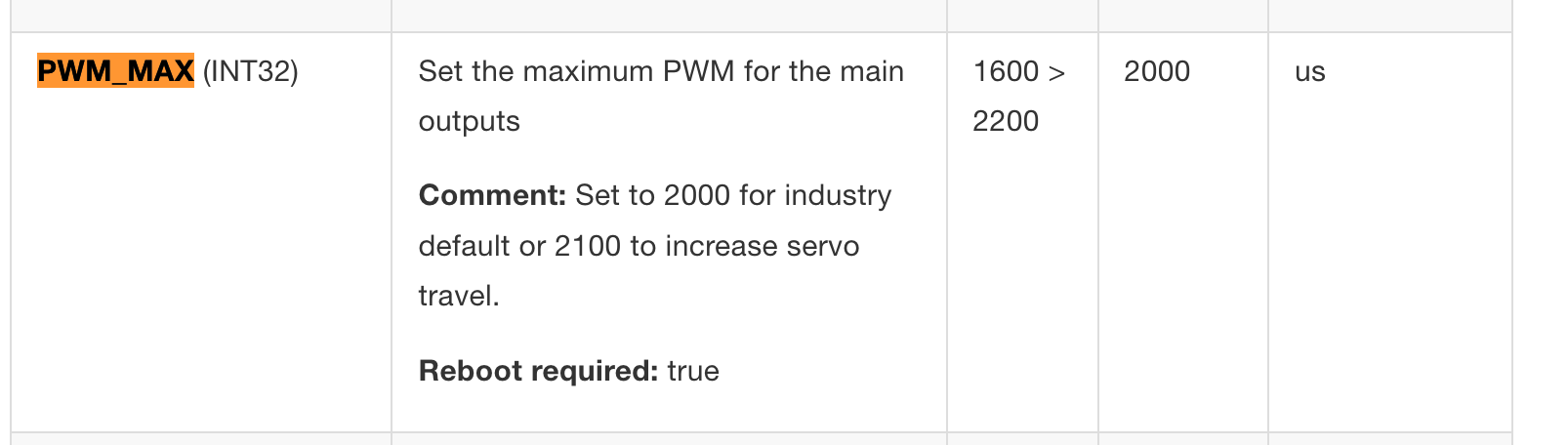
                        It looks like PWM_MAX in PX4 has a range from 1600 to 2200....
                        bb17b501-0fb8-4a45-b2ae-8069197ad1e5-image.png

                        v1.11:
                        https://docs.px4.io/v1.11/en/advanced_config/parameter_reference.html

                        and master still:
                        https://docs.px4.io/main/en/advanced_config/parameter_reference.html

                        Are you positive the ESC needs a 4000us?? I've not heard of that before 🤔

                        alfa budimanA 1 Reply Last reply
                        0
                        • modaltbM modaltb

                          Hi @alfa-budiman ,

                          It looks like PWM_MAX in PX4 has a range from 1600 to 2200....

                          bb17b501-0fb8-4a45-b2ae-8069197ad1e5-image.png

                          v1.11:
                          https://docs.px4.io/v1.11/en/advanced_config/parameter_reference.html

                          and master still:
                          https://docs.px4.io/main/en/advanced_config/parameter_reference.html

                          Are you positive the ESC needs a 4000us?? I've not heard of that before 🤔

                          alfa budimanA Offline
                          alfa budimanA Offline
                          alfa budiman
                          Contributor
                          wrote on last edited by
                          #13

                          @modaltb
                          I'm not positive that the ESC needs 4000. I just put that setting on QGC to test what would happen. I'll have to check the ESC documentation to verify its PWM range.

                          1 Reply Last reply
                          0
                          • Adrian HidalgoA Offline
                            Adrian HidalgoA Offline
                            Adrian Hidalgo
                            ModalAI Team
                            wrote on last edited by Adrian Hidalgo
                            #14

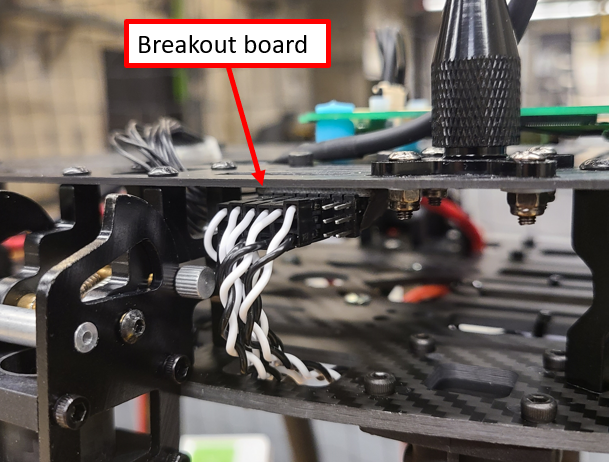
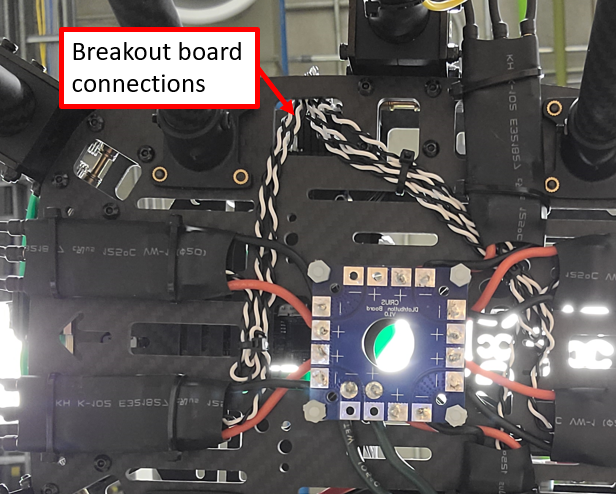
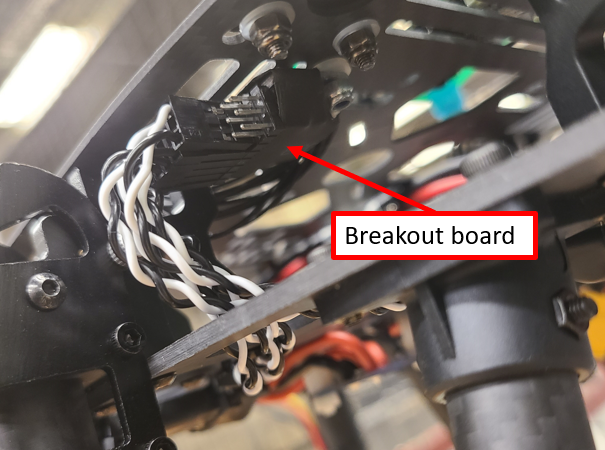
                            @alfa-budiman it may be possible that how the esc's are plugged into the breakout board are flipped. Signal is on top, ground is on the bottom.
                            Could you send a couple of high-resolution pictures of the setup?

                            alfa budimanA 1 Reply Last reply
                            0
                            • Adrian HidalgoA Adrian Hidalgo

                              @alfa-budiman it may be possible that how the esc's are plugged into the breakout board are flipped. Signal is on top, ground is on the bottom.
                              Could you send a couple of high-resolution pictures of the setup?

                              alfa budimanA Offline
                              alfa budimanA Offline
                              alfa budiman
                              Contributor
                              wrote on last edited by alfa budiman
                              #15

                              @Adrian-Hidalgo
                              1509fb3b-0cee-4cc0-9627-2c7ef24efb88-image.png

                              0b9aa5d9-1267-44cc-a144-b3d42f3c0242-image.png

                              4f85f57d-8a0a-4ffb-9e64-0f2c46a076c8-image.png

                              3a2d0c8c-7705-4617-8914-073eb3357903-image.png

                              Jeremy SchmidtJ 2 Replies Last reply
                              0
                              • alfa budimanA alfa budiman

                                @Adrian-Hidalgo
                                1509fb3b-0cee-4cc0-9627-2c7ef24efb88-image.png

                                0b9aa5d9-1267-44cc-a144-b3d42f3c0242-image.png

                                4f85f57d-8a0a-4ffb-9e64-0f2c46a076c8-image.png

                                3a2d0c8c-7705-4617-8914-073eb3357903-image.png

                                Jeremy SchmidtJ Offline
                                Jeremy SchmidtJ Offline
                                Jeremy Schmidt
                                ModalAI Team
                                wrote on last edited by
                                #16

                                @alfa-budiman Good morning, please try reversing all six pwm connections coming from the escs to the breakout board.
                                Your photo shows them plugged in with incorrect pinout.
                                This will definitely cause all of the problems you're describing. Thanks and good luck.

                                1 Reply Last reply
                                1
                                • alfa budimanA alfa budiman

                                  @Adrian-Hidalgo
                                  1509fb3b-0cee-4cc0-9627-2c7ef24efb88-image.png

                                  0b9aa5d9-1267-44cc-a144-b3d42f3c0242-image.png

                                  4f85f57d-8a0a-4ffb-9e64-0f2c46a076c8-image.png

                                  3a2d0c8c-7705-4617-8914-073eb3357903-image.png

                                  Jeremy SchmidtJ Offline
                                  Jeremy SchmidtJ Offline
                                  Jeremy Schmidt
                                  ModalAI Team
                                  wrote on last edited by
                                  #17

                                  @alfa-budiman And I would also suggest going back into QGC and configuring the PWM related params back to their defaults. Once the polarity of the PWM's are correct, you should be able to calibrate successfully.

                                  1 Reply Last reply
                                  1
                                  • alfa budimanA Offline
                                    alfa budimanA Offline
                                    alfa budiman
                                    Contributor
                                    wrote on last edited by
                                    #18

                                    Thanks. I got it working and it appears to be calibrated. It also appears to be responding as intended with MAVROS when I publish to /mavros/setpoint_velocity/cmd_vel_unstamped

                                    I tested with props off and powered via battery. I published 0,0,1,0 corresponding with vertical speed of 1 m/s up and the motors sped up. I then published 0,0,-1,0 and the motors slowed down as expected.

                                    1 Reply Last reply
                                    0

                                    Hello! It looks like you're interested in this conversation, but you don't have an account yet.

                                    Getting fed up of having to scroll through the same posts each visit? When you register for an account, you'll always come back to exactly where you were before, and choose to be notified of new replies (either via email, or push notification). You'll also be able to save bookmarks and upvote posts to show your appreciation to other community members.

                                    With your input, this post could be even better 💗

                                    Register Login
                                    Reply
                                    • Reply as topic
                                    Log in to reply
                                    • Oldest to Newest
                                    • Newest to Oldest
                                    • Most Votes


                                    ModalAI
                                    Categories Recent Tags ModalAI.com Docs
                                    © 2026 ModalAI® · Accelerating autonomy for smaller, smarter, safer drones · Powered by NodeBB
                                    • Login

                                    • Login or register to search.
                                    • First post
                                      Last post
                                    0
                                    • Categories
                                    • Recent
                                    • Tags
                                    • Popular
                                    • Users
                                    • Groups