Skip to content
  • Categories
  • Recent
  • Tags
  • Popular
  • Users
  • Groups
Collapse
Brand Logo

ModalAI Forum

  1. ModalAI Support Forum
  2. VOXL Compute & Autopilot
  3. VOXL 2
  4. Broken Parts

Broken Parts

Scheduled Pinned Locked Moved VOXL 2
52 Posts 4 Posters 19.7k Views 1 Watching
  • Oldest to Newest
  • Newest to Oldest
  • Most Votes
Reply
  • Reply as topic
Log in to reply
This topic has been deleted. Only users with topic management privileges can see it.
  • Bright NnadiB Offline
    Bright NnadiB Offline
    Bright Nnadi
    Contributor
    wrote on last edited by
    #31

    Tom right now I'm using the ADB and I want to enable the station mode. what SSID and password Im using for the command line adb shell voxl-wifi station <SSID> <Passowrd>

    1 Reply Last reply
    0
    • tomT Offline
      tomT Offline
      tom
      admin
      wrote on last edited by
      #32

      @Bright-Nnadi Apologies I mean running ifconfig in adb shell

      You will do the following:

      adb shell
      
      voxl-wifi station SSID PASS


      where SSID is the name of the WiFi network you want to connect to and PASS is the password of that network.

      You'll want to connect to whatever network your ground station is also connected to.

      Bright NnadiB 1 Reply Last reply
      0
      • tomT tom

        @Bright-Nnadi Apologies I mean running ifconfig in adb shell

        You will do the following:

        adb shell
        
        voxl-wifi station SSID PASS


        where SSID is the name of the WiFi network you want to connect to and PASS is the password of that network.

        You'll want to connect to whatever network your ground station is also connected to.

        Bright NnadiB Offline
        Bright NnadiB Offline
        Bright Nnadi
        Contributor
        wrote on last edited by
        #33

        @tom For some reason i am not able to get into the adb shell. And I am also using my organization's network which is private.

        1 Reply Last reply
        0
        • Bright NnadiB Offline
          Bright NnadiB Offline
          Bright Nnadi
          Contributor
          wrote on last edited by
          #34

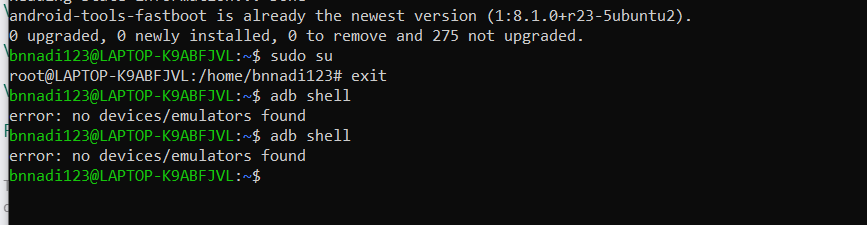
          @tom I'm trying to set up ADB now but this is happening 06b7a42f-fb9e-4a6c-86bd-279132cd724c-image.png

          1 Reply Last reply
          0
          • Bright NnadiB Offline
            Bright NnadiB Offline
            Bright Nnadi
            Contributor
            wrote on last edited by
            #35

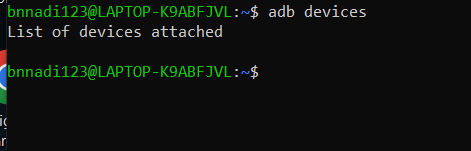
            @tom @Alex-Gardner I successfully installed adb but i am not still able to detect my VOXL CAM 419a6c4d-3e16-4010-8f1d-ed346e5db1cf-image.png
            1 Reply Last reply
            0
            • Bright NnadiB Offline
              Bright NnadiB Offline
              Bright Nnadi
              Contributor
              wrote on last edited by
              #36

              53516c02-f21c-485d-b0c5-60f13f880297-image.png

              1 Reply Last reply
              0
              • tomT Offline
                tomT Offline
                tom
                admin
                wrote on last edited by
                #37

                @Bright-Nnadi Are you using a Virtual Machine or are you running Ubuntu natively?

                Bright NnadiB 1 Reply Last reply
                0
                • Bright NnadiB Offline
                  Bright NnadiB Offline
                  Bright Nnadi
                  Contributor
                  wrote on last edited by
                  #38

                  @tom I am running ubuntu on my windows

                  1 Reply Last reply
                  0
                  • tomT tom

                    @Bright-Nnadi Are you using a Virtual Machine or are you running Ubuntu natively?

                    Bright NnadiB Offline
                    Bright NnadiB Offline
                    Bright Nnadi
                    Contributor
                    wrote on last edited by
                    #39

                    @tom is it possible we have a remote meeting?

                    1 Reply Last reply
                    0
                    • tomT Offline
                      tomT Offline
                      tom
                      admin
                      wrote on last edited by
                      #40

                      @Bright-Nnadi I would recommend running Ubuntu natively on your ground station, this has worked for others who have issues when using a Virtual Machine. USB pass-through is often iffy.

                      Bright NnadiB 1 Reply Last reply
                      0
                      • tomT tom

                        @Bright-Nnadi I would recommend running Ubuntu natively on your ground station, this has worked for others who have issues when using a Virtual Machine. USB pass-through is often iffy.

                        Bright NnadiB Offline
                        Bright NnadiB Offline
                        Bright Nnadi
                        Contributor
                        wrote on last edited by
                        #41

                        @tom but I don’t have a gcs step up yet. I just want to turn out the camera.

                        1 Reply Last reply
                        0
                        • tomT Offline
                          tomT Offline
                          tom
                          admin
                          wrote on last edited by
                          #42

                          @Bright-Nnadi I'm confused what you're asking. If you want to do any sort of configuration/setup you'll have to get ADB working, which I would use Ubuntu natively on your machine in order to do that

                          Bright NnadiB 1 Reply Last reply
                          0
                          • tomT tom

                            @Bright-Nnadi I'm confused what you're asking. If you want to do any sort of configuration/setup you'll have to get ADB working, which I would use Ubuntu natively on your machine in order to do that

                            Bright NnadiB Offline
                            Bright NnadiB Offline
                            Bright Nnadi
                            Contributor
                            wrote on last edited by
                            #43

                            @tom I’m getting confused too. So I’m following y’all’s documentation. I have Ubuntu installed on my laptop natively and I have tried all the AdB commands y’all provided to active ADB but it did not work. If you can please give me a detail ordered steps to follow to have ADB activated then use the station mode to access the VOXL CAM.

                            1 Reply Last reply
                            0
                            • tomT Offline
                              tomT Offline
                              tom
                              admin
                              wrote on last edited by
                              #44

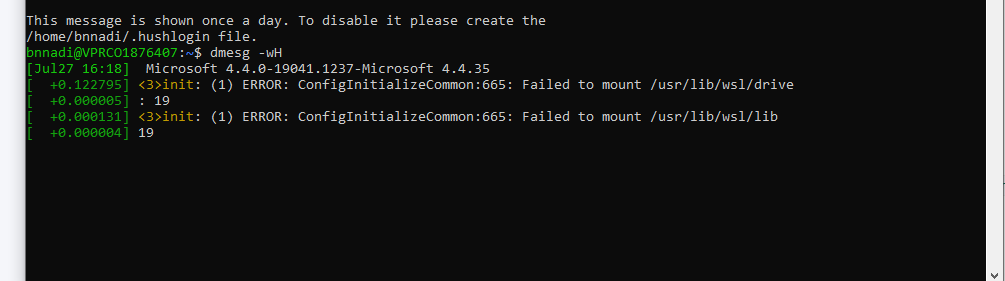
                              @Bright-Nnadi In a terminal, run dmesg -wH, then power your VOXL CAM and plug in USB to your machine, do you see any output in dmesg showing that the hardware is detected at all? If so, post it here and I can see what's going on.

                              Bright NnadiB 1 Reply Last reply
                              0
                              • tomT tom

                                @Bright-Nnadi In a terminal, run dmesg -wH, then power your VOXL CAM and plug in USB to your machine, do you see any output in dmesg showing that the hardware is detected at all? If so, post it here and I can see what's going on.

                                Bright NnadiB Offline
                                Bright NnadiB Offline
                                Bright Nnadi
                                Contributor
                                wrote on last edited by
                                #45

                                @tom This is what I'm seeingcfb909a4-393d-4590-b8ad-884afc63ec5c-image.png

                                1 Reply Last reply
                                0
                                • tomT Offline
                                  tomT Offline
                                  tom
                                  admin
                                  wrote on last edited by
                                  #46

                                  @Bright-Nnadi I can provide support in this case if you're running Ubuntu natively. Looks like you are using WSL on Windows.

                                  If you have a spare computer that you can actually load Ubuntu on by following something like this: https://ubuntu.com/tutorials/install-ubuntu-desktop#1-overview then I can help you out once you've done that but we don't use ADB over WSL.

                                  It's possible someone else on the forum has done it but we do not.

                                  Are you attempting to use the same VOXL CAM that we have already issued you an RMA for? If so I wouldn't keep trying to get it to work and I would send it in so we can fix it for you.

                                  1 Reply Last reply
                                  0
                                  • Steve TurnerS Offline
                                    Steve TurnerS Offline
                                    Steve Turner
                                    wrote on last edited by
                                    #47

                                    @Bright-Nnadi

                                    Came over here from the other thread you tagged me in. I'm not a member of the ModalAI team, but I'll try my best.

                                    It looks like you are using WSL for your Ubuntu VM. I have tried this previously with USB passthrough and at the time it actually was not supported by WSL/WSL2. VirtualBox or another VM solution would likely have much better support for USB passthrough. Even with that, as @tom said you are likely to encounter troubles in a VM. https://stackoverflow.com/a/61089833 Has an example that might help you.

                                    I would confirm first that the device even shows up in Windows with ADB. https://developer.android.com/studio/releases/platform-tools Download platform tools and try running adb list

                                    If you want to keep trying, https://www.xda-developers.com/wsl-connect-usb-devices-windows-11/ might be a good article to read through on getting USB devices to show up in your WSL VM.

                                    Bright NnadiB 1 Reply Last reply
                                    0
                                    • Bright NnadiB Offline
                                      Bright NnadiB Offline
                                      Bright Nnadi
                                      Contributor
                                      wrote on last edited by
                                      #48

                                      @tom Great, yeah I was using that VOXL CAM but I just mailed to y'all today but I'm hoping one gets to me on time, because I am supposed to be using it for a project. I will load the Ubuntu desktop on another device when I am done.

                                      1 Reply Last reply
                                      0
                                      • Steve TurnerS Steve Turner

                                        @Bright-Nnadi

                                        Came over here from the other thread you tagged me in. I'm not a member of the ModalAI team, but I'll try my best.

                                        It looks like you are using WSL for your Ubuntu VM. I have tried this previously with USB passthrough and at the time it actually was not supported by WSL/WSL2. VirtualBox or another VM solution would likely have much better support for USB passthrough. Even with that, as @tom said you are likely to encounter troubles in a VM. https://stackoverflow.com/a/61089833 Has an example that might help you.

                                        I would confirm first that the device even shows up in Windows with ADB. https://developer.android.com/studio/releases/platform-tools Download platform tools and try running adb list

                                        If you want to keep trying, https://www.xda-developers.com/wsl-connect-usb-devices-windows-11/ might be a good article to read through on getting USB devices to show up in your WSL VM.

                                        Bright NnadiB Offline
                                        Bright NnadiB Offline
                                        Bright Nnadi
                                        Contributor
                                        wrote on last edited by
                                        #49

                                        @Steve-Turner Thanks Steve, i'm sorry I thought you were a member but I will look into this and let you know how it goes.

                                        1 Reply Last reply
                                        0
                                        • Bright NnadiB Offline
                                          Bright NnadiB Offline
                                          Bright Nnadi
                                          Contributor
                                          wrote on last edited by
                                          #50

                                          @tom Hey tom, so i received my new VOXL-CAM and i Ubuntu ready too. I am trying to configure ROS on VOXL but I am getting some errors there.


                                          1 Reply Last reply
                                          0

                                          Hello! It looks like you're interested in this conversation, but you don't have an account yet.

                                          Getting fed up of having to scroll through the same posts each visit? When you register for an account, you'll always come back to exactly where you were before, and choose to be notified of new replies (either via email, or push notification). You'll also be able to save bookmarks and upvote posts to show your appreciation to other community members.

                                          With your input, this post could be even better 💗

                                          Register Login
                                          Reply
                                          • Reply as topic
                                          Log in to reply
                                          • Oldest to Newest
                                          • Newest to Oldest
                                          • Most Votes


                                          ModalAI
                                          Categories Recent Tags ModalAI.com Docs
                                          © 2026 ModalAI® · Accelerating autonomy for smaller, smarter, safer drones · Powered by NodeBB
                                          • Login

                                          • Login or register to search.
                                          • First post
                                            Last post
                                          0
                                          • Categories
                                          • Recent
                                          • Tags
                                          • Popular
                                          • Users
                                          • Groups