Skip to content
  • Categories
  • Recent
  • Tags
  • Popular
  • Users
  • Groups
Collapse
Brand Logo

ModalAI Forum

  1. ModalAI Support Forum
  2. Ask your questions right here!
  3. How to install and configure OpenVPN?

How to install and configure OpenVPN?

Scheduled Pinned Locked Moved Ask your questions right here!
37 Posts 2 Posters 9.8k Views 1 Watching
  • Oldest to Newest
  • Newest to Oldest
  • Most Votes
Reply
  • Reply as topic
Log in to reply
This topic has been deleted. Only users with topic management privileges can see it.
  • D Offline
    D Offline
    Djalma Ribeiro
    Contributor
    wrote on last edited by
    #19

    Now I understand a little more! By the way, thank you very much for your help.

    I have both the pc and the drone online on OpenVPN:
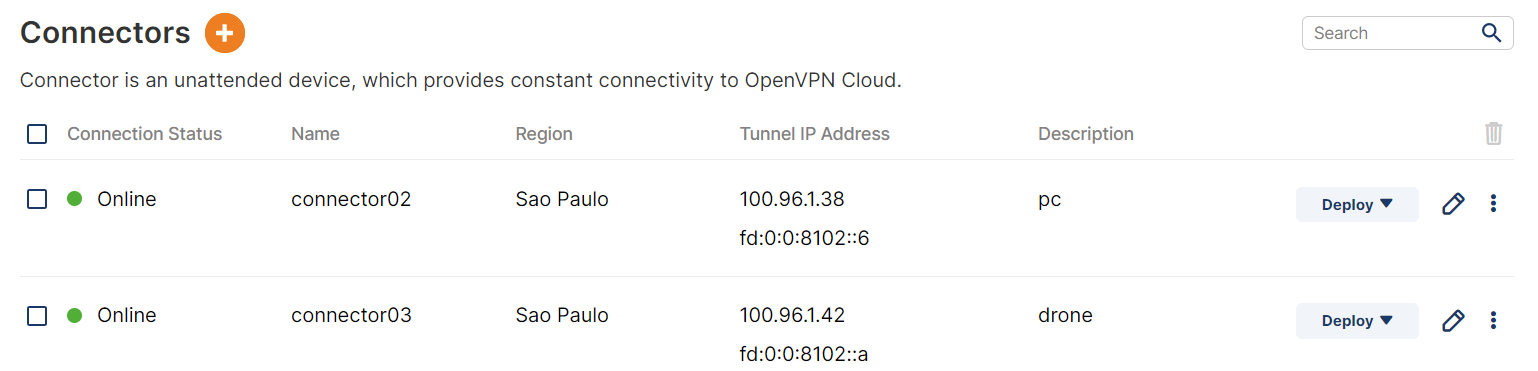
    Captura de tela 2022-05-04 164903.png

    But neither can find the other by ping.

    Is there anything else I'm forgetting?

    1 Reply Last reply
    0
    • tomT Offline
      tomT Offline
      tom
      admin
      wrote on last edited by
      #20

      @Djalma-Ribeiro Are you using a windows machine? All of our devices use Ubuntu 18.04 so I don't have much experience with it.

      However on Windows, I know that some of our customers have had to disable all their firewalls in order to allow the traffic to come through.

      D 1 Reply Last reply
      0
      • tomT tom

        @Djalma-Ribeiro Are you using a windows machine? All of our devices use Ubuntu 18.04 so I don't have much experience with it.

        However on Windows, I know that some of our customers have had to disable all their firewalls in order to allow the traffic to come through.

        D Offline
        D Offline
        Djalma Ribeiro
        Contributor
        wrote on last edited by
        #21

        @tom I managed to make the ping work by putting the drone in host and the pc in network.

        Do I have to use UDP or TCP to connect to the QGC?

        1 Reply Last reply
        0
        • tomT Offline
          tomT Offline
          tom
          admin
          wrote on last edited by
          #22

          @Djalma-Ribeiro By default it'll use UDP. See this page for the next steps: https://docs.modalai.com/Qualcomm-Flight-RB5-user-guide-px4/

          You will have to modify the rb5-net-check service and change the line ExecStart=/usr/bin/rb5-net-check wlan0 192.168 to ExecStart=/usr/bin/rb5-net-check tun0 100.96 in order to tell the drone to wait for the VPN network interface to come up before sending out PX4 packets.

          Then you will have to modify the previously mentioned /etc/modalai/qgc-ip.cfg and adding the IP of your PC on the VPN in order to tell PX4 where to send packets.

          You can also look at : /etc/modalai/full-m0052.config in order to see the PX4 startup config

          D 1 Reply Last reply
          0
          • tomT tom

            @Djalma-Ribeiro By default it'll use UDP. See this page for the next steps: https://docs.modalai.com/Qualcomm-Flight-RB5-user-guide-px4/

            You will have to modify the rb5-net-check service and change the line ExecStart=/usr/bin/rb5-net-check wlan0 192.168 to ExecStart=/usr/bin/rb5-net-check tun0 100.96 in order to tell the drone to wait for the VPN network interface to come up before sending out PX4 packets.

            Then you will have to modify the previously mentioned /etc/modalai/qgc-ip.cfg and adding the IP of your PC on the VPN in order to tell PX4 where to send packets.

            You can also look at : /etc/modalai/full-m0052.config in order to see the PX4 startup config

            D Offline
            D Offline
            Djalma Ribeiro
            Contributor
            wrote on last edited by
            #23

            @tom I didn't find the file /etc/modalai/qgc-ip.cfg

            1 Reply Last reply
            0
            • tomT Offline
              tomT Offline
              tom
              admin
              wrote on last edited by
              #24

              @Djalma-Ribeiro Okay you may have a slightly older version of the SDK. Go ahead and download the latest SDK from: https://developer.modalai.com/asset/4

              8fda22a7-4c14-47e3-b414-06a3f6e07924-image.png

              and then follow the instructions here to install:
              https://docs.modalai.com/Qualcomm-Flight-RB5-sdk-installation/

              This way we know you're using the latest SDK. This qgc-ip file was added in a later release

              D 1 Reply Last reply
              1
              • tomT tom

                @Djalma-Ribeiro Okay you may have a slightly older version of the SDK. Go ahead and download the latest SDK from: https://developer.modalai.com/asset/4
                8fda22a7-4c14-47e3-b414-06a3f6e07924-image.png

                and then follow the instructions here to install:
                https://docs.modalai.com/Qualcomm-Flight-RB5-sdk-installation/

                This way we know you're using the latest SDK. This qgc-ip file was added in a later release

                D Offline
                D Offline
                Djalma Ribeiro
                Contributor
                wrote on last edited by
                #25

                @tom 😢

                root@qrb5165-rb5:/home/rb5-flight-sdk-1.1.3# ./update-sdk.sh
                bash: ./update-sdk.sh: Permission denied
                
                1 Reply Last reply
                0
                • tomT Offline
                  tomT Offline
                  tom
                  admin
                  wrote on last edited by
                  #26

                  @Djalma-Ribeiro Looks like the permissions got lost somewhere along the way, you can use chmod +x update-sdk.sh to make it executable, then try again

                  D 1 Reply Last reply
                  0
                  • tomT tom

                    @Djalma-Ribeiro Looks like the permissions got lost somewhere along the way, you can use chmod +x update-sdk.sh to make it executable, then try again

                    D Offline
                    D Offline
                    Djalma Ribeiro
                    Contributor
                    wrote on last edited by
                    #27

                    @tom you are the best! thanks

                    D 1 Reply Last reply
                    0
                    • D Djalma Ribeiro

                      @tom you are the best! thanks

                      D Offline
                      D Offline
                      Djalma Ribeiro
                      Contributor
                      wrote on last edited by
                      #28

                      @tom

                      Well, I managed to update, redid the settings and he is connected to the internet. But I still can't connect the QGC.

                      I didn't understand one thing. Why the drone and the pc are online in the "Connectors" of "Networks" but both can't find each other by ping?

                      You can only ping if one of them is a Host Connector and the other is a Networks Connector.

                      I believe it is not Firewall because I have already disabled it.

                      Any idea?

                      1 Reply Last reply
                      0
                      • tomT Offline
                        tomT Offline
                        tom
                        admin
                        wrote on last edited by
                        #29

                        @Djalma-Ribeiro I have no experience with having an OpenVPN online account and hosting through there so I can't provide any info on any of those settings. We host our own VPN servers using Google Cloud. That doesn't mean you can't do what you're doing, I just have no experience in that area.

                        You might get better answers to those questions on the OpenVPN forum (https://forums.openvpn.net/)

                        It's possible you have to configure the server's firewall as well to allow traffic on the ports that PX4 uses but that's just a guess

                        D 1 Reply Last reply
                        0
                        • tomT tom

                          @Djalma-Ribeiro I have no experience with having an OpenVPN online account and hosting through there so I can't provide any info on any of those settings. We host our own VPN servers using Google Cloud. That doesn't mean you can't do what you're doing, I just have no experience in that area.

                          You might get better answers to those questions on the OpenVPN forum (https://forums.openvpn.net/)

                          It's possible you have to configure the server's firewall as well to allow traffic on the ports that PX4 uses but that's just a guess

                          D Offline
                          D Offline
                          Djalma Ribeiro
                          Contributor
                          wrote on last edited by
                          #30

                          @tom Is there an easier way to connect the QGC to the drone? Even if on each connection I need to manually inform the ips.

                          I need to make the drone connect via LTE/5G urgently.

                          1 Reply Last reply
                          0
                          • tomT Offline
                            tomT Offline
                            tom
                            admin
                            wrote on last edited by
                            #31

                            @Djalma-Ribeiro We usually recommend just connecting over WiFi before jumping into cellular + VPN. Have you done that yet to familiarize yourself with the process of connecting to QGC?

                            D 1 Reply Last reply
                            0
                            • tomT tom

                              @Djalma-Ribeiro We usually recommend just connecting over WiFi before jumping into cellular + VPN. Have you done that yet to familiarize yourself with the process of connecting to QGC?

                              D Offline
                              D Offline
                              Djalma Ribeiro
                              Contributor
                              wrote on last edited by
                              #32

                              @tom wifi yes

                              1 Reply Last reply
                              0
                              • tomT Offline
                                tomT Offline
                                tom
                                admin
                                wrote on last edited by
                                #33

                                @Djalma-Ribeiro As long as you have your VPN set up correctly it should be the exact same idea. The only change is that you will have to specify the IP of your ground station in the qgc-ip file. I can't help too much with the OpenVPN side of things other than what is in our docs.

                                D 1 Reply Last reply
                                0
                                • tomT tom

                                  @Djalma-Ribeiro As long as you have your VPN set up correctly it should be the exact same idea. The only change is that you will have to specify the IP of your ground station in the qgc-ip file. I can't help too much with the OpenVPN side of things other than what is in our docs.

                                  D Offline
                                  D Offline
                                  Djalma Ribeiro
                                  Contributor
                                  wrote on last edited by
                                  #34

                                  @tom how do i update openvpn in drone?

                                  1 Reply Last reply
                                  0
                                  • tomT Offline
                                    tomT Offline
                                    tom
                                    admin
                                    wrote on last edited by
                                    #35

                                    @Djalma-Ribeiro RB5 is running Ubuntu 18.04, so any installation / updating instructions for Ubuntu 18 should also be applicable to RB5

                                    1 Reply Last reply
                                    0
                                    • D Offline
                                      D Offline
                                      Djalma Ribeiro
                                      Contributor
                                      wrote on last edited by
                                      #36

                                      I was able to configure the VPN using this video: https://www.youtube.com/watch?v=IsyNtovozVU

                                      How do I make the drone auto-initialize the vpn?

                                      1 Reply Last reply
                                      0
                                      • tomT Offline
                                        tomT Offline
                                        tom
                                        admin
                                        wrote on last edited by
                                        #37

                                        @Djalma-Ribeiro You can create a systemd service file and enable it to run on boot and have it execute the OpenVPN connection command.

                                        Here is an example on how we have used it in the past on a VOXL:

                                        [Unit]
                                        After=voxl-time-sync.service
                                        Requires=voxl-time-sync.service
                                        
                                        [Service]
                                        Type=forking
                                        ExecStartPre=/bin/sleep 2
                                        ExecStart=/usr/sbin/openvpn --script-security 2 --daemon --config /etc/openvpn/KEY_FILE
                                        
                                        [Install]
                                        WantedBy=default.target
                                        

                                        Won't be exactly the same as above but that's the general idea.

                                        1 Reply Last reply
                                        2

                                        Hello! It looks like you're interested in this conversation, but you don't have an account yet.

                                        Getting fed up of having to scroll through the same posts each visit? When you register for an account, you'll always come back to exactly where you were before, and choose to be notified of new replies (either via email, or push notification). You'll also be able to save bookmarks and upvote posts to show your appreciation to other community members.

                                        With your input, this post could be even better 💗

                                        Register Login
                                        Reply
                                        • Reply as topic
                                        Log in to reply
                                        • Oldest to Newest
                                        • Newest to Oldest
                                        • Most Votes


                                        ModalAI
                                        Categories Recent Tags ModalAI.com Docs
                                        © 2026 ModalAI® · Accelerating autonomy for smaller, smarter, safer drones · Powered by NodeBB
                                        • Login

                                        • Login or register to search.
                                        • First post
                                          Last post
                                        0
                                        • Categories
                                        • Recent
                                        • Tags
                                        • Popular
                                        • Users
                                        • Groups