Skip to content
  • Categories
  • Recent
  • Tags
  • Popular
  • Users
  • Groups
Collapse
Brand Logo

ModalAI Forum

  1. ModalAI Support Forum
  2. VOXL Compute & Autopilot
  3. VOXL Flight
  4. Viewing onboard Microhard config webpage

Viewing onboard Microhard config webpage

Scheduled Pinned Locked Moved VOXL Flight
7 Posts 2 Posters 1.2k Views 1 Watching
  • Oldest to Newest
  • Newest to Oldest
  • Most Votes
Reply
  • Reply as topic
Log in to reply
This topic has been deleted. Only users with topic management privileges can see it.
  • wilkinsafW Offline
    wilkinsafW Offline
    wilkinsaf
    ModalAI Team
    wrote on last edited by
    #1

    Hello,

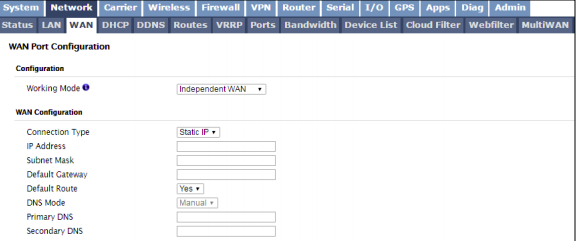
    On microhard dev board we can access configuration settings by plugging into computer and going to 192.168.168.1
    f52cdc0b-d89c-4709-83ea-24a177989999-image.png

    How could we access this page once the modem has been mounted on the VOXL? I have been trying to come up with a way to do so, but have not come up with anything substantial.

    AT commands?

    Thank you

    1 Reply Last reply
    0
    • tomT Offline
      tomT Offline
      tom
      admin
      wrote on last edited by
      #2

      @wilkinsaf Since Microhard is a point to point radio it can be assumed that you will have a modem on board as well as a modem connected to your ground station.

      If the two modems are connected to each other then you will be able to access the configuration settings for either modem from your ground station.

      wilkinsafW 2 Replies Last reply
      0
      • tomT tom

        @wilkinsaf Since Microhard is a point to point radio it can be assumed that you will have a modem on board as well as a modem connected to your ground station.

        If the two modems are connected to each other then you will be able to access the configuration settings for either modem from your ground station.

        wilkinsafW Offline
        wilkinsafW Offline
        wilkinsaf
        ModalAI Team
        wrote on last edited by
        #3

        @tom

        yes, but for some reason the only ip addresses that are available is the one that I am connected to (slave, 192.168.168.1) and the voxl (192.168.168.100).

        I just put the voxl's microhard into slave mode, and the GCS microhard into master mode and now I can access at 192.168.168.2.

        I wonder why that is. Why would it matter if I am trying to access through the slave or the master node?

        1 Reply Last reply
        0
        • tomT tom

          @wilkinsaf Since Microhard is a point to point radio it can be assumed that you will have a modem on board as well as a modem connected to your ground station.

          If the two modems are connected to each other then you will be able to access the configuration settings for either modem from your ground station.

          wilkinsafW Offline
          wilkinsafW Offline
          wilkinsaf
          ModalAI Team
          wrote on last edited by
          #4

          @tom Maybe the microhard I was connected to was not actually in slave mode. but two master nodes, so when I tried to hit 192.168.168.1 it went to the microhard that was connected to my gcs and not the VOXL's

          But, in that setup I am surprised that I would still be able to connect to drone with two master nodes

          1 Reply Last reply
          0
          • tomT Offline
            tomT Offline
            tom
            admin
            wrote on last edited by tom
            #5

            @wilkinsaf Yeah sounds like something funky was going on with your setup because it shouldn't matter. As long as the two modems are connected you should be able to ping all around to any of the modems or devices connected.


            wilkinsafW 1 Reply Last reply
            0
            • tomT tom

              @wilkinsaf Yeah sounds like something funky was going on with your setup because it shouldn't matter. As long as the two modems are connected you should be able to ping all around to any of the modems or devices connected.

              wilkinsafW Offline
              wilkinsafW Offline
              wilkinsaf
              ModalAI Team
              wrote on last edited by
              #6

              @tom Yes, that was my belief as well.

              However, I am wondering what would happen if I have 2 slaves join the network. Would they still be at 192.168.168.2 like in the documentation?

              1 Reply Last reply
              0
              • tomT Offline
                tomT Offline
                tom
                admin
                wrote on last edited by
                #7

                I'm not sure if you can have 2 slaves join the same network. From my understanding these modems only support 1 master and 1 slave

                1 Reply Last reply
                0

                Hello! It looks like you're interested in this conversation, but you don't have an account yet.

                Getting fed up of having to scroll through the same posts each visit? When you register for an account, you'll always come back to exactly where you were before, and choose to be notified of new replies (either via email, or push notification). You'll also be able to save bookmarks and upvote posts to show your appreciation to other community members.

                With your input, this post could be even better 💗

                Register Login
                Reply
                • Reply as topic
                Log in to reply
                • Oldest to Newest
                • Newest to Oldest
                • Most Votes


                ModalAI
                Categories Recent Tags ModalAI.com Docs
                © 2026 ModalAI® · Accelerating autonomy for smaller, smarter, safer drones · Powered by NodeBB
                • Login

                • Don't have an account? Register

                • Login or register to search.
                • First post
                  Last post
                0
                • Categories
                • Recent
                • Tags
                • Popular
                • Users
                • Groups