
M0213 Wifi board pinout and availability
-
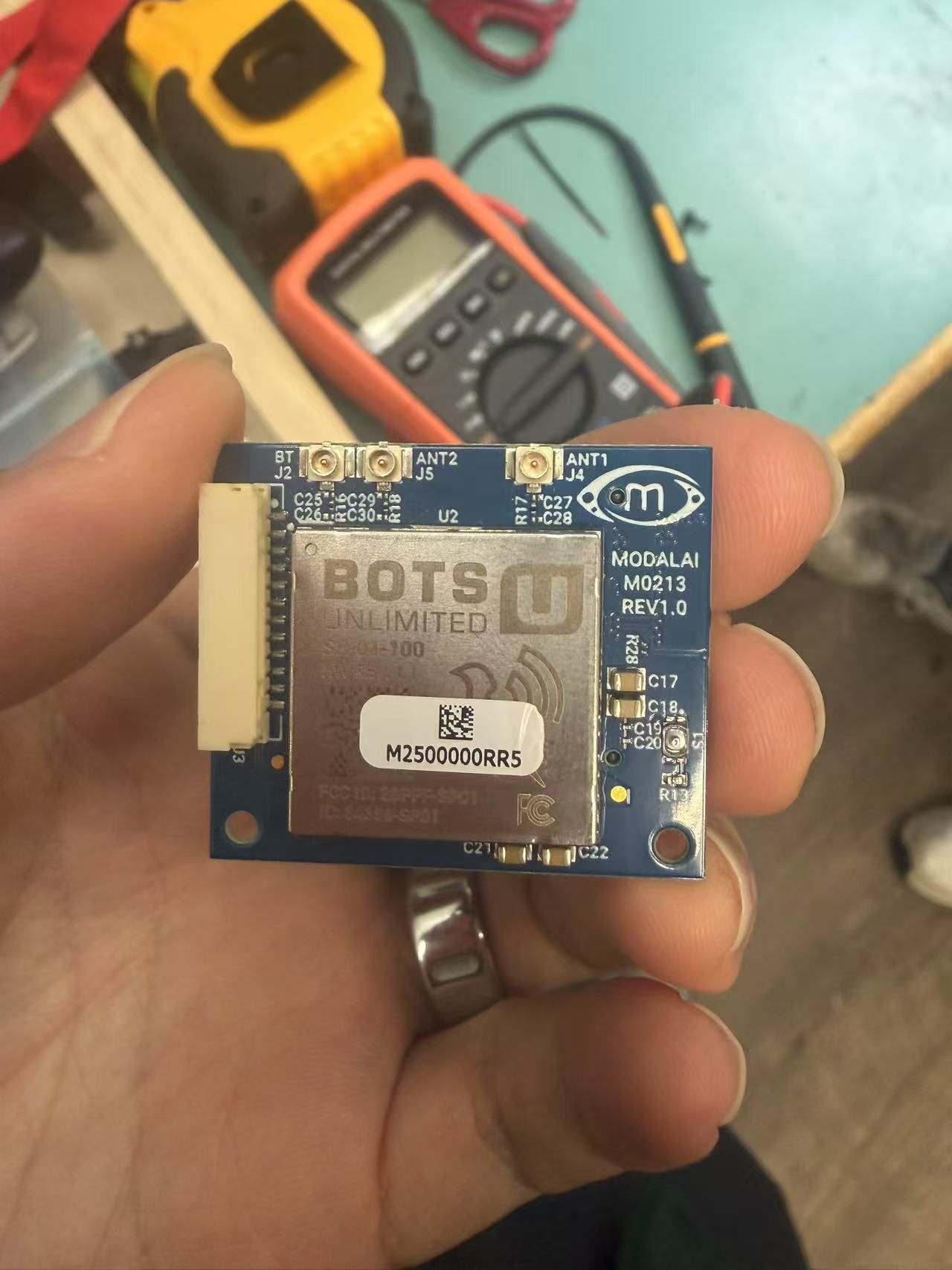
Hi, can we get the pinout for the M0213 wifi board? Specifically the two connection ports on the front and back of the board.
Also, can we get more of these boards?
-
A picture of the board:
-
Any support for this issue? Thanks!
-
Hi @muqing-cao Sorry we are lacking in the docs here, but the M0213 was a direct replacement to the M0141 board. So the 12-pin connector (J3) directly matches the info for J5 here: https://docs.modalai.com/usb2-type-a-breakout-add-on/
-
This post is deleted!
-
Thanks for your reply!
What we are trying is to make this M0213 wifi board work with the 5G add-on board: https://docs.modalai.com/5G-Modem-datasheet/
The problem is this 5G board does not have the same connector to plug M0213 onto.
Could you give us suggestion on how we can wire the cables to make wifi connection using M0213 with the 5G board?
Thanks! -
Hi @muqing-cao The M0213 board is not meant to plug into any other board than VOXL 2 directly. The best bet is to use a USB WiFi dongle connected to the 5G Modem Plug-in board. We provide several USB connections and cables to help that use case.
https://docs.modalai.com/cable-datasheets/ -
Thanks for your reply! The reason we want to use the M0213 board instead of the ALFA dongle is that, in our tests, we find that the M213 wifi board has much better signal strength and better multi-mesh access point transition. The supported ALFA dongle does not seem to support multi access point transition. Therefore, we would still want to use the M0213 board through wiring the required pins. We would really appreciate any suggestion on this.
If there are any other wifi dongle that works with the system and has better signal strength and multi access point transition, please also let us know. We tried to test some other dongles and it does not work, due to that the voxl's linux kernel is built with very limited wifi drivers.
-
Hi, I purchased a new Starling 2 Max SKU: MRB-D0012-4-V4-C29-M36-T8-K3.
I am using RadioMaster AX12 to view the video feed on the QGroundControl app on the controller. The speed of the video stream is very low (every 10 seconds, one frame). I checked many things using AI, and it seems that all settings are fine on the drone and wifi side. Would you mind providing details on how I can increase the video stream?
Also, there was no charger in the box to charge the batteries. Should I buy one, or can I charge them using the drone itself?
Why does arming with a power supply cause severe damage? I am thinking of using a power supply for flying using tethering and a better charger.
For 4G or 5G connectivity, could I purchase an accessory for the drone and use that for the camera feed?
-
Hi, I purchased a new Starling 2 Max SKU: MRB-D0012-4-V4-C29-M36-T8-K3.
I am using RadioMaster AX12 to view the video feed on the QGroundControl app on the controller. The speed of the video stream is very low (every 10 seconds, one frame). I checked many things using AI, and it seems that all settings are fine on the drone and wifi side. Would you mind providing details on how I can increase the video stream?
Also, there was no charger in the box to charge the batteries. Should I buy one, or can I charge them using the drone itself?
Why does arming with a power supply cause severe damage? I am thinking of using a power supply for flying using tethering and a better charger.
For 4G or 5G connectivity, could I purchase an accessory for the drone and use that for the camera feed?
@Hamed_Mozaffari please start a new post to increase your chance of getting replied and also not divert the main topic of this post
-
Hi @muqing-cao The M0213 board is not meant to plug into any other board than VOXL 2 directly. The best bet is to use a USB WiFi dongle connected to the 5G Modem Plug-in board. We provide several USB connections and cables to help that use case.
https://docs.modalai.com/cable-datasheets/@Vinny I would still like to get help on either getting M0213 board to work with 5g modem add-on board, or some suggestions on better dongles with better signal and multi-access point transition. thanks!
-
Hi @muqing-cao I am glad you like the M0213, as it does offer more power than most USB-A dongles, which is why we went to it.
The Only thing I can think of is to buy an MCBL-00022 and when plugged into the M0090 5G Modem Board USB 10-pin JST port, you have a standard USB host port, and maybe Bots Unlimited makes a USB-A version you can use. We just do not offer a clean/direct solution to accomplish what you are asking for. -
 V Vinny referenced this topic on
-
Hi @muqing-cao I am glad you like the M0213, as it does offer more power than most USB-A dongles, which is why we went to it.
The Only thing I can think of is to buy an MCBL-00022 and when plugged into the M0090 5G Modem Board USB 10-pin JST port, you have a standard USB host port, and maybe Bots Unlimited makes a USB-A version you can use. We just do not offer a clean/direct solution to accomplish what you are asking for.@Vinny Ah I see, thanks. A follow up question, is there a way for us to connect to another USB device if we plug in the M0213 board to the voxl2? It seems there is no more USB exposed.
-
Hi @muqing-cao Correct, M0213 does not have a USB hub on it like M0090.
-
Hi @muqing-cao Correct, M0213 does not have a USB hub on it like M0090.
@Vinny we recently experienced wifi disconnection issue with the m0213 board. During flight the wifi just completely disconnected with does not regain connectivity. It seems that the wifi chipset stopped working. We had to do a complete power cycle to regain connectivity. It happened several times during our test. Could you suggest how to resolve this issue? Or is there a way to do soft-reset of the board if we detect wifi connectivity loss?

Reading along? Create a free ModalAI Forum account to join in.
With an account you can reply, ask your own question, get an email when a ModalAI engineer answers, and mark the reply that solved it. Your place in each thread is saved between visits.
Questions about VOXL, Flight Core, ESCs and ModalAI drones are answered here by the engineers who build them.
Register Login