
Starling 2 Max C28 vs C29
-
Hello,
For the starling 2 max C28 config, is it possible I could add the tof sensor that you sell to it without sending it back in?
How is this typically mounted? The flex cable on the tof sensor seems pretty short. Is there an extension cable?
Thank you,
John -
Hello,
For the starling 2 max C28 config, is it possible I could add the tof sensor that you sell to it without sending it back in?
How is this typically mounted? The flex cable on the tof sensor seems pretty short. Is there an extension cable?
Thank you,
John@jbiscan21 , yes you can add the TOF sensor to Starling 2 Max, but you will also need a new front plastic mount that will hold the hires and tracking cameras as well as the new TOF sensor.
You can order the mount (which will be a drop in replacement for the original camera mount) with the TOF sensor. If you do want to proceed with the TOF sensor + plastics order, we will need to double check that all the necessary screws are included. You would need to send an email for a custom order to start this off and mention this thread and that we need to include mounting hardware. https://www.modalai.com/pages/contact-us
(related post : https://forum.modalai.com/topic/5157/c29-configuration)
See more detailed pictures.
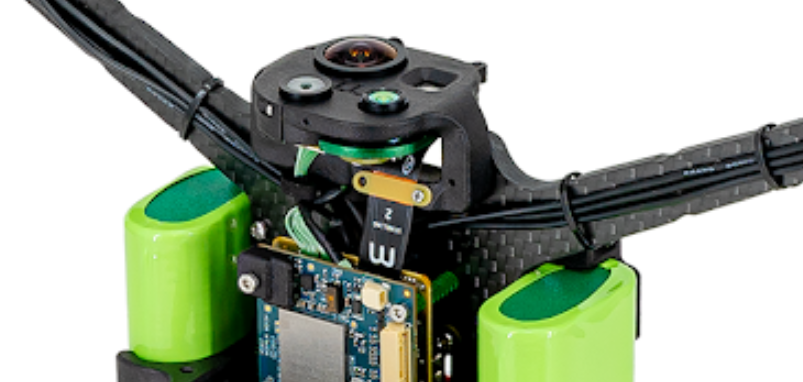
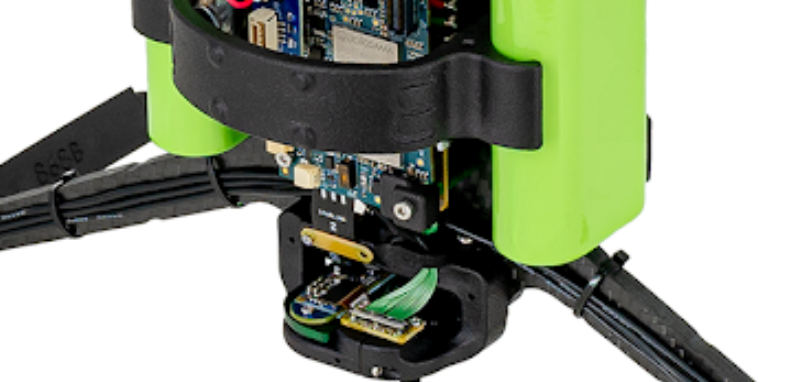
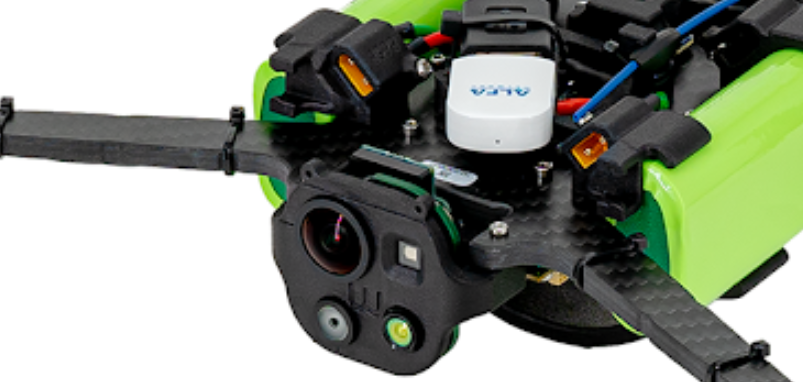
Alex
-
@jbiscan21 , yes you can add the TOF sensor to Starling 2 Max, but you will also need a new front plastic mount that will hold the hires and tracking cameras as well as the new TOF sensor.
You can order the mount (which will be a drop in replacement for the original camera mount) with the TOF sensor. If you do want to proceed with the TOF sensor + plastics order, we will need to double check that all the necessary screws are included. You would need to send an email for a custom order to start this off and mention this thread and that we need to include mounting hardware. https://www.modalai.com/pages/contact-us
(related post : https://forum.modalai.com/topic/5157/c29-configuration)
See more detailed pictures.
Alex
@Alex-Kushleyev
HI,
We purchased M0177 seperatly.
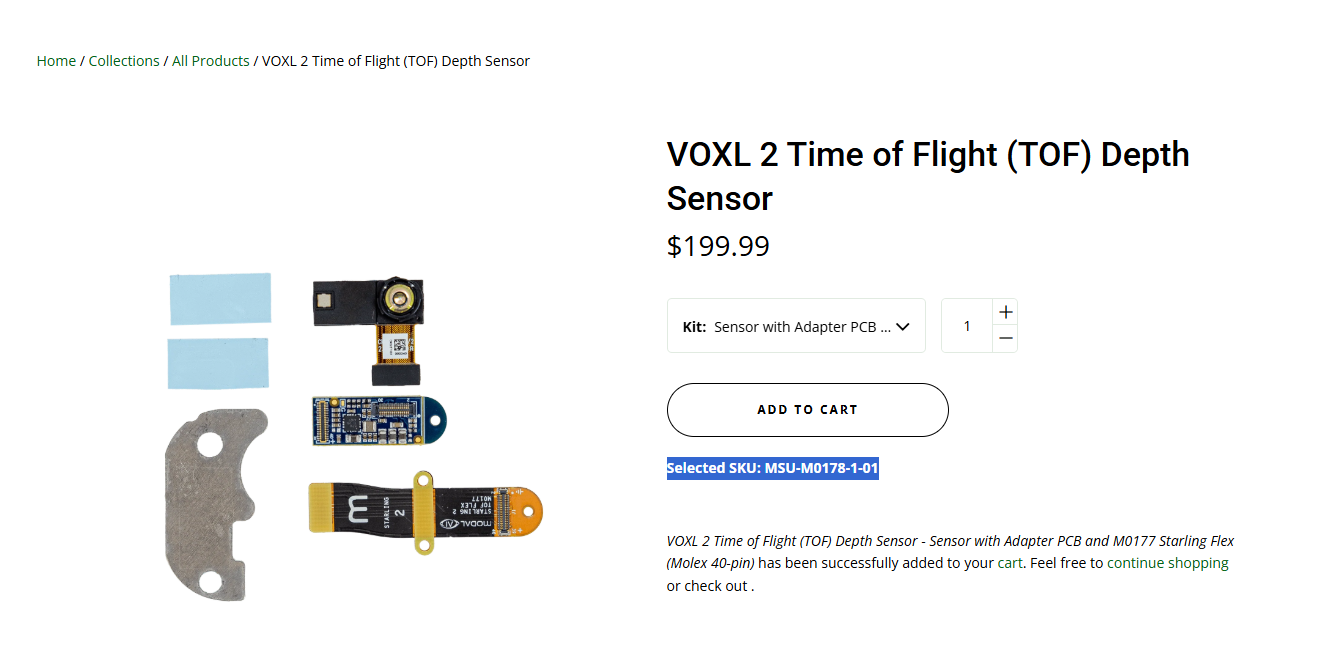
apart of mounting it what are the steps to configure it to be part of the system. what changes need to be made in configuration file to enable the driver and get the data from your mpa service ?Thank,
Roy
-
@Alex-Kushleyev
HI,
We purchased M0177 seperatly.
apart of mounting it what are the steps to configure it to be part of the system. what changes need to be made in configuration file to enable the driver and get the data from your mpa service ?Thank,
Roy
you can back up your
voxl-camera-server.confand then runvoxl-configure-cameras 29and the following will happen:- all the existing sensormodule files will be wiped from
/usr/lib/camerato avoid confusion - only those sensormodules that belong in C29 config will be copied from
/usr/share/modalai/chi-cdkto/usr/lib/camera - the camera server config file (
/etc/modalai/voxl-camera-server.conf) will be overwritten with the defaults for C29 configuration -- you can then see the config entry for TOF sensor and copy/paste that into your old config file, if you wish or use the new config file as is.
Alex
- all the existing sensormodule files will be wiped from
-
you can back up your
voxl-camera-server.confand then runvoxl-configure-cameras 29and the following will happen:- all the existing sensormodule files will be wiped from
/usr/lib/camerato avoid confusion - only those sensormodules that belong in C29 config will be copied from
/usr/share/modalai/chi-cdkto/usr/lib/camera - the camera server config file (
/etc/modalai/voxl-camera-server.conf) will be overwritten with the defaults for C29 configuration -- you can then see the config entry for TOF sensor and copy/paste that into your old config file, if you wish or use the new config file as is.
Alex
@Alex-Kushleyev
I have done the procedure after installing depth sensor and backing up.
when running voxl-inspect-cam -a I get the message below. prbobly this procedre left something out.
I have overwritten the conf file and the camera directory with the original backup and everything retruned to work fine.
can you help understand what is missing ?
I can see the pipes that used to work named tracking_front_misp_grey tracking_front_misp_norm are missing after running voxl-configure-cameras 29thanks
Roy
Pipe Name | bytes | wide | hgt |exp(ms)| gain | frame id |latency(ms)| fps | mbps | format
| hires_down_large_color |
| hires_down_large_encoded |
| hires_down_large_grey |
| hires_down_small_color |
| hires_down_small_encoded |
| hires_down_small_grey |
| hires_down_snapshot |
| hires_front_large_color |
| hires_front_large_encoded |
| hires_front_large_grey |
| hires_front_small_color |
| hires_front_small_encoded |
| hires_front_small_grey |
| hires_front_snapshot |
| tof_conf |
| tof_depth |
| tof_ir |
| tracking_down |
| tracking_down_bayer |
| tracking_down_misp_encoded |
| tracking_down_misp_grey |
| tracking_down_misp_norm |
| tracking_front |
| tracking_front_bayer |
| tracking_front_misp_encoded |
| tracking_front_misp_grey |ng request pipe: No such device or address
| tracking_front_misp_norm |ng request pipe: No such device or address
ERROR in pipe_client_open opening request pipe: No such device or address
Most likely the server stopped without cleaning up
Client is cleaning up pipes for the server - all the existing sensormodule files will be wiped from
-
@Alex-Kushleyev
I have done the procedure after installing depth sensor and backing up.
when running voxl-inspect-cam -a I get the message below. prbobly this procedre left something out.
I have overwritten the conf file and the camera directory with the original backup and everything retruned to work fine.
can you help understand what is missing ?
I can see the pipes that used to work named tracking_front_misp_grey tracking_front_misp_norm are missing after running voxl-configure-cameras 29thanks
Roy
Pipe Name | bytes | wide | hgt |exp(ms)| gain | frame id |latency(ms)| fps | mbps | format
| hires_down_large_color |
| hires_down_large_encoded |
| hires_down_large_grey |
| hires_down_small_color |
| hires_down_small_encoded |
| hires_down_small_grey |
| hires_down_snapshot |
| hires_front_large_color |
| hires_front_large_encoded |
| hires_front_large_grey |
| hires_front_small_color |
| hires_front_small_encoded |
| hires_front_small_grey |
| hires_front_snapshot |
| tof_conf |
| tof_depth |
| tof_ir |
| tracking_down |
| tracking_down_bayer |
| tracking_down_misp_encoded |
| tracking_down_misp_grey |
| tracking_down_misp_norm |
| tracking_front |
| tracking_front_bayer |
| tracking_front_misp_encoded |
| tracking_front_misp_grey |ng request pipe: No such device or address
| tracking_front_misp_norm |ng request pipe: No such device or address
ERROR in pipe_client_open opening request pipe: No such device or address
Most likely the server stopped without cleaning up
Client is cleaning up pipes for the server@RoyAzriel , which sensors does
voxl-camera-server -ldetect? you can look at the top part, not the resolution list.Take a look at this, should have some more info : https://docs.modalai.com/configure-cameras/#connect-a-new-camera
Make sure to double check the camera IDs as they may shift after adding a new sensor.
voxl-camera-server -lwill tell you the camera ID for each camera / slot number.Alex
-
@RoyAzriel , which sensors does
voxl-camera-server -ldetect? you can look at the top part, not the resolution list.Take a look at this, should have some more info : https://docs.modalai.com/configure-cameras/#connect-a-new-camera
Make sure to double check the camera IDs as they may shift after adding a new sensor.
voxl-camera-server -lwill tell you the camera ID for each camera / slot number.Alex
@Alex-Kushleyev
Hi Alex,
I did few steps to find our the problem.
after running voxl-configure-cameras 29 I have validate with dmesg camera is probed.
confirmed with voxl-camera-server -l the are 5 cameras.
When running the voxl-camera-server manualy I was able to see a lot of drops and it complains about broken pipes and even had segmentation fault.
When I disabled hires_down and hires_front the voxl-inspect-cam -a it run cleanly.
I guess currently there is a problem to run 5 cameras. for now I disables hires_down in the conf file. I can see the depth camera.
I am not sure how this will effect the vio (is it using it ?). I wonder how it works well when you ship out C29 from the factory ?
Another question it seems the pmd sensor position is that the 105 deg fov is vertically and not horizontal. Am I right ?BR,
Roy
-
@Alex-Kushleyev
Hi Alex,
I did few steps to find our the problem.
after running voxl-configure-cameras 29 I have validate with dmesg camera is probed.
confirmed with voxl-camera-server -l the are 5 cameras.
When running the voxl-camera-server manualy I was able to see a lot of drops and it complains about broken pipes and even had segmentation fault.
When I disabled hires_down and hires_front the voxl-inspect-cam -a it run cleanly.
I guess currently there is a problem to run 5 cameras. for now I disables hires_down in the conf file. I can see the depth camera.
I am not sure how this will effect the vio (is it using it ?). I wonder how it works well when you ship out C29 from the factory ?
Another question it seems the pmd sensor position is that the 105 deg fov is vertically and not horizontal. Am I right ?BR,
Roy
Hi @RoyAzriel ,
Running
voxl-inspect-cam -aputs significant stress on VOXL2 as all possible camera streams are generated and sent out to thevoxl-inspect-camapplication. With a small number of camera or low resolutions this can work fine, but in C29 config, this is not a sustainable test. There are quite a few very large images (4056x3040) per hires camera that are being sent uncompressed, causing a lot of cpu stress.A better test would be to first run
voxl-list-pipesto see which camera pipes are available and then runvoxl-inspect-camwith arguments explicitly listing the camera streams to inspect -- ideally choosing one stream per camera.example :
voxl-inspect-cam tracking_front tracking_down hires_front_misp_coloretc.So to answer your question regarding "I wonder how it works well when you ship out C29 from the factory" -- we do not use
voxl-inspect-cam -afor testing for the exact reason i described. Single stream per camera verification (can be simultaneous for all cameras) is sufficient to test the camera pipeline.When
voxl-inspect-camwas originally developed, we did not have as many cameras connected and the test worked fine, but started hitting system limits as the number of connected cameras (and their resolution) increased. In reality, you would never have to ship such large images across processes -- there is a better mechanism for sharing large buffers between processes (ION buffer) which avoids sending huge amounts of data over the linux pipes. ION buffer sharing is supported on voxl2 but that is outside of the context of this discussion, i believe
The rotation of the PMD sensor is done in software (camera server config, look for the rotation param) and it is done to match the actual rotation of the sensor in the camera mount. You can disable rotation in the camera server config.
Alex
-
@jbiscan21 , yes you can add the TOF sensor to Starling 2 Max, but you will also need a new front plastic mount that will hold the hires and tracking cameras as well as the new TOF sensor.
You can order the mount (which will be a drop in replacement for the original camera mount) with the TOF sensor. If you do want to proceed with the TOF sensor + plastics order, we will need to double check that all the necessary screws are included. You would need to send an email for a custom order to start this off and mention this thread and that we need to include mounting hardware. https://www.modalai.com/pages/contact-us
(related post : https://forum.modalai.com/topic/5157/c29-configuration)
See more detailed pictures.
Alex
@Alex-Kushleyev said in Starling 2 Max C28 vs C29:
@jbiscan21 , yes you can add the TOF sensor to Starling 2 Max, but you will also need a new front plastic mount that will hold the hires and tracking cameras as well as the new TOF sensor.
You can order the mount (which will be a drop in replacement for the original camera mount) with the TOF sensor. If you do want to proceed with the TOF sensor + plastics order, we will need to double check that all the necessary screws are included. You would need to send an email for a custom order to start this off and mention this thread and that we need to include mounting hardware. https://www.modalai.com/pages/contact-us
(related post : https://forum.modalai.com/topic/5157/c29-configuration)
See more detailed pictures.
Alex
@Alex-Kushleyev We are trying to purchase the TOF sensor for our Starling 2 max c28 configuration. The sales department asked to make a post on the forum for technical information which I did here
Can you confirm if we can also reference this post to make the purchase for our drone with the required parts included? We'd like to place an order as soon as possible.
Thank you,
Timothy Zinwota
University of Nevada, Las Vegas.


Reading along? Create a free ModalAI Forum account to join in.
With an account you can reply, ask your own question, get an email when a ModalAI engineer answers, and mark the reply that solved it. Your place in each thread is saved between visits.
Questions about VOXL, Flight Core, ESCs and ModalAI drones are answered here by the engineers who build them.
Register Login