
Running QVIO on a hires camera
-
Hi Modal team,
Has anyone tried to run QVIO on one of the MPA pipes produced by a hires camera (either IMX214 or 412 I suppose)? Wondering if that's feasible, or if the rolling shutter on those sensors makes feature tracking quite impossible under dynamic movements. Happy to try it out myself if the answer is "unsure"!
Thanks,
Rowan (Cleo Robotics) -
Hi Modal team,
Has anyone tried to run QVIO on one of the MPA pipes produced by a hires camera (either IMX214 or 412 I suppose)? Wondering if that's feasible, or if the rolling shutter on those sensors makes feature tracking quite impossible under dynamic movements. Happy to try it out myself if the answer is "unsure"!
Thanks,
Rowan (Cleo Robotics)We have not tried this recently, but it should work. Here are some tips:
- Use IMX412 camera (M0161 or similar) because it has great image quality and the fastest readout speed of all of our cameras (IMX214 is not recommended for this, it is an old and "slow" camera sensor)
- faster readout = less rolling shutter skew
- use the latest camera drivers, which max out the camera operating speed in all modes : https://storage.googleapis.com/modalai_public/temp/imx412_test_bins/20250919/imx412_fpv_eis_20250919_drivers.zip
- The readout times are documented here for all modes : https://docs.modalai.com/camera-video/low-latency-video-streaming/#imx412-operating-modes
- for example
1996x1520(2x2 binned) mode has about 5.5ms readout time, which is pretty short - QVIO (mvVISLAM.h) has a parameter "readout time", which suggests that it supports rolling shutter. I have not tried it myself, but i heard that it does work.
mvVISLAM_Initialize(...float32_t readoutTime ..)
@param readoutTime
      Frame readout time (seconds). n times row readout time. Set to 0 for
      global shutter camera.  Frame readout time should be (close to) but
      smaller than the rolling shutter camera frame period.
Here is where this param is currently set to 0 in
voxl-qvio-server: https://gitlab.com/voxl-public/voxl-sdk/services/voxl-qvio-server/-/blob/master/server/main.cpp?ref_type=heads#L371- in order to correctly use the readout time, you have to ensure that the camera pipeline indeed selects the correct camera mode (for which there is the corresponding readout time) : https://docs.modalai.com/camera-video/low-latency-video-streaming/#how-to-confirm-which-camera-resolution-was-selected-by-the-pipeline
- also, readout time is printed out by
voxl-camera-serverwhen you run it in-dmode (readout time in nanoseconds here):
- also, readout time is printed out by
VERBOSE: Received metadata for frame 86 from camera imx412 VERBOSE: Timestamp: 69237313613 VERBOSE: Gain: 1575 VERBOSE: Exposure: 22769384 VERBOSE: Readout Time: 16328284- keep the exposure low to avoid motion blur (IMX412 has quite a high analog gain, up to 22x and 16x digital gain). If you want to prioritize gain vs exposure, would need to tweak the auto exposure params in camera server (when you get to that point, i can help you)..
- it would be interesting to compare performance against QVIO with AR0144 - that would probably require collecting images from AR0144 and IMX412 (side by side) + IMU data and running QVIO offline with each camera.
Good luck if you try it! let me know if you have any other questions. Please keep in mind that QVIO is based on a closed-source library from Qualcomm and our support of QVIO is limited.
Alex
- Use IMX412 camera (M0161 or similar) because it has great image quality and the fastest readout speed of all of our cameras (IMX214 is not recommended for this, it is an old and "slow" camera sensor)
-
We have not tried this recently, but it should work. Here are some tips:
- Use IMX412 camera (M0161 or similar) because it has great image quality and the fastest readout speed of all of our cameras (IMX214 is not recommended for this, it is an old and "slow" camera sensor)
- faster readout = less rolling shutter skew
- use the latest camera drivers, which max out the camera operating speed in all modes : https://storage.googleapis.com/modalai_public/temp/imx412_test_bins/20250919/imx412_fpv_eis_20250919_drivers.zip
- The readout times are documented here for all modes : https://docs.modalai.com/camera-video/low-latency-video-streaming/#imx412-operating-modes
- for example
1996x1520(2x2 binned) mode has about 5.5ms readout time, which is pretty short - QVIO (mvVISLAM.h) has a parameter "readout time", which suggests that it supports rolling shutter. I have not tried it myself, but i heard that it does work.
mvVISLAM_Initialize(...float32_t readoutTime ..)
@param readoutTime
      Frame readout time (seconds). n times row readout time. Set to 0 for
      global shutter camera.  Frame readout time should be (close to) but
      smaller than the rolling shutter camera frame period.
Here is where this param is currently set to 0 in
voxl-qvio-server: https://gitlab.com/voxl-public/voxl-sdk/services/voxl-qvio-server/-/blob/master/server/main.cpp?ref_type=heads#L371- in order to correctly use the readout time, you have to ensure that the camera pipeline indeed selects the correct camera mode (for which there is the corresponding readout time) : https://docs.modalai.com/camera-video/low-latency-video-streaming/#how-to-confirm-which-camera-resolution-was-selected-by-the-pipeline
- also, readout time is printed out by
voxl-camera-serverwhen you run it in-dmode (readout time in nanoseconds here):
- also, readout time is printed out by
VERBOSE: Received metadata for frame 86 from camera imx412 VERBOSE: Timestamp: 69237313613 VERBOSE: Gain: 1575 VERBOSE: Exposure: 22769384 VERBOSE: Readout Time: 16328284- keep the exposure low to avoid motion blur (IMX412 has quite a high analog gain, up to 22x and 16x digital gain). If you want to prioritize gain vs exposure, would need to tweak the auto exposure params in camera server (when you get to that point, i can help you)..
- it would be interesting to compare performance against QVIO with AR0144 - that would probably require collecting images from AR0144 and IMX412 (side by side) + IMU data and running QVIO offline with each camera.
Good luck if you try it! let me know if you have any other questions. Please keep in mind that QVIO is based on a closed-source library from Qualcomm and our support of QVIO is limited.
Alex
@Alex-Kushleyev Glad to hear you are optimistic about this! And thank you, as always, for the tips to get us started. I will hopefully dive into experimenting with this in the next week or so. Do you have a suggestion for which of the hires camera pipes we should use?
- Use IMX412 camera (M0161 or similar) because it has great image quality and the fastest readout speed of all of our cameras (IMX214 is not recommended for this, it is an old and "slow" camera sensor)
-
@Alex-Kushleyev Glad to hear you are optimistic about this! And thank you, as always, for the tips to get us started. I will hopefully dive into experimenting with this in the next week or so. Do you have a suggestion for which of the hires camera pipes we should use?
@Rowan-Dempster , you should use a monochrome stream (
_grey), since QVIO needs a RAW8 image.If you are not using MISP on hires cameras, that is fine, you can start off using the output of the ISP.
You should calibrate the camera using whatever resolution you decide to try. This is to avoid any confusion, since if you using ISP pipeline, the camera pipeline may select a higher resolution and downscale + crop. So whenever you are changing resolutions, it is always good to do a quick camera calibration to confirm the camera parameters.
When using MISP, we have more control over which camera mode is selected, because MISP gets the RAW data, not processed by the ISP, so we know the exact dimensions of the image sent from camera.
Alex
-
@Rowan-Dempster , you should use a monochrome stream (
_grey), since QVIO needs a RAW8 image.If you are not using MISP on hires cameras, that is fine, you can start off using the output of the ISP.
You should calibrate the camera using whatever resolution you decide to try. This is to avoid any confusion, since if you using ISP pipeline, the camera pipeline may select a higher resolution and downscale + crop. So whenever you are changing resolutions, it is always good to do a quick camera calibration to confirm the camera parameters.
When using MISP, we have more control over which camera mode is selected, because MISP gets the RAW data, not processed by the ISP, so we know the exact dimensions of the image sent from camera.
Alex
Hi @Alex-Kushleyev,
Resurrecting this old thread, we now have the IMX412 on a drone and we are now ready to give to VIO on the IMX412 our full attention and lots of testing effort. Where I'm at now is I have a prototype working and QVIO does run on the IMX412 camera and outputs estimates that seem reasonable, but I'm 100% sure it's not configured as good as it could be cause I made so many assumptions that I would like your input on:
Which camera data / pipe to use
Ideally, we would like the IMX412 VIO to perform close to (or of course better than!) aar0144tracking camera, in terms of the quality of the image for feature tracking, low CPU usage, low latency frames, etc etc etc. In this spirit, I've been looking into how to get the MISP normalized pipes coming from the IMX412 and also how to get the camera server producing ION data to get the same CPU usage gains we saw in https://forum.modalai.com/topic/4893/minimizing-voxl-camera-server-cpu-usage-in-sdk1-6.
I saw that in the pipe setup, the normalized code for IMX412 was commented out

After commenting it back in I was able to see in the portal a decent looking normalized stream. I also see the ION pipe pop up for that norm stream but I haven't tried that ION pipe on the QVIO server yet (I'm confident it would work though, just waiting for https://gitlab.com/voxl-public/voxl-sdk/core-libs/libmodal-pipe/-/commit/d18521776e3e88f396d85aa657769c47f29e9c9f to get tagged!).
Do you see any issue with using the MISP norm pipe for IMX412 VIO, or is that actually what you would recommend?Which resolution to use
I know you talked about some resolution advice above, but I'm a little bit confused on the specifics on where to put those numbers. You had suggested1996x1520for a 5.5ms readout time. Do these numbers go into the Preview Width config fields? Here is the entire diff of the config settings I have been using for my testing:
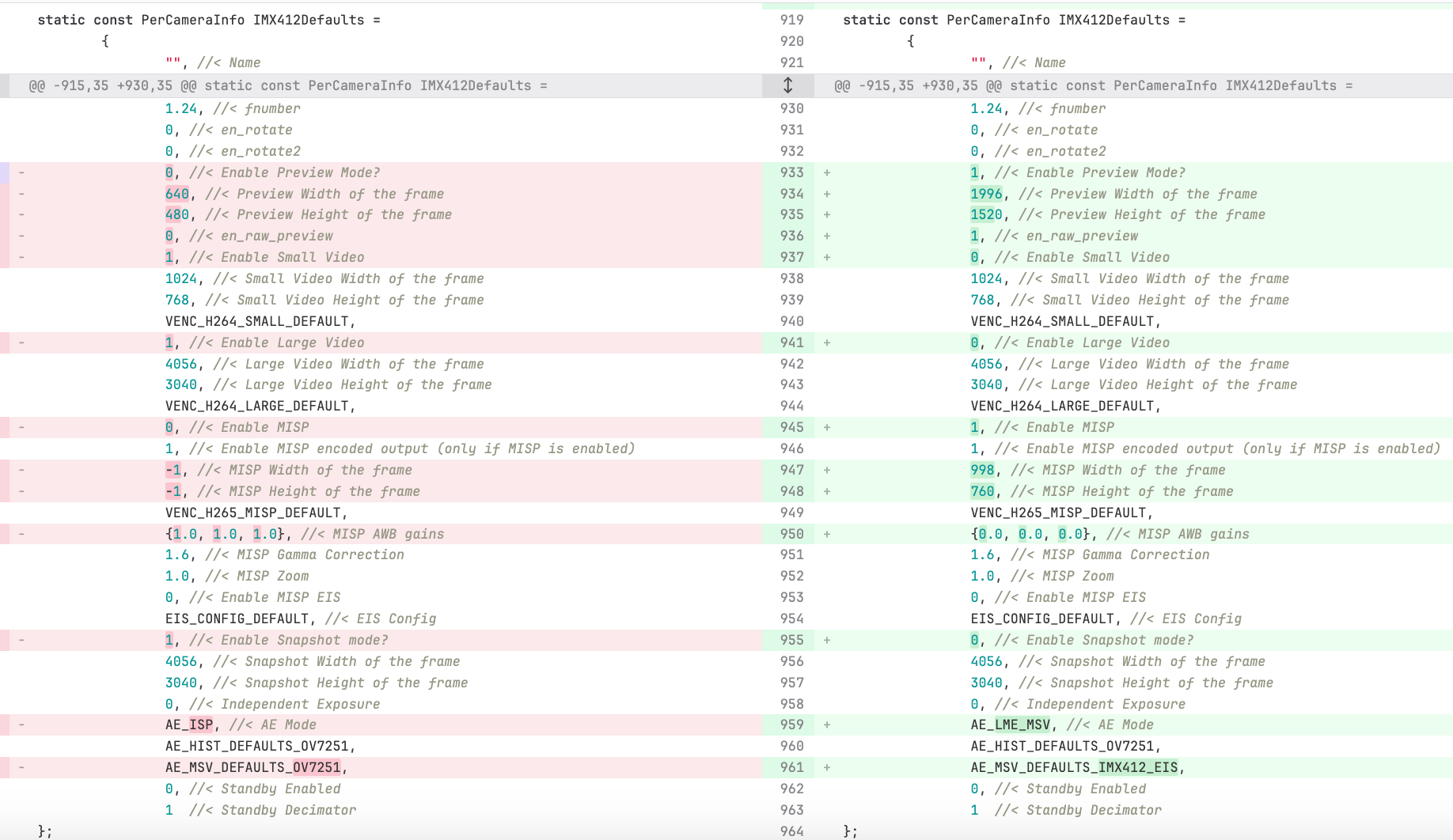
The other values I have a question about in that diff is The MISP width / height fields, I chose 998x760 which is half of the Preview Width resolution you suggested. I did this because I wasn't sure of any compute bottle necks that would pop up if I fed a1996x1520image into QVIO. Do you think 998x760 is good or maybe I should pick a like 0.75 downsample so something like 1497x1140 for the MISP width/height.Camera Driver files to use and how to version control and deploy those
Could you confirm that the binary files in https://storage.googleapis.com/modalai_public/temp/imx412_test_bins/20250919/imx412_fpv_eis_20250919_drivers.zip are still the latest and the recommended binaries to use? Could you also advise on how to version control these files and deploy them to the voxl2 when the camera server .deb is deployed? I want to keep all files related to bringing up the camera in the voxl-camera-server debian if possible. I see some binaries files being stored in this path:
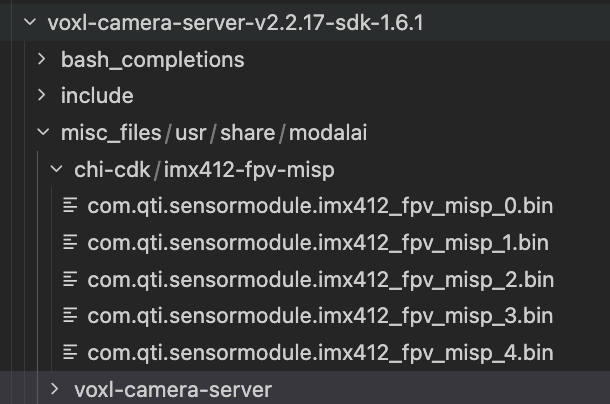
So if I understand the process correctly, those files will end up in
/usr/share/modalai/chi-cdk/imx412-fps-misp. Is that where thevoxl-configure-cameras Clooks for them? Also, do I have to do anything with thecom.qti.sensor.imx412_fpv.sofile in the zip link that you sent, or do I just ignore that file?My end desired behavior is that when I install the voxl camera server .deb, I don't have to worry about also copying binary files over to the voxl, or moving any files around on the voxl, or having to remember to run
voxl-configure-cameras C. So maybe the path forward there is to have all files deployed into the right places by the .deb install and then in the postinst script auto runvoxl-configure-cameras C? What do you think?Aspect ratio concerns and their affect on field of view and camera calibration
Is the aspect ratio you suggested (1996x1520) the actual aspect ratio of the sensor? Or does the sensor support multiple aspect ratios, or is there something more complex going on I don't understand here? I just want to make sure that we're using as much FoV as the sensor supports. That should be the goal for VIO feature detection and for streaming right, maximize field of view?Also, how does changing the aspect ratio / resolution affect the camera calibration? We're using kalibr which asks for a focal length bootstrap, which we've been giving it 470 for the
ar0144camera, do you know of a way that we can figure out an accurate focal length bootstrap for the images that we end up using for the IMX412?How to not lose other IMX412 features like 4k recording and EIS streaming etc
This is kinda my biggest concern about the feasibility of this whole thing: Will we still be able to get the other awesome IMX412 features like high quality streaming to the GCS with EIS, as well as high quality 4K recordings even in difficult low light environments, AND at the same time optimize the IMX412 for VIO which demands stuff like fast readout for less skew?Any advice you can give here on mapping out the tradeoffs? Are there any non-starters like not being able to get 4K recording if we opt to use the MISP norm pipe for VIO? Or are you confident that we can get the best of all 3 worlds

Exposure time concerns
I agree with your initial point that needing low exposure for low motion blur is important. As I mentioned in the intro to this message, I have a prototype working and I am now at a place where I can indeed tune the gain vs exposure / auto exposure params. Could you help me with that? I assume that this tradeoff also applies to thear0144camera, any lessons I can take from there?QVIO readoutTime param
Great find and thanks for pointing that out!! To confirm the specific numbers here, if I use the 1996x1520 preview width/height which has a documented read out time of 5.5ms (I should confirm this using the-dmode), then I should put0.0055for that parameter?As always, thank you for your help in camera related matters, we would be no where close to where we are now with robotic perception without your guidance!
-
Hi @Alex-Kushleyev,
Resurrecting this old thread, we now have the IMX412 on a drone and we are now ready to give to VIO on the IMX412 our full attention and lots of testing effort. Where I'm at now is I have a prototype working and QVIO does run on the IMX412 camera and outputs estimates that seem reasonable, but I'm 100% sure it's not configured as good as it could be cause I made so many assumptions that I would like your input on:
Which camera data / pipe to use
Ideally, we would like the IMX412 VIO to perform close to (or of course better than!) aar0144tracking camera, in terms of the quality of the image for feature tracking, low CPU usage, low latency frames, etc etc etc. In this spirit, I've been looking into how to get the MISP normalized pipes coming from the IMX412 and also how to get the camera server producing ION data to get the same CPU usage gains we saw in https://forum.modalai.com/topic/4893/minimizing-voxl-camera-server-cpu-usage-in-sdk1-6.
I saw that in the pipe setup, the normalized code for IMX412 was commented out
After commenting it back in I was able to see in the portal a decent looking normalized stream. I also see the ION pipe pop up for that norm stream but I haven't tried that ION pipe on the QVIO server yet (I'm confident it would work though, just waiting for https://gitlab.com/voxl-public/voxl-sdk/core-libs/libmodal-pipe/-/commit/d18521776e3e88f396d85aa657769c47f29e9c9f to get tagged!).
Do you see any issue with using the MISP norm pipe for IMX412 VIO, or is that actually what you would recommend?Which resolution to use
I know you talked about some resolution advice above, but I'm a little bit confused on the specifics on where to put those numbers. You had suggested1996x1520for a 5.5ms readout time. Do these numbers go into the Preview Width config fields? Here is the entire diff of the config settings I have been using for my testing:
The other values I have a question about in that diff is The MISP width / height fields, I chose 998x760 which is half of the Preview Width resolution you suggested. I did this because I wasn't sure of any compute bottle necks that would pop up if I fed a1996x1520image into QVIO. Do you think 998x760 is good or maybe I should pick a like 0.75 downsample so something like 1497x1140 for the MISP width/height.Camera Driver files to use and how to version control and deploy those
Could you confirm that the binary files in https://storage.googleapis.com/modalai_public/temp/imx412_test_bins/20250919/imx412_fpv_eis_20250919_drivers.zip are still the latest and the recommended binaries to use? Could you also advise on how to version control these files and deploy them to the voxl2 when the camera server .deb is deployed? I want to keep all files related to bringing up the camera in the voxl-camera-server debian if possible. I see some binaries files being stored in this path:
So if I understand the process correctly, those files will end up in
/usr/share/modalai/chi-cdk/imx412-fps-misp. Is that where thevoxl-configure-cameras Clooks for them? Also, do I have to do anything with thecom.qti.sensor.imx412_fpv.sofile in the zip link that you sent, or do I just ignore that file?My end desired behavior is that when I install the voxl camera server .deb, I don't have to worry about also copying binary files over to the voxl, or moving any files around on the voxl, or having to remember to run
voxl-configure-cameras C. So maybe the path forward there is to have all files deployed into the right places by the .deb install and then in the postinst script auto runvoxl-configure-cameras C? What do you think?Aspect ratio concerns and their affect on field of view and camera calibration
Is the aspect ratio you suggested (1996x1520) the actual aspect ratio of the sensor? Or does the sensor support multiple aspect ratios, or is there something more complex going on I don't understand here? I just want to make sure that we're using as much FoV as the sensor supports. That should be the goal for VIO feature detection and for streaming right, maximize field of view?Also, how does changing the aspect ratio / resolution affect the camera calibration? We're using kalibr which asks for a focal length bootstrap, which we've been giving it 470 for the
ar0144camera, do you know of a way that we can figure out an accurate focal length bootstrap for the images that we end up using for the IMX412?How to not lose other IMX412 features like 4k recording and EIS streaming etc
This is kinda my biggest concern about the feasibility of this whole thing: Will we still be able to get the other awesome IMX412 features like high quality streaming to the GCS with EIS, as well as high quality 4K recordings even in difficult low light environments, AND at the same time optimize the IMX412 for VIO which demands stuff like fast readout for less skew?Any advice you can give here on mapping out the tradeoffs? Are there any non-starters like not being able to get 4K recording if we opt to use the MISP norm pipe for VIO? Or are you confident that we can get the best of all 3 worlds
Exposure time concerns
I agree with your initial point that needing low exposure for low motion blur is important. As I mentioned in the intro to this message, I have a prototype working and I am now at a place where I can indeed tune the gain vs exposure / auto exposure params. Could you help me with that? I assume that this tradeoff also applies to thear0144camera, any lessons I can take from there?QVIO readoutTime param
Great find and thanks for pointing that out!! To confirm the specific numbers here, if I use the 1996x1520 preview width/height which has a documented read out time of 5.5ms (I should confirm this using the-dmode), then I should put0.0055for that parameter?As always, thank you for your help in camera related matters, we would be no where close to where we are now with robotic perception without your guidance!
Please see the following commit where we recently enabled publishing the normalized frame from IMX412 and IMX664 camera via regular and ION buffers: https://gitlab.com/voxl-public/voxl-sdk/services/voxl-camera-server/-/commit/c42e2febbc6370f9bbc95aff0659718656af6906
The parameters for 1996x1520 look good, basically you will be getting 2x2 binned (full frame) and then further down-scale to 998x760. since you are doing exact 2x2 downscale in misp, you can also remove interpolation, which will make the image a bit sharper, you can see this for reference: link -- basically change the sampler filter mode from linear (interpolate) to nearest. If you use non-integer down-sample, keep the linear interpolation.
Regarding the resolution to use with VIO.. i think the 998x760 with nearest sampling should behave the same or better than AR0144 with 1280x800 resolution, mainly because the IMX412 has a much bigger lens (while still being pretty wide), so image quality is going to be better (of course, you need to calibrate intrinsics). Also the 4:3 aspect ratio may help capture more features in the vertical direction. That of course does not account for rolling shutter effects..
There can definitely be benefit in going up in resolution and using 1996x1520, but you kind of have to use the extra resolution correctly.. typically you would detect features on lower resolution image and then refine using the full resolution (also for tracking features). However, in practice, often some small blur is applied to the image to get rid of pixel noise, etc, so very fine features won't get picked up. Unfortunately, we do not know exactly what QVIO does internally. it may do some kind of pyramidal image decomposition to do these things in a smart way. You should try it and check the cpu usage.
Using MISP you can downsample and crop (while maintaining aspect ratio) to any resolution, so it's easy to experiment.
If i had to test QVIO at different resolutions, i would log raw bayer images and imu data using
voxl-loggerand then use voxl-replay + offline misp + offline qvio to run tests on the same data sets with different processing parameters. This may sound complicated, but it's really not:- voxl-logger can log raw10 frames (on this branch) : https://gitlab.com/voxl-public/voxl-sdk/utilities/voxl-logger/-/tree/extend-cam-logging
- qvio relies on timestamps from incoming messages, so it can work with live data or playback data
- the only missing piece is offline MISP implementation, which is partially available in this tool : https://gitlab.com/voxl-public/voxl-sdk/utilities/voxl-mpa-tools/-/blob/add-new-image-tools/tools/voxl-convert-image.cpp -- and we are working on being able to run exactly the same implementation as in camera-server. The only missing piece in the code listed here is AWB -- however, white balance should not affect VIO too much, since only Y channel is used, so you can set white balance gains to a fixed value.
- running misp offline allows you to experiment with different resolutions / processing directly from the source raw10 bayer image (lossless)
So, if you are really serious about using hires camera for QVIO, since there are a lot of unknowns, you should consider setting up an offline processing pipeline, so that you can run repeatable tests and parameter sweeps. It requires some upfront work, but the pay-off will be significant. You can also use the offline pipeline for regression testing of performance and comparing to other VIO algorithms (which just need the MPA interface). We can discuss this topic more, if you are interested.
imx412_fpv_eis_20250919_drivers.zip are the latest for IMX412. We should really make them default ones shipped in the VOXL2 SDK, but we have not done it.
Since you are maintaining your own version of
voxl-camera-server, you should add them to yourvoxl-camera-serverrepo and.deband install them somewhere like/usr/share/modalai/voxl-camera-server/drivers. then modify the voxl-configure-camera script to first look for imx412 drivers in that folder and then fallback to searching/usr/share/modalai/chi-cdk/. In fact this is something I am considering, as maintaining camera drivers in the core system image is less flexible.EDIT: i guess the older version of the imx412 drivers are already in the repo, so you can just replace them with new ones in your camera server repo: link
Let me know if you have any more questions. Sounds like a fun project
Alex
-
Please see the following commit where we recently enabled publishing the normalized frame from IMX412 and IMX664 camera via regular and ION buffers: https://gitlab.com/voxl-public/voxl-sdk/services/voxl-camera-server/-/commit/c42e2febbc6370f9bbc95aff0659718656af6906
The parameters for 1996x1520 look good, basically you will be getting 2x2 binned (full frame) and then further down-scale to 998x760. since you are doing exact 2x2 downscale in misp, you can also remove interpolation, which will make the image a bit sharper, you can see this for reference: link -- basically change the sampler filter mode from linear (interpolate) to nearest. If you use non-integer down-sample, keep the linear interpolation.
Regarding the resolution to use with VIO.. i think the 998x760 with nearest sampling should behave the same or better than AR0144 with 1280x800 resolution, mainly because the IMX412 has a much bigger lens (while still being pretty wide), so image quality is going to be better (of course, you need to calibrate intrinsics). Also the 4:3 aspect ratio may help capture more features in the vertical direction. That of course does not account for rolling shutter effects..
There can definitely be benefit in going up in resolution and using 1996x1520, but you kind of have to use the extra resolution correctly.. typically you would detect features on lower resolution image and then refine using the full resolution (also for tracking features). However, in practice, often some small blur is applied to the image to get rid of pixel noise, etc, so very fine features won't get picked up. Unfortunately, we do not know exactly what QVIO does internally. it may do some kind of pyramidal image decomposition to do these things in a smart way. You should try it and check the cpu usage.
Using MISP you can downsample and crop (while maintaining aspect ratio) to any resolution, so it's easy to experiment.
If i had to test QVIO at different resolutions, i would log raw bayer images and imu data using
voxl-loggerand then use voxl-replay + offline misp + offline qvio to run tests on the same data sets with different processing parameters. This may sound complicated, but it's really not:- voxl-logger can log raw10 frames (on this branch) : https://gitlab.com/voxl-public/voxl-sdk/utilities/voxl-logger/-/tree/extend-cam-logging
- qvio relies on timestamps from incoming messages, so it can work with live data or playback data
- the only missing piece is offline MISP implementation, which is partially available in this tool : https://gitlab.com/voxl-public/voxl-sdk/utilities/voxl-mpa-tools/-/blob/add-new-image-tools/tools/voxl-convert-image.cpp -- and we are working on being able to run exactly the same implementation as in camera-server. The only missing piece in the code listed here is AWB -- however, white balance should not affect VIO too much, since only Y channel is used, so you can set white balance gains to a fixed value.
- running misp offline allows you to experiment with different resolutions / processing directly from the source raw10 bayer image (lossless)
So, if you are really serious about using hires camera for QVIO, since there are a lot of unknowns, you should consider setting up an offline processing pipeline, so that you can run repeatable tests and parameter sweeps. It requires some upfront work, but the pay-off will be significant. You can also use the offline pipeline for regression testing of performance and comparing to other VIO algorithms (which just need the MPA interface). We can discuss this topic more, if you are interested.
imx412_fpv_eis_20250919_drivers.zip are the latest for IMX412. We should really make them default ones shipped in the VOXL2 SDK, but we have not done it.
Since you are maintaining your own version of
voxl-camera-server, you should add them to yourvoxl-camera-serverrepo and.deband install them somewhere like/usr/share/modalai/voxl-camera-server/drivers. then modify the voxl-configure-camera script to first look for imx412 drivers in that folder and then fallback to searching/usr/share/modalai/chi-cdk/. In fact this is something I am considering, as maintaining camera drivers in the core system image is less flexible.EDIT: i guess the older version of the imx412 drivers are already in the repo, so you can just replace them with new ones in your camera server repo: link
Let me know if you have any more questions. Sounds like a fun project
Alex
@Alex-Kushleyev Hi Alex,
I am super excited by your idea of running parameter sweeps on top of the voxl-replay + offline misp + offline qvio infrastructure you have set up. Kudos to ModalAI for setting up such infrastructure. I myself am a huge believer in setting up the software infra for offline replay + parameter sweeps, it’s how we do all EKF2 development work at Cleo now and it’s paid large dividends once we invested in it.
Anyways, the thing(s) to nail down before going down the path of collecting datasets for offline sweeps is any settings / hardware setup that would have an impact on VIO performance but isn't something that I can change in the offline misp infrastructure. So my question before jumping into this is, what settings impact the raw10 bayer frames?
- Is it the preview mode width / height that set the resolution and readout time of the raw10 bayer frames? Should I stick with 1996x1520 for the data sets?
- Exposure settings would change the raw10 bayer frames right? So that wouldn’t be something I can tune with offline misp?
- Any other settings that would affect the raw10 bayer frames that I’m forgetting that we should nail down before I start collecting a collection of datasets?
I do have a couple other questions before I get started on the optimization part of this project, just to validate that it’s even feasible for our product:
- Will we still be able to get high quality 4K recordings from the IMX412 after optimizing it for VIO, or is there a tradeoff / infeasibility there?
- Will we still be able to stream a high quality image from the IMX412 to the GCS with Electronic Image Stabilization after optimizing the IMX412 for VIO? Or do you know of any incompatibility between the changes we’re talking about for VIO and EIS quality streaming?
I'm definitely excited for this fun project, especially since it might also open up the door for optimizing VIO performance on the other tracking cameras once I have the replay infrastructure set up.
Best,
Rowan -
@Alex-Kushleyev Hi Alex,
I am super excited by your idea of running parameter sweeps on top of the voxl-replay + offline misp + offline qvio infrastructure you have set up. Kudos to ModalAI for setting up such infrastructure. I myself am a huge believer in setting up the software infra for offline replay + parameter sweeps, it’s how we do all EKF2 development work at Cleo now and it’s paid large dividends once we invested in it.
Anyways, the thing(s) to nail down before going down the path of collecting datasets for offline sweeps is any settings / hardware setup that would have an impact on VIO performance but isn't something that I can change in the offline misp infrastructure. So my question before jumping into this is, what settings impact the raw10 bayer frames?
- Is it the preview mode width / height that set the resolution and readout time of the raw10 bayer frames? Should I stick with 1996x1520 for the data sets?
- Exposure settings would change the raw10 bayer frames right? So that wouldn’t be something I can tune with offline misp?
- Any other settings that would affect the raw10 bayer frames that I’m forgetting that we should nail down before I start collecting a collection of datasets?
I do have a couple other questions before I get started on the optimization part of this project, just to validate that it’s even feasible for our product:
- Will we still be able to get high quality 4K recordings from the IMX412 after optimizing it for VIO, or is there a tradeoff / infeasibility there?
- Will we still be able to stream a high quality image from the IMX412 to the GCS with Electronic Image Stabilization after optimizing the IMX412 for VIO? Or do you know of any incompatibility between the changes we’re talking about for VIO and EIS quality streaming?
I'm definitely excited for this fun project, especially since it might also open up the door for optimizing VIO performance on the other tracking cameras once I have the replay infrastructure set up.
Best,
RowanHi @Rowan-Dempster ,
The only things that you cannot change after the raw10 images are collected are:
- raw frame resolution and any other camera settings (which we typically don't change anyway)
- exposure and gain, as they are controlled by the auto exposure algorithm in real time
- the auto exposure algorithm only runs if at least one processed stream is requested (yuv, encoded, normalized, etc), you can see the logic here. If the camera server only has a client for the bayer image, the Auto Exposure will not be updated, which is not good. The solution should be:
- either log or use
voxl-inspect-cameraor any other client to get the yuv or grey stream going (or even encoded) - log raw10 bayer only, but you could also log the output video or YUVs
- *** i will look into potentially adding a param to force the camera to always do AE processing even if there are no clients for the processed images (essentially disable idling).
- either log or use
I would suggest not collecting too many data sets until you actually get the pipeline working, as you may realize that there is an issue in the data sets or something is missing. Probably best to focus on the processing pipeline..
- You cannot simultaneously receive 2x2 binned and not binned images from the camera, so it either has to be in unbinned mode (4040x3040 resolution) or binned (1996x1520). You can always do binning / resizing in misp, but the readout time will change for the larger resolution, as we discussed before. So one thing to test would be potentially putting two IMX412 cameras side by side and simultaneously logging at 4040x3040 (cam1) and 1996x1520 (cam2), and then run offline processing pipeline to see if QVIO can indeed compensate properly for the larger rolling shutter skew. If you are able to run QVIO using full 4040x3040 resolution, then you can have EVERYTHING : 4k video, EIS, vio... you can still run EIS and save videos from the binned resolution, but they will be lower quality.
Another thing to keep an eye on is what you are logging (bandwidth). I did some tests a while ago and voxl2 write speed to disk is quite high, about 1.5GB/s, but you can run out of disk space pretty quickly. However, it should definitely be able to log 4040x3040@30 + 1996x1520@30 (or @60). will probably need to use the ion buffers to log the raw10 images (which is supported, i just need to test), to skip the overhead for sending huge images over the pipes. Camera server already publishes the raw bayer via regular pipes and also ion buffers.
I am going to look over the components needed for this and make sure they are in good state:
- merge the new logging modes to dev (voxl-logger, voxl-replay)
- make a cleaner example of simple standalone misp to include AWB, although you don't need AWB for VIO
But either way, you should be able to start with logging tests and just see if you can playback the logs and get QVIO to do something reasonable from the log playback on target. To bypass MISP, you could just log the output of MISP for now (grey or normalized), so you have less components in the initial test pipeline. then build it up to include debayering, etc.
Perhaps it is easy to log the raw10 bayer + grey or normalized image, so that you have the AE issue solved as well (making sure the AE is running), then for playback you can choose either normalized (feed directly into voxl-qvio-server) or raw10, which will need some debayering and other processing. It is good to have choices. But i would suggest starting with lower resolution first until you also double check ability to log 4K raw images.
Alex
-
Hi @Rowan-Dempster ,
The only things that you cannot change after the raw10 images are collected are:
- raw frame resolution and any other camera settings (which we typically don't change anyway)
- exposure and gain, as they are controlled by the auto exposure algorithm in real time
- the auto exposure algorithm only runs if at least one processed stream is requested (yuv, encoded, normalized, etc), you can see the logic here. If the camera server only has a client for the bayer image, the Auto Exposure will not be updated, which is not good. The solution should be:
- either log or use
voxl-inspect-cameraor any other client to get the yuv or grey stream going (or even encoded) - log raw10 bayer only, but you could also log the output video or YUVs
- *** i will look into potentially adding a param to force the camera to always do AE processing even if there are no clients for the processed images (essentially disable idling).
- either log or use
I would suggest not collecting too many data sets until you actually get the pipeline working, as you may realize that there is an issue in the data sets or something is missing. Probably best to focus on the processing pipeline..
- You cannot simultaneously receive 2x2 binned and not binned images from the camera, so it either has to be in unbinned mode (4040x3040 resolution) or binned (1996x1520). You can always do binning / resizing in misp, but the readout time will change for the larger resolution, as we discussed before. So one thing to test would be potentially putting two IMX412 cameras side by side and simultaneously logging at 4040x3040 (cam1) and 1996x1520 (cam2), and then run offline processing pipeline to see if QVIO can indeed compensate properly for the larger rolling shutter skew. If you are able to run QVIO using full 4040x3040 resolution, then you can have EVERYTHING : 4k video, EIS, vio... you can still run EIS and save videos from the binned resolution, but they will be lower quality.
Another thing to keep an eye on is what you are logging (bandwidth). I did some tests a while ago and voxl2 write speed to disk is quite high, about 1.5GB/s, but you can run out of disk space pretty quickly. However, it should definitely be able to log 4040x3040@30 + 1996x1520@30 (or @60). will probably need to use the ion buffers to log the raw10 images (which is supported, i just need to test), to skip the overhead for sending huge images over the pipes. Camera server already publishes the raw bayer via regular pipes and also ion buffers.
I am going to look over the components needed for this and make sure they are in good state:
- merge the new logging modes to dev (voxl-logger, voxl-replay)
- make a cleaner example of simple standalone misp to include AWB, although you don't need AWB for VIO
But either way, you should be able to start with logging tests and just see if you can playback the logs and get QVIO to do something reasonable from the log playback on target. To bypass MISP, you could just log the output of MISP for now (grey or normalized), so you have less components in the initial test pipeline. then build it up to include debayering, etc.
Perhaps it is easy to log the raw10 bayer + grey or normalized image, so that you have the AE issue solved as well (making sure the AE is running), then for playback you can choose either normalized (feed directly into voxl-qvio-server) or raw10, which will need some debayering and other processing. It is good to have choices. But i would suggest starting with lower resolution first until you also double check ability to log 4K raw images.
Alex
Here is an outline of the data flow that you may want to start with:
Choose the camera resolution, since it cannot be changed after logging
- IMX412: 4040x3040 or 1996x1520 (2x2 binned), use full frame to maximize FOV (4:3 aspect ratio, not 16:9, which will crop the image)
voxl-logger + copy intrinsics / extrinsics
- log raw10 bayer and grey or normalized (or all 3)
- log imu data
- save camera intrinsics
- save camera and imu extrinsics (extrinsics.conf)
voxl-playback
-
option 1: simple:
- playback grey / normalized, feed directly into voxl-qvio server
-
option2 : more complex
- playback raw10 bayer
- run offline misp implementation to debayer + AWB + normalize
- publish grey / normalized
-
both options:
- run voxl-qvio-server, which will load voxl-qvio-server.conf
- playback imu into voxl-qvio-server
- qvio server loads camera calibration and extrinsics
- qvio server outputs vio pose
- use voxl-logger to log the output of qvio
- analyze the results of vio logs
Misc Notes
- QVIO performs better if the imu data is temperature compensated
- during drone take-off, the imu temperature and therefore imu biases can change quickly and QVIO may have trouble tracking the biases
- the bias correction can also be done offline and applied to the logged data imu data to produce better bias-compensated imu data (gyro, accel)
- Consider also logging the global shutter camera (AR0144?) at the same time as IMX412, so that it is possible to compare output of QVIO using a global shutter camera vs rolling shutter.
-
Here is an outline of the data flow that you may want to start with:
Choose the camera resolution, since it cannot be changed after logging
- IMX412: 4040x3040 or 1996x1520 (2x2 binned), use full frame to maximize FOV (4:3 aspect ratio, not 16:9, which will crop the image)
voxl-logger + copy intrinsics / extrinsics
- log raw10 bayer and grey or normalized (or all 3)
- log imu data
- save camera intrinsics
- save camera and imu extrinsics (extrinsics.conf)
voxl-playback
-
option 1: simple:
- playback grey / normalized, feed directly into voxl-qvio server
-
option2 : more complex
- playback raw10 bayer
- run offline misp implementation to debayer + AWB + normalize
- publish grey / normalized
-
both options:
- run voxl-qvio-server, which will load voxl-qvio-server.conf
- playback imu into voxl-qvio-server
- qvio server loads camera calibration and extrinsics
- qvio server outputs vio pose
- use voxl-logger to log the output of qvio
- analyze the results of vio logs
Misc Notes
- QVIO performs better if the imu data is temperature compensated
- during drone take-off, the imu temperature and therefore imu biases can change quickly and QVIO may have trouble tracking the biases
- the bias correction can also be done offline and applied to the logged data imu data to produce better bias-compensated imu data (gyro, accel)
- Consider also logging the global shutter camera (AR0144?) at the same time as IMX412, so that it is possible to compare output of QVIO using a global shutter camera vs rolling shutter.
@Alex-Kushleyev Hi Alex,
Thanks for the suggestions on how to progress from simpler replay setups to the most advanced one that we are shooting for - I agree that I should validate the replay pipeline step by step on a simple toy data set before shooting for whole thing or collecting a whole dataset suite.
I like your idea of having two IMX412s mounted side by side to allow me to A/B Test the effect of what I'm going to call "physical camera settings" (raw frame res, exposure, gain). Once I'm happy with the state of the data replay pipeline and have the"misp settings" changeable in that pipeline, then I will make an assembly for the mounting of two IMX412s to improve the parameter sweep coverage to the physical camera settings. Of course those physical camera settings parameter sweeps will be more tedious because I can't change the parameter between replays - I will need to change the parameter and then re-record a new dataset and try to get signals on which settings are better / worse that way.
Regarding my question about product feasibility: Thank you for shedding light on the main tradeoff being the unbinned vs 2x2 binned mode, and how that binning mode impacts VIO via the readout time vs. the impacts recording via lower quality. We have decided to still proceed with the analysis to see if using the unbinned image and a higher readout time parameter is viable for QVIO, and if not then at that point we will make the product design regarding the tradeoff for customers.
One more question regarding saving the camera intrinsics:
- If I am going to be playing around with the resolution that ends up being fed to QVIO, won't these intrinsics also change? Will I need to re-run kalibr for each resolution I want to try in order to get an intrinsic file for that specific resolution, or is there some way to adjust the intrinsics numbers manually to make it work if I know the res that the file was generated for and I know the new res. This is also probably a question AI knows the answer to
Thanks for pointing out that we should be doing a temperature vs. bias calibration on the IMU data. This is something that has been in the back of my mind for years but I never spent the time to really look into it and how to quantify the difference. Being able to quantify the accuracy of the qvio output on a dataset that is replayed with and without the temperature compensation would really help me make the argument for why we should start doing this as part of our calibration routines for our product.
-
@Alex-Kushleyev Hi Alex,
Thanks for the suggestions on how to progress from simpler replay setups to the most advanced one that we are shooting for - I agree that I should validate the replay pipeline step by step on a simple toy data set before shooting for whole thing or collecting a whole dataset suite.
I like your idea of having two IMX412s mounted side by side to allow me to A/B Test the effect of what I'm going to call "physical camera settings" (raw frame res, exposure, gain). Once I'm happy with the state of the data replay pipeline and have the"misp settings" changeable in that pipeline, then I will make an assembly for the mounting of two IMX412s to improve the parameter sweep coverage to the physical camera settings. Of course those physical camera settings parameter sweeps will be more tedious because I can't change the parameter between replays - I will need to change the parameter and then re-record a new dataset and try to get signals on which settings are better / worse that way.
Regarding my question about product feasibility: Thank you for shedding light on the main tradeoff being the unbinned vs 2x2 binned mode, and how that binning mode impacts VIO via the readout time vs. the impacts recording via lower quality. We have decided to still proceed with the analysis to see if using the unbinned image and a higher readout time parameter is viable for QVIO, and if not then at that point we will make the product design regarding the tradeoff for customers.
One more question regarding saving the camera intrinsics:
- If I am going to be playing around with the resolution that ends up being fed to QVIO, won't these intrinsics also change? Will I need to re-run kalibr for each resolution I want to try in order to get an intrinsic file for that specific resolution, or is there some way to adjust the intrinsics numbers manually to make it work if I know the res that the file was generated for and I know the new res. This is also probably a question AI knows the answer to
Thanks for pointing out that we should be doing a temperature vs. bias calibration on the IMU data. This is something that has been in the back of my mind for years but I never spent the time to really look into it and how to quantify the difference. Being able to quantify the accuracy of the qvio output on a dataset that is replayed with and without the temperature compensation would really help me make the argument for why we should start doing this as part of our calibration routines for our product.
@Alex-Kushleyev Hi Alex,
I thought before doing anything else I should get the Cleo fork of the voxl-camera-server up to the latest master (v2.2.21). We are currently using v2.2.17 from a couple months ago PLUS the commit on the
perf-optimizationsbranch.However, when I did the upgrade I noticed a slight uptick in CPU util, probably because the
perf-optimizationscommit never made it into the master branch? So my next action was try to rebaseperf-optimizationsoff of v2.2.21, but looks like that's a non-trivial rebase because of changes between v2.2.17 and 2.2.21.Here's the branch where I tried to rebase and just accepted all incoming, unfortunately it does not compile: https://gitlab.com/rowan.dempster/voxl-camera-server/-/merge_requests/1
Could you advise on how to get the perf improvements on top of the latest 2.2.21 release? Or are you planning on merging those perf improvements into the mainline at some point soon and I should just wait for that?
Thank you,
Rowan - If I am going to be playing around with the resolution that ends up being fed to QVIO, won't these intrinsics also change? Will I need to re-run kalibr for each resolution I want to try in order to get an intrinsic file for that specific resolution, or is there some way to adjust the intrinsics numbers manually to make it work if I know the res that the file was generated for and I know the new res. This is also probably a question AI knows the answer to
-
@Alex-Kushleyev Hi Alex,
I thought before doing anything else I should get the Cleo fork of the voxl-camera-server up to the latest master (v2.2.21). We are currently using v2.2.17 from a couple months ago PLUS the commit on the
perf-optimizationsbranch.However, when I did the upgrade I noticed a slight uptick in CPU util, probably because the
perf-optimizationscommit never made it into the master branch? So my next action was try to rebaseperf-optimizationsoff of v2.2.21, but looks like that's a non-trivial rebase because of changes between v2.2.17 and 2.2.21.Here's the branch where I tried to rebase and just accepted all incoming, unfortunately it does not compile: https://gitlab.com/rowan.dempster/voxl-camera-server/-/merge_requests/1
Could you advise on how to get the perf improvements on top of the latest 2.2.21 release? Or are you planning on merging those perf improvements into the mainline at some point soon and I should just wait for that?
Thank you,
RowanHi @Rowan-Dempster ,
Yes there are still some perf optimizations that i need to merge to dev. I will take a look at what is left...
Regarding intrinsics question.. In a perfect world, if you have an image 4040x3040 and perform intrinsic calibration (focal length, principal points, distortion), then if you scale the resolution by a factor of N, then your focal length and principal points will scale by exactly N and the fisheye distortion parameters will remain the same (because the fisheye distortion is a function of angle, not pixels and downscaling the image will not change the angle of the pixels, as long as the focal length and principal points are downscaled accordingly).
In practice, if you want to map calibration from one resolution to another resolution, you have to be careful and know exactly how the two resolutions relate to each other. Specifically, there may be a pixel offset in second resolution. Take a look at the two resolutions that we are dealing with :
4040x3040and1996x1520and you will notice that 4040/1996 != 3040/1520 -- so what happened? Why arent we using 2020 as the exact factor of 2 binning of 4040?The answer relates to the opencl debayering function, which uses hw-optimized gpu instructions, which only accepts certain widths without having to adjust image stride before feeding the buffer to the GPU (which would have some cpu overhead). It so happened that 1996 was the closest to 2020 which was an acceptable resolution for the specific opencl debayering function. The camera would happily output 2020x1520 if we configured it to do so.
So the next question is then how does 1996 pixels related to the perfect size of 2020 (which would be the exact N=2 downscale of 4040). The answer is (and is very specific to how we implemented it at the time of writing the driver..) is that to get to 1996 from 2020, we cut off pixels on the right of the image (essentially offset 0 but width of image is reduced to 1996). This actually means that the x principal point will be exactly in the same location (divided by 2). This would not be true if the 1996 resolution was shifted (centered around 2020/2 = 1010, which is something potentially more reasonable to do
 ).
).So you should be able to scale the focal length AND principal points by 2 to get the calibration for 1996x1520 resolution, if you are converting intrinsics calibrated at 4040x3040. But don't take my word for it, you should double check it and calibrate in both resolutions. After confirming, you should not have to do two calibrations for each camera.
In future, we may enable the full (uncropped) binned resolution, but it's a pretty small crop, so it may not be worth it.
Alex
-
Hi @Rowan-Dempster ,
Yes there are still some perf optimizations that i need to merge to dev. I will take a look at what is left...
Regarding intrinsics question.. In a perfect world, if you have an image 4040x3040 and perform intrinsic calibration (focal length, principal points, distortion), then if you scale the resolution by a factor of N, then your focal length and principal points will scale by exactly N and the fisheye distortion parameters will remain the same (because the fisheye distortion is a function of angle, not pixels and downscaling the image will not change the angle of the pixels, as long as the focal length and principal points are downscaled accordingly).
In practice, if you want to map calibration from one resolution to another resolution, you have to be careful and know exactly how the two resolutions relate to each other. Specifically, there may be a pixel offset in second resolution. Take a look at the two resolutions that we are dealing with :
4040x3040and1996x1520and you will notice that 4040/1996 != 3040/1520 -- so what happened? Why arent we using 2020 as the exact factor of 2 binning of 4040?The answer relates to the opencl debayering function, which uses hw-optimized gpu instructions, which only accepts certain widths without having to adjust image stride before feeding the buffer to the GPU (which would have some cpu overhead). It so happened that 1996 was the closest to 2020 which was an acceptable resolution for the specific opencl debayering function. The camera would happily output 2020x1520 if we configured it to do so.
So the next question is then how does 1996 pixels related to the perfect size of 2020 (which would be the exact N=2 downscale of 4040). The answer is (and is very specific to how we implemented it at the time of writing the driver..) is that to get to 1996 from 2020, we cut off pixels on the right of the image (essentially offset 0 but width of image is reduced to 1996). This actually means that the x principal point will be exactly in the same location (divided by 2). This would not be true if the 1996 resolution was shifted (centered around 2020/2 = 1010, which is something potentially more reasonable to do
).So you should be able to scale the focal length AND principal points by 2 to get the calibration for 1996x1520 resolution, if you are converting intrinsics calibrated at 4040x3040. But don't take my word for it, you should double check it and calibrate in both resolutions. After confirming, you should not have to do two calibrations for each camera.
In future, we may enable the full (uncropped) binned resolution, but it's a pretty small crop, so it may not be worth it.
Alex
@Alex-Kushleyev Hi Alex,
Thanks for looking into getting the perf optimizations branch into dev!
Cool good to know that intrinsics can scale like that. The calibration I did was actually at the 998x760 MISP output res. If I then decide to run QVIO on the full 1996x1520 image, then I'll scale the focal length and principal points by N=2. I don't think I'll ever run QVIO on the full 4k res.
I started to look into logging raw10 bayer, but I don't see any way "to use the ion buffers to log the raw10 images" in voxl-logger (as you suggested). Could you clarify if that is a feature you are currently working on, or is ION logging currently supported in voxl-logger and I just missed it?
-
@Alex-Kushleyev Hi Alex,
Thanks for looking into getting the perf optimizations branch into dev!
Cool good to know that intrinsics can scale like that. The calibration I did was actually at the 998x760 MISP output res. If I then decide to run QVIO on the full 1996x1520 image, then I'll scale the focal length and principal points by N=2. I don't think I'll ever run QVIO on the full 4k res.
I started to look into logging raw10 bayer, but I don't see any way "to use the ion buffers to log the raw10 images" in voxl-logger (as you suggested). Could you clarify if that is a feature you are currently working on, or is ION logging currently supported in voxl-logger and I just missed it?
Hi @Rowan-Dempster , you are right, actually, there is no option right now to log from an ion buffer using
voxl-logger. However,voxl-replayhas an option to send camera frames as ion buffers. I have not tested it recently, but you could give it a try : https://gitlab.com/voxl-public/voxl-sdk/utilities/voxl-logger/-/blob/extend-cam-logging/tools/voxl-replay.cppFor offline processing, it should not matter much whether you are using ion buffers or not. There would be a bit more cpu usage, but hopefully not too much. Having
voxl-replaysupport cam playback as ion buffers is probably more important than using ion buffers for logging, since then your offline processing pipeline uses the same flow (ion buffers) as the live vio pipeline.We may add logging from ion buffer, but it's probably not a high priority.
By the way, i wanted to mention one detail. I recently made a change in camera server dev branch to allocate the ion buffers that are used for incoming raw images as uncached buffers. This actually happens to reduce the cpu usage (so that cpu does not have to check / flush cache before sending the buffer to the GPU). The cpu reduction was something like 5% of one core per camera (for a large 4K image). For majority of hires camera use cases, this is beneficial, because usually the cpu never touches the raw10 image before sending to GPU.
However, when you are logging the raw10 image to disk using voxl-logger, the cpu will have to read the contents of the whole image and send it via the pipe - uncached reads are more expensive. There will be increased cpu usage (i dont remember how much), but it should still be fine unless you are trying to log very large images at high rate. If you wanted to profile the cpu usage while logging, you can just disable making the raw buffers uncached and see if that helps. I have not yet figured out a clean way to handle this, maybe i will add a param for type of caching to use for the raw camera buffer.
look for the following comment in https://gitlab.com/voxl-public/voxl-sdk/services/voxl-camera-server/-/blob/dev/src/hal3_camera_mgr.cpp :
//make raw preview stream uncached for Bayer cameras to avoid cpu overhead mapping mipi data to cpu, since it will go to gpu directlyAlex
-
A Alex Kushleyev referenced this topic on
-
Hi @Rowan-Dempster , you are right, actually, there is no option right now to log from an ion buffer using
voxl-logger. However,voxl-replayhas an option to send camera frames as ion buffers. I have not tested it recently, but you could give it a try : https://gitlab.com/voxl-public/voxl-sdk/utilities/voxl-logger/-/blob/extend-cam-logging/tools/voxl-replay.cppFor offline processing, it should not matter much whether you are using ion buffers or not. There would be a bit more cpu usage, but hopefully not too much. Having
voxl-replaysupport cam playback as ion buffers is probably more important than using ion buffers for logging, since then your offline processing pipeline uses the same flow (ion buffers) as the live vio pipeline.We may add logging from ion buffer, but it's probably not a high priority.
By the way, i wanted to mention one detail. I recently made a change in camera server dev branch to allocate the ion buffers that are used for incoming raw images as uncached buffers. This actually happens to reduce the cpu usage (so that cpu does not have to check / flush cache before sending the buffer to the GPU). The cpu reduction was something like 5% of one core per camera (for a large 4K image). For majority of hires camera use cases, this is beneficial, because usually the cpu never touches the raw10 image before sending to GPU.
However, when you are logging the raw10 image to disk using voxl-logger, the cpu will have to read the contents of the whole image and send it via the pipe - uncached reads are more expensive. There will be increased cpu usage (i dont remember how much), but it should still be fine unless you are trying to log very large images at high rate. If you wanted to profile the cpu usage while logging, you can just disable making the raw buffers uncached and see if that helps. I have not yet figured out a clean way to handle this, maybe i will add a param for type of caching to use for the raw camera buffer.
look for the following comment in https://gitlab.com/voxl-public/voxl-sdk/services/voxl-camera-server/-/blob/dev/src/hal3_camera_mgr.cpp :
//make raw preview stream uncached for Bayer cameras to avoid cpu overhead mapping mipi data to cpu, since it will go to gpu directlyAlex
@Alex-Kushleyev Hi Alex, just to give you an update of where I am at: I have successfully logged the raw10 bayer and misp norm pipes of the IMX412 using voxl-logger on the https://gitlab.com/voxl-public/voxl-sdk/utilities/voxl-logger/-/tree/extend-cam-logging?ref_type=heads branch. I have also successfully replayed the misp norm ION pipe alongside the IMU pipe and run voxl-qvio-server offline on that data.
I noted that the output of voxl-qvio-server is not deterministic across replays, which is expected since there is no deterministic mechanism to ensure that voxl-qvio-server initializes using the same camera frame, and any slight jitter on which frame it initializes on of course will change the trajectory of the algorithm. However, I believe the replays are deterministic enough to draw conclusions about performance, so I am not too concerned.
This week my plan is to move on to the next step you outlined: replaying the raw10 bayer pipe and running the offline misp implementation. Please let me know if any of the details you outlined in your previous posts have changed or you have any new advice since your original posts 3 weeks ago
Thank you,
Rowan -
@Alex-Kushleyev Hi Alex, just to give you an update of where I am at: I have successfully logged the raw10 bayer and misp norm pipes of the IMX412 using voxl-logger on the https://gitlab.com/voxl-public/voxl-sdk/utilities/voxl-logger/-/tree/extend-cam-logging?ref_type=heads branch. I have also successfully replayed the misp norm ION pipe alongside the IMU pipe and run voxl-qvio-server offline on that data.
I noted that the output of voxl-qvio-server is not deterministic across replays, which is expected since there is no deterministic mechanism to ensure that voxl-qvio-server initializes using the same camera frame, and any slight jitter on which frame it initializes on of course will change the trajectory of the algorithm. However, I believe the replays are deterministic enough to draw conclusions about performance, so I am not too concerned.
This week my plan is to move on to the next step you outlined: replaying the raw10 bayer pipe and running the offline misp implementation. Please let me know if any of the details you outlined in your previous posts have changed or you have any new advice since your original posts 3 weeks ago
Thank you,
Rowan@Rowan-Dempster , Thanks for the update!
On my end, I did not get a chance to enable MISP pipeline (normalization in particular) to run offline. Let me double check something with you - would you want to load a log with raw10 and resize + generate the normalized image (of a different size) or just keep the same size as input?
Since you have the basic rolling shutter QVIO working, it would be interesting to see how that compares to the AR0144 QVIO from the same data set. Any details you would like to share? (only if you want to)
Regarding playback results from QVIO output not being exactly repeatable -- " no deterministic mechanism to ensure that voxl-qvio-server initializes using the same camera frame" -- what do you mean by that? if you start QVIO and start feeding the frames + imu data from voxl-replay, the data should arrive into QVIO repeatably and QVIO should initialize on the same frame - after the initialization conditions have been satisfied.
If I remember correctly the way QVIO app works is that it may hold the frame until all the IMU data for that frame has arrived and then pushes the frame into the QVIO algorithm. If you push the frame before pushing all the IMU data, then the algorithm will still process the frame but it wont have the IMU data for the whole duration of the frame capture.
The frame capture duration for global shutter cameras is simple :
- start = start of exposure
- end = end of exposure = start of exposure + exposure time
(i believe it is common to assign a timestamp which is equal to the center of exposure, which is between the start and end timestamps). - center of exposure = start of exposure + (exposure time)/2
In order to find the center of exposure for rolling shutter camera, you need to use the following formula, as used in our EIS implementation in MISP:
int64_t center_of_exposure_ns = start_of_exposure_ns + (exposure_time_ns + readout_time_ns)/2;In any case, this would be something to double check.. also i don't know how far your trajectories are from run to run.
Another tip: since you don't have ground truth in your data, it helps to start and end your data collection in exactly the same spot and orientation, so you can use the end position drift as a good metric (ground truth).
Alex

Reading along? Create a free ModalAI Forum account to join in.
With an account you can reply, ask your own question, get an email when a ModalAI engineer answers, and mark the reply that solved it. Your place in each thread is saved between visits.
Questions about VOXL, Flight Core, ESCs and ModalAI drones are answered here by the engineers who build them.
Register Login